Sample rate and bit rate of MP3 Part 2


Free Download Mp4Gain
picture

Sample rate and bit rate of MP3 Part 2

BIT RATE

The number of digits in the sound is equivalent to the number of colors on the screen, indicating the amount of data per sample.

bit rate

Of course, the larger the amount of data, the more accurate the playback sound, so as not to confuse the sound. of the teapot with the train whistle. In the same way, it is more clear and precise for the image, so as not to confuse blood and ketchup. [However, limited by the function of human organs, 16-bit sound and 24-bit image are basically the limits of ordinary humans, and the higher digits can only be distinguished by instruments. For example, the phone has 7-bit sound sampled at 3 kHz and the CD has 16-bit sound sampled at 44.1 kHz, so the CD is clearer than the phone. ]

When you understand the above two concepts, bitrate is easy to understand. Take the phone as an example, 3000 samples per second, each sample is 7 bits, then the phone’s bit rate is 21000. And the CD is 44100 samples per second, two channels, each sample is 13 bit PCM encoded, so the CD bit rate is 44100*2*13=1146600, which means the CD data volume per second is about 144KB. the capacity of a CD is 74 minutes equal to 4440 seconds, which is 639360KB=640MB.

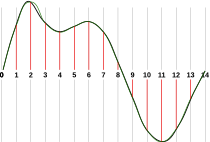
Sound is actually a type of energy wave, so it also has the characteristics of frequency and amplitude, with frequency corresponding to the time axis and amplitude corresponding to the level axis. The wave is infinitely smooth, and the string can be considered to be made up of innumerable points. Since the storage space is relatively limited, in the process of digital encoding, the points of the string must be sampled. The sampling process consists of extracting the frequency value of a certain point. Obviously, the more points that are extracted in one second, the richer the frequency information that can be obtained. To restore the waveform, there must be two sampling points in one vibration. The highest frequency that can be felt is 20kHz, so to meet the auditory requirements of the human ear, at least 40k samples per second, expressed at 40kHz, and this 40kHz is the sample rate. Our common CD has a sample rate of 44.1 kHz. It is not enough to have only frequency information, we must also obtain and quantify the energy value of this frequency to represent the strength of the signal. The number of quantization levels is an integer power of 2, and the sample size of our common CD bit is 16 bits, that is, 2 to the power of 16. Sample size is harder to understand than bit rate. sampling, because it makes it seem abstract. For a simple example: suppose a wave is sampled 8 times, and the energy values ​​corresponding to the sampling points are A1-A8, but we only use 2-bit sampling size, as a result we can only keep the 4 point values ​​in A1-A8 and discard the other 4. If we use the 3bit sample size, all 8 point information is recorded. The higher the sample rate and sample size values, the closer the recorded waveform is to the original signal.


Free Download Mp4Gain
picture


Mp4Gain Main Window
picture


Mp4Gain Features
picture


Free Download Mp4Gain
picture

MP3 sample rate and bit rate

MP3 sample rate and bit rate

Bit Rate

When we listen to mp3 and watch movies, we will notice two parameters.

BIT RATE

The most common ones are 44.1 KHz sample rate and 192 Kbps bit rate. So what is the sample rate and what is the bit rate? What is the relationship between them? Explain:

The process of converting an analog audio signal to a digital audio signal is called sampling. In a nutshell, how many data points does it take to record a 1 second long sound via waveform sampling. For example: the sound sample rate of 44.1 KHz is equivalent to spending 44,000 data points to describe the sound waveform for 1 second. In principle, the higher the sample rate, the better the sound quality; sampling frequency is generally divided into three levels: 22.05KHz, 44.1KHz and 48KHz; 22.05KHz can only achieve FM radio sound quality, and 44.1KHz is the theoretical limit of CD sound quality, 48KHz has reached DVD quality.

Sampling rate refers to the sampling frequency when converting sound (analog signal) to mp3 (digital signal), i.e. how many data points are sampled per unit of time. (The data for a sample point is 8 (or even more) bits long.)

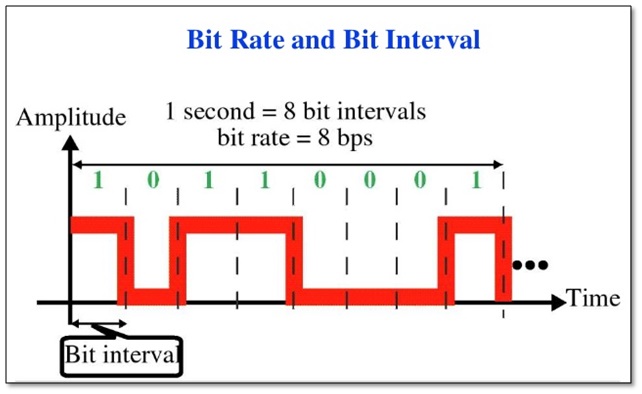
Bit rate refers to the number of bits (bits) transmitted per second. The unit is bps (bit per second). The higher the bitrate, the more data transmitted and the better the sound quality.

It can be said that the sample rate and bit rate are like the horizontal and vertical coordinates on the coordinate axis. The sampling frequency on the abscissa represents the data points sampled per second. The bit rate on the ordinate represents the precision when quantizing analog quantities with digital quantities.

The sample rate is similar to the number of frames of moving images. For example, the sampling rate of movies is 24 Hz, the sampling rate of PAL format is 25 Hz, and the sampling rate of NTSC format is 30 Hz. When we play back the still images sampled at the same rate as the sampling frequency, we see a continuous image. In the same way, when a CD recorded at a sampling rate of 44.1 kHz is played back at the same rate, a continuous sound can be heard. Obviously, the higher the sample rate, the more coherent the sound will be heard and the picture will be seen. [Of course, the sampling rate that human auditory and visual organs can distinguish is limited, which is basically higher than sound sampled at 44.1kHZ, and most people haven’t noticed the difference. ]

Quality (bit rate)

Quality (bit rate)

Bit Rate

In multimedia technology, quality is often used to judge the effect of audio, and quality here is actually bitrate.

Bit Rate

1. Introduction
2 sound control
3 encoding mode
Introductionedit transmission
The term quality is widely used.
In multimedia technology, quality is often used to judge the effect of audio, and quality here is actually bitrate.
On WINDOWS it is called “bit rate” and on some players it is described as ” bit rate “.
Quality refers to the bit rate at which digital sound is converted from analog to digital format. The higher the bitrate, the better the quality of the restored sound.
sound control edit stream
16 Kbps = phone quality
24 Kbps = increase phone quality, shortwave transmission, longwave transmission, European standard medium wave transmission
40 Kbps = American standard medium wave transmission
56Kbps=Voice
64 Kbps = boost voice (best bitrate setting for cell phone ringtones, best setting for cell phone mono MP3 players)
112 Kbps = FM stereo broadcast FM 128 Kbps = tape (best setting for mobile phone stereo MP3 player, best setting for low-end MP3 player)
160 Kbps = HIFI high fidelity (best setting for mid to high end MP3 players)
192Kbps=CD (best setting for high-end MP3 players)
256Kbps=Studio Music Studio (for music enthusiasts)
In fact, with the advancement of technology, the quality of music is also getting higher and higher, the highest quality of MP3 is 320Kbps, but some formats can achieve higher sound quality.
For example, the emerging APE audio format can provide real audiophile level lossless sound quality and smaller volume than WAV format, and its quality is usually 550kbps-950kbps.
encoding modeedit stream
VBR (Variable Bitrate) Dynamic Bitrate means there is no fixed bitrate. The compression software immediately determines which bitrate to use based on the audio data being compressed. This is a method that takes quality as a premise and takes file size into account The recommended encoding mode;
ABR Average Bit Rate (Average Bit Rate) is an interpolation parameter of VBR. LAME created this encoding mode in response to the low file volume ratio of CBR and the variable size of files generated by VBR. Within the specified file size, ABR takes every 50 frames (about 1 second for 30 frames) as a segment. High-frequency and insensitive frequencies use relatively low traffic, and low-frequency and large dynamic performance use high traffic, which can be used as VBR and CBR, a compromise option.
CBR (constant bitrate), constant bitrate means the file has one bitrate from start to finish. Compared to VBR and ABR, the compressed file size is very large and the sound quality will not improve significantly compared to VBR and ABR.

What is the difference between bitrate 128 and 320.

What is the difference between bitrate 128 and 320.

128 kbps vs 320 kbps MP3

Have you ever wondered what exactly you lose by compressing from lossless to 128kbps or 320kbps mp3?

128 kbps and 320 kbps MP3

I checked it and the result seemed interesting to me. First of all, I propose to take a survey to understand for yourself if you hear the difference. If you are not sure what you are hearing or you are sure you are not listening, then I bring you a simple and elegant idea: you should take and collide with your forehead two sound waves, one of which will be in antiphase, respectively, when you mix two. tracks, you will mainly hear what is not extinguished. I don’t promise cool graphics yet, but on your own system you can hear exactly what sounds were lost when compressed from flac to mp3 128 \ 320 kbps, file with examples at the end of the article.

You need to download and listen to 12 tracks for 30 seconds. Then specify one of the 3 options for each of the 4 songs (128 kbps, 320 kbps, or lossless).
The survey is anonymous, but you can specify a unique hash and tell me, as a last resort, post your opinion here, but always under the spoiler. The survey will last until February 25, after you publish the key and statistics.
Files on Yandex Disk, mirror on Dropbox (~ 80Mb).

Description of the experiment

Source files are cut into 10-second chunks, each chunk is exported to wav. After importing the resulting tracks, 2 seconds of silence and a second tone signal are added at the beginning of each, then converted to mp3. After importing mp3 files, it turns out that relative to the original, the resulting file “went ahead”. This is not a bug, it is. We sync against the given pitch signal from the original (I tried various values ​​for each mp3 file, which I then refined to get the best result), remove the pitch signal, mute, and export the resulting tracks to wav. Now it remains to invert the tracks so that we obtain multidirectional peaks, and mix with the original.

Outcome

Yes, there is a difference. Yes, especially when compressing up to 128 kbps. Yes, it depends on the music. Yes, even more of the audio path.
You can draw an independent conclusion and hear the difference by downloading the files at
Bit rate is indicated as one of the main characteristics of video and audio recordings. Most users are used to thinking that it determines the quality of the downloaded file. But what are bit rates and how do they really characterize music files and videos?

Bit rate, what is it?

Bit rate, what is it?

Bit Rate

as a feature of digital audio and video

Bit rate

Bitrate: literally, the information bit rate. It is common to use the bit rate when measuring the effective information transmission rate through the channel, that is, the “payload” transmission rate (in addition to that, the channel can transmit service information, for example, start and stop symbols for asynchronous transmission or control symbols for redundant coding). The baud rate, which takes into account the total bandwidth of the channel, is measured in baud.

Bit rate is the number of units of information required to store (transmit) one second of a stream of data (generally audio and video files). It is generally measured in ‘kbps’, kilobits per second.

The term bit rate is used in two basic meanings
: channel or device characteristic: the maximum number of bits that can be transmitted per unit of time.
– The size of the data stream transmitted in real time (the minimum size of the channel that can pass this stream without delay).
– A special case is the compressed video or audio bit rate.
Bitrate is expressed in bits per second (bit / s, bps), as well as values ​​derived with the prefixes kilo, mega, etc.

The term bit rate (in conjunction with subjective quality criteria) is often used as a characteristic to evaluate the performance of lossy compression algorithms.

Bitrate characterizes both the density of the information package and its quality. For example, out of two MP3 files compressed with different bit rates, a file with a higher bit rate will have higher sound quality (close to the original). At the same time, a file of a different format, with the same bit rate, can offer both better and worse sound quality.

On an audio CD, information is losslessly encoded at a constant 1407 kbps bit rate.

The MP3 format allows you to encode audio information with constant or variable bit rates from 32 to 320 kbps, that is, they provide five times the compression compared to CD.

Bit rate as a characteristic of digital video and audio

In streaming video and audio formats (such as MPEG and MP3) that use lossy compression, the bit rate parameter expresses the degree of compression of the stream and therefore determines the size of the channel for which it is compressed data transmission. Most of the time, the audio and video bit rate is measured in kilobits per second (kilobits per second in English – kbps), less often – in megabits per second (for video only).

There are three compression modes for data transmission:

– with a constant bit rate (constant bit rate in English – CBR)
– with a variable bit rate (variable bit rate in English – VBR)
– with an average bitrate (English Average Bitrate – ABR)

Variable and average bit rate

The codec chooses the required bit rate based on the parameters (the level of the desired quality) and, during the encoded chunk, the bit rate may change. When compressing audio, the desired bit rate is determined based on the psychoacoustic model. ABR is a variation of VBR in which the codec is compressed to a specified average value.

Bit rate in DVR. What is it and what does it affect?

Bit rate in DVR. What is it and what does it affect?

Bitrate

When talking about digital video recording, the term bit rate will surely ring a bell. This is an important parameter that affects image quality. Including recording to a DVR.

bitrate

video playback [(000152) 2019-07-13-15-20-56] .png

If you are intimidated by foreign words, the bit rate can otherwise be called the recording speed or compression ratio. Because that’s exactly what happens: the compression of the video stream. How? Let’s take a look.

After the light strikes the matrix and subsequent digitization of the image, a very dense stream of digital video signal is obtained at the output. Also, the higher the video recording resolution and frame rate, the bulkier this stream will be. You cannot write it directly to a memory card; It will fill up very quickly with huge video files and you may just not be able to cope with such a flow of information. This is why the original video stream is compressed to an acceptable bit rate. This parameter is just the output data rate. Basically it reflects the speed at which the video is written to the memory card.

Bit rate can be calculated in bits, kilobits and megabits per second – (bit / s, bps, b / s), (kbps, kbit / s, kbps) (Mbps, Mbit / s, Mbps). Most of the time, in megabits. The bit rate of the recorded video can be checked on a computer with a video editor or via the file properties menu. By dividing the number by 8, you can determine it roughly in megabytes per second; it will be more convenient to compare it with the speed of your memory card.

The bit rate indicator depends, as you might guess, on the processor and the software and hardware that is properly optimized to process the video stream. If all conditions are met, the video stream will be compressed with high quality and with minimal loss. Otherwise, the video will have noise, blurred images, artifacts, and other nasty distortions.

The bit rate also affects the size of the file. For example, at a relatively low bit rate (less than 10 megabits per second) more clips can fit on the memory card and cheap low speed cards can be used, but the video quality and details will be low. At a higher bit rate (10-20 begabits per second and more), the image will be of higher quality and more detailed. But the file size will also increase, so you need a memory card of the appropriate size and speed (16GB and above, class 10).

Manufacturers rarely indicate the bitrate on the box, therefore it is almost impossible to find out this indicator before buying. However, sometimes on the packaging you can see promises, for example, “8 hours of video in maximum quality at 32 GB”. And in this case, the bit rate can be roughly calculated. The formula is not complicated:
We took 32 gigabytes and, using the school’s computer skills, we converted them to megabits by multiplying them by eight and by 1024. Then we divided the resulting number by the number of seconds in eight hours.
– (32x8x1024) / (8×3600) – We get the result of 9.1 megabits per second.

Let’s clarify that the result will be conditional. First, because the actual volume of any card is always less than indicated. Second, the promises in the box can be just promises. Therefore, before buying, it is better to carefully study the selected model, having learned the speed of writing in the reviews.
So what bit rate should I be aiming for?

Given the adequate quality of the filling of the recorder (matrix + processor + lens + software), according to our practice, let’s say that this figure is in the region of 15 to 45 megabits per second. This bit rate allows you to get a fairly adequate video quality during the day. Again, only during the day, because night recording, as we all know, is still a weak point of many recorders due to insufficient lens aperture and small matrix pixel size.

Note that currently the maximum bit rate for recorders has been reached: 45 megabits per second, but only when working with a card with a capacity of 32 gigabytes or more. Some companies, notably Datakam and BlackVUE, are introducing bit rate selection options in settings. We find this option controversial. In our opinion, all drivers are initially interested in the highest quality videos, and it is easier to set the maximum bit rate for the recorder right away and just choose the right memory card in terms of speed and volume.

What sound quality is better than 320 or 128?

What sound quality is better than 320 or 128?

Bit Rate

What are bit rates? How do they affect the quality of music and video? Optimal bit rate for various musical styles

Bit Rate

There is a lot of talk these days that we have lost real music with the advent of compressed audio formats like MP3, AAC and the like. Is it really so? Will lossless music save music? Can an inexperienced listener tell the difference between MP3 and FLAC music? Let’s take a look at this problem.

What is Bitrate?

You’ve probably heard the term “bitrate” before, and you probably have a basic idea of ​​what it means, but it might be a good idea to familiarize yourself with its official definition to find out how it all works.

Bit rate is the number of bits or the amount of data that is processed over a period of time. In audio, this generally means kilobits per second. For example, the music you buy from iTunes is 256 kilobytes per second, which means that every second of the song

The higher the bit rate of the track, the more space it will take up on your computer. Audio CDs typically take up quite a bit of space, so it has become common practice to compress these files so that you can burn more music to your hard drive (or iPod, Dropbox or whatever). This is where the “lossy” and “lossy” formats conflict.

Lossless and Lossy formats: what’s the difference?

When we say lossless, we mean that we haven’t really changed the original file. That is, we copy a track from the CD to our hard drive, but we do not compress it to the point of losing data. Essentially the same as the original CD track.

However, most of the time, you will probably extract your music in Lossy format. That is, you took a CD, copied it to your hard drive, and compressed the tracks so they don’t take up a lot of space. A typical album is probably about 100MB. The same lossless album as (aka Apple Lossless) will be about 300MB in size, so it has become common practice to use lossy formats for faster boot times and more hard drive savings.

The problem is that when you compress a file to save space, you are removing chunks of data. Just like when you take a high-quality image and compress it to JPEG, your computer grabs the raw data and “tricks” certain parts of the image into being basically the same, but with some loss of clarity and quality.

What is bitrate: a clear explanation for beginners

Bit Rate

Once a student was teaching a class and asked me to give him the clearest possible explanation of what bitrate meant.

Today I am going to share with you that explanation that although it does not refer to sound but an image in the background, it is the same and is very easy to understand.

bit rate

Imagine that you put me in front of a beautiful landscape full of rivers and trees, mountains and Valleys with some Villas with Fields full of flowers and animals.

There is a lot of information there if I had to make a detailed description.

Imagine that you ask me to give you a description in 4 words.

It would have to make a very general description that, being very brief, Nova contains details. Maybe I’ll say something like “a beautiful autumn landscape.”

if after that you tell me that now I will have 14 words to describe what I am seeing.
I’ll be able to give more information Although it will really continue to be very summary, but you could already give some details.
“a beautiful autumn landscape with fields and mountains that have houses, flowers and animals”

If they ask me for the following explanation and they already allow me to use 50 words, I will be able to give many more details.
Although of course I will still have to omit a lot of details.

How many words might I need to give a detailed, spoken portrait of what I am looking at?

Well, this example that I just gave of the four words at the beginning then 15 words later have maybe 500 words later is exactly what the bit rate is.

We are talking about what is the amount of information that our audio or video file can transmit per second and obviously The higher the information There will be more details and therefore a higher quality and on the contrary the lower the information the lower the details and therefore lower quality.

That’s why a bit rate of 320 thousand bits per second will have a much higher audio quality than one of 90,000 bits per second.

Because in music, images and video, the quality always depends on the amount of information.

And in the specific case of audio and video, the amount of information is measured by seconds.

This means how much information it can transmit per second, that is, how many bits it can transmit per second, which means How much information and therefore How much detail, which is synonymous with quality.

With this we will understand very easily that as well as the sampling frequency is also very important and we will explain it in another article.
The rate of bits that are transmitted per second is crucial in determining the quality that an audio or video will have.

Of course, it must be understood that the higher the bit rate per second, the larger the size of the audio file will be because the greater the amount of information stored will be, but this will result in higher quality and greater definition.

Because here the definition concept is crucial.
The higher the bit rate the higher the definition and therefore the higher the quality.

The definition would be the detail of our initial explanation, if they let me use 2000 words to describe a landscape, I will be able to give many details and define them with great clarity. And that will mention a lot of quality.

This As-is applies to audio or video files.

Surely with this explanation it has been much clearer what is the rate of bits per second and why it is important.