What is the code rate? Part 3

What is the code rate? Part 3

code rate

Video imaging methods are mainly divided into two types: interlaced scan and progressive scan.

code rate

In plain and simple terms, an image (a frame) is made up of lines made up of hundreds of rows of pixels.

Interlacing means that only half of the lines are displayed on one screen at a time, and is made up of odd or even lines, displayed alternately with each other. It is commonly said “i”.

Originally, the image the TV would transmit per second was set to 50 frames per second. Think that the image does not flash in our eyes. However, according to the technology at the time, it was difficult to achieve 50 frames per second of TV transmission. Scientists used the persistence of human vision to invent interlaced transmission.

Interleaving is a technology developed to transmit television signals using limited bandwidth. In an interlaced system, only half the number of horizontal lines per video frame is transmitted at a time. The viewer can perceive each frame at full resolution due to transfer speed, display persistence, and persistence of vision. All analog TV standards use interlace technology. Digital television standards include interlaced and non-interlaced technologies.

(The above is official Adobe content)

We all use no field (line by line) now

video ratio

Video ratio refers to the ratio of the length to width of the video screen played by the video player. The ratio between the length and width of the CRT television used in ordinary homes is 4:3, that is, the video ratio is 4:3. The high-definition screen video ratio (TV and mobile) that is currently being developed is 16:9. The current full screen mobile phone is 17: 9

Due to the development and application of various screens, video production is also relatively informal, and will be adjusted according to the requirements of Part A, such as large conference screens and advertising screens.

What is the code rate?

What is the code rate?

CODE RATE

What is the bit rate for? What is frame rate? What is the resolution?

CODE RATE

Students often ask, what is the code rate? What is the bit rate for? What is frame rate? What is the resolution?

This problem of not being able to speak clearly, listening and not understanding has worried many beginners.

Today Ben Shuai specially came to solve these professional terms for you.

frame

In the video, do you know what the unit less than a second is?

That’s right, it’s what I’m going to talk about today: “framework”!

Frame: It is the smallest unit in video animation and countless frames constitute seconds.

Simply put, one frame equals one image, and a second is made up of a certain frame, that is, a certain number of images!

Play the images continuously and you will see dynamic images under the influence of the visual residue produced by your eyes.

The more frames per second, the smoother and more realistic the images we see!

We also call the number of frames in 1 second the number of frames, usually expressed in fps (FramesPer Second).

Boost sound

Boost sound

Boost Sound

Mp4Gain is the perfect app if you are looking for boost sound.

Boost Sound

It is very likely that if you have a large collection of audio and video files, you will find yourself in the situation where one or more of these files play at a lower volume than the rest, forcing you to manually correct those songs or videos that you they have a low, quiet volume.

Most likely, you have been building your collection of audio or video files little by little, taking an audio or video from here and another from there. But I do not take into account that they were encoded with different settings, for example, with a different amount of bit rate, among other things, which caused a different power or loudness.

In the time of vinyl records there were also some differences in volume, perhaps less significant because common people did not touch the settings, but also, as it took time to change each record, your ear forgot the volume reference of the previous one. Today, it happens that we play one video after another or one song after another, with 1 second of difference and our ear still maintains the reference of the volume or loudness level and if it changes, we notice it immediately.

In the radio broadcasting stations F.M. They avoid this phenomenon by using audio compressors, which are expensive pieces of hardware that perform this function.

Mp4Gain provides the same quality as an expensive sound compressor from a TV company or an F.M. radio. but Mp4Gainb is really cheap comparatively.

Definitely download Mp4Gain and you will experience the difference.

Principle of mp3 and file format analysis. Part 3

Principle of mp3 and file format analysis. Part 3

Mp3tag

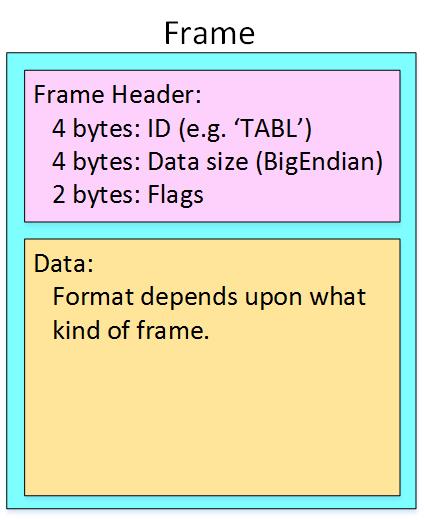
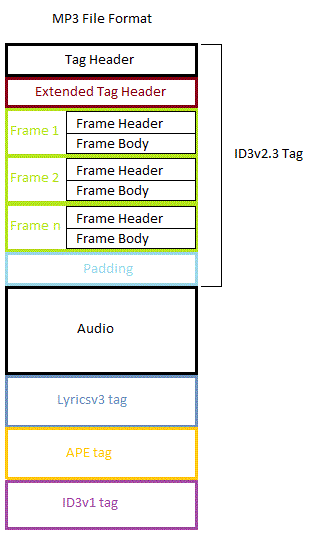
The ID3 standard MP3 frame header does not consider storing complex information such as song title, author, album name, year, etc., except some simple music description information such as privacy, copyright and original, which are very necessary in MP3 applications.

mp3 tag


In 1996, in the “Studio 3” project, FricKemp proposed to add description information for storing songs at the end of the MP3 file and formed the ID3 standard. Until now, ID3 V1.0, V1.1, V2 .0, V2, .3 and V2.4 standards have been formulated. The higher the version, the richer and more detailed the relevant information is recorded.
The ID3 V1.0 standard is not complete and the information stored is too small to store lyrics, album covers, images, etc. V2.0 is a fairly complete standard, but it brings difficulties in writing software, although there are many people in favor of this format, very few are actually implemented in software. The vast majority of MP3s still use the ID3 V1.0 standard. This standard uses the last 128 bytes at the end of the MP3 file to store ID3 information. See Table 3 for instructions on using these 128 bytes.
Table 3 Final ID3 V1.0 File Description
length in
byte (byte) Description
1-3 3 Stores the “TAG” character, which indicates the ID3 V1.0 standard, followed by the song information.
4-33 30 Song name
34-63 30 Author
64-93 30 Album name
94-97 4 Year
98-127 30 Notes
128 1 MP3 music category, a total of 147 types.

3.3 File example
Open a file called test.mp3 in VC++ with the following content:
000000 FF FB 52 8C 00 00 01 49 09 C5 05 24 60 00 2A C1
000010 19 40 A6 00 00 05 96 41 34 18 20 80 08 26 48 29
000020 83 04 00 01 61 41 40 50 04 00 C1 2 41 50 64

0000d0 Fe FF FB 52 80 01 EE 90 65 6E 02 30
0000E0 32 0C CD CD CD CD 46 16 41 89 B8 408 89 300 408
0000F0 33 B7 00 00 01 02 FF FF FF F4 E1 2F FF FF FF FF
……
0001A0 DF FF FF FF FB 52 8C 12 00 E 01 FE 90 58 6E 09 A0 02
000150 8513 B0 AC 45 F6 19 61 26 26
0001C0 05 AC B4 20 28 94 FF FF FF FF FF FF FF FF FF FF

001390 7F FF FF FF FD 4E 00 54 41 47 54 45 53 54 00 00
0013A0 00 00 00 00 00 00 00 00 00 00 00 00 00 00 00 00 00 00 00 00 00 00 00 00 00 00 00 00 00 00 00 00 00 00 00 00
001400
00 00 00 00 00 00 00 00 00 00 00 00 00 00 00 00 00 00 00 00 00
00 00 00 00 00 00 00 00 00 00 00
001410 00 00 00 00 00 00 4E
File length is 1416H (5.142K), frame header is: FF FB 52 8C, converted to binary:
11111111 11111011
01010010
10001100T

Mp3 normalize volume level software

FAQ

Normalize Audio

Mp3 normalize volume level software

Normalizing the volume level of an mp3 is quite simple using Mp4Gaion, which also allows you to normalize the volume level of other audio and even video formats.

Convert audio and video files and normalize them?

It’s perfectly possible to do it with Mp4Gain, you can normalize audio or video files in all major formats simultaneously and get any format you need.

Mp3 normalize volume level software

Audio Normalization

The normalization of volume levels is something that has existed for many years.
This arose with the need to be able to get the different songs or files to have a similar volume level.
It really wasn’t necessary in the vinyl era, for a lot of reasons.

First of all, changing from one disc to another took time, enough so that I didn’t notice if there was any difference in volume level. Unlike any playlist of mp3s or any other format, which play one song after another and if there is a noticeable difference in volume level, we perceive it immediately.

We also have the fact, which is not minor, that the quality of audio playback today is much higher.

Today any device used to play an audio file has enormous capacity in terms of sound quality. Today we handle as a common thing to talk about sample rates of 44100 or 48000 frames per second or 192 and up to 320 kilobits, etc. In other words, we are already very familiar and we have at our fingertips the possibility of choosing options that directly affect not only the volume level but also the quality.

Mp4Gain is the most powerful and modern normalizer that can not only normalize audio in many formats, but can also normalize videos or extract audio from video and convert it to mp3 or any other format you want.

Audio Basics Explained PART 2

Audio Basics Explained PART 2

Decibels

Sample Bits (sample bits, aka sample precision, quantization level, sample size, quantized data bits): The range of data that each sample point can represent.

Decibels

The number of sampling bits is usually 8 or 16. The larger the number of sampling bits, the more delicate the change of sound that can be recorded, and the larger the corresponding amount of data. 8 bit word length quantization (low quality) and 16 bit word length quantization (high quality), 16 bits is the most common sampling precision.

“Sample rate” and “sample bits” are the two most basic elements of sound digitization, which are equivalent to screen size
(for example, 800*600) and the color resolution (for example, 24 bits) in the video.

Number of channels (or number of channels): The number of channels refers to the number of speakers that support different sounds, it is one of the important indicators to measure audio equipment.

The number of channels for mono is 1 channel; the number of channels for channels
dual is 2 channels; the number of channels for
stereo channels is 2 channels by default; the number of channels for
stereo channels (4 channels) for 4 channels.

Frame (Frame): A frame records a sound unit whose duration is the product of the sample duration (number of samples) and the number of channels.

Period (Period Size): The number of frames required for an audio device to process at one time. Data access and audio data storage of the audio device are based on this unit. The hardware buffered transfer unit, which completes the transfer of so many sample frames, will return an interrupt.

insert image description here
Periods: How many hardware transfer interrupts it takes for the transfer to complete one application buffer.

Buffer Bytes: The number of bytes in an application buffer, the size of the DMA buffer.

Because the buffer size is set by the application, it can be large or small. If it is too large, the transmission delay will be too large, so it is fragmented and the concept of a period is proposed. Overflow, when recording, the data is full and the application does not have time to grab it; underflow, you need data to play and the application does not have time to write the data

Interleaved Mode: The way digital audio signals are stored. The data is stored in consecutive frames, that is, the left channel and right channel samples of frame 1 are recorded first, and then the recording of frame 2 is started…

Non-interlaced mode: The left channel samples of all frames in a cycle are recorded first, then all the right channel samples are recorded.

Quantization: The process of representing the amplitude of the discrete signal after sampling with binary numbers is called quantization. (Quantification in daily life is to set a range or interval, and then look at the acquired data collected within this condition.)

PCM: PCM (Pulse Code Modulation), that is, pulse code modulation, sound sampling and quantization without any encoding and compression processing.

PCM data is the most primitive lossless audio data, so although PCM data has excellent sound quality, it is bulky.
To solve this problem, a series of audio formats have been successively born. These audio formats use different methods to
compress audio data Compression (ALAC, APE, FLAC) and lossy compression (MP3, AAC, OGG, WMA) are available.

Encoding: The sampled and quantized signal is not yet a digital signal, it must be converted into a digitally encoded pulse, a process called encoding. The digital audio signal is the binary sequence formed after sampling, quantizing, and encoding the analog audio.

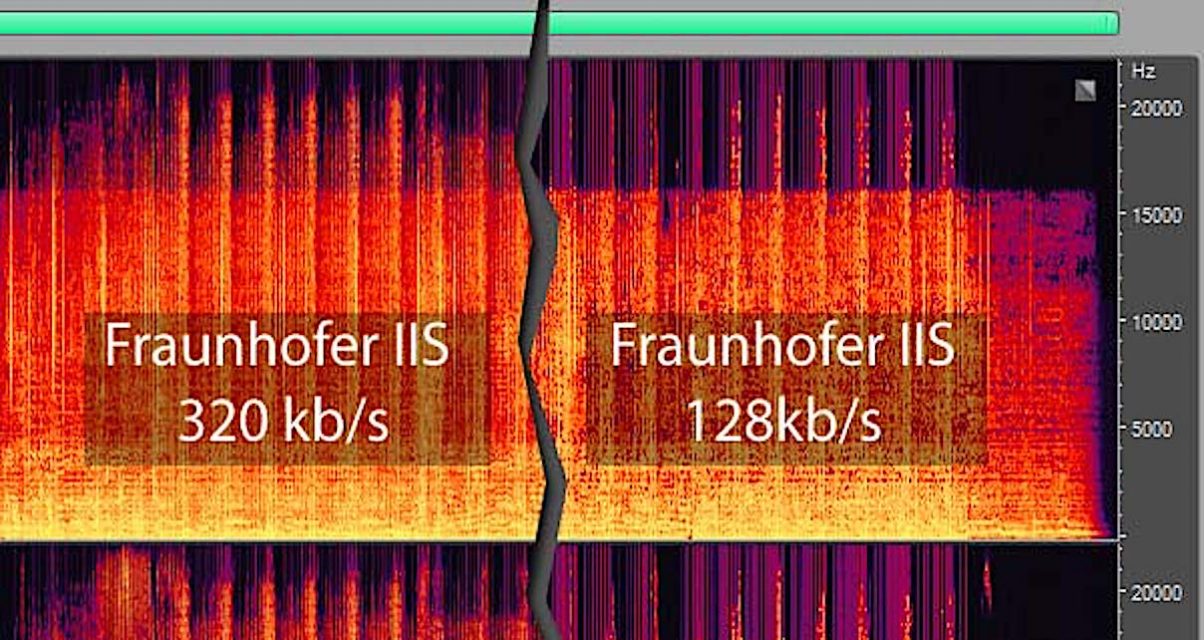
Bit rate: (also known as bit rate, bit rate) refers to the amount of information that can pass through a data stream per second, which represents the quality of compression. For example, common MP3 bit rates are 128 kbit/s, 160 kbit/s, 320 kbit/s, etc. The higher the rate, the better the sound quality. Data in MP3 consists of ID3 and audio data. ID3 is used to store common information such as song title, singer, album and track.

Audio Basics Explained

Audio Basics Explained

Decibels (dB)

Audio and video basics

Decibel

1. Introduction
In real life, the sounds we hear are continuous in time, and we call this type of signal . Analog signals must be digitized before they can be used in a computer.

At present, we need to rely on audio files for audio playback on the computer. The process of generating audio files is the process of combining sound information and generated digital signals. The sound that the human ear can hear has the lowest frequency of 20Hz to the highest frequency of 20KHZ, so the maximum bandwidth of the audio file format is 20KHZ. . According to the theory, only when the sampling frequency is greater than twice the highest frequency of the sound signal, the sound represented by the digital signal can be restored to the original sound, so the sampling frequency of the file audio is generally 40~50KHZ. , such as the most common CD quality sampling rate 44.1KHZ.

2. Audio Basics
Sampling: the wave is infinitely smooth. The sampling process consists of extracting the frequency value from some points of the wave, which consists of digitizing the analog signal. Like shown in the next figure:
insert image description here
blue represents the analog audio signal and red represents the quantized value obtained by sampling

Sample Rate: The number of times the analog signal is sampled per unit of time, expressed in Hertz (Hz). The higher the sample rate, the more realistic and natural the sound restoration will be, and of course, the larger the amount of data. The sampling frequency is generally divided into three levels: 22.05 KHz, 44.1 KHz, and 48 KHz. 8 KHz: the sampling frequency used by phones, is enough for human speech, 22.05 KHz can only achieve the sound quality of FM radio (suitable for medium quality voice and music), 44.1 KHz is the most common sampling rate standard, theoretically quality limit CD sound, 48KHz is more accurate (for the sampling rate above 48KHz, the human ear cannot distinguish it, so it has little use value in the computer).

Quick tip: one
5 kHz sampling rate is as good as people’s speech.
A sample rate of 11 kHz is the minimum standard for reproducing small pieces of sound, a quarter of CD quality.
The 22 kHz sample rate can achieve half the quality of a CD, and most websites now use this sample rate.
44kHz sampling rate is standard CD quality, which can achieve good listening effect.

Resampling: It is mainly divided into upsampling and downsampling. In the sampling process, it is necessary to pay attention to the sampling rate problem. It is not possible to change the size of the sample rate at will. According to the sampling theorem: in the analog/digital signal process During the conversion process, when the sampling frequency is greater than 2 times the highest frequency of the signal, the digital signal after sampling completely retains the information of the original signal. , in practical applications, the sampling frequency is guaranteed to be 5 to 10 times the highest frequency of the signal. The sampling theorem is also known as the Nyquist theorem.

Upsampling: In the sampling process, it is generally divided into upsampling and downsampling, and the basis for the distinction is the comparison of the new sampling rate and the original sampling rate when resampling, if it is greater than the original signal, becomes a Oversampling, if smaller than the original signal, is called undersampling. The essence of upsampling is interpolation or interpolation.
Downsampling: The size of the new sample rate is smaller than the size of the original sample rate.
Methods: When resampling, there are mainly three methods: the nearest neighbor method, the bilinear interpolation method, and the cubic convolution interpolation method. There are also deconvolutions, subpixel convolutions, etc. in convolutional networks.

The higher the kbps value of the mp3 file, the better the sound quality? Part 2

The higher the kbps value of the mp3 file, the better the sound quality? Part 2

Mp3 quality

MPEG audio encoding has a high compression ratio, MP1 and MP2 have a compression ratio of 4:1 and 6:1-8:1 respectively, while MP3 has a compression ratio of up to 10:1-12: 1, which means that one minute Uncompressed CD-quality music requires 10 MB of storage space, but only about 1 MB after MP3 compression encoding, and its sound quality is basically distortion-free.

mp3 128kbps To 320kbps

Although it is a distorted compression, its biggest advantage is a higher compression ratio in exchange for very little sound distortion. Usually a CD can only store a dozen CDs, but it can store hundreds of MP3 songs, which is why MP3 is popular all over the world. Currently, MP3 is the most common music format on the Internet. Music files of the same length are stored in the MP3 format, usually only 1/10 of the WAV format. Due to their small file size and good sound quality, they can achieve a sound effect that is closer to the original sound source. Therefore, until now, the status of MP3 format as the mainstream audio format is still hard to shake. Simply put, WMA is smaller than MP3 and MP3 has better sound quality than WMA. Currently, the music format with the best sound quality is APE, which is equivalent to the sound quality of a CD, but relatively large. A song weighs about 20 MB! 1 or so, another advantage of WMA is that content providers can add copy protection through DRM (Digital Rights Management) solutions, such as Windows Media Rights Manager 7. This copyright protection technology built-in author can limit the playback time and number of playback, and even the playback machine, etc., which is a boon for music companies that have been defeated by piracy. MP3 format: MP3 technology originated From MPEG technology, MPEG is short for Moving Picture Experts Group. MPEG audio encoding has a high compression ratio, MP1 and MP2 have a compression ratio of 4:1 and 6:1-8:1 respectively, while MP3 has a compression ratio of up to 10:1-12: 1, which means that one minute Uncompressed CD-quality music requires 10 MB of storage space, but only about 1 MB after MP3 compression encoding, and its sound quality is basically distortion-free.