MP3 file format


Free Download Mp4Gain
picture

MP3 file format

Mp3

1. Overview:

Video to MP3 Converter

the MP3 file is made up of a frame, the frame is the smallest unit of the MP3 file. The full name of MP3 should be MPEG1 Layer 3 audio file. MPEG
(Moving Picture Experts Group) translates into Chinese as Moving Picture Experts Group, which refers to the compression standard for moving video and audio.
sound part of the MPEG1 standard, also called MPEG. The audio layer is divided into three layers based on compression quality and encoding complexity, namely
Layer-1, Layer2 and Layer3, which correspond to the three sound files of MP1, MP2 and MP3 respectively, and use different
levels of audio files according to different purposes. The higher the level of MPEG audio encoding, the more complex the encoder and the higher the compression ratio. The compression ratio of MP1 and MP2 is 4:1 and
6:1-8:1 respectively, while MP3 compression ratio is up to 10:1-12:1, i.e. one minute of CD-quality music requires 10MB
of storage space without compression, but only about 1 MB after encoding with MP3 compression. However, MP3 uses a lossy compression method for audio signals. In order to reduce the degree of sound distortion, MP3 adopts “sensory encoding technology”, that is, the spectrum analysis of the audio file is done during encoding, and then the noise level. I know
filtered with a compressed file filter can achieve a sound effect closer to the original sound source during playback. 2. The whole structure of MP3 files: MP3 files are roughly divided into three parts: TAG_V2 (ID3V2), Frame, TAG_V1 (ID3V1)

ID3V2 contains information such as author, composer, album, etc. The length is not fixed, which expands the amount of ID3V1 information.
A series of frames, the number of which is determined by the file size and frame length. The length of each FRAME of the
frame
may or may not be fixed, and is determined by the bitrate
.
Each frame is divided into two parts: frame header and data entity Header
from
box Records the bit rate, sample rate, version, and other mp3 information, and each box is independent of each other.
ID3V1 contains the author, composer, album and other information, and the length is 128BYTE. 3. FRAME format of MP3: each FRAME has a FRAMEHEADER frame header, the length is 4BYTE (32 bits), there may be two CRC check bytes after the frame header, the existence of these two bytes depends on the frame information. FRAMEHEADER Bit 16 , if 0 there is no control after the frame header, if 1 there is control. The control value is 2 bytes, followed by FRAMEHEADER, followed by the frame entity data. The format is as follows: FRAMEHEADER CRC (free) MAIN_DATA 4 BYTE 0 OR 2 BYTE The length is calculated from the frame header 1. The FRAMEHEADER frame header format is as follows: AAAAAAAA AAABBCCD EEEEFFGH IIJJKLMM

The meanings of the 13 characters in the table header are as follows:
Sign Length Position Description
(bit) (bit)
A 11 (31-21) Frame Sync (all bits set)
B 2 (20,19) MPEG audio version
00 – MPEG version 2.5
01 – reserved
10 – MPEG Version 2
11 – MPEG Version 1
C 2 (18,17) Layer Description
00 – reserved
01 – Layer III
10 – Layer II
11 – Layer I
D 1 (16) Protection bit
0 – CRC protected (16-bit CRC follows header)
1 – Not protected
E 4 (15,12) Rate index bits
bits V1,L1 V1,L2 V1,L3 V2,L1 V2,L2 V2,L3
0000 free free free free free free free
0001 32 32 32 32 32 8 ( 8)
0010 64 48 40 64 48 16 (16)
0011 96 56 48 96 56 24 (24) 0100
128 64 56 128 64 32 (32)
0101 160 80 64 160 80 64 (40)
0110 1 2 6 2 1 2
112 56 (56)
1000 256 128 112 256 128 64 (64)
1001 288 160 128 288 160 128 (80)
1010 320 192 160 320 192 160 (96)
1011 352 224 192 352 224 112 (112)
1100 384 256 224 384 384 256 128 (128)
1101 416 320 256 416 320 256 (144)
1110 448 384 320 448 384 320 (160)
1111 bad bad bad bad bad
NOTES: All values ​​are in kbps
V1 – MPEG Version 1
V2 – MPEG Version 2 and Version 2.5
L1 – Layer I
L2 – Layer II
L3 – Layer III


Free Download Mp4Gain
picture


Mp4Gain Main Window
picture


Mp4Gain Features
picture


Free Download Mp4Gain
picture

Mp3 converter

Mp3 converter

MP3 Converter

Convert mp3’s.

Video to MP3 audio

As we explained in previous articles, the mp3 is the result of the compression from a wav. With the purpose of reducing the size to make it easier to transmit it over the internet and that when stored it occupies less space on a hard drive or in a memory.

Finally, the conversion and compression, although it discards information to be able to be compressed, is based on psychoacoustic models, which guarantees that if it has enough bit rate, the mp3 will not be easily distinguishable when compared to its original wav.

Mp3 Converter, for what?

There are two possible paths. One is to convert a file in any format to mp3 and another is to take an mp3 and convert it to one of many available audio formats.

In either case if you use a high quality converter like Mp4Gain you will get a very high quality conversion.

We do not recommend using online converters, they usually produce results that we will later regret. Free is usually expensive.

Convert an mp3 to another format

This option, although it will not replace the data discarded when committing or encoding the mp3, will nevertheless give it a noticeable quality if we use a bait rate of more than 192.

Convert another format to mp3

This will also generate, if we use Mp4Gain, a high quality mp3, if we choose a bit rate higher than 192. Perhaps 256 would be optimal.

Remember that Mp4Gain is the best audio and video converter on the market. And at a very good price, it is really worth it.


convert video to mp3


It is possible with Mp4Gain to extract the audio from any video format to an mp3 and obtain a very high quality mp3, for example youtube to mp3

Mp3 – Subjective perception of sound: timbre

Mp3 – Subjective perception of sound: timbre

Audio Timbre mp3

Tone is a concept that we often come into contact with in our daily lives, and it can even be said that it is an essential concept.

Mp3 timbre

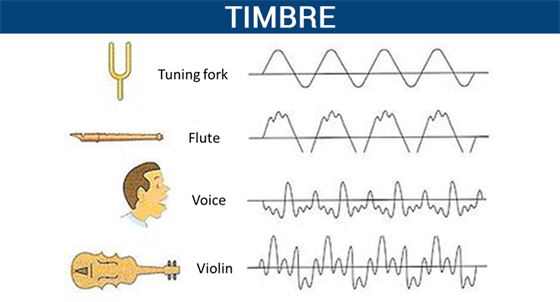
In high school physics textbooks, timbre, along with pitch and volume, are considered the three basic attributes of sound. Although we often deal with the word doorbell, and doorbell has more mature applications in many respects, doorbell is actually a very vague concept. What physical phenomenon determines the timbre? Why can we only use vague words like light and shadow, thickness and warmth to describe timbre?

Pitch and volume are well understood and correspond to physical phenomena: pitch corresponds to the vibrational frequency of an object, and volume corresponds to the object’s vibrational amplitude. However, we were unable to find a physical phenomenon that corresponds to the timbre. There are also no precise words to describe the timbre in our language.

We can create great music by precisely controlling the combination of pitch, duration, and volume. So can we control timbre like we control pitch and duration?

What exactly is pitch? What physical processes are involved in the timbre?

This is something that many people have been exploring and researching for the last few hundred years. But to this day, there is still no perfect answer.

In this article, I have classified some of the research results of my predecessors and presented some of my own thoughts. I hope that it can give everyone a systematic understanding of timbre, and I hope to inspire those who are interested in studying timbre in the future.

This article will start with the definition of timbre, discuss what timbre is, the subjective perception of timbre, the main factors that affect timbre, the description of timbre in language, the application of timbre in music, and personal perspectives for timbre. doorbell investigation. This article also proposes a sound classifier model for the timbre. At the same time, there are some conjectures that I have not been able to study in the article. I will check them out in the future.

The definition of sound
There are many definitions of timbre.

The word timbre comes from the French γ€€γ€€. In old French it referred to the sounds produced by different musical instruments.

In his music textbook “Fundamentals of Music Theory,” Li Chongguang noted that “timbres are different due to the nature, shape, and number of harmonics of the sounding body.”

The American Standards Association (ASA) defines ringing from the opposite perspective. It does not define what timbre is, but what timbre it is not: “timbre is any other difference between sounds of the same loudness, pitch, and duration.”

All the above definitions tell us what tone it is. But none of these definitions is as clearly linked to the corresponding physical laws as other physical properties.

Like pitch and frequency of vibration, like speed and time and displacement, like color and wavelength.

Why can’t the word timbre clearly correspond to a certain physical phenomenon? I think this is due to the complexity of the timbre.

What differentiates MP3 from AAC? Part 2

What differentiates MP3 from AAC? Part 2

AAC vs MP3

How MP3 works with Apple Music and iTunes

AAC Vs. MP3

MP3 is probably the most popular digital audio format on the web, but it’s not available on Apple Music’s iTunes store or in this format (more on that in the next section). Still, mp3 is compatible with Apple Music, iTunes, and all iOS devices like iPhone and iPad. You can get MP3 files from:

Digital download store.
Rip songs from CDs, depending on the music conversion settings.
Many music file sharing services.​
All about AAC audio files
AAC stands for Advanced Audio Coding. It is a type of digital audio file that has been promoted as the successor to MP3. AAC generally provides higher quality sound than MP3 while using the same amount of disk space (or less).

Many people think that AAC is Apple’s proprietary format, but this is incorrect. AAC was developed by a group of companies that includes AT&T Bell Labs, Dolby, Nokia, and Sony. While Apple has embraced AAC music, AAC files can actually be played on many non-Apple devices, including phones running Google’s Android operating system, game consoles, and more.

How does the CAA work?
AAC is a lossy file format, just like MP3. To compress CD-quality audio into a file that takes up less storage space, data that will no longer affect the listening experience is typically removed at the high and low end. So AAC files don’t sound exactly the same as CD-quality files, but they generally sound good enough that most people won’t know the difference.

Like MP3, the quality of AAC files is measured by their bit rate. Common AAC bit rates include 128 kbps, 192 kbps, and 256 kbps.

How AAC works with Apple Music and iTunes
Apple has adopted AAC as its preferred audio file format. All songs streamed or downloaded from Apple Music, or sold on the iTunes store, are in AAC format. All AAC files provided by Apple are encoded at 256 kbps.

Other types of audio files supported by iPhone, iPad and Mac
While MP3 and AAC are the most popular audio files on iPhone, iPad, Mac, and other Apple products, they’re not the only ones that work. Let’s take a look at other widely used Apple supported audio formats.

Introduction to various conventional audio encodings (or formats) Part 2

Introduction to various conventional audio encodings (or formats) Part 2

pcm

2. MP3 encoding

PCM

As the most popular audio compression format, MP3 is widely accepted by everyone. Various MP3-related software products emerge in a never-ending stream, and more hardware products start to support MP3 as well. Many VCD/DVD players that we can buy are compatible with MP3. , and there are more portable MP3 players, etc. Although several of the major music companies are extremely displeased with this open format, they cannot prevent the survival and spread of this compressed audio format. MP3 has been in development for 10 years. It is short for MPEG (MPEG: Moving Picture Experts Group) Audio Layer-3, which is a coding scheme derived from MPEG1. MP3 can achieve an incredible 12:1 compression ratio and still maintain basically audible sound quality. In the days when the hard drive was expensive, users quickly accepted MP3. With the popularity of the Internet, hundreds of millions of users accepted MP3. users At the beginning of the release of MP3 encoding technology, it was actually very imperfect. Due to a lack of research on sound and human hearing, almost all early mp3 encoders were crudely encoded and the sound quality was severely damaged. With the continuous introduction of new technologies, mp3 encoding technology has been improved over and over again, including two major technical improvements.

VBR: An interesting feature of MP3 files is that they can be read and played, which is also in line with the most basic features of streaming media. That is, the player can play without first reading the entire content of the file and play where it reads, even if the file is partially damaged. Although mp3 can have a file header, it is not very important for mp3 format files. Because of this feature, each frame of an MP3 file can have a separate average data rate without a special decoding scheme. That is why there is a technology called VBR (Variable bitrate, dynamic data rate), which allows each segment or even each frame of an MP3 file to have a separate bitrate, the advantage of this is that the sound quality is guaranteed to the maximum. . File size is limited. The advantages of this technology are obvious, but it is really difficult to use, because it requires the encoder to know how to assign the bitrate to each segment, which is like a dummy for encoders without waveform analysis. As such, VBR technology didn’t seem glamorous as soon as it appeared.

WMA file [Windows Media Audio].wma

WMA file [Windows Media Audio].wma

WMA

WMA is a compression coding method for voice data developed by Microsoft Corporation in the United States. The standard file extension when saving as a single file is “.wma”, and it can be saved to a video file as audio that accompanies the video. The company’s Windows, etc. are supported as standard.

WMA

General description
Related terms
Explanation of other dictionaries
cheep
WMA

It employs a lossy compression method that dramatically increases the compression efficiency by slightly modifying or reducing the data so that it is difficult for the human ear to notice, and adopts the user’s desired combination of sound quality and compression ratio in the time of encoding. It can be selected step by step. If the sound quality is high, the compression rate is low (the data after compression is large), and if the sound quality is low, the compression rate is high.

It was often compared to MP3 (MPEG Audio Layer-3), which was the standard format for audio compression at the time of the announcement, but in the same company, WMA requires about half the amount of data as MP3 (quality sound comparable to CD ) Can be recorded at 64 kbps ). As the version goes up, the algorithm is improved and the compression efficiency is improved.

Initially, only the constant bit rate (CBR) method was supported, which always records the same number of bits per unit of time, but as of version 9, a variable bit rate that allocates a large number of bits to places with drastic changes. also supports ( VBR : variable bit rate) and average bit rate ( ABR : average bit rate) which adjusts the average amount of VBR data to be constant.

The first version was released in 1999, and new versions have been announced with the Windows Media Player update. As derived specifications, “WMA Lossless” with lossless compression, “WMA Voice” specialized for voice recording, and “WMA Pro” with higher sound quality and multi-channel support (up to 7.1 channels) have been added. Unlike these, normal WMA is sometimes referred to as “standard WMA”, but even if not specified, WMA is almost always referred to as this.

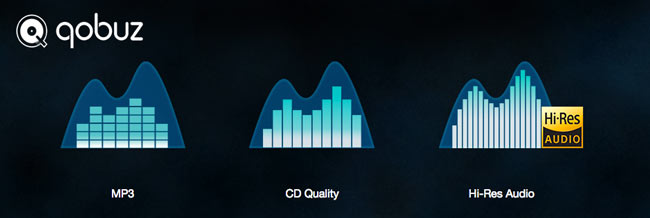
Difference Between Hi-Res and MP3

Difference Between Hi-Res and MP3

Hir-Res vs Mp3

When I tried to listen to Hi-Res (lossless) and MP3 on a site called “TIDAL”, only 2 out of 5 questions were correct…

Hi-res Audio vs Mp3

It was quite shocking to make a mistake on the James Blake song. ..

* It is written that it is not possible to distinguish between PC speaker output and cheap headphones, so please try a good quality sound card or headphones.
To test you need to connect your audio system via Airplay or DAC or use good headphones. The test will not give accurate results through the computer’s built-in speakers or through low-quality headphones.

There are 5 songs in total. After each song is loaded, press A and B to listen and compare. When you’re done listening, select the one you think is lossless (when you select it, playback will start over) and press the “THIS IS HIFI” button below. Go to the next song and repeat, and when you finish the fifth song, the answer page will be displayed.

What is the best format?

The answer is hi-res when it comes to which is better, hi-res (lossless) sound source or compressed sound source (MP3/AAC, etc.). But I think 320kbps MP3s are enough.

The problem with Hi-Res Audio sources is capacity, about 50MB for WAV (CD format) for about 5 minute songs, and about 35MB for FLAC. But a 320k MP3 will shrink to about 10MB. It’s only 3.5 times (WAV is 5 times), but 3.5 times, FLAC consumes 350MB for 10 songs, 35GB for 1000 songs and 350GB for 10000 songs! This puts a heavy load on the internal HDD and external HDD. Also, the smaller the capacity, the faster the transfer to the portable music player.

The number of portable music players stored is just 3.5 times higher with MP3, but I don’t think it is necessary to put a lot of songs in the portable music player (500 songs is enough). I can’t listen to it even though it carries thousands of songs, and I feel that the style of listening to the seasonal songs at that time is a better way to listen. It’s the same as the idea of ​​doing.
So I’d like to have 32GB for hi-res portable music players, and if it’s 128GB or half the capacity, I’d like them to put up to 1TB of storage capacity that beats the iPod Classic (320GB) (can be big). from).

It is not the case that MP3s are chosen for capacity alone. Capacity is a functional issue, and the number one reason I feel good about MP3s is limited to “differences in sound quality”. As with the previous test, few people can usually tell the difference between high resolution and compression.

What is the sampling rate (sample frequency)? Part 2

What is the sampling rate (sample frequency)? Part 2

Sample Rate

Differences in sound quality and how to check! It also explains the settings that need to be taken into account!
Sampling frequency setting Sound quality

Audio Sample Rate

How to check the sampling rate?
The most orthodox method is probably the DAW setup screen.

Sample Rate Ableton Live Settings
I think it depends on the DAW, but I think there is a sample rate setting as well as an interface setting.

4. How should I actually set the sampling rate?
Just as the resolution of televisions increases, so do the sample rate settings.

As of March 2019, the sample rate setting in DTM is

48kHz = 48000Hz
96kHz = 96000Hz
It is common.

By the way, the CD has a lower setting of 44.1 kHz = 44100 Hz.

If you want to know the sample rate of sound data on your computer, please right click and see the detail information.

Sampling rate file information
Points to consider
The higher the sample rate setting, the more PC specifications are required.

Also, the supported sample rates differ depending on the audio interface.

Please note that 96kHz is not supported by inexpensive (10,000 yen or less) audio interfaces.

5. Points to consider in addition to the sampling rate
Sampling rate Number of quantization bits Bit rate
Sample rate isn’t the only thing to consider when recording.

Points to note along with the sample rate That is the number of quantization bits (bit rate).

The number of quantization bits is a value indicating the number of steps to express when converting an analog signal to a digital signal.

The sample rate is the horizontal time axis and the number of quantization bits is the vertical depth.

As of March 2019, the setting for the number of quantization bits in the DAW is

24 bit
32 bit float
It is common.

resume
The sample rate is a frequency that indicates how accurately the sound is captured.

Of course, there are differences in sound quality depending on the rhythm, but beginners and those who do not trust the equipment will not notice the difference.

The sample rate will continue to increase, so there is no basic concept of vintage in audio interfaces. It may be better to get a new one as much as possible.

Understanding Sample Rate Part 2

Understanding Sample Rate Part 2

sample rate

When the number of samples is reduced in this way, the original smooth curve disappears and a choppy waveform is created.

Sample Rate

Well, when it’s actually played back, it’s not the reason the signal is so choppy, it’s that in post-processing by the computer, “From the position of this point, the original waveform would have looked like this.” it is possible to reproduce a certain curve, but…

However, it is easy to imagine that the smaller this point is, the more difficult it will be to reproduce the original correct waveform, right?

In other words, you can understand that the higher the sample rate, the higher the reproducibility of the original sound.

Let’s hear the difference in sound quality depending on the sample rate

Let’s see in this video how the sound quality actually changes when the sample rate is different.

In this video you can check the sound quality of each of the four stages, “8kHz, 16kHz, 32kHz, 48kHz”.

There is a clear difference, right?

At 8kHz, the treble is cut off so much that it doesn’t seem to be the same song, and the overall muffled sound makes it impossible to hear the drum hi-hat.

The higher the sample rate, the better?
As you can see in the video above, sample rate is an important part of sound quality.

At this point, it’s easy to think, “If you set the sample rate to 96kHz or 192kHz, you should get really good sound!”, but actually the change in sound is quite hard to understand after 44, 1kHz

So why is it difficult to understand the change in sound after 44.1 kHz?

The reason why the change in sound quality is difficult to understand above 44.1 kHz
First, the frequency band that humans can hear is determined to be “20 Hz to 20 kHz”.

And as the basis of audio, there is a rule that the sample rate “needs twice the frequency of the frequency band you want to reproduce”. (For more information, see “Nyquist Frequency”)

Simply put, if you want to play down to 20kHz, which is the human audible range, you need a sample rate of at least 40kHz.

Since the sound quality of the CD is 44.1 kHz, the CD can completely cover the limit of human hearing, 20 kHz.

In the video above, the sound source with a sampling rate of 8 kHz is actually 4 kHz or later, and the sound source with a sampling rate of 16 kHz is actually 8 kHz or later, and the high-pitched sound disappears.

daughter
That’s why I couldn’t hear the high-frequency hi-hat sound at first.

At this level, the difference is easy to understand because it is within the human audible range, but since the CD sound quality has already been reproduced beyond the human audible range of 20 kHz, the playable frequency becomes 48 kHz or 96kHz So in most cases, the general public either don’t have enough speakers or headphones to reproduce it, or they can’t hear frequencies above 20kHz in the first place.

However, there are some interesting research results that humans hear components above 20kHz, so you can’t say there’s no point in playing after 20kHz, but unless you’re listening in a very good environment. There’s no doubt that most people can’t tell the difference.

Reference: Effect of components above 20kHz on the perception of instrument sounds

Three reasons why a 44.1 kHz sample rate is enough

So far, you know that as the sample rate increases, the difference in sound quality becomes negligible.

So what value should be set for the project sampling rate?

It’s “44.1kHz”!

Let’s look at why 44.1 kHz is the recommended sample rate, along with three reasons why.

The higher the sample rate, the higher the CPU load.
This is the biggest disadvantage of increasing the sampling rate.

If you increase the sample rate of the project, the load on the CPU will increase and the computer will not work properly.

Therefore, the higher the sampling rate, the greater the amount of information, but it is not a good option to demand too much sound quality with the specifications of a general personal computer.

After all, the standard sample rate in the music industry is 44.1 kHz.
Although high-resolution audio sources are gradually appearing recently, the music industry standard is 44.1 kHz of CD sound quality.

Furthermore, although subscription models are becoming more and more common in the music industry today, the sample rates of Spotify, Amazon M

Video Bitrate

Video Bitrate

Video Bitrate

When encoding with a higher resolution than the original video resolution, the bit rate is also set according to the resolution, isn’t it?

Bit-Rate

Is it just when you select and encode the same codec as the original video? For example, suppose the video codec is xvid, the resolution is 640×360, and the video bit rate is 2000. When increasing the resolution to HD 1280 x 720, it is okay if the bit rate is at least 8000. This bit rate calculation is only if the selected video codec when encoding is the same as the original video codec? By the way, even if you change the xvid codec of this original video to AVC / H.264 and encode it ((The resolution is enlarged to the same size as the previous HD) Is it ok to set the bitrate with the same calculation? AVC / H.264 codec has higher compression rate than original video xvid, so the calculation came out. Isn’t it okay to set it a little lower than bit rate? If you can set it lower, tell me how much you can lower it.If the bit rate is set unnecessarily high, the capacity will naturally increase so I wanted to clarify this point.

Answer:

The bit rate at which block noise does not appear varies depending on the codec used, the screen size, and the video content. Even with the same screen size, the bit rate without block noise is completely different between a picture that does not change at all as shown in the picture and a vigorous moving sports picture. Basically, it is derived from test-based experience to some extent, but depending on the software used, it has a function that automatically calculates the bit rate called “fixed quality”. Multipath is one of them. The variable bit rate is the same, right? There should be a maximum bitrate in the encoding settings, but variable bitrate and multipath (and combinations thereof) are optimal so that deterioration in image quality, such as block noise, does not occur within the maximum bit rate in a scene with a lot of movement. Set to bit rate. With a fixed bit rate, the file size will inevitably increase because the bit rate will be the same for both still images and images with vigorous motion. With TMPGEncVMW5 that I use, if you set “1 fixed quality pass” to 3-5, there is no problem with XviD or DivX. In H.264, select “0 (lowest) to 100 (highest)” and the default is 50. If you increase it to 80, the file will be too large, so I think a little more research is needed . * H.264 requires high processing power, so I don’t use it much. In H.264 “VBR Average Bit Rate”, you can specify the file size after encoding, but depending on the video, the image quality may deteriorate even if you intend to increase the file size, so consider the balance with other parameters. for study. Also, this software has a parameter called “performance”, and even if other parameters, such as bit rate, are the same, the file size after encoding will change. The file size will be smaller (although negligible) if the performance is set to “best quality”. In other words, the bit rate is not the only factor that determines the quality of the image.