Whenever I upload a video to YouTube, it deteriorates.


Free Download Mp4Gain
picture

Whenever I upload a video to YouTube, it deteriorates.

YouTube

When you upload a video to YouTube, it will be automatically encoded. “Encoding” is the compression and conversion of video data, which changes it to a format that can be played on YouTube.

YouTube

Depending on the size of the video, “compress” means that the uploaded video will be of lower quality than the original video.

Actually, even at the video editing stage, it will be encoded last, so there is a chance that it will deteriorate twice.

In particular, action games with intense movement tend to be easy to understand and the visuals tend to be crude.

It is recommended to record the highest quality video possible at the recording stage so that it will be fine if the image quality deteriorates a little later.

This blog introduces how to record game video on your smartphone and also introduces how to record in the highest quality possible. Try to reference.

What kind of video is “high image quality”?
There are three essential elements when it comes to “high quality” video: “resolution”, “frame rate” and “bit rate”. I think it is a value that is often seen when editing videos.

The details will be presented later, but it can be said that the higher the “resolution” and the “frame rate”, the higher the “bit rate” and the higher the image quality.

What kind of video is high image quality? [Game video / preparation 5 from scratch]
1. What is resolution?
It is a word that expresses the number of pixels (pixels) in the vertical and horizontal directions of a video. It is something like “1920 x 1080” or “720P” that you see often. HD, Full HD, 4K, etc. They are also common names that refer to resolution.

If the screen resolution is high, it will be expressed in many pixels, and it will be a clear and detailed video, that is, of high quality.

What kind of video is high image quality? [Game video / preparation 5 from scratch]
I think there are many opportunities to see the resolution when recording a video or when exporting after editing a video.

When you want to get a rough idea of ​​the quality of your own recorded or edited videos, it’s a good idea to focus on resolution.

YouTube resolution (16: 9)
We recommend 1080p and 720p, but YouTube supports other resolutions as well. Basically let’s make a video that will be one of these.

resolution Known as comments
3840 x 2160 (2160p) 4K Transcendental beauty! Conventional TV picture quality
2560 x 1440 (1440p) WQHD Very beautiful! This is also the picture quality for TV.
1920 x 1080 (1080p) Full HD, Full High Definition, 2K It’s beautiful enough! The highest quality of videos recorded on smartphones.
1280 x 720 (720p) HD, high definition Everything is beautiful! If you record it with a small smartphone, this is what it is all about
854 x 480 (480p) full-width VGA It’s as beautiful as a DVD. The videos are tolerable, but each time they are more beautiful
Youtube Video recommends the aspect ratio of 16: 9. If you use a video with a different aspect ratio than this, a black frame will be displayed vertically and horizontally, so be careful.

2. What is the frame rate?
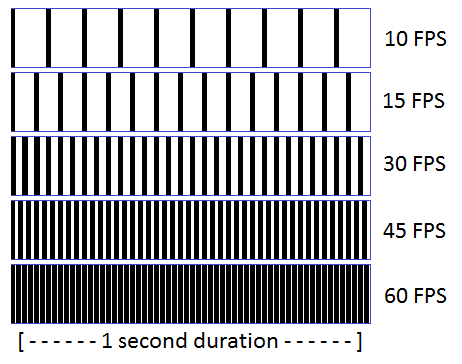
Frame rate is the number of still images (frames) displayed in a video per second. . The unit is “FPS (Frames Per Second)”. Basically I think it is often written in lower case (fps).

Please note that it is different from the “FPS (First Person Shooter)” shooting game genre! (It’s more complicated because conversations like “I want a monitor to do FPS at 120 fps” are also possible).

A movie is a series of still images. I think it is easy to understand if you imagine a flip book.

What kind of video is high image quality? [Game video / preparation 5 from scratch]
The smaller the number of still images displayed per second, the more inconspicuous the video will appear, and the higher the number, the more continuous it will appear. This is the difference in frame rate.

In other words, the higher the frame rate (= the higher the number of still images), the smoother the video will be. .

Frame rate is a numeric value that can be set at encoding time, and I think 30fps or 60fps is common.

If you also increase the fps, you will increase the file size of the video. If you want to stick to smoothness, like action videos, judge at 60fps, around 30fps otherwise.


Free Download Mp4Gain
picture


Mp4Gain Main Window
picture


Mp4Gain Features
picture


Free Download Mp4Gain
picture

What is the bit rate, which is said to be indispensable for video distribution? Part 2

What is the bit rate, which is said to be indispensable for video distribution? Part 2

Video Bit Rate

Advantages and Disadvantages of Setting a High Video Bitrate

Video Bitrate


# There are merits such as being able to offer clearer images
One of the merits of increasing the video bitrate value is that it can deliver clearer videos and even video with intense motion without generating block noise. Block noise is a phenomenon in which part or all of the image is altered to form a mosaic in the shape of a square block. Another advantage of the high video bit rate is that it can increase the number of frames and deliver smooth video.

#There are disadvantages such as not being able to play fluently
The higher the bit rate of the video, the clearer the video can be, but the size of the video file also increases accordingly. A disadvantage is that if the size of the video file is large, it may not be possible to play it smoothly depending on the Internet environment of the viewer when distributing the video on the Internet.

Also, the larger the size of the video file, the greater the amount of communication when viewing it, and the storage capacity of the distribution server will be affected to some extent. If there is no spec that can handle even higher bitrates, the CPU is more likely to be overloaded and the risk of video freezing increases. If you want to distribute or view high bit rate video, you must prepare an Internet connection and a computer that can handle it.

What are the factors that affect the image quality of the videos?
#frames per second


Frame rate is a unit that expresses how many frames, such as still images and frames, can be displayed per second.

The unit is called frames per second, which means that 100 frames per second can be displayed, for example at 100 fps. 30 fps is often selected for Internet video distribution. For videos with little movement, such as seminars and online classes in intensive schools, it is possible to reproduce them smoothly even at 15 fps.


The higher the resolution, the higher the video quality, but the higher the video bitrate value. Also, the higher the frame rate, the smoother the motion of the video. However, simply increasing the value of the frame rate will reduce the percentage of the amount of data per frame, so the bit rate should be set to a higher value.

#resolution

Video resolution refers to pixels and is expressed as vertical x horizontal pixels, such as 1920 x 1080px. The higher the number, the higher the resolution and image quality, but the optimal resolution can be selected according to the viewing environment. As with frame rate, the higher the resolution, the higher the required bit rate.

#Codec


A codec is a program that encodes or decodes audio and video data. Codecs are used in recording media such as DVD, Blu-ray, and hard disk recorders, and they are familiar to us because they are used in various places in our daily lives. Codecs are also used when handling video in digital broadcasts and video conferences. There are various types of codecs that influence such videos, video, and audio.

There are H.264, H.265, MPEG-2, etc. for video and MP3, AAC, etc. as typical audio codecs. To distribute video on the Internet, it is necessary to use these codecs to perform encoding work such as converting the video so that it can be viewed on a terminal such as a personal computer or smartphone and compressing the data.

Relationship between YouTube and bitrate
YouTube has a feature called YouTube Live that can deliver videos in real time. At this time, the bit rate, etc. they become important points. The required data capacity and image quality will be determined by what you use to shoot and how it will be sent to YouTube Live. For example, you can use YouTube Live on your smartphone.

However, the image quality and the video sound quality will be very different even if the smartphone model is different. Specifically, if the number of pixels of one smartphone is 1 million pixels and the number of pixels of another smartphone is 10 million pixels, the data capacity required for a display configuration when calculated by calculating the bit rate is 10 times higher. different.

YouTube side automatically detects the device used for shooting and sets it in settings

What is a frame rate?

What is a frame rate?

FPS

The rate of frames is the amount of frames that processes a video at a certain period of time (usually 1 second) and is related to the image quality of the video.

fps

This article describes the speed of frames.

Table of Contents

1 speed of frames, video and frames
2 Frame and web conference speed
3 Video coding and bit rate
4 Video of the next web conference
Frame speed, video and frames
Have you ever wrote an animated book on the edge of a notebook when you were a child?
It is a sleeve that seems to be moving when you change the image little by little and pass the pages.
Actually, the beginning of the video image is the same as that of this animated book.
It is said that the film was thrown into the public as a cinematographic film invented by the Lumiere brothers.
The principle was to record 16 images per second in film, print them and reproduce them to record and reproduce the images.
At first, it was a video called silent without audio, but eventually it became a video called Talkie with audio.

At this time, 24 images per second are required to record audio, and the concept of frame speed is born for the first time.
The frame rate is the number of frames (still images) that can be processed per second, and Normally FPS (frames per second) is used, which is the number of frames that can be processed per second.
Since the talkie requires 24 frames per second, the frame rate is 24 fps. The higher the speed of frames, the softer the movement will be, since more frames can be used to reproduce the same movement.

However, increasing the frame rate increases the number of frames processed per second, which results in a large number of film.
Therefore, 24 fps has become the standard for movies.
The next is the birth of television.
There are standards for televisions called PAL and NTSC, but the frame rate is 25 fps for PAL and 29.97 FPS for NTSC.
And in the latest 3D games, etc., the frame rate has increased to 60 fps.
As the content that requires a high speed of frames, such as 4K televisions and 3D movies, it will continue to increase, 120 fps videos are expected to appear.

Frame rate and web conferences
At 15 fps, it is not unnatural if you can only see the upper part of the person who attends the conference, as a web conference, and the movement is not so violent. In addition, in web conferences, audio is more important than video.
In a meeting, the video can be an extreme still image, but the meeting can not be done unless the audio is clearly transmitted.
In addition, since it is necessary to send video and audio in real time, the video frame rate tends to be as low as possible.

It seems that many general web conference systems send videos at 15 fps.
However, some modern systems also admit HD image quality at 30-60 FPS.
Of course, you need a line that can send and receive that amount of data, but you can expect more clear and clear images than conventional web conferences.

What is a bit rate?

What is a bit rate? What if it is tall?

Bitrate

This time, I will explain the bitrate briefly, in an easy to understand way and roughly.
* It is an individual subjectivity.

BITRATE

What is a bit rate? It seems difficult and troublesome … I think you!
If you are not knowledgeable about bit rates, even if you present a network camera or NVR …

“The image from the network camera is frequently interrupted …”
“The NVR is causing an unexplained reboot …”

Be careful because things will happen.
Of course, in addition to the introduction of the surveillance camera system, it is an important word on the net, so check it out!

If you don’t know the bit rate, the video may be interrupted or the NVR may reboot …

Table of Contents
What is a bit rate?
What if the bit rate is high?
Disadvantages of high bit rate!
resume
What is a bit rate?
Bit rate is the amount of data that can be sent and received per second. The unit is bps (bits per second). This unit is used to indicate how many bits can be transferred in 1 second (per second).

For example, at 1 bps, 1 bit of data can be transferred per second.
At 10bps, it can transfer 10 bits of data per second.

If you want to know more about “bit”, check out this article too!

What if the bit rate is high?
High bit rate = a lot of data can be transferred per second
.

Sounds like a good thing.

The network cameras managed by my company send the captured video data to a computer for viewing over the network.

If you want to see the video, you want to see a beautiful video that moves sharply with high image quality, right?
However, the amount of data in a beautiful image is surprisingly large …

In such a case, if the bit rate is high, a lot of data can be transferred per second, so you can deliver beautiful images to your computer. On the other hand, if the bit rate is low, there is not much data that can be transferred per second, so the image quality will be low and the image will be choppy.

“So the bitrate should be high anyway!”

… That is not the case.
In fact, in a surveillance camera system, there are the following disadvantages to increasing the bit rate.

Disadvantages of high bit rate!
Transferring a large amount of data increases the load on the network line and equipment.

There is an upper limit to the bit rate that can be transferred depending on the network environment. This depends on the LAN cable you are using, the performance of the hub, etc., but it will be difficult so I will skip it. Just think that there is an upper limit for the bit rate depending on the environment.

“So what happens if it exceeds the upper limit?”

In the case of video from a network camera, the connection is often dropped. If you exceed the upper limit, the line will be punctured and you will lose connection with the camera. The image may be interrupted for a moment, but if it is too bad, you will not be able to see the image from the camera at all.
If this happens, it will be very troublesome …

Also, if the bit rate is high, a large amount of data will reach the browsing computer and the recording NVR. When a lot of data arrives, the computer or NVR will not be able to process the data and abnormal operation (reboot, etc.) may occur.

Therefore, the System Kay NVR has decided the maximum bit rate that can be supported as a specification. The bit rate that the entire NVR can process and the bandwidth limit per channel are described in the specifications as performance.

Also, video with a high bit rate has a large data capacity. Therefore, there are disadvantages such as using a lot of hard disk capacity when recording.

resume
Bit rate is the amount of data that can be sent and received per second.
Bps (bits per second) is used as a unit
The higher the bit rate, the better the image can be delivered.
If the bit rate is high, communication is likely to be interrupted, which has the disadvantage of charging the device.

What is the standard bitrate for smartphone videos?

What is the standard bitrate for smartphone videos?

Bitrate

In this article, we’ll give you an overview of bit rates, guidelines for suitable bit rates for smartphone videos, and points to keep in mind when considering bit rates for smartphone videos, so check them out.

smartphone bit rate

What is the important bitrate for smartphone videos?
Bit rate is a term that refers to the amount of data per second.

The amount of data that can be sent and received in one second, and the unit is “bps (bit per second)”. For example, at 1 bps, 1 bit of data can be sent and received per second, and the higher the bit rate, the more data can be transferred.

Therefore, when making smartphone videos, it is necessary to consider the bit rate that viewers can comfortably watch.

Relationship to screen size
The larger the screen size, the greater the amount of data required and, conversely, the smaller the screen size, the less the amount of data.

Therefore, there is a reference bit rate for each screen size. If the screen size is 480 x 360, the bit rate is 500 to 700 Kbps, if it is HD 1280 x 720, it is around 2000 Kbps, and if it is full HD 1920 x 1080, it is around 4000 Kbps It is a guideline for the bit rate.

Three video terms to remember in advance

When creating a video, be aware of the video terminology.

In recent years, there have been many cases of video distribution in companies. However, there are many technical terms in the video, so you need to know the meaning of the terms in order to understand the video properly.

Here are three video terms to remember beforehand, so why not take a look at what they are?

Frequency used for audio (sample rate, PCM, DSD, etc.)

Frequency used for audio (sample rate, PCM, DSD, etc.)

Digital Audio

On this occasion, I would like to explain the frequencies used in digital audio and their meanings.

digital audio

Recently, the high-resolution sound source has increased, such as 192KHz Toka, 11.2MHz, as the frequency has been written or will, what frequency?

I would like to explain the frequency used for said audio taking as an example the Combo384 installed in the USB-DAC used in LV2.0.

1. 1. What is the sampling frequency?

Music distribution is becoming mainstream these days, but audio was first digitized on CDs, which are still on the market.

You often hear that the sample rate of a CD is 44.1 KHz. Since digital signals are basically 0 or 1, to reproduce up to the 20 KHz limit that can be heard by the human ear, a resolution of twice that frequency is required. Furthermore, the frequency was decided to be 44.1 KHz taking into account the digital signal processing margin. Since a music signal is a set of sine waves, it is 44.1 KHz that can fluctuate at a maximum frequency of 20 KHz.

2. What are 16 bits and 24 bits?

As you may hear often, CDs are sometimes described as 44.1KHz / 16bit. This 16 bit is the volume of the sound. Since 16 bits can express the size of 2 raised to 16, there are 65536 different sizes.

Converting this to dB is 20LOG (65536), which is approximately 96 dB. The dynamic range of a CD (the difference between low and loud sounds) is 96 dB.

For DVD and Hi-Res, it can be 24-bit, but in this case, it’s 16.77 million steps of 144 dB.

3. 3. PCM format

So what is the actual signal? In the case of the PCM format, the standard called I2S, which can support up to 32 bits in sample rate, is common. In the case of a CD, being stereo, the data has a frequency of 44.1 KHz with 2 channels (L, R) alternately of 32 bits (although in reality 16 bits are used).

Therefore, to process this digitally, a processing capacity of 44.1KHz x 2CH x 32bit = 2.8224MHz is required.

Let’s actually look at the output of COMBO384.

image049

This is a signal that the yellow is called 2CH (L · R) are switched LRCLK (or FSCLK), the LR set 44.1KHz has been sent to each.

The blue color below is divided into 32 bits by the DATA line, and DATA L and R are output.

4. COMBO 384 audio

Looking at the COMBO384 instruction manual

image021

The first thing that stands out is the OSCILLATOR SG (oscillation) item, which lists two types of frequencies.

They are 24.5760MHz and 22.5792MHz.

COMBO384 is equipped with these two as reference frequencies for audio.

5. Master clock

The reference frequency mentioned above is called the master clock. In the schematic, it is written as MCLK.

Let’s take a look at the actual waveform.

image033

MCLK 22.5792 MHz

image031

MCLK 24.5760 MHz

[Caution] Due to the frequency bandwidth performance of the oscilloscope, it is displayed as a trapezoid, but it is actually a square wave.

The difference between the two is due to the difference in the format of the music played.

From the left 22.5792MHz is, CD (44.1KHz when playing), the right side of the 24.5760MHz is, DVD (48KHz) when playing.

In digital processing, it is easy to reduce this reference frequency (master clock) to 1/2, 1/4, etc., but creating a completely different frequency is problematic. Reducing the frequency to 1/2 in this way is called frequency division.

Now let’s divide.

22.5792 MHz / 32/2 = 352.8 kHz

22.5792 MHz / 2 = 11.2869 MHz / 32/2 = 176.3 kHz

22.5792 MHz / 4 = 5.6448 MHz / 32/2 = 88.2 kHz

22.5792MHz / 8 = 2.8224 MHz / 32/2 = 44.1 kHz

24.5760 MHz / 32/2 = 384 kHz

24.5760 MHz / 2 = 12.288 MHz / 32/2 = 192 KHz

24.5760MHz / 4 = 6.144 MHz / 32/2 = 96 KHz

24.5760MHz / 8 = 3.072 MHz / 32/2 = 48 KHz

What about that. I think the frequencies that I have seen have come out.

/ 32/2 is for the 32-bit LR2 channel that came out earlier.

On the left side, you can see that the frequency comes from the CD’s 44.1KHz.

The right side is the 48KHz based frequency used in DVD and broadcast.

Also, although the method is different from PCM, the number on the left appears as the DSD sample rate, so you can see that it is based on CD.

DSD64 2.8224 MHz, DSD128 5.6448MHz, DSD256 11.2896MHz DSD512 22.5792MHz

All of these are based on this master clock frequency.

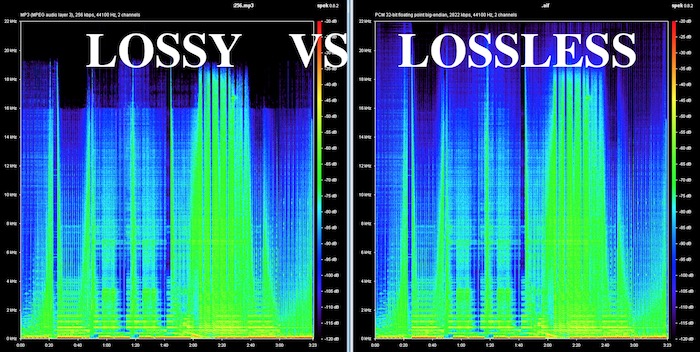
About the maximum bit rate of the audio lossy compression format

About the maximum bit rate of the audio lossy compression format

Lossy Audio

According to him
standard [MP3], the maximum bit rate is set to 320 kbps.

lossy audio

MP3 compresses audio into units called frames. A frame is determined to have 1152 samples, and if the sample rate is 44.1 kHz, a frame is 1/44 100 x 1152 ≒ about 0.026 seconds.
MP3 can take any of the 14 default types of bit rate values ​​(32,40,48,56,64,80,96,112,128,160,192,224,256,320kbps for MPEG1) for each frame, and all frames have the same bit rate. It’s called CBR (Fixed Bit Rate), and what’s different for each frame is called VBR (Variable Bit Rate).
Therefore, the maximum bit rate is 320 kbps for all frames in CBR and the highest sound quality is achieved.

Also, the lame encoder can create MP3s of up to 640kbps for CBR only by its own extension outside of the standard (although it should not be called MP3 strictly because it is not standard). Of course, since it is out of the standard, only a small part of the software can be played. With MP3s, which are the best selling point for their versatility, messing them up may not be a good idea.

[AAC]
The upper limit of the standard is
264.6 x 2 = 529.2 kbps (in the case of 44.1 kHz 2 channels)
288 x 2 = 576 kbps (48 kHz) for 2 channels)
However, it appears that the actual encoders are “up to 256 kbps per channel” (512 kbps for 2 channels).

However, there are some strange programs for beginners like iTunes, x-app, Media Go, etc. which set the upper limit of the AAC bit rate at 320 kbps. Because of this, it seems that there are quite a few beginners who think that AAC has a maximum of 320 kbps like MP3 ^^; well maybe it’s just MP3. ・ ・ ・ Well actually 320 kbps is enough.

[Ogg Vorbis]
It seems that the upper limit is not set in particular by the standard, but in the current general encoder, it appears to be “up to 256 kbps per channel” (512 kbps for 2 channels).

[WMA] It
very difficult to understand, and personally I don’t want to use it at all, so I haven’t researched it in detail, so it may be wrong …

Microsoft’s WMA encoder has a profile (like a preset), and it basically converts according to it, but the variety of profiles is kind of weird. The profile commonly used in the WMA9.2 Std format appears to be a mysterious specification offering up to 320 kbps at 44.1 kHz, but only up to 192 kbps at 48 kHz.
Perhaps because of this, some software unifies both up to a maximum of 192kbps, and there is a section where many people think that it is a WMA standard.

320 kbps (for 44.1 kHz, 16 bit, 2 channels), 192 kbps (for 48 kHz, 16 bit, 2 channels) for normal WMA 9.2 format, 440 kbps (for 44.1 kHz, 24 bit, 2 channels ), 256 kbps (44.1 kHz, for WMA10Pro format) 16 bits, 2 channels) seems to be the upper limit (at least we could build it up to that point). Even CBR looks like this, so I’m not sure what the maximum bit rate of each frame is for VBR (which has 1-step and 2-step encoding) so I don’t know the details.

Some conversion tools that support multiple formats use FFmpeg for WMA encoding. The WMA encoding feature included in FFmpeg is based on the old WMA8, so it may be different from the above. I do not want to look for it and it is better not to use it.

Difference between CBR (fixed), VBR (variable) and ABR (average) [bit rate]

Difference between CBR (fixed), VBR (variable) and ABR (average) [bit rate]

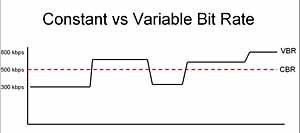
constant vs variable bit rate

CBR (constant bit rate)
VBR (variable bit rate)
ABR (average bit rate)
There are three types.

Constant bit rate (CBR)

I will present the differences between them.

See the following article for the “bit rate”.

Reference: What is a bit rate? Relationship between image quality and sound quality [Video / Audio]
Related: Difference Between VFR (Variable) and CFR (Fixed) [Frame Rate]

Every feature
I will briefly explain each feature.

CBR (constant bit rate)
CBR (constant bit rate) is

A video with a constant video bit rate.

for instance,

Scenes with intense movement
Scenes with complex audio
Even in “scenes that require a large number of bit rates”, for example, the bit rate to be assigned is constant and

Motionless scene
Scene without audio
Even in “scenes that do not require a lot of bit rate”, the bit rate to be assigned is constant.

In this way, a video that assigns a constant bitrate to “Assign a constant bitrate!” In any scene it is called CBR (constant bit rate) video.

The following are the characteristics of CBR.

(○) Search (fast forward / rewind) is fast
Since the transfer rate is the same, you can search instantly.
(○) File size can be predicted
If you decide beforehand to “encode at XX bit rate”, you can predict the file size from resolution, frame rate, video length, codec, and so on.
(○) Easy to use as a material
In the case of video, there is no need to worry so much, but in the case of the sound source, various problems can occur such as drift of sound with VBR or ABR (so if there is a possibility that it will be used later to video edit material, etc. Better to encode with CBR)
(○) Fast encoding speed
It doesn’t change much, but unlike VBR and ABR, you don’t need to “predict” it, so encoding is faster.
(X) Image quality and sound quality are not very good for the file size
Even a monotonous scene that does not require a lot of bit rate allocation may be assigned a certain number, or a scene that requires a large bit rate may not have enough bit rate, so the image quality and sound quality for the file size. Cospa is bad
VBR (variable bit rate)
VBR (variable bit rate) is

A video whose bit rate varies depending on the scene.

VBR_figure

for instance,

Scenes with intense movement
Scenes with complex audio
In “scenes that require many bit rates”, such as assigning many bit rates and

Motionless scene
Scene without audio
For “scenes that do not require a lot of bit rate”, assign a lower bit rate.

In this way, a video that assigns only the required bitrate according to the scene, “You need this bitrate, don’t you?” It’s called VBR (Variable Bit Rate) video.

The following are the characteristics of VBR.

(○) Image quality (sound quality) by file size is the best
Compared to CBR and ABR, the image quality (sound quality) by file size is the best.
(△) Unpredictable file size after encoding
The file size cannot be predicted because the bit rate fluctuates extremely depending on the content of the material to be encoded. (However with the x264 encoder etc it is possible to predict because it puts an upper limit on the file size and allocates the maximum bit rate within that range)
(X) Old MP3 players may not play well
If you have an old MP3 player, the playing time display may be strange, the bit rate display may be strange, or you may not be able to play from beginning to end.
(X) When used as video editing material, it may cause sound drift.
For more information, see the following article
Reference: Causes and countermeasures for sound deviation [Encoding]
If you want to encode video with high image quality and low capacity, VBR is your choice.

By the way, in VBR, it is common to determine video quality by “quality standard” (CRF value in x264 encoder) rather than by “bit rate standard”.

For example, instead of saying “Encode at 192bps!”, Specify something like “Encode at

Difference between audio formats Part 2

Difference between audio formats Part 2

Audio File Formats

Lossless compression: FLAC, ALAC, WMA Lossless
FLAC lossless compression

Audio File Formats

Lossless compression codecs are compressed while preserving the original data.

At the time of playback, it will be unzipped → it will be played in the original uncompressed format, so

The sound quality is the same as that of uncompressed sound sources (WAV, AIFF, etc.).

However, the data capacity is half that of uncompressed.

Lossless sound sources are FLAC, ALAC, WMA Lossless …

There is not a big difference in compression ratio and since it is lossless, the sound quality does not change.

Therefore compatibility (compatible terminals and amount of compatible software) is of the utmost importance.

Among lossless compression codecs

The most important is FLAC (Free Lossless Audio Codec).

It is often handled by high resolution audio sources and there are many supported playback devices.

ALAC (Apple Lossless)

As the name implies, a lossless codec made by Apple.

I can also select it when ripping an iTunes CD,

In many cases, you can only play with Apple products.

However, iTunes does not support FLAC, so

If you want lossless compression, you must use ALAC.

Both FLAC and ALAC are lossless compression, so

If the playback device is not supported, re-unzip (WAV, AIFF, etc.),

It is possible to convert from there to the corresponding lossy (mp3, AAC, etc.) and use it.

That is why all CD sound sources are converted from iTunes to ALAC and saved and managed.

→ Import music CDs with high sound quality to iTunes. Optimal reading settings for PC sound source management.

There’s also TAK and WMA Lossless, but …

I don’t think there is any reason to use it in mainstream FLAC and ALAC.

Sound quality = sample rate x number of quantization bits
When digitizing analog voice with high sound quality,

The “sample rate” and the “number of quantization bits” are involved.

For analog to digital (AD conversion),

It requires two processes, sampling and quantification.

These two are important in terms of faithfully converting sound into data.

The CD is 44.1 kHz and 16 bit. What does this mean?

kHz: sample rate (sample rate)
Sampling rate

The sampling frequency (Hz) is

Displays the number of sampling times (sampling) per second.

The higher the number, the more times it will be processed.

If the sample rate value is just high,

The amount of sound information increases and the sound is faithfully reproduced → the sound quality improves.

The sampling frequency is also related to the frequency of the sound (treble, bass).

According to the sampling theorem (sampling theorem)

The frequency of the sound that can be reproduced is half the sampling frequency (Nyquist frequency).

Regarding the frequency (Hz) of the sound, the bass has a small amount of vibrations and a low frequency value.

On the contrary, the treble has a lot of vibrations and a high frequency value, so

The higher the sampling frequency, the higher the treble can be reproduced.

The 44.1 kHz of the CD is sampled (converted to data) 44,100 times per second.

It can reproduce frequencies up to 22,050 Hz.

By the way, the frequency that humans can recognize is generally 20-20,000 Hz.

The difference between progressive download and streaming delivery

The difference between progressive download and streaming delivery

Streaming


When a business or organization publishes a video on the web or operates a video service, it is important to select a video distribution method.

streaming

On this occasion, we will explain the characteristics and differences between the two distribution methods, “progressive download” and “streaming distribution”.

What is progressive download?
Progressive download is a delivery technology that downloads data such as video and audio and plays them at the same time.

Sometimes referred to as “pseudo-streaming,” the video data is played back as it is saved as a temporary file on a terminal such as a PC or smartphone.

Thus, once the video data is downloaded, it can be freely viewed offline without having to go through the internet.

What is streaming distribution?
Streaming is a technology that transfers audio and video data, plays it back in sequence, and distributes the data to terminals such as PCs and smartphones without saving it.

Streaming distribution uses a dedicated streaming server for video and audio distribution and transfers only the data required for playback, making it suitable for distribution of long duration video such as movies.

Due to the technology to play while data is transferred, if the communication environment is poor, the data reception cannot be maintained and the video may stop in the middle.

Advantages and disadvantages
Let’s take a look at the pros and cons of “progressive download” and “streaming”.

Progressive discharge
merit
Even if the communication environment is bad, smooth playback is possible after the data download is complete.
Since the video data is saved as a temporary file in the terminal, the saved video data can be played repeatedly as long as the cache remains.
Operation is possible without preparing a dedicated streaming server
* Recently, streaming servers are becoming more common.
Demerit
Since the entire video file is downloaded to the terminal and distributed, it is easily copied and no copyright action can be taken.
* Recent video data security
Large video files put a strain on your bandwidth, so they take time to play.
As the number of concurrent viewers increases, the server will become overloaded and viewing will become difficult.
Transmission delivery
merit
Only the video being played is transferred to the user, so if the communication environment is stable, you can comfortably watch long and large-capacity videos.
Since there is no data left on the device, copyright-related measures such as data redistribution and falsification are higher than progressive downloads.
* Recent video data security
By using a CDN, a stable distribution is possible even if the number of concurrent viewers increases.
Reference: What is a CDN that is often used for video distribution?

Demerit
Stable playback is not possible unless the communication environment is protected.
A dedicated streaming server needs to be set up, which requires upfront and running costs.