What is a bit rate? Basic bit rate knowledge required for video distribution.


Free Download Mp4Gain
picture

What is a bit rate? Basic bit rate knowledge required for video distribution.
Video Bitrate

Bit rate / bit rate

BitRate


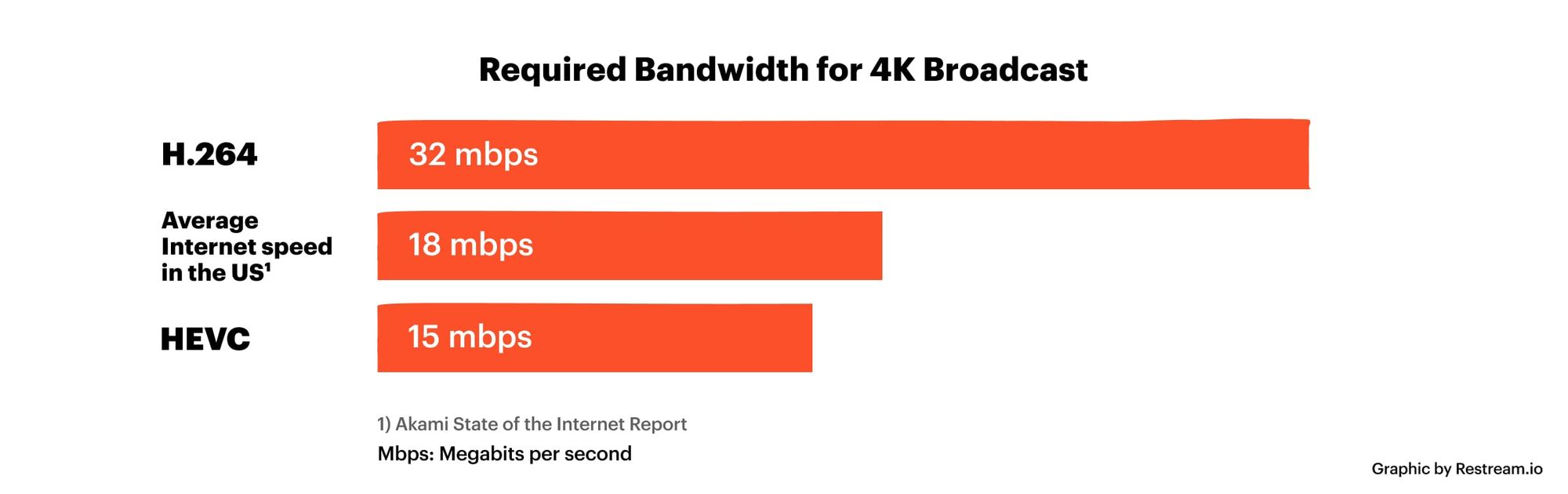
Bit rate is the amount of data per second. Video quality is determined by factors such as “resolution”, “frame rate”, “bit rate” and “codec”. Bit rate is an important factor related to video quality. Therefore, this time, I will explain the basic knowledge of bit rates required for Internet video distribution.

” Table of Contents ”

1. What is a bit rate?
2. Relationship between video bit rate and video image quality
3. Estimated video bit rate
4. Advantages and disadvantages of a high video bit rate
1. What is a bit rate?
The amount of data per second is called the bit rate. Use bps as the unit. This is an abbreviation for Bit Per Second. For example, if it is written as 500 kbps, k is 1,000, which means “the amount of data of 500,000 bits per second.”

There are two types of video bit rates: “video bit rate” and “audio bit rate”. The total value of “video bit rate” and “audio bit rate” is the total bit rate (oval bit rate) of the video file.

Video Bit Rate / Audio Bit Rate

■ Voice bit rate
The audio bit rate is the bit rate associated with the audio in the video file. Generally, the audio bit rate is lower than the video bit rate.
The guideline for the audio bit rate is as follows.

Lossy codecs like MP3, AAC, WMA … 96kbps-128kbps
Sound quality oriented video … 192 to 320 kbps
A codec is a program that encodes (encodes) / decodes (decodes) video and audio data. A lossy codec is a codec that dilutes the data and reduces its weight without affecting it. For more information on codecs, see the following.

[Reference article] What is a codec? Basic knowledge of the codecs required for video distribution.
■ Video bit rate
The video bit rate is the bit rate of the video in the video file. Generally, the video bit rate value is higher than the audio bit rate. The appropriate video bit rate will differ depending on the size of the resolution and the content of the video, such as amount of movement / small amount of movement.

The guideline for video bit rate is explained in “3. Guideline for bit rate”, but the value varies depending on the image quality you want to deliver, such as 500 kps to 70 Mbps. Since the standard for audio is “approximately 96 kbps to 128 kbps”, the video bit rate occupies most of the bit rate of the entire video file.

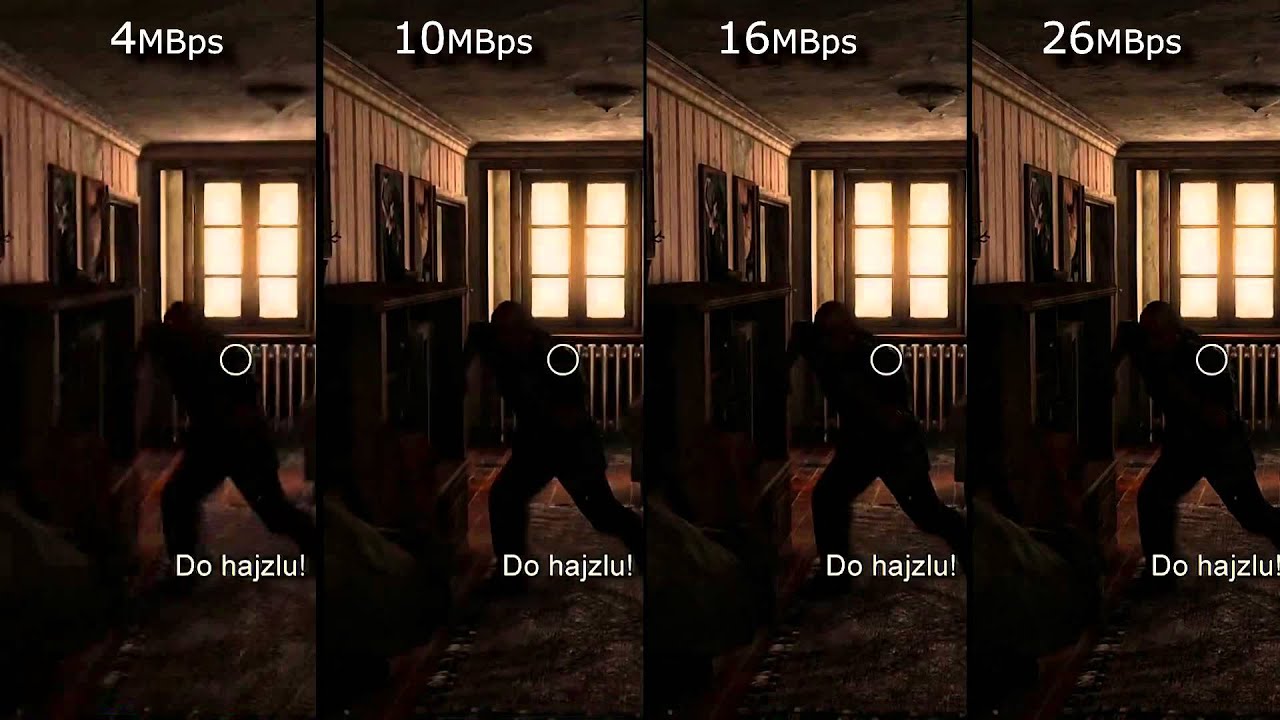
It can be said that the higher the value of the video bitrate, the better the image quality, but that does not mean that “the higher the value, the better”. When displayed at a small resolution, the roughness is not as noticeable even if the bit rate is reduced. On the contrary, even if you encode at a high bit rate, you will not notice the difference in image quality, and in many cases the file size will only increase.

From now on, we will focus on the bitrate of the video.


Free Download Mp4Gain
picture


Mp4Gain Main Window
picture


Mp4Gain Features
picture


Free Download Mp4Gain
picture

MKV MP4 What is the difference?

MKV MP4 What is the difference?

MP4 vs MKV

MKV MP4 What is the best image quality?

MKV VS MP4

If you want to save the video, which one should you choose, MKV vs. MP4? Many people wonder what the difference is in that MKV MP4. Certainly the MKV MP4 video files you see often have different uses based on their characteristics. However, the difference between MP4 and MKV is a bit difficult for an amateur. Also, even if you search for it on the Internet, the information about the difference between MKV MP4 is quite scattered and difficult to read. So, let’s compare MKV and MP4 in the text and explain in detail the difference between MKV and MP4 for those who are wondering where is the difference between MP4 and MKV.

MKV MP4 Difference Overview
MKV is one of the file formats that can record video and accompanying audio and subtitles, and it is one of the container formats that defines how to store data in the file. Various compression methods (codecs) can be used for video data and audio data. The most important feature of MKV is its ability to support different types of encoded video, audio, and subtitle streams.
Related Article: Introducing the Acclaimed MKV Playback Player Recommendations!

MP4 is one of the file formats for storing video data compressed in MPEG-4 format. It is specified in Part 14 of ISO / IEC 14496. MP4 is a format derived from ISO / IEC 14496 Part 12 developed based on Apple’s QuickTime media technology file format, and has a structure that follows many of conventional QuickTime formats. The feature is that even if the compression rate is high, the image quality and sound quality remain high, and it is highly compatible with devices such as smartphones.

Point: What is MP4? MP4 Tips: Summary of Definitions, Functions, Extensions, etc.

MKV MP4 Difference
Compare MKV and MP4: Detailed Explanation of MKV MP4 Difference
Difference between MP4 and MKV: Compatibility
As mentioned above, MKV vs. MP4 is characterized by being compatible with any codec even if the basic codec is the same MPEG-4 / H264. Therefore, when playing MKV as a fairly multi-functional container, a dedicated codec is required, so it is often limited to some playback and player software and cannot be played. Many people complain and complain about the poor compatibility of the MKV format. On the other hand, MP4 is highly compatible with various operating systems. Currently it can be used in most terminals and multimedia players. So if you compare MKV and MP4, MP4 will win in terms of compatibility.

Difference between MP4 and MKV: Quality of
image The image quality of MKV MP4 is not determined by the quality of the video, but depends on the compression format of the data contained in it, so the difference between MKV MP4 cannot be easily said. Both MKV and MP4 support AVC MPEG-4 and H.264 video codec, which have high compression ratios and can support HD image quality, so it cannot be said which is better for MKV MP4 image quality. Speaking of strength, in general MKV is cleaner than MP4 if you use the same codec. Also, since MKV can support most video codecs and audio codecs, today’s super-resolution videos use MKV more often than MP4.

Difference between MP4 and MKV: File size
file The file size is also different due to the difference in video bit rate (bps) and time. In fact, both MKV and MP4 feature a highly compressible format because they produce the smallest file size and high-quality video. However, when comparing MKV and MP4, the file size of MKV compressed under the same conditions is slightly larger than that of MP4.

Difference Between MP4 and MKV: Versatility
Speaking of versatility, which one is most commonly used, MKV vs. MP4? MP4, which uses H.264 with a high compression rate for the video section and combines high-quality AAC for audio, can be used in various terminals, so it can be said to be the most versatile. MKV is used less than MP4 due to the playback environment. However, as the demand for video quality increases, it has several advantages, such as being able to compress long-length videos into small parts, maintain video and audio quality, and add chapters or subtitles. The existing MKV will have a great effect in the future.

YOUTUBE SOUND QUALITY AND PICTURE QUALITY (AS OF JUNE 2021)

YOUTUBE SOUND QUALITY AND PICTURE QUALITY (AS OF JUNE 2021)

YouTube Audio

This time, I investigated the sound quality and image quality of “YouTube”.

youtube audio

HOW TO UPLOAD TO YOUTUBE WITH HIGH QUALITY SOUND

Basically YouTube uses “H.264 AAC-LC” or “Opus” as the audio codec.
The video codec used is “H.264” (MP4) or “VP9” (WebM). “AV1” is also used in some videos.

Verification method
(Video) Download the official video of “3D Youtube Downloader”, upload the video to “VLC Media Player” and refer to Media Information → Input Bit Rate in Statistics.
(Audio) Check the audio of the video downloaded by the above method using “foobar2000” for the bit rate. The cutoff frequency is converted to .wav format by “XMedia Recode”, and the file is imported into “WaveSpectra” and verified.

● PC
The PC version of YouTube ranges from 144p (320 x 180) to 4K (3860 x 2160), but there are differences in the image quality that can be selected and the audio that can be played depending on the browser.
You can check if your browser supports it on the next page.
YOUTUBE SUPPORT BROWSER

The following is the support status for each browser (browsers that support both VP9 and MP4 have the highest picture and sound quality).

Browser name PIN
Internet Explorer (Windows7) Not supported (not visible)
Incompatible iOS Safari
Internet Explorer (Windows 8.1 / 10) Only compatible with MP4 (not viewable)
Safari on Macintosh Only compatible with MP4
Microsoft Edge (EdgeHTML) Correspondence (depending on model)
Microsoft Edge (Chrome) Correspondence
Firefox Correspondence
Google Chrome (recommended browser) Correspondence
Correspondence table by DASH browser
* We are looking for information. Provide information in the comment section.

Recommended browser
YouTube Help from
> YouTube video is available to view in a variety of formats and resolutions. However, some browsers do not support the new video format. Depending on your browser, you may only have one or two video formats to choose from. We recommend that you update your browser or operating system to enjoy watching the video comfortably.

The following is an example of a browser and operating system combination that supports the video format for high-quality YouTube videos.

Google Chrome (all operating systems)
MS Edge
Safari (Mac OS X 10.10 or later)
Firefox (Windows 7 or later and Mac OS X 10.10 or later)
* Internet Explorer is no longer supported.

Video and Audio DASH Correspondence Table
[Caution] In the following table, only those whose use is currently confirmed are listed. Therefore, not all configurations are listed.

Photography
Since the video bit rate is a variable bit rate (VBR), the upper and lower limits are listed. The mean value is somewhere in the middle.

Image format: MP4
DASH value Video size Video bitrate Comments
36 240p (426 × 240) is not clear Validated with Safari on iOS14 (mp4v.20.3, mp4a.40.2)
18 360p (640 × 360) 500K-1 Mbps Validated with Safari on iOS14 (avc1.42001E, mp4a.40.2)
22 720p (1280 × 720) 1-3 Mbps Validated with Safari on iOS14 (avc1.64001F, mp4a.40.2)
160 144p (256 × 144) 50K-90 Kbps Validated with Internet Explorer 11 on Windows 10
133 240p (426 × 240) 150K-580 Kbps Validated with Internet Explorer 11 on Windows 10
134 360p (640 × 360) 200K-1 Mbps Validated with Internet Explorer 11 on Windows 10
135 480p (854 × 480) 250K-2.3 Mbps Validated with Internet Explorer 11 on Windows 10
136 720p (1280 × 720) 30 fps 300K-4.4 Mbps Validated with Internet Explorer 11 on Windows 10
298 720p (1280 × 720) 60 fps 300K-4.4 Mbps Validated with Internet Explorer 11 on Windows 10
137 1080p (1920 × 1080) 30 fps 500K-6.2Mbps Validated with Internet Explorer 11 on Windows 10
299 1080p (1920 × 1080) 60 fps 500K-6.2Mbps Validated with Internet Explorer 11 on Windows 10
Image form: VP9
DASH value Video size Video bitrate Comments
278 144p (256 × 144) 100K-300 Kbps Validated in Firefox
330 144p (256 × 144) (Only HDR compatible terminals can be selected) Validated with Google Pixel 4
242 240p (426 × 240) 100K-500 Kbps Validated in Firefox
331 240p (426 × 240) (Only HDR-compatible terminals can be selected) Validated with Google Pixel 4
243 360p (640 × 360) 200K-950 Kbps Validated in Firefox
332 360p (640 × 360) (Only HDR-compatible terminals can be selected) Validated with Google Pixel 4
244 480p (854 × 480) 300K-2 Mbps Validated in Firefox
333 480p (854 × 480) (Only HDR-compatible terminals can be selected) Validated with Google Pixel 4
247 720p (1280 × 720) 30 fps 600K-4.3

The meanings of Hz and bit of sound sources

The meanings of Hz and bit of sound sources

Audio Frequency

The meanings of Hz and bit of high resolution sound sources are “how accurately a second was made” and “how accurately the pitch width and sound pressure of the sound were recorded.”

Audio Hz

We use Hz (hertz) and bit (bit) to represent music data.

When I started researching hi-res audio sources, I was wondering “what is Hz? What is bit?”, So I will write an article.

As I mentioned each time, this article was written by someone who is not familiar with audio as a memo.

Please be careful as you may have misunderstanding or misunderstanding.

In short, Hz is “whether to record the sound and how much a second” to represent the, bit is “What was finely recorded how much the width and pressure of the sound of the highs and lows of the sound” represents the increase.

What is Hz?
What is a bit?
High bit and high Hz sound sources are easier to deliver to consumers
abstract
Sponsorship

What is Hz?
Hz is a unit that expresses the sampling frequency (sampling frequency).

This is “how good a second is.”

If you make the digital clock display thinner, it will be “plugged in” and “smooth”.

If the digital display timer also shows up to 1/1000 of a second, it will display the time as if it were connected to the human eye.

Even if it can’t show the time between each number.

In the same way as this, when the “Hz = value of the precision with which the data is taken per second” becomes extremely fine, you can hear it as if you were connected and you can hear it with the so-called good sound.

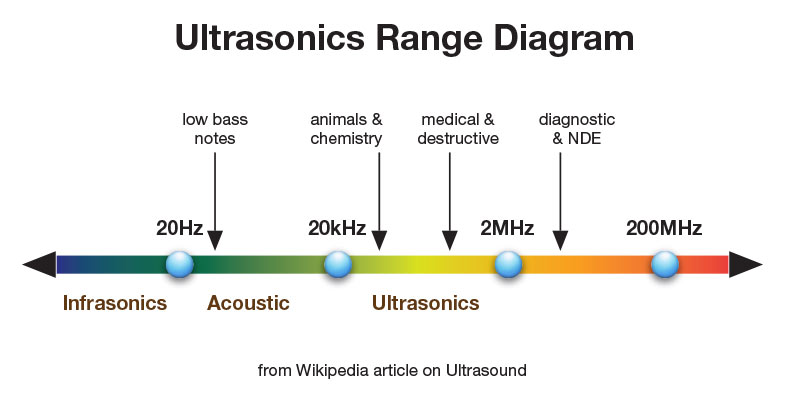
The sampling frequency of CDs is 44.1 kHz, and many high-resolution audio sources are sold at 96 kHz or 192 kHz.

“K” is the same as kg, which means 1000, so 44.1 kHz means 44100 Hz.

In other words, a 44.1 kHz CD is significant because it is divided into 44,100 pieces to express the sound for one second.

Since the high-resolution sound source is 96 kHz or 192 kHz, it means that the original sound is expressed in more detail than the CD.
(One second is divided into 96000 and 192000)

Therefore, it seems that high-resolution sound sources usually sound good.

High resolution sound source distribution site: e-onkyo music

What is a bit?
A bit is the smallest unit that a computer handles.

It may be difficult to understand when it comes to the smallest unit, but in Japan today, 1 yen is the smallest unit, and it is the same feeling that the price is not expressed in intervals of 1 yen or less. (In the case of daily life. Without considering actions or changes.)

There is no 1.3 yen and it looks like there is no 0.9 yen.

You can express 1 yen, 2 yen, 1096 yen, etc., and all prices are expressed in 1 yen intervals.

Therefore, in everyday life, 1 yen is the minimum unit for expressing price.

In the case of a computer, that “1 yen” is “1 bit”.

In terms of sound, the bit seems to correspond to the width of the tone and the sound pressure of the sound.

The difference according to the number of bits is, for example, when the sound in the world can be expressed only with the three numbers 10, 15, 17 and 20, and when there are 10, 13, 15, 17 and 20, the sound is more precise. Which one can you express? It is so.
(I think it’s correct, but it may be wrong …)

How small must the bit be to express the sound? it is.

If you can only express with 10, 15 and 20, there are some parts where you have to change the sound you want to express with 16 and 17 to “15!” Or 8 and 9 to “10!” First of all, if 16 or 17, 8 and 9 can be expressed as they are, it will be more faithful to the original sound.

It is better to be able to express 13.22222 with 13 instead of 14, and firstly, if you divide the decimal point as 13.2 into small pieces so that they are expressed as they are, it will be more faithful to the original sound.

This is why sound recorded with high bits has more depth and breadth, isn’t it? It seems .

Specifically, it appears that 16 bits are expressed in the fineness of 2 to the 16th power, and 24 bits are expressed in the fineness of 2 to the 24th power.

High bit and high Hz sound sources are easier to deliver to consumers
In the case of PC audio, the original sound is converted to digital data and saved on the PC, and then converted to analog again for listening.

The stream is original sound → digital data → analog.
(The flow is the same for CDs, but CDs contain data on CD, but in the case of PC audio, it is stored on the PC’s HDD or SSD.)

Until now, when putting the recorded sound on a CD, it seems that the part that would have little effect on the sound quality, but because it can be sold free of charge due to the spread of the Internet, was somewhat omitted to some extent. I mean, it looks like I tried to sell it without skipping it.

What is bit depth?

What is bit depth?

Bit Depth

Describes the resolution of the sound data captured and stored in a value bit depth audio file called In Digital Audio.

Bit Depth

Higher audio bit depth indicates more detailed recording.

Similarly, for image and video files, the bit depth is used to determine the resolution of the image. The higher the bit depth (for example, 24-bit compared to 16-bit), the better the image.

Bit depth vs. bit rate
Bit depths are often confused with bit rates, but they are different. Bit rate is measured in kilobits / second and is the data throughput per second when playing audio, not the resolution of each individual sample that makes up the audio waveform.

Bit depth is the sample format or audio resolution.

For more information on the difference between bit rate and bit depth, see an overview of these two concepts.

Bit depth and sound quality
The unit of measure for bit depth is a binary number (bit). For every 1-bit increment, the precision doubles. The bit range is an important integer that determines how good the recording sounds.

If the bit depth is too low, the recording will not be accurate and you will lose a lot of quiet sound. Stored in a music library converted from analog audio to digital audio signals using MP 3 S pulse code modulation (PCM) at high bit depths, it contains a wider frequency spectrum than frequencies encoded at low bit depths.

High bit depth recordings are much more accurate when played back, especially in areas of the song that contain quiet harmonics. If the bit depth is too low, the frequency will be lost and the recording will be of poor quality.

Bit depth is relevant only within the range of the PCM signal. Lossy compressed audio format has no bit depth.

Bit depth and dynamic range
Having the correct bit depth is an important aspect to consider in reducing the amount of background noise. All recordings have a degree of signal interference called background noise, which is kept to a minimum at a sufficiently high bit depth. This phenomenon occurs because the dynamic range (the difference between the loudest and lowest sounds) is much higher than the background noise, and that difference can minimize noise.

Bit depth also determines the volume of the recording. For each bit of increase, the dynamic range increases by approximately 6 decibels. The Audio CD format uses a bit depth of 16. This corresponds to a dynamic range of 96 dB. With an If DVD or Blu-ray bit depth of 24, the sound quality is high and you get a dynamic range of 144 dB.

What is dithering?

What is dithering?

Error display
To understand what the above means, let’s take a look at what kind of error is occurring in the audio image.

dithering

The image on the left is the original image. Similar to a file recorded in a DAW in full resolution.

True Centered Image takes those naive files and drastically reduces bit depth. Recognizing the image is quite difficult.

The image on the right has the same percentage of reduced bit depth, but with dithering applied.
Looks good! But how can you make a low resolution image look good with dithering?

When you reduce the resolution, you have to discard a lot of information in the file that expresses the details as closely as possible.

How that information is truncated is why dithering is important. Minimizing mistakes has a great impact.

Let’s take a closer look at the effect on the file if the information in the audio file is erased by reducing the bit depth.

Rounding up and down and rounding down numbers

Suppose you need to change a 24-bit file to a 16-bit file. All information in the original 24-bit file must be moved to the 16-bit space to fit.

That is, something must remain. But how can the damage be minimized?

The first option is to easily cut and adjust the numbers. This is called truncation and it is the most inaccurate way to solve the problem.

Instead of truncating the numbers, you can round them up or down to get closer to rendering 24-bit audio at 16-bit.

But what if the middle number should be rounded up or down? Try the golden rule. I will round every time a number appears on the road.

This way, you will at least have the right time. But you also know that you are wrong!

The noise (or random variation) that the dithering adds basically randomizes the rounding up and down decisions.

After dithering, the distortion produced by truncation or rounding down has a much less detectable effect.

After dithering, the distortion produced by truncation or rounding down has a much less detectable effect.
Diffuse heights
All this round-down hatching and mistakes may seem completely academic, but the correct hatching can make all the difference in the final work.

At the very least, adding dithering at the right point in your project is the closest thing to improving your mix with a single click, even with the slightest improvement.

As an engineer, you have to work hard to get the best possible sound. Do not miss the opportunity to improve it.

Now that you know the dither, go back to your DAW and bounce some tracks.

Is the sound quality of the Bluetooth headphones not good? Part 4

Is the sound quality of the Bluetooth headphones not good? Part 4

Bluetooth

What is low quality Bluetooth codec?

Bluetooth

SBC (Sub Band Codec) is a codec that is said to have low sound quality, unlike high sound quality codecs like AAC, aptX, aptX HD, and LDAC.

In general, according to a wireless connection (radio) apparently towards the low sound quality Bluetooth connection with a wired connection connecting the AUX connection cable or the like Bluetooth, also flat sound and lengthening treble lost the stereoscopic realism Sound quality is said to be often suppressed, which is largely due to this SBC.

SBC, which is a codec specified as standard support in A2DP for music streaming, has become a specification that considerably sacrifices sound quality due to reasons such as reducing the hardware load of the computer under the premise at the time. specification …

Although the sound quality is low, on the contrary, there are few restrictions on the device side and it has been adopted in various devices, so it can be said that it was the engine that drove the widespread use of Bluetooth.

Bluetooth A2DP codec list
Using the bitrate as an index that determines the sound quality, if you rearrange the Bluetooth A2DP codecs in a list,

[Reference] FM radio: about 96 kbps
SBC: Since it is a standard A2DP codec, it can be used with all devices that support Bluetooth A2DP. Practically 64 to about 200 kbps.
AAC – Originally the format adopted by the iTunes Store. Widely used in Apple Bluetooth devices such as iPhone and iPod. Effectively up to 320 kbps.
aptX – Currently developed by CSR Limited, which was acquired by Qualcomm. Really up to 384 kbps.
aptX HD – Like aptX, developed by CSR Limited. Actually up to 576 kbps higher than aptX.
LDAC: developed by Sony. It is mainly used to connect high quality sound sources, such as high resolution. Really up to 990 kbps.
[Reference] Media that records compressed sound sources such as mp3 / AAC: Nearly 64 to 320 kbps
[Reference] CD (-DA): 1,411 kbps
Will be. The higher the number, the greater the amount of data per second, so the sound quality is considered to be higher. The Bluetooth connection via SBC is approximately 200 kbps even under the best communication conditions. If the communication conditions are bad, the amount of data transfer will be reduced to the equivalent of 64 kbps and the sound quality will be lower than that of FM radio.

For example, generally well compressed sound source data, such as mp3 or AAC, used is a data amount of about 256 kbps, when selecting the SBC as the codec, the Bluetooth connection, the part of the Bluetooth connection due to the low SBC quality, it becomes a bottleneck.

SBC has already finished its role in popularizing Bluetooth to some extent. In the future, considering that the maximum bit rate supported by general compressed sound sources like mp3 and AAC is 320 kbps, AAC, aptX, aptX HD and LDAC, which are high quality sound codecs with a standard of 320 kbps or higher. , it will be possible. I think you should use it as much as possible to make a Bluetooth connection.

– –

4 points to consider when using a high quality Bluetooth sound codec (AAC, aptX, LDAC)
Next, I would like to write about the precautions when using high quality sound codecs when connecting to Bluetooth A2DP: AAC, aptX, aptX HD and LDAC.

Generally speaking, there are four points to consider when connecting a high-quality Bluetooth A2DP sound codec.

Both connected devices must support the same high-quality codec
Be careful of wireless connection environment other than Bluetooth, such as WiFi and radio wave interference
AAC codec support such as Bluetooth A2DP is required instead of AAC file support
Reconfirm the A2DP codec selection settings for the Bluetooth connection

What is an extension? Easy to understand explanation of the differences between JPG, PNG, GIF and WebP – Part 2

What is an extension? Easy to understand explanation of the differences between JPG, PNG, GIF and WebP – Part 2

FILE EXTENSION

“JPEG (Jepeg)” which is more suitable for photographic data

File Extension

* The yellow background color is shown below the image saved as “.jpg”.

[Advantages of the JPEG format] -Abundant
number of colors that can be expressed-
Data capacity
light-
Ideal for photo storage format- Suitable for printing images

[Disadvantages of the JPEG format] -The
Image deteriorates every time editing and saving is repeated
-Transparency processing is not possible.

JPEG is an abbreviation for “Joint Photographic Experts Group”.

The large number of usable colors and light data capacity make it ideal for storing photographic data.

On the other hand, every time it is stored, it is compressed and deteriorates. “When I edited the same image many times, the image got dirty.”

To avoid this, keep the original image and edit the copy. If you need to make corrections, copy the original image again and so on, the deterioration will be minimal.

Also, since it does not support transparency processing, it is not possible to say “I want to crop only here and show the site background”. The image above has a white circle in the background cut out, but in JPEG format it is displayed in white instead of the background color.

By the way, there are several types such as “.jpg”, “.jpeg”, “.jpe”, etc., but they are all in JPEG format. Originally, multiple strings were used for the “length is up to 3 characters” link, but now there is no such limit.

There is no difference in the data, so you can basically use “.jpg” or “.jpeg”.

High-quality “PNG (ping)” for the web

* The yellow background color is displayed below the image saved as “.png”.

[Advantages of PNG format] -Abundant
number of colors that can be expressed
-It is possible to process transparencies-
Suitable for displaying on the Web-Sin
deterioration even after repeated storage

[Disadvantages of the PNG format] -The
data capacity is heavy
-Color changes when printing

PNG is an abbreviation for “Portable Network Graphics”.

An important feature is that the background can be transparent while maintaining almost the same quality as a JPEG image. In the image above, you can see that the part that was just shown in white in JPEG becomes transparent and the background is shown in yellow.

Unlike JPEG, there is no “image quality deteriorates every time it is saved”, but the data capacity is large and can be more than double that of JPEG.

Also, since it does not support color expression for printing, if you print a PNG image as is, you will get “that? Somehow the color is light …”. Just the “when it comes to not so big image on the home page”, let’s think.

“GIF” that moves even if it is light

* The yellow background color is displayed below the image saved as “.gif”.

[Advantages of the GIF format]
-It is possible to express the animation -It is possible to
transparency processing-
Suitable for icons with a small number of colors-
Does not deteriorate even after repeated storage

[Disadvantages of GIF format] -Only
Up to 256 colors can be expressed.
colors change when printed

GIF is an abbreviation for “Graphics Interchange Format”.

There are many things in common with PNG, such as transparency and web rendering, but the most important feature is that you can still create animated images. Although it is not video data, it can be moved in the same way as a flip book.

The advantage is that the capacity is very light, but the maximum number of colors that can be displayed is 256, which is small.

Doesn’t the image above feel a bit rough compared to JPEG and PNG? Especially easy to see is that the red logo on the dog’s chest has been replaced by an approximate color to make it yellowish.

It seems to be better suited for data like logos, icons, and menu buttons than those with lots of colors like photographs.

By the way, there seems to have been a long-standing debate as to whether the reading is “gif” or “gif”. It seems that some countries read it as “gif”, but for now it seems that it has settled in the form of “gif is common”.

What is an extension? Easy to understand explanation of the differences between JPG, PNG, GIF and WebP

What is an extension? Easy to understand explanation of the differences between JPG, PNG, GIF and WebP

File Extension

An extension that is one of the essential information for the production of the home page.

file extension

The extension refers to characters like “.jpg” and “.png” attached to the data name, but “I really don’t know what the difference is …” “By the way, I was too worried about Some people may say:” There is no such thing. ”

This time, I will explain in an easy to understand way the points of “what is the extension in the first place”, “how to read jpg” and “the advantages and disadvantages of each”.

What is an extension?
Image extension
“JPEG” which is ideal for photographic data
High-quality “PNG” for the web
“GIF” that works
even though it’s lightweight “WebP” Newcomer promising next-gen that can do anything
You can be at the forefront of “AVIF”
abstract
What is an extension?

The extension is a character such as “.jpg”, “.png”, or “.exe” that is displayed at the end of the data name. This represents “what kind of data is this data” and “what application should be used to open it.”

It’s like the nationality of the data, as we would say, “I’m from Japan, so let’s speak Japanese.” “Since .pptx is a PowerPoint extension, this data is PowerPoint. Let’s open it using.” The extension is important to open a file, right?

So if you accidentally delete the extension when renaming the file, or forcibly change it to a different one, you won’t be able to open the data, so be careful.

Rewriting the extension of an image from “.jpg” to “.gif” without using image editing software is like changing your nationality by handwriting directly on your passport without the formal procedure.

The extension may not be familiar to those who primarily use smartphones. However, just because it is a specification that is not shown to the user, all the photos they took, the apps they downloaded, the images shown on the home page, and the site have extensions.

Image extension

The extension indicates the type of data, but the extension of the image is especially important to use it correctly. The right one depends on the number of colors and the medium to be displayed (be it a site or a paper).

Also, unlike other extensions, one of the features is that there is almost no “open only with this software” with basic image data. In the nationality analogy mentioned above, it is an image of “from a country that uses multiple languages.”

Video file formats / formats Part 3

Video file formats / formats Part 3

Video File Formats

Incidentally, the existence of some half-finished frame rates is due to technical restrictions in the transition of television transmission from black and white to color.

Video Formats

In fact, for applications other than broadcasting, 30 fps and 60 fps are often used.

On some platforms, the upper limit of the frame rate of the videos that can be sent can be set to 30 fps, but higher frame rates are still progressing, such as the video recording function of smartphones and YouTube that supports 60 fps. Super Hi-Vision, which is being developed as a next-generation streaming standard, has an even higher value of 120 fps.

1-5. Field order (drawing method)
There are two main types of video drawing methods, “progressive” and “interlaced”.

The drawing method is often expressed as a set with the vertical size of the resolution or the frame rate (or the number of fields). For example, 1280 x 720 progressive is “720p”, 1920 x 1080 interlaced is “1080i”, 24fps progressive is expressed as “24p”, 60-field interlaced is expressed as “60i”, and so on.

The video is made up of a collection of many points, and the points are divided into a block of horizontal lines (this is called a scan line) and displayed according to the drawing method. There is a difference in how this scan line is displayed between progressive and interlaced.

Field order
Currently, most of the media like YouTube recommend the progressive format, so it is good to remember that you basically use the progressive format for WEB videos.

Therefore, in progressive, the scan line of an image is twice as large as that of interlaced, so that the moving image becomes clearer. In interlaced, the moving image is less sharp, but the moving image is smoother with less data. .Can be displayed in.

1-6. Bit rate
Bit rate is a unit that is also used in communication lines, etc., but in video, it is a value that indicates how many bits per second are used to represent video data and audio data, and the rate value of bits is ◯ bps., ◯ b / s, or ◯ bit / s.

If the bit rate value is large, the amount of data packed per second will be large, so the video and audio quality will naturally improve. On the other hand, if the bit rate value is small, the video and audio quality will be reduced, but the video capacity will be reduced.

The higher the resolution of the video, the more noticeable the detailed drawing will be, so higher resolution videos will require a higher bit rate.

Also, there are two main types of bit rates: constant bit rate (CBR) and variable bit rate (VBR). Constant bit rate (CBR) refers to a compression method with a constant bit rate and variable bit rate (VBR) refers to a compression method with a variable bit rate.

Since CBR always has a constant bit rate, it has the advantage that it is easy to predict the size of the video in advance, and it has the disadvantage of using many bit rates. On the other hand, VBR adjusts the bit rate according to the scene, so it can improve the image quality by file size, but it has the disadvantage that the file size cannot be predicted. Variable Bit Rate (VBR) is recommended for YouTube.

Also, in the VBR (file compression / encoding) encoding method, “1-pass encoding” is used to encode the content of the file without parsing, and an appropriate bit rate is assigned after analyzing the data before encoding. . There is something called “2 -pass encoding” for encoding. With 2-pass encoding, analysis is done in advance, so encoding takes more time, but can produce high-quality video.

Bit rate

2. Recommended format for each platform
With that in mind, let’s take a look at an overview of the recommended formats for each video platform.
* See official help for the latest and most detailed information.

2-1. Youtube
YouTube supports a wide range of file formats, but the help page has recommended encoding settings, so it’s a good idea to check that out.

Recommended encoding settings for uploaded videos – YouTube Help

2-2. Facebook / Instagram
Facebook also supports a wide range of file formats. AAC of 1080p or less is recommended for video and 128 kbps or more for MP4 audio. Consider the aspect ratio, such as screen occupancy.