About the maximum bit rate of the audio lossy compression format


Free Download Mp4Gain
picture

About the maximum bit rate of the audio lossy compression format
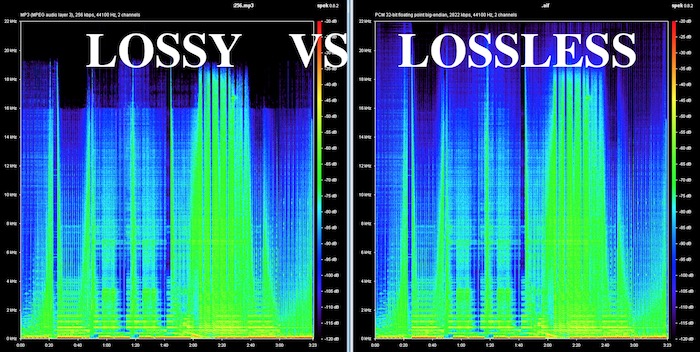
Lossy Audio

According to him
standard [MP3], the maximum bit rate is set to 320 kbps.

lossy audio

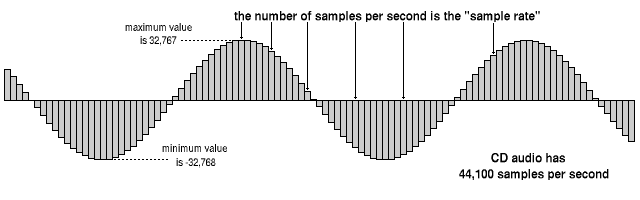
MP3 compresses audio into units called frames. A frame is determined to have 1152 samples, and if the sample rate is 44.1 kHz, a frame is 1/44 100 x 1152 ≒ about 0.026 seconds.
MP3 can take any of the 14 default types of bit rate values ​​(32,40,48,56,64,80,96,112,128,160,192,224,256,320kbps for MPEG1) for each frame, and all frames have the same bit rate. It’s called CBR (Fixed Bit Rate), and what’s different for each frame is called VBR (Variable Bit Rate).
Therefore, the maximum bit rate is 320 kbps for all frames in CBR and the highest sound quality is achieved.

Also, the lame encoder can create MP3s of up to 640kbps for CBR only by its own extension outside of the standard (although it should not be called MP3 strictly because it is not standard). Of course, since it is out of the standard, only a small part of the software can be played. With MP3s, which are the best selling point for their versatility, messing them up may not be a good idea.

[AAC]
The upper limit of the standard is
264.6 x 2 = 529.2 kbps (in the case of 44.1 kHz 2 channels)
288 x 2 = 576 kbps (48 kHz) for 2 channels)
However, it appears that the actual encoders are “up to 256 kbps per channel” (512 kbps for 2 channels).

However, there are some strange programs for beginners like iTunes, x-app, Media Go, etc. which set the upper limit of the AAC bit rate at 320 kbps. Because of this, it seems that there are quite a few beginners who think that AAC has a maximum of 320 kbps like MP3 ^^; well maybe it’s just MP3. ・ ・ ・ Well actually 320 kbps is enough.

[Ogg Vorbis]
It seems that the upper limit is not set in particular by the standard, but in the current general encoder, it appears to be “up to 256 kbps per channel” (512 kbps for 2 channels).

[WMA] It
very difficult to understand, and personally I don’t want to use it at all, so I haven’t researched it in detail, so it may be wrong …

Microsoft’s WMA encoder has a profile (like a preset), and it basically converts according to it, but the variety of profiles is kind of weird. The profile commonly used in the WMA9.2 Std format appears to be a mysterious specification offering up to 320 kbps at 44.1 kHz, but only up to 192 kbps at 48 kHz.
Perhaps because of this, some software unifies both up to a maximum of 192kbps, and there is a section where many people think that it is a WMA standard.

320 kbps (for 44.1 kHz, 16 bit, 2 channels), 192 kbps (for 48 kHz, 16 bit, 2 channels) for normal WMA 9.2 format, 440 kbps (for 44.1 kHz, 24 bit, 2 channels ), 256 kbps (44.1 kHz, for WMA10Pro format) 16 bits, 2 channels) seems to be the upper limit (at least we could build it up to that point). Even CBR looks like this, so I’m not sure what the maximum bit rate of each frame is for VBR (which has 1-step and 2-step encoding) so I don’t know the details.

Some conversion tools that support multiple formats use FFmpeg for WMA encoding. The WMA encoding feature included in FFmpeg is based on the old WMA8, so it may be different from the above. I do not want to look for it and it is better not to use it.


Free Download Mp4Gain
picture


Mp4Gain Main Window
picture


Mp4Gain Features
picture


Free Download Mp4Gain
picture

Lossy Compression Part 3

Lossy Compression Part 3

lossy compression

MPEG-1 and MPEG-2 video compression formats

lossless  compression

As an initial step in image processing, the MPEG-1 and MPEG-2 compression formats divide the reference frames into several equal blocks, which are then subjected to a floppy cosine transform (DCT). Compared to MPEG-1, the MPEG-2 compression format provides better image resolution at a higher video bit rate by using new compression algorithms and elimination of redundancy and encoding of the output data stream. . Also, the MPEG-2 compression format allows you to select the compression level due to quantization precision. For video with a resolution of 352×288 pixels, the MPEG-1 compression format provides a bit rate of 1.2 – 3 Mbps and MPEG-2 – up to 4 Mbps.

Compared with MPEG-1, the MPEG-2 compression format has the following advantages:

MPEG-2 provides scalability for various levels of image quality in a single video stream.
In the MPEG-2 compression format, the precision of the motion vector increases to 1/2 pixel.
User can select arbitrary discrete cosine transform precision.
Additional prediction modes are included in the MPEG-2 compression format.
Compression format MPEG-4

MPEG-4 uses a technology called fractal image compression. Fractal compression (contour-based) means extracting the contours and textures of objects in the image. The contours are presented in the form of so-called. splines (polynomial functions) and are encoded with reference points. Textures can be represented as spatial frequency transform coefficients (eg, discrete cosine or wavelet transform).

The bit rate range that the MPEG 4 video image compression format supports is much wider than that of MPEG 1 and MPEG 2. The new developments from the specialists are aimed at a complete replacement of the processing methods used by the MPEG 2 format. The MPEG 4 video compression format supports a wide range of standards and data transfer rates. MPEG 4 includes interlaced and progressive scanning techniques and supports arbitrary spatial resolutions and bit rates ranging from 5 kbps to 10 Mbps. MPEG 4 has an improved compression algorithm that improves quality and efficiency at all supported bit rates.

Lossy Compression Part 2

Lossy Compression Part 2

Lossy Compression

Compress audio and video

LOSSY COMPRESSION

The term “bit rate” refers to the number of bits of information transmitted per second. This term is translated into Russian in different ways in different sources. Recently, the word “bitrate”, which is new to the Russian language, is often used instead of a formal translation. The translation options are also as follows: “data stream width”, “bit stream complexity”, “stream rate”, “bit rate”. This same parameter is sometimes called the file compression rate for sound files. For example, the file is said to be compressed at 128 Kbps. The fact is that the bit rate value is directly related to the physical size of the sound file per second of sound.

All compression formats of the MPEG family use a high redundancy of information in images separated by a short time interval. Between two adjacent frames, usually only a small part of the scene changes; for example, there is a smooth movement of a small object against the background of a fixed background. In this case, the complete information about the scene is saved selectively, only for reference images. For the rest of the frames, it is enough to transmit differential information: on the position of the object, the direction and magnitude of its displacement, on new background elements that open up behind the object as it moves. Furthermore, these differences can form not only in comparison with the previous images, but also with the later ones (since it is in them, as the object moves, that the previously hidden part of the background is revealed).

The MPEG family of compression formats reduces the amount of information as follows:

Temporal video redundancy is eliminated (only difference information is considered).
The spatial redundancy of the images is eliminated by suppressing the small details of the scene.
Some of the color information is removed.
The information density of the resulting digital stream is increased by choosing the optimal mathematical code for its description.
MPEG compression formats compress only anchor frames: I-frames (intraframes). The intervals between them include frames that contain only changes between two adjacent I-frames: P-frames (predicted frame – predicted frame). To reduce the loss of information between the I frame and the P frame, so-called B frames (bidirectional frame) are introduced. They contain information that is taken from the previous and next frames. When encoding in MPEG compression formats, a chain of frames of different types is formed. A typical sequence of frames looks like this:

I B B P B B I B B P B B I B B …

Consequently, the sequence of frames according to their numbers will be played in the following order:
1 4 2 3 7 6 5 …

Lossy compression

Lossy compression

Lossy compression

Compress audio and video

lossy compression

High-quality digitized audio requires a large amount of disk space. Attempts to reduce file sizes using standard cabinets do not yield significant gains due to the specificity of the audio data. However, it is possible to achieve a fairly significant level of compression of the audio information using special methods based on the analysis of the data structure and subsequent compression with some loss.

The real possibility of sound processing comparable in quality to existing analog examples appeared only in the late 1980s. In 1988, the International Organization for Standardization (ISO) formed the MPEG (Moving Pictures Expert Group) committee, whose main task is develop coding standards for moving images, sound and their combination. During the ten years of its existence, the committee has developed a series of norms on this subject. As a result, when summarizing extensive research in this area, several specific formats were recommended for storing data, differing in the quality of the results and the data flow.

Currently, there are three most common video storage standards: MPEG-1, MPEG-2, and MPEG-4. Within the first two formats, there are also formats for storing audio information: Layer-1, Layer-2 and Layer-3. These three audio formats are defined for MPEG-1 and minor extensions are used in MPEG-2. The three formats are similar to each other, but use different levels of compression and complexity compensation. Layer-1 is the simplest, it does not require significant compression costs, but it also provides a negligible compression ratio. Layer-3 level: the most time consuming and provides the best compression. Recently, this format has gained immense popularity. It is often called MP3. This name is associated with the extension of the audio files stored in this format.

Founded idea, in which all lossy audio signal compression methods – ignore the subtle details of the original sound, which are outside of that perceived by the human ear. Here several points can be highlighted.

Noise level. Sound compression is based on a simple fact: if a person is next to a loud siren, it is unlikely that he will hear the conversation of the people who are nearby. Also, this happens not because a person pays close attention to a loud sound, but to a greater extent because the human ear actually misses out sounds that are in the same frequency range as a louder sound. This effect is called masking, it changes with the difference in volume and frequency of the sound.

The second point is the division of the audio frequency band into subbands, each of which is further processed separately. The encoding program extracts the loudest sounds from each band and uses this information to determine an acceptable noise level for that band. The best encoding programs also take into account the influence of adjacent bands. A very loud sound in one band can affect the masking effect and nearby bands.

Another point of coding is the use of a psychoacoustic model based on the peculiarities of human perception of sound. Compression The use of this model is based on the removal of obviously inaudible frequencies with a more careful preservation of sounds that are clearly distinguishable by the human ear. Unfortunately, there can be no exact mathematical formulas here. Human perception of sound is a complex process that is not fully understood, so the choice of compression methods is based on analyzing listening and comparing compressed sounds differently by teams of experts. But here there are practically unlimited possibilities in the field of improving psychoacoustic models. Most of the existing algorithms to encode the human voice are based on the high predictability of said signal; Universal MPEG compression algorithms have tried to apply this technique with variable success.

The Truth About High Bitrate Lossy Compression

The Truth About High Bitrate Lossy Compression

Lossy compression

In the understanding of most people, the word music lover is most often associated with a person who not only loves and collects music, but also appreciates high-quality music, and not only in artistic and aesthetic terms. but also the quality of the recording. of the phonogram itself. Just think, a few years ago, an audio CD was considered the standard for music quality, whereas a computer, even in dreams, could not compete with the quality of a CD. However, time is a great joker and he often likes to turn things upside down. It would seem that quite a long time passed, one or two years and … that’s it, the CD on the PC went into the background. Don’t ask “why?” You know the answer to this question yourself. Everything is to blame for the revolution in the world of sound on a computer: audio compression (hereinafter referred to as audiolo compression which means lossy compression to reduce the size of the audio file), which made it possible to store music on the hard drive, lots of music! In addition, it was possible to exchange it over the Internet. New sound cards have been released, capable of squeezing almost studio quality out of a piece of hardware that seems useless in terms of music. Nowadays, even having a computer that is not very smart in performance, having bought a Creative SoundBlaster Live! and remembering that since Soviet times there is a good amplifier and good acoustics, you will get nothing but a high-quality music center, the sound of which is inferior only to very expensive audio equipment (average or even the highest hifi category ). Add to this the general availability of music files and you understand that you have the power at your fingertips. And then there is a revolution, and you understand that a compact disc is no longer so convenient, you are fascinated by something completely different: the magic signs of the “MP3”. You cannot eat or sleep; At first glance, the “chicken and egg” question is insoluble: how to “squeeze” and, most importantly, how to “squeeze” …

This is where I will help you. This article is the beginning of my new series of informational materials on music on the computer. For over a year developing OrlSoft MPeg eXtension and maintaining an extensive database of MP3 files, I have accumulated a great deal of research on audio compression. It is these studies that I will try to share with you. Several respected authors have written many articles on audio compression, so I will try not to write what I can easily find in other sources of information. I would like to express my position on the subject under discussion simply and clearly. We will not consider audio compression to be as compact a tool as possible put audio information on your hard drive (so that you can record so many hours of music there). Yes, compression allows you to record music more compactly, but my goal is to minimize quality loss by converting “pure” audio to compressed audio. This is why only high bit rates and qualitatively compressing encoders are considered in these modes. So it is much more convenient to work with compressed audio – instant access to any track from any album, convenient software for playback. And, of course, the financial issue has not been forgotten either.

Of the audio compression formats that exist today, three deserve attention, in my opinion: MP3 (or MPEG-1 Audio Layer III), LQT (as representative of the MPEG-2 AAC / MPEG-4 family) and the completely new OGG format (Ogg Vorbis) developed by a group of enthusiasts:

MP3 is by far the most widely used of these (mainly because it is free). Let me remind you that it was thanks to the MP3 format that the victorious procession of compressed audio took place. However, as is often the case with pioneers, little by little it is losing ground and giving way to new and better formats.
The second format, LQT, is a representative of a new direction of audio coding algorithms, a representative of the AAC family. This is a fairly high quality, but commercial and highly classified format.
OGG became widely known to the public this summer and is currently developing rapidly, soon (with the release of the Encoder and Decoder) it should beat MP3 with better sound quality with smaller file size.
I will not give a detailed description of technologies and formats here, you can easily find them yourself. There will only be facts, conclusions and recommendations. I plan to present my research separately for each format in separate articles.