Difference between audio formats Part 3


Free Download Mp4Gain
picture

Difference between audio formats Part 3

Audio File Formats

bit: number of quantization bits (bit depth)
Audio Format

Number of quantization bits

The number of quantization bits (bit) is the data sampled at the sample rate.

A number that represents how much data capacity is provided.

The higher the capacity, the finer the oscillation width of the sampled sound can be recorded.

The sound is closer to the original sound.

The number of quantization bits is also required to accurately record the sample rate.

1bit has 2 stages, 2bit has 4 stages, 4bit has 16 stages, 8bit has 256 stages,

16-bit has 65,536 steps, 24-bit has 16,777,216 steps …

In short, at what stage should the oscillation amplitude (frequency) of the sound be recorded? That is to say.

As an image, the sample rate is relative to the data in the horizontal direction.

The number of quantization bits is vertical data and height value.

That is why it is also called “bit depth”.

If the number of bits is small,

The difference (quantization error) from the original sound (sample rate) also becomes large.

The noise (quantization noise) will also increase.

Also, the dynamic range (D-range) is determined by the number of quantization bits, so

The volume of music that can be expressed is also relevant.

Dynamic range is the ratio (difference) between minimum sound and maximum sound.

Noted in dB (decibels),

The higher this value, the wider the range of volume that can be expressed.

* Dynamic range in video is “brightness”. It is the difference between light and dark.

→ Video quality and resolution Different from the meaning of “SD, HD, Full HD, 4K UHD, 8K, 480p, 720p, 1080p, HDR, Dolby Vison”

Since it is calculated by the maximum dB ≒ 6.02 × number of bits,

For example, if it is a 16-bit CD, it will be about 96 dB.

Approximately 144dB for 24-bit, approximately 192dB for 32-bit.

* Each time 1 bit is added, it increases by 6.02 dB.

The dynamic range of human hearing is

The limit is 120 dB to 130 dB,

If it exceeds 140 dB, the ear will be damaged.

Difference between high resolution and CD
High resolution and high resolution format definition

The word high resolution has become common, but

High Resolution = High Resolution Audio = High Resolution Sound Source,

Digital audio that has more sound information than conventional CDs.

At JEITA (Japan Electronics and Information Technology Industries Association)

High resolution definition is also specified,

CD sampling rate (44.1-48 kHz) and

Refers to data in the sound source that exceeds the number of quantization bits (16 bits).

Either the sample rate or the number of quantization bits

If it is less than the CD specification, it will not be high resolution.

High resolution specific example

44.1 kHz / 16-bit: CD specifications
48 kHz / 16-bit: CD specifications
44.1 kHz / 24 bit: high resolution (the number of quantization bits is greater than the CD specification)
48 kHz / 24 bit: high resolution (the number of quantization bits is greater than the CD specification)
96 kHz / 16 bit: high resolution (sampling frequency is higher than CD specification)
96 kHz / 24-bit: high resolution (both higher than CD specs)
96 kHz / 12 bit: not high resolution (low number of quantization bits)
32 kHz / 24 bit: not high resolution (sample rate is low)
→ General Association Incorporated Japan Audio Association | High resolution | High resolution logo | Definition and operation

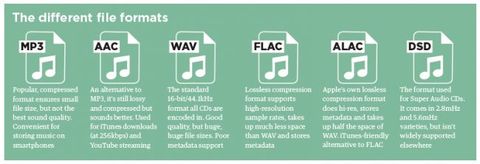
Common high resolution formats are WAV and FLAC.

There is also 96 kHz / 24 bit in ALAC, but

At the moment, Apple (iTunes) does not support high resolution.

Also, as defined by the Japan Audio Association,

DSD (DSD2.8MHz, DSD5.6MHz, etc.) is also recognized as high resolution.

The high-resolution compressed sound source “MQA” has also appeared.

It’s hard to say that all of them are popular, so

If you use WAV or FLAC. Considering capacity, it’s FLAC.

Compared to uncompressed WAV, it can save 30-40% capacity.


Free Download Mp4Gain
picture


Mp4Gain Main Window
picture


Mp4Gain Features
picture


Free Download Mp4Gain
picture

Difference between audio formats Part 2

Difference between audio formats Part 2

Audio File Formats

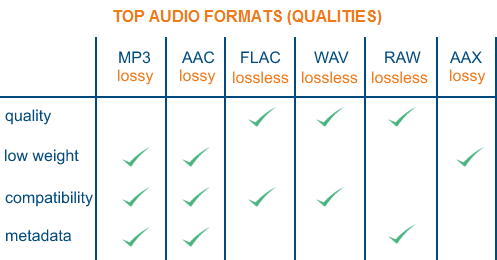
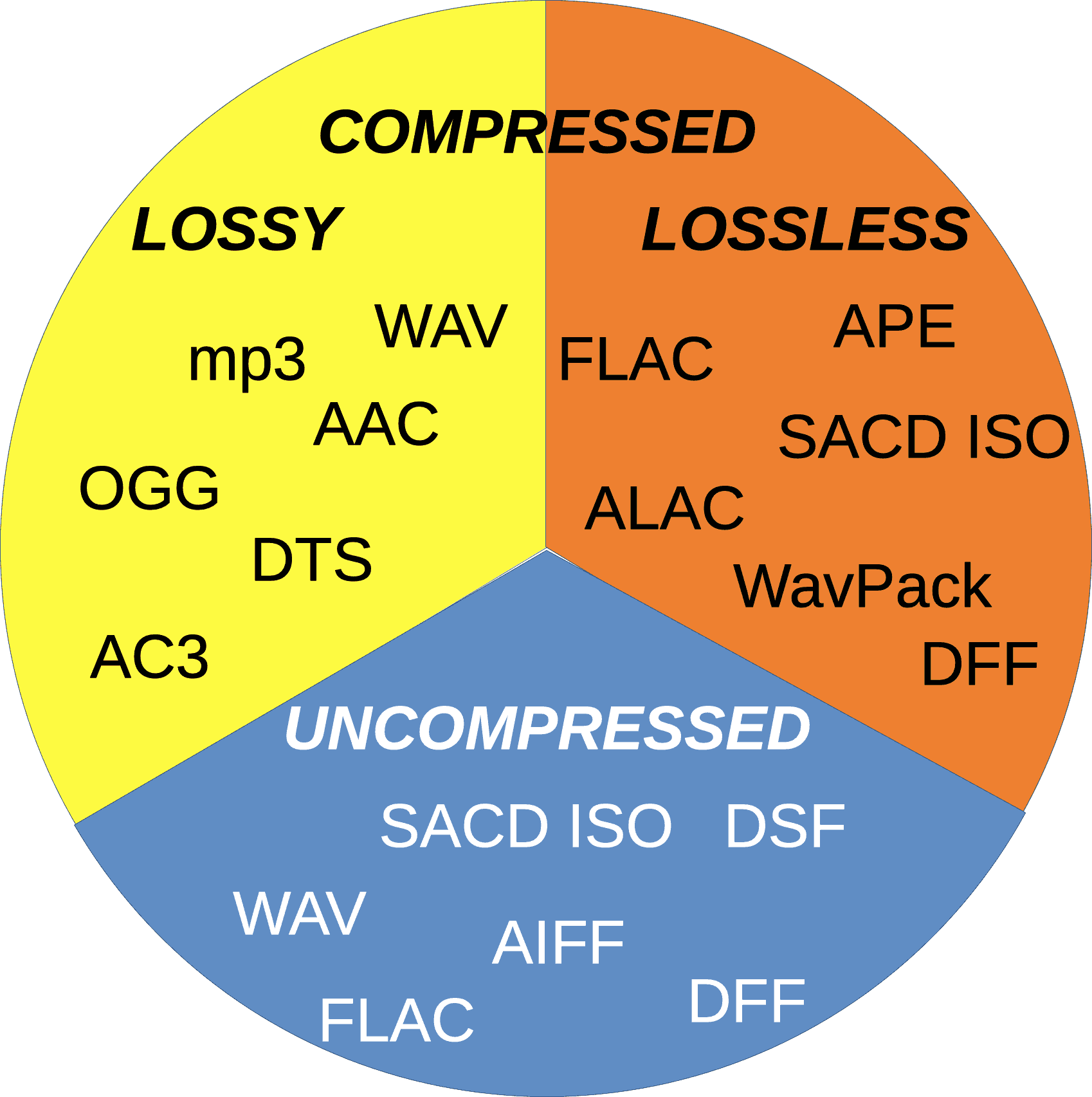
Lossless compression: FLAC, ALAC, WMA Lossless
FLAC lossless compression

Audio File Formats

Lossless compression codecs are compressed while preserving the original data.

At the time of playback, it will be unzipped → it will be played in the original uncompressed format, so

The sound quality is the same as that of uncompressed sound sources (WAV, AIFF, etc.).

However, the data capacity is half that of uncompressed.

Lossless sound sources are FLAC, ALAC, WMA Lossless …

There is not a big difference in compression ratio and since it is lossless, the sound quality does not change.

Therefore compatibility (compatible terminals and amount of compatible software) is of the utmost importance.

Among lossless compression codecs

The most important is FLAC (Free Lossless Audio Codec).

It is often handled by high resolution audio sources and there are many supported playback devices.

ALAC (Apple Lossless)

As the name implies, a lossless codec made by Apple.

I can also select it when ripping an iTunes CD,

In many cases, you can only play with Apple products.

However, iTunes does not support FLAC, so

If you want lossless compression, you must use ALAC.

Both FLAC and ALAC are lossless compression, so

If the playback device is not supported, re-unzip (WAV, AIFF, etc.),

It is possible to convert from there to the corresponding lossy (mp3, AAC, etc.) and use it.

That is why all CD sound sources are converted from iTunes to ALAC and saved and managed.

→ Import music CDs with high sound quality to iTunes. Optimal reading settings for PC sound source management.

There’s also TAK and WMA Lossless, but …

I don’t think there is any reason to use it in mainstream FLAC and ALAC.

Sound quality = sample rate x number of quantization bits
When digitizing analog voice with high sound quality,

The “sample rate” and the “number of quantization bits” are involved.

For analog to digital (AD conversion),

It requires two processes, sampling and quantification.

These two are important in terms of faithfully converting sound into data.

The CD is 44.1 kHz and 16 bit. What does this mean?

kHz: sample rate (sample rate)
Sampling rate

The sampling frequency (Hz) is

Displays the number of sampling times (sampling) per second.

The higher the number, the more times it will be processed.

If the sample rate value is just high,

The amount of sound information increases and the sound is faithfully reproduced → the sound quality improves.

The sampling frequency is also related to the frequency of the sound (treble, bass).

According to the sampling theorem (sampling theorem)

The frequency of the sound that can be reproduced is half the sampling frequency (Nyquist frequency).

Regarding the frequency (Hz) of the sound, the bass has a small amount of vibrations and a low frequency value.

On the contrary, the treble has a lot of vibrations and a high frequency value, so

The higher the sampling frequency, the higher the treble can be reproduced.

The 44.1 kHz of the CD is sampled (converted to data) 44,100 times per second.

It can reproduce frequencies up to 22,050 Hz.

By the way, the frequency that humans can recognize is generally 20-20,000 Hz.

Difference between audio formats

Difference between audio formats

Audio Format

The sound quality of music that you must know when you enjoy music.

audio file formats

If you listen with all your strength, save the music with higher sound quality and

I want to play music with high sound quality.

The invisible thing called sound

What is the standard for judging good sound?

This time, we will deepen our understanding of “sound quality”.

Table of contents [Open]
Different from the type of music file format
Music moves from analog to digital music data.

If you compress the sound source when you capture it, deterioration in sound quality is inevitable.

First of all, because of the difference in the music file format (audio format).

Uncompressed (linear PCM): WAV, AIFF
Uncompressed WAV / AIFF

By ripping a CD as-is without compressing it, it becomes an uncompressed sound source.

WAV (WAVE) was developed by Microsoft (Windows) and IBM.

AIFF (Audio Interchange File Format) was developed by Apple (Mac).

WAV is a common uncompressed codec for PC,

In Apple iTunes, WAV cannot handle metadata (tag information).

If you add song information (song title, album art, etc.) with iTunes, it will be AIFF.

If you want to save the amount of data, I think you can use ALAC with lossless compression.

Lossy compression (lossy): MP3, AAC, WMA
MP3 / ACC / WMA lossy compression

The most important lossy compression is “MP3 = MPEG-1 Audio Layer-3”.

It has a long history and a high penetration rate.

There is also the term “MP3 player” as a general term for digital music players.

“AAC = Advanced Audio Cording” has appeared as an improved version of MP3.

If the compression rate (bit rate) is the same as MP3,

AAC (m4a) has superior sound quality.

“WMA = Windows Media Audio” has a compression rate comparable to AAC.

Developed by Microsoft and adopted by Windows,

It is a codec that was not popular because it is not supported by Apple.

For video, Blu-ray AC3, DVD MP2,

There is also a Youtube Vorbis audio codec, but …

The main music is MP3 and AAC.

For lossy compression, you can also select the compression rate when compressing,

For music data, 128 kbps, 160 kbps, 192 kbps, 256 kbps, 320 kbps are common.

Bit rate (bps) is the amount of data per second, so

The higher the number, the better the sound quality.

* Uncompressed CD equals 1411 kbps

There are almost no devices that cannot play MP3,

Currently, AAC is as popular as MP3, so I choose AAC.

If you want to import CD sound source with iTunes, iTunes Plus from AAC encoder.

The stereo bit rate is 256 kbps and the sampling rate is 44,100 kHz.