Skip to content

mp4gain.com

Mp4 Gain Official Website

Tag: id3 tag structure

MP3 ID3v1 vs ID3v2 Tag Formats

Free Download Mp4Gain
picture

MP3 ID3v1 vs ID3v2 Tag Formats

MP3 ID3v1 vs ID3v2 Tag Formats

Let’s talk about MP3 ID3v1 vs ID3v2 Tag Formats

When you dive into the world of MP3s, it’s not just about the audio quality or file compression—it’s also about how your music files store information like artist names, song titles, and album names. These pieces of data are embedded in the file using something called ID3 tags, specifically ID3v1 and ID3v2 formats. As someone who’s worked extensively with digital audio, I can say that understanding these tag formats is essential to keep your music library well-organized and accessible. Here, I’ll walk you through how ID3v1 and ID3v2 differ, why each format was created, and how choosing the right one can simplify your music management.

What is an ID3 Tag?

An ID3 tag is like a digital label that stores information about an MP3 file beyond just the audio itself. Imagine you have a bookshelf full of books without titles or authors on the covers—that’s how an MP3 file would feel without ID3 tags. ID3 tags add crucial details so that when you play a song, you see the artist, album, and track title right away.

History of ID3v1 Tags

ID3v1, introduced in the 1990s, was a breakthrough because it allowed MP3 files to carry basic metadata. Before ID3v1, it was challenging to organize digital music libraries, as users couldn’t distinguish between different songs easily. However, ID3v1 was pretty limited—it could only store a small amount of information, like the artist’s name, song title, and album. Each of these pieces of data had strict character limits, which meant you could only fit so much information before you ran out of space. I remember finding it frustrating to have to shorten song titles or artist names because of these restrictions.

Key Limitations of ID3v1

ID3v1 tags, despite their utility, were quite restricted. The 128-byte structure at the end of the file imposed strict limits, like:

  • 30 characters for the song title
  • 30 characters for the artist name
  • 30 characters for the album name
  • 4 characters for the year
  • 28 predefined genres

With these restrictions, long names had to be truncated, and custom genres couldn’t be added. This structure was far from ideal for anyone with a diverse music collection.

Why ID3v2 Was Created

ID3v2 came along as a response to the limitations of ID3v1. Imagine trying to write a summary of a book on a sticky note—that’s what it felt like with ID3v1. ID3v2 gave us a larger canvas, so to speak. Instead of being limited to 128 bytes at the end of the file, ID3v2 was designed to allow much more data. ID3v2 tags could be placed at the beginning of a file and had no strict byte limit, which opened up new possibilities.

Differences Between ID3v1 and ID3v2

One of the biggest differences between ID3v1 and ID3v2 is the placement and capacity of data storage. While ID3v1 had rigid constraints, ID3v2 allowed for longer text fields, custom genres, and additional data like album artwork, lyrics, and even embedded URL links. This flexibility made ID3v2 essential for people who wanted a richer music experience.

Key Features of ID3v2

ID3v2 tags support a broader range of features, making them far more versatile than ID3v1. Here’s what ID3v2 can do that ID3v1 couldn’t:

  • Embed cover art or images
  • Include lyrics and extensive comments
  • Support custom genres
  • Handle non-English character encoding

Each of these features transforms the way we interact with music files, as they provide far more context and personalization.

Why ID3v2 Tags Are Important for Modern Music Libraries

If you’re like me, you probably have a diverse music collection. ID3v2 tags are invaluable for managing a collection with songs in various languages, genres, and styles. The extra space and flexibility allow for more detailed categorization. For example, without ID3v2, organizing a collection of classical music pieces with long titles and different movements would be nearly impossible.

Comparing File Size Impact of ID3v1 vs ID3v2

ID3v2 tags add slightly more data to the file size because they store more information, but the impact on file size is minimal compared to the convenience they offer. ID3v1 adds only 128 bytes, while ID3v2 can vary, especially if you add album art. However, with today’s storage capacities, this slight increase is usually negligible for most users.

How Different Devices Handle ID3v1 and ID3v2

Different devices and software handle these tags differently. Older devices may only support ID3v1, which could cause issues if your files use ID3v2. However, most modern music players and smartphones fully support ID3v2 tags. It’s worth noting that ID3v2 is backward-compatible with ID3v1 in most cases, meaning that even older players can display basic information.

How ID3v2 Enhanced User Experience

ID3v2 significantly enhances the user experience by allowing users to view more detailed metadata and even artwork while playing songs. This added context makes for a more engaging listening experience, as I can see the album cover and additional details about the track, bringing me closer to the music.

Choosing Between ID3v1 and ID3v2 for Your Collection

If you’re unsure which tag format to use, think about your collection’s size and your devices’ capabilities. If you only need basic information and have limited storage, ID3v1 might suffice. However, if you want a richer experience with images, lyrics, and detailed metadata, ID3v2 is the better choice. Personally, I lean toward ID3v2 because it provides more context and flexibility.

How to Edit ID3 Tags in MP3 Files

Editing ID3 tags is straightforward with various tools available today. You can choose between basic editors, which only support ID3v1, and advanced ones for ID3v2. I recommend always checking your device’s compatibility before editing tags to avoid data display issues.

Latest Words on MP3 ID3v1 vs ID3v2 Tag Formats

Choosing between ID3v1 and ID3v2 comes down to your priorities. If you value simplicity and minimal file sizes, ID3v1 might be all you need. However, ID3v2 offers a world of possibilities with custom genres, album artwork, and detailed metadata. For a seamless experience, I suggest using a tool like Mp4Gain to manage your tags effortlessly, ensuring that your library remains organized and accessible.

Frequently Asked Questions About MP3 ID3v1 vs ID3v2 Tag Formats

What is the difference between ID3v1 and ID3v2 tags?

ID3v1 tags are basic metadata tags added to the end of an MP3 file, limited to 128 bytes with short character limits for fields like song title and artist name. ID3v2 tags, in contrast, are placed at the beginning of the file, offering more storage for metadata, allowing album artwork, lyrics, and longer text fields, providing a richer experience.

Why was ID3v2 developed after ID3v1?

ID3v2 was developed to overcome ID3v1’s limitations. ID3v1 tags couldn’t store large amounts of data or images, making it difficult to store complete metadata. ID3v2 offers enhanced flexibility and space, allowing users to include album covers, custom genres, and other details that improve the organization and experience of digital music files.

Can both ID3v1 and ID3v2 tags exist in the same MP3 file?

Yes, MP3 files can contain both ID3v1 and ID3v2 tags. Some programs and devices read only ID3v1, while others read ID3v2 or prioritize one over the other. Adding both tags can improve compatibility across different platforms, ensuring that basic information is readable even if a device doesn’t support ID3v2.

How do ID3 tags affect MP3 file size?

ID3v1 tags add only 128 bytes, so their impact on file size is minimal. ID3v2 tags, especially those with embedded images or extensive data, can increase file size more significantly. However, for most users with modern storage capacities, this increase is manageable and outweighed by the benefits of richer metadata.

Which devices support ID3v1 vs ID3v2 tags?

Older devices may only support ID3v1 tags, while most modern players and software fully support ID3v2. For compatibility across different devices, some users prefer files with both ID3v1 and ID3v2 tags to ensure metadata displays correctly on any device.

How can I edit ID3 tags in my MP3 files?

Editing ID3 tags can be done with various audio tag editors available today, allowing users to add or modify metadata in either ID3v1 or ID3v2 formats. Before editing, ensure your preferred format is compatible with your devices to avoid issues displaying metadata.

Do ID3v2 tags support album artwork?

Yes, one of the main advantages of ID3v2 tags is their ability to store album artwork within the MP3 file. This feature enhances the visual experience and makes it easy to identify songs in music libraries that support displaying artwork.

Is it possible to convert ID3v1 tags to ID3v2?

Yes, many audio tag editors allow you to upgrade ID3v1 tags to ID3v2. This process typically involves copying data from ID3v1 and expanding it with additional metadata fields available in ID3v2, enhancing the overall information stored in the MP3 file.

How do I decide between using ID3v1 and ID3v2 tags?

Choosing between ID3v1 and ID3v2 depends on your needs. If you only require basic information and minimal storage space, ID3v1 might be sufficient. However, for more detailed metadata with visuals like album art, ID3v2 is the better option, offering a richer user experience.

Comments:

Thanks for this detailed breakdown. I’ve been trying to organize my music library, and this really helped!

Wow, didn’t realize how limited ID3v1 was. The 30-character limit is pretty rough.

Can anyone explain how ID3v2 works with album art? I keep having issues with my older device.

Appreciate the tips! Switching to ID3v2 now. Didn’t know it was so much better for modern music collections.

Anyone else find it confusing with all these tags? I just want my songs to display correctly!

This is exactly what I needed to understand the differences. I think I’ll go with ID3v2, thanks!

I’m curious, do most players nowadays even support ID3v1?

Nice! But could you go into more detail on how devices handle both tag versions?

Finally, an article that explains this clearly. Been looking for an answer for ages!

I tried adding album art, but it keeps disappearing on my older MP3 player. Any advice?

This is so helpful, but I’m still a bit lost. Do I need special software to edit ID3 tags?

Good article. I’ll probably start using ID3v2 from now on. Makes my collection way easier to manage.

tags earlier. I’ve been struggling with missing info on my songs for years!

This is amazing info, but I’m confused about why ID3v1 even exists if ID3v2 is so much better.

Just wanted to say this article rocks! Been looking for a simple way to understand these tags.


Free Download Mp4Gain
picture


Mp4Gain Main Window
picture


Mp4Gain Features
picture


Free Download Mp4Gain
picture

Author R. AriasPosted on November 12, 2024Categories Audio and videoTags adding MP3 album art, advanced ID3v2 tagging, audio tag formats, benefits of ID3 tags, benefits of ID3v2, best MP3 metadata practices, best MP3 tags, converting ID3v1 to ID3v2, difference between ID3v1 ID3v2, editing ID3 tags, editing MP3 tags, how ID3 tags work, how to add MP3 metadata, how to convert ID3 tags, how to edit MP3 tags, how to use ID3 tags, ID3 metadata, ID3 metadata formats, ID3 metadata in MP3, ID3 tag editing, ID3 tag enhancements, ID3 tag features, ID3 tag formats, ID3 tag functions, ID3 tag storage, ID3 tag storage size, id3 tag structure, ID3 tag support, ID3 tags for beginners, ID3 tags for devices, ID3v1 character limit, ID3v1 data storage, ID3v1 for MP3, ID3v1 ID3v2 comparison, ID3v1 ID3v2 compatibility, ID3v1 length, ID3v1 limitations, ID3v1 MP3 files, ID3v1 storage limit, ID3v1 tag size, ID3v1 tag structure, ID3v1 vs ID3v2 details, ID3v1 vs ID3v2 differences, ID3v1 vs ID3v2 info, ID3v2 advantages, ID3v2 artwork support, ID3v2 compatibility, ID3v2 field expansion, ID3v2 fields, ID3v2 flexibility, ID3v2 images, ID3v2 MP3 tagging, ID3v2 tag examples, ID3v2 tag functions, ID3v2 tag structure, ID3v2 vs ID3v1 benefits, MP3 album artwork, MP3 audio tagging, MP3 file information, MP3 file organization, MP3 ID3 tags explained, MP3 ID3 version history, MP3 ID3 versions, MP3 ID3v1 vs ID3v2, MP3 ID3v2 metadata, mp3 metadata, MP3 metadata advantages, MP3 metadata comparison, MP3 metadata fields, MP3 metadata file size, MP3 metadata management, MP3 metadata storage, MP3 metadata tags, MP3 metadata tools, MP3 song metadata, MP3 tag compatibility, MP3 tag editing, MP3 tag limitations, MP3 tagging best practices, MP3 tagging guide, MP3 tagging options, MP3 tags for music, tagging MP3s, understanding ID3 tags, upgrading ID3v1 tags, why use ID3v2

Mp3 id3 tag Part 2

Mp3 id3 tag Part 2

mp3 id3 tag

ID3v1

mp3 id3 tag

The MPEG Layer I, Layer II, and Layer III (MP3) audio format does not have a native way of preserving content information, except for some simple yes/no parameters like “private”, “copyrighted” and “family”. original” (meaning this is the original document and not a copy). A solution to this problem was presented in 1996 by Eric Kemp. By adding a small piece of extra data to the end of the file, you can make MP3 files contain information about the audio, not just the audio itself.

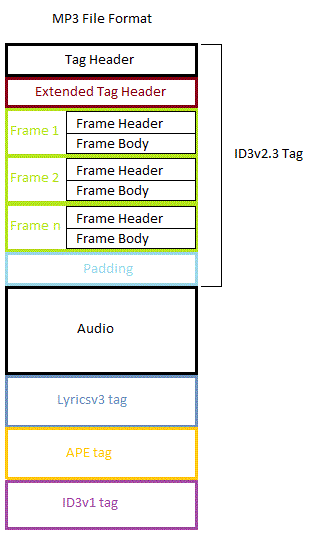
The location of the tag, as the data calls it, may be because it has little chance of interfering with the decoder. To facilitate detection, a fixed size of 128 bytes was chosen. The label has the following layout (shown in the schematic on the right):

Field Length Content
ID3v1 tag 3 TAG
Title 30 Song Name
Artist 30 Artist
Album 30 Album name
Year 4 Year
Comment 30 Comment
Genre 1 Song genre identifier
ID3v2
tages the complete tag described in this document.
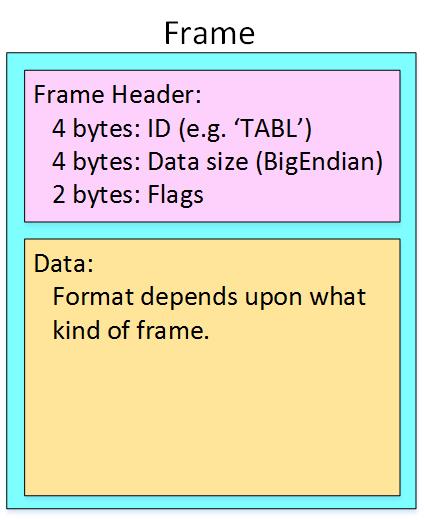
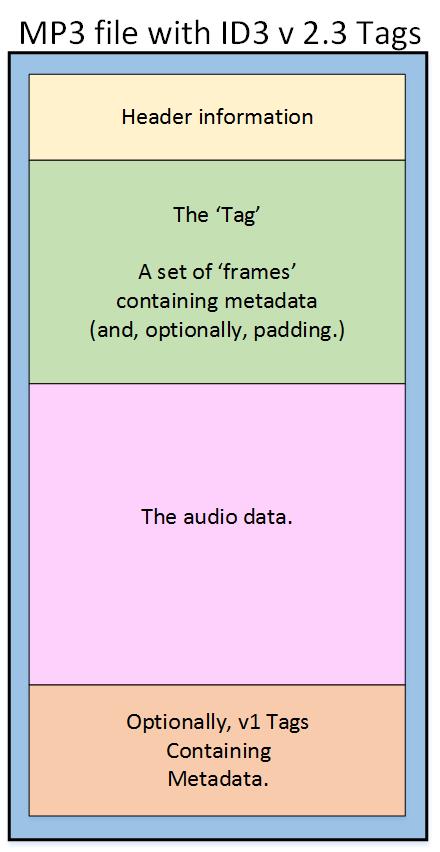
tagInclude tag header, tag body(1 or n frame), optional padding.

The bit order in ID3v2 is Most Significant Bit First (MSB).
Byte order in multibyte numbers is most significant byte first (for example, 0x12345678 would be encoded as 0x12 34 56 78), also known as big-endian storage.

ID3v2.3.0
label header
ID3v2 header
Field Length Content
ID3v2/file identifier 3 ID3
version ID3v2 2 03 00 (hexadecimal)
ID3v2 flags 1 abc00000 (binary)
ID3v2 size 4 4 ​​* 0xxxxxxx (binary)
1,ID3v2/file identifier

The first three bytes are always ID3, indicating that it is an ID3v2 tag, followed by two version bytes.

2,ID3v2 version

ID3v2 version

The first byte is your major version, while the second byte is your revision number. In this case, it is ID3v2.3.0. All revisions are backward compatible, while major versions are not. If software compatible with ID3v2.2.0 and lower encounters version 3 or higher, it should simply ignore the entire tag. Versions and revisions are never 0xFF.

3.ID3v2 flags

ID3v2 version Followed by one ID3v2 flags, currently only 3 flags are used:

unsynchronization
ID3v2 flags The seventh bit in a- indicates whether unsynchronization is used.
extended header
ID3v2 flags The sixth bit in b- indicates header if there are extended header followers.
Experimental indicator
ID3v2 flags
The fifth bit in c- should be used as an “experimental flag”.
All other flags must be cleared. If one of these undefined flags is set, it may mean that a parser that doesn’t know about the function can’t read the function.

Author R. AriasPosted on May 5, 2022Categories Audio and videoTags add id3 tag to wav, d3 id attribute, ford sync 3 id3 tag, hörbuch id3 tag, how to id3 tag your music, id.4 trunk, id3 java tag library, id3 tag, id3 tag 2.3 vs 2.4, id3 tag 2.4, id3 tag album art, id3 tag android, id3 tag apk, id3 tag app, id3 tag artist vs album artist, id3 tag audacity, id3 tag automatic, id3 tag automatic update, id3 tag automatisch korrigieren, id3 tag based, id3 tag batch editor, id3 tag bearbeiten, id3 tag bearbeiten mac, id3 tag bearbeiten windows 10, id3 tag bild hinzufügen, id3 tag byte order, id3 tag classical music, id3 tag cleaner, id3 tag command line, id3 tag compilation, id3 tag converter, id3 tag copyright, id3 tag cover art, id3 tag cover art size, id3 tag database, id3 tag date, id3 tag definition, id3 tag description, id3 tag disc number, id3 tag display, id3 tag documentation, id3 tag download, id3 tag editor, id3 tag editor 64 bit, id3 tag editor android, id3 tag editor free, id3 tag editor github, id3 tag editor linux, id3 tag editor mac, id3 tag editor mac free, id3 tag editor mac os x, id3 tag editor online database, id3 tag editor open source, id3 tag editor os x, id3 tag editor osx, id3 tag editor ubuntu, id3 tag editor wav files, id3 tag editor windows, id3 tag editor windows 10, id3 tag editor windows 10 download, id3 tag editor windows 7, id3 tag example, id3 tag fields, id3 tag finder, id3 tag fixer, id3 tag flac, id3 tag for mac, id3 tag format, id3 tag format specification, id3 tag from filename, id3 tag generator, id3 tag genre, id3 tag grouping, id3 tag header, id3 tag hls, id3 tag identifier, id3 tag image, id3 tag image size, id3 tag image type, id3 tag info, id3 tag information, id3 tag it download, id3 tag itunes, id3 tag konvertieren, id3 tag language, id3 tag length, id3 tag library, id3 tag linux, id3 tag linux command line, id3 tag list, id3 tag logic pro, id3 tag lyrics, id3 tag mac, id3 tag mac free, id3 tag meaning, id3 tag metadata, id3 tag mp3, id3 tag multiple artists, id3 tag multiple genre, id3 tag music, id3 tag names, id3 tag node, id3 tag online, id3 tag online database, id3 tag options, id3 tag os x, id3 tag parser, id3 tag parser c++, id3 tag php, id3 tag picture, id3 tag podcast, id3 tag program for windows 10, id3 tag publisher, id3 tag python, id3 tag rating, id3 tag reader, id3 tag reader node js, id3 tag rekordbox, id3 tag remover, id3 tag remover download, id3 tag remover online, id3 tag renamer, id3 tag request error chevrolet, id3 tag scanner, id3 tag search, id3 tag size, id3 tag software, id3 tag specification, id3 tag spotify, id3 tag structure, id3 tag subtitle, id3 tag tdrc, id3 tag to filename, id3 tag tool, id3 tag track number format, id3 tag tyer, id3 tag ubuntu, id3 tag umbenennen, id3 tag v2.3, id3 tag v2.4, id3 tag version 2, id3 tag version 2.3, id3 tag version 2.3 vs 2.4, id3 tag version 2.3.0, id3 tag version itunes, id3 tag versions, id3 tag video, id3 tag viewer, id3 tag vlc, id3 tag wav, id3 tag wav editor, id3 tag wikipedia, id3 tag windows, id3 tag windows command line, id3 tag year, id3 tag zu mp3 hinzufügen, id3 tagger, id3 tagging, id3 tags, id3 tags hinzufügen, id3 tags itunes, id3 tags list, id3 tags podcast, id3 tags unicode, id3 tags wav, id3 update tags, id3_get_tag, id3_get_tag error, id3_get_tag not working, id3_get_tag php, id3_remove_tag not working, id3-tagit, id3-tagit 3, id3/tag.h, idaho b tag, itunes id3 tags konvertieren, java id3 tag, java id3 tag editor, javascript id3 tag reader, kde id3 tag editor, kid id3 tag editor, logic pro x id3 tags, mp3 id3 tag key, mp3 id3 tag tool, mp3 id3 tag unicode, mp3 id3-tag (ver. 2), musicbee id3 tag, no id3 tag, open source id3 tag, os x id3 tag editor, p&id tag, p&id tag number, parse id3 tag javascript, read id3 tags javascript, s3 bucket tagging, s3 tags, stamp id3 tag editor 2.39 registration code, stamp id3 tag editor key, stamp id3 tag editor keygen, tag n3c, ubuntu id3 tag editor command line, w3-tag, w3schools id tag, what are id3 tags, what is convert id3 tags, whats an id3 tag, yatour id3 tag, zortam id3 tag editor

Mp3 id3 tag

Mp3 id3 tag

Mp3 ID3 Tag

When you listen to music, ID3 tags provide title, artist, year, genre, and other important information.

Mp3 Id3 Tag

Here you can find current standards files, pointers to software libraries in almost all languages, and other information that can be used to improve MP3 audio libraries.

mp3 id3 tag

ID3 tags are the audio file data standard for MP3 files and are actively used by software and hardware developers around the world. ID3 tags are supported by software such as iTunes, Windows Media Player, Winamp, VLC, and hardware players such as iPod, Creative Zen, Samsung Galaxy, and Sony Walkman.

An ID3 tag is a data container in an MP3 audio file stored in a specific format. This data typically contains the artist name, song title, year, and genre of the current audio file. This website contains standard format information for ID3 tag data containers. If you’ve read this far and are confused, check out the ID3v2Easy page for a brief low-tech introduction.

While there are old and new standards for ID3 tags, the most popular version implemented today is ID3 version 2.3. The follow-up version 2.4 is documented on this site, but it hasn’t caught on yet due to some disagreement over some revisions and the great inertia that exists in the software and hardware markets.

Consumers should read the introduction, which covers the basics of the ID3 tag format and its history. This page provides links to basic technical information on how ID3 tags work. The Frequently Asked Questions (FAQ) page contains other items of interest.

Developers unfamiliar with the ID3 tag format may wish to skip to the ID3v2 simplified page for a quick low-tech introduction. Those interested in learning more about the standard should check out the developer information page. Software developers will find the ID3 tag manipulation library under Implementation.

The technical aspects of ID3 tags are discussed on the ID3v2 developer mailing list.

Author R. AriasPosted on May 5, 2022Categories Audio Converter SoftwareTags add id3 tag to wav, d3 id attribute, ford sync 3 id3 tag, hörbuch id3 tag, how to id3 tag your music, id.4 trunk, id3 java tag library, id3 tag, id3 tag 2.3 vs 2.4, id3 tag 2.4, id3 tag album art, id3 tag android, id3 tag apk, id3 tag app, id3 tag artist vs album artist, id3 tag audacity, id3 tag automatic, id3 tag automatic update, id3 tag automatisch korrigieren, id3 tag based, id3 tag batch editor, id3 tag bearbeiten, id3 tag bearbeiten mac, id3 tag bearbeiten windows 10, id3 tag bild hinzufügen, id3 tag byte order, id3 tag classical music, id3 tag cleaner, id3 tag command line, id3 tag compilation, id3 tag converter, id3 tag copyright, id3 tag cover art, id3 tag cover art size, id3 tag database, id3 tag date, id3 tag definition, id3 tag description, id3 tag disc number, id3 tag display, id3 tag documentation, id3 tag download, id3 tag editor, id3 tag editor 64 bit, id3 tag editor android, id3 tag editor free, id3 tag editor github, id3 tag editor linux, id3 tag editor mac, id3 tag editor mac free, id3 tag editor mac os x, id3 tag editor online database, id3 tag editor open source, id3 tag editor os x, id3 tag editor osx, id3 tag editor ubuntu, id3 tag editor wav files, id3 tag editor windows, id3 tag editor windows 10, id3 tag editor windows 10 download, id3 tag editor windows 7, id3 tag example, id3 tag fields, id3 tag finder, id3 tag fixer, id3 tag flac, id3 tag for mac, id3 tag format, id3 tag format specification, id3 tag from filename, id3 tag generator, id3 tag genre, id3 tag grouping, id3 tag header, id3 tag hls, id3 tag identifier, id3 tag image, id3 tag image size, id3 tag image type, id3 tag info, id3 tag information, id3 tag it download, id3 tag itunes, id3 tag konvertieren, id3 tag language, id3 tag length, id3 tag library, id3 tag linux, id3 tag linux command line, id3 tag list, id3 tag logic pro, id3 tag lyrics, id3 tag mac, id3 tag mac free, id3 tag meaning, id3 tag metadata, id3 tag mp3, id3 tag multiple artists, id3 tag multiple genre, id3 tag music, id3 tag names, id3 tag node, id3 tag online, id3 tag online database, id3 tag options, id3 tag os x, id3 tag parser, id3 tag parser c++, id3 tag php, id3 tag picture, id3 tag podcast, id3 tag program for windows 10, id3 tag publisher, id3 tag python, id3 tag rating, id3 tag reader, id3 tag reader node js, id3 tag rekordbox, id3 tag remover, id3 tag remover download, id3 tag remover online, id3 tag renamer, id3 tag request error chevrolet, id3 tag scanner, id3 tag search, id3 tag size, id3 tag software, id3 tag specification, id3 tag spotify, id3 tag structure, id3 tag subtitle, id3 tag tdrc, id3 tag to filename, id3 tag tool, id3 tag track number format, id3 tag tyer, id3 tag ubuntu, id3 tag umbenennen, id3 tag v2.3, id3 tag v2.4, id3 tag version 2, id3 tag version 2.3, id3 tag version 2.3 vs 2.4, id3 tag version 2.3.0, id3 tag version itunes, id3 tag versions, id3 tag video, id3 tag viewer, id3 tag vlc, id3 tag wav, id3 tag wav editor, id3 tag wikipedia, id3 tag windows, id3 tag windows command line, id3 tag year, id3 tag zu mp3 hinzufügen, id3 tagger, id3 tagging, id3 tags, id3 tags hinzufügen, id3 tags itunes, id3 tags list, id3 tags podcast, id3 tags unicode, id3 tags wav, id3 update tags, id3_get_tag, id3_get_tag error, id3_get_tag not working, id3_get_tag php, id3_remove_tag not working, id3-tagit, id3-tagit 3, id3/tag.h, idaho b tag, itunes id3 tags konvertieren, java id3 tag, java id3 tag editor, javascript id3 tag reader, kde id3 tag editor, kid id3 tag editor, logic pro x id3 tags, mp3 id3 tag key, mp3 id3 tag tool, mp3 id3 tag unicode, mp3 id3-tag (ver. 2), musicbee id3 tag, no id3 tag, open source id3 tag, os x id3 tag editor, p&id tag, p&id tag number, parse id3 tag javascript, read id3 tags javascript, s3 bucket tagging, s3 tags, stamp id3 tag editor 2.39 registration code, stamp id3 tag editor key, stamp id3 tag editor keygen, tag n3c, ubuntu id3 tag editor command line, w3-tag, w3schools id tag, what are id3 tags, what is convert id3 tags, whats an id3 tag, yatour id3 tag, zortam id3 tag editor

ABOUT US


Volume Booster

Mp4

Mp4


Flac Nomalizer – Flac volume normalization

Ogg Normalizer

M4a Normalizer

Audio Normalization

Mp4Gain Crack

Posts

Mp3 Normalizer

audio blog in het nederlands

Mp3 to Wav Converter

Mp3 Converter

Mp3Gain

Amplificateur de volume Mp3

Make mp3 louder
volume booster and equalizer

volume equalizer

volume booster

volume equalization


normalize mp4, normalize flv, normalize avi, normalize mpeg, normalize mpg, normalize 3gp, normalize wmv, normalize mp3, normalize mp2, normalize flac, normalize ogg, normalize m4a, normalize aac, normalize wav, normalize ac3

mp3 louder
mp3 volume booster
youtube normalize audio
mp3 volume increaser
increase mp3 volume
volume enhancer
normalize video audio

La normalizzazione del livello audio

Youtube to mp4 converter download

Mp4 Gain Website

Dowload Mp4Gain

Mp3Gain alternative

Mp3Gain

Video Formats:
mp4, flv, avi
mpeg, mpg
3gp, wmv

Audio Formats:
mp3, mp2, flac
ogg, m4a, aac
wav, ac3

Flv Gain, Mp4 Gain, Avi Gain, Mpeg Gain, wmv Gain, Wav Gain, 3gp Gain, Flac Gain, Ogg Gain…


Video Volume Booster

Bass Booster

Mp3Gain Alternative

Mp3Gain Online

mp4 normalize, flv normalize, avi normalize, mpeg normalize, mpg normalize, 3gp normalize, wmv normalize, mp3 normalize, mp2 normalize, flac normalize, ogg normalize, m4a normalize, aac normalize, wav normalize, ac3 normalize.

Mp3Gain,mp3 louder,boost sound,increase mp3 volume,volume increaser,volume booster,normalize audio,mp3 volume increaser,mp3 volumne booster,volume equalizer,Volume Booster -Sound Booster,loudness equalizer,boost audio,make mp3 louder,boost mp3 volume,mp4 volume booster,mp3 audio booster,raise mp3 volume,loudness normalization,mp3 louder,mp3 volume booster,youtube normalize audio,mp3 volume increaser,increase mp3 volume,volume enhancer,normalize video audio,volume equalizer,mp3 louder,increase mp3 volume,video audio normalizer,

Categories

  • 3gp volume normalizer
  • AAC normalizer
  • are volume boosters safe
  • Audio and video
  • audio converter
  • Audio Converter Software
  • Audio Normalizer
  • AVI normalizer
  • Bit rate
  • Boost volume
  • codec
  • FLAC
  • Flac Normalizer
  • FLV volume normalizer
  • Increase mp3 volume
  • Lossless
  • loudness equalizer
  • loudness normalization
  • M4A
  • M4a (iTunes) Normalizer
  • M4a Normalizer
  • make mp3 louder
  • mp3 download
  • mp3 louder
  • Mp3 Normalizer
  • Mp3 to Wav
  • mp3 volume increaser
  • mp3 volumne booster
  • Mp3Gain
  • mp3gain online
  • Mp4
  • Mp4 Gain
  • Mp4 Normalizer
  • Mp4 volume booster
  • Mp4Gain
  • Mp4Gain Crack
  • Normalizing audio for the videos
  • Ogg Normalizer
  • Replay Gain
  • Samplerate
  • video
  • video audio normalizer
  • Video Converter
  • Video Gain
  • video to mp3 converter
  • VideoGain
  • Volume Booster
  • Volume Enhancer
  • volume equalizer
  • volume increaser
  • volume leveler
  • WAV
  • webm
  • WMV
  • youtube normalize audio
  • Youtube to mp3 downloader

Recent Posts

  • Video Louder
  • Video Volume Leveling
  • MP4 to MP3 Converter
  • Audio & Video Converter
  • Volume Changer for MP4 and MP3s Increase & Decrease
  • Increase Volume in MP4
  • adjust audio and video volume
  • Sound Leveling
  • Volume Booster
  • Importance of LUFS in Video or Audio Normalization
  • How to make MP4 audio volume consistent
  • Lossy compression in M4A
  • Advanced audio coding (AAC) in M4A
  • OGG vs. MP3 comparison
  • FLAC file size
  • Apple M4A Format: The Ultimate Guide
  • MP4 Compression Techniques
  • RMS Normalization
  • Loudness Normalization
  • MP4 Converter
  • MP4 File Extension
  • OGG Normalizer
  • Video & Audio Normalizer
  • FLAC Normalizer
  • MP4 Video Quality
  • MP4 File Format
  • m4a Normalizer
  • Mp4 Increase Volume
  • How MP4 Handles 4K and 8K Video Resolutions Efficiently
  • Low-Latency Encoding Strategies for WMV Live Streaming
  • Resampling Effects on M4A Audio Quality
  • How MP3 Bitrates Affect Audio Quality and File Size
  • MP4 Multi-Pass Encoding Benefits and Use Cases
  • How Variable Bitrate Encoding Affects MP4 Video Quality
  • How WMV Handles Aspect Ratio Correction in Different Players
  • How WMA Adapts to Dynamic Range in Music Encoding
  • Comparing WMV to MPEG-2 for Legacy Video Storage
  • WMA Standard, WMA Pro, and WMA Lossless: Key Differences
  • Understanding the MP4 moov Atom and Its Role in Video Playback
  • Comparing WMA to Ogg Vorbis for Open-Source Audio Compression
  • WMV Container Efficiency in Video Streaming Applications
  • Hardware Acceleration for M4A Encoding and Decoding
  • How M4A Compares to MP3 in Real-World Listening Tests
  • The Role of Perceptual Coding in WMA Compression
  • Temporal Noise Filtering Techniques in WMV Compression
  • H.264 and H.265 Codecs
  • Advanced Audio Compression Techniques in M4A Format
  • Comparing GPU vs. CPU Encoding Efficiency for WMV Files
  • Advanced Error Correction in M4A and AAC Encoding
  • The Effect of Multi-Channel Encoding on WMA Audio Files
mp4gain.com Proudly powered by WordPress