Does the bitrate of an mp3 improve the sound quality?


Free Download Mp4Gain
picture

Does the bitrate of an mp3 improve the sound quality?

Does the bitrate of an mp3 improve the sound quality?

The sound quality of a digital audio file depends on a variety of factors, including bitrate. Does the bitrate of an MP3 file improve the sound quality? In this article, we will explore this question and see how bitrate affects the sound quality of an MP3 file.

Bitrate refers to the amount of data used to encode a digital audio file. The more data used, the better the sound quality. This is because there is more information contained in the file to recreate the original sound.

Bitrate is measured in bits per second (bps). The higher the bitrate, the better the sound quality. For example, an MP3 file with a bit rate of 128 kbps will have much better sound quality than an MP3 file with a bit rate of 64 kbps.

However, the higher the bitrate, the larger the file size. This means that higher bitrate MP3 files will take up more space on your hard drive. Therefore, it is important to balance the bitrate with the desired sound quality. For example, if you want to store a lot of MP3 files on a hard drive, it is better to use a lower bitrate to reduce the footprint.

Also, MP3 files with a higher bitrate will have better sound quality on high-quality audio players. Therefore, if using headphones or a high-quality speaker system, it is advisable to use a higher bitrate to get the most out of the speakers’ potential.

In conclusion, the bitrate of an MP3 file affects the sound quality. The higher the bitrate, the better the sound quality. However, it will also increase the file size. Therefore, it is important to find a balance between bitrate and desired sound quality to get the best performance.



Free Download Mp4Gain
picture


Mp4Gain Main Window
picture


Mp4Gain Features
picture


Free Download Mp4Gain
picture

Compress mp3 with best quality

Compress mp3 with best quality

Compress mp3 with best quality


Reducing the size of MP3 audio files means creating extra space on your device for more audio files.

Compress mp3 with best quality


File storage and management is a major concern for all music lovers, DJs, podcasters, and musicians. In this case, the role of MP3 compression tools becomes very important. When you want to compress MP3 files online, there is a list of options because online tools are always free and easy to use. According to your requirements, you can choose the most suitable MP3 audio compression tool. So if you are looking for the best way to reduce MP3 file size, then read the details below.

Part 1: Best Ways to Reduce MP3 Audio Volume Without Compromising Quality

Although online MP3 compression tools are simple and convenient to use, they also have certain limitations. Since most of these tools are free to use, they only support a limited number of files and sizes and have no additional features.

Mp4Gain has a lot of additional functions, from the normalizer, to eplay gain, also equalizer, also modify the pitch without altering the speed and vice versa.

Because it is not just about converting, for example, between audio or video files, but about the possibility of obtaining a high quality result and for which we can modify the settings until we obtain exactly what we were looking for, in the sense of volume level. , quality, bit rate, sample rate, etc.

Because one of the most common current problems is finally getting the song or video we were looking for and it doesn’t sound or look like we need or want, and for that Mp4Gain is the software that offers the best options.

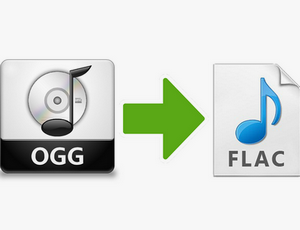
Which is better between FLAC format and ogg format?

Which is better between FLAC format and ogg format?

OGG vs FLAC

Positionable: FLAC supports fast sampling and precise positioning.

OGG vs FLAC

This is not only beneficial for playback, but also makes FLAC files easier to edit.
Resilient metadata: New types of metadata blocks can be defined and implemented without affecting the use of old decoders and data streams. Existing metadata types include tags, reference tables, and ranking tables. Registered applications can define their own dedicated metadata types (Note: this is similar to the MIDI standard).
Great for archiving applications: FLAC is an open and lossless encoding format, you can convert it to any other format you need. In addition to CRC and MD5 marking of each data frame to ensure data integrity, flac also provides a check (verify) option, when using this option for encoding, the encrypted data will be immediately decoded and compared with the data. original input in the same encoding time.
Easy to backup CDs: FLAC has a “reference table” metadata block that contains the list of CD contents and index points for all tracks. You can save a CD into a single file and import the CD reference table, so that a FLAC file can record all the information of the entire CD completely. When your original CD is damaged, you can use this file to restore an exact copy of the original CD.
Damage resistance: Due to the structure of the FLAC frame, once the data stream is damaged, the loss will be limited to the damaged data frame. Usually only a short segment is lost. When many other lossless audio compression formats suffer corruption, one corruption will cause all subsequent data to be lost.
OGGVorbis is a lossy compression encoding for audio.

All the Audio Format Differences: Which One Should You Use?

All the Audio Format Differences: Which One Should You Use?

All the Audio Format

Three classifications of audio formats

All the Audio Format

Characteristics and differences of different audio formats

Which audio format is right for you?

You already know MP3, but what about AAC, FLAC, OGG or WMA? Why are there so many audio file formats and is there any best audio format?

Comparison of audio formats

Audio files come in various types and sizes. While we’re all probably familiar with MP3, what about AAC, FLAC, OGG, or WMA? Why are there so many audio standards? Is there a better audio format? Which ones are important and which ones can be ignored?

All audio formats are divided into three main categories, and once you know what the categories mean, you can choose the format within the categories that best suits your needs.

uncompressed audio format

Uncompressed audio consists of actual sound waves that have been captured and converted to digital format without any additional processing. So uncompressed audio files tend to be the most accurate, but take up a lot of disk space: about 34MB per minute for 24-bit 96KHz stereo.

Audio file format: PCM

PCM stands for Pulse Code Modulation, a digital representation of the original analog audio signal. Analog sounds exist as waveforms. To convert a waveform into digital bits, the sound must be sampled and recorded at specific intervals (or pulses).

This digital audio format has a “sample rate” (how often the samples are made) and a “bit depth” (how many bits are used to represent each sample). There is no compression involved. Digital recordings are almost accurate representations of analog sounds.

The mp3 format is better or worse than the other formats?

The mp3 format is better or worse than the other formats?

mp3 format is better

Some people often say, and almost always in a connoisseur’s tone, that the mp3 format is obsolete and old and that it sounds worse.

mp3 format is better

This is not necessarily a truth.

The reality, to start with the real thing, is that a 320 kbps mp3 that is based on good quality original audio will sound so good that only 1% could even slightly tell the difference.

Multiple investigations have been conducted, even with hearing trained personnel, and it has been found that an mp3 that exceeds 192 kbps can have such good sound that it is very difficult to distinguish when compared to high quality audio without compression or loss.

This means you don’t have to run around looking for a new format and convert your mp3s to that format, which would also be a mistake, because converting one format to another will never make it sound better.

Mp4Gain for example can not only convert between formats, but at the same time add processes that make the volume sound more even between the different mp3 files and also the quality improves or at least sounds better to your ears.

But this is the result of a series of processes added together and not just a conversion from one format to another or changing one bitrate to another.

The same is true for video file formats like mp4, webm, etc.

Mp4Gain can optimize them to match loudness or volume levels, but it’s not just as a result of converting one format to another or setting them all to X bitrate. It is a slightly more complex phenomenon.

How to make an mp3 sound as good as possible?

How to make an mp3 sound as good as possible?

Mp3 Quality
Mp3 Quality

Achieve the best quality in an mp3

Mp3 Quality
Mp3 Quality

Everything we talk about mp3 in this article actually applies to other formats like FLACC, ogg, etc.

But how do you make it sound as good as possible?

In the first place we start from a source file, which is the one that you have obtained. The more quality it has, the better.

And besto wants to say that it must have a good birate and a good samplerate, that it be stereo and that it sound as good as possible.

If we start from that, we will be able to normalize the volume and give a consistent quality with Mp4Gain.

Because we will be able to use a high quality bitrate, an adequate samplerate, make the “color” of the audio clear, bright, but with powerful and defined bass, etc.

Mp4Gain can extract audio tracks from videos. Nowadays it is one of the best options since it is relatively easy to obtain good audio with the music we are looking for and Mp4Gain can extract the audio and convert it into an mp3, a FLAC, etc.

Mp4Gain is the best prepared normalizer for these times where every time we have devices with better hardware for music and video playback quality.

Because we are living in a time where devices and computers are rapidly improving their capacity for audio and video and only Mp4Gain is prepared for it.

Today, with Mp4Gain you have the perfect tool to get your audio and video with the best quality and volume.

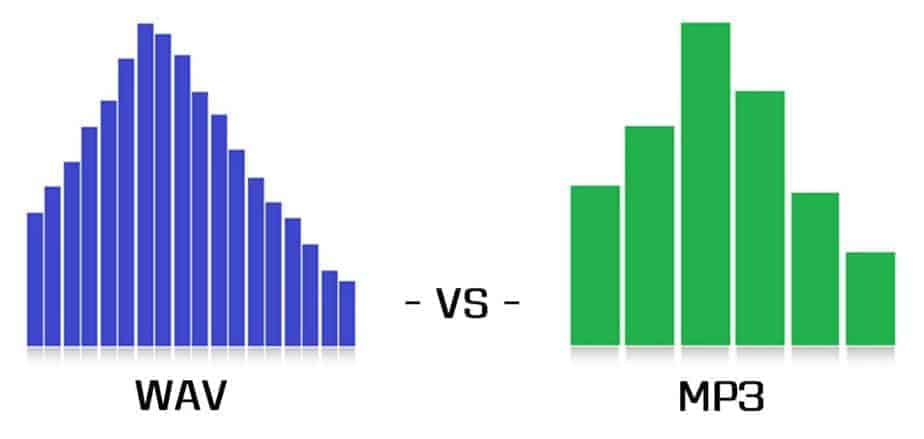
An mp3 has lower sound quality than a wav?

An mp3 has lower sound quality than a wav?

Mp3 High Quality
Mp3 High Quality

The format is used to know which audio file has the highest quality?

Mp3 High Quality
Mp3 High Quality

No, the answer is nmo for both questions.

The first thing that should be clearly stated is that what we call audio quality is expressed and only thought of in terms of human hearing, human ears.

Because we don’t listen like many animals. Each one has its most efficient frequencies and others that it does not perceive, according to its survival needs. Exactly how some animals see better in the dark or perceive colors differently, and all this has been so because of the environment where they live and where they must survive.

Even a child or teenager can often perceive that an adult cannot.

Then, we will have to understand that quality is not synonymous with an absolute capacity to reproduce all frequencies, but rather that for us quality is something that sounds in a certain way to the human ear.

With that understood, we will say that an mp3 with 192 kbs and 44100 or more samplerate is of sufficient quality and can hardly be distinguished from other formats.

Only less than 1% of the population can perceive a slight and uncertain difference if the mp3 has that quality.

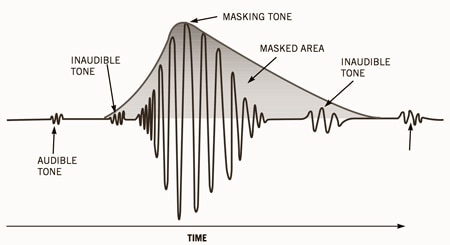
We will see in other articles how it is that those frequencies that we cannot perceive are the ones used to compress the audio and that is why a good quality mp3, which only eliminated frequencies that the human ear cannot distinguish, sounds 99.9999999% the same as other files promoted as better quality.

Normalize the volume and loudness of an mp3 or a video easily

Normalize the volume and loudness of an mp3 or a video easily

Normalize the volume and loudness of an mp3 or a video easily

It’s absolutely easy if we use Mp4Gain, it only takes one click of a button and all audio and video files are volume normalized.

Normalize the volume and loudness of an mp3 or a video easily

Today we find many problems with this volume issue because they are compressed by different compressors and above all using different bitrate and sample rate settings.

People don’t realize how important this whole issue is, but Mp4Gain solves it automatically. Not only through bitrate and samplerate, but also by making a deep analysis of each frame and optimizing each frequency band, so that the result is magnificent.

The largest number of inquiries we receive by email refer to that difference in volume levels in the mp3s and also between the mp4s.

And what we have been able to corroborate is that, to a large extent, many are due to having been encoded with wrong settings, for example a very low bitrate.

Because the bitrate implies the amount of information or detail that the audio or video can pass per second and this translates into the detail that a video has, for example. Which immediately affects the quality of the aforementioned video.

Mp4Gain is the solution to normalization problems.

Audio intro

Audio intro

Audio intro
Audio intro

An mp3 is 320kbps, 44100hz, what does this mean?

Audio intro
Audio intro

44100Hz represents the sample rate of the signal. The so-called sampling consists of obtaining the value y of the sound wave at the current moment every unit of time. Sampling is the process of discretizing continuous data (converting an analog signal to a digital signal).
image source

The sampling method mentioned above is called PCM (Pulse Code Modulation). According to the Nyquist-Shannon sampling law, the sampling rate must be at least twice the highest target frequency. The hearing range of the human ear is about 20Hz-20,000Hz (if you’re curious how loud you can hear, you can click here to test your ears), although recording software often has a 48,000 option Hz, but we can safely conclude: 44100Hz can meet almost all our needs, higher is just a waste of your memory and CPU. More than 48,000 samples are meaningless to the human ear, which is similar to 24 frames per second on a movie. 44100Hz happens to be the standard sample rate for almost all music released. In fact, for vocals and many instruments, high-frequency sounds are noise, so high sample rates can sometimes worsen sound quality (which is why we need to adjust the equalizer).

320 kbps represents your bitrate/bitrate, which is shorthand for kilobits per second, which represents the size of the data used to describe sound. In CD (uncompressed audio file), the bit rate is 1411.2kbps, and the mp3 sound quality to achieve CD quality should be higher than 128kbps/44100Hz (128kbps can be said to be the most common bit rate). Generally, a higher number means better quality. The quality depends on many factors (such as the encoding algorithm). Many times we don’t need too high bitrate: our device can play mp3 and CD without difference (sound/sound card is normal).