Skip to content

mp4gain.com

Mp4 Gain Official Website

Tag: audio metadata

MP3 vs WMA comparision


Free Download Mp4Gain
picture

MP3 vs WMA: Unraveling the Audio Format Mystery


MP3 vs WMA
MP3 vs WMA
MP3 vs WMA
MP3 vs WMA

Let’s Talk About MP3 vs WMA

MP3 vs WMA
MP3 vs WMA

In the digital age, the world of audio formats can be a complex labyrinth, and at the heart of this maze are two prominent formats: MP3 and WMA. As a specialist with extensive experience in the field, I’m here to help you navigate through this audio landscape and make an informed decision based on your needs. Let’s embark on this journey to understand the differences between MP3 and WMA, going beyond the standard comparisons you might find elsewhere.

The Evolution of MP3 and WMA

The Birth of MP3

MP3, short for “MPEG-1 Audio Layer 3,” revolutionized the music industry when it was introduced. This format’s key innovation was its ability to compress audio files without a significant loss in quality. It became the go-to choice for digital music, and its impact was akin to the introduction of the CD in the 1980s. MP3 made it possible to store and share music digitally, paving the way for the digital music revolution we know today.

The Rise of WMA

On the other side of the spectrum, we have WMA, or “Windows Media Audio.” Developed by Microsoft, WMA was introduced to provide an alternative to MP3. Its primary goal was to offer a similar level of audio quality while allowing for efficient compression. Microsoft’s backing made WMA a prominent player in the world of digital audio. It found its way into the Windows operating system and various Microsoft products, which led to widespread adoption.

MP3 vs WMA: Technical Differences

To truly understand the differences between MP3 and WMA, we need to delve into the technical aspects.

Audio Compression Methods

MP3 uses lossy compression, which means it sacrifices some audio data to reduce file size. Imagine this as taking a high-resolution photograph and converting it into a smaller image file. While the overall picture is preserved, you lose some fine details. On the other hand, WMA also employs lossy compression, but its methods may differ slightly from MP3, resulting in variations in audio quality.

Audio Quality Comparison

When it comes to audio quality, MP3 is like listening to music on a high-end stereo system. It provides good quality, and for most listeners, the difference is subtle. However, audiophiles may notice the loss of some nuances. On the other hand, WMA offers a similar quality but may have variations in sound based on the encoder used. It’s like comparing two different speakers, each with its unique sound signature.

File Size and Compatibility

File Size Comparison

MP3 files tend to be smaller due to their compression method. Think of it as a compact car – it’s efficient and doesn’t take up much space. This makes MP3 an excellent choice for devices with limited storage. On the other hand, WMA files may be slightly larger, similar to a mid-sized sedan. While not as compact as MP3, they still offer reasonable file sizes, suitable for most storage capacities.

Compatibility Across Devices

One critical consideration is compatibility. MP3 is like the universal remote control of audio formats. It plays nicely with almost every device and software, making it a versatile choice. You’ll rarely encounter issues when using MP3 files on various platforms. WMA, however, may not be as universally compatible. It’s like trying to fit a square peg into a round hole in some cases. While it works seamlessly within the Windows ecosystem, you may face challenges when using it on non-Windows devices.

Encoding and Decoding: The Inside Story

To understand how MP3 and WMA work, let’s dive into the encoding and decoding processes.

MP3 Encoding and Decoding

The process of encoding audio into MP3 involves selecting a bitrate, which affects the file’s size and quality. Higher bitrates preserve more audio data, resulting in better sound quality but larger file sizes. Decoding an MP3 file is like opening a music box – it translates the compressed data back into audible sound.

WMA Encoding and Decoding

WMA encoding methods may vary based on the version and encoder used. Microsoft introduced different iterations of the format over the years, each with its improvements. Decoding a WMA file involves the software interpreting the compressed data, similar to deciphering a coded message. The quality and file size may differ based on the encoder settings.

Audio Quality vs File Size: Making Your Choice

Choosing between MP3 and WMA ultimately comes down to your preferences and requirements.

Factors Influencing Your Decision

Your choice should align with your audio needs and personal preferences. If you prioritize portability and compatibility, MP3 is like the compact car that fits seamlessly into your daily life. On the other hand, if you’re part of the Windows ecosystem and appreciate efficient compression, WMA could be your ideal choice.

Real-Life Scenarios

Imagine you’re a commuter using a smartphone with limited storage. MP3, with its smaller file sizes and universal compatibility, is like having a compact car for your daily travels. It’s efficient, and you don’t have to worry about space. On the other hand, if you’re a Windows user and enjoy the seamless integration with Microsoft products, WMA is like driving a reliable sedan that suits your needs.

MP3 vs WMA: The Future of Audio Formats

As technology evolves, new audio formats continue to emerge. Some of these formats offer high-resolution audio and even better compression methods. MP3 and WMA, while still relevant, face competition from these newcomers.

Emerging Audio Formats

New audio formats are like the latest models of cars, offering improved features and performance. They aim to provide even better sound quality with efficient compression. Exploring these new formats can be a worthwhile endeavor for audiophiles and music enthusiasts.

The Role of MP3 and WMA in the Modern World

MP3, with its legacy support and widespread use, remains a valuable format. It’s like the classic car that collectors still appreciate. On the other hand, WMA, although less prominent than in the past, continues to have its place within the Windows ecosystem. It’s like a classic car that loyal enthusiasts still cherish.

Latest Words on MP3 vs WMA

In conclusion, the choice between MP3 and WMA depends on your priorities and how you intend to use your audio files. Whether you opt for the compact efficiency of MP3 or the seamless integration of WMA, both formats have their unique strengths. As a specialist in the field, my goal is to empower you to make an informed decision based on your audio needs and preferences.

Comments:

I’ve been using MP3 for years, and it’s like my trusty old car. I know it inside out, and it’s never let me down. But this article made me curious about WMA. Maybe I should take that sedan for a spin!

Great article! But could you go even deeper into the technical aspects of audio compression? I’d love to learn more about the bitrates and how they impact quality.

As a Mac user, I’ve never really considered WMA. This article shed some light on the format, but I’m still leaning towards MP3 for its compatibility.

I remember the early days of MP3, and it’s come a long way. But I’m also excited about these new audio formats you mentioned. Any recommendations for the latest music players that support them?

I appreciate the practical examples in this article. Comparing MP3 to a compact car and WMA to a sedan really helps me visualize the differences.

I’ve always wondered about the trade-off between MP3 and WMA. This article clarified things for me, and I’m now considering converting some of my files to WMA.

As a musician, audio quality is paramount. I’ve been using FLAC, but this article got me thinking about MP3 and WMA. Are there any advantages to using them in specific scenarios?

This article provided a comprehensive comparison. I’m a student, and file size matters for me. MP3 seems like the way to go for my music library.

Great job! The article gave me a better understanding of the MP3 vs. WMA debate. I’m still sticking with MP3, though, as it works seamlessly with my devices.

Impressive article! I’ve been using WMA for a while, and it’s nice to see it get some recognition. But it’s essential to choose the right encoder for the best results.

As a podcast producer, I’m always looking for the best format for my episodes. This article helped me weigh the pros and cons of MP3 and WMA. It’s like choosing the right microphone for a recording studio!

This article made me realize that both MP3 and WMA have their merits. It’s like choosing between two excellent smartphones – they may have different features, but they both get the job done!


Free Download Mp4Gain
picture


Mp4Gain Main Window
picture


Mp4Gain Features
picture


Free Download Mp4Gain
picture

Author R. AriasPosted on October 25, 2023Categories Audio and videoTags audio backup, audio bit depth, audio codecs, audio comparison, audio compression methods, audio compression standards, audio conversion, audio conversion tools, audio data rates, audio decoding, audio encoding, audio encoding efficiency, audio encoding software, audio encoding techniques, Audio File Compatibility, audio file editing, audio file insights., audio file longevity, Audio File Management, Audio file preservation, Audio file security, audio file sharing, audio file size, audio file storage, audio file types, audio files, audio format conclusion, audio format conversion, audio format debate, audio format details, audio format evolution, audio format explanations, audio format history, audio format insights, audio format preference, audio format recommendations, Audio format selection, audio format specifics, audio format summary, audio format support, audio format versatility, audio formats, Audio Jargon, audio metadata, audio playback, audio player compatibility, Audio Preservation, Audio quality, audio quality comparison, Audio quality considerations, audio quality factors, audio specifications, Audio streaming, Audio technology, audio technology advancements, Audio technology trends, Audio Terminology, Audio-Software, bitrates, data loss prevention, digital audio, digital audio players, digital music, digital music players, Digital sound, encoder selection, file conversion, file size, lossless audio, lossy compression, Mac compatibility, MP3, Music Archiving, music compression, music file formats, music file insights, music format flexibility, music format preferences, music industry, music library, music player software, Music production, music storage, music storage options, music technology, musician's choice, online music services, podcast formats, podcast production, sound file attributes, sound file compression, sound file conversion, sound file editing, sound file formats, sound file quality, sound format details, sound format insights, sound format overview, Sound quality, wma

FLAC vs M4A Comparision

FLAC vs M4A

FLAC vs M4A
FLAC vs M4A
FLAC vs M4A
FLAC vs M4A


Let’s talk about FLAC vs M4A

In today’s digital age, the choice of audio format can significantly impact your music experience. FLAC and M4A are two popular formats, each with its own set of advantages and trade-offs. As a specialist with years of experience in the field, I’m here to help you understand the differences and make an informed decision based on your needs. Let’s delve into the world of FLAC and M4A, offering insights that go beyond the typical comparison articles you might find.

The Basics of FLAC and M4A

FLAC vs M4A
FLAC vs M4A

To kick things off, let’s start with a basic introduction to these two formats.

FLAC (Free Lossless Audio Codec): FLAC is the audiophile’s dream. It’s like a Tupperware container for your music. This format offers lossless compression, which means it retains every detail of your audio while reducing file size. It’s like storing your favorite sandwich without losing any flavor.

M4A (MPEG-4 Audio): On the other hand, M4A is like a Ziplock bag. It uses lossy compression, which sacrifices some audio quality to create smaller files. Think of it as a quick snack – convenient and smaller in size.

Audio Quality Comparison

Now, let’s talk about the most significant difference – audio quality.

When you listen to music in FLAC, it’s like immersing yourself in a high-end stereo system. Every note, every nuance, and every instrument is crystal clear. It’s like enjoying a gourmet meal prepared by a top chef.

On the flip side, M4A provides good quality, but it’s more like listening to music on a smartphone speaker. You get the general idea, but you might miss the subtleties and richness.

File Size and Compression

One critical consideration is file size. FLAC files tend to be larger because they store all the audio data. Think of it as a high-resolution photo of a scenic landscape. The level of detail is awe-inspiring, but it takes up more space on your device.

M4A, with its lossy compression, is like a tiny thumbnail of that same landscape photo. It’s smaller, making it ideal for devices with limited storage.

Compatibility and Usage

FLAC isn’t as widely supported as M4A. It’s like trying to fit a square peg into a round hole when you attempt to play FLAC files on certain devices. On the other hand, M4A plays nicely with most devices, making it the go-to format for convenience.

Metadata and Tagging

FLAC shines in the realm of metadata. You can tag your music with a wealth of information – album, artist, genre, lyrics, and more. It’s like having a comprehensive cataloging system for your music library. M4A also supports metadata, but it’s more limited in its capabilities.

Editing and Conversion

If you need to edit or convert your audio files frequently, M4A is the way to go. It’s like having an editable e-book. You can easily make changes and share it with others. FLAC, however, is more like a printed book. Once it’s set, it’s challenging to modify.

Streaming and Online Services

Streaming services often favor M4A due to its smaller file size, making it ideal for quicker buffering and streaming. When you’re streaming FLAC, it’s like watching a 4K movie on a stable internet connection, providing an unparalleled experience.

Storage and Backup Considerations

When it comes to preserving your music collection, FLAC is the way to go. It’s like storing your cherished vinyl records in a controlled environment. Your audio is safe, and the quality is unmatched. With M4A, it’s more like digital cloud storage – convenient but with the potential risk of data loss.

Final Verdict

So, which is better – FLAC or M4A? It depends on your priorities and needs. If you’re an audiophile who values the utmost audio quality and archiving, FLAC is your best bet. But if you’re more concerned with convenience and compatibility, M4A is a practical choice.

Going Deeper: The Unspoken Advantages

Audio Engineering Insights

When we dive deeper into the world of audio formats, it’s essential to understand the technical aspects that drive these formats. Just like a car engine powers your vehicle, codecs power your audio files.

Archiving and Preservation

In the realm of archiving, FLAC has a clear advantage. It’s like preserving rare and valuable antique books. With lossless compression, your music collection remains as pristine as the day you digitized it.

Future-Proofing Your Music Collection

As technology evolves, FLAC ensures your music remains compatible with future devices and platforms. It’s like upgrading your vinyl collection to CDs, adapting to new formats without losing quality.

Metadata Magic: Organizing Your Music

The rich metadata capabilities of FLAC offer an unparalleled organizational experience for your music library. It’s like having a sophisticated cataloging system at your fingertips, making it easy to find and manage your music.

Perceived Quality vs. Practicality

When making a choice, it’s crucial to consider the balance between perceived audio quality and practicality. The choice between FLAC and M4A is context-dependent. Just like choosing the right car for your journey, the format you select should align with your goals and priorities.

Behind the Scenes: Codec Technologies

Understanding the technologies that power FLAC and M4A can provide a deeper appreciation for these formats. Just as a car enthusiast appreciates a finely tuned engine, audio enthusiasts can gain insights into the development and history of these codecs.

Community Opinions

The final word should come from the community. Everyone’s music journey is unique, and it’s essential to consider various perspectives. Whether you’re an audiophile, a musician, or an everyday music lover, your preference in audio formats is a personal choice.

Latest Words on FLAC vs M4A

In conclusion, the choice between FLAC and M4A ultimately depends on your priorities and how you intend to use your music. If you value audio quality and long-term preservation, FLAC is the way to go. If convenience and compatibility are paramount, M4A has you covered. Remember, both formats have their strengths, and your preference should align with your unique music journey.

Author R. AriasPosted on October 25, 2023Categories Audio and videoTags archiving, audio archiving, audio cataloging, Audio codec development, Audio codec technology, audio collection, audio compatibility, audio conversion, audio devices, audio editing, audio enthusiasts, audio experience, Audio fidelity, audio file alternatives, audio files, audio format advice, audio format alternatives, audio format article, audio format comparison, audio format decision, audio format deep dive, audio format insights, audio metadata, audio playback, Audio Preservation, Audio quality, Audio streaming, audio tagging, audio tech, Audio technology, audio technology evolution, audio tool recommendations, audio versatility, audiophiles, backup, codec technologies, community opinions, compatibility, compressed audio, compressed sound, convenience, conversion, data loss, digital audio, digital compression, digital convenience, digital music, digital music tips, digital music tools, digital preservation, digital quality, digital storage, editing, file compatibility, file conversion, file format, file size, file storage, file tech, FLAC, FLAC conversion, future-proofing, high-resolution audio, lossless audio, Lossless compression, lossless sound, lossy compression, M4A, m4a conversion, metadata, metadata organization, music codec development, music codec history, music collection, music conversion, music enthusiasts, music file alternatives, Music Format, music format alternatives, music format article., music format comparison, music format decision, music format deep dive, music format guidance, music format insights, music library, music lovers, music management, music metadata, music organization, music organization system, music playback, music playback devices, music preferences, music preservation, music quality, music storage, music streaming, music streaming services, music tagging, music tech history, music tech recommendations, online services, preservation, quality comparison, sound archiving, sound codec technology, sound collection, sound format choice, sound format selection, sound preservation, Sound quality, sound streaming, sound technology, storage, Streaming, streaming quality, streaming services, tagging, technical aspects

MP3 YouTube

MP3 YouTube: Audio from Video

Let’s talk about MP3 YouTube

As a specialist with extensive experience in the world of digital audio and video, I’m excited to delve into the fascinating realm of MP3 YouTube. You’ve probably found yourself in a situation where you stumbled upon an incredible piece of music or a memorable podcast while watching a YouTube video. But what if you want to enjoy that audio on the go, without the need for a video? That’s where MP3 YouTube conversions come into play.

The Magic of MP3 YouTube

Imagine this: you’re watching a fantastic cooking tutorial on YouTube, and the background music is a catchy tune that you can’t get out of your head. Or perhaps you’re engrossed in a podcast interview with your favorite author, and the audio quality is superb. You’d love to listen to these without the distraction of visuals or while offline, right? MP3 YouTube allows you to extract the audio from YouTube videos and convert it into the widely supported MP3 format. This way, you can enjoy your favorite audio content anywhere, anytime.

Now, let’s explore the ins and outs of MP3 YouTube and how it works. We’ll provide you with invaluable insights and tips to get the most out of this conversion process.

The Science Behind MP3 YouTube

MP3 YouTube conversions are like magic spells that transform a video into a stand-alone audio file. To understand this process better, let’s break it down step by step:

Step 1: Choose Your Video

Imagine you have a DVD of your favorite movie at home. The movie itself is the YouTube video, and the DVD player represents YouTube. You pick the movie you want to watch (your chosen YouTube video) and load it into the player (access it on YouTube).

Step 2: Extract the Audio

Now, think of this movie as having two elements: audio and visuals. In MP3 YouTube conversions, we’re only interested in the audio. It’s like taking the sound from the DVD and leaving the visuals behind. This process is similar to hitting the “Extract Audio” button when converting a YouTube video to MP3.

Step 3: Convert to MP3

Once you’ve extracted the audio, you have a format that’s like the soundtrack of the movie. Think of this as your MP3 file. Just like you can listen to the soundtrack separately, you can play your MP3 file on any device or share it with friends.

The Convenience of MP3 YouTube Conversions

Now, let’s discuss why MP3 YouTube conversions are so popular and how they can make your digital life easier:

Saving Data and Space

Imagine you’re going on a road trip, and you have a limited data plan. If you had to stream videos from YouTube, it would consume a lot of data. But with MP3 YouTube, you can convert your favorite videos into audio files and save them on your phone or music player. This not only saves data but also precious storage space.

Offline Listening

Picture a long flight with no in-flight entertainment. With MP3 YouTube conversions, you can download audio versions of your favorite videos before your trip. Once in the air, you can enjoy the content without the need for an internet connection.

Custom Playlists

Let’s say you want to create a playlist of your favorite motivational speeches from various YouTube videos. MP3 YouTube makes it simple. Extract the audio, organize the speeches in your preferred order, and create your custom playlist. You’ll have an instant source of inspiration on your device.

The Importance of Quality

In the world of MP3 YouTube conversions, one crucial aspect to consider is audio quality. While most conversions provide decent quality, there can be differences. To ensure you’re getting the best audio experience, let’s take a look at what to watch out for:

Bitrate Matters

Think of the audio quality as the number of colors in a painting. The more colors you have, the more vivid and detailed the image is. Bitrate represents the number of pieces of information (or bits) transmitted per second in an audio file. Higher bitrates generally result in better sound quality. For your music collection, aim for a bitrate of at least 128 Kbps. This provides a balance between file size and audio quality. However, if you’re an audiophile, you might prefer bitrates of 256 Kbps or higher for an even richer listening experience.

Source Matters

Imagine you’re baking a cake. The quality of your ingredients plays a significant role in the final taste. Similarly, the source video on YouTube affects the quality of the extracted audio. If the source video has poor audio quality, there’s a limit to how good the converted MP3 can be. Therefore, when searching for content to convert, choose videos with high audio quality to ensure a great listening experience.

Customization Is Key

Not all MP3 YouTube conversion tools offer the same level of customization. Some allow you to select the desired bitrate, while others may not. When converting, look for options that let you control the output quality. This way, you can tailor the conversion to your specific preferences.

Finding the Best MP3 YouTube Converter

Now that you understand the world of MP3 YouTube conversions, you’re probably wondering where to find the best tools to perform this magic. Here are some tips to help you on your quest:

User-Friendly Interface

Think of the user interface as a recipe book. The simpler and more intuitive it is, the easier it is to follow the steps. Look for a converter with a clean, user-friendly interface that doesn’t overwhelm you with unnecessary options.

Compatibility

Just as you need the right ingredients for a specific dish, you need a converter that works with your devices and platforms. Ensure that the converter you choose is compatible with your operating system (Windows, macOS, Linux, etc.) and supports the video-sharing platforms you use.

Speed and Efficiency

Consider this scenario: you’re cooking a meal, and the recipe you’re following has multiple steps. A good recipe book provides clear instructions and ensures you can prepare the meal efficiently. Similarly, the best MP3 YouTube converter is one that can complete the conversion process swiftly without compromising the audio quality.

Customization Options

Remember, a great chef loves to experiment and adjust recipes to their liking. The same goes for MP3 YouTube conversions. Look for a converter that allows you to customize the output, including bitrate, file format, and even adding metadata like album art or song information.

Reliability

Just as you trust a renowned chef for a delectable meal, you want to trust the converter you use. Read user reviews and seek recommendations to find a reliable and trustworthy tool. Avoid converters that are known for delivering poor audio quality or malware.

The Legality of MP3 YouTube Conversions

Now, let’s address an important aspect that often confuses many users – the legality of MP3 YouTube conversions. It’s like understanding the rules and regulations of a specific cuisine.

Grey Area

The legality of MP3 YouTube conversions falls into a grey area. While converting YouTube videos to MP3 format for personal use is generally considered acceptable, distributing copyrighted content without permission is not. Therefore, it’s crucial to be mindful of the content you convert and how you use it.

Copyrighted Material

Think of copyrighted material as a secret family recipe. Just as you can’t sell someone else’s famous dish without permission, you can’t distribute copyrighted audio without the appropriate rights. If you’re

Author R. AriasPosted on October 19, 2023October 19, 2023Categories Audio and videoTags album art, audio bitrates, audio bitrates explained, audio conversion, audio conversion efficiency, audio conversion features, audio conversion methods, audio conversion software, audio conversion speed, audio conversion tools, audio copyright, audio copyright laws, audio copyrights, audio customization, audio distribution, audio download, audio enhancement, audio enhancement tools, audio experience, audio extraction, audio extraction process, audio extraction software, audio extraction tools, audio file format, audio file size, audio format, Audio format compatibility, audio format options, audio formats, audio legality, audio management, audio metadata, audio player, audio playlist creation, audio preferences, Audio quality, Audio source, Audio Storage, Audio streaming, audio tools, Audio-Software, best audio quality, best MP3 converter, bitrate, compatibility, conversion process, conversion speed, convert YouTube videos, copyright compliance, copyright guidelines, copyright infringement, copyright laws, copyright permissions, copyrighted content, custom audio playlists, custom playlists, customization, customization options, data saving, digital audio, digital devices, digital music collection, download audio, fair use, fair use policy, fast conversion, high quality audio, legality, listening preferences, malware-free software, MP3 bitrates, mp3 converter, MP3 converter tools, mp3 download, MP3 extraction, mp3 file, mp3 quality, mp3 youtube, music conversion, music enjoyment, offline audio, offline audio playback, offline listening, online conversion tools, online converter, personal audio collection, personal use, reliability, reliable audio conversion, song information, source quality, trusted MP3 converter, user reviews, user-friendly interface, video audio, video content, video soundtrack, video source, video streaming, video to audio, YouTube audio, YouTube audio extractor, youtube audio quality, YouTube content, YouTube content rights., YouTube content usage, YouTube conversion options, YouTube copyright, YouTube downloader, YouTube music, YouTube policies, YouTube terms of service, youtube to mp3, YouTube video downloader, youtube video quality, YouTube video soundtrack

Flac Encoding

Flac Encoding: Unraveling the Audiophile’s Choice

Flac Encoding
Flac Encoding

Let’s Talk About Flac Encoding

As a specialist with extensive experience in audio technology, I’m here to unravel the mysteries of Flac encoding for you. If you’ve ever wondered about the best way to preserve audio quality without sacrificing storage space, you’re in the right place. Flac, which stands for Free Lossless Audio Codec, is the audiophile’s best friend when it comes to audio compression. In this comprehensive article, we’ll delve deep into the world of Flac encoding, addressing your search intent directly and providing you with a wealth of knowledge and real-life examples to make the journey enjoyable and educational.

What Is Flac Encoding?

Before we dive into the intricacies of Flac encoding, let’s start with the basics. Flac is a lossless audio compression format, which means it reduces file size without compromising the original audio quality. This is in contrast to lossy compression formats like MP3, which discard some audio data to achieve smaller file sizes. Flac, on the other hand, retains every bit of the audio information, ensuring that what you hear is as close to the original recording as possible.

Imagine you have a favorite painting, and you want to make a copy to hang in a smaller room. With lossy compression, it’s like making a photocopy of the painting, but the copy loses some details and colors. Flac encoding, on the other hand, is like having a professional artist recreate the painting on a smaller canvas while preserving all the nuances and details. The result is a beautiful, high-fidelity reproduction.

Flac vs. Other Audio Formats

To truly appreciate Flac encoding, it’s essential to compare it with other audio formats. The most popular alternative to Flac is the MP3 format. MP3 is well-known for its widespread use, but it’s a lossy format. This means that during compression, some audio data is discarded to achieve smaller file sizes. The result is a compromise between file size and audio quality.

Let’s put this into perspective: If you were to store your favorite songs on a mobile device, a lossy format like MP3 might be suitable. It’s like having a collection of smaller, convenient-to-carry reproductions of famous paintings. However, if you want to archive your audio collection or create a master copy for your home theater, Flac encoding is the equivalent of preserving the original artwork in all its glory.

The Magic of Lossless Compression

One of the remarkable features of Flac encoding is its lossless nature. It achieves this through a clever algorithm that compresses audio data without losing any of the information. Think of it as a magician’s trick – a skilled magician can fit a deck of cards into a small box without removing any cards. Flac is like that magician, making your audio files smaller while keeping every musical note intact.

The beauty of lossless compression becomes evident when you’re dealing with vast audio libraries. Let’s say you have a music collection that takes up hundreds of gigabytes in its raw, uncompressed form. Flac encoding allows you to shrink that collection significantly, saving precious storage space. This is akin to having a magical bag that can hold many more items than it seems possible, yet you can retrieve each one intact whenever you need it.

Compatibility and Versatility

Flac encoding offers the best of both worlds: high-quality audio and compatibility. While some older devices may not support Flac natively, there are numerous apps and software tools available that can decode Flac files for playback. So, even if you have a mix of old and new devices, you can enjoy your music library without compromise.

Consider this scenario: You have a vast collection of unique musical instruments, and you want to play them on different types of stages. Flac encoding ensures that your instruments sound just as vibrant and authentic in a small jazz club as they do in a grand concert hall. It’s like having an ensemble of versatile musicians who can adapt to any setting without losing their precision and flair.

Preservation of Metadata

Flac doesn’t just preserve the audio quality; it also ensures that all the associated metadata, such as artist names, album titles, and track information, remains intact. This is crucial for those who want a well-organized music library. Think of your music collection as a vast library, and the metadata as the catalog that helps you quickly find the book you want to read. Flac encoding ensures that the catalog is meticulously maintained, so you can easily locate your favorite songs.

Flac Encoding: The Audiophile’s Dream

Now, let’s talk about why Flac encoding is often dubbed the “audiophile’s choice.” Audiophiles are individuals who have a deep appreciation for high-fidelity sound and are willing to invest in quality equipment to enjoy the best audio experience. For them, Flac is the gold standard because it delivers audio in its purest form, maintaining every subtle detail and nuance.

Imagine you’re a wine connoisseur, and you’re savoring a rare vintage. Flac encoding is like enjoying that wine in a crystal-clear glass that enhances the aroma, taste, and color, allowing you to fully appreciate the wine’s complexity. This level of detail is what sets Flac apart and makes it the preferred choice for those who demand nothing but the best in audio quality.

Flac Encoding in the Real World

To understand Flac encoding better, let’s look at some real-world examples. Consider a music producer working on a new album. They want to ensure that the final mix and master sound precisely as intended. Flac encoding is their best friend in this scenario. It allows them to store and share high-quality audio files with collaborators and record labels, ensuring that every note and sound effect is preserved.

Now, picture yourself as a car enthusiast who’s invested in a high-end sound system for your vehicle. You want to experience your favorite music with the utmost clarity while cruising down the highway. Flac-encoded audio files provide the closest experience to having a live concert in your car. You hear every instrument, every vocal, and every beat in perfect harmony, just as the artist intended.

Practical Steps for Using Flac Encoding

If you’re eager to embrace Flac encoding for your own audio needs, there are some practical steps to consider:

1. Choosing the Right Software

  • Look for audio players that support Flac. Download Mp4Gain to convert or encode to FLAC.

2. Converting Existing Audio

  • If you have a vast collection of audio files in other formats, consider converting them to Flac to enjoy the benefits of lossless compression.

3. Organizing Your Library

  • Make sure to maintain the metadata of your Flac files for easy access and organization.

4. Backing Up Your Collection

  • As your Flac-encoded library grows, consider creating backup copies to protect your valuable audio assets.

5. Enjoying the Experience

  • Once your library is set up, sit back, and savor the audio quality that Flac encoding brings to your music collection.

Latest Words on Flac Encoding

In conclusion, Flac encoding is a true audiophile’s choice when it comes to preserving audio quality while minimizing storage space. This lossless compression format is like having a magical preservation method for your music, keeping it pristine and unaltered. Whether you’re a music producer striving for perfection or a car enthusiast seeking the ultimate audio experience, Flac is your gateway to auditory bliss. Don’t hesitate to explore this world of high-fidelity sound and unlock the full potential of your audio collection with Flac encoding.

Author R. AriasPosted on October 17, 2023Categories Audio and videoTags audio archives, audio archiving, audio artists, audio cataloging, audio codec comparison, audio codecs, audio compression, audio compression algorithms, audio compression methods, audio compression optimization, audio compression software, audio compression standards, audio compression techniques, audio conversion, audio conversion software, audio conversion tools, audio data, audio decoding, audio decoding methods, audio detail, audio devices, audio editing, audio encoding, audio encoding methods, audio enthusiasts, Audio equipment, audio experience, Audio fidelity, audio file organization, audio files, audio format advantages, Audio format choices, Audio format compatibility, audio format conversion, audio format disadvantages, audio format optimization, audio formats, audio gadgets, Audio mastering, audio metadata, audio metadata management, audio playback, Audio Playback Devices, audio playback equipment, audio playback quality, audio player software, Audio Preservation, audio preservation methods, audio preservation software, audio preservationists, audio producers, audio production, Audio quality, audio quality evaluation, Audio quality preservation, Audio recording, audio reproduction, audio sampling, audio standards, Audio Storage, Audio storage solutions, audio storage space, Audio technology, audio technology experts, Audio-Software, Audiophile, digital audio, digital audio formats, Digital Audio Preservation, digital music, digital music libraries, Digital sound, digital sound preservation, digital sound quality, File formats, file size reduction, flac compression, Foobar2000, high quality audio, high-fidelity music, high-fidelity sound, lossless audio, lossless audio formats, Lossless compression, lossless encoding, lossless sound, lossy compression, metadata preservation, mp3 vs. flac, Music Archiving, music backup, music collection, Music Collection Management, music collectors, music enthusiasts, music format comparison, music industry, music library, Music Library Organization, music metadata, music player compatibility, music preservation, music producers, Music production, music production tools, music recording, music reproduction, music reproduction methods, music reproduction quality, music storage, music technology, sound engineers, Sound quality, Sound reproduction, sound system, sound system optimization, studio recording, VLC Media Player

WMA Format

WMA Format

WMA Format
WMA Format
WMA Format
WMA Format

What is WMA format used for?

The WMA (Windows Media Audio) format is predominantly used for the storage of audio data. Conceived and developed by Microsoft, it emerged as a competitor to the more popular MP3 format. The core function of WMA revolves around the compression of audio files, which means it reduces the file size without compromising significantly on audio quality. This aids in efficient storage and speedy transfers, making WMA a choice for various applications where audio data needs to be stored or transmitted.
Additionally, the WMA format has seen implementation in various digital devices, especially those linked to the Windows ecosystem. It’s suitable for both streaming audio content and local playback. Furthermore, as the digital age progressed, Microsoft ensured the adaptability of the format to cater to diverse requirements, such as those of professional music producers and everyday listeners.

“Sound is the vocabulary of nature.” – Pierre Schaeffer

How does WMA differ from MP3?

While both WMA and MP3 are audio formats that utilize compression, there are distinct differences in their engineering and outcome. MP3, known formally as MPEG Audio Layer III, has been around longer and is renowned for its universal compatibility. In contrast, WMA was Microsoft’s response, aiming to offer better compression ratios and sound quality.
Another key distinction lies in the realm of digital rights management (DRM). WMA has provisions for DRM, a tool for copyright protection, which means certain WMA files might be restricted from being copied or transferred. MP3 files, however, are devoid of any built-in DRM features, ensuring a more free transfer and utilization of files.

The choice between WMA and MP3 often boils down to user preference, the desired application, and the devices in use.

“Music is the universal language of mankind.” – Henry Wadsworth Longfellow

What are the benefits of WMA files?

There are multiple benefits of using WMA files. Firstly, they offer a good balance between file size and sound quality. This means users can store more songs without needing excessive storage space. Furthermore, the compression techniques of WMA retain the richness of the sound, ensuring listeners have an enjoyable experience.
WMA also offers versatility. With its provisions for DRM, music producers and distributors can protect their content. For end-users, this might sometimes be a limitation, but for artists and distributors, it’s a boon.

Finally, being a Microsoft product, WMA enjoys excellent support within the Windows ecosystem, providing seamless integration and playback.

“Without music, life would be a mistake.” – Friedrich Nietzsche

Is WMA better than MP3 for audio quality?

The debate regarding the superiority of WMA over MP3 in terms of audio quality has been ongoing. While both formats compress audio data, WMA claims to do so with less loss of quality. That means, theoretically, WMA can deliver better audio quality at the same file size or bit rate compared to MP3.
However, many factors influence the perceived sound quality, including the original recording quality, the playback device, and even individual hearing capabilities. Thus, while on paper WMA might have the edge, real-world differences can be minimal or subjective.

“Music can change the world because it can change people.” – Bono

How does WMA compression work?

WMA employs a method of lossy compression. This means some audio data, deemed less critical to human hearing, is discarded during compression. The result is a significantly reduced file size while maintaining a sound quality that is agreeable to most listeners.
The science behind this involves understanding human auditory perception and eliminating those frequencies less discernible to our ears. Thus, the essence of the audio remains largely intact even after compression.

“The music is not in the notes, but in the silence between.” – Wolfgang Amadeus Mozart

Can WMA files be played on all devices?

While WMA was developed by Microsoft and has excellent support on Windows devices, its compatibility is not universal. Many modern devices and platforms do support WMA playback. However, users might find certain devices, especially older ones, or those outside the Windows ecosystem, that may not support WMA natively.
Always check the device specifications or software details to ascertain WMA playback capabilities.

“Music touches us emotionally, where words alone can’t.” – Johnny Depp

Are there different versions of WMA format?

Yes, over the years, Microsoft introduced various versions of WMA. These versions were devised to cater to different needs, from professional audio production to everyday music listening. Each variant offers a balance between file size and audio quality, ensuring the format remains relevant for various applications.
“Music expresses that which cannot be put into words and that which cannot remain silent.” – Victor Hugo

How does WMA handle digital rights management?

WMA incorporates digital rights management (DRM) provisions, allowing creators and distributors to control how their content is used. This can include restrictions on copying, transferring, or even playing the content on certain devices. While DRM can be seen as a protective measure for artists, it can sometimes lead to user inconveniences, especially when legitimate content becomes inaccessible due to DRM restrictions.
“Music is the shorthand of emotion.” – Leo Tolstoy

What is the history behind WMA?

Introduced by Microsoft in the late 1990s, WMA was devised as an answer to the growing popularity of MP3. Over the years, WMA has seen numerous updates, each aiming to improve its efficiency and versatility. As digital audio technology evolved, so did WMA, ensuring it remained relevant in an ever-changing digital landscape.
“Music is the wine that fills the cup of silence.” – Robert Fripp

How can I convert a file to WMA?

Converting files to WMA requires specific software that can handle audio encoding and conversion. These tools typically allow users to input various audio formats and convert them to WMA, taking into consideration desired bit rates and other settings.
“Music brings a warm glow to my vision, thawing mind and muscle from their endless wintering.” – Haruki Murakami

Final Words

The WMA format, with its roots in Microsoft’s vision for digital audio, has indeed carved a niche for itself in the world of audio formats. Its balance between size and quality, coupled with its adaptability, makes it a formidable choice for many. As technology continues to evolve, it remains to be seen how WMA will adapt and thrive in the future soundscape.

Author R. AriasPosted on August 23, 2023Categories Audio and videoTags .wma format, are wma files lossless, are wmata buses free, audio advancements, audio algorithms, audio benchmarks, audio channels, audio codec, audio compatibility, audio compression, audio containers, audio data, audio encoding, audio engineering., audio experience, audio file extension, audio file transformation., audio formats, audio metadata, audio parameters, audio playback, audio players, audio profiles, Audio quality, audio resolution, audio settings, audio specifications, audio spectrum, audio standards, Audio Storage, Audio streaming, Audio technology, audio transfer, audio waveform, bit rate =, bitrate efficiency, can vlc convert wma to mp3, can wma files be converted to mp3, can wma files play on iphone, can you camp on peabody wma, can you camp on wma land, can you convert wma to mp3, can you hunt on wma land, can you unsend an email, can't play wma files on android, compression techniques, dewey wills wma map, did lauren cook leave wmar, did patrick pete leave wmar, did pine log wma sell, did sabrina fein leaving wmar, did sabrina fein leaving wmar-tv, digital audio, digital audio compression, digital audio evolution, digital audio standards, digital compression, digital encoding, digital formats, digital music, digital music landscape, digital playback, digital rights management, Digital sound, digital sound landscape, do i need a wma stamp in ga, do wmata smartrip cards expire, does a pioneer wma/mp3 have bluetooth, does walmart, does wma use compression, does wmata drug test, does wmata go to dulles, does wmata have an app, does wmata hire felons, does wmata take apple pay, DRM protection, emancipation will smith, file compatibility, file conversion, file encoding, file format, file size, haddam weather, home made, home made lemonade, home made pasta, home maker, homemade dog food, homemade ice cream, homemade pizza, homemade salsa, homemade weed killer, how do i change a wma file to mp3, how do i convert a wma file to mp3, how do i convert wma to mp3, how do i get a wma permit, how do you convert wma to mp3, how many calories should i eat a day, how many employees does wmata have, how many moons does jupiter have, how many moons does mars have, how many moons does mercury have, how many moons does neptune have, how many moons does saturn have, how many moons does venus have, how many sides does a hexagon have, how many weeks in a year, how many witches did macbeth meet, how to convert a wma file to an mp3, how to wma, is wm a rogers real silver, is wma a video format, is wma better than mp3, is wma compressed or uncompressed, is wma lossless, is wmata a federal agency, is wmata bus free, is wmata free, is wmata on fire, is wmata private, lossless quality, lossy compression, make a will, media encoding, media formats, media player, media players, Microsoft, mp3 vs wma, music bitrate, music compression, music encoding, music file standards, music files, music format evolution, music players, music quality, music streaming, music technology, o'keefe wma duck hunting, portable devices, sound bitrate, Sound clarity, sound clarity benchmarks, sound compression, sound depth, sound devices, Sound fidelity, sound files, sound frequency, sound innovation, sound quality comparison, sound quality metrics, Sound reproduction, sound storage, Sound waves, w m a, what app will play wma files, what are wma files, what did the wmap satellite discover, what did wmap do, what did wmap reveal about the universe, what do i need to hunt wma in ga, what does wma mean, what does wma stand for, what does wya stand for hunting, what email, what email address, what email does apple use, what email does microsoft use, what email does zelle use, what email should i use, what emails are there, what emancipated mean, what wma stand for, what wmata stations are closed, when cma awards 2022, when did wmata open, when will wmata be fixed, where is bf grant wma, where is black warrior wma, where is chuck swan wma, where is gene rush wma, where is green swamp wma, where is phil bryant wma, where is pine log wma, where is powderhorn wma, where is the headquarters of wmata, where is wanya reese from wmaz, which wmata stations have parking, who eem, who whom, whose man, whose we, why convert wma to mp3, why did views podcast stop, will airpods play wma, will iphone play wma files, will itunes play wma files, Windows Media Audio, Windows platform, wma, WMA advantages, WMA bit rate, wma calendar, WMA disadvantages, WMA evolution, WMA history, wma hunting dates, wma lossless, WMA Pro, WMA versions, WMA Voice, wma which format

MP3 File Extensions: .mp3, .mpga, .mpeg Comparison

MP3 File Extensions: .mp3, .mpga, .mpeg Comparison

MP3 File Extensions
MP3 File Extensions
MP3 File Extensions
MP3 File Extensions

Understanding the Differences Between MP3 Audio Formats

As a music lover and audio enthusiast, I have always been interested in the different audio formats available today. One of the most popular formats is the MP3, which has revolutionized the way we listen to music. However, there are different file extensions associated with MP3 audio files, including .mp3, .mpga, and .mpeg. In this article, I will explain the differences between these file extensions and how they affect the quality of the audio.

The .mp3 File Extension

The .mp3 file extension is the most common file extension associated with MP3 audio files. It is a compressed audio format that uses lossy compression to reduce the size of the audio file. This means that some of the audio data is discarded during the compression process, resulting in a smaller file size. However, this also means that some of the audio quality is lost.

The .mpga File Extension

The .mpga file extension is another file extension associated with MP3 audio files. It is also a compressed audio format that uses lossy compression to reduce the size of the audio file. However, the .mpga file extension is used for MPEG-1 Layer III audio files, which are older and less common than .mp3 files. The .mpga file extension is still supported by some media players and devices, but it is not as widely used as .mp3.

The .mpeg File Extension

The .mpeg file extension is not specifically associated with MP3 audio files, but it is used for MPEG-1 and MPEG-2 video files, which can also contain audio data. The audio data in .mpeg files is usually compressed using MPEG-1 Layer III, which is the same compression algorithm used for .mp3 files. However, .mpeg files are not as common for audio as they are for video.
In conclusion, understanding the differences between .mp3, .mpga, and .mpeg file extensions is important for anyone who works with digital audio. As an audio enthusiast, I have found that knowing the different audio formats and file extensions has helped me to appreciate the technology behind digital audio. If you are looking for a reliable and efficient way to normalize and convert your audio files, I highly recommend MP4Gain. It is a powerful tool that can help you get the most out of your digital audio collection.
Final Words:
In this article, we have explored the differences between .mp3, .mpga, and .mpeg file extensions for MP3 audio files. We have learned how each file extension affects the quality of the audio and how they are used in different contexts. If you have any questions or comments, please feel free to leave them below. Thank you for reading!

Author R. AriasPosted on May 28, 2023Categories Audio NormalizerTags .mpga, audio algorithms, audio analysis, audio bitrates, audio codecs, audio collection, audio compression, audio conversion, audio data, audio editing, audio encoding, audio engineering., audio file extensions, audio file formats, audio formats, audio metadata, audio normalization, audio processing, Audio quality, audio sampling rates, audio science, audio specifications, audio standards, audio synthesis, audio synthesis academies, audio synthesis blogs, audio synthesis books, audio synthesis careers, audio synthesis centers, audio synthesis certifications, audio synthesis challenges, audio synthesis colleges, audio synthesis communities, audio synthesis companies, audio synthesis competitions, audio synthesis conferences, audio synthesis consultants, audio synthesis contributions., audio synthesis controllers, audio synthesis courses, audio synthesis degrees, audio synthesis demos, audio synthesis devices, audio synthesis diplomas, audio synthesis donations, audio synthesis effects, audio synthesis entrepreneurs, audio synthesis envelopes, audio synthesis events, audio synthesis exams, audio synthesis exhibitions, audio synthesis experiments, audio synthesis experts, audio synthesis filters, audio synthesis forecasts, audio synthesis forums, audio synthesis freelancers, audio synthesis funding, audio synthesis games, audio synthesis grants, audio synthesis hackathons, audio synthesis hardware, audio synthesis innovations, audio synthesis insights, audio synthesis institutes, audio synthesis interfaces, audio synthesis investors, audio synthesis jobs, audio synthesis labs, audio synthesis languages, audio synthesis LFOs, audio synthesis libraries, audio synthesis mastering, audio synthesis meetups, audio synthesis mixing, audio synthesis modulation, audio synthesis modules, audio synthesis opportunities, audio synthesis oscillators, audio synthesis plugins, audio synthesis podcasts, audio synthesis predictions, audio synthesis processors, audio synthesis production, audio synthesis professionals, audio synthesis programming, audio synthesis programs, audio synthesis projects, audio synthesis prototypes, audio synthesis puzzles, audio synthesis quizzes, audio synthesis research, audio synthesis resources, audio synthesis routing, audio synthesis scholarships, audio synthesis schools, audio synthesis services, audio synthesis showcases, audio synthesis software, audio synthesis sponsorships, audio synthesis startups, audio synthesis studies, audio synthesis studios, audio synthesis techniques, audio synthesis tests, audio synthesis tips, audio synthesis tools, audio synthesis trends, audio synthesis tricks, audio synthesis tutorials, audio synthesis universities, audio synthesis videos, audio synthesis websites, audio synthesis workshops, Audio technology, audio tools, Audio-Software, convert audio, digital audio, lossy compression, MP3, MP3 file extensions, MPEG, normalize audio

MP3 File Structure

MP3 File Structure: Frames Sync Words

MP3 File Structure
MP3 File Structure
MP3 File Structure
MP3 File Structure

Understanding the Basics of MP3 Audio Compression

As an audio enthusiast, I have always been fascinated by the technology behind digital audio. One of the most popular audio formats today is the MP3, which has revolutionized the way we listen to music. In this article, I will explain the basics of MP3 file structure, frames, and sync words, and how they work together to compress audio data.

What is MP3 Audio Compression?

MP3 is a digital audio format that uses lossy compression to reduce the size of audio files. This means that some of the audio data is discarded during the compression process, resulting in a smaller file size. The MP3 format was developed by the Fraunhofer Institute in Germany in the late 1980s and has since become the de facto standard for digital audio.

Understanding MP3 File Structure

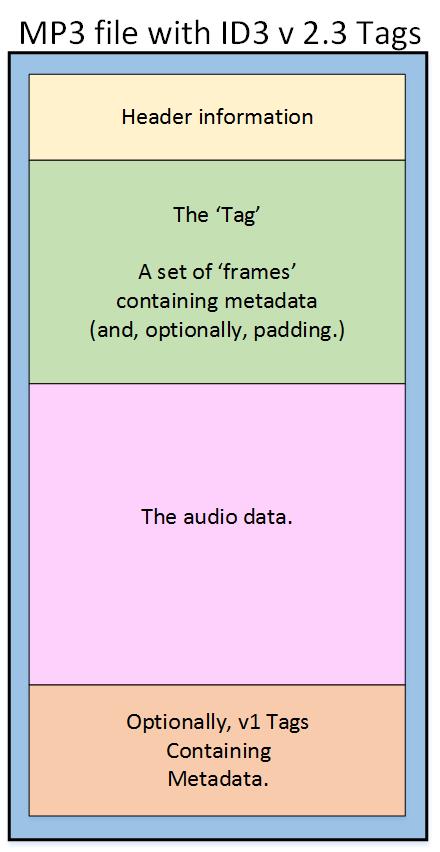
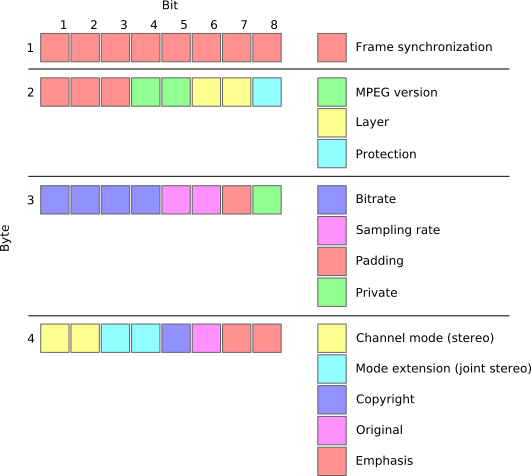
MP3 files are made up of a series of frames, each of which contains a small portion of the audio data. The frames are synchronized using sync words, which are unique patterns of bits that indicate the start of a new frame. The sync words are used by the MP3 decoder to identify the beginning of each frame and to synchronize the audio data.

How Frames and Sync Words Work Together

Frames and sync words are the building blocks of the MP3 file format. The frames contain the compressed audio data, while the sync words are used to identify the beginning of each frame. The sync words are also used to ensure that the frames are decoded in the correct order. Without sync words, the MP3 decoder would not be able to properly decode the audio data.
In conclusion, understanding the basics of MP3 file structure, frames, and sync words is essential for anyone who wants to work with digital audio. As an audio enthusiast, I have found that knowing how MP3 compression works has helped me to appreciate the technology behind digital audio. If you are looking for a reliable and efficient way to normalize and convert your audio files, I highly recommend MP4Gain. It is a powerful tool that can help you get the most out of your digital audio collection.
Final Words:
In this article, we have explored the basics of MP3 file structure, frames, and sync words. We have learned how MP3 compression works and how frames and sync words are used to compress and decompress audio data. If you have any questions or comments, please feel free to leave them below. Thank you for reading!

Author R. AriasPosted on May 28, 2023Categories Audio NormalizerTags 7zip file structure, an mp3, an mp3 or a mp3, audio algorithms, audio analysis, audio bitrates, audio codecs, audio collection, audio compression, audio conversion, audio data, audio decoding, audio editing, audio encoding, audio engineering., audio enthusiast, audio file formats, audio frames, audio metadata, audio normalization, audio processing, Audio quality, audio sampling rates, audio science, audio specifications, audio standards, audio synthesis, audio synthesis academies, audio synthesis blogs, audio synthesis books, audio synthesis careers, audio synthesis centers, audio synthesis certifications, audio synthesis challenges, audio synthesis colleges, audio synthesis communities, audio synthesis companies, audio synthesis competitions, audio synthesis conferences, audio synthesis consultants, audio synthesis contributions., audio synthesis controllers, audio synthesis courses, audio synthesis degrees, audio synthesis demos, audio synthesis devices, audio synthesis diplomas, audio synthesis donations, audio synthesis effects, audio synthesis entrepreneurs, audio synthesis envelopes, audio synthesis events, audio synthesis exams, audio synthesis exhibitions, audio synthesis experiments, audio synthesis experts, audio synthesis filters, audio synthesis forecasts, audio synthesis forums, audio synthesis freelancers, audio synthesis funding, audio synthesis games, audio synthesis grants, audio synthesis hackathons, audio synthesis hardware, audio synthesis innovations, audio synthesis insights, audio synthesis institutes, audio synthesis interfaces, audio synthesis investors, audio synthesis jobs, audio synthesis labs, audio synthesis languages, audio synthesis LFOs, audio synthesis libraries, audio synthesis mastering, audio synthesis meetups, audio synthesis mixing, audio synthesis modulation, audio synthesis modules, audio synthesis opportunities, audio synthesis oscillators, audio synthesis plugins, audio synthesis podcasts, audio synthesis predictions, audio synthesis processors, audio synthesis production, audio synthesis professionals, audio synthesis programming, audio synthesis programs, audio synthesis projects, audio synthesis prototypes, audio synthesis puzzles, audio synthesis quizzes, audio synthesis research, audio synthesis resources, audio synthesis routing, audio synthesis scholarships, audio synthesis schools, audio synthesis services, audio synthesis showcases, audio synthesis software, audio synthesis sponsorships, audio synthesis startups, audio synthesis studies, audio synthesis studios, audio synthesis techniques, audio synthesis tests, audio synthesis tips, audio synthesis tools, audio synthesis trends, audio synthesis tricks, audio synthesis tutorials, audio synthesis universities, audio synthesis videos, audio synthesis websites, audio synthesis workshops, Audio technology, audio tools, Audio-Software, bam file example, bam file structure, bam vs bed file, c file structure, convert audio, digital audio, examples of mp3 files, Fraunhofer Institute, heat soundtrack list, how are mp3 files stored, how to make an mp3 file on windows 10, how to organize mp3 files, how to put 2 mp3 files together, jmp file format, jmp structural equation modeling, k3 file sequence, lossy compression, mp3 + g files, mp3 binary file structure, mp3 decoder, mp3 file examples, mp3 file features, mp3 file format example, mp3 file format properties, mp3 file format specification, mp3 file format specification pdf, mp3 file format structure, mp3 file header structure, mp3 file structure, mp3 file structure pdf, mp3 file type, mp3 file types, mp3 format, mp3 structure, mp4 file format structure, mp4 file structure, mp4 structure, mp6 file, mp6 format, normalize audio, q3 mp3, q3 mp3 player, r file structure, r project file structure, structure of an mp3 file, structure of mp3 file, sync words, v3 file, v3 file extension, what does mp3 file stand for, x3p file format, zip mp3 files

Posts pagination

Previous page Page 1 Page 2

ABOUT US


Volume Booster

Mp4

Mp4


Flac Nomalizer – Flac volume normalization

Ogg Normalizer

M4a Normalizer

Audio Normalization

Mp4Gain Crack

Posts

Mp3 Normalizer

audio blog in het nederlands

Mp3 to Wav Converter

Mp3 Converter

Mp3Gain

Amplificateur de volume Mp3

Make mp3 louder
volume booster and equalizer

volume equalizer

volume booster

volume equalization


normalize mp4, normalize flv, normalize avi, normalize mpeg, normalize mpg, normalize 3gp, normalize wmv, normalize mp3, normalize mp2, normalize flac, normalize ogg, normalize m4a, normalize aac, normalize wav, normalize ac3

mp3 louder
mp3 volume booster
youtube normalize audio
mp3 volume increaser
increase mp3 volume
volume enhancer
normalize video audio

La normalizzazione del livello audio

Youtube to mp4 converter download

Mp4 Gain Website

Dowload Mp4Gain

Mp3Gain alternative

Mp3Gain

Video Formats:
mp4, flv, avi
mpeg, mpg
3gp, wmv

Audio Formats:
mp3, mp2, flac
ogg, m4a, aac
wav, ac3

Flv Gain, Mp4 Gain, Avi Gain, Mpeg Gain, wmv Gain, Wav Gain, 3gp Gain, Flac Gain, Ogg Gain…


Video Volume Booster

Bass Booster

Mp3Gain Alternative

Mp3Gain Online

mp4 normalize, flv normalize, avi normalize, mpeg normalize, mpg normalize, 3gp normalize, wmv normalize, mp3 normalize, mp2 normalize, flac normalize, ogg normalize, m4a normalize, aac normalize, wav normalize, ac3 normalize.

Mp3Gain,mp3 louder,boost sound,increase mp3 volume,volume increaser,volume booster,normalize audio,mp3 volume increaser,mp3 volumne booster,volume equalizer,Volume Booster -Sound Booster,loudness equalizer,boost audio,make mp3 louder,boost mp3 volume,mp4 volume booster,mp3 audio booster,raise mp3 volume,loudness normalization,mp3 louder,mp3 volume booster,youtube normalize audio,mp3 volume increaser,increase mp3 volume,volume enhancer,normalize video audio,volume equalizer,mp3 louder,increase mp3 volume,video audio normalizer,

Categories

  • 3gp volume normalizer
  • AAC normalizer
  • are volume boosters safe
  • Audio and video
  • audio converter
  • Audio Converter Software
  • Audio Normalizer
  • AVI normalizer
  • Bit rate
  • Boost volume
  • codec
  • FLAC
  • Flac Normalizer
  • FLV volume normalizer
  • Increase mp3 volume
  • Lossless
  • loudness equalizer
  • loudness normalization
  • M4A
  • M4a (iTunes) Normalizer
  • M4a Normalizer
  • make mp3 louder
  • mp3 download
  • mp3 louder
  • Mp3 Normalizer
  • Mp3 to Wav
  • mp3 volume increaser
  • mp3 volumne booster
  • Mp3Gain
  • mp3gain online
  • Mp4
  • Mp4 Gain
  • Mp4 Normalizer
  • Mp4 volume booster
  • Mp4Gain
  • Mp4Gain Crack
  • Normalizing audio for the videos
  • Ogg Normalizer
  • Replay Gain
  • Samplerate
  • video
  • video audio normalizer
  • Video Converter
  • Video Gain
  • video to mp3 converter
  • VideoGain
  • Volume Booster
  • Volume Enhancer
  • volume equalizer
  • volume increaser
  • volume leveler
  • WAV
  • webm
  • WMV
  • youtube normalize audio
  • Youtube to mp3 downloader

Recent Posts

  • Video Louder
  • Video Volume Leveling
  • MP4 to MP3 Converter
  • Audio & Video Converter
  • Volume Changer for MP4 and MP3s Increase & Decrease
  • Increase Volume in MP4
  • adjust audio and video volume
  • Sound Leveling
  • Volume Booster
  • Importance of LUFS in Video or Audio Normalization
  • How to make MP4 audio volume consistent
  • Lossy compression in M4A
  • Advanced audio coding (AAC) in M4A
  • OGG vs. MP3 comparison
  • FLAC file size
  • Apple M4A Format: The Ultimate Guide
  • MP4 Compression Techniques
  • RMS Normalization
  • Loudness Normalization
  • MP4 Converter
  • MP4 File Extension
  • OGG Normalizer
  • Video & Audio Normalizer
  • FLAC Normalizer
  • MP4 Video Quality
  • MP4 File Format
  • m4a Normalizer
  • Mp4 Increase Volume
  • How MP4 Handles 4K and 8K Video Resolutions Efficiently
  • Low-Latency Encoding Strategies for WMV Live Streaming
  • Resampling Effects on M4A Audio Quality
  • How MP3 Bitrates Affect Audio Quality and File Size
  • MP4 Multi-Pass Encoding Benefits and Use Cases
  • How Variable Bitrate Encoding Affects MP4 Video Quality
  • How WMV Handles Aspect Ratio Correction in Different Players
  • How WMA Adapts to Dynamic Range in Music Encoding
  • Comparing WMV to MPEG-2 for Legacy Video Storage
  • WMA Standard, WMA Pro, and WMA Lossless: Key Differences
  • Understanding the MP4 moov Atom and Its Role in Video Playback
  • Comparing WMA to Ogg Vorbis for Open-Source Audio Compression
  • WMV Container Efficiency in Video Streaming Applications
  • Hardware Acceleration for M4A Encoding and Decoding
  • How M4A Compares to MP3 in Real-World Listening Tests
  • The Role of Perceptual Coding in WMA Compression
  • Temporal Noise Filtering Techniques in WMV Compression
  • H.264 and H.265 Codecs
  • Advanced Audio Compression Techniques in M4A Format
  • Comparing GPU vs. CPU Encoding Efficiency for WMV Files
  • Advanced Error Correction in M4A and AAC Encoding
  • The Effect of Multi-Channel Encoding on WMA Audio Files
mp4gain.com Proudly powered by WordPress