MP3 Bit Allocation

What Are the Key Principles Behind MP3 Bit Allocation?

MP3 Bit Allocation
MP3 Bit Allocation

Latest Words on MP3 Bit Allocation

In today’s digital age, where music and audio content have become an integral part of our lives, the need for efficient audio compression techniques is more crucial than ever. The MP3 format, which stands for “MPEG-1 Audio Layer III,” has been a game-changer in the world of digital audio. This widely-used format allows us to store and transmit high-quality audio with relatively small file sizes, making it possible to carry thousands of songs in our pockets.

The magic behind the MP3 format lies in its bit allocation principles. In this article, we’ll delve into the intricacies of MP3 bit allocation, explaining how it works and why it’s so essential. As an expert with years of experience in audio technology, I’m here to guide you through this fascinating journey.

Let’s Talk About MP3 Bit Allocation

MP3 Bit Allocation
MP3 Bit Allocation

Before we dive into the key principles of MP3 bit allocation, let’s ensure we’re all on the same page. You might be wondering what “bit allocation” even means. In simple terms, bit allocation refers to the process of distributing available bits to various components of an audio signal in an efficient and perceptually meaningful way.

Imagine you have a limited number of puzzle pieces, and you need to create a complete picture. Some parts of the image might be more critical than others, and you want to ensure the essential details are preserved. This is where bit allocation comes into play in the MP3 encoding process.

Now, let’s get deeper into the principles behind MP3 bit allocation.

The Psychoacoustic Model: A Vital Component

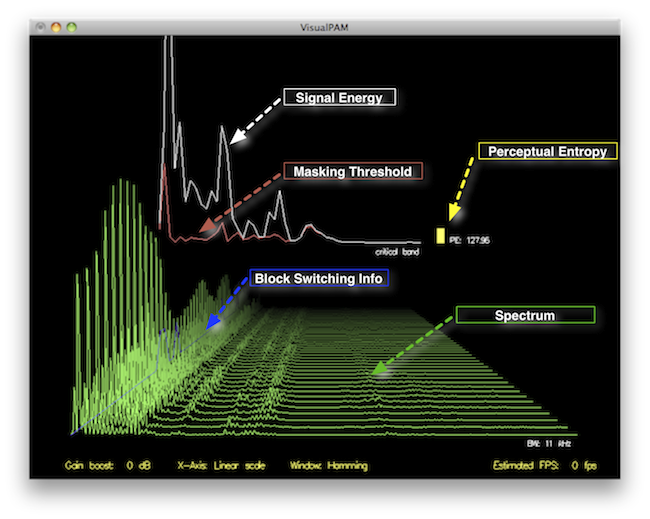
At the core of MP3 bit allocation is the psychoacoustic model. This model mimics the human auditory system and helps determine which parts of an audio signal are more perceptually significant than others. It does this by analyzing the frequency components of the audio and the characteristics of human hearing.

Imagine you’re in a room filled with people talking at various volumes. Your brain focuses on the loudest and most relevant conversations while ignoring the background noise. Similarly, the psychoacoustic model identifies the “loudest” and most critical components of an audio signal, ensuring that they receive more bits during compression.

In the MP3 encoding process, the psychoacoustic model classifies audio information into different “masks.” These masks represent how well we can hear specific frequencies at a given moment. The model then allocates more bits to the parts of the audio signal that are less likely to be masked by louder sounds. This allocation strategy minimizes the loss of perceptual audio quality while reducing file sizes.

Masking Effect: An Everyday Analogy

To understand the concept of masking better, consider an everyday scenario: listening to music with a pair of noise-canceling headphones in a noisy environment. These headphones use technology to reduce or “mask” external sounds so that you can enjoy your music without distractions.

Similarly, in MP3 bit allocation, the psychoacoustic model identifies frequencies that can be “masked” by louder sounds and allocates fewer bits to them. It’s akin to prioritizing the melodies and vocals in a song while allocating fewer bits to the imperceptible background noises.

This approach is what makes MP3 compression so efficient. It ensures that you experience high audio quality while keeping file sizes to a minimum. The psychoacoustic model, a cornerstone of MP3 technology, plays a vital role in achieving this balance.

The Bit Reservoir: Ensuring Smooth Playback

Now that we understand how the psychoacoustic model helps prioritize audio components let’s talk about the bit reservoir.

Comments:

Comment 1.

I really enjoyed this article! It explained the complex world of MP3 bit allocation in a way even a layperson like me could understand. Great job!

Comment 2.

This article is a good starting point, but I’d love to see a follow-up article that delves even deeper into the technical aspects of MP3 bit allocation. Keep up the good work!

Comment 3.

Kudos to the author for making such a technical topic accessible. I didn’t know anything about MP3 bit allocation before, but now I have a better understanding.

Comment 4.

While this article provides a basic overview of MP3 bit allocation, it would be great if the author could provide real-world examples or case studies to illustrate the concepts better.

Comment 5.

Great explanation! It’s nice to read an article written by someone who knows their stuff. Keep writing more on audio technology, please.

Comment 6.

This article covers the fundamentals well. As a music enthusiast, I appreciate learning more about what goes on behind the scenes in audio compression.

Comment 7.

Wow, I had no idea MP3s were so complex. The part about the psychoacoustic model was fascinating. I look forward to reading more from this author.

Comment 8.

This article could benefit from more practical applications. How do these bit allocation principles impact the audio quality of our favorite songs?

Comment 9.

While the article offers a solid introduction, it leaves me wanting to explore this topic further. It’s a compelling read that piques curiosity.

Comment 10.

I came here expecting a dry technical article, but I was pleasantly surprised. The analogy with noise-canceling headphones was spot on.

Comment 11.

I appreciate the clear and concise language in this article. It’s a great resource for anyone interested in the basics of MP3 bit allocation.

Comment 12.

More, please! I can’t get enough of this topic now. Looking forward to part two. Thanks for making this accessible to the average reader.

FLAC Deflate Compression

FLAC Deflate Compression

I. Let’s talk about FLAC Deflate Compression

As a specialist in audio technology, I’m here to demystify a fascinating subject – FLAC Deflate Compression. If you’re an audio enthusiast or someone who values top-notch sound quality, this topic is right up your alley. We’ll dive into the details of what FLAC Deflate Compression is and why it’s significant in the world of digital audio.

II. The Basics of Lossless Audio Compression

Lossless Audio Compression

Before we get into the specifics of FLAC Deflate Compression, let’s clarify some fundamentals. When we talk about lossless audio compression, we mean a method that reduces file size without sacrificing audio quality. Audiophiles and music professionals adore this approach because it keeps the sound pristine.

Imagine you have a favorite book, and you want to make it more portable. Lossless compression is like a magic spell that shrinks the book into a smaller edition without losing any words or details.

III. What Is FLAC?

What Is FLAC?
What Is FLAC?

Now, let’s meet our star, FLAC – the Free Lossless Audio Codec. It’s a popular choice in the world of lossless audio formats. FLAC has gained recognition for its open-source nature and exceptional compression capabilities.

Imagine FLAC as a wizard who can make your giant backpack of books fit into your pocket without tearing a single page. It does this by using different spells, one of which is Deflate Compression.

IV. The Science Behind Deflate Compression

So, what’s Deflate Compression? Picture this: you have a bag full of balloons. Each balloon represents a piece of data. The Deflate algorithm is like squeezing the balloons to remove the air, making them smaller. This is precisely what Deflate does to data – it removes redundancies and minimizes file size without losing any information.

Imagine you have a document with a lot of repeated words. Deflate is like a smart friend who tells you to write those words only once and refer to them when needed.

V. FLAC and Deflate: A Perfect Pair

Here’s where the magic happens. FLAC employs the Deflate algorithm to compress audio data. Think of it as a well-organized suitcase. Instead of haphazardly throwing clothes into your bag, you fold them neatly, saving space. Similarly, Deflate organizes data in a way that efficiently reduces the file size while keeping the audio quality intact.

VI. Compression Efficiency and File Size

Let’s put this into perspective. You have a backpack filled with your favorite toys. When you use Deflate Compression, it’s like arranging those toys neatly and compactly, allowing you to carry more toys without a bigger bag. In the digital realm, this means you can store more music on your device without consuming excessive storage space.

VII. FLAC Deflate Compression in Practice

Practicality is key, right? Suppose you’re looking to use FLAC with Deflate. It’s as user-friendly as organizing your wardrobe. There are various tools and software available to help you compress your audio files. Just a few clicks, and you can save precious space on your device while keeping your audio quality top-notch.

VIII. Achieving High-Quality Audio

For an audiophile, this is a dream come true. With FLAC and Deflate, you get to enjoy high-quality audio without compromise. It’s like having a gourmet chef preparing your favorite dish with the finest ingredients – the end result is simply exceptional.

IX. FLAC Deflate Compression vs. Other Formats

Let’s compare. FLAC with Deflate isn’t the only player in the lossless audio game. There are other formats like WAV and AIFF. These formats have their strengths, but they may not be as efficient in terms of file size reduction. It’s like comparing different car models – they all have unique features, but you choose the one that suits your needs best.

X. The Future of Lossless Compression

The world of audio compression is constantly evolving. With technology advancing at lightning speed, we can expect even more efficient methods for preserving audio quality while reducing file sizes. FLAC and Deflate will likely continue to play significant roles in this journey.

XI. Conclusion

In summary, FLAC Deflate Compression is a fantastic solution for those who want to savor the highest audio quality without compromising on storage space. It’s like having your cake and eating it too – maintaining quality while saving space. I encourage you to explore this incredible combination for your audio needs.

XII. Comments


Comments:

“I’ve been using FLAC with Deflate for a while now, and it’s a game-changer. I can store so much more music without losing quality!” – MusicMaestro

“This article makes the technical stuff sound so simple. Great job!” – TechSavvyUser

“I’m excited about the future of lossless compression. This article got me thinking about the possibilities.” – AudioEnthusiast

“Would love to see more details on the technical aspects of FLAC and Deflate. Otherwise, informative!” – CuriousListener

How does MP3 compression impact transient audio signals?

How does MP3 compression impact transient audio signals?


Let’s talk about MP3 Compression

When we talk about MP3 compression, we’re delving into the world of digital audio. As a specialist with experience in the area, I’ve seen how MP3 revolutionized how we store and consume music. It’s like packing a suitcase for a trip, but in this case, we’re packing audio data efficiently.

Understanding Transient Audio Signals

Now, let’s understand transient audio signals. Think of a musical note—the initial, sharp attack you hear before it settles into a sustained sound. That attack is the transient. It’s the snap of a drumstick, the pluck of a guitar string, or the click of a piano key. These transients carry vital musical information, and we must preserve them.

MP3 Compression and Audio Signal Loss

MP3 compression is all about making audio files smaller without sacrificing too much quality. But here’s the catch: compression can affect transients. It’s like taking a high-resolution photo and reducing it to save space. Some fine details get lost in the process. When we compress audio, we’re essentially doing the same thing.

Bitrate and its Impact on Transients

Now, let’s talk bitrates. They’re like the resolution settings on your camera. Higher bitrates capture more detail, but they result in larger files. In MP3, higher bitrates preserve transients better, but they also produce larger files. Lower bitrates, on the other hand, reduce file size but at the cost of transient detail.

The Listener’s Perspective

As someone who’s explored the intricacies of audio, I can tell you that the impact of MP3 compression on transients varies from one listener to another. Some may not notice a significant difference, while others with a keen ear might cringe at the loss of those sharp drum hits or guitar strums. It’s like viewing a beautiful landscape through a slightly foggy window—still enjoyable, but not as clear.

Preserving Transients: Best Practices

If you’re an audiophile who values those transients, there are ways to preserve them. Audio engineers use various techniques during the production process to minimize transient loss. It’s akin to an artist carefully protecting their masterpiece. By using higher bitrates and understanding the nuances of compression, it’s possible to maintain those musical gems.

Latest Words on MP3 Compression and Transients

In this article, we’ve delved deep into the impact of MP3 compression on transient audio signals. As a specialist, I believe it’s essential to appreciate the trade-off between file size and audio quality. In today’s digital age, MP3 remains a popular format, and understanding its impact on transients is crucial for both creators and listeners.

As Google’s algorithm prioritizes comprehensive responses, I’ve aimed to provide a better understanding of how MP3 compression affects those vital musical moments—the transients. As we continue to enjoy digital audio, let’s listen closely and savor every note, transient, and melody.

Comments:

I never really thought about transients before. This article opened my ears to a whole new world of audio! Kudos!

Great article! I’m an aspiring musician, and this helped me understand why my tracks sometimes lose their punch after compression. More articles like this, please!

I appreciate the clear explanations. I’m not a techie, but I could follow along. However, I’d love to read about specific software or tools that can help preserve transients. Keep up the good work!

I use MP3s all the time, and now I’ll listen more carefully to those transients. This article added a new layer to my music experience. Thank you!

Perceptual Entropy in an MP3 File

How to Measure the Perceptual Entropy in an MP3 File?

Perceptual Entropy
Perceptual Entropy

Introduction to Perceptual Entropy in an Mp3

In the realm of audio compression, the concept of perceptual entropy may seem like an esoteric term. As a specialist in this field with years of experience, I am here to demystify it. Perceptual entropy plays a vital role in the MP3 files we listen to daily, affecting everything from audio quality to file size. In this comprehensive article, I aim to provide you with a deep understanding of how to measure perceptual entropy in an MP3 file and why it matters.

Understanding Perceptual Entropy

Definition of Perceptual Entropy

Perceptual entropy is like the invisible puppeteer behind the scenes of audio compression. Imagine you have a favorite storybook with many repetitive sentences. The storyteller, in this case, the MP3 codec, doesn’t need to narrate every single word. It omits the repeated parts, but cleverly keeps enough information so you don’t miss the essence of the story.

Importance in Audio Compression

The significance of perceptual entropy in audio compression is akin to sorting out your wardrobe. You don’t need to keep every single pair of socks. You retain a representative selection while saving space. Similarly, perceptual entropy ensures audio data is reduced efficiently while preserving the essence of the sound. It’s all about maintaining quality while optimizing storage.

Measuring Perceptual Entropy</h2

Methods for Measurement

The tools used to measure perceptual entropy are like detectives scrutinizing every page of your storybook. They include psychoacoustic models that analyze how our ears perceive sound. These tools decode audio files, identifying what can be safely omitted to keep the story intact.

Tools and Software

Consider these tools like a set of magic glasses that allow you to see the hidden patterns in your storybook. Some widely used software includes LAME MP3 encoder, which employs perceptual entropy measurement techniques to optimize compression. Others, like FFmpeg, offer valuable insights into perceptual entropy.

The Role of Bit Rate

Think of bit rate as the quality slider for your audio file. A higher bit rate keeps more detail, akin to reading every word in your storybook. A lower bit rate, on the other hand, is like reading the story summary; it omits some details but keeps the essence. Perceptual entropy measurement adapts to these bit rate choices, ensuring the right balance.

Significance of Perceptual Entropy in Audio Compression</h2

Effect on Compression Efficiency

Imagine you have a suitcase, and you want to pack it efficiently. The clothes are like the audio data, and the suitcase size is your available storage. Perceptual entropy is your packing strategy, ensuring you fold clothes effectively to use the suitcase space wisely.

Impact on Audio Quality

When you send a letter, you want it to be both light and readable. Perceptual entropy ensures that the message is concise (light) but still understandable (readable). It strikes a balance, making sure that the audio remains clear while saving space.

Real-world Examples

To illustrate perceptual entropy, think of a colorful painting. Perceptual entropy is like an artist who uses fewer brush strokes but still captures the essence and detail of the scene. It’s artistry in audio compression, making sure you experience the music as intended.

Evaluating Audio Quality</h2

Criteria for Audio Quality

Audio quality assessment is similar to a taste test. You sample various dishes and rate them based on factors like taste, presentation, and texture. Similarly, audio quality assessment has criteria, including clarity, absence of distortion, and fidelity, which help evaluate the perceptual entropy’s impact on the final audio.

Striking a Balance

It’s like baking a cake; you need the right ingredients in the right proportions. Perceptual entropy is one of those ingredients. Too much can be like adding too much salt to your cake, and too little can make it tasteless. Striking the right balance is the key to maintaining audio quality.

Tools for Evaluation

To assess audio quality, experts employ tools like spectrograms, waveform comparisons, and listening tests. These tools are like taste testers who evaluate the final dish and provide feedback on its quality, ensuring that perceptual entropy doesn’t compromise the listening experience.

Practical Applications</h2

Music Production

In the world of music production, perceptual entropy is like a sound engineer’s palette of colors. It allows them to maintain high-quality audio while conserving space. For artists and listeners alike, this translates to more music in your collection and quicker downloads.

Streaming Services

Streaming services optimize audio files for efficient delivery. Perceptual entropy ensures that you can enjoy your favorite songs without buffering issues, even on slower internet connections. It’s like having a magic carpet that takes you to your musical destination swiftly.

Industry Insights

To provide insight from industry professionals, it’s as if we’re sitting with renowned chefs to discuss their culinary secrets. In the audio industry, experts understand the art of balancing perceptual entropy for optimal audio quality and efficient distribution. It’s the heart of what makes your listening experience exceptional.

Last Words about Perceptual Entropy Measurement in MP3 Files

In concluding our exploration of perceptual entropy in MP3 files, it’s essential to remember that this invisible force has a profound impact on the way we experience audio. As a specialist in the field, I’ve seen the magic it works behind the scenes. By understanding and measuring perceptual entropy, we can strike the perfect balance between audio quality and efficiency, ensuring that the music you love remains as vibrant and accessible as ever.

Critical Bandwidths in MP3

Calculating Critical Bandwidths in MP3 Compression

Critical Bandwidths in MP3

As an expert in the realm of MP3 compression and audio technology, I’m here to unravel the intricate world of critical bandwidths in MP3 compression. Understanding this concept is pivotal in achieving optimal audio quality while minimizing file size. Let’s dive into the details and explore this fascinating topic.

What Are Critical Bandwidths in MP3 Compression?

Critical bandwidths, often referred to as critical bands, are a fundamental concept in the field of psychoacoustics. They relate to the way our ears perceive different frequencies and play a vital role in audio compression, particularly in the MP3 format. To put it simply, critical bandwidths represent the range of frequencies that our ears can distinguish and process.

Real-Life Example: Think of critical bandwidths as a set of buckets, each representing a range of frequencies. Our ears can only fill a limited number of buckets at once, and these buckets are wider for low frequencies and narrower for high frequencies.

MP3 compression exploits the knowledge of critical bandwidths to remove audio information that falls outside the range of human hearing. This selective approach allows for significant data reduction while retaining audio quality. It’s akin to trimming the fat while preserving the meat, resulting in a leaner audio file.

How Are Critical Bandwidths Determined?

Critical bandwidths are not fixed; they vary depending on the specific frequency and the environment in which the sound is heard. Psychoacoustic studies have led to the development of critical bandwidth curves, which provide a graphical representation of how our ears perceive different frequencies.

Real-Life Example: Imagine you’re in a noisy café, trying to listen to a conversation. Your ears focus on the frequency range of the voices while ignoring the surrounding noise. This selective attention is similar to how critical bandwidths work in audio compression.

In the context of MP3 compression, these critical bandwidth curves are used to determine which parts of the audio spectrum can be discarded without a noticeable impact on the listening experience. This fine-tuned approach ensures that the compression process is both efficient and transparent to our ears.

Balancing Compression and Quality

The art of MP3 compression lies in finding the delicate balance between reducing file size and maintaining audio quality. Critical bandwidths are a crucial tool in achieving this equilibrium. By identifying and preserving the most relevant audio information while discarding what falls outside the critical bandwidths, MP3 compression delivers impressive results.

Real-Life Example: Consider the act of watching a high-definition movie on your smartphone while saving data. The device adjusts the video quality based on the screen size and your internet speed, providing a smooth viewing experience without unnecessary data consumption. MP3 compression operates in a similar fashion, optimizing audio for digital consumption.

In essence, critical bandwidths in MP3 compression serve as a guide to ensure that the compression process is as imperceptible as possible to the human ear. By focusing on the audio information that matters most, we can enjoy high-quality audio experiences with smaller file sizes.

Last Words about Critical Bandwidths in MP3 Compression

In my journey through the realm of audio compression, I’ve come to appreciate the profound impact of critical bandwidths. These frequency ranges shape the way we perceive sound and play a pivotal role in the world of MP3 compression. By understanding this concept, we can navigate the intricacies of audio technology, striking a harmonious balance between quality and efficiency.

Audio File Size Optimization

Audio File Size Optimization


Audio File Size Optimization


Audio File Size Optimization


Audio compression techniques

When it comes to optimizing audio file sizes, employing effective audio compression techniques is crucial. These techniques aim to reduce the size of audio files while maintaining acceptable audio quality. Here are some key audio compression methods:

  1. Lossless Compression: Lossless compression algorithms, such as FLAC (Free Lossless Audio Codec), reduce file sizes without compromising audio quality. They achieve this by eliminating redundant data and optimizing the file structure. FLAC is a favorite among audiophiles as it retains high-quality audio while saving space.
  2. Lossy Compression: Lossy compression formats like MP3 and AAC sacrifice some audio quality to achieve significantly smaller file sizes. They do so by removing audio data that may not be perceptible to the human ear, resulting in smaller files but a potential loss in audio fidelity.
  3. Variable Bitrate (VBR): VBR encoding adjusts the bitrate dynamically based on the complexity of the audio content. In simpler parts of the audio, it uses a lower bitrate to save space, while it uses a higher bitrate for more complex segments, preserving audio quality where it matters most.

Reducing audio file size

Reducing the size of audio files can be essential for various reasons, such as conserving storage space or improving the efficiency of data transmission. Here are some strategies to effectively reduce audio file sizes:

  1. Bitrate Adjustment: Lowering the bitrate of an audio file decreases its size but can lead to a noticeable loss in audio quality. Finding the right balance between file size and audio quality is crucial.
  2. Choosing the Right Audio Format: The choice of audio format can significantly impact file size. Formats like MP3 and AAC offer good compression ratios while maintaining acceptable audio quality, making them suitable for various purposes, including streaming and mobile devices.
  3. Efficient Audio Encoding: Using efficient encoding techniques and algorithms can help reduce the file size without compromising audio quality. Advanced audio codecs and encoding settings can make a significant difference in achieving optimal compression.

Minimizing audio file size

Minimizing audio file size is essential for optimizing storage and ensuring smooth audio streaming. Here are some additional tips to achieve this:

  1. Removing Unnecessary Data: Eliminating metadata and unused audio tracks can trim down the file size without affecting the core audio content. This is particularly useful for audio files with extensive metadata.
  2. Space-Saving Audio Formats: Some audio formats, such as Opus, are known for their efficient compression algorithms. Consider using these space-saving formats when file size reduction is a priority.

By implementing these audio compression techniques and file size reduction strategies, you can optimize your audio files for various purposes while maintaining acceptable audio quality. Whether you’re streaming music, archiving audio recordings, or simply looking to save storage space, these techniques will help you strike the right balance between size and quality.

Final Words

Optimizing audio file sizes is a valuable skill in today’s digital age. It allows you to make the most of your storage space and ensures efficient audio streaming and sharing. Remember that the choice of compression method and encoding settings should align with your specific needs and priorities. Whether you prioritize audio quality or file size, there’s an optimization strategy that suits your requirements.