Video codecs


Free Download Mp4Gain
picture

In photography, the choice of the recording codec is quite limited: we usually fluctuate between the JPG format and the Raw format. In video, the choice is slightly wider: MPEG-1, MPEG-2, MPG-4, H264, H265, RAW, ProRes, ProRes Raw, Motion jpeg, etc.

So what are these codecs for, what uses are they designed for, and which ones should you choose?

Códecs

CONTAINERS AND CODECS are NOT the same!

Digital videos are contained in files. These files are called “containers”. The extension of these files often makes it possible to determine their type. The most common containers are MP4, MOV, AVI and MXF. The MXF container is generally used in professional camera series from manufacturers such as Sony or Panasonic.

These containers are “boxes” or “folders” that consist of several elements: video track, sound tracks, time code or subtitles. The purpose of the container is to synchronize all the elements it contains.

Therefore, you cannot know the codec of a video from the file extension: for example, an .avi file and a .mov file could use the same codec to encode the video track.

WHAT IS A CODEC?

A codec is a mathematical procedure consisting of algorithms used to encode and decode the image (codec). It helps define how sensor information is stored and the strategy for compressing and decompressing images.

codec

The size of a one minute 4K video file is about 50 GB. Therefore, it is easy to understand the main advantage of using a codec: compression. For the same minute of 4K recording, for example, using the H264 codec reduces the file size by a factor of about 27, or a final size of about 1.8 GB.

The more “codec” a codec is, the more complex the decoding will be and it will require a powerful machine to accomplish this task. At the same time, the higher the compression, the greater the loss of information that can make post-production difficult.

To achieve this optimization, most codecs use spatial compression: each image is compressed independently of the other images; This is known as an “intra” codec. For more compression, more complex codecs add temporary compression: we’re talking LONG GOP (GOP for “Group of Pictures” or “Long Group of Pictures”); Codecs of this type record only one full image per x images (often 12) and retain only what has changed between these images.


Free Download Mp4Gain
picture


Mp4Gain Main Window
picture


Mp4Gain Features
picture


Free Download Mp4Gain
picture

Which video codec should you choose? H264 or H265?

When we finish editing our problems in our editing software, the first obstacle we face (after lack of hard disk space …) is often the format in which we decided to export our video. Whether digital or physical. We are faced with a list of video codec names that we sometimes have trouble entering. And that also scares many amateur friends.

Which internet user has never searched for a codec or codec package to play a video. And if not, then at best you only heard the audio … As I wrote in another article, the video codec will mainly depend on the medium in which your video is sent in. In fact, it is not as simple as the image, which is often enough to export in jpeg or other format so that it can be seen anywhere. Video has this major drawback choosing the correct codec based on streaming platform.

codec

The concept of containers and codecs.

To illustrate what a container and a codec are, imagine a jar (container) containing letters (codec). The video player that will “decode” this file can be compared to someone who holds the key to the pot. And who puts the letters together to make words and then meaningful sentences? Basically, the container is the file that can be related to a box or jar that contains video codec, audio codec and sometimes even the subtitle file. When you have a video in .avi or .mp4 or .mov or even .mkv, the container ends after the period. What videographers are also used to call “video format”.

For example, for .mp4, the container is MP4. So far so good. And then in this container there can be Mpeg4, H264 or x264, which are video codecs.

Accompanied by the audio track which may be in mp3, AC3 or AAC, but we will return to the audio codecs in another article. And since we don’t just like doing things in the video, these video codecs can also be found in other containers …

Yes, otherwise it would be too easy. So the main concern found in the video is this famous lack of compatibility that ALL multimedia platforms have. Being able to play a video file if a codec package is not installed before. In fact, each codec has an association with this or that manufacturer (Windows, Apple, etc.).

The main containers

My goal here is not to make a complete list of existing containers today. But rather to give you the most useful, the most widespread. And especially its compatibility according to the multimedia support you want to distribute them to.

mp4.MP4
So it can contain Mpeg4, H264, x264, XAVC, VP9 (YouTube codec), H265 and even Mpeg2 (super logical, we agree …). That’s why so many people get confused with codecs! MP4 is widely used, but unfortunately it is not supported everywhere. It runs on the latest smartphones and tablets. But this does not happen in, for example, multimedia DVD players that have a USB port, such as

.mov.MOV
The Apple-owned Quicktime container. Very popular with publishers on Mac with Final Cut. This container can contain a sacred package of codecs (DV, Divx, WMV, Mpeg2, H264, x264, DVCPRO …). But unfortunately it is only almost compatible only on Apple (Mac, Ipad, Iphone) and PC after installing Quicktime.

.avi.AVI
The King Container from the 2000s, but which I think is destined to disappear very soon. Except for those who want to watch standard definition videos. It may contain DV, Divx 5, Xvid and even H264 codecs, but I do not guarantee the comfort of reading or editing with this container for HD content. Except for HDV format.

mkv.MKV (Matroska)
The successor to AVI for HD, Full HD, 4K and also 8K! Free Container is the container I advise you to use when exporting your videos (or RIP for your Blurays) 🙂 so they are compatible almost everywhere. It can contain Divx, Xvid, Mpeg2, Mpeg4, H264, x264 and H265 (also called HEVC, the new codec), and you’ll probably forget it. It has great advantages over other containers. For example, managing subtitle tracks in various formats, chapter support. You can also embed attachments, such as illustrations, for example (cover or cover). And finally, it also allows you to “chapters” from videos like Bluray’s creation.

.mts.mts.MTS (and .M2TS)
The AVCHD (Advanced Video Codec HD) container is often found on Sony and Panasonic cameras. It is MPEG-4 and it also has a declination for Bluray discs that are M2TS (Mpeg 2 TS).

Compression formats and codecs for audio and video.

From mp3 format to H.265 and VP9 codecs, these are the most widely used audio and video compression formats.

codecs

The videos we watch on YouTube, the music we listen to through Spotify and iTunes, the photos taken with the digital camera. The multimedia content that we process daily is the result of a compression process that allows you to enjoy them without major headaches. Due to the weight of the files, the need arose to reduce their size so that they take up less disk space and can be exchanged faster on the network.

Over the years, two different compression techniques have been developed: one involving loss of information and one involving loss of information. This has led to the emergence of various codecs and formats, such as MPEG, MP3, MPEG-H and many others.

codecs

Without loss and without loss

Media compression can occur in two ways: lossy (translated with “lossless”) and lossless (translated with “lossless”). In the first case, encoding audio and video files involves loss of some information that is considered “useless” or non-essential. The files obtained through this process will have a lower quality than the original files, but the human eye or ear should not notice major differences. In an mp3 file, for example, the ultrasound is removed; In the case of a Jpeg file, groups of adjacent pixels and the like can be chromatically grouped into larger blocks and lose a certain amount of detail depending on the amount of compression performed.

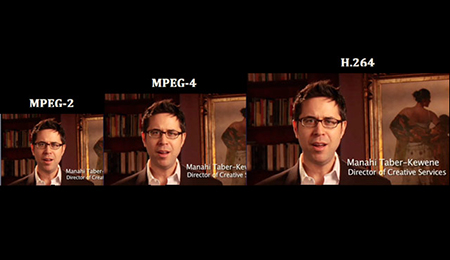
Comparison of MPEG formats

Losses without compression ensure that no loss of information is lost in the coding process. This is possible by using certain algorithms that eliminate redundant information by replacing it with some sort of “placeholder”. For example, the LLE (Run Length Encoding) algorithm identifies the usual repetition in the bitstream files and replaces them with a single symbol and the number of repetitions.

Video compression formats

DivX, Xvid. They belong to one of the first generations of the era of online multimedia content. In essence, these are two “twin” codecs: DivX was born as the proprietary format of the homonymous software house; XviD as a free and open source alternative with similar, if not identical, functionalities. They achieved great success and widespread popularity thanks to their ability to compress long clips (even full-length movies) into small files while maintaining a good quality level.

Comparing formats to the Internet.

– Google code. Google is increasingly engaged in the multimedia sector and is increasingly committed to investing in technologies that can minimize the impact on users’ bandwidth consumption. An example of this is the set of codecs and video compression formats developed in recent years. The latest addition is the VP9 codec, which is compliant with the 4K standard and is capable of guaranteeing a high reproduction quality associated with small files.

H.264. Among the most widely used video compression formats to create and distribute movies and videos of all sizes and resolutions, the H.264 codec (also known as MPEG-4 Part 10 AVC) is also known to be one of the Blue Disks-ray encoding standards . It is capable of guaranteeing excellent video quality at low bitrate levels (ie smaller files) and is widely used by web video streaming services (Vimeo, iTunes) and video playback software (Adobe Flashplayer and Microsoft Silverlight)

H.265. The inheritance of the H.264 codec (officially released only in April 2013) theoretically guarantees a double compression compared to its predecessor: therefore, for the same video quality, a video file compressed with the H.265 codec will weigh approximately half of that movie compressed with the H.264 codec. It is compatible with the 8K standard, which guarantees viewing videos with a resolution up to 8,192×4,320 pixels

What is video encoding and how does it work?

The technique of compressing videos

What do we mean when we talk about video coding or, as industry experts generally call it, video coding?

YOUTUBE VIDEO FORMAT

Simply put, video encoding is the process of compressing and converting video content. The ultimate goal is to use less storage space, use less bandwidth, and make the user experience smoother. It goes without saying that the compression process causes a significant loss of information. The more data that is applied, the more data is deleted in the video. The result is a different version of the original due to missing data.

mp4 videos

Why is video coding so important?

Video encoding is essential for transmission because it simplifies the transmission of video on the Internet through a compression process. Compression reduces the bandwidth required while providing a high quality experience. Without this, raw video content would not allow many users to view content on the Internet due to insufficient connection speeds. The protagonist of this process is the bit rate or the speed of digital data transmission that can be transmitted in a certain time interval in a communication channel. When streaming, the bit rate determines whether users can easily view the content or are exposed to video buffering.

Another fundamental aspect of video coding is compatibility. Indeed, sometimes the content is already compressed to an appropriate size, but it still needs to be encoded to be compatible with different devices and applications, although this is often referred to as transcoding.

The video encoding process is governed by video codecs, which are compression standards that are created through software or hardware applications. Each codec consists of an encoder for compressing the video and a decoder for restoring an approximation of the video for playback. The name codec is actually derived from the merging of the words “encoder” and “decoder”.

But what is the best codec?

It depends on the type of video. On this occasion we will describe the most commonly used.

To stream high quality video over the Internet, H.264 is arguably the most widely used codec for most multimedia traffic. This codec is considered to be of excellent quality, coding speed and compression efficiency, although it is not as efficient as the later HEVC (High Efficiency Video Coding) compression standard, also known as H.265. H.264 also supports 4K video streaming, a real advance for a codec created in 2003.

Now that we have an overview of codecs, let’s look at some compression techniques.

Compression techniques

The most common compression technique is scaling the resolution. The higher the resolution of a video, the more information is contained in each picture. One way to reduce the amount of data is to reduce the size of the image and then scan it again. As a result, fewer pixels are generated, which reduces the level of detail of the image, which has a positive effect on the amount of information required. This process allows you to set multiple quality levels for a video that correspond to different resolutions created. A practical example is if you are watching a movie in streaming before playing it, you can actually choose the resolution at which you want to watch it, provided your device
Support him

One video compression technique that may not be widely used is the interframe. This process reduces “redundant” information from one frame to another.

Another technique is the P-frame, short for predictive frame, which means that it can look back at an i-frame or another P-frame and understand whether the same images are present. In this case, this part is excluded for reasons of space.

B-Frame, on the other hand, is the bidirectional predictive frame that offers good compression without affecting the viewing experience. However, this technique requires a higher coding profile.

Another technique is that which makes it possible to intervene in the color. This process, called “chroma subsampling”, tries to maintain the brightness of the image, which affects the quality of the color. Finally, another method of compressing videos is to reduce the number of frames per second.

What is a codec?

What does codec stand for?

codec

The word codec is a new word invented to display the encoding and decoding programs of video and MP3 files (remember that a file [reading error] is a series of numerical values ​​that make up a text, a song or a video consists of data from a file, a card, etc. etc., which are stored and transferred on a computer, on the hard disk, on an SD card or a USB stick, on a smartphone and transmitted via the Internet, Bluetooth , WIFI). There are several CODECs because different techniques have been developed to process a video or audio file in order to save memory and transmission space (so-called memory byte allocation or GIGA …). Sometimes our computer may not be able to read a video that we receive, downloaded from the Internet, or recorded by the home video surveillance system. Here there is a need to install a suitable codec for reading the video.

codec

Where do you download a codec? Where can I find the right codec for reading the video? Where can I download the audio codec?
To find out which codec we need, we turn to small special programs that examine the contents of the file and find out which codec was used to encode the file and consequently for subsequent reading. In our article: How to find out the format of a video or song (here), we illustrate this process.

To download the required codec, we can do a search on Google, Bing or another search engine or connect to one of the many websites where codecs are collected both individually and in packages.

The best-known codec collection on the Internet is the K-LITE codec package, which you can download from the well-known Italian website html.it.

The most popular audio codec is undoubtedly MP3, the result of mathematical and psychoacoustic studies that allow you to compress an audio track in its original format, saving a lot of space. The introduction of the MP3 codec revolutionized the music world on the PC (and later on the advanced audio devices), since on average 90% of the storage space and thus the transfer of a file was saved by audio. The format used in Windows was called .wav (remember that the period followed by three letters indicates a file extension to indicate to the programs / operating system what a file contains and to match the correct reader / processor).

The best-known video codec for the Windows world was .avi (Interleaved Audio – Video).

What is the CODEC?

CODEC is a program that reduces the number of bytes contained in large files (similar to WinZIP) so that they can be stored on storage media and then played back. Typically used to compress and decompress multimedia files such as songs or videos (CODEC is actually short for CO compression / DEC compression, ie compression / decompression). There are audio and video codecs. MPEG-1, MPEG-2, MPEG-4, Vorbis, DivX, … are examples of CODEC.

codec

The main difference between a CODEC and a compression algorithm like WinZIP is that in CODECs the compression / decompression is done in real time. This means that while CODEC is watching a video behind the scenes, it processes the data stream by unpacking it. A CODEC can consist of two parts: an encoder for compressing the multimedia file (encoding) and a decoder for decompressing the file (decoding). Some CODECs can contain both parts, others only one.

codec

CODECs can be installed and updated on older computers or multimedia devices or integrated in dedicated hardware components (e.g. CD or DVD players). CODECs should not be confused with containers. A container contains one or more streams that have already been coded by CODEC. Very often you will find an audio and a video stream in the container at the same time. AVI, Ogg, MOV, ASF, … are examples of containers. while others just one of them.

CODECs should not be confused with containers. A container contains one or more streams that have already been coded by CODEC. Very often you will find an audio and a video stream in the container at the same time. AVI, Ogg, MOV, ASF, … are examples of containers. Very often you will find an audio and a video stream in the container at the same time. AVI, Ogg, MOV, ASF, … are examples of containers. Very often you will find an audio and a video stream in the container at the same time. AVI, Ogg, MOV, ASF, … are examples of containers.

Where can I find the CODEC?

If Tizio creates a document with the Word program and sends it to Caio, the latter must use the Word program to open it. If a film is compressed with the XYZ-CODEC, the same CODEC must be used for the display.
At this point the question arises: Where can the CODECs be found? CODECs are available on the Internet. There are dozens of audio and video formats and related CODECs. However, there is no point in downloading them individually and then installing them on the computer. It is much better to download a collection of CODECs like K-Lite Codec Pack. K-Lite Codec Pack is a collection of CODEC for Microsoft Windows, with which the operating system can play various audio and video formats that are not supported by default.

In addition to CODECs, the K-Lite Codec Package can also contain other tools, including: Media Player Classic for playing multimedia files, information tools such as Media Info and tools for editing CODECs. There are four versions of the K-Lite codec package:

Basic – Plays many of the popular video file formats, e.g. B. AVI, MKV, MP4, OGM and FLV
Standard: Contains everything that is required to reproduce the most commonly used formats.
Full: Supports multiple audio and video formats. It also has coding support
Mega: combines the content of “K-Lite Codec Pack (Full)” and Real Alternative. In the past, it also included QuickTime Alternative. QuickTime Alternative (with Media Player Classic) and QT Lite (without Media Player Classic) are now available as separate programs
The standard version is for the average user, while the full version is for advanced users who edit and decode videos. The K-Lite Codec Pack is updated regularly and contains everything you need to play all movies and music. Any uninstallation will also remove everything that has been installed from the package.

The best video codec packs

Having trouble playing videos?

Simply install a codec package and you can magically watch all the videos you want.

codec pack

If you’ve ever downloaded a video from the network and couldn’t play it and the media player in your operating system returns one or more errors, you’re likely to be a victim of the notorious codecs. Fortunately, there’s no need to worry: it’s not malware or viruses that are ready to steal all of your data or, worse, block access to your PC. It is a software component with which you can play any kind of multimedia file after installation on your PC.

codec pack

The codec is a complementary software for the multimedia player, which is responsible for encoding and decoding multimedia files (video, audio, but also pictures) so that they can be played on the PC. In the case of an audio file, the codec enables the audio player to listen to music. In the case of a video file, the codec “decrypts” the data stream and translates it into audio and image. Over the years, the number of available (and usable) codecs has grown exponentially, multiplying the options available to users. However, codecs are not “interchangeable” and there is a risk that you will have to try many before you find the one that is right for you.

To prevent these situations from occurring with a certain frequency, some software houses specializing in multimedia products have created so-called codec packages. In fact, they are files that allow you to install dozens of codecs at the same time. In this way, the user does not have to fight too much and can see the downloaded video online in a few minutes. It’s about choosing the best codec package (that best suits your needs) and installing it on your PC.

K-Lite Codec Pack

The K-lite codec package is considered by many to be the best available codec package (at least the most complete) and features an extremely simple user interface and a file of several dozen codecs that are updated regularly. This means that users always have the latest version of the codec available (already available, e.g. the codec for videos compressed with HEVC / H.265), and there is no problem.

Codecs and bit rates, how much do they influence the quality of MP3s?


The importance of codecs

Everything that has been written about the bit rate is valid
“with the same codec”, ie with the same algorithm
Coding, but the quality of the algorithms is very variable,
since the perception model, fundamental control of the levels of
compression.

codec

Those who are best able to mimic natural perception will get it
the best results since the cutoff frequencies will be
least audible and significant, while a codec with a perceptual model
Unrealistic creates flat and empty passages of important frequencies.

video container

In addition, a bad codec easily introduces “artifacts”; or
Sounds that are not available in the original originate from poor quantization
of some frequencies, especially if the original is not perfect.

Like most things in the computer world, codecs are evolving
In addition to the codec type, it is important that it is current and updated
for increasingly powerful algorithms.

Codecs fall into two categories: “fast”
and slow “. The most important fast codecs include blade,
QDesign and Xing, fast compression, but low to medium quality,
among the slow but high quality Fraunhofer and Lame are these
latest free and especially valid for high bit rates.

You can achieve good results with Fraunhofer coding
Most listeners cannot do this even at 128 Kbit / s and 320 Kbit / s
Distinguish MP3 from the original while compressing with Xing
o Blade with 128 Kbit / s can detect obvious artifacts and only with 256 Kbit / s
Audio reaches the quality of an MP3 compressed with 128 Kbit / s
Fraunhofer.

The just released Xing algorithm had the advantage of lower costs
Rights compared to Fraunhofer and faster coding speed
(It was also the first to implement variable bit rate VBR coding), but
Today’s processor performance is like that. for this
Factor is less important.

The lame algorithm has the advantage that no fees have to be paid
and of remarkable quality, especially at high bit rates – an MP3 from
128 Kbit / s encoded with Lame are less than one compressed with Fraunhofer.
but significantly better than Xing, and 256 Kbit / s Lame has the same quality
Fraunhofer.

At the moment, Lame is the best option for those who
You can afford larger files, while those that need to be careful
about the size, maybe because they have to offer files on an amateur website
or because they have an MP3 player with limited memory, they can pay well
Get a Fraunhofer encoder.

Xing, Blade, and other faster algorithms are not recommended, though
Pay attention to quality.

General quality and bit rate considerations
So that most listeners are of acceptable quality,
using a quality codec like Fraunhofer the bit rate that is normally used
(128 kbps, 1 MB per minute) is usually sufficient, especially if
Songs have a limited frequency range.

For some traces or for more sensitive ears a
highest bit rate, e.g. B. 256 Kbit / s (2 MB per minute, 1/5 of
Corresponding WAV).

64 kbit / s bit rates are always insufficient and with low quality codecs
like Xing or Blade are practically unknown.

Finally, we have to dispel a false myth: it is not possible to point it out
Music genres that need a higher bit rate, classical music too
Sometimes it can be made acceptable at 128 kbps because
Use restricted frequencies, while some rock or pop songs can
suffer because synthesizer tones and human voices are
easily exposed to the “artifact” effect.

Only lyrical music that has always been the most difficult
play and jazz (with cymbals,
Artifacts easy to suffer) certainly not suitable for MP3 and require bit rates
higher.

However, the results vary from song to song and are not
possible to give a general rule. It must be remembered that the audiophile,
The hi-fi musician or hobbyist can almost always
Distinguish an MP3 file with 320 Kbit / s from the original on the audio CD.
So if you have storage space, WAV files or codecs without loss of information
like WMA9 Lossless or FLAC (Free Lossless Audio Codec) always have a quality
Consider MP3, even if they are two to four times larger than
an MP3 with 320 Kbit / s.

The best video encoder

Get information on the network about the various existing video encodings: the question “what is the best format?” I have not yet found an answer. For now, to maintain a large video in HD-TV format (1080 × 720), the best seems to be the code adopted by Microsoft “h.264 / MPEG4 part10”, also called H.264 Advanced Video Coding (AVC), used on blu-ray discs. The “container”, ie the file format, can vary from .M2TS, from bluray, to .MPEG4.

video encoder

The following is a diagram of the main forms of video compression:

Divx

He is the most famous coder, the one who changed the history of online video transmission. The basic version is free, the paid version (the Pro version) adds better encoding skills (ie for those who want to create Divx with higher quality than the standard version). The latest versions add full encoding and screen support to the HDTV standard.

video formats

Xvid

The open source encoder that competes with Divx Pro. With it you can create high quality videos.

x.264 (AVC / H.264)

The H.264 / AVC encoder is the latest generation (paid) video compression encoder, which achieves the best results (intended both in terms of compression and final quality). It also comes with high definition (HD) compression, designed for TV and Blu-Ray. Unfortunately, the official version of the encoder is shareware (already used in various encoding programs, including Nero), but there is a free version (even open source) called x.264, which can be used for encoding / decoding. In some open source video editing programs, such as AviDemux, this encoder is already built-in and can be used like any other encoder (although a video created with it is currently incompatible with divx player programs). is already embedded in some media players, such as VLC or others.

MKV (Matroska and Haali splitter package)

The MKV format is not a format, but a container (like the avi). Inside it can accommodate the most different codecs, such as Xvid, Divx, H264, AAC, etc. To watch .mkv movies, which recently seem to be spreading more and more (and will become more and more, given the increase in HD 720p or 1080p video, HDTV and Blu-Ray), the Matroska package or a video player that supports this form / container inherent.

FFDShow

It is a very useful open source and filter encoder package for displaying multimedia content such as divx, xvid, mkv, h.264, ac3, etc. It is also widely used by free applications such as BD Rebuilder, RipBot, etc., requiring the operation of your presence.