HEVC: what is it
Since last year, users have regularly come across a new video format called HEVC. In this article, we will tell you what HEVC format is, why it is better than old video encoding formats than watching HEVC files, and also how to go back to old formats if you have an iPhone.

HEVC Logo The abbreviation HEVC stands for High Efficiency Video Coding, which can be translated into Russian as High Efficiency Video Coding. It is a format designed to compress video up to 8K (UHDTV, 8192 × 4320 pixels). Another name for the format is H.265, so HEVC and H.265 are one and the same.
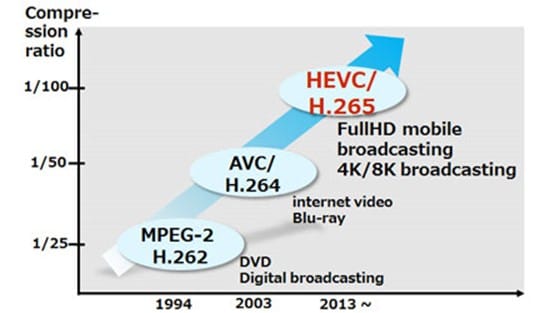
HEVC was designed to replace the outdated H.264 / MPEG-4 AVC format. Work on the new standard began in 2004, when the Video Coding Experts Group (VCEG) began looking for new technologies that could form the basis for the new standard. This project was later given the temporary names H.265 and H.NGVC (Next Generation Video Coding). The main requirements for the standard being developed are: reducing the video bit rate, maintaining current image quality, and maintaining current computing power requirements.
development of video encoding formats
Development has continued since 2012, when this format was officially approved. But, after the launch, the format did not receive much popularity, it was used in IP cameras, television broadcasts and other specialized areas. The HEVC format became known to common users in late 2017, when iOS 11 was released.
Why HEVC is better than older formats
With the launch of the macOS High Sierra and iOS 11 operating systems, Apple began actively implementing new formats for videos and photos. So for photos the HEIF format is now used, which we already talked about, and for videos, the HEVC format.
The transition to the HEVC format occurred for two reasons. First, this format provides a higher quality image. And second, this type of video takes up less memory space and requires less network bandwidth when streaming over the Internet. Simply put, HEVC video provides a significant improvement in image quality while maintaining the same file size and bit rate. According to Apple, using the HEVC format can save up to 40 percent of memory.
Several new approaches have been taken to achieve this improvement in video compression. One of these approaches is the increased block size into which the encoded file is divided. When encoding video in H.264 format, said block is 16 by 16 pixels (256 in total), while when using HEVC, said block can be 64 by 64 pixels (4096 in total). This block enlargement shows particularly good results on high-resolution videos, which is very useful, because the HEVC format supports video up to a resolution of 8192 × 4320 pixels.