Video Aspect Ratio Correction


Free Download Mp4Gain
picture

Video Aspect Ratio Correction
Video Aspect Ratio Correction


Aspect Ratio Correction in Videos

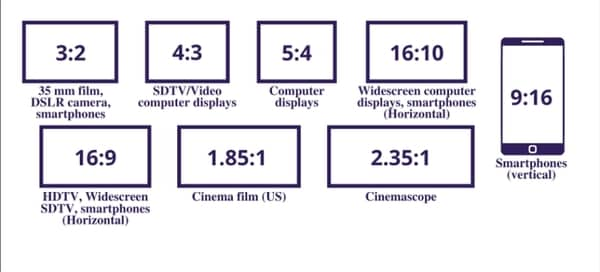
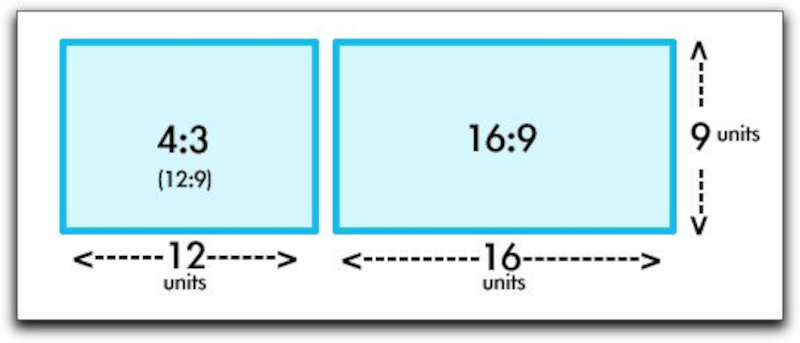
Video aspect ratios play a significant role in how we perceive and enjoy visual content. Imagine aspect ratios as the frame in which a story is told. The aspect ratio determines the width and height of the video frame, influencing how images and scenes are composed. Think of it like two differently shaped picture frames – one rectangular and one square. Each frame can display the same image, but it will look quite different depending on the frame’s shape.

In the world of video production, ensuring the correct aspect ratio is crucial for delivering an engaging and visually pleasing experience. For example, if you’re watching a movie on your widescreen TV, an incorrect aspect ratio could result in black bars on the sides or a stretched image, which detracts from the viewing experience. Correcting aspect ratios is akin to making sure the picture fits perfectly within its frame, ensuring that viewers see the intended visuals without distortion.

Why Correcting Video Aspect Ratios Matters

As a seasoned video producer, I can attest to the importance of correct aspect ratios. Imagine you’re creating a promotional video for your business. If you don’t pay attention to the aspect ratio, your video might look skewed when displayed on different devices or platforms. This can leave a negative impression on your audience and affect the effectiveness of your message.

To put it simply, think of video aspect ratios as puzzle pieces. When they fit perfectly, you get a complete, clear image. But if the pieces are forced together incorrectly, the picture becomes distorted and unrecognizable. Correcting aspect ratios ensures that your content looks its best, whether it’s viewed on a widescreen TV, a smartphone, or a computer monitor.

How to Correct Video Aspect Ratios

Correcting video aspect ratios may sound complex, but it’s a crucial skill in video production. It’s like resizing a photograph to fit perfectly in a frame. There are several ways to achieve this, depending on your editing software and the specific problem you’re addressing.

One common method is “letterboxing” or “pillarboxing,” which involves adding black bars to the top and bottom (for widescreen) or sides (for standard) of the video to maintain the correct aspect ratio. This prevents stretching or cropping of the visuals.

Another technique is “cropping,” where you remove a portion of the video to fit the desired aspect ratio. This is like trimming a photograph to fit in a smaller frame without distorting the image.

For more advanced adjustments, video editing software provides tools to manually resize and reposition the video frame, ensuring the correct aspect ratio is maintained.

Correcting video aspect ratios is like tailoring a suit – it requires precision to achieve the perfect fit, but the result is a polished and professional presentation.

Common Issues with Video Aspect Ratios

In the world of video production, aspect ratios can be a tricky business. It’s like trying to fit a square peg into a round hole – it just doesn’t work. Common issues include videos appearing stretched, squished, or with black bars that disrupt the viewing experience.

Imagine you’re watching a classic movie on your widescreen TV, and the characters look unnaturally tall and skinny. That’s an aspect ratio problem. Or picture trying to enjoy a YouTube video, but you can’t see the full image because it’s cropped. That’s another aspect ratio issue.

These problems can be frustrating for both creators and viewers, which is why understanding and correcting aspect ratios is crucial in video production.

Fixing Aspect Ratio Problems in Videos

Fixing aspect ratio problems in videos is like solving a puzzle – it requires the right pieces in the right places. When you encounter stretched or cropped visuals, it’s essential to identify the correct aspect ratio and apply the appropriate correction method.

For stretched videos, you’ll need to “squeeze” or “unsqueeze” the visuals to match the intended aspect ratio. Imagine you’re resizing a photo to its original proportions after it’s been distorted.

For cropped videos, you’ll need to adjust the frame to reveal the missing parts while maintaining the correct aspect ratio. Think of it as expanding a picture to fit a larger frame without stretching it.

Video editing software offers various tools to help you tackle these issues effectively. It’s like having a set of precision tools to fix a broken puzzle piece and make the image whole again.

So, whether you’re a professional videographer or a casual content creator, understanding how to fix aspect ratio problems ensures that your videos look their best and provide an enjoyable viewing experience.

Video Aspect Ratio Troubleshooting

Video aspect ratios can sometimes be like a riddle waiting to be solved. When you encounter issues with aspect ratios, it’s essential to troubleshoot the problem systematically. Consider it similar to diagnosing and solving a technical glitch in a computer.

Start by identifying the specific issue: Is the video stretched, cropped, or displaying black bars? This is akin to identifying the symptoms of a problem.

Next, determine the correct aspect ratio for your project. It’s like knowing the specifications required for a particular software application to run smoothly on your computer.

Once you’ve identified the issue and the correct aspect ratio, choose the appropriate correction method. This is similar to selecting the right troubleshooting steps to resolve a technical issue.

Remember, troubleshooting video aspect ratios is a skill that improves with practice. It’s like becoming more proficient at troubleshooting computer problems – the more you do it, the better you become at solving the puzzle and ensuring that your videos look their best.


Free Download Mp4Gain
picture


Mp4Gain Main Window
picture


Mp4Gain Features
picture


Free Download Mp4Gain
picture

Video Codec Explanation

Video Codec Explanation

Video Codec Explanation

Video codecs, or compression-decompression algorithms, are the unsung heroes behind the videos we watch daily. They work like digital magicians, making it possible to store and transmit videos efficiently while preserving image quality. To understand them better, think of video codecs as puzzle masters.

Imagine you have a jigsaw puzzle of a beautiful landscape. However, you need to fit it into a smaller box for storage or mailing. A video codec is like an expert puzzle solver; it disassembles the image into smaller pieces, discards unnecessary ones (compression), and records the steps needed to put it all back together (encoding). When you want to enjoy the landscape again, the video codec reassembles it, like completing the puzzle.

Video codecs come in various types, each with its strengths. Some prioritize smaller file sizes for streaming, while others focus on maintaining pristine quality for high-definition content. Understanding these differences helps you select the right codec for your specific needs.

What Are the Best Video Codecs for Streaming?

When it comes to streaming video content over the internet, the choice of video codec plays a significant role in ensuring a smooth and enjoyable viewing experience. Two popular video codecs for streaming are H.264 and H.265 (also known as HEVC).

H.264, also known as AVC (Advanced Video Coding), has been a long-standing favorite for online streaming platforms. It offers a good balance between video quality and compression efficiency, making it suitable for a wide range of devices and network conditions. It’s like the reliable family car that gets you where you need to go comfortably and without fuss.

On the other hand, H.265, or HEVC (High-Efficiency Video Coding), is like the fuel-efficient hybrid car of the video codec world. It provides superior compression, resulting in smaller file sizes without compromising quality. This makes it an excellent choice for streaming 4K and even 8K video content, where bandwidth is a concern.

As someone deeply immersed in the world of video codecs, I’ve witnessed firsthand how the right codec choice can transform the streaming experience. It’s not just about technicalities; it’s about delivering content that captivates the audience while optimizing resources.

Best Audio Codecs

Best Audio Codecs

Best Audio Codecs
Best Audio Codecs
Best Audio Codecs
Best Audio Codecs

Audio codecs, short for compression-decompression algorithms, are essential tools in the world of digital audio. Think of them as translators that help digital audio files communicate efficiently while conserving storage space and maintaining sound quality. They achieve this by encoding audio data during compression and decoding it during playback.

Imagine you’re packing for a trip, and you want to save space in your suitcase. You decide to use vacuum-sealed bags for your clothes. Similarly, an audio codec compresses audio data into a more compact format for efficient storage or transmission. When you unpack your suitcase at your destination, you release the air from the bags to restore your clothes to their original form—this is akin to an audio codec decoding compressed audio data for playback.

There’s a wide range of audio codecs available, each with its own strengths and weaknesses. Some prioritize small file sizes, making them ideal for streaming, while others emphasize preserving audio quality, a must for audiophiles. Understanding these differences helps you choose the right codec for your specific needs.

What Are Lossless Audio Codecs?

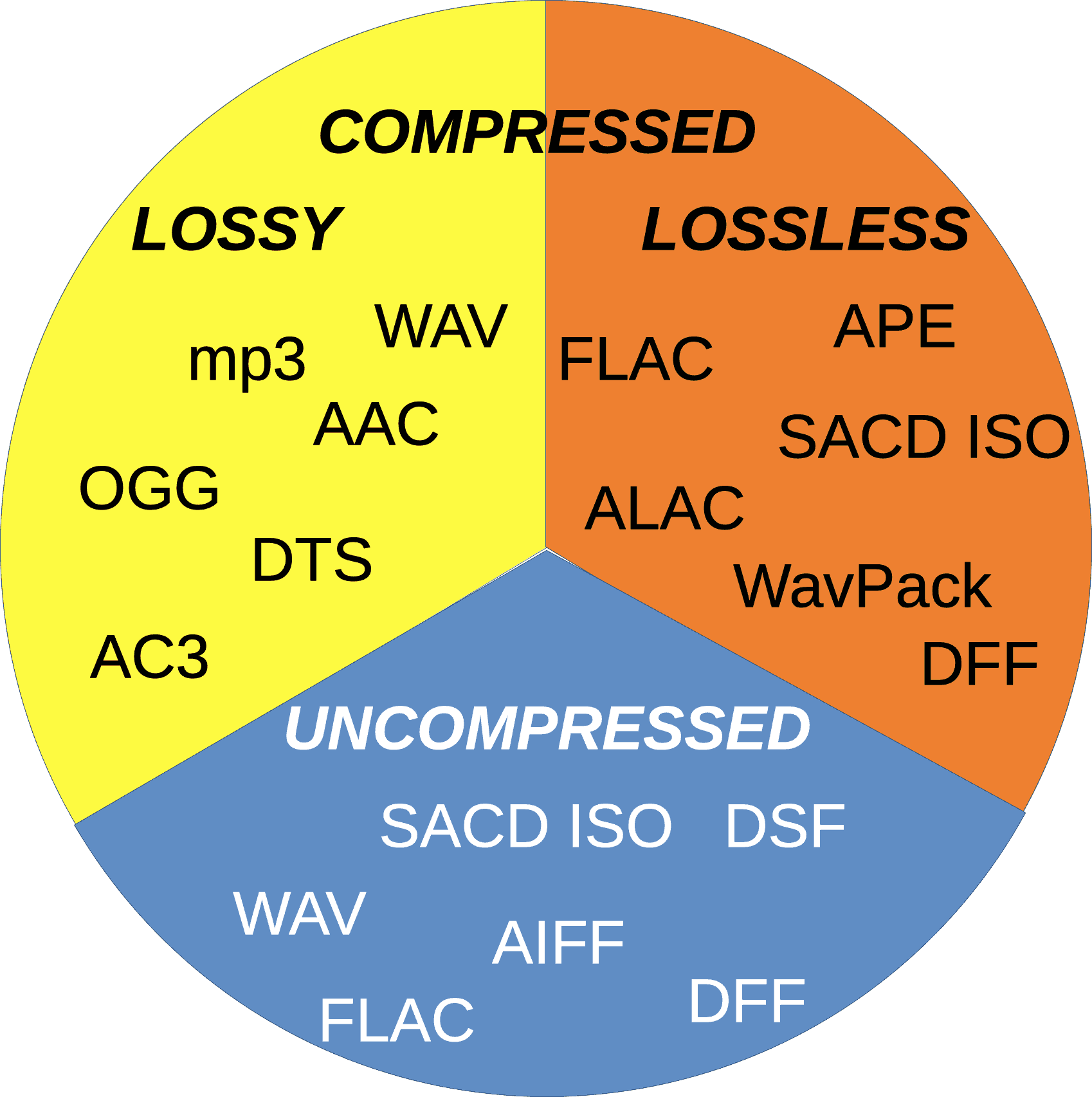
Lossless audio codecs are like the archivists of the audio world. They compress audio data without sacrificing any of the original quality. This is akin to zipping a file on your computer; when you unzip it, you get back an identical copy of the original.

Imagine you have a precious handwritten letter. You want to make a copy for safekeeping, but you don’t want to lose any detail or quality. A lossless audio codec accomplishes this by finding patterns in the audio data and encoding them more efficiently. When you want to listen to the music or sound stored with a lossless codec, it’s like opening the envelope of your preserved letter—you get the same experience as the original.

Lossless audio codecs are favored by audiophiles and professionals who prioritize audio quality over file size. They are ideal for archiving music collections and audio recordings where every nuance matters.

Popular Audio Codecs

When it comes to audio codecs, several popular options are commonly used in various applications. One of the most recognizable is MP3, which revolutionized digital music. MP3, short for MPEG-1 Audio Layer 3, achieves significant compression while maintaining decent audio quality, making it suitable for music streaming and portable devices.

AAC (Advanced Audio Coding) is another well-known codec, commonly used by Apple devices. It offers superior sound quality compared to MP3 at similar bitrates, making it a popular choice for iTunes and other Apple platforms.

For lossless audio, FLAC (Free Lossless Audio Codec) stands out. It’s widely adopted by audiophiles and music enthusiasts for its ability to compress audio without any loss in quality. FLAC files are perfect for preserving high-fidelity audio.

As an expert in audio technology, I can confidently say that understanding audio codecs is crucial for anyone working with digital audio. Whether you’re a music lover, a content creator, or a tech enthusiast, the right knowledge about audio codecs can significantly enhance your experience and the quality of your audio content.


Best Format to Make a Pro Video

Best Format to Make a Pro Video

Best Format to Make a Pro Video


Selecting the right format for creating a professional video is akin to choosing the perfect canvas for a masterpiece. The video format sets the foundation for your project, impacting its quality, compatibility, and overall appeal. Let’s explore the importance of selecting the best format for pro-level video production.

Imagine you’re a skilled photographer preparing to capture a breathtaking landscape. Just as you’d select the ideal lens and camera settings, choosing the right video format is paramount. Different formats offer varying levels of detail, color depth, and compression. For pro-level work, formats like ProRes and DNxHD are often preferred. These formats preserve the highest quality, ensuring your video retains its visual integrity throughout editing and post-production.

Additionally, consider the platform where your video will be showcased. If it’s destined for the big screen, formats like CinemaDNG or REDCODE RAW might be ideal, offering the utmost in cinematic quality. On the other hand, web content or streaming services often favor formats like H.264 or H.265 for efficient online delivery without compromising too much on quality.

Choosing the best format is akin to selecting the right ingredients for a gourmet dish. Each format brings its unique flavor to your video, and your choice should align with your creative vision and the preferences of your audience.

What Are the Key Considerations for Selecting a Video Format?

Selecting a video format is a multifaceted decision, much like choosing the right vehicle for a cross-country road trip. Several key considerations come into play when deciding on the best format for professional video production.

Resolution is a fundamental factor. Higher resolutions, such as 4K or even 8K, offer exceptional detail and clarity, perfect for pro-level work. However, they also require more storage space and processing power. Consider the technical capabilities of your equipment and your post-production workflow when determining the ideal resolution.

Color depth is another critical aspect. Professional formats often support a wide color gamut, allowing for rich, vibrant visuals. This is particularly important if your video involves intricate color grading or if you intend to showcase it on high-quality displays.

Compression plays a vital role in video formats. Some formats use lossless compression, preserving every detail, while others use lossy compression, sacrificing some detail for smaller file sizes. Your choice should align with your storage and bandwidth constraints.

Lastly, compatibility is key. Ensure the format you choose is supported by your editing software, playback devices, and distribution platforms. It’s like selecting a language that your entire team understands to communicate effectively.

In essence, the best video format for professional content hinges on a careful balance of technical specifications, creative goals, and practical considerations.

Importance of Video Format in Professional Video Production

The importance of the video format in professional video production is akin to the foundation of a skyscraper. It’s the bedrock upon which your entire project stands. The format dictates how your video will be captured, edited, and ultimately presented to your audience.

Consider a scenario where you’re shooting a documentary in a remote location. The right video format can make the difference between capturing stunning landscapes with vibrant colors and struggling with subpar footage. Professional formats often provide a broader color gamut, ensuring your visuals are as breathtaking as the real-life scenes.

Additionally, the editing process relies heavily on the chosen format. Pro-level formats like ProRes or DNxHD offer robust support for post-production workflows, allowing for extensive color grading, compositing, and effects. This flexibility is like having a vast palette of colors at your disposal as a painter, enabling you to craft your video with precision.

Furthermore, when it’s time to showcase your work to the world, the video format can affect the viewing experience. A well-chosen format ensures that your audience enjoys your video as intended, whether it’s on a cinema screen, a television, or a mobile device. It’s like presenting a gourmet meal on fine china, elevating the dining experience.

In summary, the video format is the backbone of professional video production, influencing every aspect of your project. It’s essential to select a format that aligns with your creative vision and technical requirements to create a truly exceptional pro-level video.

Optimizing Video Format for Pro-Level Content

Optimizing the video format for pro-level content is a meticulous process, much like crafting a precision instrument. It requires attention to detail and a deep understanding of the technical aspects of video production. Let’s explore the steps involved in optimizing the video format for professional-grade content.

Step 1: Determine the Project’s Requirements

Begin by assessing the specific needs of your project. Consider the target audience, the platform where the video will be showcased, and the technical capabilities of your equipment. Are you creating a cinematic masterpiece for the big screen, or is it web content for online streaming? Understanding these requirements is crucial for format selection.

Step 2: Choose the Right Resolution

Selecting the appropriate resolution is essential. Pro-level content often benefits from higher resolutions, such as 4K or 8K, to capture intricate details. However, remember that higher resolutions require more storage and processing power. Ensure your equipment can handle the chosen resolution without compromising performance.

Step 3: Optimize Color Depth

Professional formats offer a wide color gamut, providing the flexibility for extensive color grading. This is particularly important if your project involves complex color correction or if you’re aiming for cinematic visuals. Choose a format that supports the color depth required for your creative vision.

Step 4: Consider Compression

Compression affects both file size and video quality. Lossless compression preserves every detail but results in larger file sizes, while lossy compression sacrifices some detail for smaller files. Balance your storage and bandwidth constraints with the need for visual quality when selecting the compression method.

Step 5: Ensure Compatibility

Check that your chosen format is compatible with your editing software, playback devices, and distribution platforms. Compatibility issues can lead to workflow disruptions and affect the final presentation of your video.

In essence, optimizing the video format for professional content is a meticulous process that demands a comprehensive understanding of both creative and technical aspects. When done correctly, it ensures that your video meets the highest standards of quality and visual excellence.

In conclusion, choosing the best format for professional video production is a critical decision that impacts the overall quality and appeal of your project. It involves a careful consideration of technical specifications, creative goals, and practical requirements. Opting for the right format is akin to selecting the perfect canvas and brushes for a masterpiece—it sets the stage for your creative vision to shine. As the renowned filmmaker Christopher Nolan once said, “I think IMAX is the best film format that was ever invented.” Just as IMAX is celebrated for its exceptional quality, the choice of video format can elevate your content to new heights of excellence.

Opus vs Webm

Opus vs Webm

Opus vs Webm
Opus vs Webm
Opus vs Webm
Opus vs Webm


Opus and Webm are two popular choices in the world of audio compression and encoding, each with its unique strengths and applications. Comparing Opus to Webm is like comparing two different tools in your toolkit, where each tool serves a specific purpose. Opus is like a precision screwdriver, while Webm is akin to a versatile Swiss army knife. Let’s delve into the distinctions between these two audio technologies.

Opus, known for its exceptional audio quality and low latency, is ideal for real-time applications like voice and video calls. It’s as if you’re having a crystal-clear conversation with someone right next to you, even if they are miles away. On the other hand, Webm, with its broader compatibility and support across various platforms, is like a universal remote control. It ensures that your audio content can be accessed and enjoyed by a wide audience, regardless of their device or software.

Choosing between Opus and Webm depends on your specific needs. If you prioritize high-quality audio and minimal delay, Opus is your go-to choice. Think of it as selecting a professional-grade camera lens for capturing breathtaking, high-definition photos. However, if you require versatility and compatibility across different devices and applications, Webm is like the Swiss army knife of audio formats, offering a wide range of capabilities.

What are the differences between Opus and Webm?

Opus and Webm, while both serving audio compression purposes, have notable differences that set them apart. Understanding these distinctions is akin to recognizing the unique characteristics of two distinct musical instruments. Opus can be compared to a grand piano, known for its rich, nuanced sound, while Webm is more like an electric guitar, versatile and suitable for various genres. Let’s explore these differences.

Opus excels in delivering high-quality audio at lower bitrates, making it an excellent choice for applications where bandwidth efficiency is crucial. It’s as if Opus is a master chef who can create exquisite dishes with minimal ingredients. Webm, on the other hand, is more versatile and compatible across a wide range of devices and platforms. It’s like a universal remote control that works seamlessly with multiple devices, ensuring your audio content reaches a broad audience.

One significant distinction is Opus’s low latency, making it ideal for real-time communication. Imagine having a conversation with someone over a phone call with no noticeable delay—it’s that responsive. Webm, while not as low in latency as Opus, provides solid performance and compatibility across the digital landscape, much like a well-built bridge connecting various destinations.

Opus audio codec

The Opus audio codec is a remarkable piece of technology that has revolutionized the way we transmit and store audio data. Think of it as a finely-tuned musical instrument, capable of producing a wide range of sounds and tones. Opus is renowned for its exceptional audio quality, even at low bitrates, making it a preferred choice for various applications.

One of the standout features of Opus is its ability to adapt to changing network conditions. It’s like a seasoned pilot adjusting the flight path to navigate through turbulent weather. Opus ensures that audio quality remains consistent, even when faced with varying levels of network congestion or packet loss.

Opus is also known for its low latency, which is crucial for real-time applications like online gaming and video conferencing. It’s as if Opus is a lightning-fast relay runner, ensuring that your voice reaches the recipient’s ears with minimal delay. This low latency enhances the natural flow of conversations and interactions, making it a top choice for developers and users alike.

Webm audio format

The Webm audio format is like a versatile toolbox that contains a wide range of tools for audio encoding and compression. It’s designed to be adaptable and compatible across various platforms and devices, catering to the diverse needs of users. Webm ensures that your audio content can be accessed and enjoyed by a broad audience, much like a well-translated book that can be read by people from different language backgrounds.

One of the key advantages of Webm is its open and royalty-free nature, making it a cost-effective choice for developers and content creators. It’s like having access to an open-source software library, where you can freely use and share audio content without worrying about licensing fees or restrictions.

Webm also offers efficient compression, reducing the file size of audio content without compromising quality. It’s as if you have a magician’s hat that can fit an array of items while maintaining its magical appeal. This compression feature is particularly useful for streaming audio online, ensuring smooth playback even with limited bandwidth.

How to choose between Opus and Webm for audio encoding?

Choosing between Opus and Webm for audio encoding is a decision that depends on your specific requirements and priorities. It’s like selecting the right vehicle for a journey—each has its advantages and is suited for different terrains. To make an informed choice, consider the following factors:

  • **Audio Quality:** If your primary concern is delivering high-quality audio with minimal loss, Opus is the preferred choice. It’s like choosing a professional-grade camera for capturing breathtaking photos with unmatched clarity.
  • **Compatibility:** If you need your audio content to be accessible across various platforms and devices, Webm’s versatility shines. It’s like opting for a universal remote control that seamlessly connects to different appliances.
  • **Latency:** For real-time applications where low latency is crucial, Opus is the go-to option. It ensures that audio communication feels natural and responsive, much like a face-to-face conversation.

In the end, the choice between Opus and Webm depends on your specific use case and objectives. Both codecs offer valuable features and have their place in the world of audio encoding, catering to a wide range of needs and preferences.

As the renowned physicist Albert Einstein once said, “The only source of knowledge is experience.” In the realm of audio encoding, it’s through experimentation and hands-on experience that we truly understand the nuances of Opus and Webm, unlocking their full potential to deliver exceptional audio experiences.

Opus vs Webm – A Comparative Analysis

When we delve into the realm of audio encoding, it’s essential to understand the differences between Opus and Webm, as these distinctions play a significant role in determining which codec to choose for specific applications. This comparative analysis will shed light on the key aspects of Opus and Webm, offering valuable insights for decision-making.

  • **Compression Efficiency:** Opus is known for its exceptional compression efficiency, providing high-quality audio at low bitrates. It’s like a chef who can create gourmet dishes with minimal ingredients, ensuring that your audio files remain compact without sacrificing quality. Webm offers efficient compression as well, making it suitable for streaming and online content delivery.
  • **Compatibility:** Webm takes the lead in terms of compatibility, with broader support across various devices and platforms. It’s akin to a versatile tool that fits seamlessly into different scenarios. Opus, while widely supported, may require specific player support in some cases.
  • **Latency:** Opus boasts low latency, making it ideal for real-time applications like VoIP calls and online gaming. It ensures that audio communication remains responsive and natural. Webm, while not as low in latency as Opus, still offers solid performance in this regard.

In conclusion, Opus and Webm are valuable tools in the world of audio encoding, each with its unique strengths. Your choice should align with your specific needs and priorities, whether it’s prioritizing audio quality, compatibility, or low latency. Ultimately, both codecs contribute to enriching the audio experiences we encounter in our digital journeys.

How Does Opus Audio Compression Work?

Understanding how Opus audio compression works involves diving into the technical intricacies of this remarkable codec. Opus utilizes a combination of advanced techniques to achieve its renowned audio quality and compression efficiency. Let’s explore the key components of Opus’s compression process:

  • **Predictive Coding:** Opus employs predictive coding, where it analyzes the audio signal’s characteristics and predicts future samples based on past data. It’s similar to how a weather forecaster uses historical weather patterns to predict upcoming conditions, ensuring accurate forecasts.
  • **Transform Coding:** Opus utilizes transform coding to convert the audio signal into a frequency domain representation. This process is akin to breaking down a complex puzzle into smaller, more manageable pieces, making it easier to reconstruct the original audio later.
  • **Variable Bitrate (VBR):** Opus employs variable bitrate encoding, allocating more bits to complex and critical parts of the audio signal and fewer bits to less critical sections. It’s like a chef adjusting the seasoning in a dish to ensure that every element tastes just right.

These components work harmoniously to deliver Opus’s exceptional audio quality, even at low bitrates. Opus’s ability to adapt to changing network conditions and maintain audio integrity makes it a powerful choice for a wide range of applications, from voice calls to music streaming.

The Evolution of Audio Compression: Opus and Beyond

The journey of audio compression has been a fascinating one, with Opus marking a significant milestone in this evolution. As we explore the world of audio encoding, it’s essential to look beyond Opus and envision the future possibilities. Here’s a glimpse into the ongoing evolution of audio compression:

  • **Next-Generation Codecs:** Researchers and developers continue to push the boundaries of audio compression, aiming to create even more efficient and high-quality codecs. It’s like the constant quest to develop faster and more fuel-efficient vehicles to meet the demands of the modern world.
  • **Immersive Audio:** With the rise of virtual reality and augmented reality, the demand for immersive audio experiences is on the rise. Future audio codecs may focus on delivering 3D spatial audio, creating a sense of presence and immersion for users, similar to the way surround sound systems enhance movie-watching experiences.
  • **Enhanced Accessibility:** The audio industry is increasingly focused on making audio content accessible to individuals with disabilities. Future codecs may prioritize features like enhanced speech recognition and audio description capabilities, ensuring that everyone can enjoy digital audio content.

As we embrace the possibilities of Opus and other audio codecs, it’s exciting to envision the innovations that lie ahead. The evolution of audio compression is a testament to human ingenuity and our relentless pursuit of audio excellence.

“Innovation distinguishes between a leader and a follower.” — Steve Jobs

Importance of Video Samplerate

Importance of Video Samplerate

Importance of Video Samplerate

Let’s talk about the importance of video samplerate. You might be wondering what this technical term really means and why it matters. Well, think of it as the secret ingredient that makes your favorite recipe taste just right. Just as a pinch of salt can transform a dish, the samplerate in a video plays a crucial role in delivering high-quality audio. Imagine watching a movie with poor audio quality—it’s like trying to enjoy a gourmet meal with bland flavors. The samplerate ensures that you savor every note, word, and sound in your video, enhancing your overall viewing experience.

Consider samplerate as the rhythm of a song. You’ve probably tapped your foot to a catchy beat before, right? Well, the samplerate sets the tempo for the audio in your video. Too slow, and it feels like a drag; too fast, and it becomes chaotic. Just like a well-paced song, the right samplerate ensures that the audio elements in your video sync perfectly, creating a harmonious blend of visuals and sound that engages your senses.

Another way to understand the importance of video samplerate is by comparing it to a jigsaw puzzle. Imagine putting together a puzzle, and some pieces don’t quite fit—it’s frustrating and ruins the picture. Similarly, a mismatched samplerate can result in audio that doesn’t align with the video, creating a disjointed and unpleasant viewing experience. When the samplerate matches, it’s like every puzzle piece fitting perfectly, revealing a beautiful image that captivates your attention.

Why Does Video Samplerate Affect Audio Quality?

  • Let’s dive deeper into why video samplerate matters for audio quality. Think of it as a recipe for your favorite dessert. The ingredients need to be precisely measured, or the taste won’t be right. Similarly, if the samplerate is off in a video, it affects how audio elements are “measured” and presented to your ears, potentially distorting the sound.
  • Imagine you’re in a quiet room, listening to a friend tell a story. If they suddenly start whispering or shouting, it disrupts the flow and understanding of the narrative. In a video, the samplerate ensures that the audio remains consistent, preventing sudden shifts in volume or clarity that could distract or confuse the viewer.
  • Consider a symphony orchestra where each instrument plays its part in harmony. If one instrument falls out of tune or plays at a different tempo, it can create dissonance in the music. Similarly, in a video, a mismatched samplerate can introduce dissonance in the audio, causing discomfort for the audience.

Understanding the importance of video samplerate is like mastering the art of cooking. Just as a chef carefully selects the right ingredients and techniques to create a delightful dish, video creators must pay attention to samplerate to ensure that every audio element in their videos harmonizes, delivering an enjoyable and immersive viewer experience.

Optimizing Video Samplerate for Professional Results

Now, let’s explore how to optimize video samplerate for professional-grade results. Think of this as the final touch that transforms an ordinary dish into a gourmet masterpiece. In the world of video production, achieving the best samplerate ensures that your audio is crisp, clear, and captivating.

Imagine you’re a photographer capturing a breathtaking landscape. To do justice to the scene, you carefully select the right lens, adjust the exposure, and frame the shot perfectly. In video production, optimizing samplerate is just as critical—it’s like choosing the ideal camera settings to capture the essence of your subject. It ensures that your audio is captured with precision, allowing viewers to hear every detail, whether it’s the rustling leaves in a forest or the gentle whisper of a character’s dialogue.

Consider samplerate as the conductor of an orchestra. The conductor guides each musician to play their part at the right tempo and intensity, resulting in a harmonious performance. In video production, optimizing the samplerate is akin to being the conductor of your audio elements. It ensures that every sound, from the background music to the actors’ voices, blends seamlessly to create a symphony of audio that captivates your audience.

Think of optimizing samplerate as the final brushstroke on a masterpiece painting. Each brushstroke adds depth and detail to the artwork, making it come alive. Similarly, in video production, the right samplerate adds the finishing touch to your audio, making it vibrant and engaging. It’s the difference between a video that feels amateur and one that exudes professionalism.

Common Questions About Video Samplerate

    • 1. What happens if the video samplerate doesn’t match the audio samplerate?

If the video samplerate doesn’t match the audio samplerate, you can encounter synchronization issues, resulting in audio that doesn’t align with the video properly. This mismatch can lead to distorted sound and a jarring viewing experience.

    • 2. How can I check the samplerate of a video?

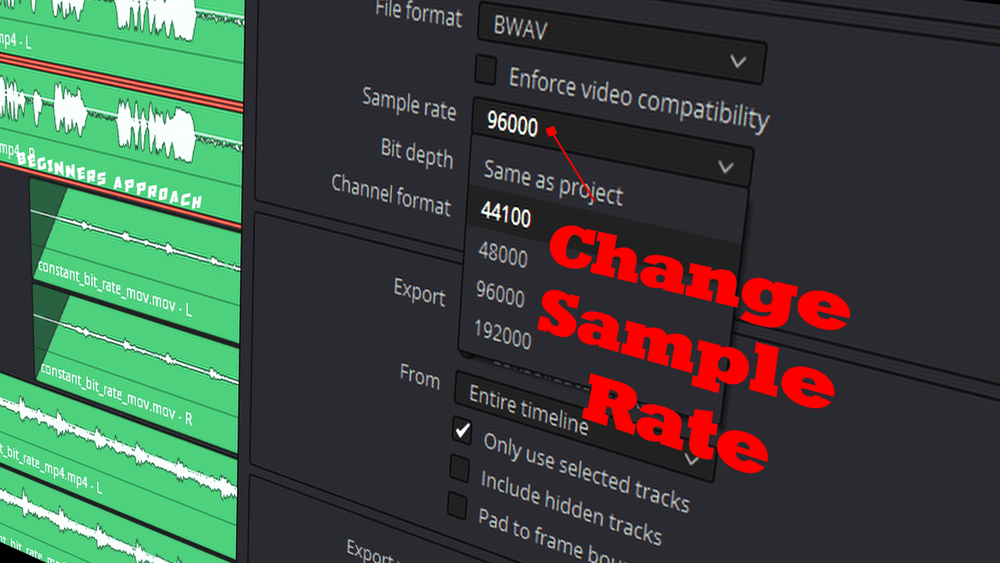
You can check the samplerate of a video using various software tools or video editing programs. Simply import the video, and the samplerate information should be visible in the video’s properties or settings.

    • 3. Is a higher samplerate always better for video quality?

Not necessarily. While a higher samplerate can capture more detail, it also results in larger file sizes. The choice of samplerate depends on your specific needs and the platform where the video will be played. It’s important to strike a balance between audio quality and file size.

In the world of video production, attention to detail, especially when it comes to samplerate, can make all the difference in delivering a captivating and professional viewer experience. Just as a chef refines their culinary skills to create exquisite dishes, mastering the art of optimizing samplerate elevates your video content to a new level of excellence.

Video Samplerate and Audio Bit Depth: The Dynamic Duo

Let’s explore the dynamic duo of video samplerate and audio bit depth—a partnership that can truly transform your audiovisual creations. Think of them as the Batman and Robin of the audio world, working together to ensure audio quality that’s nothing short of heroic.

Consider audio bit depth as the resolution of a photograph. Just as a high-resolution image captures more detail, a higher bit depth in audio allows for a broader range of tones and subtleties to be recorded. When combined with an appropriate video samplerate, it’s like having a high-definition canvas for your audio, allowing you to paint with a richer palette of sounds and nuances.

Imagine you’re a filmmaker crafting a suspenseful scene. The audio bit depth and video samplerate are your tools for building tension. A deep audio bit depth captures the quiet whispers and the thunderous roars, while the video samplerate sets the pace, ensuring that every heartbeat and every footstep are in perfect sync with the visuals. It’s this synchronization that keeps viewers on the edge of their seats, fully immersed in the story.

Think of video samplerate and audio bit depth as the architects of a magnificent building. The samplerate determines the rhythm and tempo of the construction, while the bit depth defines the intricate details and textures of the structure. Together, they create an audiovisual masterpiece that captivates the senses.

The Future of Video Samplerate: Innovations and Trends

  • As technology continues to advance, we can expect innovations in video samplerate that push the boundaries of audio quality. Imagine a world where videos offer audio experiences so immersive that you feel like you’re part of the story. These innovations will rely on higher samplerates and bit depths to deliver audio that’s as realistic as the world around us.
  • With the rise of virtual reality and augmented reality, video samplerate will play a pivotal role in creating immersive environments. Picture yourself in a virtual world where every sound is so lifelike that you forget you’re wearing a headset. This level of immersion is achievable through advancements in samplerate technology.
  • As content creators seek to differentiate themselves in a crowded digital landscape, the importance of video samplerate will become even more pronounced. Viewers will gravitate toward content that offers superior audio quality, making samplerate optimization a key competitive advantage.

Just as the world of audio and video production continues to evolve, so does the significance of video samplerate. It’s not just a technical detail—it’s the heartbeat of audiovisual storytelling. As we embrace these innovations and trends, we’re ushering in an era where video samplerate isn’t just important; it’s transformative.

Mastering Video Samplerate for Cinematic Sound

Now, let’s delve into the art of mastering video samplerate for cinematic sound. Picture yourself in a movie theater, surrounded by the mesmerizing sounds of a blockbuster film. The thunderous explosions, the delicate whispers, and the sweeping orchestral scores—all brought to life by impeccable audio quality.

Consider video samplerate as the conductor of this cinematic symphony. It sets the tempo, ensuring that every audio element is in perfect harmony with the visuals. Just as a skilled conductor guides an orchestra to create an unforgettable performance, mastering video samplerate elevates your videos to cinematic heights.

Imagine you’re a director crafting a pivotal scene in your movie. The dialogue between the characters is crucial, and every word carries emotional weight. Video samplerate allows you to capture the nuances of their voices—the tremor in a nervous whisper, the intensity of a heated argument. It’s these subtleties that make the scene resonate with the audience, drawing them deeper into the story.

  • Let’s take a closer look at the technical aspects of mastering video samplerate. Think of it as tuning a musical instrument. Just as a musician tunes their instrument to achieve the perfect pitch, video creators must select the appropriate samplerate to achieve the desired audio quality. This involves considering factors like the source of the audio and the platform where the video will be played.
  • Consider video samplerate as the frame rate in filmmaking. While the frame rate determines the smoothness of motion, the samplerate dictates the clarity and fidelity of sound. Imagine watching a movie with stunning visuals but muffled audio—it’s a jarring experience. Mastering samplerate ensures that your videos offer a complete sensory experience.
  • Now, think of video samplerate as the brush strokes in a painting. Each brush stroke adds depth and texture to the artwork, just as each sample in the samplerate contributes to the richness of audio. The mastery lies in selecting the right brush strokes—or samples—to create an audiovisual masterpiece.

As you embark on your journey of mastering video samplerate, remember that it’s not just a technical skill; it’s an art form. It’s the magic that makes your videos come alive, captivating your audience and immersing them in the world you’ve created.

Common Misconceptions About Video Samplerate

    • Misconception 1: Higher samplerate always means better quality.

While a higher samplerate can capture more detail, it doesn’t always equate to better quality. The choice of samplerate depends on various factors, including the content’s intended use and the capabilities of playback devices. Sometimes, a lower samplerate may suffice without sacrificing quality.

    • Misconception 2: Samplerate doesn’t affect audio clarity.

This is a common misconception. Samplerate plays a significant role in audio clarity, as it determines how accurately sound is sampled and reproduced. Mismatched samplerates can result in distorted or unclear audio.

    • Misconception 3: All audio needs a high samplerate.

Not every audio source requires a high samplerate. For example, speech recordings may not benefit significantly from extremely high samplerates. It’s essential to consider the specific needs of your project and balance audio quality with file size and compatibility.

Mastering video samplerate is a journey that combines technical expertise with artistic sensibility. Just as a chef creates a culinary masterpiece with precision and passion, video creators can craft audiovisual wonders by mastering the intricacies of samplerate. It’s a skill that transforms videos into immersive experiences, leaving a lasting impact on the audience.

Video Encoding Algorithms

Video Encoding Algorithms

Video Encoding Algorithms

Video Compression Techniques

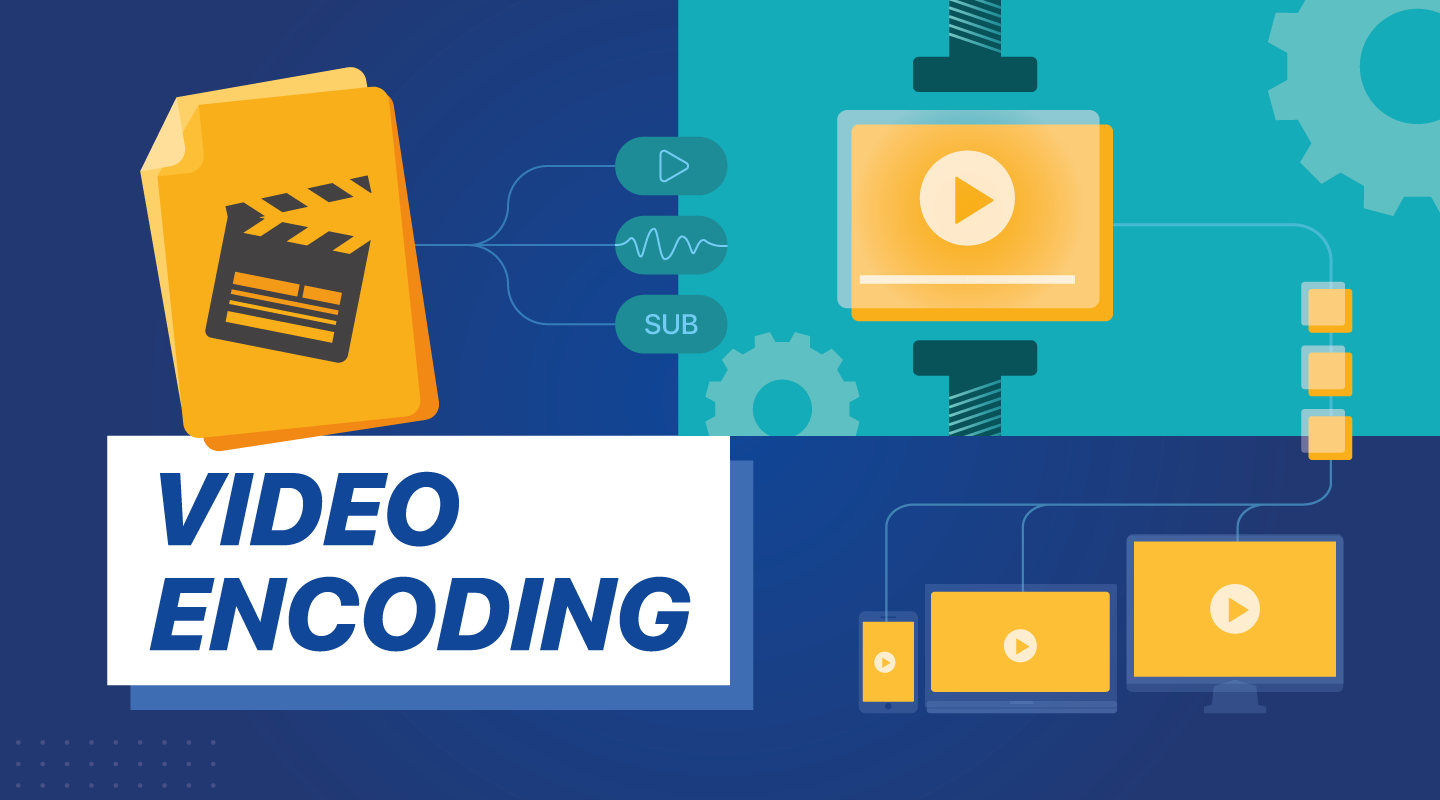
Video compression techniques are the backbone of efficient video encoding. These methods allow us to reduce the size of video files without significantly compromising quality. Think of it as a clever way to pack a suitcase efficiently, ensuring you can carry more without exceeding weight limits. Video compression algorithms analyze and eliminate redundant information in video frames, making them indispensable for digital video transmission, storage, and streaming.

Video codecs like H.264 and HEVC are at the forefront of video compression techniques. They use sophisticated mathematical models to compress video data while maintaining impressive visual fidelity. Imagine a painter meticulously crafting a masterpiece on a smaller canvas; video compression algorithms do something similar, preserving the essence of the video within a smaller digital footprint.

Digital Video Encoding

Digital video encoding is the process of converting raw video data into a digital format suitable for storage or transmission. It’s like translating a book into a language that computers can understand. Video encoding algorithms handle this translation, transforming analog video signals or raw digital data into compressed video files.

One crucial aspect of digital video encoding is achieving a balance between file size and video quality. This delicate dance requires careful selection of encoding parameters, such as bitrates, resolutions, and encoding profiles. Digital video encoding is vital for various applications, from creating streaming-friendly video content to optimizing video playback on mobile devices.

Video Encoding Optimization

Video encoding optimization is akin to fine-tuning the performance of a race car. It involves selecting the right video encoding settings to achieve the best possible output. Optimal video encoding enhances video quality, minimizes file size, and ensures compatibility with target devices or platforms.

To achieve video encoding optimization, professionals must choose the appropriate techniques and settings for each type of content. It’s like tailoring a suit for a specific occasion—different videos may require different encoding approaches. Factors such as resolution, bitrate, and codec selection all play critical roles in the optimization process.

Video Compression vs. Encoding

Video compression and video encoding are closely related but distinct processes. Video compression primarily focuses on reducing file size, while video encoding involves the transformation of video data into a digital format. Think of video compression as a suitcase that shrinks to fit more items, and video encoding as translating a book into a digital language.

Video compression employs algorithms to eliminate redundant information and compress video files, making them smaller. In contrast, video encoding encompasses the entire process of converting video data, including compression. Both are essential for efficient video storage and transmission, but they serve different purposes within the video production and distribution pipeline.

Hardware Acceleration in Video Encoding

Hardware acceleration in video encoding leverages specialized hardware components to enhance the encoding process. It’s like having a dedicated co-pilot in an aircraft, sharing the workload and increasing efficiency. Hardware acceleration significantly speeds up video encoding tasks, reducing processing time and energy consumption.

Graphics processing units (GPUs) and dedicated video encoding chips are examples of hardware used for acceleration. These components offload encoding tasks from the CPU, allowing for smoother video playback and faster video processing. Hardware-accelerated encoding is particularly crucial in applications like gaming, video conferencing, and real-time video streaming.

Video Encoding for Streaming

Video encoding for streaming is a specialized application of video encoding tailored to deliver content over the internet. It’s like preparing a gourmet meal for delivery, ensuring that it arrives at its destination in the best possible condition. Streaming video encoding optimizes video files for smooth, buffer-free playback on various devices and network conditions.

Adaptive bitrate streaming, a common technique, adjusts video quality in real-time based on the viewer’s internet connection speed. This ensures a seamless viewing experience, regardless of fluctuations in bandwidth. Video encoding for streaming plays a pivotal role in the world of online entertainment, from YouTube videos to live sports broadcasts.

Adaptive Video Encoding

Adaptive video encoding is a dynamic approach that tailors video quality to match changing network conditions. It’s like driving a car with adaptive cruise control, adjusting your speed to maintain a safe following distance. This technique ensures that viewers receive the best possible video quality, even when faced with unreliable or fluctuating internet connections.

Adaptive video encoding relies on the segmentation of video content into multiple quality levels or bitrates. When network conditions change, the player seamlessly switches between these segments to maintain uninterrupted playback. This technology is particularly valuable in streaming services, where viewers expect a consistent experience regardless of their connection.

Video Encoding and Decoding

Video encoding and decoding are two sides of the same coin in the world of digital video. Encoding is the process of converting raw video data into a compressed digital format, while decoding involves converting compressed video back into a usable form. It’s like sending a secret message that can only be read by the intended recipient—encoding and decoding ensure that video content is accessible and playable.

Video codecs like H.265 (HEVC) and VP9 are responsible for both encoding and decoding operations. When you stream a video online or watch a movie on your device, these codecs work behind the scenes to deliver the audiovisual experience you enjoy.

H.264 Video Encoding

H.264 video encoding is a widely adopted video compression standard known for its efficiency and versatility. It’s like a Swiss Army knife in the world of video codecs, capable of handling a variety of applications. H.264 excels in balancing video quality, compression efficiency, and compatibility.

This codec is commonly used in video streaming, video conferencing, and online video platforms like YouTube. Its ability to deliver high-quality video with relatively low bitrates has made it a popular choice for a wide range of video content, from webinars to high-definition movies.

HEVC (High-Efficiency Video Coding)

HEVC, or High-Efficiency Video Coding, represents a significant advancement in video compression technology. It’s like upgrading from a compact car to a high-performance sports car in terms of compression efficiency. HEVC offers superior video quality at lower bitrates compared to its predecessors.

HEVC is particularly valuable for applications requiring ultra-high-definition video, such as 4K and 8K content. It reduces storage and bandwidth requirements while maintaining stunning visual clarity. As video resolutions continue to climb, HEVC plays a crucial role in delivering immersive viewing experiences.

Video Encoding for Mobile Devices

Video encoding for mobile devices is a specialized approach to ensure optimal video playback on smartphones and tablets. It’s like tailoring a suit to fit perfectly; mobile video encoding adapts video files for small screens and varying device capabilities. This optimization ensures a seamless and enjoyable viewing experience on mobile platforms.

Efficient video encoding for mobile devices involves considerations like resolution, bitrate, and codec selection. These factors impact not only video quality but also device battery life and data usage. Mobile-friendly video encoding is essential for mobile apps, social media platforms, and on-the-go entertainment.

Video Encoding for VR Content

Video encoding for virtual reality (VR) content presents unique challenges and opportunities. It’s like creating an immersive world within a digital realm, where every detail must be meticulously encoded to deliver a lifelike experience. VR video encoding focuses on maintaining high resolutions, frame rates, and low latency to transport users to virtual worlds.

One of the key aspects of VR video encoding is 360-degree video support. VR users can explore their surroundings by looking in any direction, requiring specialized encoding techniques to ensure smooth and responsive interaction. VR content creators rely on advanced video encoding to bring their virtual adventures to life.

Video Encoding Quality Settings

Video encoding quality settings are the dials and knobs that fine-tune the video encoding process. They’re like the controls on a professional camera, allowing you to adjust settings like exposure, focus, and white balance. These settings play a crucial role in determining the visual and auditory quality of the encoded video.

Key quality settings include bitrate, resolution, frame rate, and codec selection. Choosing the right combination of these settings is essential to achieve the desired video quality and file size. Whether you’re producing high-definition videos for streaming or optimizing videos for mobile devices, understanding and mastering these settings is fundamental to video encoding success.

In the intricate world of video encoding algorithms, each facet serves a unique purpose. From the artistry of video compression techniques to the precision of hardware acceleration, these elements work together to deliver the videos we watch every day. As we explore the depths of digital video encoding, we unlock the secrets that make our viewing experiences seamless and immersive.

Audio Signal Noise Reduction

Audio Signal Noise Reduction

Audio Signal Noise Reduction


Understanding Audio Noise Reduction

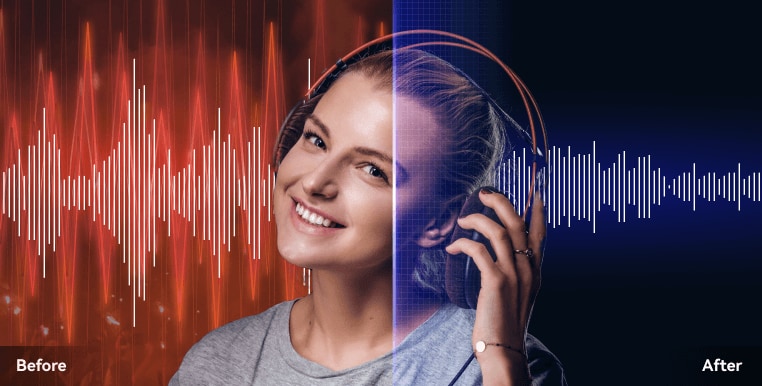
Audio noise reduction is a critical aspect of audio production, focused on improving the quality of sound recordings by minimizing unwanted background noise. Imagine trying to have a clear conversation in a noisy cafe; noise reduction techniques are like tuning out the surrounding chatter to hear your companion better. In this article, we’ll delve into the various techniques and methods used in audio noise reduction, uncovering the intricacies and challenges faced in this endeavor.

Noise reduction involves the application of specialized algorithms and processes to identify and reduce undesirable noise while preserving the desired audio content. It’s akin to distinguishing the melody of a song played in a bustling city square. Key steps in noise reduction include noise profiling, spectral analysis, and adaptive filtering.

How Noise Reduction Works in Audio

Noise profiling is analogous to collecting evidence at a crime scene. It entails capturing a sample of the background noise present in the audio recording, which serves as a reference for noise reduction. Spectral analysis dissects the audio signal into its frequency components, allowing us to pinpoint the frequencies dominated by noise. It’s akin to dissecting a rainbow to reveal its constituent colors.

The core of noise reduction lies in adaptive filtering. Think of it as using an intelligent eraser that selectively removes noise while leaving the primary audio content unaltered. Advanced algorithms adjust in real-time, adapting to changes in noise characteristics. It’s like a skilled chef who adds just the right amount of seasoning to enhance a dish’s flavor without overpowering it. In audio, this means reducing noise while preserving the original sound quality.

Challenges and Benefits of Audio Noise Reduction

Audio noise reduction is not without its challenges. Striking a balance between noise reduction and audio quality is akin to walking a tightrope. Excessive noise reduction can lead to artifacts and distortion, similar to overdoing it with photo editing, resulting in an unnatural appearance. Audio engineers aim to find the sweet spot where noise is minimized while maintaining audio integrity.

One significant challenge is dealing with dynamic noise environments. Just as a photographer adjusts settings to capture a moving subject, audio noise levels can change over time. For instance, in a live recording, the noise from the audience may fluctuate during the performance. Adaptive noise reduction techniques are crucial in such scenarios to maintain audio quality.

Noise reduction is essential in various fields, including music production, film, and telecommunication. It ensures that the final audio product is of high quality and free from distracting background noise, enhancing the overall listening experience.

Benefits of Effective Noise Reduction

Effective noise reduction in audio has several noteworthy advantages that significantly improve the listening experience and the quality of audio recordings. It’s like upgrading from a standard definition television to a high-definition one, where every detail becomes clearer and more vibrant. In this section, we’ll explore the key benefits of implementing noise reduction techniques in audio.

Enhanced Audio Clarity

One of the primary benefits of noise reduction is enhanced audio clarity. Imagine listening to your favorite song without the constant hum of background noise. Noise reduction techniques help eliminate distractions, allowing you to focus on the pure sound of the music. This is particularly important in critical audio recordings, such as music production and podcasting, where clarity is paramount.

Improved Speech Intelligibility

Noise reduction plays a crucial role in improving speech intelligibility. Think of it as tuning a radio to reduce static interference, making the broadcasted speech much clearer. In applications like conference calls, audio recordings, and voiceovers, noise reduction ensures that every word is easily understood, even in noisy environments.

Optimized Audio Quality

Audio quality is at the heart of noise reduction. It’s like restoring an old painting to its original brilliance. By removing unwanted noise, audio engineers can preserve the integrity of the audio signal, resulting in cleaner and more natural-sounding recordings. This is essential for producing high-quality music, films, and other audio content.

Enhanced User Experience

Consider noise reduction as the equivalent of upgrading from standard earphones to noise-canceling headphones. The reduction of background noise creates a more immersive and enjoyable listening experience. Whether you’re watching a movie, attending a live event, or simply enjoying your favorite music, noise reduction enhances the overall quality of audio consumption.

Challenges in Audio Noise Reduction

While audio noise reduction offers numerous benefits, it also presents unique challenges that audio engineers and professionals must navigate. It’s like solving complex puzzles to achieve the desired audio quality. In this section, we’ll delve into the key challenges associated with noise reduction in audio and explore how they impact the process.

Balancing Noise Reduction and Audio Quality

One of the central challenges in audio noise reduction is striking the right balance between noise reduction and audio quality. It’s akin to walking a tightrope, where too much noise reduction can lead to a loss of audio fidelity. Audio engineers must carefully adjust settings and algorithms to ensure that noise is minimized without compromising the integrity of the audio signal.

Dynamism of Noise Environments

Noise environments are seldom static; they can change over time. Consider a live concert where the audience noise varies throughout the performance. Adapting noise reduction techniques to dynamic noise environments is akin to adjusting the focus of a camera to capture a moving subject. Real-time adaptive filtering becomes essential in such scenarios to maintain audio quality.

Artifacts and Distortion

Excessive noise reduction can introduce artifacts and distortion into the audio signal. It’s similar to overediting a photograph, resulting in unnatural and undesirable effects. Audio engineers must carefully monitor the noise reduction process to prevent these artifacts from degrading the audio quality. Finding the right settings and algorithms is crucial to avoid such issues.

Complexity of Audio Content

Audio content varies in complexity, from simple voice recordings to intricate music compositions. Different types of audio content may require tailored noise reduction approaches. For instance, reducing noise in a symphony orchestra recording is different from cleaning up a podcast interview. Audio professionals must choose the appropriate techniques and settings for each type of content.

Real-Time Noise Reduction in Audio

Real-time noise reduction in audio is a valuable technology that allows for immediate noise suppression during audio capture or playback. It’s like having a live editor who removes unwanted noise as you speak or listen. In this section, we’ll explore the concept of real-time noise reduction and its significance in various audio applications.

Immediate Noise Suppression

Real-time noise reduction offers the advantage of immediate noise suppression. It’s as if a virtual assistant is actively removing background noise as you speak or record audio. This is particularly useful in applications like live broadcasting, video conferencing, and podcasting, where interruptions due to noise can be highly disruptive.

Live Performance Enhancement

Live performances, whether in music or public speaking, benefit greatly from real-time noise reduction. Think of it as having an invisible barrier that shields your performance from unwanted noise interference. This technology ensures that the audience experiences a clean and clear audio presentation, enhancing the overall impact of the performance.

Seamless Audio Playback

Real-time noise reduction also plays a role in audio playback devices. Imagine listening to your favorite music on your headphones, and the noise from your surroundings fades away. Noise reduction algorithms work in real-time to create an immersive listening experience, allowing you to enjoy your audio content without distraction.

Tools and Techniques for Audio Noise Reduction

Audio noise reduction relies on a range of tools and techniques, each designed to address specific noise-related challenges. These tools and methods are like a skilled craftsman’s toolbox, each serving a unique purpose. In this section, we’ll explore the essential tools and techniques used in audio noise reduction.

Audio Noise Reduction Software

Audio engineers often turn to specialized software applications for noise reduction. These software solutions employ advanced algorithms to identify and remove noise while preserving audio quality. It’s like having a digital assistant that fine-tunes your audio recordings for optimal clarity.

Noise Gate Filters

Noise gate filters act as gatekeepers for audio signals, allowing passage when the signal exceeds a specified threshold and blocking it when it falls below. They’re similar to automatic doors that open when you approach and close behind you. Noise gates are effective in suppressing background noise during pauses in audio recordings, such as in speech or music.

Spectral Subtraction

Spectral subtraction is a technique that focuses on identifying and subtracting noise components from the audio spectrum. It’s akin to removing specific colors from a painting to reveal the underlying image. This method is particularly useful for reducing stationary noise, such as constant background hums or hisses.

Adaptive Filtering

Adaptive filtering is a dynamic approach to noise reduction, where algorithms continuously adapt to changing noise characteristics. Think of it as a self-adjusting lens on a camera, ensuring a clear image regardless of shifting lighting conditions. Adaptive filtering excels in scenarios where noise levels fluctuate.

Machine Learning-Based Solutions

Machine learning has made significant strides in audio noise reduction. These solutions utilize trained models to recognize and remove noise patterns from audio. It’s like having an audio expert who has analyzed countless recordings and can instantly identify and reduce noise. Machine learning-based noise reduction is versatile and effective in various audio settings.

Audio Output Resolution

Audio Output Resolution

Audio Output Resolution

Understanding Audio Output Resolution

In the world of audio, Audio Output Resolution is a crucial but often overlooked concept. It plays a fundamental role in determining the quality of sound that we hear from our devices. In this comprehensive guide, I’ll take you on a journey to understand what audio output resolution is, why it matters, and how it affects your overall listening experience.

Explaining Audio Output Resolution

Let’s begin by unraveling the term “Audio Output Resolution.” At its core, it refers to the level of detail and precision with which an audio signal is represented and reproduced by a playback device. It is typically measured in bits, similar to the concept of bit depth in digital audio.

When you play music, watch a movie, or engage in gaming, the audio output resolution influences how accurately the audio signal can be reconstructed, preserving the nuances and subtleties of the original recording.

How Does Audio Output Resolution Affect Sound Quality?

The impact of Audio Output Resolution on sound quality is significant. Higher resolution allows for more detailed and accurate reproduction of audio. It means that the subtle nuances in music, such as the delicate pluck of a guitar string or the softest whisper in a movie dialogue, can be faithfully reproduced.

Choosing the Right Audio Output Resolution

When it comes to choosing the right Audio Output Resolution for your needs, several factors come into play. Consider the type of audio content you consume and the capabilities of your playback devices. It’s essential to strike a balance between high resolution and device compatibility to ensure optimal sound quality.

Audio Output Resolution vs. Bit Depth

Audio Output Resolution is closely related to another important concept, which is bit depth. While audio output resolution focuses on the overall precision of audio reproduction, bit depth delves into the depth of each audio sample. Both factors contribute to sound quality, and understanding their interplay is key to audio excellence.

Audio Output Resolution and Sampling Rate

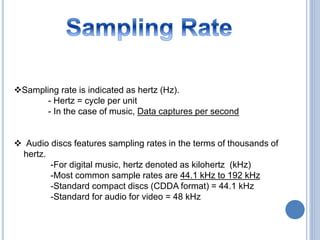
The sampling rate is another critical element tied to Audio Output Resolution. Together, they determine the accuracy of audio playback. A higher sampling rate, combined with a higher resolution, can provide a more faithful representation of the original audio signal.

Does Audio Output Resolution Impact File Size?

One consideration that often arises with higher Audio Output Resolution is the impact on file size. It’s true that audio files with greater resolution can be larger in size. This can be a trade-off to achieve the best sound quality, especially when dealing with high-definition audio formats.

Audio Output Resolution in High-Definition Audio

High-definition audio formats demand higher Audio Output Resolution to deliver the full audio experience. Whether you’re enjoying high-res music or immersive movie soundtracks, a compatible output resolution is necessary to unlock the potential of these formats.

Audio Output Resolution for Home Theater Systems

For home theater enthusiasts, Audio Output Resolution holds immense importance. It’s a key factor in recreating cinematic audio experiences at home. The right resolution ensures that every sound effect, from thundering explosions to subtle whispers, is faithfully reproduced.

The Role of Audio Output Resolution in Gaming

Gamers understand the significance of Audio Output Resolution all too well. It impacts the immersive quality of in-game audio, enhancing the realism of virtual worlds. Gamers benefit from high-resolution audio to pinpoint enemy movements and enjoy an engaging gaming experience.

Audio Output Resolution for Audiophiles

For audiophiles, the pursuit of audio perfection is a lifelong journey. Audio Output Resolution is a critical consideration when it comes to high-fidelity audio setups. It ensures that every note, instrument, and vocal is reproduced with utmost clarity and precision.

Benefits of Upgrading Audio Output Resolution

Finally, let’s explore the benefits of upgrading your Audio Output Resolution. Upgrading can lead to a more immersive, lifelike audio experience. Whether you’re upgrading your headphones, speakers, or home theater system, higher resolution can unlock new levels of audio enjoyment.

Audio Bitstream Quality

Understanding Audio Bitstream Quality

Audio Bitstream Quality


Audio Bitstream Quality Explanation

In this exploration of Audio Bitstream Quality, let’s unravel the complex world of audio signals and digital representation. At its core, an audio bitstream serves as the vessel carrying the essence of sound in the digital realm. Imagine it as a stream of bits, each carefully structured to capture the subtleties and intricacies of audio.

At first glance, it might seem like a string of ones and zeros, but beneath the surface lies a rich tapestry of information. Each bit contributes to the amplitude, frequency, and other characteristics of the audio signal. Understanding this encoding process is pivotal for anyone seeking high-fidelity audio experiences.

The Crucial Role of Bitrate

One of the central elements influencing Audio Bitstream Quality is bitrate. Bitrate refers to the number of bits processed per unit of time, typically measured in kilobits per second (kbps) or megabits per second (Mbps). It dictates the amount of data available to represent audio, and therefore, plays a significant role in audio quality.

Higher bitrates offer more data, resulting in greater fidelity. This means that more intricate details of sound, such as subtle nuances in music or the spatial effects in a movie soundtrack, can be faithfully reproduced.

Understanding Audio Bitstream Quality

Audio Bitstream Quality can be a complex concept to grasp, but it’s essential for anyone who wants to appreciate high-quality sound. Essentially, it refers to the digital representation of audio data, comprising a sequence of bits that encode various attributes of an audio signal.

Each bit in the bitstream plays a crucial role, representing aspects like amplitude, frequency, and more. These bits work together to recreate the original audio when decoded, making it imperative to ensure that the bitstream maintains its quality.

Importance of High-Quality Bitstream

The importance of a high-quality bitstream cannot be overstated, especially for audiophiles and those who seek an immersive audio experience. When a bitstream accurately represents the original audio, it ensures that every nuance and detail in the sound is faithfully reproduced.

This level of fidelity is particularly crucial in scenarios like music production, where every note and instrument should be crystal clear, or in home theater setups, where surround sound relies on precise bitstream quality to create an immersive experience.

Bitstream Quality vs. Audio Resolution

While bitstream quality and audio resolution are related, they aren’t the same thing. Audio resolution typically refers to the number of discrete values a digitized audio signal can take, often expressed in bits.

Higher audio resolution means more detailed audio, but it’s only one part of the equation. Bitstream quality encompasses not only the resolution but also how well the digital representation captures the subtleties of the analog audio signal. It’s about maintaining fidelity throughout the entire digital audio chain.

Bitstream and Audio Fidelity

When discussing Audio Bitstream Quality, audio fidelity is a term that frequently comes up. Fidelity, in the context of audio, refers to how accurately the reproduced sound matches the original source.

For audiophiles and music enthusiasts, achieving high audio fidelity is paramount. It means that the music you listen to retains the same depth, clarity, and emotional impact as the artist intended.

Bitstream Bitrate and Sound Clarity

Bitrate, as mentioned earlier, is a key determinant of Audio Bitstream Quality. It directly influences the amount of data used to represent audio.

Higher bitrates result in more data being used to represent sound, which, in turn, leads to greater sound clarity. This is especially noticeable in intricate audio compositions, where every instrument and vocal should be distinct and clear.

How to Measure Bitstream Quality

Measuring Audio Bitstream Quality requires a thorough understanding of audio technology. Various metrics and tools are available to assess the quality of an audio bitstream.

One common metric is the signal-to-noise ratio (SNR), which quantifies the level of unwanted noise present in the audio signal. The higher the SNR, the better the bitstream quality.

Bitstream Quality in Surround Sound

Surround sound systems rely heavily on bitstream quality to create an immersive audio experience. In a surround sound setup, multiple audio channels work together to envelop the listener in a 360-degree audio environment.

Each of these audio channels requires a high-quality bitstream to ensure that the spatial audio effects, such as panning and sound localization, are accurate and realistic.

Bitstream Quality and Home Theater

Home theater systems have become increasingly popular for recreating the cinematic experience at home. These systems often include advanced audio components, including high-definition audio receivers and surround sound speakers.

For a home theater to deliver the best audio experience, the bitstream quality must be top-notch. This ensures that movies and TV shows are presented with the same audio clarity and impact as in a commercial theater.

Bitstream vs. Analog Audio Quality

In the realm of audio, there’s an ongoing debate between bitstream and analog audio quality. Analog audio is continuous and unaltered, while digital audio relies on bitstream representation.

The choice between the two often comes down to personal preference, but it’s important to note that high-quality bitstreams can approach, and sometimes even surpass, analog audio quality in terms of fidelity and accuracy.

Bitstream Transmission and Audio Quality

The transmission of audio bitstreams, especially in digital formats, can impact audio quality. Factors like data compression and transmission errors can introduce distortions into the bitstream.

Therefore, it’s crucial to use reliable transmission methods and ensure that the bitstream remains intact from the source to the playback device to maintain audio quality.

Bitstream Quality in Professional Audio Systems

Professional audio systems, such as those used in recording studios and live performances, demand the highest standards of bitstream quality.

Recording engineers and artists rely on pristine audio bitstreams to capture and reproduce music accurately. Any compromise in bitstream quality can result in a loss of audio fidelity, which is unacceptable in professional audio production.

Final Words

In conclusion, Audio Bitstream Quality is a critical aspect of the audio experience, impacting everything from music enjoyment to home theaters and professional audio production.

Understanding the intricacies of bitstream quality, including factors like bitrate and fidelity, allows audiophiles and audio enthusiasts to appreciate sound at its finest. Whether you’re building a home theater, creating music, or simply enjoying your favorite tunes, a high-quality bitstream ensures that every note and sound effect is faithfully reproduced.