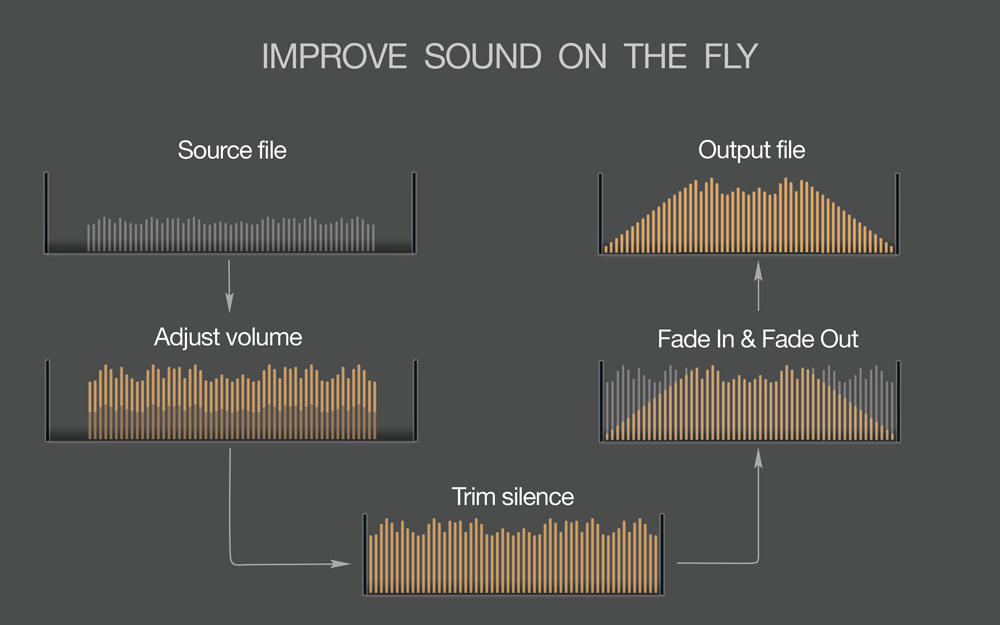
As a music lover, I know how frustrating it can be to have a favorite song that just isn’t loud enough. Whether you’re playing music on your phone, laptop, or in your car, having to constantly adjust the volume can take away from the listening experience. In this article, I’ll be sharing some tips and tricks for boosting the volume of a song without sacrificing its quality.
Equalization
One of the easiest ways to increase the volume of a song is through equalization. By adjusting the levels of specific frequencies, you can make the song sound louder without increasing the overall volume. Start by boosting the mid-range frequencies, which is where most of the vocals and instruments are. Be careful not to overdo it, as too much boosting can result in distortion and loss of quality.
Compression
Compression is another technique that can help increase the volume of a song. It works by reducing the dynamic range of the music, which means the difference between the loudest and softest parts of the song is less pronounced. This makes it easier to hear the quieter parts without having to turn up the volume. However, be careful not to compress the song too much, as this can also lead to distortion.
Normalization
Normalization is a process that adjusts the volume of a song so that the loudest part is at a certain level. This can help to make the song sound louder overall, without changing the dynamic range. However, it’s important to use normalization carefully, as it can sometimes lead to a loss of quality.
Hardware
If you’re still struggling to get your song loud enough, it might be time to invest in some new hardware. A good set of speakers or headphones can make a big difference in how loud your music sounds. You could also consider using an external amplifier or sound card to boost the volume.
Final Words
Boosting the volume of a song can be a tricky process, but with the right techniques, it’s definitely possible. Remember to use equalization and compression carefully, and consider investing in some new hardware if you’re still having trouble. And if all else fails, mp4gain is a great solution for boosting the volume of your songs without sacrificing quality. Give it a try and see how much better your music can sound!
Improving the sound quality of an MP3 file can be a tricky task, but it is definitely possible with the right tools and techniques. As a music enthusiast, I have spent countless hours trying to find the best practices for enhancing the sound quality of my mp3 files. In this article, I will share with you some of the tips and techniques that I have found to be the most effective.
MP3 Sound Improvement
One of the most effective ways to improve the sound quality of an mp3 file is to use a high-quality audio editor like mp4gain. This software allows you to adjust the levels of your mp3 file and normalize the volume to ensure that it sounds great on any device. Additionally, mp4gain can convert your mp3 file to other popular audio formats like WAV, FLAC, and OGG, which can further improve the sound quality.
Another way to improve the sound quality of your mp3 files is to use a high-quality audio player. A good audio player will allow you to adjust the sound settings to your liking, including bass and treble levels, as well as any other sound enhancements that you prefer.
Mp3 Sound Editing
If you want to take your mp3 sound editing to the next level, consider using an equalizer. An equalizer allows you to adjust the levels of specific frequencies in your mp3 file, which can have a dramatic impact on the overall sound quality. With an equalizer, you can boost the bass or treble, or make any other adjustments that you feel are necessary.
Another important aspect of mp3 sound editing is to remove any unwanted noise or distortion from the file. This can be done using various noise reduction tools that are available in most audio editing software. By removing any unwanted noise or distortion, you can greatly improve the overall sound quality of your mp3 file.
Best Practices for Improving MP3 Sound
In addition to the tips and techniques outlined above, there are some best practices that you should keep in mind when trying to improve the sound quality of your mp3 files. Firstly, make sure that you are using high-quality source files. If your original source file is of poor quality, no amount of editing or processing will be able to fix it.
Secondly, always listen to your mp3 file on multiple devices to ensure that it sounds good across different platforms. What sounds great on your computer may not sound as good on your phone or portable music player.
Lastly, don’t be afraid to experiment with different settings and techniques to find what works best for you. Improving the sound quality of your mp3 files is an ongoing process, but with the right tools and techniques, you can achieve great results.
Final Words
Improving the sound quality of your mp3 files may seem like a daunting task, but it is definitely worth the effort. With the tips and techniques outlined in this article, you can take your mp3 sound editing to the next level and enjoy your music to the fullest.
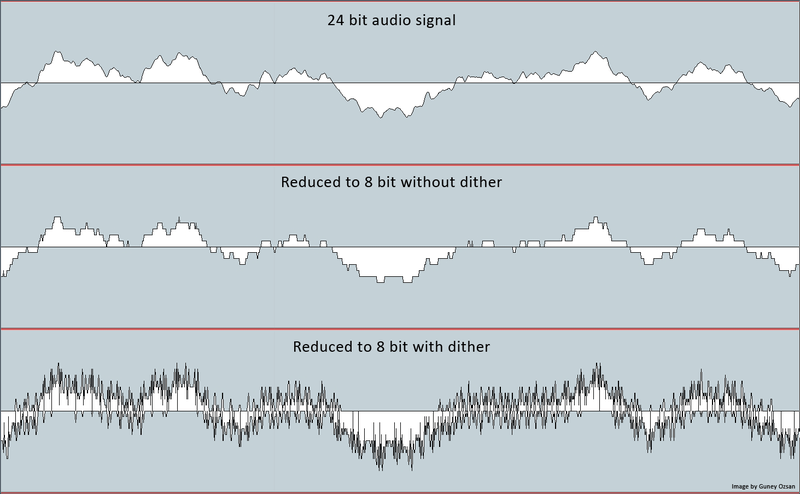
Dithering is a technique used to reduce banding and other artifacts in digital images and audio. It works by adding a small amount of noise to the signal, which can mask the unwanted artifacts and create a more natural, organic look or sound.
What is Dithering?
Dithering is the process of adding random noise to a signal in order to improve its quality. This can be used to reduce quantization error in digital audio, or to create a more natural-looking gradient in digital images.
Dithering Algorithm
There are many different algorithms used for dithering, each with their own strengths and weaknesses. Some of the most popular include ordered dithering, error diffusion dithering, and random noise dithering.
Dithering Images
In digital imaging, dithering can be used to reduce banding and other artifacts that can occur when the number of available colors is limited. By adding noise to the image, dithering can create the illusion of more colors and a smoother gradient.
Dithering Audio
In digital audio, dithering can be used to reduce quantization error and improve the overall sound quality. By adding a small amount of noise to the signal, dithering can create a more natural, analog sound that is easier on the ears.
At MP4Gain.com, we understand the importance of high-quality audio and video. That’s why we offer a range of powerful tools, including our flagship product, MP4Gain. With MP4Gain, you can easily normalize and convert your audio and video files to a wide range of formats, all with the click of a button.
Whether you’re a professional audio engineer or just looking to improve the quality of your home recordings, MP4Gain is the solution you’ve been looking for. So why wait? Try MP4Gain today and experience the power of dithering for yourself.
“Windows Media Audio (WMA) is an audio data compression technology developed by Microsoft.”
How does WMA work?
“WMA uses a perceptual audio coding technique to compress audio data while minimizing perceptible loss of audio quality.”
What are the benefits of using WMA?
“Some of the benefits of using WMA include smaller file size, higher sound quality, and compatibility with a wide range of devices.”
What are the disadvantages of using WMA?
“One of the main disadvantages of using WMA is its limited compatibility with non-Microsoft devices.”
How can you convert WMA files?
“You can convert WMA files to other formats using various software tools such as MP4Gain, which can also normalize audio levels and convert other major audio and video formats.”
Final Words
“As a long-time expert in audio technology, I highly recommend using WMA for its superior sound quality and smaller file size. However, keep in mind its limitations when it comes to compatibility with non-Microsoft devices. And if you need to convert WMA files, consider using a reliable tool like MP4Gain.”
Audio compression is the process of reducing the size of digital audio files by removing redundant or unnecessary information, while maintaining the perceived quality of the original sound. This is done by using various algorithms that analyze and modify the audio data in a way that reduces its file size.
Types of Audio Compression Techniques
There are two main types of audio compression techniques: lossy and lossless.
Lossy Compression
Lossy compression algorithms are used to achieve high compression rates, but at the cost of some loss in quality. In lossy compression, some of the original audio data is discarded or modified in a way that reduces its size. The amount of data that is removed or modified depends on the compression algorithm used.
Some popular lossy compression algorithms include MP3, AAC, and WMA. These algorithms are commonly used for music streaming, online radio, and other applications where high compression rates are necessary.
Lossless Compression
Lossless compression algorithms are used to compress digital audio files without losing any information. These algorithms are designed to reduce the size of the file by removing redundancies in the data, but without modifying any of the original information.
Some popular lossless compression algorithms include FLAC, ALAC, and WAV. These algorithms are commonly used for high-quality music streaming and for archiving music collections.
How Audio Compression Works
Audio compression works by analyzing the original audio data and then modifying it in a way that reduces its size while maintaining its quality. This is done using various mathematical algorithms that compress the data.
The most common way to compress audio data is to use perceptual coding. This method takes advantage of the human ear’s limitations in hearing certain frequencies and sounds. By removing these sounds, the audio data can be compressed without the listener noticing any loss in quality.
Another method of audio compression is predictive coding. This method uses mathematical algorithms to predict the next sample in a waveform based on previous samples. The difference between the predicted sample and the actual sample is then compressed and stored.
Why Audio Compression is Important
Audio compression is important because it allows us to store and transmit audio data more efficiently. This means that we can store more audio files on our devices and transmit audio data faster over the internet. Without audio compression, it would be impossible to stream music or podcasts over the internet.
12 Common Questions About Audio Compression Techniques
1. What is the difference between lossy and lossless audio compression?
Lossy compression algorithms are designed to achieve high compression rates at the cost of some loss in quality, while lossless compression algorithms are designed to compress audio files without losing any information.
2. Which audio compression algorithm should I use?
The choice of audio compression algorithm depends on the intended use of the audio file. Lossy compression algorithms like MP3 and AAC are commonly used for music streaming and online radio, while lossless compression algorithms like FLAC and ALAC are commonly used for high-quality music streaming and archiving.
3. How much does audio compression affect the quality of the original sound?
The amount of quality loss in audio compression depends on the compression algorithm used and the degree of compression applied. Lossy compression algorithms generally result in some loss in quality, while lossless compression algorithms do not.
4. How can I tell if an audio file has been compressed?
You can usually tell if an audio file has been compressed by looking at its file extension. Lossy compressed files usually have extensions like MP3, AAC
Digital audio bit depth refers to the number of bits used to represent each sample in a digital audio signal. Bit depth is a crucial aspect of digital audio because it affects the accuracy and dynamic range of the signal.
In digital audio, sound is captured and processed as a series of discrete samples, with each sample representing the amplitude of the sound wave at a specific point in time. The bit depth determines the number of possible amplitude values that can be represented in each sample.
How Does Bit Depth Affect Audio Quality?
The higher the bit depth, the more accurately the digital audio signal can represent the original analog waveform. A higher bit depth allows for a greater dynamic range, which means that the quietest sounds can be represented with more accuracy, and the loudest sounds can be represented without distortion.
For example, a 16-bit audio signal can represent 65,536 possible amplitude values, while a 24-bit audio signal can represent 16,777,216 possible amplitude values. This means that a 24-bit audio signal can capture a wider range of dynamic levels and is capable of greater accuracy and detail than a 16-bit audio signal.
What is the Relationship Between Bit Depth and Signal-to-Noise Ratio?
As the bit depth increases, the signal-to-noise ratio (SNR) also increases. SNR is the ratio between the desired signal (the audio) and the background noise.
A higher bit depth means that there are more possible amplitude values for each sample, which reduces the amount of quantization noise in the signal. Quantization noise is a type of distortion that occurs when the analog signal is converted to digital.
How is Bit Depth Measured?
Bit depth is measured in bits per sample. Common bit depths in digital audio include 16-bit, 24-bit, and 32-bit.
What is Dithering?
Dithering is a process used to reduce the distortion caused by quantization error in digital audio. When an analog signal is digitized, the conversion process rounds the amplitude of each sample to the nearest possible value.
Dithering adds a small amount of random noise to the signal before it is quantized, which allows for a smoother transition between amplitude values and reduces the audible effects of quantization error.
What is the Difference Between Bit Depth and Sample Rate?
While bit depth determines the number of possible amplitude values in each sample, sample rate determines the number of samples taken per second. A higher sample rate allows for greater accuracy in capturing the original analog waveform, but it does not affect the dynamic range or accuracy of each individual sample.
What is the Ideal Bit Depth for Recording and Mixing?
The ideal bit depth for recording and mixing depends on the intended use of the final product. For most applications, a bit depth of 24 bits is considered to be sufficient, as it provides a wide dynamic range and high accuracy.
However, for applications that require extreme accuracy and detail, such as classical music recording, a higher bit depth may be necessary.
What is the Relationship Between Bit Depth and File Size?
As the bit depth increases, the file size of the digital audio also increases. This is because a higher bit depth requires more storage space to represent the additional amplitude values.
What is the Relationship Between Bit Depth and Processing Power?
Higher bit depths require more processing power to manipulate and process. This is because the additional amplitude values must be calculated and stored in memory.
What Happens When a High Bit-Depth Audio File is Converted to a Lower Bit-Depth Format?
When a high bit-depth audio file is converted to a lower bit-depth format, the result is a loss of some of the original audio data. This is because the lower bit-depth format has fewer bits to represent the audio data, which means that some of the information is lost in the conversion process.
For example, if a 24-bit audio file is converted to a 16-bit format, the conversion process will discard the least significant 8 bits of each sample. This can result in a loss of some of the subtle nuances and details in the audio, which can be particularly noticeable in quiet passages or when the audio is heavily processed.
It’s worth noting that some audio formats, such as MP3 and AAC, use lossy compression to reduce the file size. This means that even if the original file was at a high bit-depth, converting it to a lower bit-depth format such as MP3 will result in a further loss of data due to the compression algorithm.
What is Dithering and How Does it Help with Bit Depth Reduction?
Dithering is a technique used to reduce the impact of bit-depth reduction when converting high-resolution audio to a lower resolution format. It works by adding a small amount of random noise to the audio signal before it is truncated to the lower bit depth.
This noise effectively masks the truncation distortion, allowing the audio to retain some of its original detail and clarity. Dithering is particularly useful when converting from a higher bit-depth format to a lower bit-depth format, as it can help to mitigate the loss of information that would otherwise occur.
How Does Bit Depth Affect Audio Quality?
The bit depth of an audio file can have a significant impact on its perceived quality. Generally speaking, higher bit-depth files can capture more detail and nuance in the audio, resulting in a more accurate and realistic reproduction of the original recording.
For example, a 16-bit audio file has a maximum dynamic range of 96 dB, while a 24-bit file has a maximum dynamic range of 144 dB. This means that a 24-bit file can capture much quieter sounds and much louder sounds than a 16-bit file, resulting in a more accurate representation of the original recording.
That being said, the impact of bit depth on perceived audio quality can vary depending on a number of factors, including the quality of the recording equipment, the mastering process, and the listening environment.
What is the Difference Between Bit Depth and Sample Rate?
While bit depth and sample rate are both important aspects of digital audio, they refer to different things. Bit depth refers to the number of bits used to represent each sample in an audio file, while sample rate refers to the number of samples per second that are taken to create the audio file.
In other words, bit depth determines the level of detail captured in each sample, while sample rate determines the temporal resolution of the audio. Both bit depth and sample rate can have an impact on the perceived quality of an audio file, and both are important considerations when working with digital audio.
What is the Best Bit Depth for Audio Production?
The best bit depth for audio production depends on a number of factors, including the specific needs of the project and the available hardware and software. In general, however, a bit depth of 24 bits is considered to be a good choice for most recording and production purposes.
This is because a 24-bit depth provides a high level of detail and dynamic range, while also being widely supported by modern recording equipment and software. That being said, there may be situations where a lower bit depth may be sufficient. For example, if the final audio product will only be distributed online or through streaming services, a 16-bit depth may be acceptable as it will still provide decent quality while reducing file size and download times. Additionally, if the recording environment is not optimal and contains a high level of background noise, a lower bit depth may actually be preferable as it can help mask the noise.
How does bit depth affect audio quality?
Bit depth plays a critical role in determining the quality of digital audio recordings. The higher the bit depth, the greater the dynamic range and level of detail that can be captured in a recording. This results in a more accurate and faithful reproduction of the original sound source. In contrast, a lower bit depth may result in a loss of detail and accuracy, leading to a less faithful reproduction of the original sound.
Can bit depth be converted after recording?
While it is possible to convert the bit depth of a digital audio file after recording, it is generally not recommended. This is because bit depth conversion can result in a loss of information and a decrease in overall audio quality. If possible, it is best to record at the desired bit depth from the start to ensure the highest possible quality.
What are some common bit depths used in digital audio?
The most common bit depths used in digital audio are 16-bit, 24-bit, and 32-bit. 16-bit is the standard for CDs and is widely used in digital audio recording for distribution on streaming platforms. 24-bit is increasingly becoming the standard for professional recording due to its high level of detail and dynamic range. 32-bit is relatively new and provides an even greater level of detail and dynamic range, but is not yet widely supported by all recording equipment and software.
Does bit depth affect the final file size of an audio recording?
Yes, bit depth does affect the final file size of an audio recording. A higher bit depth requires more data to represent each sample, resulting in larger file sizes. For example, a 24-bit audio file will be larger than a 16-bit audio file of the same duration and sample rate.
What is dithering in relation to bit depth?
Dithering is a technique used to reduce the audible effects of quantization distortion when converting from a higher bit depth to a lower bit depth. When reducing the bit depth, some of the information from the original recording must be discarded. This can result in audible distortion and noise. Dithering adds a small amount of random noise to the audio signal to mask this distortion and make it less audible.
Can different bit depths be mixed in the same audio project?
Yes, different bit depths can be mixed in the same audio project. However, it is important to note that mixing different bit depths can result in a loss of quality for the higher bit depth audio. When mixing different bit depths, it is best to convert all audio to the same bit depth before mixing to ensure the highest possible quality.
What is the relationship between bit depth and sample rate?
Bit depth and sample rate are both important factors in determining the quality of digital audio recordings. Bit depth refers to the number of bits used to represent each sample, while sample rate refers to the number of samples taken per second. Higher bit depths and sample rates result in higher quality recordings with greater detail and accuracy.
Can bit depth affect the sound of analog audio recordings?
No, bit depth does not affect the sound of analog audio recordings. Bit depth only applies to digital audio recordings.
Opus and Ogg are two popular audio codecs that often spark debates among enthusiasts and content creators. Opus, developed by the Internet Engineering Task Force (IETF), is renowned for its exceptional versatility and low latency, making it suitable for a wide range of applications like VoIP, video conferencing, and real-time communications. With its robust compression algorithm, Opus can deliver high-quality audio even at low bit rates, making it an excellent choice for streaming services and online content distribution. On the other hand, Ogg is a container format, often paired with the Vorbis audio codec. Ogg Vorbis is an open-source codec known for its superior sound quality and efficient compression, particularly in delivering lossy audio without significant quality degradation. Content creators often face a dilemma when choosing between Opus and Ogg Vorbis, as both offer unique advantages depending on the specific use case.
Opus vs Ogg: The Audio Quality and Compression Efficiency Debate
The Opus vs Ogg comparison frequently revolves around audio quality and compression efficiency. Opus has gained popularity as a go-to codec for real-time communications due to its low latency and adaptive bit rate capabilities. Its dynamic nature allows it to adjust the bit rate based on network conditions, ensuring smooth audio transmission over varying internet connections. Furthermore, Opus supports both mono and stereo audio, making it versatile for different media formats. On the other hand, Ogg Vorbis excels in delivering excellent sound quality while maintaining relatively smaller file sizes. It is well-suited for streaming and online content distribution, where efficient compression is crucial to minimize bandwidth usage and optimize user experience. Ultimately, the choice between Opus and Ogg Vorbis depends on prioritizing either low latency and adaptability or the highest possible audio fidelity and compression efficiency.
Opus vs Ogg: Choosing the Right Codec for Specific Use Cases
When making a decision between Opus and Ogg Vorbis, content creators need to consider the specific use case and target audience. For applications that require real-time audio communication with minimal delays, such as online gaming or video conferencing, Opus is a compelling choice. Its ability to maintain high-quality audio even in challenging network conditions ensures smooth communication experiences for users. On the other hand, Ogg Vorbis may be preferable for media distribution platforms where audio quality is of utmost importance, like music streaming services or podcasting platforms. The open-source nature of Ogg Vorbis also appeals to communities that prioritize open standards and free access to the technology. Ultimately, a careful assessment of the requirements and priorities will guide content creators to select the most suitable audio codec between Opus and Ogg Vorbis.
“Audio is a powerful medium that has the ability to evoke emotions and feelings like no other,” said Jack Johnson in his book, “The Power of Sound.” Audio quality is important, and choosing the right format can make a big difference in how your audio sounds. Opus and Ogg Vorbis are two audio formats that are commonly used for music and voice recordings. In this article, we will explore the differences between Opus and Ogg Vorbis and help you determine which format is best for your needs.
What are Opus and Ogg Vorbis?
“Opus is a lossy audio coding format designed for real-time interactive communication over the Internet,” according to the Xiph.Org Foundation. “Ogg Vorbis is a fully open, non-proprietary, patent-and-royalty-free, general-purpose compressed audio format for mid to high quality (8kHz-48.0kHz, 16+ bit, polyphonic) audio and music at fixed and variable bitrates from 16 to 128 kbps/channel.”
Quality
The quality of the audio is an important factor to consider when choosing between Opus and Ogg Vorbis. Opus is generally considered to have better quality than Ogg Vorbis at lower bitrates. According to a study by the GStreamer team, Opus was found to have better quality than Ogg Vorbis at bitrates of 64kbps or less. However, at higher bitrates, the difference in quality becomes less noticeable.
Compatibility
Compatibility is another important factor to consider when choosing between Opus and Ogg Vorbis. Opus is a relatively new format, and as such, it may not be supported by all devices or software. Ogg Vorbis, on the other hand, has been around since 2002 and is supported by a wide range of devices and software. If you are looking for a format that is widely compatible, Ogg Vorbis may be the better choice.
File Size
The size of the audio file is another consideration when choosing between Opus and Ogg Vorbis. Opus is known for its small file sizes, making it a great choice for streaming audio over the Internet. Ogg Vorbis files are also relatively small, but they may be slightly larger than Opus files at similar bitrates.
Final Words
Choosing between Opus and Ogg Vorbis ultimately depends on your needs and preferences. Opus is a great choice if you are looking for high-quality audio at low bitrates or if you need small file sizes for streaming. Ogg Vorbis, on the other hand, may be the better choice if you are looking for a format that is widely compatible with a range of devices and software. No matter which format you choose, make sure to test it out and see if it meets your needs. As Jack Johnson said, “The power of sound can bring us closer to ourselves and each other.” Choose the right audio format and let the power of sound bring you closer to what matters most.
Video content has become an essential part of our daily lives, from entertainment to education and everything in between. But have you ever stopped to think about the quality of the video you’re watching? One important factor that affects the quality of a video is the sample rate.
Sample Rate in Video
In digital audio and video, sample rate refers to the number of samples of audio or video per second. It is measured in hertz (Hz), which represents the number of samples per second. The higher the sample rate, the more samples are taken per second, resulting in a higher quality video.
For example, a video with a sample rate of 24 frames per second (fps) will appear smoother and more fluid than a video with a lower sample rate, such as 12 fps. This is because the higher sample rate captures more detail and movement in the video, making it appear more realistic and lifelike.
But why does sample rate matter? Imagine watching a movie with a low sample rate; the video would appear choppy and disjointed, ruining the viewing experience. On the other hand, a high sample rate provides a more immersive experience, allowing the viewer to become fully immersed in the content.
As filmmaker George Lucas once said, “Sound is fifty percent of the movie-going experience.” The same can be said for video – without high-quality visuals, the viewing experience falls short.
In addition to the visual quality, the sample rate also affects the file size of the video. A higher sample rate means a larger file size, which can take up more storage space and take longer to load or transfer. However, with advancements in technology, the file size issue has become less of a concern as storage capacity and internet speeds continue to increase.
In conclusion, sample rate plays a crucial role in the quality of a video. It affects both the visual experience and file size, making it an important consideration for anyone creating or consuming video content. As filmmaker Francis Ford Coppola once said, “The essence of cinema is editing.” But without a high sample rate, the editing and overall viewing experience falls flat.
So next time you watch a video, pay attention to the sample rate – you may be surprised by the difference it makes. As the character Neo from The Matrix said, “I know kung fu.” And now, you know sample rate.
Multimedia formats are digital file types that can contain different types of media such as text, audio, video, and images. These files can be played on various multimedia devices, including computers, smartphones, and tablets. Multimedia formats are used for a variety of purposes such as entertainment, education, and communication.
The Different Types of Multimedia Formats
There are various types of multimedia formats, each with its own advantages and disadvantages. Some of the most common multimedia formats include:
Audio Formats: Audio formats are used to store sound recordings. Some of the most common audio formats include MP3, AAC, FLAC, and WAV.
Video Formats: Video formats are used to store video recordings. Some of the most common video formats include AVI, MP4, MOV, and WMV.
Image Formats: Image formats are used to store digital images. Some of the most common image formats include JPEG, PNG, and GIF.
Document Formats: Document formats are used to store text-based documents. Some of the most common document formats include PDF, DOC, and TXT.
Interactive Formats: Interactive formats are used to create multimedia presentations and games. Some of the most common interactive formats include Flash and HTML5.
What are the Advantages of Different Multimedia Formats?
Different multimedia formats offer different advantages. For example, MP3 is a popular audio format because it is small in size and can be played on most devices. On the other hand, FLAC is a lossless audio format that offers higher quality sound but takes up more storage space. Similarly, AVI is a popular video format because it can be played on most devices, while MOV is a high-quality video format that is often used for professional video editing.
What are the Disadvantages of Different Multimedia Formats?
Different multimedia formats also have their own disadvantages. For example, some formats may not be supported by certain devices, which can make it difficult to play them. Additionally, some formats may take up a lot of storage space, which can be a problem for devices with limited storage capacity.
How do Multimedia Formats Impact File Size?
The file size of a multimedia file is determined by various factors such as the duration, resolution, and bitrate of the file. For example, a high-quality video with a long duration will have a larger file size compared to a low-quality video with a short duration. Similarly, a high-quality audio file with a high bitrate will have a larger file size compared to a low-quality audio file with a low bitrate.
What is the Role of Codecs in Multimedia Formats?
Codecs are used to compress and decompress multimedia files. Without codecs, multimedia files would take up a lot of storage space and would be difficult to transmit over the internet. Codecs can be used to compress files while maintaining the quality of the media, or to reduce the quality of the media while minimizing the file size.
What is the Difference between Lossy and Lossless Compression?
Lossy compression is a type of compression that permanently removes some of the data from a multimedia file to reduce its size. This can result in a loss of quality in the media. Lossless compression, on the other hand, compresses files without permanently removing any data, which means that the quality of the media remains the same.
What are Some Common Audio Codecs?
There are a number of different audio codecs that are commonly used to encode digital audio files. Here are a few of the most common:
MP3: This is perhaps the most well-known and widely used audio codec. MP3 files use lossy compression to reduce file size while maintaining reasonable sound quality.
FLAC: This codec uses lossless compression, meaning that it is able to compress audio files without sacrificing any of the original audio data. As a result, FLAC files are typically larger than MP3 files but offer higher quality sound.
Ogg Vorbis: This is a relatively new codec that uses a combination of lossy and lossless compression to achieve high-quality sound while maintaining a small file size. Ogg Vorbis files are often used for online streaming and broadcasting.
M4A: This is a codec that is commonly used by Apple for its iTunes music store. M4A files can use either lossy or lossless compression and are often used for streaming music on mobile devices.
WAV: This is an uncompressed audio format that is commonly used in professional audio production. WAV files offer high quality sound but are also very large in size.
What Are Some Common Video Codecs?
In addition to audio codecs, there are also a number of video codecs that are commonly used to encode digital video files. Here are a few of the most common:
MPEG-4: This is a popular codec that is widely used for streaming video online. MPEG-4 files can use either lossy or lossless compression and offer a good balance between file size and video quality.
H.264: This codec is used for high-definition video and is commonly used for streaming video online, as well as for Blu-ray discs and other high-quality video formats.
WebM: This is an open-source video codec that is designed for use on the web. WebM files are typically smaller than other video codecs while still offering high-quality video playback.
AVI: This is an older video codec that is still commonly used today. AVI files offer high-quality video playback but can be quite large in size.
WMV: This is a video codec that is commonly used on Windows-based systems. WMV files offer good video quality but can be somewhat restricted in terms of compatibility with other devices and software platforms.
How Do You Choose the Right Codec?
Choosing the right codec for your digital media files can be a bit tricky, as there are many factors to consider. Some of the most important factors to consider when choosing a codec include the intended use of the file, the quality of the original source material, the available storage space, and the compatibility of the file with different devices and software platforms.
When it comes to audio codecs, for example, you may want to choose a lossy codec like MP3 if you are creating a file for online streaming or sharing, as this will help to keep the file size small while still maintaining good sound quality. On the other hand, if you are creating a file for professional audio production or for archiving purposes, you may want to choose a lossless codec like FLAC or WAV, as this will ensure that none of the original audio data is lost during compression.
Before we dive into the comparison between 128 kbps and 320 kbps, let’s first define what audio bitrate is. Audio bitrate refers to the amount of data per second that is used to encode an audio file. In simpler terms, it determines the quality of the audio file. The higher the bitrate, the better the quality of the audio file.
What is 128 kbps?
128 kbps stands for 128 kilobits per second, which is a common audio bitrate used in digital audio files such as MP3s. This bitrate is considered to be the minimum acceptable bitrate for digital audio files. It is typically used for streaming services and online downloads where file size and bandwidth usage are important factors.
What is 320 kbps?
320 kbps stands for 320 kilobits per second, which is a higher audio bitrate than 128 kbps. It is often considered to be the highest bitrate that is practical for digital audio files. This bitrate is commonly used for audio files that require high-quality audio, such as music files that are intended for audiophiles or professional audio recordings.
What is the Difference Between 128 kbps and 320 kbps?
The main difference between 128 kbps and 320 kbps is the audio quality. 320 kbps audio files are of higher quality compared to 128 kbps audio files. This is because the higher bitrate allows for more audio data to be included in the file. This results in a richer, fuller sound with more detail and depth. However, this increased audio quality comes at the cost of larger file sizes.
When Should You Use 128 kbps?
128 kbps is suitable for situations where file size and bandwidth usage are important factors. For example, streaming services such as Spotify and Apple Music use 128 kbps for their standard quality audio streams. This allows for smooth streaming without buffering or interruptions, even on slower internet connections. 128 kbps is also suitable for audio files that are intended for casual listening, such as podcasts or background music.
When Should You Use 320 kbps?
320 kbps is suitable for situations where audio quality is the top priority. This includes music files that are intended for audiophiles or professional audio recordings. 320 kbps is also suitable for audio files that are intended for playback on high-end audio equipment such as high-end headphones or speakers. However, it is important to note that 320 kbps audio files have larger file sizes compared to 128 kbps audio files, which may not be practical for certain situations such as streaming or downloading over limited internet bandwidth.
Does Bitrate Affect File Size?
Yes, bitrate affects file size. Higher bitrates result in larger file sizes while lower bitrates result in smaller file sizes. This is because higher bitrates include more audio data in the file, which results in a larger file size.
Does Higher Bitrate Mean Better Quality?
Not necessarily. While higher bitrates generally result in better audio quality, there are other factors that can affect audio quality such as the audio codec used and the mastering of the audio file. It is possible for a well-mastered 128 kbps audio file to sound better than a poorly-mastered 320 kbps audio file.
Can You Convert a 128 kbps Audio File to 320 kbps?
No, you cannot convert a 128 kbps audio file to 320 kbps. Converting a lower bitrate audio file to a higher bitrate will not improve the audio quality. In fact, it may even worsen the audio quality since the original audio file is being compressed again with a higher bitrate.
However, you can convert a 320 kbps audio file to a lower bitrate such as 128 kbps. This is because the higher bitrate includes more audio data, which can be compressed to a lower bitrate without significant loss in audio quality.
What Factors Should You Consider When Choosing Audio Bitrate?
When choosing audio bitrate, there are several factors to consider such as:
The intended use of the audio file
The available bandwidth and storage space
The quality of the audio source
The type of audio content (music, speech, etc.)
The playback equipment (headphones, speakers, etc.)
It is important to choose the appropriate bitrate based on these factors to ensure that the audio file meets the desired quality and functionality.
What is Lossless Audio?
Lossless audio refers to audio files that are compressed without any loss in audio quality. This is achieved by using compression algorithms that retain all of the original audio data, resulting in a file that is identical in quality to the original audio source. Lossless audio files typically have larger file sizes compared to compressed audio files such as MP3s.
Is Lossless Audio Better Than Compressed Audio?
It depends on the intended use of the audio file. Lossless audio files are generally of higher quality compared to compressed audio files such as MP3s. However, they also have larger file sizes, which may not be practical for certain situations such as streaming or downloading over limited internet bandwidth. Lossless audio is more suitable for situations where audio quality is the top priority, such as professional audio recordings or music files for audiophiles.
What is the Best Audio Bitrate for Music?
The best audio bitrate for music depends on several factors such as the type of music, the quality of the audio source, and the playback equipment. Generally, a bitrate of 256 kbps or higher is recommended for music files that are intended for audiophiles or professional audio recordings. However, for casual listening or streaming, a bitrate of 128 kbps may be sufficient.
What is the Best Audio Bitrate for Podcasts?
For podcasts, a bitrate of 64 kbps to 128 kbps is typically sufficient. This allows for a balance between audio quality and file size, making it practical for both streaming and downloading.
What is the Best Audio Bitrate for Speech?
For speech, a bitrate of 64 kbps to 96 kbps is typically sufficient. Speech files do not require as high of a bitrate compared to music files since they contain less audio data.
What is the Relationship Between Audio Bitrate and Frequency Response?
The audio bitrate has a direct relationship with the frequency response of the audio file. Higher bitrates allow for a wider frequency response, which results in a richer and fuller sound with more detail and depth. Lower bitrates limit the frequency response, resulting in a less detailed and flat sound.
What is the Difference Between Bitrate and Sample Rate?
Bitrate and sample rate are both important factors in determining the quality of an audio file. Bitrate refers to the amount of data per second used to encode an audio file, while sample rate refers to the number of samples per second that are used to capture the audio