High Bitrate Music


Free Download Mp4Gain
picture

High Bitrate Music

High Bitrate Music
High Bitrate Music
High Bitrate Music
High Bitrate Music

Introduction to High Bitrate Music

High bitrate music has become a buzzword in the music industry in recent years. It refers to audio files with a higher bitrate, or the number of bits of information processed per second, than the standard compressed audio formats like MP3 or AAC. The higher the bitrate, the more information can be captured and the better the quality of the sound. In this article, we will dive deep into the world of high bitrate music, discussing its benefits, potential drawbacks, and answering frequently asked questions about this topic.

What is High Bitrate Music and Why is it Important?

High bitrate music refers to audio files that contain more data than standard compressed audio formats. It is important because it offers a more accurate representation of the original sound recording, resulting in better sound quality. The higher the bitrate, the more information is captured, resulting in a more detailed and nuanced sound.

Benefits of High Bitrate Music

There are several benefits to high bitrate music, including:

1. Better sound quality: As mentioned earlier, high bitrate music captures more information, resulting in better sound quality.

2. More accurate representation of the original recording: High bitrate music captures more detail in the original recording, resulting in a more accurate representation of the artist’s intended sound.

3. Increased dynamic range: High bitrate music can capture a wider range of sound, from the quietest whispers to the loudest screams, resulting in increased dynamic range.

4. Improved listening experience: High bitrate music provides a more immersive and engaging listening experience.

Potential Drawbacks of High Bitrate Music

While high bitrate music offers many benefits, there are also some potential drawbacks to consider, including:

1. Larger file sizes: High bitrate music files are larger than standard compressed audio files, which can take up more storage space on your device.

2. Increased bandwidth requirements: High bitrate music files require more bandwidth to stream or download, which can be an issue for those with slower internet connections.

3. Compatibility issues: Some devices and software may not be able to play high bitrate music files.

How to Access High Bitrate Music

There are several ways to access high bitrate music, including:

1. Purchasing high-resolution audio files: Many online music stores offer high-resolution audio files in various formats.

2. Streaming services: Some streaming services offer high-quality audio streaming, including Tidal and Qobuz.

3. Local music libraries: Some users may have their own high bitrate music files stored locally on their devices.

Common Formats for High Bitrate Music

There are several formats for high bitrate music, including:

1. FLAC: FLAC stands for Free Lossless Audio Codec and is a popular format for high-resolution audio files.

2. ALAC: ALAC stands for Apple Lossless Audio Codec and is the Apple version of FLAC.

3. WAV: WAV stands for Waveform Audio File Format and is a popular format for high-quality audio files.

FAQ

Q: Can high bitrate music be played on any device?

A: Not all devices are compatible with high bitrate music. Some older devices or software may not be able to play high bitrate music files.

Q: Is high bitrate music worth the extra cost?

A: This is a personal preference. If you value high-quality sound and are willing to invest in it, then high bitrate music may be worth the extra cost. However, if you are content with standard compressed audio formats, then high bitrate music may not be worth the added expense.

Q: Can high bitrate music improve the sound of low-quality recordings?

A: High bitrate music can only capture what is in the original recording. It cannot improve the quality of a low-quality recording or fix any issues with the original source. However, it can provide a more accurate representation of the original recording and may sound better than a compressed version of the same recording.

Q: Do I need special equipment to listen to high bitrate music?

A: While you don’t necessarily need special equipment to listen to high bitrate music, you will need a device that is compatible with the format and can handle the larger file sizes. Additionally, high-quality headphones or speakers can enhance the listening experience.

Q: How can I tell if a music file is high bitrate?

A: The bitrate of a music file can usually be found in the file’s properties or metadata. It is typically measured in kilobits per second (kbps) or megabits per second (mbps). High bitrate music files will typically have a bitrate of 1,411 kbps or higher.

Q: Can high bitrate music improve the sound of streaming services?

A: Some streaming services offer high-quality audio streaming, including high bitrate music. However, the quality of the sound will also depend on the quality of your internet connection and the device you are using to stream the music.

Q: Is there a noticeable difference between high bitrate music and standard compressed audio formats?

A: Yes, there is a noticeable difference between high bitrate music and standard compressed audio formats. High bitrate music captures more detail in the original recording, resulting in a more accurate and nuanced sound.

Q: Are there any free sources of high bitrate music?

A: While most high bitrate music sources require payment, some websites offer free high-resolution audio downloads, such as the Free Lossless Audio Codec website.

Q: How do I convert standard compressed audio files to high bitrate music?

A: You cannot convert standard compressed audio files to high bitrate music, as the information captured in the original recording cannot be added back. To access high bitrate music, you will need to acquire a high-resolution audio file in the desired format.

Q: Are there any downsides to converting standard compressed audio files to high bitrate music?

A: Yes, converting compressed audio files to high bitrate music will not improve the quality of the original recording and may result in larger file sizes without any added benefits.

Conclusion

High bitrate music offers many benefits, including better sound quality, increased dynamic range, and an improved listening experience. However, there are also potential drawbacks to consider, including larger file sizes and compatibility issues. Understanding the formats and sources for high bitrate music can help you access and enjoy this high-quality audio format.


Free Download Mp4Gain
picture


Mp4Gain Main Window
picture


Mp4Gain Features
picture


Free Download Mp4Gain
picture

The Loudness War

The Loudness War: Understanding the Battle for Loudest Sound

Loudness War
Loudness War
Loudness War
Loudness War

What is the Loudness War?

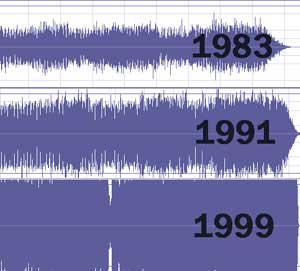
The Loudness War is a phenomenon in the music industry where music producers and mastering engineers compete to make their songs the loudest possible. This has resulted in a trend where songs are heavily compressed and limited to achieve a consistent volume level, often at the expense of dynamic range and overall sound quality.

Why is the Loudness War a problem?

The Loudness War is a problem because it sacrifices sound quality for loudness. Songs that are heavily compressed and limited can sound distorted and lack the natural dynamics that make music enjoyable to listen to. Additionally, this trend has led to a decrease in the overall quality of music production, as producers focus more on volume than on the nuances of the music itself.

How did the Loudness War start?

The Loudness War began in the 1990s, when CDs became the dominant format for music distribution. Record labels wanted their songs to stand out on the radio and in stores, so they began using compression and limiting to make them louder than their competitors. This led to a trend where each subsequent release was louder than the previous one, resulting in a race to see who could make the loudest song.

What is compression?

Compression is an audio processing technique that reduces the dynamic range of a recording. This means that the difference between the loudest and quietest parts of the recording is reduced, resulting in a more consistent volume level.

What is limiting?

Limiting is an audio processing technique that prevents the peaks in a recording from exceeding a certain level. This is done to ensure that the recording remains at a consistent volume level and to prevent distortion.

What is dynamic range?

Dynamic range refers to the difference between the loudest and quietest parts of a recording. A song with a wide dynamic range will have both quiet and loud sections, while a heavily compressed and limited song will have a more consistent volume throughout.

What are the consequences of the Loudness War?

The consequences of the Loudness War include decreased sound quality, reduced dynamic range, and listener fatigue. Additionally, songs that are heavily compressed and limited can sound distorted and lack the natural dynamics that make music enjoyable to listen to.

Is the Loudness War still happening?

The Loudness War is still happening, although it has become less pronounced in recent years. Many music producers and mastering engineers have become more aware of the negative effects of excessive loudness and are now focusing on producing music with a wider dynamic range and better overall sound quality.

What is the difference between loudness and volume?

Loudness refers to the perceived intensity of sound, while volume refers to the physical measurement of sound pressure level. In other words, loudness is how loud a sound seems to be, while volume is how loud it actually is.

What is mastering?

Mastering is the final stage of audio production, where the final mixes are processed and prepared for distribution. This includes adjusting the overall volume, EQ, and other effects to ensure that the final product sounds as good as possible on a variety of playback systems.

What is the role of mastering in the Loudness War?

Mastering is often the stage where the Loudness War is fought. Mastering engineers are under pressure from record labels and producers to make songs as loud as possible, often at the expense of sound quality. However, many mastering engineers are now advocating for a more balanced approach to mastering that prioritizes sound quality over loudness

What is the limit of the human ear to hear bass and treble tones and how does this affect audio recordings?

What is the limit of the human ear to hear bass and treble tones and how does this affect audio recordings?

Limits of Human Hearing

Understanding the Limits of Human Hearing

The human ear is capable of detecting a wide range of frequencies, from 20 Hz to 20,000 Hz. The range of human hearing is often divided into three main sections: bass, midrange, and treble. The bass frequencies are generally considered to be those below 200 Hz, while the midrange covers frequencies from 200 Hz to 5,000 Hz. Treble frequencies are typically those above 5,000 Hz.

It is important to note that the ability of the human ear to detect different frequencies varies depending on a number of factors, including age, gender, and exposure to loud noises. As we age, our ability to hear high-frequency sounds diminishes, and we become more sensitive to sounds in the lower frequency range.

The Importance of Frequency Response in Audio Recordings

The limits of human hearing have a significant impact on the recording and reproduction of audio. In order to create recordings that accurately capture the full range of sounds that we can hear, it is important to ensure that the recording equipment has a frequency response that is wide enough to capture both high and low frequencies.

This is particularly important when it comes to music recordings, where the bass and treble frequencies can have a significant impact on the overall sound of the recording. If the recording equipment is not capable of capturing these frequencies accurately, the resulting recording may sound muddy or lacking in clarity.

How to Ensure Accurate Frequency Response in Audio Recordings

One of the most important factors in achieving accurate frequency response in audio recordings is the quality of the recording equipment. High-quality microphones, amplifiers, and speakers are all essential components of a recording setup that can capture and reproduce a wide range of frequencies.

It is also important to consider the acoustic properties of the recording environment. Rooms with hard, reflective surfaces can cause unwanted reflections and standing waves that can distort the frequency response of the recording. Proper acoustic treatment, including the use of absorbent materials and diffusers, can help to minimize these issues and ensure that the recording accurately captures the sound of the source.

FAQ

What is the difference between frequency response and frequency range?

Frequency range refers to the range of frequencies that a particular piece of equipment is capable of producing or reproducing. Frequency response, on the other hand, refers to how accurately the equipment is able to reproduce those frequencies. For example, two different speakers may have the same frequency range, but one may have a more accurate frequency response, meaning that it is better able to reproduce the full range of frequencies within that range.

Why is it important to consider the limits of human hearing when recording audio?

The limits of human hearing have a significant impact on the recording and reproduction of audio. If the recording equipment is not capable of capturing the full range of frequencies that we can hear, the resulting recording may sound muffled or lacking in clarity. By ensuring that the recording equipment has a wide enough frequency response to capture both high and low frequencies, we can create recordings that accurately capture the full range of sounds that we can hear.

What is the difference between bass and treble frequencies?

Bass frequencies are generally considered to be those below 200 Hz, while treble frequencies are typically those above 5,000 Hz. The midrange covers frequencies from 200 Hz to 5,000 Hz. Bass frequencies are often associated with a sense of warmth and depth, while treble frequencies are associated with brightness and clarity. Together, these frequencies create a full and balanced sound.

How can the limits of human hearing affect the mixing and mastering process?

The limits of human hearing can have a significant impact on the mixing and mastering process. If the mix is too heavy on the low frequencies, it may sound muddy or indistinct, particularly on smaller speakers or headphones that may not be capable of reproducing those frequencies accurately. Similarly, if the mix is too heavy on the high frequencies, it may sound harsh or piercing, particularly on speakers that are overly bright.

It is important to strike a balance between the different frequency ranges when mixing and mastering, to ensure that the final mix sounds balanced and full on a wide range of playback systems.

What is the difference between dynamic range and frequency response?

Dynamic range refers to the difference between the loudest and softest parts of a recording. Frequency response, on the other hand, refers to how accurately a piece of equipment is able to reproduce different frequencies. While both factors are important in creating high-quality audio recordings, they are distinct from one another.

Why is it important to consider the acoustic properties of a recording environment?

The acoustic properties of a recording environment can have a significant impact on the sound of a recording. Rooms with hard, reflective surfaces can cause unwanted reflections and standing waves that can distort the frequency response of the recording. This can result in a recording that sounds muffled or overly bright. Proper acoustic treatment, including the use of absorbent materials and diffusers, can help to minimize these issues and ensure that the recording accurately captures the sound of the source.

What is the impact of age on the limits of human hearing?

As we age, our ability to hear high-frequency sounds diminishes, and we become more sensitive to sounds in the lower frequency range. This can impact our ability to fully appreciate the range of sounds in music recordings, as well as our ability to detect certain types of sounds in everyday life.

What is the impact of exposure to loud noises on the limits of human hearing?

Exposure to loud noises can cause permanent damage to the delicate structures in the ear that are responsible for hearing. This can result in a loss of sensitivity to certain frequencies, particularly in the high-frequency range. It is important to protect your hearing from loud noises by wearing earplugs or limiting exposure to noisy environments.

What is the role of equalization in audio recordings?

Equalization is the process of adjusting the balance of different frequencies in an audio recording. By boosting or cutting specific frequency ranges, engineers can shape the sound of the recording to create a more balanced and pleasing mix.

What is the impact of compression on audio recordings?

Compression is the process of reducing the dynamic range of a recording, by reducing the volume of the loudest parts and boosting the volume of the softest parts. While compression can help to create a more even and consistent sound, it can also reduce the impact and excitement of a recording, particularly in music recordings where dynamics play an important role.

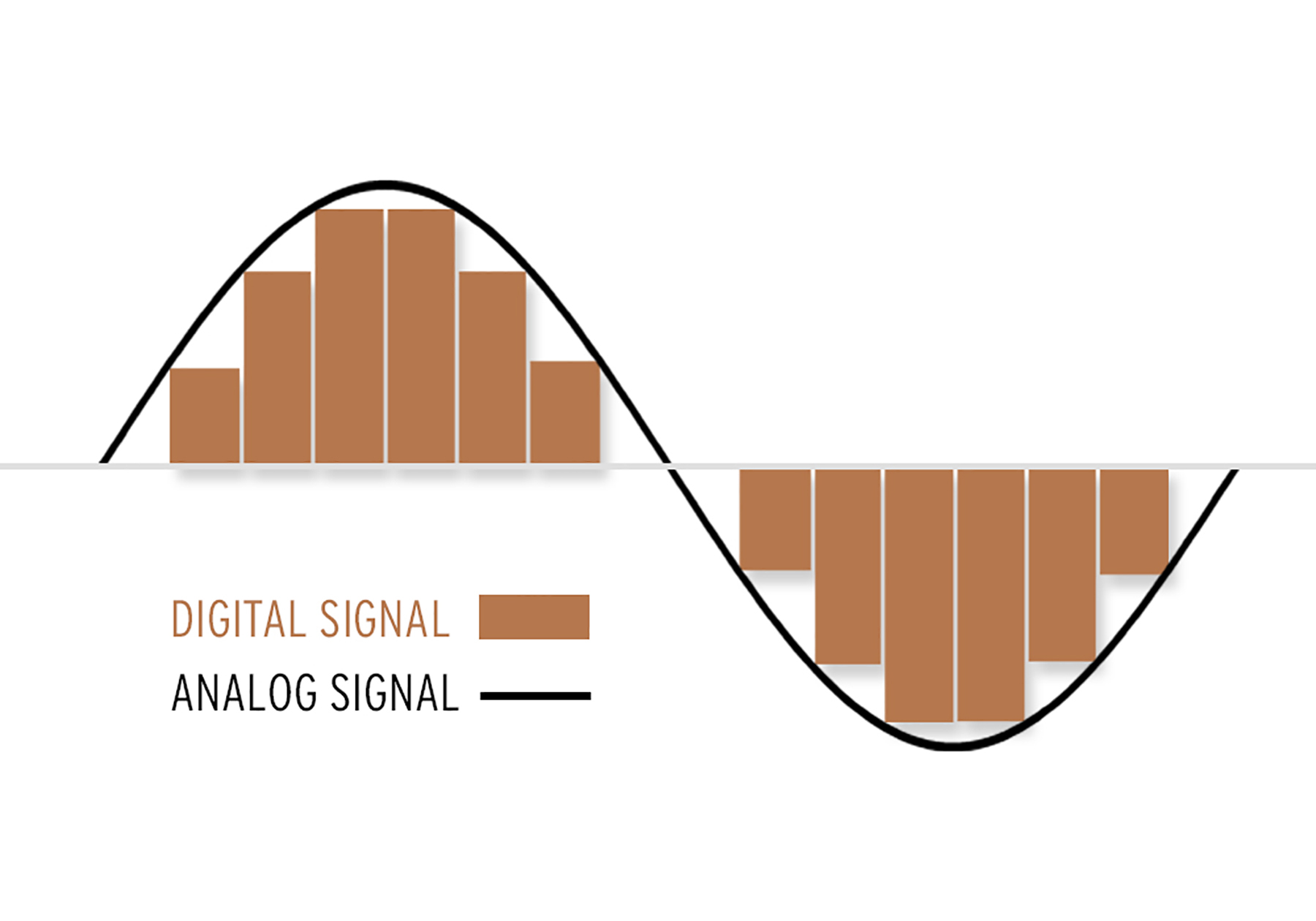
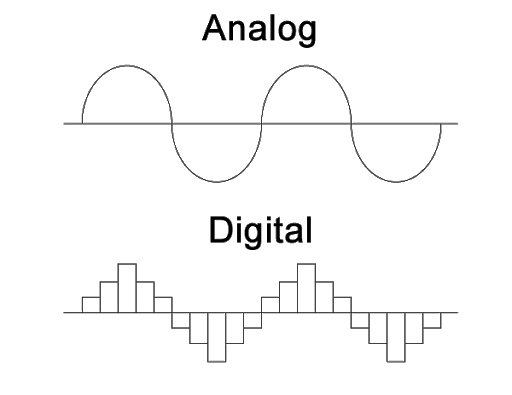
What is the difference between analog and digital audio recordings?

Analog recordings are created by capturing sound waves directly onto a physical medium, such as a tape or vinyl record. Digital recordings, on the other hand, are created by converting the sound waves into a series of 1s and 0s that can be stored on a computer or digital storage medium. While both types of recordings have their own unique characteristics, digital recordings are generally more flexible and convenient, while analog recordings are often prized for their warmth and character.

How to Use an Equalizer

How to Use an Equalizer: A Comprehensive Guide

How to Use an Equalizer

Equalizing – Introduction

How to Use an Equalizer

An equalizer is a device that adjusts the frequency response of an audio signal. It allows you to boost or cut specific frequencies to tailor the sound to your liking. Equalizers are commonly found in audio systems, whether it’s in your car, home, or studio.
In this article, we will discuss how to use an equalizer and provide a step-by-step guide on adjusting the EQ settings to achieve the desired sound.

Understanding the Basics of EQ

Before we dive into the specifics of using an equalizer, it’s important to understand the basics of EQ. EQ stands for equalization, which is the process of adjusting the balance between different frequency components in an audio signal.
An EQ consists of several bands, each of which controls a specific frequency range. The number of bands on an EQ can vary, but most consumer-grade EQs have between five and ten bands. Professional-grade EQs can have up to 31 bands or more.

Each band has a center frequency and a bandwidth. The center frequency is the frequency that the band affects, and the bandwidth determines how wide of a range of frequencies the band affects. A narrow bandwidth affects only a small range of frequencies, while a wide bandwidth affects a broader range of frequencies.

Step-by-Step Guide to Using an EQ

Now that we have a basic understanding of EQ, let’s dive into the step-by-step guide on using an EQ.
Step 1: Identify the problem areas in the audio signal.

Before making any EQ adjustments, it’s important to identify which frequencies need boosting or cutting. This can be done by listening to the audio signal and paying attention to any frequencies that sound too harsh, muddy, or boomy.

Step 2: Set all EQ bands to their default position.

Most EQs have a button or knob that allows you to reset all bands to their default position. This is typically labeled as “flat” or “0 dB.”

Step 3: Adjust the low-frequency band.

The low-frequency band controls the bass frequencies in the audio signal. If the audio signal lacks bass, you can boost this band. If the bass is too overpowering, you can cut this band.

Step 4: Adjust the mid-frequency bands.

The mid-frequency bands control the frequencies in the middle of the audio spectrum. If the audio signal lacks clarity, you can boost these bands. If the audio signal is too harsh, you can cut these bands.

Step 5: Adjust the high-frequency band.

The high-frequency band controls the treble frequencies in the audio signal. If the audio signal lacks brightness, you can boost this band. If the audio signal is too sibilant or hissy, you can cut this band.

Step 6: Make fine adjustments.

After making the initial adjustments, it’s important to listen to the audio signal again and make fine adjustments as needed. This can be done by making small changes to each band until the desired sound is achieved.

Frequently Asked Questions (FAQ)

Q1: How do I know which frequencies to adjust?

A1:

To identify which frequencies to adjust, listen to the audio signal and pay attention to any frequencies that sound too harsh, muddy, or boomy. You can also use a spectrum analyzer to visualize the frequency spectrum of the audio signal and identify any problem areas.

A2:

To use an equalizer, you should first identify the problem areas in the audio signal. Once you’ve identified the frequencies that need adjusting, you can use the EQ bands to boost or cut specific frequencies to achieve the desired sound. It’s important to make fine adjustments and listen to the audio signal again after making initial adjustments.
Q3: Can I use an EQ to make a bad recording sound better?

A3:

While an EQ can help improve the sound of a recording, it cannot make a bad recording sound good. EQ can only adjust the balance between different frequency components in an audio signal, but it cannot fix problems with the recording itself, such as distortion or noise.
Q4: Can I use an EQ to boost the volume of a recording?

A4:

An EQ can boost specific frequency ranges, but it cannot increase the overall volume of a recording. To increase the volume, you would need to use a compressor or a limiter.
Q5: What is the difference between a graphic EQ and a parametric EQ?

A5:

A graphic EQ has a fixed number of bands with fixed center frequencies and bandwidths. A parametric EQ, on the other hand, allows you to adjust the center frequency, bandwidth, and gain of each individual band.
Q6: How many bands should an EQ have?

A6:

The number of bands on an EQ can vary depending on the application. Consumer-grade EQs typically have between five and ten bands, while professional-grade EQs can have up to 31 bands or more.
Q7: Can I use an EQ on headphones?

A7:

Yes, you can use an EQ on headphones to adjust the frequency response of the audio signal. Some headphone amplifiers come with built-in EQs, or you can use software EQs on your computer or mobile device.
Q8: Should I use EQ when mixing a song?

A8:

EQ is an important tool for mixing a song, as it allows you to balance the different frequency components of each instrument or vocal track. However, it’s important to use EQ judiciously and not rely on it too heavily.
Q9: Can I use EQ to create special effects?

A9:

Yes, EQ can be used to create special effects, such as a telephone or radio effect. By cutting specific frequency ranges, you can simulate the sound of a low-quality recording or a specific environment.
Q10: What is a shelving EQ?

A10:

A shelving EQ is a type of EQ that boosts or cuts all frequencies above or below a certain frequency. For example, a high-shelf EQ would boost or cut all frequencies above a certain point, while a low-shelf EQ would boost or cut all frequencies below a certain point.
Q11: How can I avoid overusing EQ?

A11:

To avoid overusing EQ, it’s important to use it judiciously and not rely on it too heavily. Start by making subtle adjustments and listening to the effect on the overall sound. Use EQ to address specific problem areas, but don’t try to fix everything with EQ alone.
Q12: Can I use EQ to fix a room’s acoustics?

A12:

While an EQ can help compensate for some acoustic problems, such as a room with a boomy bass response, it cannot fix all acoustic problems. To improve the acoustics of a room, you would need to use acoustic treatment

FAQ

Q: How do I know which frequencies to adjust with EQ?

A:

You can use a frequency analyzer to identify the problem areas in the audio signal. A frequency analyzer will show you which frequencies are too loud or too quiet, allowing you to make adjustments with the EQ.
Q: How do I know when I’ve achieved the desired sound with EQ?

A:

The best way to know when you’ve achieved the desired sound with EQ is to use your ears. Make subtle adjustments and listen to the effect on the overall sound. Keep adjusting until you achieve the sound you’re looking for.
Q: Can I use EQ on live sound?

A:

Yes, you can use EQ on live sound to adjust the sound of the PA system or individual instruments. However, it’s important to make adjustments carefully and not to introduce feedback or other problems.
Q: Can I use EQ on vocals?

A:

Yes, you can use EQ on vocals to adjust the tone of the voice and improve clarity. However, it’s important to be careful not to overuse EQ, as this can make the vocals sound unnatural.
Q: How do I adjust EQ for different music genres?

A:

Different music genres have different frequency characteristics, so it’s important to adjust EQ accordingly. For example, rock music often has a lot of low-end energy, while jazz music may have a more balanced frequency response. Use your ears and listen to reference tracks to get a sense of what sounds right for each genre.
Q: Can EQ affect the stereo image?

A:

Yes, EQ can affect the stereo image if you make adjustments to the stereo field. For example, if you boost the high frequencies on one channel and cut them on the other, this can create a sense of width in the stereo image.
Q: How do I adjust EQ for headphones?

A:

Adjusting EQ for headphones is similar to adjusting EQ for speakers. Use your ears and listen to the overall sound, making adjustments to achieve the desired sound.
Q: Can I use EQ on a guitar amp?

A:

Yes, you can use EQ on a guitar amp to adjust the tone of the guitar. This can help you achieve a more balanced sound and improve clarity.
Q: Can I use EQ to remove noise from a recording?

A:

EQ cannot remove noise from a recording, as it cannot distinguish between the desired signal and unwanted noise. To remove noise from a recording, you would need to use noise reduction software or hardware.
Q: How do I adjust EQ for a bass guitar?

A:

Adjusting EQ for a bass guitar depends on the style of music and the sound you’re trying to achieve. Generally, you’ll want to boost the low frequencies to add warmth and punch to the sound, and cut the high frequencies to reduce harshness.
Q: Can I use EQ to make a small room sound bigger?

A:

EQ cannot make a small room sound bigger, as it cannot affect the physical dimensions of the room. To make a small room sound bigger, you would need to use reverb or other processing to create a sense of space.
Copy to Clipboard

Q: Can EQ be used to fix bad recordings?

A:

EQ can help improve the sound of a bad recording, but it cannot fix all issues. For example, if the recording is distorted or has other technical problems, EQ will not be able to fully fix these issues. However, EQ can be used to improve the overall tone and balance of the recording.
Q: Can EQ be used for mastering?

A:

Yes, EQ is an important tool in the mastering process. Mastering engineers use EQ to adjust the overall tone and balance of the music, and to make sure the different instruments and frequencies are well-balanced.
Q: Can I use EQ on a drum kit?

A:

Yes, you can use EQ on a drum kit to adjust the tone of each drum and improve overall balance. For example, you can boost the low frequencies on the kick drum to add more punch, or cut the high frequencies on the cymbals to reduce harshness.
Q: Can EQ be used on a podcast?

A:

Yes, EQ can be used on a podcast to adjust the tone and clarity of the voices. This can help make the podcast easier to listen to and improve overall sound quality.
Q: How do I know when to use EQ?

A:

You should use EQ when you need to adjust the tone and balance of an audio signal. This could be to improve clarity, reduce harshness, or to make different instruments or voices stand out.
Q: Can EQ be used for sound design?

A:

Yes, EQ can be used for sound design to shape and manipulate sounds. For example, you can use EQ to create a sense of distance or depth, or to emphasize certain frequencies in a sound.
Q: How do I avoid overusing EQ?

A:

To avoid overusing EQ, start by making subtle adjustments and listening to the effect on the overall sound. Use reference tracks to get a sense of what sounds natural and balanced, and avoid making drastic changes to the EQ.
Q: Can EQ be used on a video soundtrack?

A:

Yes, EQ can be used on a video soundtrack to adjust the tone and balance of the audio. This can help make the soundtrack easier to listen to and improve overall sound quality.
Q: Can EQ be used on individual tracks in a mix?

A:

Yes, EQ can be used on individual tracks in a mix to adjust the tone and balance of each instrument or voice. This can help create a well-balanced mix with each instrument or voice occupying its own space in the mix.
Q: How do I adjust EQ for a piano?

A:

Adjusting EQ for a piano depends on the style of music and the sound you’re trying to achieve. Generally, you’ll want to boost the low frequencies to add warmth and depth to the sound, and cut the high frequencies to reduce harshness.
Q: Can EQ be used for live streaming?

A:

Yes, EQ can be used for live streaming to adjust the sound of the audio being streamed. This can help make the audio easier to listen to and improve overall sound quality.

RMS Normalization

RMS Normalization: Understanding and Applying the Technique

RMS Normalization
RMS Normalization
RMS Normalization
RMS Normalization

What is RMS Normalization?

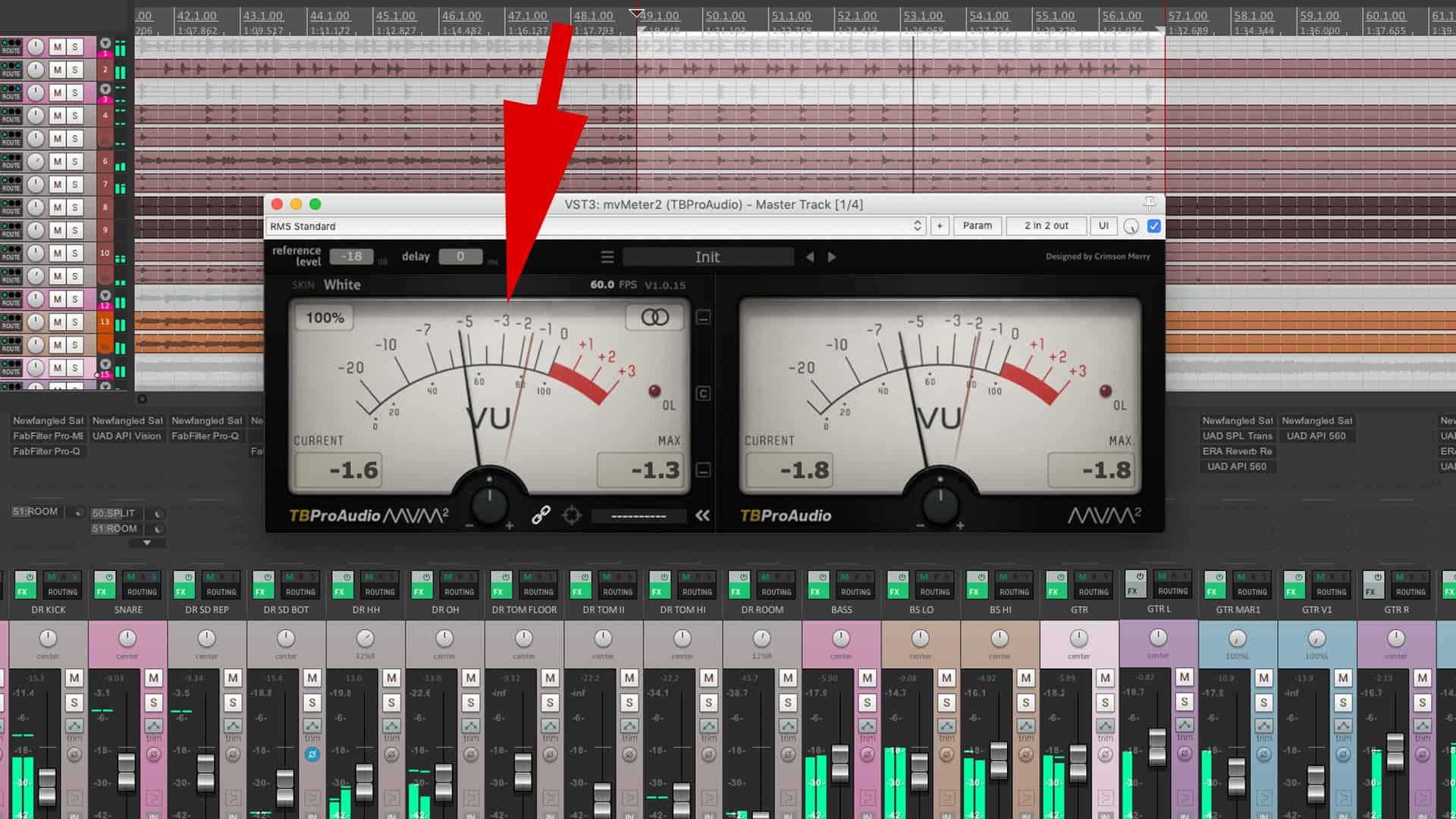
RMS normalization is a technique used in audio engineering to adjust the volume of a sound signal. It is a type of gain staging that measures the Root Mean Square (RMS) value of the audio signal and adjusts it to a desired level. The purpose of RMS normalization is to make sure that the volume of a sound signal is consistent and compatible with other audio files in a mix.

How Does RMS Normalization Work?

RMS normalization involves calculating the RMS value of an audio signal and then adjusting its gain to match a target RMS level. The RMS value is the average energy of the signal over a certain period of time. To calculate the RMS value, the audio signal is squared, then averaged over time, and then the square root of that average is taken.

Once the RMS value of the audio signal has been determined, the gain is adjusted so that the signal’s RMS value matches the desired target level. This can be done using software tools that are available in most Digital Audio Workstations (DAWs).

Why is RMS Normalization Important?

RMS normalization is important in audio engineering because it ensures that the volume of a sound signal is consistent and compatible with other audio files in a mix. In a mix, audio signals that are too loud can cause distortion, while audio signals that are too quiet can get lost in the mix. By using RMS normalization, audio engineers can make sure that each audio file is at a consistent level, which makes it easier to create a balanced and well-mixed track.

How is RMS Normalization Different from Peak Normalization?

Peak normalization is another type of gain staging that is commonly used in audio engineering. Peak normalization adjusts the gain of an audio signal so that its highest point (or peak) matches a certain level. While peak normalization can be useful for preventing clipping and ensuring that the loudest parts of a signal don’t exceed a certain level, it does not take into account the overall energy level of the signal.

RMS normalization, on the other hand, measures the average energy of the signal over time, which is a more accurate representation of the signal’s perceived loudness. RMS normalization is a more useful tool for ensuring that the overall volume of a signal is consistent and compatible with other audio files in a mix.

What are the Pros and Cons of RMS Normalization?

Pros:

  • Ensures consistent volume levels across a mix
  • Provides a more accurate representation of perceived loudness
  • Can improve the clarity and balance of a mix

Cons:

  • Can reduce the dynamic range of a signal if overused
  • May not be suitable for all types of audio signals
  • Can introduce unwanted artifacts or noise if not used correctly

How to Apply RMS Normalization in Practice?

To apply RMS normalization in practice, follow these steps:

  1. Import the audio file into your DAW
  2. Identify the target RMS level for your mix
  3. Measure the RMS value of the audio file using a metering tool in your DAW
  4. Adjust the gain of the audio file so that its RMS value matches the target level
  5. Repeat steps 3 and 4 for all audio files in your mix
  6. Adjust the overall volume of the mix to achieve a balanced and cohesive sound

When to Use RMS Normalization

RMS normalization should be used in situations where consistent volume levels are important, such as in music production, film and video post-production, and podcast editing. It can be especially useful when working with multiple audio files that were recorded at different levels.

RMS normalization can also be useful when mastering a track for release. In mastering, the goal is to create a final version of the mix that sounds great on a variety of playback systems, such as speakers and headphones. By using RMS normalization to ensure consistent volume levels across the mix, the mastering engineer can create a cohesive and balanced final product.

However, it is important to note that RMS normalization should not be used as a fix for poorly recorded audio. If an audio file has significant issues with noise, distortion, or clipping, it should be addressed at the source rather than relying on normalization to fix the problem.

Can RMS Normalization Improve the Sound Quality of a Mix?

While RMS normalization can help create a more balanced and consistent mix, it is not a magic bullet for improving sound quality. The quality of a mix depends on many factors, including the quality of the source material, the arrangement and processing of the tracks, and the skill of the mixer.

That being said, using RMS normalization as part of the mixing and mastering process can certainly improve the sound quality of a mix. By ensuring consistent volume levels and reducing the risk of distortion, RMS normalization can help create a clearer, more balanced mix that is easier to listen to.

Are There Any Alternatives to RMS Normalization?

Yes, there are several alternatives to RMS normalization that can be used in audio engineering. One alternative is manual gain staging, where the gain of each track is adjusted by ear to achieve a balanced mix. This method requires more time and attention to detail, but it can result in a more natural and dynamic sound.

Another alternative is using a compressor or limiter to control the dynamic range of a signal. A compressor reduces the volume of loud parts of a signal, while a limiter prevents the signal from exceeding a certain level. While these tools can be useful for controlling the dynamic range of a signal, they do not provide the same level of consistency and accuracy as RMS normalization.

How Does RMS Normalization Affect the Dynamic Range of a Signal?

RMS normalization can affect the dynamic range of a signal if it is overused. Dynamic range refers to the difference between the loudest and quietest parts of a signal. If a signal is heavily compressed or normalized, the dynamic range can be reduced, which can make the signal sound less natural and more compressed.

To avoid reducing the dynamic range of a signal, it is important to use RMS normalization judiciously and in conjunction with other gain staging techniques, such as manual gain staging or the use of compressors and limiters.

Can RMS Normalization Cause Clipping?

RMS normalization itself does not cause clipping, but it can exacerbate clipping that already exists in an audio file. Clipping occurs when the volume of a signal exceeds the maximum level that can be recorded or processed without distortion. If an audio file has clipping, normalizing it using RMS normalization can cause the clipped parts of the signal to become even louder, which can make the distortion more noticeable.

To avoid clipping, it is important to monitor the levels of each track during recording and to use proper gain staging techniques during mixing and mastering. If clipping is present in an audio file, it should be addressed at the source rather than relying on normalization to fix the problem.

What is the Difference Between RMS and Peak Level?

RMS level measures the average energy of a signal over time, while peak level measures the highest instantaneous level of a signal. In audio engineering, RMS level is often used to measure the perceived loudness of a signal, while peak level is used to measure the potential for clipping and distortion.

RMS normalization adjusts the volume of a signal based on its RMS level, while peak normalization adjusts the volume based on its peak level. RMS normalization is generally considered to be a more accurate method of normalization, as it takes into account the overall energy of the signal rather than just its peak levels.

How Do You Perform RMS Normalization?

To perform RMS normalization, you will need audio editing software that supports the feature. Here are the basic steps:

  1. Open the audio file you want to normalize in your audio editing software.
  2. Select the portion of the audio file you want to normalize, or the entire file if you want to normalize the entire track.
  3. Find the RMS normalization function in your software. It may be called something like “normalize to RMS” or “normalize by loudness.”
  4. Select the desired target RMS level. This will vary depending on your specific needs, but a common target level for music production is -16 dBFS.
  5. Apply the normalization and listen to the results. If the results are satisfactory, save the file. If not, adjust the target RMS level and try again.

What Are Some Best Practices for Using RMS Normalization?

Here are some best practices to keep in mind when using RMS normalization:

  • Use RMS normalization as part of a comprehensive gain staging strategy that includes manual gain staging and the use of compressors and limiters.
  • Avoid using RMS normalization as a fix for poorly recorded audio. Address any issues with noise, distortion, or clipping at the source.
  • Be careful not to overuse RMS normalization, as it can reduce the dynamic range and naturalness of a signal.
  • When applying RMS normalization to a mix, make sure to normalize all tracks to the same RMS level to ensure consistency.
  • Listen to the results of RMS normalization carefully and make adjustments as necessary to achieve the desired sound.

What Are Some Common Misconceptions About RMS Normalization?

Here are some common misconceptions about RMS normalization:

  • That it can fix poorly recorded audio. RMS normalization can help balance and normalize the volume levels of a signal, but it cannot fix issues with noise, distortion, or clipping that are present at the source.
  • That it can automatically improve the sound quality of a mix. While RMS normalization can help create a more balanced and consistent mix, it is not a magic bullet for improving sound quality. The quality of a mix depends on many factors beyond volume levels.
  • That it can replace proper gain staging techniques. While RMS normalization can be a useful tool in the gain staging process, it should be used in conjunction with other techniques, such as manual gain staging and the use of compressors and limiters.

How Does RMS Normalization Differ from LUFS Normalization?

RMS normalization and LUFS (Loudness Units Full Scale) normalization are both methods of adjusting the volume levels of audio signals, but they differ in their approach and application.

RMS normalization adjusts the volume of a signal based on its RMS level, while LUFS normalization adjusts the volume based on its perceived loudness. LUFS normalization takes into account the characteristics of the human ear and how it perceives loudness, while RMS normalization is based purely on the energy of the signal.

FS normalization is often used in broadcast and streaming environments, where it is important to maintain a consistent perceived loudness across multiple programs or pieces of content.

While RMS normalization is useful for balancing the volume levels of individual tracks or sections of a mix, LUFS normalization is better suited for ensuring consistency and compliance with loudness standards.

Frequently Asked Questions About RMS Normalization

1. Can RMS normalization be used on any type of audio file?

Yes, RMS normalization can be used on any type of audio file that can be opened in your audio editing software.

Audio Psychoacoustics

Audio Psychoacoustics: Understanding How We Hear

Audio Psychoacoustics

Introduction to Psychoacoustics

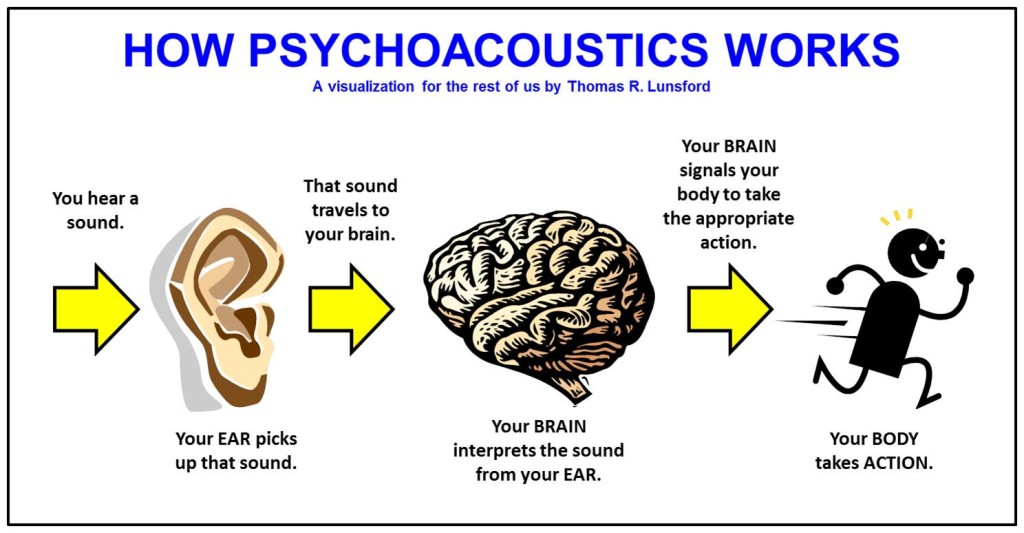
Audio psychoacoustics is the study of how humans perceive and process sound. This includes the physiological and psychological aspects of hearing, as well as the cognitive and emotional responses that result from it. As an expert in this field, I will provide a detailed explanation of the topic, including the various theories and principles that underpin it.

The Physiology of Hearing

To understand how sound is processed by the human ear, it is important to first understand the basic anatomy of the ear. The ear is made up of three main parts: the outer ear, middle ear, and inner ear. The outer ear consists of the pinna, ear canal, and eardrum, which work together to capture and transmit sound waves to the middle ear. The middle ear contains the three smallest bones in the human body, the malleus, incus, and stapes, which amplify and transmit the sound waves to the inner ear. The inner ear is made up of the cochlea, which contains tiny hair cells that convert the sound waves into electrical impulses that are sent to the brain for processing.

Psychoacoustic Principles

Psychoacoustics is concerned with how the human brain processes sound signals. One of the key principles of psychoacoustics is the concept of loudness, which refers to the perceived volume of a sound. The human ear is capable of detecting a wide range of sound levels, from the faintest whisper to the loudest explosion. Another important principle is pitch, which refers to the perceived frequency of a sound. The human ear can detect frequencies ranging from around 20 Hz to 20,000 Hz.

Masking and Perception

Masking is a psychoacoustic phenomenon where the presence of one sound makes it more difficult to perceive another sound. This can occur when two sounds are played at the same time, or when one sound is played immediately after another. Masking can occur in both the frequency domain (when two sounds have overlapping frequencies) and the temporal domain (when one sound occurs immediately before or after another). Understanding masking is important in fields such as audio engineering and sound design, where it is necessary to minimize the impact of masking on the listener’s perception of sound.

Audio Compression and Psychoacoustics

Audio compression is the process of reducing the size of an audio file by removing redundant or irrelevant data. One of the most common forms of audio compression is lossy compression, which works by removing data that is not perceived by the human ear. This is achieved by taking advantage of psychoacoustic principles such as masking and frequency masking. By removing sounds that are masked by other sounds, lossy compression algorithms can significantly reduce the size of an audio file without perceptible loss in quality.

Applications of Psychoacoustics

Psychoacoustics has a wide range of applications in fields such as audio engineering, music production, and sound design. By understanding how humans perceive and process sound, audio professionals can create more effective and engaging audio experiences for listeners. For example, understanding masking can help audio engineers to design more effective soundtracks for films and video games. Similarly, understanding how humans perceive loudness and pitch can help music producers to create more impactful and emotionally engaging music.

FAQ

Q: What is binaural audio?

Binaural audio is a type of audio recording that is designed to be listened to with headphones. It is created using two microphones that are placed inside a simulated head, with each microphone positioned at the location of one of the ears.

This creates a stereo image that closely replicates the way humans perceive sound in real life, allowing for a more immersive and realistic listening experience. Binaural audio is often used in virtual reality and video game audio, where a sense of spatial awareness is important.

Q: How does psychoacoustics relate to audio engineering?

Psychoacoustics plays an important role in audio engineering, as it provides a framework for understanding how humans perceive and process sound. This understanding can be used to create more effective and engaging audio experiences for listeners. For example, by understanding the principles of loudness and masking, audio engineers can design soundtracks that effectively communicate the intended emotional impact of a scene.

Q: How does audio compression affect sound quality?

Audio compression can affect sound quality by removing data that is perceived as irrelevant or redundant by the human ear. Lossy compression algorithms can reduce the size of an audio file by removing sounds that are masked by other sounds, without a perceptible loss in quality. However, if too much data is removed, the resulting file can sound noticeably compressed or distorted. For this reason, it is important to strike a balance between file size and sound quality when compressing audio.

Q: Can psychoacoustics be used to improve hearing aid technology?

Yes, psychoacoustics can be used to improve hearing aid technology by providing a better understanding of how humans perceive and process sound. This understanding can be used to design hearing aids that better replicate the natural hearing process, resulting in a more natural and effective listening experience for the wearer.

Q: What is the importance of psychoacoustics in sound design?

Psychoacoustics is important in sound design because it provides a framework for understanding how humans perceive and respond to sound. This understanding can be used to create more effective and engaging soundscapes that effectively communicate the intended emotional impact of a scene. For example, understanding the principles of masking can help sound designers to create more immersive and detailed soundscapes for films and video games.

Q: How can understanding psychoacoustics help with audio editing?

Understanding psychoacoustics can help with audio editing by providing a better understanding of how humans perceive and respond to sound. This understanding can be used to make more effective and impactful edits that effectively communicate the intended emotional impact of a scene. For example, understanding the principles of loudness can help audio editors to make more effective cuts and transitions in a soundtrack.

Q: How does the environment affect psychoacoustics?

The environment can have a significant impact on psychoacoustics, as it can affect the way that sound waves are transmitted and perceived. For example, the acoustics of a room can affect the way that sounds are reflected and absorbed, leading to changes in loudness and perceived pitch. Understanding the environmental factors that affect psychoacoustics is important in fields such as audio engineering and sound design, where it is necessary to create audio experiences that are effective in a wide range of environments.

Q: How does masking affect speech intelligibility?

Masking can affect speech intelligibility by making it more difficult to distinguish individual sounds and words in a sentence. This can occur when a speech signal is masked by other sounds that have overlapping frequencies, making it more difficult for the brain to isolate and process the speech signal. Understanding masking is important in fields such as audio engineering and sound design, where it is necessary to ensure that speech is clear and intelligible in a wide range of environments.

MP3 Psychoacoustics Sound Masking

MP3 Psychoacoustics Sound Masking

MP3 Psychoacoustics Sound Masking

Introduction to Sound Masking

MP3 psychoacoustics sound masking is a technique used in audio encoding to reduce the amount of data required to represent an audio signal while maintaining a high level of perceived audio quality. It involves the use of psychoacoustic principles to remove or reduce parts of the audio signal that are not perceived by the human ear. The technique is commonly used in the creation of compressed audio files, such as those in the MP3 format.

The Science of Psychoacoustics

Psychoacoustics is the study of how the human ear and brain process sound. It involves the investigation of the physical and psychological factors that affect the perception of sound. One of the key principles of psychoacoustics is the concept of masking.

Masking occurs when one sound is made less audible by the presence of another sound. This effect can occur in two ways: simultaneous masking, where the masking sound occurs at the same time as the sound being masked, and temporal masking, where the masking sound occurs shortly before or after the sound being masked.

Sound Masking Techniques

There are several techniques used in sound masking, including:

  • Frequency Masking: This technique involves reducing or removing sounds that are outside the range of human hearing or that are masked by other sounds within the same frequency range.
  • Temporal Masking: This technique involves reducing or removing sounds that occur shortly before or after other sounds that are more audible.
  • Amplitude Masking: This technique involves reducing or removing sounds that are masked by louder sounds.
  • Masking Noise: This technique involves adding a low-level noise to the audio signal to mask unwanted sounds.

MP3 Compression

MP3 compression uses psychoacoustic principles to reduce the amount of data required to represent an audio signal. The technique works by analyzing the audio signal and identifying parts that are masked by other sounds or are outside the range of human hearing. These parts of the audio signal are then removed or reduced in volume, resulting in a smaller file size without a significant loss in audio quality.

The Benefits of MP3 Compression

There are several benefits of using MP3 compression for audio files:

  • Smaller File Sizes: MP3 compression allows for significantly smaller file sizes compared to uncompressed audio files, making it easier to store and share audio files.
  • Faster Streaming: Smaller file sizes also mean that audio files can be streamed more quickly over the internet, reducing buffering times and improving the overall user experience.
  • Compatibility: MP3 is a widely used audio format that is supported by most audio players and devices.

FAQ

What is the difference between MP3 and other audio formats?

MP3 is a lossy audio format, meaning that it uses compression to reduce the amount of data required to represent an audio signal. Other formats, such as WAV and FLAC, are lossless, meaning that they do not use compression and therefore result in larger file sizes but higher audio quality.

How much data can be saved with MP3 compression?

The amount of data that can be saved with MP3 compression varies depending on the complexity of the audio signal and the desired level of audio quality. In general, MP3 compression can result in file sizes that are 50-75% smaller than uncompressed audio files.

Can MP3 compression affect audio quality?

Yes,

Streaming Audio Quality

Streaming Audio Quality

Streaming Audio Quality

Table of Contents

Streaming Audio Quality

Introduction on Audio Streaming

Streaming audio quality is an essential aspect of modern music streaming services. The quality of streaming audio can determine the overall listening experience of the listener. As an expert in the field, I will guide you through everything you need to know about streaming audio quality, including its significance, factors that affect it, and how to improve it.

The Significance of Streaming Audio Quality

Streaming audio quality is critical to the overall listening experience. The quality of the audio can determine how enjoyable the music is to listen to, how clear the sound is, and how much detail is present. Low-quality audio can result in distortion, background noise, and lack of clarity. On the other hand, high-quality audio can offer a rich and detailed sound, allowing listeners to appreciate the music to its fullest.

Factors Affecting Streaming Audio Quality

The quality of streaming audio can be affected by several factors, including:

  • Internet connection speed: A slow internet connection can result in buffering, low-quality audio, and even disconnection.
  • Device quality: The quality of the device used to stream the music can impact the overall quality of the audio.
  • Compression: The compression used during the streaming process can affect the quality of the audio.
  • Format: The format used for the audio can also affect the quality.
  • Speaker quality: The quality of the speakers or headphones used to listen to the music can also impact the overall quality of the audio.

How to Improve Streaming Audio Quality

Improving streaming audio quality can be done by taking the following steps:

  1. Use a high-quality device: Using a high-quality device can improve the overall quality of the audio.
  2. Upgrade your internet connection: Upgrading your internet connection speed can significantly improve the quality of the audio.
  3. Choose the right format: Choosing the right audio format can also improve the overall quality of the audio.
  4. Use high-quality speakers: Using high-quality speakers or headphones can further enhance the audio experience.

FAQ

Q1. What is the recommended internet speed for high-quality audio streaming?

The recommended internet speed for high-quality audio streaming is at least 320 kbps. This bitrate ensures that the audio is clear, detailed, and free from distortion. However, higher internet speeds are always better as they can reduce buffering and improve overall audio quality.

Q2. Does the audio format affect streaming audio quality?

Yes, the audio format can significantly impact the streaming audio quality. Lossless audio formats like FLAC and WAV offer the highest audio quality as they preserve all the details of the original recording. However, these formats are often larger in size and require more bandwidth to stream. Compressed audio formats like MP3 and AAC are smaller in size, making them easier to stream, but they often result in a loss of audio quality.

Q3. Does using high-quality headphones improve streaming audio quality?

Yes, using high-quality headphones or speakers can enhance the streaming audio quality. High-quality headphones can offer better sound isolation, resulting in clearer and more detailed audio.

Q4. Can streaming audio quality be affected by the music streaming service?

Yes, the music streaming service can affect the streaming audio quality. Some music streaming services use higher quality audio codecs than others, resulting in better audio quality. Additionally, some services offer higher quality audio as part of a premium subscription, while others only offer lower quality audio in their free service.

Q5. Can adjusting the audio settings on the streaming service improve audio quality?

Yes, adjusting the audio settings on the streaming service can improve audio quality. Some services offer audio quality settings that allow users to adjust the bitrate or audio codec used for streaming. Adjusting these settings can result in higher quality audio.

Q6. Can background noise affect streaming audio quality?

Yes, background noise can affect streaming audio quality, particularly in low-quality audio streams. Background noise can result in distortion, making it difficult to hear the details of the music. Using high-quality headphones or speakers with noise isolation features can help reduce the impact of background noise.

Q7. Does the quality of the recording impact streaming audio quality?

Yes, the quality of the original recording can impact streaming audio quality. A higher quality recording with more detail and clarity will result in better audio quality when streamed. However, even lower quality recordings can be improved with proper compression and audio codec selection.

Q8. Can streaming audio quality be affected by the device used to stream the music?

Yes, the device used to stream the music can affect streaming audio quality. Higher quality devices with better audio hardware and software will generally result in better audio quality. Additionally, using outdated or malfunctioning devices can result in audio quality issues.

Q9. Is it better to use a wired or wireless connection for streaming audio?

A wired connection is generally better for streaming audio as it offers more stable and reliable data transfer, resulting in fewer buffering issues and better audio quality. However, a high-quality wireless connection can also offer good audio quality, particularly if the internet speed is sufficient.

Q10. Can using a virtual private network (VPN) affect streaming audio quality?

Yes, using a VPN can affect streaming audio quality, particularly if the VPN connection is slow or unstable. A VPN can also add additional latency, resulting in audio synchronization issues. However, a high-quality VPN connection can offer good audio quality and added privacy and security.

Q11. What should I do if I experience poor streaming audio quality?

If you experience poor streaming audio quality, you can try the following steps:

  1. Check your internet connection speed and upgrade if necessary.
  2. Try using a different device or audio player to stream the music.
  3. Adjust the audio quality settings on the streaming service if available.
  4. Use high-quality headphones or speakers with noise isolation features.

Q12. Can streaming audio quality improve in the future?

Yes, streaming audio quality can improve in the future as technology advances. Higher internet speeds and more efficient audio codecs can result in higher quality audio streams. Additionally, music streaming services may offer higher quality audio as part of their standard service, rather than only in premium subscriptions.

Conclusion

Streaming audio quality is a crucial aspect of modern music streaming services. The quality of the audio can significantly impact the overall listening experience. Factors such as internet connection speed, device quality, compression, and format can affect streaming audio quality. However, by using high-quality devices, upgrading internet connections, choosing the right audio format, and using high quality headphones or speakers, users can improve their streaming audio experience. It is also important to note that music streaming services can offer different audio codecs and quality settings, which can impact the overall audio quality. As technology advances, streaming audio quality is likely to continue to improve, offering even better listening experiences.

FAQ

What is the best audio format for streaming?

The best audio format for streaming depends on a variety of factors, including the device used for streaming, internet connection speed, and personal preference. However, commonly used audio formats for streaming include AAC, MP3, and Ogg Vorbis.

Can streaming audio quality be affected by the location of the user?

Yes, the location of the user can affect streaming audio quality. Users in areas with poor internet connectivity or high internet traffic may experience buffering issues and reduced audio quality.

Can using a high-quality audio cable improve streaming audio quality?

Using a high-quality audio cable can improve streaming audio quality, particularly for wired connections. A higher quality cable can offer better shielding, resulting in reduced noise and distortion.

What is the recommended internet connection speed for streaming high-quality audio?

The recommended internet connection speed for streaming high-quality audio varies depending on the quality of the audio stream. However, a minimum internet speed of 1.5 Mbps is recommended for streaming low-quality audio, while 5-10 Mbps is recommended for streaming high-quality audio.

Can streaming audio quality be affected by the browser used for streaming?

Yes, the browser used for streaming can affect streaming audio quality, particularly if the browser has compatibility issues with the streaming service. Using a browser recommended by the streaming service can help ensure optimal streaming audio quality.

Does streaming audio quality impact data usage?

Yes, streaming audio quality can impact data usage. Higher quality audio streams use more data than lower quality streams, which can result in increased data usage. Users can adjust the audio quality settings on the streaming service to reduce data usage if necessary.

Can using a streaming service from a different country affect audio quality?

Using a streaming service from a different country can affect audio quality, particularly if the streaming service uses different audio codecs or quality settings than those used in the user’s country. However, this is not always the case and may depend on the specific streaming service used.

What should I do if I experience audio syncing issues while streaming?

If you experience audio syncing issues while streaming, you can try the following steps:

  1. Pause and restart the audio stream.
  2. Adjust the audio quality settings on the streaming service if available.
  3. Ensure that your internet connection is stable and fast enough for the audio stream.
  4. Use a wired connection rather than a wireless connection if possible.

Can the type of device used for streaming affect audio quality?

Yes, the type of device used for streaming can affect audio quality. Different devices may have different audio hardware and software, which can impact the quality of the audio output. Additionally, using headphones or speakers that are not designed for high-quality audio can also impact the overall audio quality.

What is the difference between lossy and lossless audio compression?

Lossy audio compression reduces the size of audio files by permanently discarding some of the original data. This can result in a loss of audio quality, particularly with higher levels of compression. Lossless audio compression, on the other hand, reduces the size of audio files without permanently discarding any data, resulting in no loss of audio quality.

Can streaming audio quality be affected by the number of users on the streaming service?

Yes, streaming audio quality can be affected by the number of users on the streaming service, particularly if the service is experiencing high levels of traffic. This can result in buffering issues and reduced audio quality.

What is the difference between streaming audio and downloading audio?

Streaming audio involves listening to audio files in real-time over an internet connection, while downloading audio involves downloading audio files to a device for later listening. Streaming audio does not require the user to store the audio files on their device, but may require a stable and fast internet connection for optimal audio quality.

Can the audio quality of a streaming service vary between different songs or albums?

Yes, the audio quality of a streaming service can vary between different songs or albums, particularly if the songs or albums were uploaded to the service at different times. Additionally, different songs or albums may have been mastered differently, resulting in differences in audio quality.

What is the impact of audio quality on music production and mastering?

Audio quality is a crucial aspect of music production and mastering, as it can impact the overall sound of the final product. High-quality audio recording and mastering techniques can result in a clearer, more detailed sound, while poor recording and mastering can result in a muddled or distorted sound.

Can the audio quality of a streaming service be improved with a software or hardware upgrade?

In some cases, the audio quality of a streaming service can be improved with a software or hardware upgrade. Upgrading to a higher quality audio playback software or using a dital-to-gianalog converter (DAC) can improve the overall audio quality of the streaming service. However, it is important to note that the quality of the original audio files also plays a significant role in the overall audio quality.

What is the impact of streaming audio quality on live streaming events?

Streaming audio quality can have a significant impact on the overall experience of live streaming events, particularly for events that involve music or other types of audio. Poor audio quality can detract from the overall experience and make it difficult for viewers to fully engage with the content.

Can streaming audio quality impact the user’s perception of a streaming service?

Yes, streaming audio quality can impact the user’s perception of a streaming service. Poor audio quality can lead to frustration and dissatisfaction with the service, while high-quality audio can enhance the overall user experience and increase satisfaction.

What is the future of streaming audio quality?

As technology continues to advance, it is likely that streaming audio quality will continue to improve. This may involve the use of new audio codecs, improved internet connectivity, and advancements in audio hardware and software. Ultimately, the future of streaming audio quality will depend on a variety of factors, including technological advancements, user demand, and the overall direction of the streaming industry

Digital Audio vs. Analog Audio

Digital Audio vs. Analog Audio

Digital Audio vs. Analog Audio

Introduction Digital vs Analog audio

The debate between digital audio and analog audio has been ongoing for decades. Both methods have their advantages and disadvantages, and the choice between them ultimately depends on the specific needs and preferences of the listener. In this article, we will explore the differences between digital and analog audio, and provide an in-depth analysis of their respective strengths and weaknesses.

What is Analog Audio?

Analog audio is the original method of recording and reproducing sound. It involves capturing sound waves as continuous, analog signals and storing them on physical media, such as vinyl records, cassette tapes, or magnetic tapes. To play back the recorded sound, an analog signal is sent through an amplifier and converted into sound waves by a speaker.

One of the primary advantages of analog audio is its warm, natural sound. Because analog signals are continuous, they can capture subtle nuances and variations in sound that can be lost in digital recording. However, analog audio is also susceptible to distortion and degradation over time, which can cause the sound quality to deteriorate.

What is Digital Audio?

Digital audio, on the other hand, involves converting sound waves into a series of binary code, which can be stored and manipulated on electronic devices such as CDs, MP3 players, and computers. Unlike analog signals, digital signals are discrete and quantized, which means they can be precisely controlled and reproduced without loss of quality.

Digital audio also has the advantage of being easily editable and shareable, as it can be manipulated and transferred between devices with minimal loss of quality. However, some argue that digital audio lacks the warmth and character of analog audio, and can sometimes sound harsh or clinical.

Advantages and Disadvantages of Analog Audio

Advantages:

  • Natural, warm sound
  • Captures subtle nuances and variations in sound
  • Can be played on analog equipment without conversion

Disadvantages:

  • Susceptible to distortion and degradation over time
  • Limited editing and manipulation options
  • Less convenient for storage and transport

Advantages and Disadvantages of Digital Audio

Advantages:

  • Precise, high-quality sound
  • Easily editable and shareable
  • Can be compressed for efficient storage and transport

Disadvantages:

  • Lacks the warmth and character of analog audio
  • Can sometimes sound harsh or clinical
  • May require conversion to be played on analog equipment

Which is Better: Digital or Analog Audio?

The answer to this question ultimately depends on the specific needs and preferences of the listener. While some people prefer the warm, natural sound of analog audio, others prefer the precise, high-quality sound of digital audio.

It’s worth noting that many modern recordings are made using a combination of both analog and digital methods, with analog equipment used to capture the initial sound and digital methods used for editing and manipulation. This hybrid approach can often provide the best of both worlds.

FAQ

What is the difference between analog and digital audio?

Analog audio involves capturing sound waves as continuous signals and storing them on physical media, while digital audio involves converting sound waves into binary code and storing them on electronic devices.

What are the advantages of analog audio?

Analog audio has a warm, natural sound that some people prefer over digital audio. Analog signals can also capture subtle nuances and variations in sound that can be lost in digital recording.

What are the disadvantages of analog audio?

Analog audio is susceptible to distortion and degradation over time, which can cause the sound quality to deteriorate. Analog recordings are also limited in terms of editing and manipulation options, and can be less convenient for storage and transport.

What are the advantages of digital audio?

Digital audio provides precise, high-quality sound that can be easily edited and shared between devices. Digital audio can also be compressed for efficient storage and transport.

What are the disadvantages of digital audio?

Some people argue that digital audio lacks the warmth and character of analog audio, and can sometimes sound harsh or clinical. Digital audio may also require conversion to be played on analog equipment.

Can analog audio be converted to digital?

Yes, analog audio can be converted to digital using an analog-to-digital converter (ADC).

Can digital audio be converted to analog?

Yes, digital audio can be converted to analog using a digital-to-analog converter (DAC).

What is the difference between lossless and lossy audio compression?

Lossless audio compression retains all of the original audio data, while reducing the file size through compression algorithms. Lossy audio compression, on the other hand, sacrifices some of the audio data in order to achieve greater compression and smaller file sizes.

What is the difference between bit rate and sample rate?

Bit rate refers to the amount of data used to represent one second of audio, while sample rate refers to the number of samples taken per second to represent the audio.

What is the difference between a codec and a file format?

A codec is a software algorithm used to compress and decompress audio data, while a file format specifies how the compressed audio data is stored in a file.

What is the difference between WAV and MP3 audio files?

WAV files are uncompressed, lossless audio files that retain all of the original audio data, while MP3 files are compressed, lossy audio files that sacrifice some of the audio data in order to achieve greater compression and smaller file sizes.

Can digital audio be as high quality as analog audio?

Yes, digital audio can be of high quality, but it may not have the same warmth and character as analog audio.

What is the future of audio technology?

The future of audio technology is likely to involve advancements in digital audio processing, such as higher bit rates and sample rates, improved compression algorithms, and more efficient storage and transmission methods.

Is it possible to improve the sound quality of analog audio recordings?

Yes, it is possible to improve the sound quality of analog audio recordings through various techniques, such as remastering, noise reduction, and equalization.

How important is the quality of audio equipment?

The quality of audio equipment can have a significant impact on the sound quality of audio recordings and playback. High-quality equipment can capture and reproduce audio more accurately, while lower-quality equipment may introduce distortion and other artifacts.

Audio to WAV Converter

Audio to WAV Converter: Everything You Need to Know

Audio to WAV Converter

If you’re struggling with incompatible audio file formats and need to convert your audio files to a different format, an audio to WAV converter may be just what you need. In this article, we’ll go over everything you need to know about audio to WAV converters, including their benefits, features, and how to use them.

What is an Audio to WAV Converter?

An audio to WAV converter is a software application that allows you to convert audio files to the WAV format. WAV stands for Waveform Audio File Format, and it’s a common format used for storing uncompressed audio files. WAV files are high-quality and compatible with most media players and devices.

Benefits of Using an Audio to WAV Converter

  • High-quality audio: WAV files are uncompressed, which means they maintain the original audio quality of the source file.
  • Compatibility: WAV files are compatible with most media players and devices, including Windows and Mac computers, smartphones, and tablets.
  • Editing: WAV files are easy to edit with audio editing software, making them a popular choice for professional audio production.

Features of an Audio to WAV Converter

Most audio to WAV converters have the following features:

  • Batch conversion: Convert multiple audio files at once.
  • Customization: Choose the output settings, including bitrate, sample rate, and channel.
  • User-friendly interface: Easy-to-use interface for simple and fast conversions.
  • Support for multiple formats: Convert audio files from various formats, including MP3, AAC, WMA, and more.

How to Use an Audio to WAV Converter

Using an audio to WAV converter is simple and straightforward. Here are the basic steps:

  1. Download and install the audio to WAV converter software.
  2. Select the audio files you want to convert.
  3. Choose the output settings, including bitrate, sample rate, and channel.
  4. Start the conversion process.

Frequently Asked Questions (FAQs)

What is the difference between WAV and MP3?

WAV files are uncompressed, which means they maintain the original audio quality of the source file. MP3 files, on the other hand, use compression to reduce the file size, which can result in a loss of audio quality. WAV files are larger than MP3 files, but they offer higher audio quality.

Can I convert WAV files to other audio formats?

Yes, most audio to WAV converters also allow you to convert WAV files to other audio formats, including MP3, AAC, WMA, and more.

Is an audio to WAV converter free?

There are both free and paid audio to WAV converter software available. Free software may have limited features or be supported by ads, while paid software may offer more advanced features and support.

Conclusion

An audio to WAV converter can help you convert audio files to the WAV format quickly and easily. WAV files are high-quality and compatible with most media players and devices. With the right audio to WAV converter software, you can enjoy high-quality audio and edit your audio files easily.

Mp4Gain is the best wav converter, download it and test it.