Energy Compaction Techniques in MP3


Free Download Mp4Gain
picture

Energy Compaction Techniques in MP3

Energy Compaction Techniques in MP3

Let’s Talk About Energy Compaction Techniques in MP3

Energy compaction techniques are the secret behind MP3’s ability to shrink audio files while preserving quality. When you listen to MP3s, what you might not realize is how much data gets compressed in ways that keep the sound clear and rich. As a specialist in audio encoding, I’ve worked with these techniques and seen how they save file space and bandwidth, making them essential in the world of digital audio. Through my years of experience, I’ve learned that these techniques rely on psychology and sound science to deliver that high quality in smaller file sizes. Let’s dig into how these strategies work and why they’re so effective.

Understanding Energy Compaction in Audio Compression

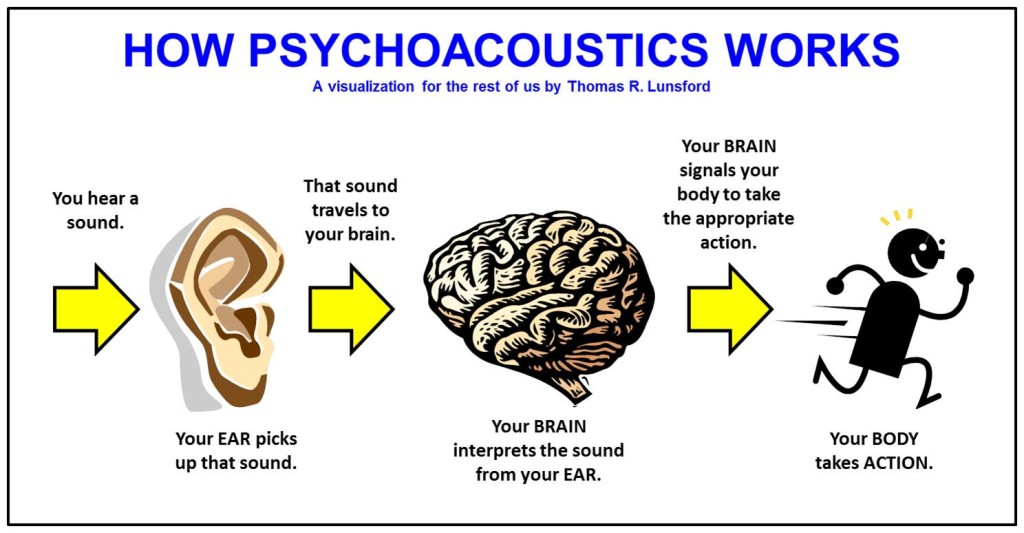
Energy compaction in audio means capturing the most “energy” or impactful parts of sound, then efficiently storing them. Think of a box you want to pack tightly. The idea is to keep the essential items while ditching things you won’t need. In audio, it’s similar, focusing on the frequencies that impact what we hear. Techniques like psychoacoustics and frequency masking help, concentrating on sounds our brains pick up easily while discarding what we won’t miss. This process is why MP3s retain such quality despite reduced data size.

The Science Behind Psychoacoustic Models

The psychoacoustic model is the backbone of MP3 compression, utilizing how humans perceive sound. I’ve noticed that this model’s core is auditory masking, where certain sounds cover others, allowing us to filter out less noticeable audio details. For example, in a crowded room, a loud voice drowns out quieter conversations. MP3s apply this by omitting audio frequencies masked by louder ones. This trimming down is barely perceptible but makes the file lighter without compromising the listening experience.

Frequency Masking: A Key to Efficient Compression

Frequency masking is a fascinating aspect that mimics how the human ear naturally filters sound. In audio compression, this technique reduces the data of sounds that are “hidden” by others. Imagine two musical notes, one high-pitched and soft, and the other low-pitched and loud. You’re more likely to notice the loud, low-pitched sound, while the softer one fades. MP3 compression leverages this concept to retain sounds that our ears will register while cutting those masked sounds, effectively reducing file size.

Bit Allocation and Its Role in MP3 Compression

Bit allocation is all about efficiency, deciding where to place the “energy” in an audio file. I see this as budgeting – you allocate more bits to essential areas and fewer bits to less noticeable parts. High-energy, dynamic sounds get more bits to ensure clarity, while low-energy areas get fewer. This smart allocation is a big reason MP3 files maintain quality even when compressed. It’s like highlighting the main points in a presentation, so you communicate the essentials without overloading the file.

Transform Coding: Breaking Down Sound Frequencies

Transform coding breaks audio into frequency components, simplifying the compression process. If you’ve ever used packing cubes in a suitcase, you know how they allow you to fit more while keeping things organized. Similarly, transform coding organizes sound into manageable “blocks” or frequencies. This process, usually through the Modified Discrete Cosine Transform (MDCT), rearranges and compacts data, fitting it more neatly and reducing the file size while keeping audio integrity.

The Role of Critical Band Analysis in Energy Compaction

Critical band analysis divides audio into “bands” or sections that our brains process separately. In MP3, it enhances compression by adjusting each band’s clarity. Think of critical bands as different instruments in a band, each with its role in the song. MP3 encoding uses this band separation to focus on parts of sound that we process most. The result? It delivers higher quality where our ears will notice it most, effectively maximizing audio impact while saving data.

Transform-Based Coding and MDCT in Depth

Transform-based coding through MDCT is a powerful compaction tool. It breaks down complex audio into smaller, easily encoded parts, making compression possible without losing clarity. I often think of this as slicing a pie – it’s easier to manage in sections. MP3 uses MDCT because it’s efficient for complex sounds, keeping the file size small without losing the richness. This efficiency is why MP3s perform so well, even for intricate audio like music.

Perceptual Coding: Focusing on Auditory Importance

Perceptual coding aligns with how our minds interpret sound by storing what’s essential and leaving out the rest. When I encode audio, I consider how perceptual coding can reduce unnecessary data. It’s like summarizing an article with only the main points. MP3s use this to keep files light and easy to store. By storing sounds our ears register best, perceptual coding delivers that “full” listening experience we crave.

Analyzing the Harmonic Structure in MP3 Compression

Harmonic structure in audio compression focuses on how sounds layer and interact. When encoding, MP3s maintain harmonics to keep that natural tone. Imagine hearing a piano piece: the melody and harmony intertwine to create that “piano” sound. Harmonic preservation means MP3s keep this intact, ensuring our ears enjoy the full, layered quality, even if data is reduced.

Spectral Compression for Efficient Data Reduction

Spectral compression reduces the bits used on lower-priority frequencies, focusing energy on what’s essential. This method is especially handy for music or sound with consistent tones. It’s similar to focusing a flashlight beam on a specific spot, illuminating it while dimming the rest. By emphasizing critical frequencies, MP3 compression keeps the audio’s richness intact, ensuring you don’t miss out on the sound’s fullness.

Handling Compression Artifacts in MP3

Compression artifacts can impact MP3 quality if not managed. When compressing audio, you might get “blurring” or “ringing” sounds. These occur if we go too far with reduction. Through trial and error, I’ve learned how to avoid these issues, balancing data reduction with sound quality. Techniques like noise shaping help smooth over these artifacts, keeping the listening experience pleasant.

Using Auditory Masking in MP3 Encoding

Auditory masking is an ingenious trick that capitalizes on how our brains ignore certain sounds. In MP3, we use masking to drop frequencies that softer sounds would cover. For instance, in a busy city, we focus on a friend’s voice, tuning out car engines and chatter. MP3s do this by saving on data for sounds that we wouldn’t consciously perceive, giving us high quality without the extra bits.

Bit Rate Reduction Without Quality Loss

Bit rate reduction aims to minimize data without compromising sound. It’s like trimming the fat off a steak: you keep the flavor but lose what’s unnecessary. MP3s apply this by reducing bits used on lower-priority sounds. Over the years, I’ve learned that careful tuning during compression ensures we retain sound depth and fidelity, even with a lower bit rate.

The Importance of Spectral Band Replication

Spectral band replication (SBR) helps MP3s reproduce high frequencies efficiently. Picture adjusting an equalizer to enhance treble – SBR does this, adding detail to compressed files. It’s particularly useful in improving quality for lower-bitrate files, giving us that crispness in sound that’s often missed. This technique is essential in maximizing audio output, especially in files with limited data capacity.

Practical Applications of Energy Compaction in MP3s

Energy compaction is all around us in music, podcasts, and online streaming. Each of these applications uses MP3’s compaction techniques to deliver high-quality audio with less data. It’s how we enjoy hours of music without maxing out storage space. Whether you’re listening on your phone or streaming online, energy compaction keeps things light and efficient, a real advantage for today’s digital lifestyle.

Maximizing MP3 Efficiency for Storage and Streaming

MP3 efficiency ensures we store more audio with less space. When I work on audio files, I focus on optimizing bit rate and frequency masking to ensure sound quality remains high. This balance lets us store extensive music libraries or stream smoothly on minimal bandwidth. It’s why MP3s remain a go-to choice for audio – they provide storage-friendly options without sacrificing quality.

Latest Words on Energy Compaction Techniques in MP3

Energy compaction techniques make MP3 a reliable format, giving us quality sound in a compact form. I’ve seen how these methods blend technology and psychology, creating a unique space in digital audio. By understanding the science behind compression and focusing on the parts we truly hear, MP3s continue to thrive. If you’re looking for efficient audio solutions, tools like Mp4Gain provide the tweaks and control needed to make the most of these compression techniques, enhancing your audio experience further.

Comments:

Man, this article opened my eyes about MP3! Never thought about how much goes into making files sound good even after they’re compressed. Awesome stuff!

I wish they’d gone even deeper on critical band analysis. It’s such a cool topic and super important for anyone making music or audio files.

Totally agree, learned so much. MP3s feel different now knowing how they work. Big thanks to whoever wrote this!

Could you go more in-depth about spectral band replication? Still kinda unclear on how it adds to quality on low bitrate files.

Impressive breakdown! Now I see why MP3 still rules. It’s like the ultimate file format for music. Thanks for the clarity!

This article made me realize how MP3s have stayed relevant. All those compaction techniques really make sense now. Nice!

I’m a DJ and always wondered why my MP3s sound great despite being compressed. Loved learning about frequency masking and bit allocation.

Good stuff, I only knew the basics but now understand the real tech behind MP3s. So useful, appreciate the article!

Wow, didn’t expect this much detail. Honestly makes me look at MP3s with a whole new level of respect. Solid info!

This breakdown makes MP3 compression so clear! Was just looking to understand the basics, but learned a ton.


Free Download Mp4Gain
picture


Mp4Gain Main Window
picture


Mp4Gain Features
picture


Free Download Mp4Gain
picture

Audio Clipping in MP3 Compression

Audio Clipping in MP3 Compression

Audio Clipping in MP3 Compression

Let’s talk about audio clipping in MP3 compression

Audio clipping in MP3 compression is an issue that can make or break the quality of the music or sound you’re listening to. When sound is compressed to save storage or bandwidth, sometimes the peaks in the audio are cut off, or “clipped,” which can lead to a harsh, distorted listening experience. MP3 compression, which reduces file size by eliminating parts of the audio that are less likely to be noticed, can sometimes cause clipping if the original audio file has loud, sharp peaks. In this article, I’ll explain why audio clipping happens, what causes it, and how to recognize and prevent it to ensure high-quality audio.

Understanding audio clipping and how it impacts sound quality

Clipping occurs when an audio signal’s amplitude exceeds the maximum limit, creating distortion because the signal has nowhere to go but flat out. Imagine if you shouted directly into a microphone so loudly that it couldn’t capture all the sound; the result would be a rough, chopped-off noise rather than the clear, full sound of your voice. In audio terms, clipping means that the sound wave gets “cut off” at the peaks, which in digital audio becomes a harsh, unpleasant distortion. This type of distortion is particularly noticeable in compressed formats like MP3, as they’re designed to strip away data considered unnecessary.

How MP3 compression can lead to audio clipping

MP3 compression works by removing frequencies that human ears may not pick up as easily. However, if the original audio has intense peaks, the compression process can cut them off rather than preserve the quality. This happens because MP3 algorithms prioritize reducing file size over maintaining the original audio’s peak structure, which can result in clipping on louder sections. I’ve noticed that high-energy tracks with many peaks are particularly susceptible, as MP3 compression forces the audio into a smaller file while trying to preserve most of its integrity.

Factors contributing to clipping in MP3 compression

Various elements can contribute to clipping in MP3 compression, including the bit rate, loudness, and dynamics of the original track. Here are some major contributing factors:

  • High volume levels in the original file
  • Low bit rates used during compression
  • Complex or dynamic sound profiles
  • Poor quality or outdated compression algorithms

If you’ve ever tried converting a loud or heavily produced track to a lower bit rate, you might have noticed that the audio becomes scratchy or distorted. This is the result of inadequate data to capture the full detail of the sound peaks, leading to clipping.

Recognizing audio clipping in MP3 files

Knowing what clipping sounds like can help you recognize it quickly in your MP3 files. Typically, clipped audio will sound “crunchy” or “harsh” during peak moments in a song or recording. Imagine playing a song with loud drums or powerful vocals and hearing an unpleasant buzzing or crackling – that’s often a sign of clipping. Some listeners describe it as a “cut-off” effect, where the sound seems abruptly stopped or truncated.

How clipping affects listening experience and music enjoyment

Clipping can ruin an otherwise perfect listening experience. For instance, if you’re listening to a high-energy rock song, those clipped peaks can reduce the impact of the drums or make the vocals sound strained. As a music enthusiast, it’s frustrating because the song loses the richness and fullness intended by the artist. If you’re serious about sound quality, even subtle clipping can feel like a loss of detail, turning what should be immersive into a hollow experience.

Preventing clipping in MP3 compression

Avoiding clipping while compressing audio requires a balanced approach. First, selecting the right bit rate plays a huge role. Higher bit rates like 256 kbps or 320 kbps retain more audio data and reduce the chance of clipping. Choosing quality compression algorithms is also essential, as they are designed to handle dynamic ranges better. In my experience, I found that adjusting the volume of the original file before compressing can reduce clipping, as this allows more headroom for peaks without flattening them.

Testing for clipping in MP3 files

One way to check for clipping is by listening carefully to high-energy sections of a track. I typically pay attention to parts where the volume peaks, such as crescendos or intense vocal moments, to spot any unwanted distortion. Alternatively, audio analysis software can visually display clipping, showing waveforms that flatline at the top. Personally, I rely on both methods to ensure that my MP3s don’t suffer from clipping, especially when preparing tracks for live sound or digital releases.

Audio clipping vs. other audio distortions

Clipping isn’t the only type of distortion you might encounter, but it is among the most disruptive. Unlike hiss or background noise, which can sometimes be ignored, clipping is a glaring error that cuts into the core quality of a track. Clipping is unique because it specifically affects high peaks, while other distortions may impact a broader range of frequencies. Knowing the difference helps because if you’re hearing distortion only on the loudest parts, it’s likely due to clipping.

Latest words on audio clipping in MP3 compression

To sum up, audio clipping in MP3 compression can seriously affect the quality of your music or audio files. By understanding the causes and symptoms of clipping, you can take steps to prevent it, ensuring a clear and enjoyable listening experience. While MP3 compression has many benefits, being aware of its limitations and taking the proper steps, like adjusting bit rates or monitoring the original track’s levels, can go a long way toward preserving audio quality. For those looking to fine-tune their audio files, Mp4Gain offers an effective solution to prevent clipping and enhance your sound quality without sacrificing file size.

Comments:

Great article! I’ve been having issues with clipping in some of my favorite songs after converting them to MP3. Now I understand why it happens and how I can prevent it. Thanks!

This explains a lot! I always wondered why some songs sound distorted on certain devices. Didn’t know about the impact of bit rate on clipping. Really useful info!

Been struggling with this for a while. I produce music, and clipping has been a nightmare. Maybe I need to look at bit rates more closely. Thanks for the tips!

I love high-quality audio, and clipping ruins it for me every time. Wish more streaming services would be upfront about bit rates and clipping issues. Appreciate the insights here.

Very insightful. I never realized how much clipping affects my listening experience, especially with MP3s. This is a must-read for any audio lover.

Well written. Some parts of my old MP3 collection have this exact problem. Now I know what’s going on, thanks to your easy-to-understand breakdown.

I’m new to audio production, and this article gave me some solid guidance on preventing clipping. Still learning, but this was super helpful!

Thank you for explaining the details! I’m definitely going to try Mp4Gain to fix some of my old files with clipping issues.

Man, I hate when my favorite songs have that crunch sound from clipping. Nice to see some good advice on avoiding it.

I was skeptical, but I learned a lot! I didn’t realize MP3 bit rate had such an impact on clipping. I’ll try higher bit rates from now on.

This is the article I’ve been looking for! I had no idea clipping was such a common issue in MP3s. Thanks for the info.

Pretty good breakdown of clipping. I’ve had trouble understanding it before, but this makes sense now. Great job!

Scalability of MP3 Compression

Scalability of MP3 Compression

Scalability of MP3 Compression

Let’s Talk About the Scalability of MP3 Compression

MP3 compression is a powerful technology that revolutionized the way we listen to music, store audio, and even communicate. But beyond the basics, MP3 offers something very special in the form of scalability. As an audio compression expert, I can tell you that scalability is what makes MP3 so adaptable to different needs—whether you’re listening on a high-end sound system or a tiny mobile speaker. Let’s dive deeper to understand how MP3 compression adapts to various devices, sound qualities, and storage demands.

What is Scalability in MP3 Compression?

When I talk about scalability in MP3 compression, I’m referring to its ability to adjust and adapt based on the file size, quality needs, or playback device. Imagine you’re storing your entire music collection on a small device with limited space. You could compress your MP3s to a lower bitrate, saving space while still enjoying your songs. But if you’re an audiophile wanting top-notch sound quality, MP3’s scalability allows for higher bitrates and better audio quality.

Why Scalability Matters for MP3 Users

Scalability is more than just a technical feature; it’s a real-life benefit for anyone who listens to music, podcasts, or any audio files. In my experience, scalability means you have control. It allows you to decide if you want smaller file sizes for quick downloads or high-quality sound that feels like a live performance. This flexibility is something I value every time I adjust an MP3 file to match my needs—whether I’m optimizing for my phone, laptop, or a professional sound system.

How MP3 Compression Works to Achieve Scalability

MP3 compression removes parts of the audio that the human ear is less sensitive to, allowing for reduced file sizes without losing noticeable sound quality. This process involves perceptual coding, which is why MP3s can compress to different bitrates, adapting to the level of quality you need. For instance, compressing a file to 128 kbps means it will take up less space but may sound less clear on high-end equipment. Compressing to 320 kbps, on the other hand, preserves more detail but requires more storage.

Perceptual Coding

Perceptual coding is where MP3’s magic lies. Think of it as a smart reduction process that focuses on what’s essential in the audio. By removing inaudible frequencies, MP3 makes the audio smaller without impacting quality, making it perfect for situations where space is a concern.

Bitrate Flexibility

The flexibility of MP3 bitrates—from as low as 64 kbps up to 320 kbps—lets you adjust file sizes and quality. I’ve often found that choosing the right bitrate depends on where and how I plan to listen. Low bitrates work great for quick listening on the go, while higher bitrates are ideal for immersive experiences.

Real-World Applications of MP3 Scalability

MP3 scalability has transformed how we store, share, and experience audio. I’ve seen scalability’s impact firsthand in several fields, from education to broadcasting. For example, in podcasting, scalability allows creators to publish files that download quickly on any device without eating up data or storage.

Music Storage and Streaming

Music libraries on phones or portable devices rely on MP3’s scalability. Smaller file sizes allow people to store thousands of songs on a small device. This scalability also enhances streaming platforms, allowing them to adjust audio quality based on internet speed to ensure seamless playback.

Podcasting and Audiobooks

I’ve noticed that podcasts and audiobooks are a prime example of MP3 scalability in action. Listeners download lower-bitrate files that still sound good, making them easy to access on mobile data or slower connections. Podcast creators can reach more listeners without worrying about huge data usage.

Sound Quality for Different Playback Systems

Imagine playing an MP3 file on different sound systems. High-end speakers reveal the audio’s depth, while smaller speakers won’t show as much detail. MP3’s scalability lets you choose the bitrate that best matches your playback device, ensuring a good experience regardless of the system.

Challenges in MP3 Scalability

Despite its strengths, MP3 scalability has limitations, particularly with the trade-off between file size and quality. As someone who has worked with MP3s extensively, I know that lower bitrates often lead to audio artifacts, which are imperfections in sound quality that become more noticeable on higher-end equipment.

Quality Loss at Low Bitrates

When you compress MP3s to very low bitrates, you’re sacrificing audio details. This loss is noticeable in high-frequency sounds, like cymbals, which can sound flat. I’ve had to balance between file size and quality in projects where space was tight but audio quality was a priority.

Compatibility Issues with Legacy Devices

Older devices sometimes struggle with certain bitrates or codec settings, meaning they can’t fully utilize MP3’s scalability. This is something I’ve encountered when trying to play newer MP3 files on older MP3 players that don’t support certain bitrate ranges.

Energy Consumption in Encoding and Decoding

Encoding and decoding MP3 files at higher bitrates require more processing power, which can drain battery life faster on portable devices. I’ve noticed this especially with high-quality audio playback on older phones or MP3 players.

How to Optimize MP3 Compression for Your Needs

Optimizing MP3 files isn’t just about getting the smallest file size; it’s about striking the right balance between quality and storage needs. Here’s how I approach this process to ensure I get the best out of my MP3 files, depending on the device and situation.

Choosing the Right Bitrate

If you’re storing MP3s for casual listening on a mobile device, a bitrate of 128 kbps might be enough. However, for high-fidelity listening, I recommend a bitrate closer to 256 or 320 kbps. The higher the bitrate, the more details you preserve, which is crucial for music enthusiasts.

Using Variable Bitrate Encoding

Variable Bitrate (VBR) encoding allows the MP3 file to adjust its compression rate dynamically. When I use VBR, I get a more efficient file size without compromising on quality. It’s like getting the best of both worlds—smaller files when possible but better sound quality when needed.

Storage and Backup Strategies

Scalability also means thinking about storage. For large music libraries, I often compress files at a slightly lower bitrate to save space, while backing up original high-quality files on an external hard drive. This approach balances storage without sacrificing access to high-quality versions.

Advantages of MP3 Scalability Over Other Formats

While newer formats like AAC and OGG offer similar features, MP3’s scalability remains unmatched in certain ways. For instance, MP3 files are universally compatible, meaning I don’t have to worry about compatibility issues with different devices.

Universal Compatibility

One of MP3’s main advantages is its near-universal compatibility. Whether you’re using a smartphone, computer, or car stereo, MP3 files play smoothly, which isn’t always true for other formats. In my experience, this compatibility makes MP3 a preferred choice for scalable audio.

Established Infrastructure

MP3’s long-standing presence means that devices, software, and even streaming services are optimized for it. The established infrastructure around MP3 files simplifies scalability since you don’t need extra tools to play, edit, or share MP3 files across platforms.

Adaptability for Multiple Audio Qualities

From a single recording, you can create MP3 files of various quality levels. I often use this adaptability to create versions for streaming, high-quality playback, and portable storage. MP3’s adaptability makes it easy to cater to different needs without re-encoding from scratch.

When MP3 Scalability Might Not Be Enough

Though MP3 is versatile, there are times when its scalability falls short, especially for high-definition audio. As an audio specialist, I sometimes need higher fidelity than MP3 can provide, particularly in professional settings where lossless audio is preferred.

Limitations with Lossless Audio

MP3 is a lossy format, which means it’s not ideal for archiving or professional audio. When I need the highest possible quality, I turn to lossless formats like WAV or FLAC. MP3’s scalability helps in daily use but isn’t perfect for preserving every detail.

Emergence of Newer Codecs

The rise of newer codecs like AAC and Opus challenges MP3’s dominance. These formats offer better compression efficiency, meaning they deliver higher quality at the same file size. In my experience, these newer formats are gaining traction, especially in streaming platforms.

Future Trends in Scalable Audio Formats

The future of scalable audio formats is exciting, with advances in artificial intelligence and machine learning promising to further improve compression quality. As we look ahead, MP3 may adapt, but it will also face competition from newer technologies that offer even more efficient scaling.

Dynamic Range Compression in MP3

Dynamic Range Compression in MP3

Dynamic Range Compression in MP3

Let’s Talk About Dynamic Range Compression in MP3

Dynamic range compression (DRC) is a concept that often comes up in audio discussions, especially when we talk about MP3s and audio quality. It’s a process that affects how we hear quiet and loud sounds in a recording by balancing their volumes. Think of it like adjusting the volume knob automatically so the quieter sounds are more noticeable and the louder sounds don’t overwhelm. I have years of experience in audio processing and understand how DRC impacts everything from music streaming to the soundtracks we hear in movies. In this article, I’ll dive into how dynamic range compression works, how it affects MP3 files, and share insights on making the most of it in digital audio.

What is Dynamic Range Compression?

Dynamic range compression is all about controlling the difference between the quietest and loudest parts of an audio track. If you’ve ever listened to a song where the vocals get drowned out by the instruments, you’re experiencing a wide dynamic range. Compression tackles this by “squeezing” the audio into a more consistent volume range, making the quieter parts louder and the loudest parts softer. Think of it as balancing a book on a seesaw, where the compressor acts as the steadying force, preventing extreme highs or lows.

Why Dynamic Range Matters in MP3 Compression

MP3s are a compressed file format designed to reduce file size without significantly compromising sound quality. However, achieving this compression means some audio data is discarded, typically by cutting out sounds that are less likely to be noticed by human ears. This process, called lossy compression, already affects the dynamic range. DRC, when applied to an MP3, can both help and harm, depending on how it’s used. While it can bring out quieter details, it may also reduce the natural contrast between loud and soft sounds. For example, in classical music, which relies on these contrasts, heavy compression could strip away its depth.

How Dynamic Range Compression Works in MP3 Encoding

Dynamic range compression in MP3 encoding uses algorithms to measure the volume of the audio content and then applies compression settings accordingly. This includes parameters like threshold, which defines the volume level where compression starts, and ratio, which determines how much compression is applied. For instance, if I’m encoding an MP3 of a rock song, I might use a higher ratio to ensure that vocals don’t get buried under guitars, but with a softer threshold to keep the percussive energy intact.

  • Threshold: The volume level at which compression begins.
  • Ratio: The intensity of compression applied to sounds above the threshold.
  • Attack Time: How quickly the compressor reacts to loud sounds.
  • Release Time: How quickly the compression effect stops when the sound decreases.

How Human Hearing Influences Dynamic Range Compression

Our ears are sensitive to certain frequencies and less so to others. Dynamic range compression takes advantage of these natural listening preferences, particularly when applied to MP3s. MP3 compression removes “unnecessary” sounds based on psychoacoustic models, making dynamic range compression more noticeable. For example, in a jazz recording, the soft whisper of a saxophone might be drowned out by louder instruments. Compression can bring out this subtlety by amplifying the saxophone’s volume relative to louder sounds, providing a fuller listening experience.

The Role of Psychoacoustic Models in MP3 Compression

Psychoacoustic models consider what our brains are likely to ignore when processing sounds. MP3 encoders use these models to selectively discard sounds during compression, aiming to retain only the most essential elements. In my experience, understanding psychoacoustics helps make smart decisions in audio processing, especially in MP3s where balancing quality with file size is key. When applying dynamic range compression, these models guide what frequencies and volumes to boost or soften without degrading perceived quality.

Benefits of Dynamic Range Compression in MP3 Files

Dynamic range compression in MP3 files offers several benefits. For one, it creates a more uniform listening experience, especially in environments with ambient noise, like a car or train. I’ve found that DRC can make a podcast or an audiobook clearer and more enjoyable since it brings voices to a more consistent level.

  • Enhanced clarity in noisy settings.
  • Improved intelligibility for speech audio, like podcasts.
  • Balanced volume across different listening environments.
  • Preserved details in quiet audio passages.

Challenges of Using Dynamic Range Compression in MP3 Files

Applying too much compression in an MP3 file can lead to a “flattened” sound where the subtle dynamics that make music expressive get lost. This is sometimes called the “loudness war” effect. For instance, rock and pop tracks are often heavily compressed to make them sound louder, but at the cost of depth and dynamics. In classical or jazz, over-compression can erase the subtlety that’s crucial to the genre.

Different Types of Compression in MP3 Audio Processing

Several types of compression can be applied to MP3s, each with its own effects:

  • Peak Compression:

    Reduces only the peaks, preserving most of the dynamics.

  • Average Compression:

    Balances the average loudness of the track, ideal for dialogue-heavy audio.

  • Multiband Compression:

    Separates the audio into frequency bands and applies different compression settings to each.

How Much Compression is Too Much in an MP3 File?

Over-compressing an MP3 can make it sound unnatural and “boxy.” I always suggest a subtle approach to maintain a balance between loudness and audio fidelity. For most music genres, especially those that rely on dynamic contrast, over-compression can be detrimental.

Examples of Dynamic Range Compression in Real-Life Audio

Think of TV commercials that sound louder than the show you’re watching. That’s compression in action, used to grab your attention. In MP3s, compression is used similarly to make certain sounds “pop,” though with more nuance. Another example is in phone calls, where DRC is used to ensure the voice remains clear despite background noise.

Using DRC with MP4Gain for Optimal Results

If you want precise control over dynamic range compression, especially for MP3s, MP4Gain offers customizable settings that allow you to adjust compression levels based on your needs. Whether it’s enhancing vocals or ensuring a consistent playback volume, it’s a tool that brings out the best in compressed audio.

Latest Words on Dynamic Range Compression in MP3

Dynamic range compression, when used wisely, can enhance the listening experience of MP3s by bringing clarity and balance to the audio. While it’s a powerful tool, overuse can strip audio of its character and depth. My advice: start with minimal compression and adjust gradually to find the best balance. Understanding the effects of compression and using tools like MP4Gain can make a significant difference in your audio projects, ensuring the quality you want without sacrificing the nuances that make audio truly enjoyable.

Comments:

This was super helpful! I always wondered why MP3s sounded different. Great breakdown on compression.

Really good explanation. But I would like more info on how psychoacoustic models actually work in compression.

I’ve struggled with audio sounding “flat” after compressing—didn’t realize it could be the DRC settings!

Man, compression in MP3s is wild. Thanks for explaining it in simple terms, never knew about all these types of compression.

Can someone help me understand why compression is necessary at all? Why not just leave the audio alone?

This article cleared up so much for me. Now I know why some music feels “boxed in”!

Great article. I wish you’d talk about how MP3 compares to other formats in terms of compression.

Thanks for breaking it down! Didn’t know compression affects different genres in such specific ways.

Reading this made me realize why my podcasts sometimes sound different on my phone. Good info!

I never understood why my music sounded “muffled” on high volume. This helped a lot!

Interesting stuff. Might have to try out that MP4Gain tool you mentioned for my recordings.

Wow, very thorough. Really makes me appreciate the work that goes into audio processing.

I learned so much from this. Wish I knew about compression when I was starting with audio editing.

Nice article! You should add a video tutorial for those of us who want a visual guide.

This answered a lot of questions but left me wondering how compression affects live recordings. Anyone?

Advantages of MP3 Format

Advantages of MP3 Format

Advantages of MP3 Format

Let’s talk about MP3 format

As a seasoned expert in the audio industry, I embark on a journey to explore the intricacies of the MP3 format. In a world saturated with various audio formats, MP3 stands as a ubiquitous and often misunderstood format. Let’s unravel the layers and discover the unique advantages that make MP3 a stalwart in the realm of digital audio.

Advantages of MP3 Format

The Evolution of MP3: A Digital Revolution

In the early days of digital audio, the emergence of MP3 marked a revolutionary shift. Imagine the transition from traditional telephones to smartphones—MP3 brought a similar leap in audio accessibility. The format revolutionized the way we consume music, allowing us to carry thousands of songs in our pockets. It’s the pocket-sized jukebox that changed the way we experience music on the go.

Optimal Balance: Quality vs. File Size

One of the defining features of MP3 is its ability to strike a delicate balance between audio quality and file size. Think of it as a well-crafted sandwich—you get the richness of flavors without the bulk. MP3 achieves this balance through a process called compression, where it trims down file sizes without compromising the essence of the audio. It’s like having your cake and eating it too—crisp audio without overwhelming storage demands.

Every Beat Counts: Efficient Compression

In the realm of audio compression, MP3 takes center stage. The format employs efficient algorithms to discard redundant information, focusing on preserving the essential elements of the sound. Picture a skilled chef reducing a sauce to intensify the flavor—MP3 refines audio, discarding excess data while retaining the core musicality. It’s this efficiency that makes MP3 the preferred choice for streaming and downloading.

The MP3 Advantage in Digital Landscape

Streaming Symphony: MP3 in Online Platforms

In the age of music streaming, MP3 emerges as the maestro of online audio. Its efficient compression ensures swift streaming, delivering a seamless musical experience without buffering interruptions. It’s like having a concert at your fingertips, where every note flows effortlessly, thanks to MP3’s prowess in handling data over the internet.

Podcasting Power: MP3 in Digital Content

For content creators, especially in the podcasting realm, MP3 is the go-to format. Its optimal balance between quality and size ensures that podcasts are easily downloadable and shareable. It’s akin to sending a postcard—you get the message without the bulk. MP3’s compatibility across devices ensures that listeners can enjoy podcasts anytime, anywhere, making it the linchpin of digital content distribution.

Dynamic Range: MP3 in Musical Diversity

MP3’s efficient compression also plays a pivotal role in preserving the dynamic range of music. In simpler terms, it ensures that the soft whispers and thunderous roars of a song remain intact. It’s like watching a movie in high definition, where every detail is vivid. MP3 allows the nuances of each instrument and vocal to shine through, creating an immersive musical experience.

Behind the Scenes: MP3 in Audio Production

As someone deeply entrenched in audio production, I’ve witnessed firsthand the impact of MP3 in the studio. Its efficient compression streamlines the workflow, making it an ally for producers and artists. It’s like having a reliable assistant—MP3 ensures that the final mix retains its brilliance without overwhelming storage or complicating the editing process.

Latest Words on MP3 Format

Sound Waves of the Future: MP3 Beyond the Basics

As we navigate the evolving landscape of digital audio, MP3 continues to adapt and thrive. It’s not just a format; it’s a vessel for the future of sound. The efficiency, compatibility, and quality of MP3 make it a timeless companion in our daily audio adventures.

Unveiling the Layers: MP3 and Audio Quality

One aspect often overlooked is the impact of MP3 on shaping our perception of audio quality. In the era of convenience, MP3 has become synonymous with accessible, high-quality audio. It’s like upgrading from a standard TV to a 4K display—the difference is palpable. MP3 ensures that we don’t compromise on audio excellence, even in the hustle and bustle of our digital lives.

MP3 and the Digital Renaissance

In the grand symphony of digital audio, MP3 orchestrates a renaissance, bringing music to the masses with unparalleled accessibility. It’s not just a format; it’s a cultural phenomenon that transcends generations. MP3 has redefined how we consume, produce, and share music, leaving an indelible mark on the sonic landscape.

Let Your Ears Decide

In conclusion, the advantages of the MP3 format extend far beyond the technical realm. It’s a format that speaks to the heart of audio accessibility and convenience. As an expert in the field, I invite you to let your ears decide. The next time you stream a song, enjoy a podcast, or delve into the world of digital audio, remember that MP3 is not just a format—it’s the key to a universe of musical possibilities.

Comments:

This article opened my eyes to the magic of MP3 in preserving audio quality. Kudos for the insightful journey!

Nick: AudioExplorer

MP3 is my companion in every road trip. The balance of quality and file size is a game-changer!

Nick: RoadTunes

Great article, but I crave more insights on how MP3 handles different genres of music. Keep it up!

Nick: MusicMaestro

MP3 and streaming—a match made in audio heaven! Thanks for shedding light on its role in the digital era.

Nick: StreamMaster

Any recommendations for maximizing MP3 quality during the production process? Share your secrets!

Nick: StudioSorcerer

MP3’s impact on podcasting is undeniable. It’s like the unsung hero of the digital content world!

Nick: PodcasterPro

How does MP3 stack up against emerging audio formats? A comparison would be fascinating!

Nick: FutureListener

MP3’s role in shaping our digital audio landscape is commendable. Exciting times ahead!

Nick: DigitalHarmony

Can we delve deeper into MP3’s influence on the democratization of music production? Intriguing topic!

Nick: MusicDemocratizer

MP3’s journey from revolution to renaissance—a captivating read! More articles like this, please!

Nick: RenaissanceReader

MP3 Bit Allocation

What Are the Key Principles Behind MP3 Bit Allocation?

MP3 Bit Allocation
MP3 Bit Allocation

Latest Words on MP3 Bit Allocation

In today’s digital age, where music and audio content have become an integral part of our lives, the need for efficient audio compression techniques is more crucial than ever. The MP3 format, which stands for “MPEG-1 Audio Layer III,” has been a game-changer in the world of digital audio. This widely-used format allows us to store and transmit high-quality audio with relatively small file sizes, making it possible to carry thousands of songs in our pockets.

The magic behind the MP3 format lies in its bit allocation principles. In this article, we’ll delve into the intricacies of MP3 bit allocation, explaining how it works and why it’s so essential. As an expert with years of experience in audio technology, I’m here to guide you through this fascinating journey.

Let’s Talk About MP3 Bit Allocation

MP3 Bit Allocation
MP3 Bit Allocation

Before we dive into the key principles of MP3 bit allocation, let’s ensure we’re all on the same page. You might be wondering what “bit allocation” even means. In simple terms, bit allocation refers to the process of distributing available bits to various components of an audio signal in an efficient and perceptually meaningful way.

Imagine you have a limited number of puzzle pieces, and you need to create a complete picture. Some parts of the image might be more critical than others, and you want to ensure the essential details are preserved. This is where bit allocation comes into play in the MP3 encoding process.

Now, let’s get deeper into the principles behind MP3 bit allocation.

The Psychoacoustic Model: A Vital Component

At the core of MP3 bit allocation is the psychoacoustic model. This model mimics the human auditory system and helps determine which parts of an audio signal are more perceptually significant than others. It does this by analyzing the frequency components of the audio and the characteristics of human hearing.

Imagine you’re in a room filled with people talking at various volumes. Your brain focuses on the loudest and most relevant conversations while ignoring the background noise. Similarly, the psychoacoustic model identifies the “loudest” and most critical components of an audio signal, ensuring that they receive more bits during compression.

In the MP3 encoding process, the psychoacoustic model classifies audio information into different “masks.” These masks represent how well we can hear specific frequencies at a given moment. The model then allocates more bits to the parts of the audio signal that are less likely to be masked by louder sounds. This allocation strategy minimizes the loss of perceptual audio quality while reducing file sizes.

Masking Effect: An Everyday Analogy

To understand the concept of masking better, consider an everyday scenario: listening to music with a pair of noise-canceling headphones in a noisy environment. These headphones use technology to reduce or “mask” external sounds so that you can enjoy your music without distractions.

Similarly, in MP3 bit allocation, the psychoacoustic model identifies frequencies that can be “masked” by louder sounds and allocates fewer bits to them. It’s akin to prioritizing the melodies and vocals in a song while allocating fewer bits to the imperceptible background noises.

This approach is what makes MP3 compression so efficient. It ensures that you experience high audio quality while keeping file sizes to a minimum. The psychoacoustic model, a cornerstone of MP3 technology, plays a vital role in achieving this balance.

The Bit Reservoir: Ensuring Smooth Playback

Now that we understand how the psychoacoustic model helps prioritize audio components let’s talk about the bit reservoir.

Comments:

Comment 1.

I really enjoyed this article! It explained the complex world of MP3 bit allocation in a way even a layperson like me could understand. Great job!

Comment 2.

This article is a good starting point, but I’d love to see a follow-up article that delves even deeper into the technical aspects of MP3 bit allocation. Keep up the good work!

Comment 3.

Kudos to the author for making such a technical topic accessible. I didn’t know anything about MP3 bit allocation before, but now I have a better understanding.

Comment 4.

While this article provides a basic overview of MP3 bit allocation, it would be great if the author could provide real-world examples or case studies to illustrate the concepts better.

Comment 5.

Great explanation! It’s nice to read an article written by someone who knows their stuff. Keep writing more on audio technology, please.

Comment 6.

This article covers the fundamentals well. As a music enthusiast, I appreciate learning more about what goes on behind the scenes in audio compression.

Comment 7.

Wow, I had no idea MP3s were so complex. The part about the psychoacoustic model was fascinating. I look forward to reading more from this author.

Comment 8.

This article could benefit from more practical applications. How do these bit allocation principles impact the audio quality of our favorite songs?

Comment 9.

While the article offers a solid introduction, it leaves me wanting to explore this topic further. It’s a compelling read that piques curiosity.

Comment 10.

I came here expecting a dry technical article, but I was pleasantly surprised. The analogy with noise-canceling headphones was spot on.

Comment 11.

I appreciate the clear and concise language in this article. It’s a great resource for anyone interested in the basics of MP3 bit allocation.

Comment 12.

More, please! I can’t get enough of this topic now. Looking forward to part two. Thanks for making this accessible to the average reader.

YouTubeToMp3

YouTubeToMp3


youtubetomp3
youtubetomp3


youtubetomp3
youtubetomp3

When it comes to enjoying music or podcasts, YouTube is a treasure trove of content. But what if you want to listen to your favorite YouTube videos as MP3 audio files? YouTube to MP3 conversion offers a solution. In this article, we’ll explore this topic comprehensively, diving into the methods, tools, legal considerations, and best practices for converting YouTube videos to MP3 files.

Understanding YouTubetoMP3 Conversion

YouTube to MP3 conversion is the process of extracting audio from YouTube videos and saving it in the MP3 format. This allows you to enjoy the content on your preferred audio player or device. However, it’s essential to understand the legal and ethical aspects of this process, as well as the different methods available.

Benefits and Use Cases

youtubetomp3
youtubetomp3

People convert YouTube videos to MP3 for various reasons. It’s a convenient way to create a personal music library or listen to podcasts on the go. For instance, imagine you have a long road trip planned, and you want to listen to your favorite songs without worrying about data connectivity.

John, a music enthusiast, recalls a recent camping trip. “I downloaded a playlist of nature sounds from YouTube to MP3 to create a relaxing ambiance for our camping trip. It was a great way to enjoy the sounds of nature without worrying about internet access.”

YouTube’s Policies and Copyright Issues

YouTube has specific terms of service that users must abide by. Downloading or converting content without proper authorization may violate these terms. Additionally, copyright laws must be respected when converting YouTube videos to MP3. Unauthorized use of copyrighted material can lead to legal consequences.

Tools and Software for YouTubetoMP3 Conversion

There are various tools and software available for YouTube to MP3 conversion. When choosing a converter, it’s crucial to select a reputable and secure option. Let’s take a closer look at how to use a popular conversion tool:

Download and install the tool on your computer.
Copy the URL of the YouTube video you want to convert.
Paste the URL into the converter.
Select the MP3 format and desired quality settings.
Click the “Convert” button to initiate the process.
Audio Quality and Formats

The quality of the MP3 file you obtain through conversion depends on factors like bitrate and sampling rate. The higher the bitrate, the better the audio quality, but it also results in a larger file size. Users should strike a balance between quality and file size based on their preferences.

Safety and Security

While converting YouTube videos to MP3 is popular, it comes with security risks. Some converters and download sites may contain malware or lead to scams. To ensure safety, only use well-established and reputable converters. Additionally, be cautious when clicking on ads or pop-ups while downloading.

Legal Alternatives

There are legal alternatives to YouTube to MP3 conversion. Music streaming services like Spotify, Apple Music, and Amazon Music offer vast libraries, and you can subscribe for a monthly fee. These platforms provide legal access to a wide range of music.

User Experiences and Recommendations

User experiences with YouTube to MP3 conversion vary. Some users prefer the convenience and cost-effectiveness, while others opt for legal alternatives to support artists and avoid legal complications. It’s essential to make an informed choice based on your needs and ethical considerations.

Future Trends

The world of audio conversion is continually evolving. Emerging technologies are making it easier to access and enjoy music legally and efficiently. Keep an eye on developments in this field, as they may impact the way you consume and share audio content.

Last words about Youtubetomp3

In conclusion, YouTube to MP3 conversion can be a valuable tool for personal audio enjoyment, but it comes with legal and ethical considerations. Choose your conversion tools wisely, prioritize safety, and consider legal alternatives. The future of audio conversion is exciting, so stay informed about the latest trends.

Comments:

Comments:

“I’ve been using YouTube to MP3 converters for years, and I agree that safety is crucial. Always double-check the source!” – MusicLover87

“This article provides a balanced perspective on YouTube to MP3 conversion. I appreciate the legal alternatives section.” – LegalEagle

“I’d love to see more information on the technical side of audio quality in MP3 conversion. Great article otherwise!” – TechEnthusiast

“I converted a YouTube concert to MP3 for my road trip last summer, and it was a game-changer. The article covers all the essential points.” – RoadTripper

“I didn’t know the legal aspects were so complex. Thanks for shedding light on this issue.” – CuriousListener

MP3 Louder

MP3 Louder

MP3 Louder
MP3 Louder
MP3 Louder
MP3 Louder

How to increase the volume of MP3 files?

An MP3 file’s volume can sometimes be inadequate, especially if the original recording was done at a low level. Fortunately, there are ways to amplify its volume without relying on external tools. One common method is through normalization, which adjusts the volume by analyzing the track’s loudest point and setting it to a standard level. Another approach is to use equalization, which can increase certain frequencies making the audio sound louder.

However, it’s crucial to be cautious. Over-amplifying can lead to audio clipping, where the loudest parts are cut off, leading to distortion. It’s always a good idea to make a backup of your original file before making any modifications.

“Turn the volume up, but not too loud, lest you break the speakers.” – Unknown

Why is my MP3 file so quiet?

MP3 files can be quiet for a variety of reasons. The initial recording might have been set at a low volume, or the conversion process into the MP3 format might have affected its loudness. It’s also possible that dynamic range compression wasn’t applied during the creation, leading to quieter audio.

Understanding these factors can be essential to prevent such issues in future recordings or conversions. Listening to the file on multiple devices can also give insight into whether the problem lies with the file or with a particular playback device.

“In the quiet, we hear the most noise.” – Unknown

Can I make my MP3 songs louder without distorting them?

Yes, MP3 songs can be made louder without causing distortion, but caution is necessary. It’s essential to increase the volume gradually and listen for any signs of audio clipping or distortion. If the track starts sounding harsh, it’s a sign that the volume is too high.

Using the normalization process is a safer way to achieve a louder sound without distorting the audio. This technique adjusts the track’s overall volume based on its loudest point, ensuring a more consistent and clearer sound.

“The loudest noise comes from the silent adjustment.” – Unknown

Methods to boost MP3 audio quality?

Improving the quality of an MP3 isn’t just about volume. Factors like bit rate, sample rate, and the codec used can all impact audio quality. A higher bit rate typically results in better audio quality but at the cost of a larger file size.

It’s also worth noting that once an MP3 has been compressed at a low bit rate, boosting its quality can be challenging. The best approach would be to obtain or create a new file with a higher bit rate or in a lossless format.

“Quality is not an act, it’s a habit.” – Aristotle

How do volume levels in MP3s work?

Volume levels in MP3s are determined by the amplitude of sound waves in the audio data. This amplitude represents the height of sound waves, and the greater the amplitude, the louder the sound. MP3s utilize a compression algorithm that can sometimes alter these amplitudes, affecting the volume.

To get a consistent volume across multiple MP3s, it’s a good idea to use normalization. This ensures that all songs play back at the same volume level.

“Consistency is the last refuge of the unimaginative.” – Oscar Wilde

Can amplifying an MP3 degrade its quality?

Indeed, over-amplifying an MP3 can degrade its quality. If the audio is amplified too much, it can result in clipping, where the peaks of the sound waves are cut off. This leads to a distorted and unpleasant listening experience.

To avoid this, always amplify in moderation and continuously check the audio for signs of distortion.

“Moderation is the key to lasting enjoyment.” – Hosea Ballou

Why do some MP3s play louder than others?

The perceived loudness of an MP3 can vary due to several factors. The recording environment, the original audio source, and the compression methods used can all play a role. Additionally, the use of dynamic range compression in the creation process can make some MP3s sound louder than others.

To achieve a uniform listening experience, consider using normalization or volume leveling software.

“Variety may be the spice of life, but consistency pays the bills.” – Doug Cooper

Best practices for adjusting MP3 volume?

When adjusting MP3 volume, it’s crucial to:

Always make a backup of the original file.
Use normalization rather than manual amplification for consistent results.
Avoid over-amplifying to prevent distortion.
Test the adjusted audio on different devices to ensure quality.
“Best results are achieved through diligence and practice.” – Unknown

What causes variability in MP3 volume levels?

Variability in MP3 volume levels can be attributed to differences in recording equipment, environments, compression techniques, and mastering processes. The way an MP3 is encoded can also introduce variability, especially if different bit rates and codecs are used.

“Inconsistency is the only thing in which men are consistent.” – Horace Smith

How does normalization affect MP3 loudness?

Normalization adjusts the volume of an MP3 based on its loudest point. Instead of amplifying the entire track uniformly, normalization ensures that the peak volume remains consistent across the file. This results in a balanced audio output that’s loud enough without causing distortion.

“Balance is the key to everything.” – Koi Fresco

Final words

MP3s have become a popular audio format due to their versatility and compatibility. Adjusting their volume for an optimal listening experience requires a careful approach to maintain audio quality. By understanding the intricacies of MP3 audio and following best practices, listeners can enjoy their music and recordings at the perfect volume.

Everything You Need to Know About Audio Quality

Everything You Need to Know About Audio Quality

Audio Quality
Audio Quality
Audio Quality
Audio Quality

Audio Quality Explained

As an audio enthusiast, I understand how crucial audio quality is for enjoying music or movies. In simple terms, audio quality refers to how good the sound is. But what makes a sound “good”? It’s a combination of factors like bit rate, sample rate, dynamic range, and compression.
In digital audio, bit rate refers to the number of bits of data that are processed per second. The higher the bit rate, the more information is transmitted, resulting in better sound quality. Sample rate, on the other hand, refers to the number of samples per second. A higher sample rate means more data is being captured, leading to a more accurate representation of sound.

When it comes to audio compression, there are two types: lossless and lossy. Lossless compression reduces file size without losing any audio quality, while lossy compression sacrifices some audio quality to achieve smaller file sizes.

“Audio quality is not just about the equipment you use, but also about how the audio is recorded and produced,” as Ken Pohlmann states in his book “Principles of Digital Audio”. It’s essential to consider the recording and mixing process to ensure high-quality audio output.

Analog vs Digital Audio

Analog audio refers to sound that is recorded and transmitted as an electrical signal. It’s been around for decades and is still used in some recording studios today. However, digital audio has taken over in recent years, as it’s more accurate and offers better sound quality.
Digital audio uses a binary code to represent sound, which is then converted back into an analog signal for playback. This process results in a more accurate representation of sound, and the digital format makes it easier to edit and manipulate audio.

As filmmaker George Lucas once said, “sound is 50% of the movie experience.” The switch from analog to digital audio has allowed for more immersive and realistic audio in movies and music.

Dynamic Range and Equalization

Dynamic range refers to the difference between the loudest and softest parts of an audio recording. It’s an essential aspect of audio quality, as a higher dynamic range means a more natural and realistic sound. However, too much dynamic range can cause distortion or clipping, so it’s crucial to find the right balance.
Equalization, or EQ, is the process of adjusting the balance between different frequencies in an audio recording. It’s used to enhance certain aspects of the sound, such as boosting the bass or adding clarity to the vocals. However, overuse of EQ can lead to unnatural or distorted audio.

As composer Hans Zimmer once said, “the music is never the problem, the music is the solution.” By understanding dynamic range and equalization, you can achieve the perfect sound for your music or movie.

Lossless vs Lossy Audio Compression

As mentioned earlier, lossless compression retains all the original audio quality while reducing file size. Lossy compression, on the other hand, sacrifices some audio quality to achieve smaller file sizes.
When it comes to music, many audiophiles prefer lossless formats like FLAC or ALAC, as they offer the best possible sound quality. However, these formats result in larger file sizes, which can be inconvenient for some users. Lossy formats like MP3 and AAC are more widely used, as they provide good sound quality while keeping file sizes small.

As filmmaker Quentin Tarantino once said, “When you’re watching a movie, you’re watching over the filmmaker’s shoulder.” The quality of the audio and video can greatly affect the overall viewing experience of a film. In this article, we’ll explore everything you need to know about audio quality, including bit rate, sample rate, and other related topics.

What is Audio Quality?

Audio quality refers to the overall fidelity, clarity, and richness of the sound in a recording. In other words, it’s how well the sound reproduces the original performance or source material. A high-quality audio recording will accurately capture the nuances of the original performance, while a low-quality recording will distort or lose some of these details.

Why is Audio Quality Important?

Audio quality is important because it directly affects the overall experience of listening to music or watching a film. Poor audio quality can distract from the content of the recording and make it difficult to understand what’s being said or played. In contrast, high-quality audio can make the recording more engaging and enjoyable to listen to.

As musician Brian Eno once said, “The quality of the sound is essential to the success of the music.” The same can be said for any audio recording, whether it’s a song, a podcast, or a movie soundtrack.

Understanding Bit Rate and Sample Rate

Two key factors that determine the quality of digital audio recordings are bit rate and sample rate. Bit rate refers to the amount of data used to represent each second of audio, while sample rate refers to the number of times per second that the audio is measured and recorded.

In general, higher bit rates and sample rates result in higher-quality audio recordings. For example, a CD-quality audio recording has a bit rate of 1,411 kbps and a sample rate of 44.1 kHz, while an MP3 file typically has a bit rate of 128 kbps and a sample rate of 44.1 kHz or lower.

Other Factors Affecting Audio Quality

In addition to bit rate and sample rate, there are other factors that can affect the quality of digital audio recordings. For example, the type of compression used can have a significant impact on the overall sound quality. Lossless compression algorithms, which preserve all of the original audio data, generally result in higher-quality recordings than lossy compression algorithms, which discard some of the original data to achieve higher levels of compression.

Other factors that can affect audio quality include the type of microphone or recording equipment used, the acoustics of the recording space, and the mixing and mastering process.

Conclusion: Why Audio Quality Matters

In conclusion, audio quality is a critical factor in any recording, whether it’s a song, a podcast, or a movie soundtrack. Understanding bit rate, sample rate, and other related topics can help you make informed decisions about how to record, edit, and distribute your audio content. By paying attention to audio quality, you can ensure that your recordings are engaging, enjoyable, and of the highest possible quality.

Why Audio Quality Matters: A Comprehensive Guide

Why Audio Quality Matters: A Comprehensive Guide

Audio Quality
Audio Quality

When it comes to creating video content, audio quality is often overlooked. Many content creators focus solely on the visuals and neglect the importance of high-quality audio. However, audio quality is just as important as video quality when it comes to creating engaging content. In this comprehensive guide, we’ll explore the importance of audio quality, the factors that affect it, and how to improve it to keep your viewers engaged and satisfied.

1. Defining Audio Quality

Before we dive into the specifics of audio quality, it’s important to define what we mean by “audio quality.” Audio quality refers to the clarity, richness, and overall sound of the audio content. This includes factors such as volume, tone, and background noise. The higher the quality of the audio, the more enjoyable the listening experience for the audience.

2. The Importance of Audio Quality

2.1 Improving User Experience

High-quality audio is crucial for a good user experience. Viewers are more likely to engage with video content that has clear and crisp audio. Poor audio quality can lead to frustration and disappointment, causing viewers to lose interest in the content.

For example, imagine watching a video with muffled or low-quality audio. You may struggle to understand what is being said, or you may become distracted by background noise. This can take away from the overall viewing experience and make it difficult to stay engaged with the content.

On the other hand, high-quality audio can enhance the viewing experience, making it more enjoyable and engaging. Clear and crisp audio can help to create a more immersive experience, drawing viewers into the content and keeping them engaged from beginning to end.

Long-tail keyword: “Why good audio is important in video content”

2.2 Impact on Perceived Video Quality

Audio quality also affects the perceived quality of the video content. If the audio quality is poor, viewers may assume that the overall video quality is also low. This can lead to negative perceptions of the content and discourage viewers from watching more videos from the same creator.

For example, imagine watching a high-quality video with poor audio. Even though the video quality may be excellent, the poor audio quality can make the content seem amateurish or low-budget. This can negatively impact the viewer’s perception of the content and the creator.

On the other hand, high-quality audio can enhance the perceived quality of the video content, making it seem more professional and engaging. When the audio quality matches the video quality, viewers are more likely to perceive the content as high-quality and engaging.

Long-tail keyword: “The effects of poor audio quality on viewer engagement”

2.3 Impact on Viewer Engagement

In addition to affecting the perceived quality of video content, audio quality can also have a significant impact on viewer engagement. When audio quality is poor, viewers may quickly lose interest and stop watching. This can result in lower audience retention, decreased watch time, and lower engagement rates.

Conversely, high-quality audio can help to keep viewers engaged and enhance the emotional impact of video content. Clear dialogue, well-balanced music and sound effects, and a lack of distracting background noise can all contribute to a more engaging and immersive experience for the viewer.

Studies have shown that high-quality audio can have a direct impact on viewer engagement and audience retention. For example, a study conducted by Dolby Laboratories found that viewers were more likely to remember and engage with content that featured high-quality audio. The study also found that viewers were more likely to share content that had good audio quality, indicating that high-quality audio can also have a positive impact on social sharing and virality.

2.4 Sound Design and Audio Quality

Sound design is an important aspect of audio quality in video content. It involves the use of music, sound effects, and other audio elements to enhance the emotional impact of video content and create a more immersive viewing experience. Effective sound design can help to establish the mood and tone of a video, convey important information, and create a sense of continuity between different scenes.

Music is a particularly important element of sound design, as it can evoke specific emotions and create a memorable experience for the viewer. For example, a fast-paced, upbeat soundtrack can create a sense of excitement and energy, while a slow, melancholy melody can convey a sense of sadness or reflection.

Sound effects are another important aspect of sound design, as they can help to create a more immersive and realistic viewing experience. For example, the sound of footsteps, doors opening and closing, and other ambient noises can help to create a sense of presence and realism in a video.

2.4.1 Music and Audio Quality

When it comes to music in video content, it’s important to use high-quality recordings that are well-mixed and balanced. Poorly-mixed music can be distracting and detract from the overall quality of the video, while well-mixed music can create a more immersive and engaging experience.

In addition to the quality of the recording, it’s also important to consider the musical style and genre. The music should complement the tone and mood of the video, and should be appropriate for the target audience. For example, a video aimed at children might feature bright, cheerful music, while a video aimed at adults might feature more mature or sophisticated music.

2.4.2 Sound Effects and Audio Quality

Like music, sound effects should be of high quality and well-mixed to ensure that they don’t detract from the overall quality of the video. When choosing sound effects, it’s important to consider their appropriateness for the scene and the emotional impact that they will have on the viewer.

For example, a video that features a dramatic car chase scene might use sound effects such as screeching tires, engine revving, and crashes to create a sense of excitement and danger. In contrast, a video that features a quiet, introspective moment might use sound effects such as birds chirping, leaves rustling, or a soft breeze to create a more peaceful and reflective atmosphere.

3. Conclusion

In conclusion, high-quality audio is a crucial element in producing engaging and impactful video content. Investing in the right equipment, such as a high-quality microphone, and optimizing the recording environment can greatly improve the overall audio quality.

Not only does good audio quality impact the perceived quality of the video, but it also plays a significant role in audience engagement and retention. Poor audio quality can result in viewer frustration and disinterest, ultimately impacting the success of the content.

By understanding the importance of audio quality and taking steps to optimize it, content creators can create a better experience for their viewers and increase the overall impact of their content. Additionally, sound design and music can further enhance the quality of the audio and create a more immersive and emotional experience for the audience.

It’s important to remember that good audio quality is not just important for video content, but it also plays a crucial role in other contexts such as in education, entertainment, and advertising. The use of audio has evolved over time, and platforms have adapted to the preferences of users.

Overall, by recognizing the impact of high-quality audio and taking steps to improve it, content creators can enhance the experience of their audience and increase the success of their content.

Note 1: Types of Microphones

There are several types of microphones that content creators can choose from to achieve high-quality audio. Understanding the differences between each type can help creators make an informed decision about which microphone is best for their needs:

1. Dynamic Microphones

Dynamic microphones are the most durable and versatile type of microphone. They are ideal for recording vocals and instruments with a high sound pressure level, such as drums and electric guitars. They are also less sensitive to background noise, making them a good choice for recording in noisy environments.

2. Condenser Microphones

Condenser microphones are known for their high sensitivity and clear sound quality. They are ideal for capturing the nuances of acoustic instruments and vocals, making them a popular choice for recording studios and podcasting. However, they are more delicate than dynamic microphones and require phantom power to operate, which may not be available on all recording devices.

3. Ribbon Microphones

Ribbon microphones are a specialized type of dynamic microphone that use a thin strip Hf metal suspended in a magnetic field to capture sound. They are known for their warm and natural sound quality, making them a popular choice for recording vocals and acoustic instruments, such as guitars and strings.

When choosing a microphone, it’s important to consider the specific needs of the recording environment and the type of content being produced. With the right microphone and proper techniques, creators can achieve high-quality audio that enhances the overall user experience.

How Noise Reduction Software Works

How Noise Reduction Software Works: Noise reduction software is a type of audio processing tool that analyzes an audio signal and removes unwanted noise or interference. It works by detecting patterns in the noise that are different from the patterns in the desired audio signal, and then subtracting those patterns from the overall signal.

One common approach is to use a technique called spectral subtraction, which works by taking a short-term Fourier transform of the audio signal to identify the frequency spectrum of the noise. The software can then create a filter that selectively removes those frequencies from the signal, leaving the desired audio intact.

Another approach is to use machine learning algorithms to train the software to recognize different types of noise and automatically remove them. This can be particularly effective for complex or variable noise sources, such as the sound of traffic or wind.

While noise reduction software can be effective, it’s important to note that it’s not a silver bullet. Some types of noise may be difficult or impossible to remove without degrading the quality of the desired audio signal.

Nota 3: Understanding Decibels

Understanding Decibels: Decibels are a unit of measurement that is used to express the intensity of a sound. The decibel scale is logarithmic, which means that a small change in decibel level represents a large change in actual sound intensity.

The threshold of human hearing is generally considered to be around 0 decibels, while the threshold of pain is around 120 decibels. Common sounds like conversation or music may be around 60-70 decibels, while a rock concert or chainsaw can easily exceed 100 decibels.

The reason for the logarithmic scale is that the human ear is not equally sensitive to all frequencies of sound. By using a logarithmic scale, we can better represent the way that the human ear perceives changes in sound intensity across different frequency ranges.

It’s important to be aware of the decibel levels in your environment, as exposure to loud sounds over time can cause permanent hearing damage. This is particularly important for people who work in loud environments, such as construction or music production.