Audio Compression Techniques: Understanding the Basics
Audio CompressionAudio Compression
What is Audio Compression?
Audio compression is the process of reducing the size of digital audio files by removing redundant or unnecessary information, while maintaining the perceived quality of the original sound. This is done by using various algorithms that analyze and modify the audio data in a way that reduces its file size.
Types of Audio Compression Techniques
There are two main types of audio compression techniques: lossy and lossless.
Lossy Compression
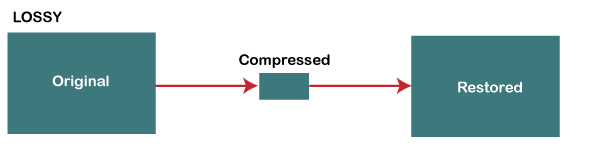
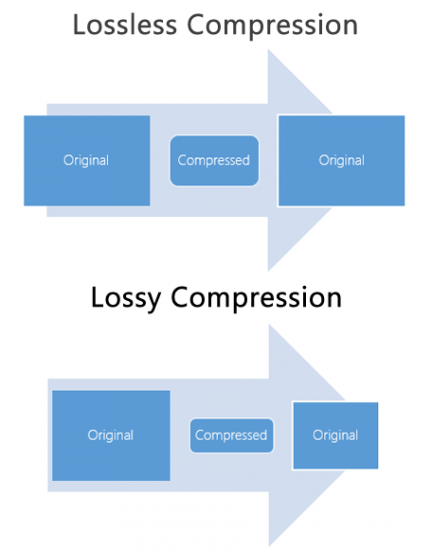
Lossy compression algorithms are used to achieve high compression rates, but at the cost of some loss in quality. In lossy compression, some of the original audio data is discarded or modified in a way that reduces its size. The amount of data that is removed or modified depends on the compression algorithm used.
Some popular lossy compression algorithms include MP3, AAC, and WMA. These algorithms are commonly used for music streaming, online radio, and other applications where high compression rates are necessary.
Lossless Compression
Lossless compression algorithms are used to compress digital audio files without losing any information. These algorithms are designed to reduce the size of the file by removing redundancies in the data, but without modifying any of the original information.
Some popular lossless compression algorithms include FLAC, ALAC, and WAV. These algorithms are commonly used for high-quality music streaming and for archiving music collections.
How Audio Compression Works
Audio compression works by analyzing the original audio data and then modifying it in a way that reduces its size while maintaining its quality. This is done using various mathematical algorithms that compress the data.
The most common way to compress audio data is to use perceptual coding. This method takes advantage of the human ear’s limitations in hearing certain frequencies and sounds. By removing these sounds, the audio data can be compressed without the listener noticing any loss in quality.
Another method of audio compression is predictive coding. This method uses mathematical algorithms to predict the next sample in a waveform based on previous samples. The difference between the predicted sample and the actual sample is then compressed and stored.
Why Audio Compression is Important
Audio compression is important because it allows us to store and transmit audio data more efficiently. This means that we can store more audio files on our devices and transmit audio data faster over the internet. Without audio compression, it would be impossible to stream music or podcasts over the internet.
12 Common Questions About Audio Compression Techniques
1. What is the difference between lossy and lossless audio compression?
Lossy compression algorithms are designed to achieve high compression rates at the cost of some loss in quality, while lossless compression algorithms are designed to compress audio files without losing any information.
2. Which audio compression algorithm should I use?
The choice of audio compression algorithm depends on the intended use of the audio file. Lossy compression algorithms like MP3 and AAC are commonly used for music streaming and online radio, while lossless compression algorithms like FLAC and ALAC are commonly used for high-quality music streaming and archiving.
3. How much does audio compression affect the quality of the original sound?
The amount of quality loss in audio compression depends on the compression algorithm used and the degree of compression applied. Lossy compression algorithms generally result in some loss in quality, while lossless compression algorithms do not.
4. How can I tell if an audio file has been compressed?
You can usually tell if an audio file has been compressed by looking at its file extension. Lossy compressed files usually have extensions like MP3, AAC
MP3 vs MP4 Audio Quality: Understanding Digital Audio Formats
MP3 vs MP4MP3 vs MP4
What is MP3?
MP3 is a digital audio format that compresses audio files to make them smaller in size without significantly affecting the sound quality. MP3 stands for MPEG-1 Audio Layer 3 and is a type of lossy compression. This means that some audio data is lost during the compression process to reduce the file size. As a result, the audio quality of an MP3 file may not be as good as the original file.
For example, suppose you have a song that is 4 minutes long with a bitrate of 320 kbps. The uncompressed audio file may have a size of around 40 MB, but if you compress it into an MP3 file with a bitrate of 128 kbps, the file size may be reduced to around 3-4 MB. This makes it easier to store and share the audio file, but the audio quality may be affected by the compression process.
What is MP4?
MP4 is a digital multimedia container format that can store audio, video, and other types of data. MP4 uses various codecs, including AAC, to compress audio files while maintaining high quality. Unlike MP3, MP4 is a type of lossless compression, meaning that no audio data is lost during the compression process. As a result, the audio quality of an MP4 file is usually better than that of an MP3 file.
For example, if you compress the same 4-minute song with a bitrate of 128 kbps into an MP4 file, the file size may be larger, around 5-6 MB. However, the audio quality will be better than the MP3 file because no audio data was lost during the compression process.
How Does Audio Quality Compare between MP3 and MP4?
When it comes to audio quality, MP4 generally provides better quality than MP3. This is because MP4 uses a more advanced compression method that preserves more of the original audio data. MP4 can also support higher bitrates, which means that it can provide higher quality audio compared to MP3 at the same file size.
For example, imagine you have a song that is 4 minutes long and has a bitrate of 320 kbps. If you compress this song into an MP3 file with a bitrate of 128 kbps, the file size may be around 3-4 MB. However, if you compress the same song into an MP4 file with a bitrate of 128 kbps, the file size may be around 5-6 MB. Despite the larger file size, the MP4 file will likely sound better because it preserves more of the original audio data.
Another way to compare audio quality between MP3 and MP4 is by using a tool that can analyze the audio spectrum and display the differences between the two formats. For example, you can use a free online tool called “Sonic Visualizer” to compare the waveform and spectrogram of an MP3 file and an MP4 file. The spectrogram displays the frequency content of the audio over time, and you can see that the MP4 file has more high-frequency content and less distortion compared to the MP3 file.
Can Audio Quality be Improved?
Yes, audio quality can be improved for both MP3 and MP4 files using a variety of methods. One method is to increase the bitrate of the audio file during the compression process. This will result in a larger file size but will also improve the audio quality for the same reason – it is a type of lossless compression, meaning that no audio data is lost during the compression process. This is important for professionals in the music and audio industry who require high-quality audio files for their work.
Conclusion
In summary, MP3 and MP4 are both popular digital audio formats used for storing and sharing audio files. MP3 uses a type of lossy compression, while MP4 uses a type of lossless compression. This means that MP4 generally provides better audio quality compared to MP3, but at the cost of a larger file size. However, both formats can be improved through various methods such as increasing the bitrate or using a different codec. Ultimately, the choice of format depends on the specific needs and preferences of the user.
Digital audio compression is a complex topic that is often misunderstood. It is a process that reduces the size of digital audio files without affecting the overall quality of the sound. The goal of this article is to provide a comprehensive overview of the science behind digital audio compression, including its history, the different types of compression, and how it affects the quality of the sound.
Digital Audio Compression
The History of Digital Audio Compression
The history of digital audio compression can be traced back to the early 1990s when the first MP3 encoder was developed. MP3 stands for MPEG-1 Audio Layer 3 and is a method of compressing digital audio files. This compression method quickly gained popularity due to its ability to reduce file size without compromising the quality of the sound.
Since then, many different types of digital audio compression have been developed, each with its own set of advantages and disadvantages. However, they all work on the same principle of reducing the amount of data in the audio file while maintaining the overall quality of the sound.
The Different Types of Digital Audio Compression
There are two main types of digital audio compression: lossy and lossless. Lossy compression is the most common type of compression and is used in formats like MP3, AAC, and WMA. It works by removing parts of the audio file that are deemed less important to the overall quality of the sound.
Lossless compression, on the other hand, is used in formats like FLAC and ALAC. This method of compression works by compressing the file in a way that allows it to be decompressed back to its original form without losing any of the data. This means that the sound quality is preserved, but the file size is still reduced.
The Science Behind Digital Audio Compression
Digital audio compression works by reducing the amount of data in an audio file. The amount of data in an audio file is measured in bits per second (bps) or kilobits per second (kbps). The higher the bitrate, the better the quality of the sound. However, higher bitrates also mean larger file sizes.
Compression algorithms work by analyzing the audio data and removing parts that are not critical to the overall sound quality. These parts can include frequencies that are outside the range of human hearing or parts that are masked by other sounds in the file.
Once the compression algorithm has identified the parts of the file that can be removed, it uses a mathematical formula to compress the remaining data. This formula is designed to reduce the size of the file without affecting the overall quality of the sound.
The Effects of Compression on Sound Quality
The goal of digital audio compression is to reduce the size of the file without affecting the overall quality of the sound. However, compression can have some effects on sound quality, depending on the type of compression used and the bitrate of the original file.
Lossy compression, for example, can result in a loss of high-frequency information and dynamic range. This can lead to a loss of detail in the sound and a less natural-sounding reproduction of the original recording.
Lossless compression, on the other hand, preserves the original sound quality of the recording, but the resulting file sizes can still be quite large. This makes it less practical for use in situations where file size is a concern.
The Future of Digital Audio Compression
The future of digital audio compression is closely tied to the ongoing development of digital audio technology. As technology continues to improve, the potential for more efficient compression algorithms and higher quality sound reproduction is becoming a reality.
One of the most exciting developments in digital audio compression is the emergence of artificial intelligence (AI) and machine learning. These technologies have the potential to create compression
Audio compression is a critical component of modern audio production. It allows for the reduction of file sizes while maintaining an acceptable level of sound quality. Lossy audio compression is a popular method that achieves this by removing non-essential information from an audio file. In this article, we will dive deep into the technical details of lossy audio compression and explore its advantages and disadvantages, as well as the impact it has on audio quality.
Lossy Audio Compression
The Technical Basics of Lossy Audio Compression
Lossy audio compression works by removing information that is deemed non-essential to the human ear. This information is often in the form of high-frequency sounds or sounds that are below the threshold of human hearing. Lossy compression achieves this by analyzing the audio file and creating a model of the sounds that the human ear can and cannot hear. This model is then used to remove the non-essential information from the audio file.
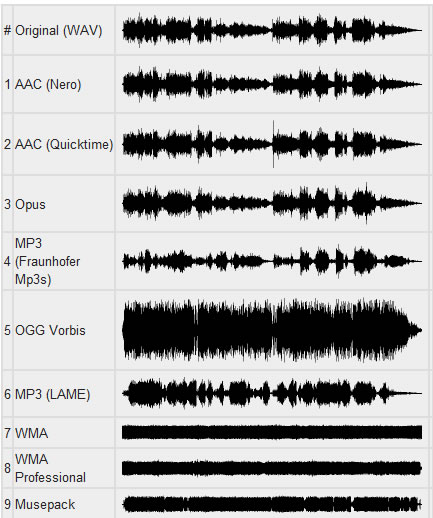
There are several popular lossy audio compression formats and codecs, including MP3, AAC, and Ogg Vorbis. Each of these formats has its own strengths and weaknesses, and choosing the right one depends on the specific needs of the user.
The Trade-offs of Lossy Audio Compression
While lossy compression is an effective way to reduce file sizes, it does come with some trade-offs. The most significant trade-off is the loss of audio quality. As non-essential information is removed from the audio file, it can result in a loss of dynamic range and a decrease in overall sound quality. However, the degree of quality loss is often subjective and depends on the specific requirements of the user.
When comparing lossy and lossless compression formats, file size is often a significant factor. Lossy compression generally results in much smaller file sizes than lossless compression, but at the cost of some audio quality loss. However, the size difference between the two formats can be significant, making lossy compression a practical solution for many users.
Advanced Techniques for Lossy Audio Compression
Advanced techniques are available for lossy audio compression that can help to improve audio quality while still achieving significant file size reduction. Perceptual coding is one such technique that uses psychoacoustic models to analyze the audio and remove non-essential information in a way that minimizes the impact on sound quality. Another technique involves the use of metadata, which can help to provide additional information about the audio file that can be used to improve compression.
Best Practices for Lossy Audio Compression
There are several best practices that can be followed to achieve the best results when compressing audio files using a lossy format. Some of these practices include choosing the right codec for the specific needs of the user, ensuring that the encoding settings are appropriate for the file being compressed, and avoiding the use of excessive compression, which can result in a loss of sound quality. Additionally, it is important to avoid common mistakes when compressing audio files, such as encoding at too low of a bit rate or not checking the final output for artifacts or distortion.
Psychoacoustic Models
Psychoacoustic models are mathematical models that simulate the way that the human ear processes sound. They are used in perceptual coding to identify which audio signals can be safely removed without causing a noticeable loss in audio quality.
Psychoacoustic models take into account factors such as frequency masking, temporal masking, and the sensitivity of the human ear to different types of audio signals. They can also take into account more complex factors such as the interaction between different audio signals.
Metadata
Metadata is data that is embedded in an audio file and provides additional information about the audio content. In the context of lossy audio compression, metadata can be used to improve the compression process by providing additional information about the audio content.
One common use of metadata in lossy audio compression is to provide information about the target device or playback environment. For example, metadata can provide information about the type of headphones or speakers that the audio file is intended to be played through. This information can be used by perceptual coders to optimize the compression process for the target device or playback environment.
Another common use of metadata in lossy audio compression is to provide information about the audio content itself. For example, metadata can provide information about the genre, tempo, and key of a song. This information can be used to optimize the compression process for the specific characteristics of the audio content.
Best Practices for Lossy Audio Compression
To achieve the best results in lossy audio compression, there are several best practices that should be followed. These include:
Use the highest quality compression settings available
Use a well-supported and widely-used compression format
Use a lossless format for archiving and backup purposes
Avoid excessive compression, as this can lead to noticeable audio artifacts
Take into account the intended playback environment when compressing audio files
Include appropriate metadata to provide additional information about the audio content
Common Mistakes to Avoid
When compressing audio files, there are several common mistakes that should be avoided. These include:
Using excessively low compression settings, as this can lead to a noticeable loss in audio quality
Using an unsupported or proprietary compression format, as this can lead to compatibility issues
Not taking into account the intended playback environment, which can lead to suboptimal compression settings
Not including appropriate metadata, which can make it difficult to organize and manage large collections of audio files
Using excessive compression, as this can lead to noticeable audio artifacts
Explanation of Audio Compression and Lossy Audio Compression
Audio compression is the process of reducing the size of an audio file without significantly degrading the quality of the sound. Compression is necessary in the world of digital audio because it allows for more efficient storage and transmission of audio files. Without compression, audio files would be prohibitively large, making it difficult to store and share them over the internet.
Lossy audio compression is a specific type of audio compression that achieves a high degree of compression by discarding some of the audio data. This means that when you compress an audio file using a lossy compression algorithm, some of the data is permanently lost, and the resulting file is of lower quality than the original. Lossy compression is used widely because it allows for much higher compression ratios than lossless compression, making it more practical for everyday use.
Importance of Audio Compression in Modern Audio Production
Audio compression is an essential tool in modern audio production. The ability to compress audio files allows for more efficient use of storage space and bandwidth, which are essential resources in the world of digital media. Audio compression also makes it possible to stream high-quality audio over the internet, which has revolutionized the way we consume music and other audio content.
However, it’s important to remember that audio compression is not without its downsides. Lossy compression, in particular, can have a significant impact on the quality of the audio, and it’s essential to understand the trade-offs involved when choosing a compression format and level of compression.
The Technical Basics of Lossy Audio Compression
At its most basic level, lossy audio compression works by analyzing the audio file and discarding information that is deemed unnecessary for human perception. This information can include sounds that are too quiet to hear, or frequencies that are outside the range of human hearing. By discarding this information, the compression algorithm can significantly reduce the size of the audio file while still retaining much of the original sound quality.
The specific techniques used in lossy audio compression can vary, but most algorithms use some combination of frequency masking, quantization, and other mathematical techniques to achieve compression. The result is a smaller file size that can be easily stored or transmitted, but with some loss of audio quality.
The Most Commonly Used Lossy Audio Compression Formats and Codecs
There are many different lossy audio compression formats and codecs available, each with its own strengths and weaknesses. Some of the most commonly used formats and codecs include:
MP3 – one of the most widely used audio compression formats, with a high degree of compatibility and a good balance between file size and sound quality
AAC – a newer format that is widely used for streaming audio and has a better sound quality than MP3 at the same bitrate
OGG – an open-source format that is popular for internet radio and streaming
WMA – a format developed by Microsoft that is commonly used for streaming and downloading audio files from the internet
FLAC – a lossless audio compression format that is capable of compressing audio files without any loss of quality, but with larger file sizes than lossy formats
The Fascinating History of Lossy Compression
Lossy compression is a method of data compression that reduces the size of a file by discarding information that is deemed to be unnecessary. This technique has been used for decades in various fields, including image, audio, and video processing, to make files smaller and easier to share or store.
The first significant work on lossy image compression was done in the early 1970s by a group of researchers at the University of Southern California. They developed the first image compression algorithm, called the discrete cosine transform (DCT), which is still used today in the popular JPEG image format.
In the 1980s, the Moving Pictures Experts Group (MPEG) was established to develop standards for digital video compression. They introduced the MPEG-1 and MPEG-2 video formats, which became widely adopted in the industry. The success of these formats led to the creation of newer standards, such as MPEG-4 and H.264, which are still used in modern video streaming services.
Lossy compression has also been essential for audio processing. In the late 1980s, the MP3 format was developed by the Fraunhofer Society in Germany, which used a perceptual coding algorithm to remove information that the human ear cannot detect. MP3 quickly became the standard for digital music distribution, leading to the creation of newer formats such as AAC and OGG Vorbis.
However, lossy compression is not without its drawbacks. Because it removes data, it can lead to a loss of quality, especially if the compression is too aggressive. This can result in artifacts or distortions in the processed image, audio, or video.
Despite these limitations, lossy compression remains an important tool in the modern digital world. It allows for more efficient storage and sharing of multimedia content and has revolutionized industries such as music, film, and photography. As technology continues to evolve, it’s likely that new and more efficient lossy compression techniques will be developed, further enhancing the way we share and consume digital content.
I often hear what is called Hi-Res Audio. The sampling frequency is said to be 96 kHz or 192 kHz, which is over 48 kHz, the number of quantization bits is 24 bits, and the limit (high range) of human hearing is about 20 kHz, but it expresses frequencies higher than that. It will be. It is the same bit rate as the image from a long time ago. .. ..
By the way, it seems that dogs can hear up to 60 kHz and cats up to about 64 kHz.
Hi-res audio example
Sampling frequency Number of quantization bits Number of channels bit rate Frequency that can be expressed
192 kHz twenty-four 2 9.216 kbps 96 kHz
192 kHz 16 2 6,144 kbps 96 kHz
96 kHz twenty-four 2 4.608 kbps 48 kHz
96 kHz 16 2 3,072 kbps 48 kHz
48 kHz twenty-four 2 2,304 kbps 24 kHz
Considering the limit of human hearing (about 20 kHz), according to the sampling theorem, 48 kHz or 44.1 kHz is a sufficient frequency, but what about all of them? .. ..
In my case, I cannot distinguish the high resolution range, but it should be able to reproduce the discarded frequency at 48 kHz to 96 kHz, and when the number of quantization bits is in the 24-bit range, the sound pressure (dB) is a bit. Feels like I’m going up (?) (It’s just a story from my ears).
I’d like to make a comparison if I get the chance, but I don’t think I can tell by ear without a proper regenerator (like an expensive analog amp).
Is it time for cats and dogs to get verified in the acoustic industry? .. ..
16-bit monaural PCM bit rate (for audio) (example)
Sampling frequency Number of quantization bits Number of channels bit rate Comments
32 kHz 16 1 512 kbps Super Wide Band
24 kHz 16 1 384 kbps
16 kHz 16 1 256 kbps Broadband
8 kHz 16 1 128 kbps Narrowband
Sampling rate
If you check the web, there are explanations like the sampling required to convert analog waveforms to digital conversion. For example, it shows how many samples of an audio signal input from a microphone are taken per second and digitized. The larger the sample, the greater the range that can be recorded. When an analog waveform is digitized, the frequency that can be expressed is half the sampling frequency (sampling theorem). For example, with a sampling frequency of 48 kHz, it can be expressed up to 24 kHz. At 8 kHz (narrow band) and 16 kHz (wide band), which are often used for audio, you can only hear up to 4 kHz and 8 kHz, respectively. The higher the sample rate, the higher the bit rate.
Sampling theorem
It is a very simple explanation, but it can express up to half the sample rate. When sampling a signal, if the interval is small, it can be restored close to the original signal, but if it is too thick, it cannot be restored (I would like to write a little more detail when I talk about signal processing or other time ).
44.1 kHz
Why is there a poorly separated rate of 44.1? .. ..
Isn’t the technician deliberately wearing an annoying watch to prevent music CDs from being easily copied? I heard something like that. When I searched, it seems this happened (?) Due to the convenience of an old PCM recorder. In this age, it is difficult to know what 44.1 kHz is in development. The 44.1 kHz ↔ 48 kHz sampling conversion is a headache. For example, USB audio (USB audio device class) exchanges data at 1 ms intervals. In the case of 48kHz, the data is 48 samples, but when considering 44.1kHz, it will be 44 samples (x9) and 45 samples (x1) in 10ms. If a sample of 45 samples is misled (tentatively), it will be 44.0kHz. I think it’s more like that with voice and music, and the human ear is mostly misleading (just my personal opinion).
However, the objective evaluation method will soon come to an end. For example, you can clearly see that you were fooled by a sine wave (sine wave) (maybe you are unexpectedly on the market).
Number of quantization bits
Sampling had to take a value in the direction of time (discretization), but quantization had to take a value in the direction of amplitude. The range that is possible to display the volume of the sound, which is heard often, “dynamic range 96 dB” means that the number of quantization bits is 16 bits and the music signal is played in the range of 0 to 65535 I can do it. The number of quantization bits is also called the bit depth or bit depth.
Bitrate
In communication, it indicates how many bits of data are transferred per hour and is generally expressed in bps (bit / s) of how many bits are transferred (processed) per second. If it is small, the size when saving as a file is small and there is space on the transmission line for communication. For example, when an audio (1 channel) is compressed to 1/3, the 3 channel audio can be sent at the same bit rate. Excuse the old story, but considering from the age of analog communication (analog mobile phone), digitization + compression will be able to support multiple calls with the same radio wave.
When compressing using audio encoding (AAC, MP3, etc.), the compression rate is determined by the bit rate at the time of encoding.
Specifically, if you set a low bitrate, the compression rate will be high and the file size when saved will be small, but what is the bitrate for the original sound source (PCM) without compression in the first place?
If you save it as PCM, the sound quality of the original sound will be obtained, but it can be a little inconvenient to save it without worrying about the file size. Also, depending on the application, I think the original sound size has enough memory capacity and the communication speed is correct. Therefore, I would like to write about the sample rate and bit rate that are often heard in digital audio.
The bit rate of digital audio is determined by the sample rate, the number of bits assigned to a sample (number of quantization bits), and the number of channels (stereo, monaural, etc.).
PCM bit rate (uncompressed) = sample rate x number of quantization bits x number of channels
As I wrote a bit last time, file containers like wav and mp4 format have this information as the header, so the application can see the header and play it. The compression rate of the encoding is determined by the bit rate specified at the time of encoding for this PCM (uncompressed) bit rate.
For example, as many of you know about music CDs, with 44.1 kHz stereo, this is the next bit rate.
Music CD bit rate: 44100Hz x 16bit x 2ch (stereo) = 1411.2kbps
When encoding this with MP3, AAC, etc., you will naturally specify a bitrate less than 1,411.2 kbps. For example, when encoding at 256 kbps, the compression rate is approximately 18% and the file size is 1/5 or less, assuming the original sound is 100%.
Encode 256 kbps music CDs: 256 kbps / 1,411.2 kbps = approximately 18%
Generally, the sample rates of audio devices actually connected to a PC are 48 kHz and 44.1 kHz for music, 16 kHz and 8 kHz for voice, such as microphones and headphones, and 32 kHz, 24 kHz, 22.05 kHz, etc.
The bit rate of PCM (uncompressed sound source) with 16-bit quantization bits is as follows.
Stereo (for music) PCM 16-bit bit rate (example)
Sampling frequency Number of quantization bits Number of channels bit rate Comments
48 kHz 16 2 1,536 kbps
44.1 kHz 16 2 1,411.2 kbps Music CD
32 kHz 16 2 1,024 kbps
24 kHz 16 2 768 kbps
22.05 kHz 16 2 705.6 kbps
Compression is one of your most powerful mixing tools. It is the essential element behind any good mix.
But for your compressors to work, you must first understand what compression is.
It can seem intimidating to start learning such a broad subject, especially when the controls and how they affect the signal are difficult to understand in relation to the sound.
This article will help you understand what compression does, how to choose the perfect compressor setting, and some common mistakes to avoid.
But before…
What is compression in music?
Compression in music is the process of reducing the dynamic range of a signal. Dynamic range is the difference between the loudest and quietest parts of an audio signal.
You must reduce the dynamic range of most audio signals to sound natural to a recording.
For example: imagine a whisper and a scream on the same audio track. If they had the same volume difference as they do in real life, it would be very annoying!
Compressors fix all of this by attenuating the loudest parts of the signal and boosting what is output so that the quieter parts are more noticeable.
Imagine a whisper and a scream on the same audio track. If they had the same volume difference as they do in real life, it would be very annoying!
Using compression
Experienced engineers often talk about how one compressor is more “musical” than another.
It is an important concept. Its dynamics is one of the fundamental aspects for its sound to be unique.
When you use a compressor to change the dynamics, the sound engineer becomes part of the musical performance.
If your compressors work properly, they will positively contribute to performance and improve recordings.
Transients: understanding high energy moments.
To understand compression, you need to know what transients are.
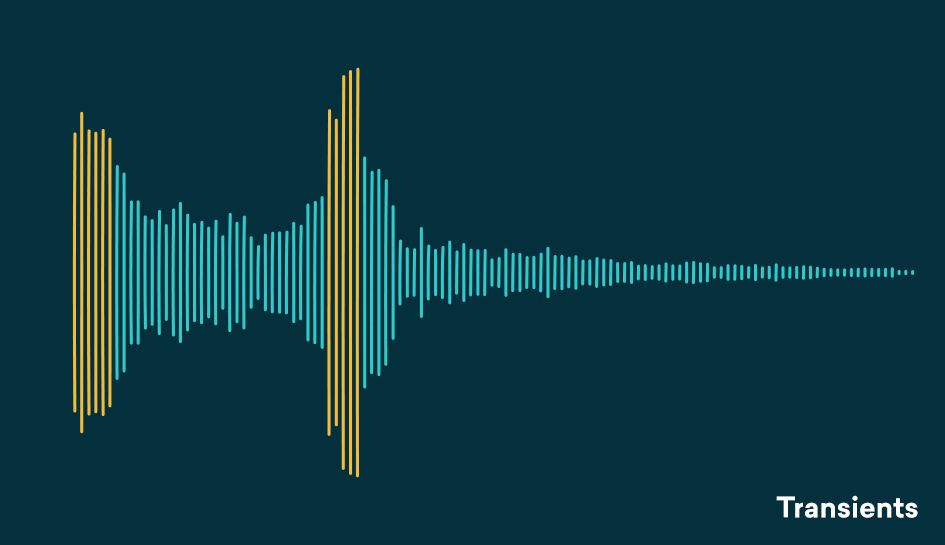
Transients are the first high-energy moments of a certain sound in its waveform. These explosions give our brain a lot of information about the quality of a sound.
Since transients are usually louder than the rest of the waveform, they are greatly influenced by compressors.
For example: think of a nice roaring trap. As soon as the trap enters, there is an initial peak in the waveform that narrows slowly. That initial energy spike is your transient.
Compression helps you find the perfect balance for a track that has good dynamic range with a beautiful, full body.
A waveform with good dynamics will have a lot of transients when some sounds hit and then decay in the composition. Transients and their final decay are what make a waveform similar to a fish bone.
There is even an overly dynamic trail. If your song is transient without a body, its sound will not be of interest to your ear.
The reverse is also true, no dynamics can lead to lifeless, exhausting sound for the human ear and a waveform that looks like a big brick.
Compression helps you find the perfect balance for a track that has good dynamic range with a beautiful, full body.
Limiter
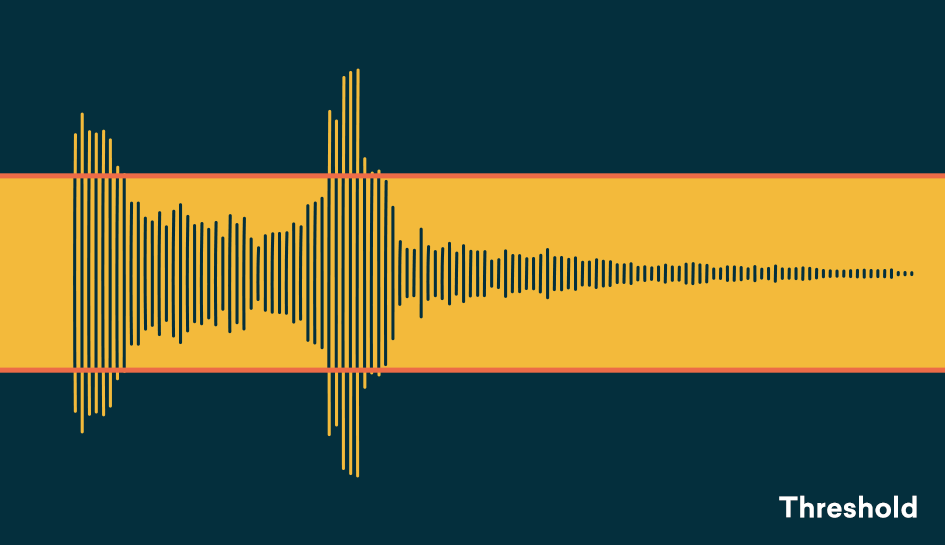
The threshold determines the signal level at which the compressor will start operating. The threshold is measured in dB, therefore any signal above the set threshold will be compressed.
When setting the threshold, decide what part of the signal you want to reduce.
With the threshold low, the compressor gain reduction is applied to a larger portion of the signal. Setting it higher affects only the most aggressive peaks and leaves the rest intact.
To determine what the perfect threshold is, think about what you’re trying to accomplish by compressing the audio and which parts of the signal are the most troublesome.
Are strong signal transients distracting you from the rest of your mix? Or maybe your final decadence is imperceptible in the mix?
A good rule of thumb for compression is “do no harm.”
Set the threshold to hear compressor operation on the part of the signal that needs to be addressed and not lowered.
Setting the perfect threshold will depend on your needs. Play the track and tweak it on the go to find the perfect amount.
Relationship
The ratio determines the amount of gain reduction applied by the compressor when the signal exceeds the threshold. It is called a relationship because it is expressed in comparison with the unaffected signal.
The higher the first number in the report, the greater the gain reduction factor.
For example, we can say that an uncompressed signal would have a 1: 1 ratio
The compressor, together with the equalizer, is one of the most important and most used processors in professional audio, but its operation is not always so intuitive and knowing how to master the compression technique sometimes requires years of experience. In this new article we begin to explore this fundamental processor.
What is the compressor for?
First of all, let’s start to see what the compressor’s function is: to reduce the dynamic range of an audio track, that is, to decrease the distance in volume between the weakest signal and the strongest signal. Initially created to optimize recording on magnetic tape and to avoid saturation of the input stages, the compressor is still used today during recording and mixing. Reducing dynamic range also allows us to keep multiple tracks in the mix, such as a voice, for example, always at the same volume throughout the song so that they are not dominated by the other instruments in the most crowded sections, as well as to avoid Output saturation.
Back to basics: what is the compressor and how does it work
The controls
Now let’s see in detail what the various compressor controls are and what they are for:
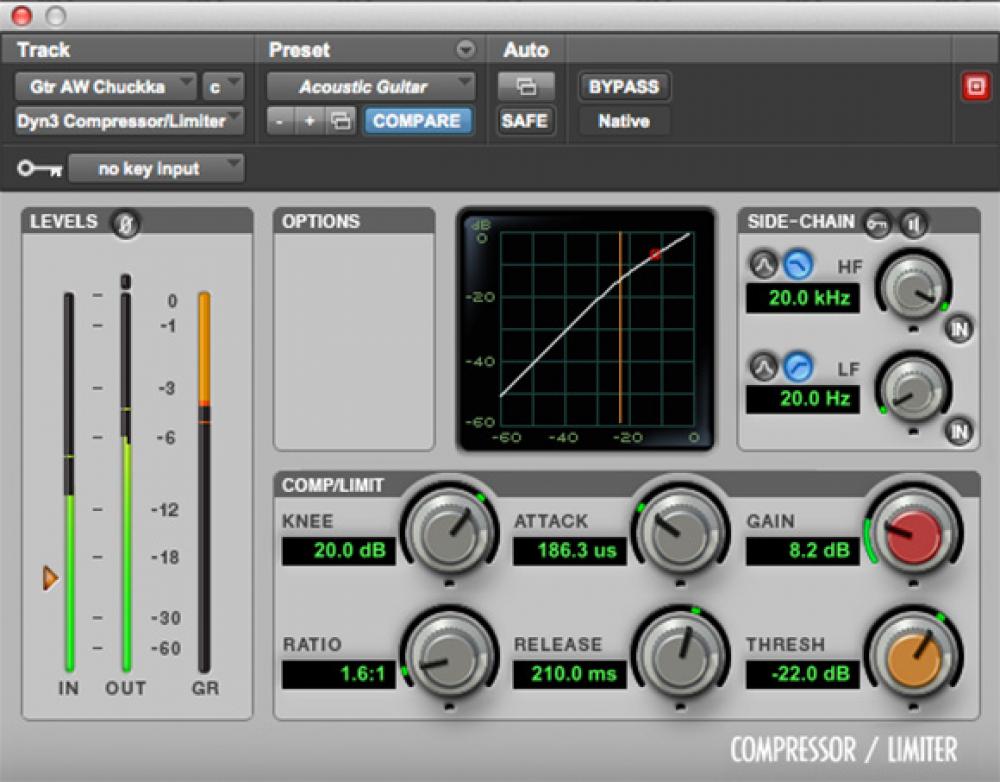
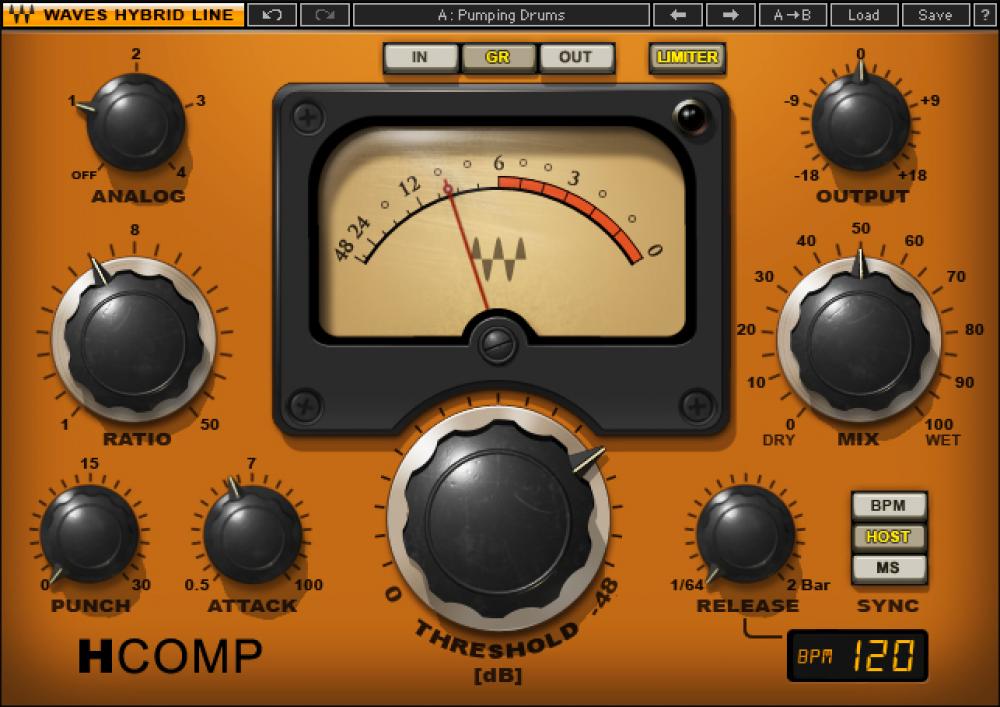
— Threshold: or threshold, expressed in dB, indicates the point beyond which the compressor begins to operate.
— Ratio: is the compression ratio and indicates how much the signal will compress when it exceeds the Threshold. For example, with a 2: 1 ratio, each signal that exceeds the threshold will be halved at the output, that is, every 2 dB at input 1 will be returned at the output.
— Make Up Gain: This is the output of the compressor and is used to recover the volume lost due to compression.
— Attack: expressed in milliseconds is the time it takes for the compressor to start once the signal has passed the threshold.
— Release: always expressed in milliseconds, it indicates the time it takes for the compressor to stop compression once the signal has returned below the threshold.
— Gain reduction meter: it is not a control but a visual indicator, led or pointer, which informs how much the signal is compressed, through a scale in dB.
— Bypass: shuts down the processor, making the signal pass through the machine without alteration.
With the advent of digital and accessories, we can find controls that not all hardware compressors have:
— Knee: indicates the type of curve at the point where the compressor begins to operate, which can be abrupt (Hard Knee), soft (Soft Knee) or various intermediate values.
— Automatic: sets the time control to which it refers (attack, release or both) automatically, depending on the input signal (program dependent).
— Sidechain eq or External Sidechain: Sidechain is the signal that drives the compression circuit, where in most cases it is the signal itself to compress, but sometimes it can be a version of the input signal with different equalization, for example without low frequencies, so that they don’t start the compressor too soon. Or it can be an external signal, such as the one used on the radio where the speaker’s voice signal drives a compressor on the background music signal, so it automatically turns off when it starts to speak (Ducking), or Classic Speaker Use to activate the compressor on various instruments in the mix or the Master Buss.
— Mix: used to mix the compressed signal with the original signal. This way, you can use Parallel Compression directly on the compressor, without having to use two mixer tracks (one for the dry signal and one for the compressed signal).
Back to basics: what is the compressor and how does it work
Compressor or limiter?
What is the difference between a compressor and a limiter?
Essentially, the compression ratio: over 10 dB ratio, the processor is considered a limiter. A separate case is the Brickwall Limiter, a compressor with immediate attack and a compression ratio of infinity to 1, so that no signal can exceed the Threshold. It is mainly used on the master buses so as not to exceed 0dBFS on the output and then send the converters to clips.
Usage examples
As we already said, the compressor is used to keep the volume excursion under control. One track in the mix: in this case, using a fairly fast attack, slow release and not too aggressive ratio, allows us to compress the signal constantly and transparently, that is, without making your intervention feel excessively.
The compressor can also serve to emphasize the attack of a percussion instrument: in one case, for example, by setting a medium slow attack.
The function of a compressor is to reduce the dynamic range of the signal, that is, the level difference between the strongest and weakest signal parts.
Why compression or normalize?
At the time of analog, the limited dynamics of the main musical supports (vinyl, audio and video cassettes) did not allow to reproduce the dynamics of a classical, jazz or even rock orchestra in the case of the audio cassette. Therefore, the signal was compressed to avoid distortion in the transmission medium.
Now that the music is converted to 16-bit or more, recorded in digital format, and then streamed to CD / DVD or downloaded, the dynamics of the media is enough to faithfully reproduce the dynamics of almost any orchestra. The old technical limitations have disappeared, therefore compression is no longer essential.
However, whatever the musical genre, some sources (voices) are compressed almost systematically. The goal of modern compression is therefore to optimize sound recording, either to get closer to reality or, conversely, to create a less faithful but denser, more controlled, more powerful sound, etc., or even a sound. totaly new.
And to do all this, the compressor is satisfied with a simple principle: it reduces dynamics by attenuating the signal level when the latter exceeds a given threshold level.
Level settings
– Threshold (threshold level, in dB)
This parameter determines the threshold level from which the compressor is triggered. As long as the input signal level remains below the threshold, the compressor does not start and no treatment is applied. As soon as the source signal exceeds the threshold level, compression is applied.
– Ratio (compression ratio)
The ratio determines the amount of level reduction applied to the part of the signal that exceeds the threshold level, the rest of the signal is not processed. Depending on the compressor, the ratio can vary from 1: 1 to Inf: 1. Quésaco?
Set up a compressor
With a 1: 1 ratio, no compression is applied, the level of the input signal is equal to that of the output signal. With a ratio of 2: 1, the level of the signal portion that exceeds the threshold is divided by 2 in the output signal. With a 3: 1 ratio, it is divided by 3, etc. When the compression ratio is infinite (Inf: 1 ratio), the compressor behaves like a limiter: the output signal never exceeds the threshold level, regardless of the input level.
Therefore, the compression intensity applied to the signal is a compromise between the threshold and the compression rate setting:
The lower the threshold, the larger the compressed signal portion.
The higher the ratio, the greater the level reduction applied to the signal portion above the threshold.
Depending on the compressors, you may find other parameters, for example, an input level setting instead of the threshold, or a gain setting (also called the offset or output level) that amplifies the signal to compensate for the drop in level resulting from compression.
Time settings
– Attack (attack, in ms)
Attack corresponds to the time the compressor needs to reach the given ratio when the signal level exceeds the threshold level. A quick attack of a few milliseconds triggers strong compression as soon as the signal level exceeds the threshold; With a slower attack, the compressor passes the first transients of the signal peaks, keeping one side alive and well cut.
Set up a compressor
– Launch (launch, in ms and s)
Release corresponds to the time the compressor needs to return to the 1: 1 unit ratio when the source signal falls below the threshold level. A quick launch of a few tens of ms allows the original character to stay alive. Slower relaxation improves instrument resonance and reverberation, but can cause compression of the first peak transients when the latter are close together.
– Knee (literally knee!)
The Knee parameter determines the increase in compression, that is, the transition between the compression ratio of the unit (1: 1, no compression) and the compression ratio set to ratio.
Applications
At the output, the compressor can be used as a limiter to control signal peaks and prevent distortion from occurring in the analog / digital conversion stage.
When taking and mixing, light compression can bring out weak parts of the signal and thus reveal certain details.
In the mix, the compressor allows you to increase the average level of the audio volume output.