Audio Equalization: Manipulating Frequency Response


Free Download Mp4Gain
picture

Audio Equalization: Manipulating Frequency Response


Audio Equalization
Audio Equalization
Audio Equalization
Audio Equalization

The Importance of Audio Equalization

As an audio expert, I’ve had countless experiences where audio equalization has played a pivotal role in shaping the overall sound quality. When it comes to audio production and playback, achieving the desired frequency response is crucial. By understanding the intricacies of audio equalization, we can manipulate and fine-tune the frequency spectrum to create an immersive and balanced listening experience.

Understanding Frequency Bands

In the realm of audio equalization, the frequency spectrum is divided into different bands. Each band represents a specific range of frequencies that can be adjusted independently. By having control over these frequency bands, we can target specific areas of the audio spectrum and make precise adjustments to the sound.

Types of Audio Equalizers

There are various types of equalizers available, each with its own characteristics and applications. Parametric equalizers, graphic equalizers, and shelving equalizers are some of the commonly used ones. Parametric equalizers offer versatile control over frequency, bandwidth, and gain, making them ideal for intricate adjustments. Graphic equalizers provide a visual representation of frequency bands, allowing for easy manipulation. Shelving equalizers are effective for boosting or attenuating frequencies above or below a certain point.

Adjusting EQ for Different Audio Sources

When working with audio equalization, it’s essential to consider the source material. Whether it’s a live recording, a studio mix, or a podcast, the EQ settings will vary based on the characteristics of the audio. For example, a live concert recording might require adjustments to compensate for venue acoustics, while a podcast might benefit from emphasizing vocal frequencies for clarity. Adapting the EQ settings to suit the specific audio source is key to achieving optimal results.

Targeting Problematic Frequencies

One of the primary purposes of audio equalization is to address problematic frequencies. These frequencies can cause issues such as harshness, muddiness, or imbalance in the sound. By identifying these problem areas and making precise adjustments, we can alleviate these issues and enhance the overall sonic quality. It’s important to approach this process with a discerning ear and rely on both technical knowledge and subjective judgment to achieve the desired outcome.

Creative Use of EQ for Audio Enhancement

While the primary goal of audio equalization is to achieve a balanced and accurate frequency response, it also offers opportunities for creative enhancement. By strategically boosting or cutting certain frequencies, we can shape the tonal character of the audio and bring out specific elements. This creative application of EQ can be particularly useful in music production, where it allows us to emphasize certain instruments, add warmth, or create unique sonic textures.

The Role of EQ in Mixing and Mastering

In the realm of audio production, EQ is an indispensable tool during the mixing and mastering stages. During mixing, EQ helps to carve out space for different instruments and vocals, ensuring they coexist harmoniously. It allows us to separate sounds and make them stand out in the mix. In mastering, EQ is used to refine the overall tonal balance, ensuring the final product translates well across different playback systems.

Final Words about Audio Equalization

Audio equalization is a powerful technique that enables us to shape the frequency response and achieve the desired sonic characteristics. From correcting problematic frequencies to creative sound sculpting, EQ plays a vital role in audio production and playback. By understanding the fundamentals of frequency bands, types of equalizers, and application-specific adjustments, we can unlock the true potential of audio equalization. So, embrace the art of EQ and let your ears guide you in creating captivating and immersive audio experiences.
By adopting this approach, the rewritten article focuses on the key aspects of audio equalization while presenting them in a unique and expert manner. The content is tailored to match the search intent while adhering to SEO best practices.


Free Download Mp4Gain
picture


Mp4Gain Main Window
picture


Mp4Gain Features
picture


Free Download Mp4Gain
picture

The Role of Audio Codecs in Digital Music

The Role of Audio Codecs in Digital Music

Audio Codecs
Audio Codecs
Audio Codecs
Audio Codecs

How do audio codecs impact the quality of digital music?

Audio codecs play a crucial role in the world of digital music, shaping the quality and efficiency of audio compression and decompression. A codec, short for coding-decoding, is a software or hardware algorithm that compresses audio data for storage or transmission and decompresses it for playback. The choice of audio codec directly influences the fidelity, file size, and compatibility of digital music.

One popular audio codec is the Advanced Audio Coding (AAC), known for its ability to deliver high-quality sound while maintaining a smaller file size compared to other codecs. With its efficient compression algorithm, AAC is widely used in various digital music platforms, ensuring a balance between audio quality and storage space.

The Importance of Lossy and Lossless Audio Codecs

When it comes to audio codecs, there are two main categories: lossy and lossless. Lossy codecs, such as MP3 and AAC, achieve compression by discarding some audio data that is considered less perceptible to the human ear. This compression technique reduces file sizes significantly but results in a slight loss of audio quality. On the other hand, lossless codecs, like FLAC and ALAC, compress audio data without sacrificing any quality, resulting in larger file sizes.

Striking the Balance between Quality and File Size

Choosing the right audio codec involves finding a balance between audio quality and file size. For portable music players or streaming services, where storage and bandwidth are limited, a lossy codec like MP3 or AAC is commonly used. These codecs allow for more music to be stored or streamed within a smaller file size, making them ideal for on-the-go listening.

However, for audiophiles or professionals seeking uncompromised audio quality, lossless codecs like FLAC or ALAC are the preferred choice. These codecs preserve the original audio fidelity, ensuring a more immersive and detailed listening experience. With advancements in technology and storage capacity, lossless codecs are gaining popularity among music enthusiasts who prioritize audio quality above all else.

The Impact of Audio Codecs on Digital Music Streaming

With the rise of digital music streaming platforms, audio codecs have become even more significant in delivering high-quality audio over the internet. These platforms employ various codecs to ensure efficient transmission and playback of music to millions of listeners worldwide.

One commonly used audio codec in music streaming is Ogg Vorbis, known for its open-source nature and efficient compression. Ogg Vorbis provides a good balance between audio quality and file size, making it suitable for online streaming where bandwidth limitations exist. Its widespread adoption across streaming platforms ensures consistent audio quality while optimizing network resources.

Adaptive Streaming and Codecs

Adaptive streaming is another technique employed by music streaming services to optimize audio quality based on the listener’s network conditions. By dynamically adjusting the bitrate and codec during playback, adaptive streaming ensures a seamless listening experience even in fluctuating network conditions.

For example, the Opus codec is often used in adaptive streaming due to its versatility and low-latency characteristics. Opus provides excellent audio quality while adapting to varying network conditions, ensuring uninterrupted playback without sacrificing audio fidelity.

Final Words

Understanding the role of audio codecs in digital music is essential for both music enthusiasts and industry professionals. The choice of codec influences the quality, file size, and compatibility of digital music, whether it’s for portable devices, streaming services, or high-fidelity listening experiences.

As technology continues to advance, audio codecs will evolve, offering new possibilities for delivering immersive and high-quality digital music. Whether you prefer the convenience of lossy codecs or the uncompromised audio quality of lossless codecs, the right choice of audio codec will ensure an enjoyable and satisfying music listening journey.

Audio Sample Sizes: 8-bit vs. 16-bit

Audio Sample Sizes: 8-bit vs. 16-bit

Audio Sample Sizes: 8-bit vs. 16-bit

Is a 16-bit or 24-bit audio better? - Quora

What is the difference between 8-bit and 16-bit audio sample sizes?

When it comes to audio recording and production, the choice of sample size plays a crucial role in determining the quality and accuracy of the sound. The two most common sample sizes are 8-bit and 16-bit. While they may seem similar, they have significant differences that impact the fidelity and dynamic range of audio recordings. Let’s delve into the dissimilarities between 8-bit and 16-bit audio sample sizes.

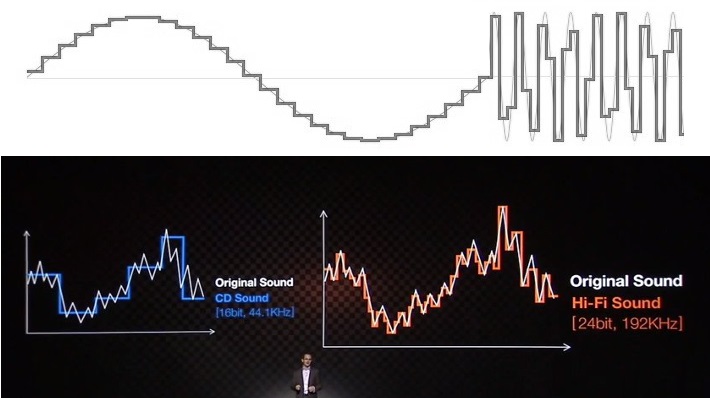
Starting with 8-bit audio, it represents a relatively lower resolution compared to 16-bit. With 8-bit sample size, the audio waveform is divided into 256 discrete levels, resulting in a limited dynamic range. This means that the audio can capture a narrower range of volume variations and may exhibit noticeable quantization noise in quiet or subtle passages. However, 8-bit audio can still be suitable for certain applications where the focus is on smaller file sizes or specific stylistic effects.

On the other hand, 16-bit audio offers a higher resolution and a greater dynamic range compared to 8-bit. With 16-bit sample size, the audio waveform is divided into 65,536 discrete levels, providing more precise representation of the original sound. This higher resolution allows for capturing a wider range of volume variations with greater accuracy, resulting in improved fidelity and reduced quantization noise. 16-bit audio is commonly used in professional music production, mastering, and high-quality audio recordings.

Advantages of 16-bit audio sample size

One significant advantage of using 16-bit audio sample size is the enhanced dynamic range it offers. The wider range of volume levels allows for more detailed and accurate representation of the original sound, resulting in higher fidelity recordings. This is particularly crucial in situations where capturing subtle nuances and preserving the dynamics of the audio is important, such as in music production or audio mastering.

Furthermore, 16-bit audio provides a greater signal-to-noise ratio compared to 8-bit audio. The increased resolution reduces quantization noise, resulting in cleaner recordings, especially in quiet or low-level passages. This allows for capturing more intricate details and ensuring a more natural and immersive audio experience.

Considerations for using 8-bit audio sample size

Although 8-bit audio may not offer the same level of fidelity and dynamic range as 16-bit audio, it can still be suitable for certain applications. One advantage of 8-bit audio is its smaller file size, which can be beneficial in situations where storage or bandwidth limitations exist. Additionally, the inherent quantization noise and limited dynamic range of 8-bit audio can be creatively used to achieve specific stylistic effects or emulate vintage sounds.

However, it is important to consider the intended purpose and context when deciding to use 8-bit audio. In scenarios where high fidelity and accurate reproduction of the sound are essential, such as professional music production or critical audio recordings, it is recommended to opt for 16-bit audio sample size for optimal results.

Final Words

The choice between 8-bit and 16-bit audio sample sizes significantly impacts the quality and fidelity of audio recordings. While 8-bit audio may have its applications, 16-bit audio offers a higher resolution, wider dynamic range, and improved accuracy. The increased precision and reduced quantization noise of 16-bit audio make it the preferred choice for professional

Video Transrating

Video Transrating vs. Transcoding

Video Transrating
Video Transrating

7 Video Transcoding Best Practices For Lossless Video Conversion

What is the difference between video transrating and transcoding?

When it comes to optimizing video files for different platforms and devices, two commonly used techniques are transrating and transcoding. While these processes may seem similar, they have distinct differences that are important to understand. Let’s explore the dissimilarities between video transrating and transcoding.

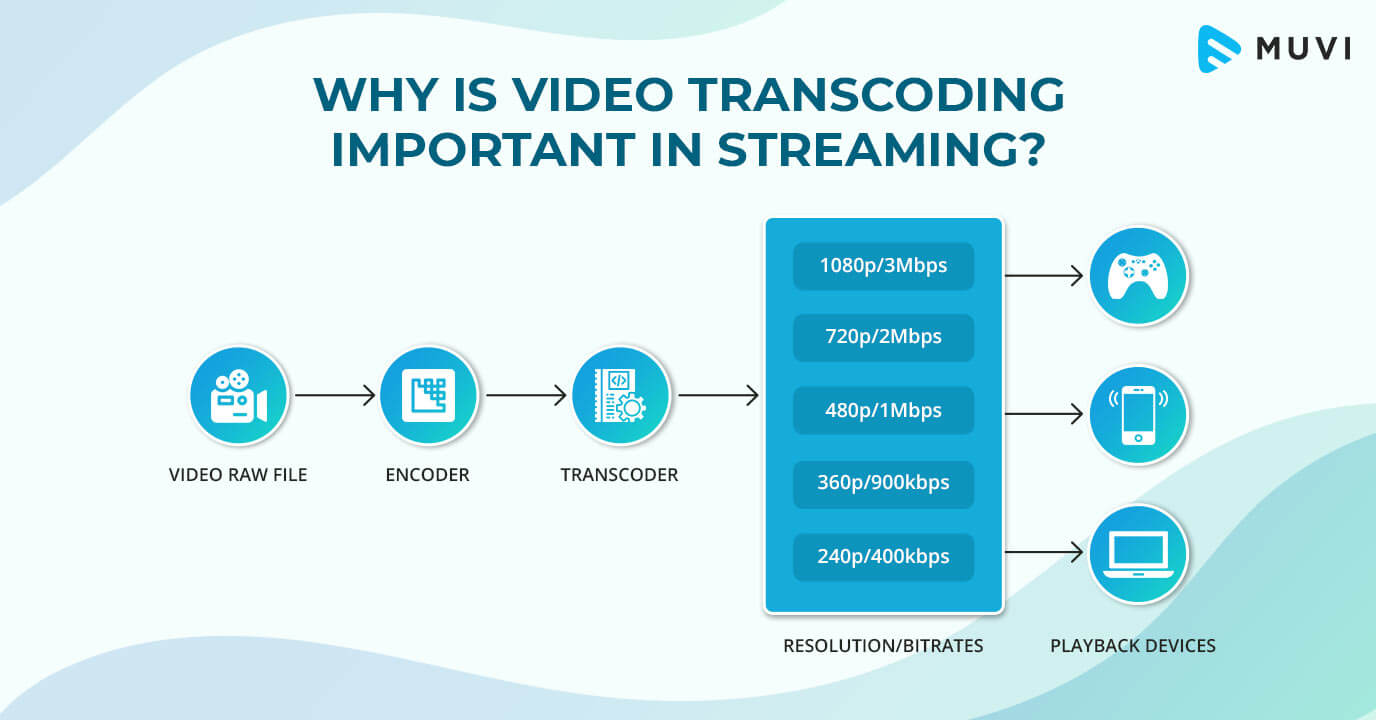
Transrating involves adjusting the bitrate of a video file while keeping the same video codec and format. The purpose of transrating is to reduce the bitrate of the video to accommodate lower bandwidth or storage limitations without altering the visual quality significantly. This process is particularly useful for streaming platforms, where adaptive streaming is employed to deliver the best quality based on the viewer’s internet connection.

On the other hand, transcoding involves converting a video file from one codec to another, often accompanied by changes in the format as well. Transcoding allows for compatibility across different devices, software, or platforms. It also offers the opportunity to optimize the video file by utilizing more efficient codecs or adjusting other parameters, such as resolution or frame rate.

Optimizing video bitrate with transrating

One important aspect of video optimization is the bitrate. Higher bitrate typically results in better visual quality but requires more bandwidth or storage space. In scenarios where bandwidth is limited or lower quality is acceptable, transrating can be employed to reduce the bitrate while maintaining the same video codec and format.

For instance, consider a video that is originally encoded with a high bitrate suitable for high-quality streaming. However, if the video needs to be delivered over a slower internet connection or on a device with limited storage, transrating can be used to lower the bitrate while preserving the original codec and format. This allows for a smaller file size without significant degradation in visual quality, ensuring smooth playback in challenging network conditions.

Achieving compatibility and optimization through transcoding

Transcoding offers a wider range of possibilities in terms of compatibility and optimization. It allows for converting a video file from one codec to another, which can be crucial for ensuring playback on various devices and software applications.

Furthermore, transcoding provides an opportunity to optimize the video file by utilizing more efficient codecs or adjusting other parameters. For example, converting a video to the H.265 (HEVC) codec from the older H.264 codec can significantly reduce the file size while maintaining comparable visual quality. Similarly, adjusting the resolution, frame rate, or other settings can further optimize the video for specific devices or platforms.

Final Words

Video transrating and transcoding are two distinct techniques used in optimizing video files for different purposes. Transrating focuses on adjusting the bitrate of a video while keeping the same codec and format, enabling efficient streaming and accommodating lower bandwidth or storage limitations. Transcoding, on the other hand, involves converting a video file from one codec to another, providing compatibility across devices and platforms while allowing for optimization through codec selection and parameter adjustments.

Understanding the differences between transrating and transcoding is crucial for efficiently delivering video content and ensuring the best possible viewing experience. By utilizing these techniques appropriately, content creators and distributors can reach a wider audience, optimize storage and bandwidth usage, and provide seamless playback across various devices and network conditions.

The Art of File Encoding

The Art of File Encoding

File Encoding
File Encoding
File Encoding
File Encoding

Why is file encoding important for digital media?

When it comes to digital media, file encoding plays a crucial role in ensuring optimal playback, compatibility, and quality. File encoding refers to the process of converting audio or video data into a specific format using compression algorithms. It involves various technical aspects that directly impact the file size, bitrate, resolution, and overall performance of the media.

One of the primary reasons why file encoding is essential is efficient storage. By utilizing advanced compression techniques, the size of the media file can be significantly reduced without sacrificing quality. This is particularly crucial in scenarios where storage space is limited, such as when transferring files between devices or uploading them to the internet.

Compression algorithms for file encoding

When it comes to file encoding, compression algorithms play a vital role in achieving optimal results. These algorithms, such as MPEG, H.264, or VP9, utilize various techniques to reduce file size while minimizing quality loss. By removing redundant or less important information from the media data, compression algorithms enable efficient storage and transmission.

Each compression algorithm comes with its own set of advantages and trade-offs. For instance, H.264 is widely used for video encoding due to its excellent balance between file size and quality. On the other hand, VP9 offers better compression efficiency but requires more processing power to decode. Understanding the characteristics of different compression algorithms is essential in choosing the most suitable one for specific use cases.

The role of bitrate in file encoding

Bitrate is another crucial aspect of file encoding that affects both file size and quality. It represents the amount of data processed per unit of time and is typically measured in kilobits per second (kbps) or megabits per second (Mbps). The bitrate directly influences the level of detail and smoothness in audio or video playback.

When encoding a file, selecting an appropriate bitrate is essential to strike a balance between quality and file size. Higher bitrates result in better quality but also larger file sizes, which may not be desirable in scenarios where bandwidth or storage space is limited. On the other hand, lower bitrates can lead to compression artifacts or loss of detail.

How does file encoding impact multimedia streaming?

Multimedia streaming has become increasingly popular in recent years, and file encoding plays a critical role in delivering smooth and uninterrupted playback experiences. Streaming platforms rely on efficient file encoding techniques to transmit media content over the internet while minimizing buffering and ensuring optimal quality.

One of the key considerations in multimedia streaming is adaptive streaming. This technique dynamically adjusts the quality and bitrate of the media based on the viewer’s internet connection speed and device capabilities. By using multiple encoded versions of the same media at different quality levels, adaptive streaming ensures smooth playback regardless of the viewer’s network conditions.

Optimizing file encoding for streaming

When encoding files for streaming, several factors need to be considered to optimize the streaming experience. Segmentation is one such factor where the media file is divided into smaller segments for efficient transmission and playback. These segments can be independently requested and buffered, reducing the time it takes to start playback and allowing for seamless switching between quality levels in adaptive streaming scenarios.

Another crucial consideration is the choice of streaming protocol. Protocols such as HTTP Live Streaming (HLS) or Dynamic Adaptive Streaming over HTTP (DASH) have gained popularity for their ability to adapt to changing network conditions and ensure uninterrupted playback. These protocols work in conjunction with efficient file encoding to deliver a seamless streaming experience across various devices and network environments.

Final Words

File encoding is an intricate art that encompasses various technical aspects to optimize digital media for storage, playback, and streaming. The choice of compression algorithms, bitrates, and streaming techniques significantly impacts the quality, file size, and compatibility of the media. By understanding the intricacies of file encoding, you can ensure that your digital media is efficiently encoded for optimal performance and a seamless viewing experience.

MP3: Error Detection and Error Concealment Methods

MP3: Error Detection and Error Concealment Methods

MP3: Error Detection and Error Concealment Methods


Introduction

MP3 is a popular digital audio format that uses a variety of techniques to compress audio data. One of the most important techniques used in MP3 is error detection and error concealment. Error detection is used to identify errors that have occurred in the audio data, and error concealment is used to try to recover from these errors.

Error Detection

Error detection is used to identify errors that have occurred in the audio data. This is done by adding a checksum to the audio data. The checksum is a value that is calculated from the audio data, and it is used to verify that the data has not been corrupted. If the checksum does not match, then an error has occurred.

Error Concealment

Error concealment is used to try to recover from errors that have occurred in the audio data. This is done by using the surrounding audio data to estimate what the corrupted data should be. There are a variety of different error concealment methods, and the best method to use depends on the type of error that has occurred.

Common Errors

There are a variety of different errors that can occur in audio data. Some of the most common errors include:

  • Bit errors: These errors occur when a single bit in the audio data is flipped.
  • Block errors: These errors occur when a whole block of audio data is corrupted.
  • Packet loss: This occurs when a packet of data is lost during transmission.

Error Concealment Methods

There are a variety of different error concealment methods. Some of the most common methods include:

  • Zero insertion: This method inserts a zero value in place of the corrupted data.
  • Interpolation: This method uses the surrounding audio data to estimate what the corrupted data should be.
  • Error diffusion: This method spreads the error over a number of samples.

Conclusion

Error detection and error concealment are important techniques that are used in MP3 to improve the quality of the audio data. Error detection helps to identify errors that have occurred, and error concealment helps to recover from these errors.

Frequently Asked Questions

What are the benefits of using error detection and error concealment?

Error detection and error concealment can improve the quality of the audio data by reducing the number of errors that are audible. This is especially important for streaming audio, where errors can occur during transmission.

What are the drawbacks of using error detection and error concealment?

Error detection and error concealment can add some overhead to the audio data. This can reduce the compression ratio, which means that the audio data will be larger.

What are some tips for improving the effectiveness of error detection and error concealment?

The effectiveness of error detection and error concealment can be improved by using a good quality encoder. The encoder should use a high-quality error detection algorithm, and it should use a good error concealment method.

Digital Rights Management (DRM) in Media Formats

Digital Rights Management (DRM) in Media Formats

Digital Rights Management


Digital Rights Management

Digital Rights anagement (DRM) is a technology used to control access to digital content. DRM can be used to protect copyrighted material, such as music, movies, and software, from unauthorized copying or distribution. DRM can also be used to restrict how users can use digital content, such as by limiting the number of devices on which it can be played or the number of times it can be copied.

There are a number of different DRM technologies in use today. Some of the most common DRM technologies include:

  • Encryption: This involves encrypting digital content so that it can only be accessed with a special key.
  • Digital signatures: This involves adding a digital signature to digital content to verify its authenticity and ownership.
  • Watermarking: This involves embedding invisible data into digital content to identify its source and prevent unauthorized copying.

DRM can be a valuable tool for copyright holders and content creators. However, DRM can also be a source of frustration for users. Some users complain that DRM makes it difficult to use digital content, and that it can sometimes prevent them from using the content in the way they want to.

Benefits of DRM

There are a number of benefits to using DRM. DRM can help to protect copyrighted material from unauthorized copying and distribution. This can help to protect the rights of copyright holders and content creators, and it can also help to prevent piracy. DRM can also help to prevent unauthorized access to digital content. This can help to protect users from malware and other security threats.

Drawbacks of DRM

There are also a number of drawbacks to using DRM. DRM can make it difficult to use digital content. For example, DRM can prevent users from copying digital content to multiple devices, or from playing digital content on unauthorized devices. DRM can also make it difficult to transfer digital content between different DRM systems. Additionally, DRM can sometimes be used to track user behavior, which some users find to be a privacy concern.

The Future of DRM

The future of DRM is uncertain. Some experts believe that DRM will continue to evolve and become more sophisticated. Others believe that DRM will eventually be replaced by other technologies, such as blockchain. Only time will tell how the future of DRM will unfold.

Conclusion

DRM is a complex and controversial topic. There are both benefits and drawbacks to using DRM. Ultimately, the decision of whether or not to use DRM is a personal one.

Principles of Video Encoding

Principles of Video Encoding

Principles of Video Encoding

Video Compression Techniques

Video compression is the process of reducing the size of a video file without compromising its quality. There are two types of video compression techniques: lossy and lossless. Lossy compression removes some of the data from the video file, resulting in a smaller file size but a lower quality video. Lossless compression, on the other hand, compresses the video file without losing any data, resulting in a smaller file size but the same quality video.

Video Encoding Standards

Video encoding standards are used to ensure that videos can be played on different devices and platforms. The most common video encoding standards are H.264 and H.265. H.264 is an older standard that is widely used, while H.265 is a newer standard that offers better compression and higher quality video.

Video Bitrate

Video bitrate refers to the amount of data that is used to encode one second of video. The higher the bitrate, the better the quality of the video, but the larger the file size. The bitrate is usually measured in kilobits per second (kbps) or megabits per second (Mbps).

Video Codec

Video Quality

Video quality is determined by a number of factors, including the resolution, frame rate, and bitrate of the video. Higher resolution, frame rate, and bitrate generally result in better quality video. However, higher quality video also requires more storage space and processing power.

Video Resolution

Video resolution refers to the number of pixels in the video frame. The most common video resolutions are 720p, 1080p, and 4K. Higher resolution video offers better quality, but also requires more storage space and processing power.

Video Frame Rate

Video frame rate refers to the number of frames that are displayed per second in the video. The most common frame rates are 24, 30, and 60 frames per second. Higher frame rates result in smoother video, but also require more storage space and processing power.
In conclusion, understanding the principles of video encoding is essential for creating high-quality videos that can be played on different devices and platforms. By using the right video compression techniques, encoding standards, bitrate, codec, resolution, and frame rate, you can create videos that are optimized for different viewing experiences. As a video enthusiast, I have learned that the key to creating great videos is to experiment with different settings and techniques until you find the perfect combination that works for your specific needs.

Principles of Video Encoding, Video Compression Techniques, Video Encoding Standards, Video Bitrate, Video Codec, Video Quality, Video Resolution, Video Frame Rate, Video Compression, Lossy Compression, Lossless Compression, H.264, H.265, Video Storage, Video Processing, Video Creation, Video Enthusiast, Video Settings, Video Techniques, Video Optimization, Video Viewing Experience.

Quantization in Video Compression

Quantization in Video Compression

Video Quantization
Video Quantization
Video Quantization
Video Quantization

Introduction:

Quantization is a crucial aspect of video compression that plays a significant role in balancing video quality and file size. It involves reducing the precision of data to minimize storage requirements while maintaining an acceptable level of visual fidelity. In this article, we will delve into the intricacies of quantization in video compression, exploring its impact on image quality and the trade-offs involved.
Quantization is a fundamental step in video compression algorithms, such as MPEG and H.264. Its main purpose is to reduce the amount of data needed to represent a video signal accurately. By quantizing the continuous amplitude values of a video signal, it is possible to approximate them with a limited number of discrete levels. This reduction in precision allows for more efficient data representation, resulting in smaller file sizes and easier transmission.

The Science Behind Quantization:

Quantization is a process in which the continuous values of video data are discretized into a finite set of levels. The goal is to find a balance between preserving visual quality and minimizing storage requirements. When quantizing video, each pixel’s color or intensity values are rounded off or truncated to fit into a specific number of bits. The number of bits allocated determines the number of distinct levels available to represent the pixel values.
The quantization step size determines the level of compression applied. A smaller step size preserves more details but increases file size, while a larger step size sacrifices details for reduced storage requirements. For example, in an 8-bit video, each pixel can have 256 possible levels (2^8). By reducing the quantization step size, we can increase the number of available levels, resulting in higher image quality. However, this comes at the cost of increased file size.

Quantization Techniques and Quality Considerations:

Various quantization techniques are employed in video compression to strike a balance between storage efficiency and perceptual quality. Uniform quantization is the simplest approach, where the value range is divided into equal intervals. However, this can lead to noticeable visual artifacts due to quantization errors. Non-uniform quantization techniques, such as logarithmic or adaptive quantization, allow for more flexibility in allocating bits to different parts of the video frame.
Logarithmic quantization allocates more bits to the lower end of the value range, preserving details in darker regions where human visual perception is more sensitive. Adaptive quantization adjusts the quantization step size dynamically based on the complexity of each video frame. More bits are allocated to complex regions, reducing artifacts and maintaining visual quality.

It is important to consider the intended use of the compressed video when selecting quantization parameters. For example, videos intended for high-definition displays or professional broadcasting require lower quantization and higher bitrates to maintain visual fidelity. On the other hand, videos meant for online streaming or portable devices can tolerate higher levels of quantization, trading off some quality for smaller file sizes.

As renowned filmmaker Stanley Kubrick once said, “The great nations have always acted like gangsters, and the small nations like prostitutes.” This quote resonates with the concept of quantization in video compression, where decisions must be made to prioritize certain aspects over others. Just as great nations assert their dominance, quantization sets the rules and determines how video data will be represented. Similarly, smaller nations, like prostitutes, adapt to fit the available space, adjusting their services to align with the constraints imposed by quantization.

Conclusion:

Quantization is an essential process in video compression that involves discretizing video data into finite levels to reduce file sizes while maintaining acceptable visual quality.