NORMALIZE DIGITAL AUDIO


Free Download Mp4Gain
picture

NORMALIZE DIGITAL AUDIO

The “Normalize” feature has the function of scanning all or part of a selected audio file and detecting the highest peak.

In fact, it passes all samples in the file one after the other (counting at a rate of 44, 48 or 96000 per second of recording), temporarily stores the value until it finds a sample, the highest value ignores all the lowest values ​​that the last.

Once this final value is detected, you can imagine a value of -8 dB, the software applies an increase of 8 dB to all the samples in the file and therefore raises the total level of the file by 8 dB to find the main peaks at zero dB.

Normalize audio

Signal normalized to 0 dB peak or 0 dB at Absolute Peak – Listen

The advantage? Normalization does not allow “partial” to systematically change the listening volume from one song to another or from one fragment to another, from one disc to another. This feature says what it does, normalizes (bring it to the default).

Note: In general, a maximum normalization level of zero dB can be defined. For example: -1 dB. To prevent some intermediate CD player converters or some output amplifiers from these players from being distorted (?). Subject to debate.

Advantage: This processing only changes the overall level of the file, but by no means its dynamics (it does not reduce the difference between the highest and lowest levels of recording). So nothing to do with a limiter, a compressor or an expander.

Problem: if only one of the samples in the recording or the selected part reaches 0 dB (either positive or negative), even if all the others are -20 dB or less, the system will consider that the file does not need to be changed and then normalization will still be strictly ineffective, which is kind of silly, right?

Original signal with 0dB peak – Listen

Therefore, before normalizing the recording or marking, make sure that some isolated peaks do not deceive the system and, if necessary, remove or reduce them with the “volume” function or another (select the peak, reduce or redraw with the pencil tool) .

Also, remember to select your file in parts to apply appropriate “volume” or “normalization” levels for the sounds to be normalized.

Danger 2 (Return): It is good when the software allows it not to normalize certain recordings or fragments of recordings to zero dB.

For example: Record steps on the lawn whose average level is -35 dB and less, which is perfectly correct. If you “normalize” it to ZERO, you end up with an outrageous sound that will sound like anything but footsteps on the grass.

Mistrust: Some software offers various options for “normalization”: either in “RMS” or “Peak”. The two processes must be clearly differentiated.

RMS: It has nothing more to do with it. In fact, the software will apply a compression algorithm to the processed file. For SF, it will have 3 other predefined values, but you can choose any other value.

Peak: The software performs a “normalization” according to the technique described above. Therefore, there is no change in the recording dynamics.


Free Download Mp4Gain
picture


Mp4Gain Main Window
picture


Mp4Gain Features
picture


Free Download Mp4Gain
picture

Sampling frequency

To convert a so-called analog audio to digital, we use a process called: sampling. Sampling is done on a converter (or sound card). The principle is to take regular snapshots, which are the measurements of the analog signal voltage, and transform them into digital data whose language is numbers (numbers).

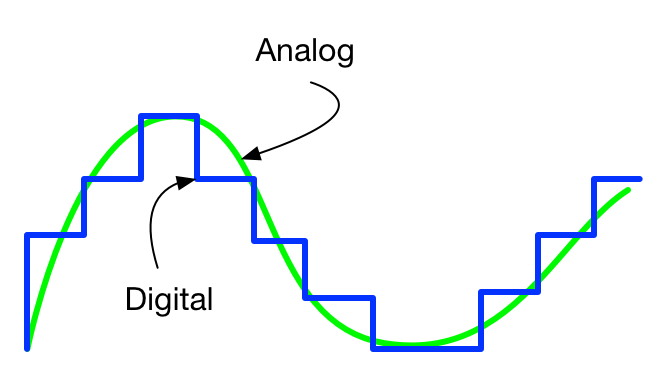
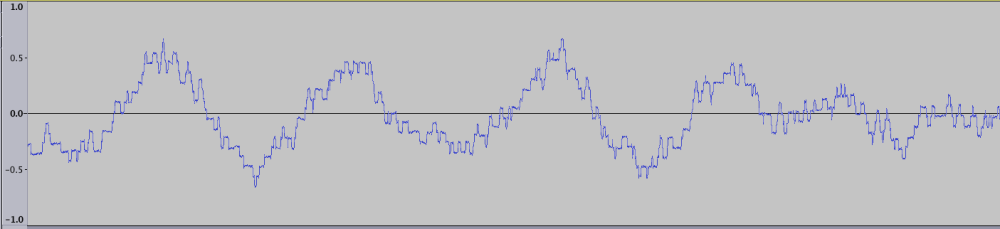
Here is a diagram representing the samples included in the amplitude of a sound wave. The number of samples in this wave defines the sampling frequency or sampling frequency.

La frecuencia de muestreo

Sampling frequency

The sampling rate is expressed in hertz (Hz) or (kHz). The following values ​​are commonly found: 44,100 Hz, 48,000 Hz, 96,000 Hz, 192,000 Hz. The CD and the digital world standard are 44,100 Hz. This means that for every second, there are 44,100 samples. (samples) reproduced. The higher the sample rate (number of “snapshots” of the audio taken per second), the more accurate the analysis and coding of the music in digital data. The sampling rate affects the audio frequency range from the lowest to the highest pitch that can be stored.

Sampling frequency
16-bit / 44.1 kHz coding was the best quality available when the CD was released in the early 1980s, but things have changed, and we can now record and distribute music at higher bit-depth levels and sample rates. These formats have been used in studio recordings and for mastering for many years.

High-resolution audio (HRA) matches any recording format above the 16-bit / 44.1 kHz standard for CDs, and HRA recordings usually use 24-bit encoding, providing a greater dynamic range than CD and sampling rates up to 192 kHz . This is the pinnacle of HRA business records. First and foremost, it’s about getting as close as possible to the sound heard in the studio.

Which sampling rates should you choose?

In order to capture the smallest details at high frequencies, we need to try more frequently. The way it works is that a given sampling rate can accurately detect audio frequencies down to just under half its value. For example, a sample rate of 48 kHz can accurately detect audio frequencies as low as just below 24 kHz. This limit for half the sampling frequency is called the Nyquist frequency and is named after one of the engineers who developed the calculation behind the sampling principle.

La frecuencia de muestreo

The human ear can generally hear in the following spectrum: 20 Hz – 20,000 Hz. As we have just seen, for no obvious loss, the sampling rate must be at least twice as high as the maximum frequency contained in the audio when digitizing. The sampling rate must be at least 40,000 Hz for a correct result for our ears.

This is why 44 100 Hz resolution is the most widely used because it allows us to cover the spectrum up to 22 050 Hz. We even benefit from a small margin because we could have rounded up to 40,000 Hz, but it also means that if you export your music at a sampling rate higher than 44,100 Hz, your ear can’t hear the difference.

Anti alias filters

The first thing an analogue to digital converter does to analogue audio before sampling is to filter all frequencies above the Nyquist limit of the desired sampling frequency. If not filtered, all frequencies above Nyquist are injected again into the sample. This is called an alias effect.

Fortunately, almost all converters on the market today have implemented high-quality anti-aliasing filters. As a result, it seems undesirable aliasing effects are not, and all frequencies below the Nyquist recorded accurately. In most cases, as long as you use a good quality converter and a sampling rate of at least 44.1 Khz, you can record all frequencies in the area of ​​human hearing in an orderly manner. Since the analog to digital converter measures each sample, you have to assign a number to that sample, as that is what makes it digital instead of analog.

How about sound cards up to 192,000 Hz?
There are two benefits to working at a very high frequency:

The first is that the drivers for your sound card (especially professional converters) will be optimized for a given sampling rate. In general, the ASIO drivers for your drives are optimized to the maximum sample rate it offers: 96,000 Hz and 192,000 Hz in most cases. This may be surprising, but it will have less delay and more relief for the microprocessor with a higher sample rate.

ANALOGUE VS DIGITAL SOUND: WHAT A DIFFERENCE?

The difference between digital and analog audio depends mainly on how the audio was recorded and stored.

Analog and Digital Audio

The analogue:

In keeping with a traditional recording technology, the analog sound experienced its golden age in the 1970s and was then attached to a magnetic tape or vinyl record. The audio signal is reproduced as faithfully as possible by copying the original audio waveform identically and continuously. As production costs are substantial, this recording model has gradually been abandoned in favor of digital.

Analogue Vs. Digital

digital:

The digital audio signal is in the form of a series of binary coded digital data, the basic language of modern computing: 0 and 1. As soon as a computer enters the audio production chain during recording or playback, the audio is digital. Sound is no longer obtained by copying the sound wave, but digitizing the sound, a process that allows the computer to decipher the sound in binary format. However, 0 and 1 do not allow you to reproduce the entire analog audio wave. To reproduce the sound, it will divide the sound wave into a series of small sound samples, each of sufficient quality separately, to artificially reproduce the sound wave.

The differences between analog and digital audio

Traditionally, we distinguish analog audio from digital audio. Before we get to the heart of the matter, it must be understood that the phenomena that surround us and which our ears perceive are all analogous.

Analog vs Digital

In a concert, for example, the sound produced by the artist’s instrument, the audience’s applause, or the spectator’s whisper is all analogous: they are continuous, that is, they give value to another without interruption and this continuously.

As soon as we want to reproduce these sounds using a recording, we have two solutions: either the signal is recorded continuously and analogously to the source, or we only record certain signal information in the Conversion of a list of predefined values. The first is said to be analog, the second is digital.

The dancer, the light and the strobe.

A good image that is often used to differentiate analog from digital audio is that of the dancer, the light and the strobe.

Imagine one dancer performing their choreography under a “normal” diffused light, and another performing the same dance but under a strobe light.

The first dance will no doubt be considered fluid and continuous, while the second is seen as uneven.

And the more you increase the speed of the strobe, the more you’ll be able to perceive the choreography fine. This is exactly what happens to digital audio: the higher the sample rate and resolution, the more faithful the audio reproduction will be.

SIGNAL PROCESSING

The analog signal varies continuously with time. Therefore, it consists of continuous variations in air pressure, and our ear, more precisely the eardrum, perceives these variations, which our brain in turn interprets as sound. How good is nature!

The analog signal which can take an infinite number of values ​​is traditionally represented as a continuous and sinusoidal curve.

In contrast, the digital signal is discontinuous and limited to a number of predefined values ​​at precise times. Therefore, it is represented schematically in the form of a histogram.

TRANSFER FROM ANALOGUE TO DIGITAL: DIGITIZATION

The transformation of the analog signal into a digital signal is called digitization.

It is actually a transformation of the vibration (analog signal) into a series of figures (digital signal), made thanks to an analog-digital converter (ADC: Analog Digital Converter).
Sampling and quantification.
ADC measures the analog signal strength at regular intervals and over an equal period of time – this is called sampling. Sampling frequency, expressed in kHz, represents the number of samples taken per day. Second.

These samples are stored in the memory of a computer and constitute an audio file which, in order to be heard by the human ear, must be converted to an analog signal: it is the role of DAC (analog digital converter).

Quantification or resolution is for each sample to measure an amplitude value.

This amplitude value is expressed in bits.

The act of converting the digital value of the amplitude into a binary value is called encoding.

Choose the sound format well into 2020

Although many dematerialized music rhymes with MP3, it is recommended to take a tour of the owner in existing dematerialized formats to choose the audio format well when digitizing their CD / Vinyl.

What is an audio format?

An audio format is to simplify a kind of container where dematerialized music is stored: it is important to choose it carefully when ripping a CD, because its properties will directly affect the quality of the file created.

audio formats

Therefore, selecting audio format is a crucial step and it is advisable to guarantee three things with priority: the quality, functionality, and the fact that they are standard and legible on a maximum of devices, whether on a PC or MAC computer, but also on your smartphone / car radio …

It is also important to understand that in general, and although there are exceptions, the choice of audio format consists of placing the cursor in the middle between the quality on the one hand and the space occupied by the media on the other. storage.

audio format

Choose audio format: which challengers?

select aac-ogg-wma mp3 audio format
The 4 semi-amazing audio formats with destructive compression.

MP3:
Give glory where honor is due. MP3 is just as popular as it is underrated: it will have done a lot for dematerialized music by itself and has enabled millions of people around the world to discover a new way to listen to their music.

MP3 is a format of strong and destructive compression, in other words, a large part of the musical signal will be suppressed (priority, frequencies inaudible to the human ear … but not only!), And therefore offers a quality that only becomes good for from 256/320 kbps.

Is this a good opportunity today? Not being the best from a quality standpoint, choosing mp3 audio format today allows you to be sure that you can listen to it on all devices released for 10 years. MP3 is dematerialized music, what jeans should wear: versatility and the highest “acceptance rate” in the world.

Note that it is also advisable to choose mp3 audio format if you have limited storage space on a smartphone, for example because it is (in the company of AAC / WMA / OGG) the type of format that requires least space.

AAC:
This format is similar to “Apple MP3”. It has the same qualities and shortcomings as the previous one with some details: slightly better at the same speed, on the other hand it is far less standard: except for the fact that manufacturers have made explicit agreements (and pay because they require a license) , we find in Practice much fewer AAC compliant devices.

So it should be avoided unless you only have Apple products around you (even the car radio? I doubt it) and even in this case they are all perfectly mp3 compatible.

WMA
If AAC is Apple’s MP3, WMA Microsoft is MP3. Even less widespread because it doesn’t benefit from iTunes / Music Store / iPOD steamroller (who still remembers Zune’s iPod killer? Miscrosoft)

Again, forget the same qualities and shortcomings as MP3, but even less standard, therefore urgent. I even advise you to convert your existing WMA files to MP3 at a similar or slightly higher bit rate to ensure durability. Therefore, choosing WMA audio format today is not a good idea.

OGG:
We also find it under the name “vorbis”, we also have an mp3 clone here, except it is compatible with the free world (understand free) a bit in the same format as Linux.

Ogg is a completely free format unlike the previous ones, but despite this it is very confidential and is generally used only by those who take a pro-free dogmatic stance. While this position is quite respectable, selecting OGG audio format in 2014/2015 does not seem like a good idea because it is not widely distributed and above all it is like MP3, a destructive format.

WAV:
WAV is the first format on the list that does not deteriorate the quality extracted from the CD, and therefore offers an identical bit rate of 1411 kbps and therefore provides optimal quality.

However, the format shows its age and is limited in several ways: no space optimization (one second of silence = one second of noise) and no metadata or album cover management.

Therefore, choosing Wav audio format is similar to generating very heavy files and simply impossible to organize properly in a music database.

HEARING TEST: DIFFERENT FROM DIFFERENT AUDIO FORMATS?

We find this published by NPR that challenges the ears as sharp as they are aware. There are many who do not distinguish between compressed mp3 audio files of the highest quality. But are you one of them? We suggest you test your knowledge. Be careful, the level is quite high.

If MP3 (MPEG Audio Layer-3) became known to everyone, it is not the only one available. This compressed format, though it has become the definitive standard, is not without its loss. They may not tell you anything, but the new title version of YouTube’s The XX that was converted to your phone lost a lot of feathers along the way. The weight of the file is reduced thanks to removing frequencies that the naked ear cannot hear (but necessary for good quality). No doubt what your cat hears when he jumps for no apparent reason. Fraud.

Neil Young Details 'Songs for Judy,' New 1976 Live Album - Rolling ...

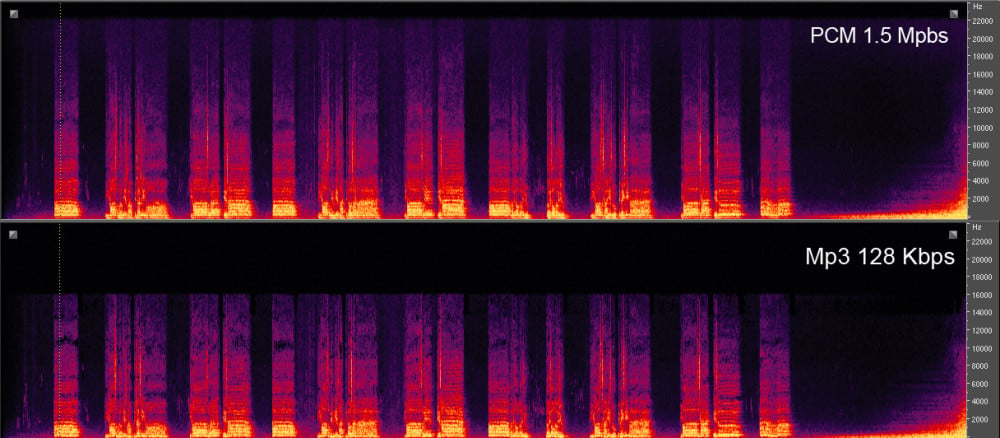
To make things a little more complicated, there are two types of mp3. The difference is made to the extent of suppression of frequencies. All frequencies above 16 kHz are removed for MP3 128 Kbps (which you will find on pirate download sites, we saw you hanging out in The Pirate Bay), while frequencies from 18 kHz to 22 kHz are aggravated by mp3 320 Kbps (which is available at premium streaming platforms and legal buying platforms: yes, always pay, somehow). On YouTube, the most widely used way to listen to music is the quality of around 192 Kbps (though it is not an mp3 format but a derivative called AAC). When not compressed, a digital song is in WAV format, a high definition format that maintains all frequencies. The only lossless compression is FLAC (Free Lossless Audio Codec) … But these two will weigh too heavily on their tired processor. End of class.

A study by the University of Hong Kong recently showed that listening to music in a poor digital format can negatively impact our emotions and our condition. We know that listening to Celine Dion is depressing, but in fact there are varying degrees of exposure to depression. The study, which compares and listens to compressed music and better quality music, points to an amplification of negative reactions accompanied by a weakening of positive feelings for compressed music. So Céline Dion at 128 Kbps, is execution guaranteed? Yes, frequency scheduling adds a mysterious, scary or even sad look to songs because they lose their spaciousness. That shattered. The study was published in the Journal of the Audio Engineering Library and offers an explanation for this phenomenon: the parasitic background noise added to the low-quality song would amplify negative emotions. A bit like cracking of the Canal + encrypted, but more discreet.

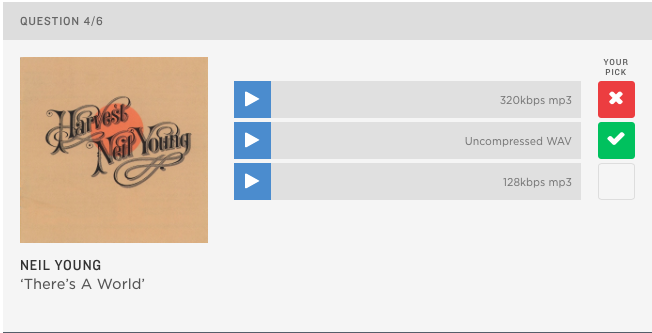
If you are curious, the NPR exam is the perfect way to challenge your hearing. Now that you have all the explanations in mind, we suggest that you test your knowledge of the records of Neil Young, Jay-Z, Katy Perry, Coldplay or Suzanne Vega. Just listen to all three excerpts and then select the track you think is the best quality. Show us that you are ready for the task.

This is the image of the test:

Click to do the test

Test

Does it make sense to convert a file to a higher audio bit rate?

When a particular file (mp4, flv, etc.) has a 95 kbps audio bit rate, does it make sense to convert it to a higher bit rate when converting to mp3 or other format (lost or lost)?

Change bitrate

Would this result in higher audio quality or just a larger file?

I’m not talking about a higher quality of output than an input: this is obviously not possible. (Apart from switching from a lossless format to the original waveform.) I want to know if an output with a higher bit rate than the input will have a better quality than it would.

Note that conversion between lost formats is not recommended. Only in some cases, an original CD / wave may not be available. The question is more or less about the utility of possibly increasing the bit rate during conversion.

maybe a sub question is helpful: does the answer depend on the type of output file (lossless or lost)?

The top two answers below seem to be different, namely the latter indicating that the bit rates are not directly comparable, and if the original sound is in a more efficient format, the (less efficient) audio output should have a somewhat higher bit rate (same idea here and here), but if mp3 is the least effective, I’m not sure which formats are more effective. (Is it aac?) (- And in general, the answers seem to fall into one of the two attitudes represented by the most reconciled responses).

bitrate

Yes, it may make sense if you need to change the format.

If you have a 95 kbps file in a very efficient format to maintain the same quality, a relatively inefficient format like the mp3 format requires a higher bit rate.

Bitrate

Of course, you never recover anything that was lost in the first place. Conversely, MP3 encoding will further reduce the quality. Each lost format uses a different means to reduce the amount of stored data, eliminating “unnecessary” (unnecessary) portions of the data. Come and go through a bunch of different formats and there’s not much left …

Therefore, if you want to stay as close to the quality of your file as possible, choose a higher bit rate. Probably 320 kbps of space is wasted, but for mp3 format, a value between 128 and 192 is required to maintain, or at least get close to, the quality of a more efficient 95 kbps file.

Generally, this will usually not result in higher sound quality. The basic reason is that you cannot create sounds that are not in the original file.

Ideally, the only result that you suggest will be larger files.

At worst, the quality of the files may be even worse as the second lossy encoder tries to encode the output of a previous lossy encoder. It encodes noise and actual data.

Recording at a higher speed can have benefits if you have a lossless source and make it a lost output. This will minimize any loss of output lost.

If you can, it is much better to go back to the original source and re-code it at the highest bit rate you want.

By increasing the bit rate you will not get better sound quality.

Think of it this way: when it was converted from the original media (such as a CD), it was compressed to contain the “content” in a smaller “box”, thus losing a lot of data (read in loss-making and loss-free formats). If you then increase the speed, you simply expand the “box”, but the “content” is always the same.

Which format for digital music should you choose?

AAC, MP3, MP3 Pro, Ogg Vorbis, WMA. In the digital age, choosing one or the other of these standards is not easy. Especially since their properties lend them to one use instead of another. Detailed review

codec

Which format for digital music should you choose?


MP3 is far from alone in the world. Feeling that compressed digital music is likely to change the record market, many developers have begun designing formats designed to offer the best compromise between the amount of data used and the sound quality. Thus, AAC for Apple, WMA from Microsoft and other OGG Vorbis communities were born. So many standards that have their advantages and disadvantages and that it is advisable to know them well before choosing the most appropriate coding software for your needs.

audio formats

First, remember that an audio CD uses uncompressed data. Music is digitized on its surface at a rate of 44,100 samples per minute. Second, each of these samples is encoded in 16 bits (2 bytes) and in stereo. This gives a total of 176 KB per Second music, or about 10 MB per second. Minute. Even if an increasing number of Internet users use broadband, websites that sell music for download cannot afford to offer 40-minute four-minute songs. Compression formats allow this amount of data to be shared by a factor ranging from 8 to 15, with little or no loss of quality.

All of these compression algorithms work on the same principle: eliminate frequencies that the human ear does not perceive at all, or very little, and level the frequencies close to each other for identical values ​​to increase compression. These are the so-called “destructive” algorithms. In other words, when converting a compressed audio file from an audio CD to an audio CD format, the resulting data will not be the same as the original file. Depending on the formats and needs, compression may be more or less important. It is defined by what is called bitrate, that is, the flow of information per. Second of music. It can range from 32 kbps (kilobits per second) to 320 kbps. Detailed review of the different formats.

audio formats

MP3

Commonly designed by the Fraunhofer Institute and Thomson and standardized in 1992, it is a derivative of audio compression used for MPEG-1 format videos (MP3 also stands for MPEG-1 Audio Layer 3).
This is the format offered by the main configuration panel. In fact, we can define a bit rate (“bit rate” in jargon) that ranges from 32 to 320 kbps. From 128 Kbps the sound quality becomes enough to encode songs. At 192 Kbps, the quality is similar to an audio CD. At this compression rate, one minute of music equals 1.4 MB of data. But it is also possible to choose a variable bit rate called VBR (variable bit rate). In this case, the encoder increases the compression ratio in less complex music regions, reducing the size of the final file slightly. The benefit depends largely on the type of song: 5 to 10% with an extract from classical or jazz music, not much with rock or rap.
The great advantage of MP3 remains its compatibility with all portable audio players, but also certain hi-fi systems, car radios and DVD players in the living room. Almost universal, it appears on all free download sites such as Kazaa or eDonkey. On the other hand, this format sinks slightly at the level of high frequency recovery and is therefore less suitable for e.g. Classical music.
Free MP3 encoding software includes WinAmp and MusicMatch JukeBox. Lastly, note that there are several MP3 coding algorithms, with “Fraunhofer” being the most widely used, and “Lame” being the most effective, with the latter being especially compatible with Pinnacle’s CDex.

WMA

Launched in 1999 by Microsoft, WMA (Windows Media Audio) was only intended to counter the rise of MP3. With compelling arguments. By utilizing the features of the human ear more effectively in the audible spectrum, WMA is able to eliminate frequencies that are truly useless while maintaining certain high frequencies that affect sound quality. The relatively efficient compression algorithm maintains a quality that corresponds to an audio CD with a 128 kbps bit rate, or 1 MB per second. Minute of a song.
Completely free of charge, WMA also has the advantage of having an encoder built into Windows Media Player. An effective way to ensure the spread of this support. Especially since this format is linked to precise copyright management (DRM or Digital Right Management) that allows, for example, to define a limited useful life of files or prohibit recording options. That’s why some music download sites use it. Many digital audio players also support WMA and reputable shareware such as WinAmp allows encoding in this format.

AAC

Contrary to belief, AAC (Advanced Audio Coding) is not a format developed by Apple, but by a consortium that includes the Fraunhofer Institute (father of MP3), Sony and even Dolby. Prestigious names that grow well. In fact, AAC is arguably the most efficient compression algorithm. Unlike MP3 and WMA, it is not based on MPEG-1 but on MPEG-4 (the format behind DivX). This choice seems to have paid off as it allows you to get a better compromise between compression ratio and sound quality. That’s why at AAC we get the equivalent of audio CD quality with a bit rate of only 96 kbps. In addition, as with WMA, the DRM (copyright management) features and the ability to control sounds on 48 different channels,
We found AAC on the Apple iTunes online music site and on your iPod player. But it is also integrated into software like WinAmp.

OGG Vorbis

OGG Vorbis is in audio compression format, as Linux is in operating systems. In fact, it is an “open” format whose source codes are public and can be customized and changed by anyone. It’s still a pretty effective format. At 128 kbps, we reach the quality level of an audio CD (1 MB in 1 minute). The compression structure of OGG format is also significantly different from MP3, WMA and other AACs. Segmenting audio sources into successive packets, the compression algorithm works first on each packet independently of the others. This allows you to not really have weakness at certain frequencies and to maintain the same quality regardless of the type of music.
In addition, polyphony features allow playback of up to 255 audio channels (sic). The package structure also makes it very suitable for streaming on the Internet, especially for online radios. Open, OGG Vorbis needed to evolve quickly and maybe move closer to AAC in terms of performance.

Do we really need HD (24 bit / 192 KHz) audio on smartphones?

We are currently testing Marshall London, the first smartphone from the famous English amplifier brand. It has a dedicated audio chip (Cirrus Logic WM8281), which in theory is capable of transcribing HD music with 24-bit coding and a maximum sampling frequency of 192 kHz. Audio files are happy to read these tracks, which have nothing to do, in theory with a compressed MP3 or audio CD with a 16-bit definition sampled at 44.1 kHz. But do we really need HD audio? Do you really notice a difference with standard files in practice?

hd audio

Before you go into the details of the case, a little physical explanation is required. Sound is a vibration that is propagated in the form of waves and that people feel through the ear. Young people are often said to be able to pick up sounds at a frequency between 20 Hz and 20,000 Hz. The older they get, the less they hear the top of the spectrum (hence the treble). To record music, you need to capture these vibrations and even the fastest (sharpest).

TESTING AND HERTZ

This is where the term sampling comes in. For convenience, sampling is the amount of information retrieved in a second when digitizing an audio signal. The unit is Hertz: a Hertz means to retrieve information per Second. On an audio CD, the sampling is 44.1 kHz, which means that we will be able to collect 44 100 times per minute. The second vibrations and therefore, in theory, a high-pitched sound with a maximum frequency of 44.1 kHz. But it gets a little trickier as you have to record a sound with a frequency of 20 kHz, you have to double the sampling frequency (according to the Nyquist-Shanon sampling theorem), which produces 40 kHz. When creating the audio CD, Sony decided to increase it to 44.1 kHz to leave some space and be compatible with the video standards of the time.

PCM-vs-MP3

DEFINITION IN BITS

As for the definition of music, it is expressed in bits and corresponds to its coding. In fact, it is the number of numeric values ​​that can exist between an inaudible sound and the loudest sound. At 16 bits, each sample (44,100 with 44.1 kHz sampling) can take 65,536 different volume values. With 24 bits, that number rises to 16,777,216 different values. The 24-bit definition has long been considered useful only for working on music to avoid loss of manipulation. In fact, one can think that with the 65,536 different 16-bit values, this definition is enough to listen. This is not necessarily true, as this figure is used only under ideal conditions and when the unit volume is maximized.

MORE HERTZIOS = BETTER QUALITY?

First, let’s look at the sample. On some media such as DVD-Audio or streaming / download platforms such as Qobuz, it is possible to enjoy 192kHz sampled music. Each music frequency is captured 192,000 times per Second, it is theoretically possible to record and transcribe a sound with a frequency of 96 kHz, well above the theoretical hearing limit, set to 20 kHz. So what’s the point of capturing the sound “so far”? Some people think they can hear sounds above 20 kHz. Others find that the harmonics of the instruments (which rise very high in frequencies) should be preserved for a more natural sound, even if the ears do not hear them directly.

A few months ago, the Le Monde site conducted an interesting experiment by blindly listening to two different versions of the same uncompressed song: in 24-bit / 96 kHz and in 16-bit / 48 kHz. Three famous musicians heard the piece (an audio technician, a pianist and a jazzman) blindly in an attempt to discern the difference in two portable players sold for 1,000 euros, a Sony and an Astell & Kern with Sennheiser HD650 headphones. In the end, it was impossible to distinguish the HD song each time from the standard version each time. Maybe with a team of tens of thousands of euros, this would have been possible, and even more … Jazzman Médéric Collignon also clarified: “If there’s a difference, it’s really small. At least I don’t like HD version. “

MP3, FLAC, WAV and other digital audio formats

MP3, FLAC, WAV and others: digital audio formats, from compression to high definition

Let’s try to take some marks in the jungle in digital audio formats …
For a few months, Neil Young has opened a public debate on the quality of digital music, made a crusade against MP3 and announced his project to launch Pono, a portable music player dedicated to reading digital files in Very High Definition. . In addition to the sarcasm that is already on fire, as Trent Reznor compares Pono’s design to a Toblerone, one might wonder if this hype is not the implementation of a beautiful marketing operation, inspired by Dr. Their success Beats helmets?


Neil Young presents his Pono on the David Letterman show

Because the prophecy announced by Neil Young has already been fulfilled: audiophile digital music players are there: we can especially mention music players from the manufacturers Sony (Japan), Cowon, Astell & Kern (Korea) or Fiio (China), HifiMAN (USA) ), Colorfly (Germany). This type of player’s contribution is to reproduce high quality files.
Add to this that the latest generation of Android smartphones can also play high-resolution files with the appropriate player (Poweramp type, Neutron Music Player). Likewise, the latest generation of Apple products (Iphone, Ipad, Ipod) are partially compatible with HD audio (today with up to 24 bit / 48 kHz resolution with ALAC, AIFF, WAV formats).

Sony, Fiio, Cowon brand audio players

CD quality / High resolution, what difference does it make?
The audio files on a CD are encoded in 16 bits at a frequency of 44 kHz.
High resolution (or high definition) files (such as SA-CD or Blu-ray Pure Audio) are in 24-bit frequency 44, 48, 88, 96 or 192 kHz
What does it mean?
16 bits – 44 kHz = 65,536 bits (2 at the effect of 16) x 44,100 Herz x 2 (stereo) per Second
24 bit – 192 kHz = 16,777,216 bits (2 at the power of 24) x 192,000 Herz x 2 (stereo) per second So,
an hour of high-resolution music takes over 2 GB vs. 635 MB for CD quality
. We measure the gap in information volume and computing power between a CD quality file and a high-definition file.

Which format should you choose?

We must first distinguish between:

Tabbed compression formats: MP3, AAC, Ogg Vorbis, WMA
Lossless or compression-free compressed formats: AIFF, ALAC, FLAC, WAV, DSD, mono sound, lossless WMA
Today, if we are looking for sound quality, we have to choose from 3 requirements:

-High quality: MP3 from 196 to 320 kb / s, AAC from 128 to 256 kb / s, OGG vorbis from 160 to 320 kb / s

Loss without CD quality: FLAC, ALAC, WMA, WAV, AIFF (16 bit – 44.1 kHz)

– High resolution quality: FLAC, ALAC, WMA, WAV, AIFF, DSD (24-bit – 44, 48, 88, 96, 192 kHz)
Choosing MP3 encoding at 320 kbs or FLAC (16-bit – 44.1 kHz) seems like a good compromise.

And streaming?

Audio format selection is also important for streaming platforms (especially as it is subject to bandwidth and bandwidth limitations):

Deezer uses MP3 format with 2 quality levels:

128 Kbits / s for the free version,
320 Kbits / s (HQ audio) for the paid version of the transmission

Qobuz uses 2 formats:

MP3 at 320 MHz for your “premium” service and
CD quality FLAC (16 bit 44.1 kHz) for Hi-Fi option
(Qobuz also sells 24-bit master study quality files ranging from 44.1 kHz to 192 kHz in WAV, AIFF, FLAC, ALAC, lossless WMA format)

Spotify uses the Ogg Vorbis format for streaming with three quality levels:
96 kbps: Spotify app “Low Speed” setting
160kbps: standard transmission quality for the mobile application / “High quality” setting of the mobile application
320 kbps: “High quality” setting available in Spotify Premium / “Extreme Quality” setting of mobile app (currently available on iOS and Android only)

YouTube uses the AAC audio format at 128 or 192 kbps to transfer the sound of medium and high resolution videos (and also 64 kbps MP3, to low resolution videos) (source)

Equip yourself with a portable listening system

Equipping yourself with a hi-fi player means paying attention to all the elements of the “chain”: the quality of the initial recording, encoded file, streaming material, software (player) and headphones. . This requires a comparative and empirical approach to evaluate each parameter separately. For example, if you Can listen to 24-bit 88Mhz files with an Android smartphone, the rendering is not the same, depending on the choice of audio playback application

What is the best file format for listening to music?

Digitizing music involves compressing the original sound that may distort the work. AAC, MP3, WMA or Wav: which of these formats offers the best representation?

Best audio format

If we are not aware of or no longer aware of the quality of today’s music in its digital form, it is often because our audio rendering tools are so poor. This is due to the speakers that come with desktops or built-in laptops, but also to the headphones / earphones that come with MP3 players, which are mostly entry-level products. On the other hand, for those with high performance equipment, listening to poorly recorded or poorly coded songs quickly becomes unpleasant.

best audio format

Therefore, choosing the best audio format for the same recording is best for fun. Today, there are 5 main audio file formats: AAC (promoted by Apple, iPod and iPhone in mind), WMA (promoted by Microsoft), MP3, Wav and Ogg (the last three are neutral).

In addition to the file format, there is another criterion called the compression ratio. The more a file is compressed, the more it removes the frequency bands in the music and therefore potentially small nuances that enrich the listening. The compression ratio is expressed in the number of bits, the basic computing unit. Values ​​range from 56 Kbits / s (56,000 bits per second, minimum quality for radio or podcasts) to 320 Kbits / s. The lower the number, the more compressed and small the file will be, but the less comfortable it is to listen to.

The sampling frequency is also important. This value is expressed in Hz and must be as large as possible to preserve the shape of the original audio signal and therefore the accuracy of the recording. In general, we prefer a file with a sampling rate for CD quality (44,100 Hz), but we also found lower quality files (22,000 Hz).

The study from the Musiclassics studio.

This online digital music sales site dedicated exclusively to classical music launched a modernization of its interface during 2009. On this occasion, the question arose about the best audio formats that its customers could offer. To make it right, the site invited 15 people (bloggers, musicians, fans, audiophiles) to a listening session in a professional studio. They had to judge from 1 to 5 the quality of 4 different musical excerpts representative of the diversity of classical music (voice, violin, piano, orchestra and heart), coded in 6 different ways: MP3 320 Kbps, Wav, WMA 192 Kbps and 320 Kbps, AAC 192 Kbps and 320 Kbps. Here are the results of this study:

Examine listening results
File formats average rating received (out of 5)
MP3 320 Kbps ……………… 3.1
Wav ………………………………. 3.5
WMA 192 Kbps …………… 3.7
AAC 192 Kbps ……………. 3.8
AAC 320 Kbps ……………. 3.8
WMA 320 Kbps …………. 4.0

Since formats compressed at 128 Kbps or less have not been studied, the difference in ratings is relatively small. However, the MP3 format, even compressed at 320 Kbps, is the worst with a significant difference. More surprisingly, the CD (Wav file) is located behind the WMA and AAC formats. These files seem to change the rendering slightly. It is observed that the difference in notation between the 192 and 320 Kbps compression is not significant.

But too bad MusiClassics did not want to integrate the free and open OGG file format into these results. However, we noticed that as a consumer it would be better to choose 192 Kbps AAC or WMA files instead of 320 Kbps MP3 and 192 192 Kbps MP3. 128 Kbps files would score less than 3/5, which is not satisfactory.