Loudness Normalization: Why is it necessary to Normalize the loudness of an audio or a video?


Free Download Mp4Gain
picture

Loudness Normalization: Why is it necessary to Normalize the loudness of an audio or a video?

Loudness

The war of volume or loudness war.

Already in the 1940s and in later decades, in the middle of the vinyl record era, a volume war was experienced.

The goal was to make a song sound louder on the radio, louder than other songs and louder than advertising.

Sure, the limitations of vinyl didn’t allow the ability to indiscriminately increase volume to be possible.

Loudness normalization

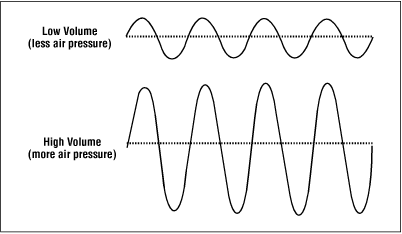
But with the advent of CDs and digital music it was possible to push the loudness of a song to the max. The situation is that the digitization of the audio allowed it to be manipulated quite precisely, achieving dynamic normalizations that actually ended the dynamics of the music and then played all the time at maximum volume.

By the 90s, groups like Red Hot Chilli Peppersm and their album Californication took this war of loudness to levels rarely seen.

But why did they do that?

Some research on human hearing showed that people did not find that a song sounded better if it had louder loudness.

Every artist, every producer, and every hardware manufacturer has figured out a way to make their production sound louder, louder.

Digitally many limiters and compressors pointed in that direction and made a lot of music sound almost to the point of distortion.

Each one wanted their music to stand out, among other things for being louder and having a greater sound, a higher volume level.

If to this recipe we add the appearance of the mp3 and a great variety of encoders, and also that ordinary people did not understand the effect that the bit rate could produce, then many mp3s with different qualities were generated.

The possibility of sharing these mp3s filled people with mp3s that each had very different sounds. Both for its production and for its coding.

Then a new need appeared: normalize the music to avoid these disparities in loudness, in the volume of the songs.

The holy grail of normalization had to be found.

Many ideas were found, many experiments. The situation matured and certain products like Mp3Doctor and Mp4Gain matured to the point where they actually managed to find the solution: a dynamic standardization that will work well with today’s advanced player equipment.

Then Mp4Gain made the leap, achieving that even videos could not be normalized.

Audio could already be normalized in its main formats (mp34, aac, ogg, floac, etc) with Mp3Doctor, but Mp4Gain added the possibility of these dynamic normalization to video in its main formats (mp4, 3gp, flv, avi, etc. )


Free Download Mp4Gain
picture


Mp4Gain Main Window
picture


Mp4Gain Features
picture


Free Download Mp4Gain
picture

The most important video formats in comparison

The most important video formats in comparison

video formats

AVI, WMV, MPEG, MOV, FLV, WebM: a guide through the terms of video formats, with all their pros and cons The most common video formats at a glance ‘

Videos basically consist of many individual images and associated sound. Four different values ​​are relevant to recording the image: The frame rate or the frame rate, which is displayed in hertz (Hz) or in frames per second (fps = frames per second).
Video Formats

The higher this value, the more frames will be used to create the video and the larger the file will be. The second value is the color depth, which contains information about the color and brightness values. Third, the movie format indicates the resolution of the image in pixels or the aspect ratio of the video (for example, 16: 9 or 4: 3). And fourth, the soundtrack, which contains the recorded sound. The higher the image resolution, quality and length of the video, the larger the file will be on the hard drive.

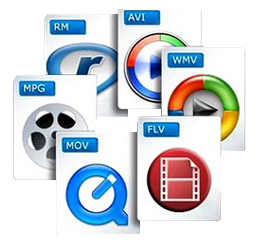
There are numerous video formats. The most common formats are:

  • AVI – Audio Video Interleaved – file.avi
  • WMV – Windows Media Player – file.wmv
  • MPEG I, MPEG II – Moving Images Expert Group – file.mpg
  • MOV – Movie – file.mov
  • FLV – Flash Video – file.flv, file.swf
  • MPEG IV – Moving Image Expert Group – file.mp4
  • WebM – Google – .webm file

Video players such as the VLC player can be used to play such files on the computer. A DVD is typically 8 gigabits in size, while Bluray DVDs can be significantly larger. These can then be reduced with a compressor, but both the sound and the image quality are a handful.

All video formats have their advantages and disadvantages. The MPEG 2 format is synonymous with good quality picture and sound. With the iPad, however, it has to be an MPEG 4 format or a special application to play the video. Then there are the AVI videos, which can be played on almost any device. However, they have the great disadvantage that they become very large if the quality is adequate. On the contrary, the FLV format is ideal if the video will be published on the Internet. Because it is precisely this format that is compatible with the browser or with Flash plugins.

3GP / 3G2 (file extension: .3gp, .3g2, .3gpp)

3gp is the name of a video file format for mobile devices such as third-generation cell phones or PDAs. This format was specified by the 3GPP organization. Files in this format have the file name extension “.3gp” or “.3gpp”. It is used in the UMTS (3G) standard.
3g2 is a mobile phone video file format that is functionally similar to the 3gp format. This format was specified by the 3GPP2 organization. Files in this format have the file name extension “.3g2”. It is used in the CDMA2000 standard.

AVI (audio video interleaved) * .avi

A video format developed by Microsoft in 1992. Widely used in software and hardware. Almost all multimedia programs and almost all DVD players can play this format. Also, most digital cameras record in this format. Unfortunately at the price of very high storage requirements (compared to WMV or MPEG up to 20 times more).

FLV (short for Flash Video) * .flv * .swf

With Flash Video is a container format developed by Adobe Systems, which is best used for streaming video content over the Internet. To play the videos, Adobe Flash Player version 6 or 7 or higher is required. By embedding Flash video files in a SWF (Small Web Format) file, a video file can be integrated into a website with relative ease. SWF is an ActionScript, vector graphics, and multimedia file format.

MJPEG

Motion JPEG (MJPEG) is a video codec in which each individual image is compressed separately as a JPEG image. Videos compressed with MJPEG, unlike those compressed with MPEG, have a quality that is independent of the movement of the image. This standard is often used in older digital cameras. Due to the individual compression of all individual images, with this format it is possible to cut a frame from a video clip precisely without the need for recoding, which is generally only possible with MPEG keyframes.

MPEG 1 and 2 (Moving Image Expert Group) * .mpg

Video format developed by a group of experts with standardized compression methods. The advantages of MPEG movies are the comparatively small files with good image quality, albeit with low resolution. In practice, MPEG-II movies are far superior to MPEG-I movies in terms of resolution and image quality.

MPEG 4 (Moving Pictures Expert Group) * .mp4

Video format developed by a group of experts with standardized compression methods.
Originally, the aim of MPEG-4 was to support systems with low resources or narrow bandwidths (mobile phones, videophones, …) with a relatively small loss of quality. Since H.263, an ITU standard for video compression and decoding, had already successfully met these requirements, it was integrated into MPEG-4 as Part 2 without major changes. Films
MPEG-4 is compressed even stronger and without any noticeable loss of quality, that is, very small files with very good resolution. In practice, MPEG-4 places somewhat higher demands on the performance of the computer, since highly compressed data must first be “decompressed” again when played back.

MPEG 7

MPEG-7 is an ISO standard (ISO / IEC 15938) that was adopted in 2002 and was defined by the Moving Picture Experts Group, or MPEG for short. MPEG-7 is not a real compression standard, but it is used to describe multimedia data with the help of meta information and is stored in the form of one or more XML documents. It can be attached to the time code, for example, to mark certain events or, for example, to synchronize the lyrics with a song.

MOV (movie) * .mov

MOV-type video files are based on the Apple Quicktime standard. Quicktime movies largely share the advantages and disadvantages of MPEG-4 movies for comparison: good movie quality with little space, but higher demands on computer performance. The container format for Apple’s QuickTime multimedia architecture typically has the file extension .mov or .qt. Depending on the functions, the endings .qtvr, .qti and .qtif are also used. Storage takes place in sequentially and hierarchically organized units of data, so-called atoms. In addition to chronological information and tracking data, you can also store structural and hierarchical information and relationships. A special sync layer also makes it suitable for streaming. In professional cinema- and post-production it is the usual format for the exchange of multimedia data (video, audio, subtitles, time codes, chapter marks, etc.) due to the aforementioned properties. It also serves as the basis for the ISO standardized MP4 MPEG-4 file format.

Ogg .ogg

Ogg is a container file format for multimedia files, so it can hold audio, video, and text data at the same time. Ogg was designed with the goal of offering a free and unrestricted software patent alternative to proprietary formats for efficient storage and streaming of multimedia content. The ability to transmit is the decisive design feature: everything that is packaged in an Ogg container can be transmitted without additional adjustments. This distinguishes Ogg from formats that are only capable of streaming in certain ways (like Matroska) or not capable of live streaming (like MP4). Ogg streams can be grouped and chained without having to adjust the individual stream.
Ogg Theora is not very common in the video field. However, it is enjoying increasing popularity in the open source scene. However, for HD videos, the Matroska format, which is also free, is gaining more and more acceptance outside of the open source scene, so it remains to be seen what role Ogg Theora will play in the future.

RM (Real Average) * .rm

A collective term for the file formats of the software maker RealNetworks, in particular the Real-Audio audio format and the Real-Video video format. It is used primarily in streaming applications. Real files are lossy, but the quality of real video files is still comparatively good, especially with high compression.
Files compressed with RealVideo are lossy. The quality of RealVideo files is generally comparatively good with high compression, older versions are poor with low compression compared to MPEG for example. However, the quality of the newer versions is comparable to MPEG-4 video codecs like Xvid or DivX, as well as Windows Media Video 9. RealVideo usually occurs in the RealMedia container and then has its file extension .rv, .ram, .rm, or .rmvb.

WebM

WebM is a container format for audio and video data, used for the VP8 and VP9 video codecs introduced by Google, which represent alternatives to the well-known H.264 codec. It was developed for websites in the HTML5 standard, where it is used as an alternative to the MP4 format. WebM was introduced by Google Inc. in May 2010 and is endorsed by the Mozilla Foundation and Opera Software, among others. For Internet Explorer 9 or higher, Google provides a browser extension for download. In April 2011, Google also introduced WebM on YouTube, where it has since been available as an alternate playback option using the HTML5 video tag built into the page without browser plugins such as the Flash player that was previously required. Another implementation example, which in the case of the VP8 video format also represents the description of the standard, was released as free software under the terms of a BSD license.

WMV (Windows Media Video) * .wmv

A video format developed by Microsoft that offers high compression with good quality. In addition to Windows Media Player and many other software players, some standalone hardware players can also decode WMV files. Files that contain WMV encoded video streams are generally embedded in Microsoft’s Advanced Streaming Format (ASF) container format. These files usually have the extension .asf, but in the case of a video file they can also have the extension .wmv. A new variant of WMV is the Windows Media Video High Definition (WMVHD) format.
The Windows Media format also supports the integration of Digital Rights Management (DRM), which is intended to allow copyright owners to regulate access rights to audio and video material. In practice, this technology is often used as a copy protection measure.

Video format comparison: MOV, FLV, MP4 and 3GP

Video format comparison: MOV, FLV, MP4 and 3GP

Video Formats
Each video file format has its own unique characteristics, which make it ideal for specific uses. This fact forces the user to have to choose between them more and more frequently. The most important criteria in making this decision is which characteristics of the file types best suit your specific needs. To help you choose the best type of video file, here is a list of the pros and cons of the most popular video formats.

video formats

The .mov video format

The MOV video file format was developed by Apple with the aim of bringing clear benefits to users. One of these advantages is the high quality of MOV videos. Cinema purists and filmmakers who want to create long digital movies, in particular, are determined by the quality preservation properties of the MOV format. When working with MOV files, optimal video quality will be maintained throughout the project. Although MOV is closely linked to Apple, the files can also be opened with Quicktime Player on Windows.

A major problem with MOV is the lack of support from the various media player applications. Many users have to download new software before they can play MOV video. Also, the files are very large, which requires more hard disk space. This can slow down old hardware.

Ultimately, .mov was designed for a specific group of users, especially those who value high video quality. Even if these files are generally used less frequently, they are of great value to a small target group.

The word ‘video’ is made up of many letter tiles.
With the right video format, projects can be implemented smoothly.

The .flv video format

The FLV video file format stands for Adobe Flash Videos. It is the most widely used type of video file on the Internet. The reason for the enormous popularity of .flv is that the format works optimally in all major browsers. Therefore, leading video portals like YouTube also use Flash videos by default. Another reason for the frequent use of FLV video files is that it is suitable for various video formats, including commercial ones.

There is also a downside to the FLV format: if a lot of Flash videos are hosted on a website, it can get slower overall. This is especially likely to be felt by visitors with slower Internet access. This is still a major problem at this time. As the Internet becomes more accessible, this concern will lessen in the future.

A man is editing a video on a laptop.
The FLV video format sadly affects the loading times of websites.

The video format .mp4

The MP4 video file format offers high-quality video. Unfortunately, the format is not ideal for a single task. But that doesn’t mean that these files don’t have many advantages as well. In fact, MP4 files are so small that they are ideal for storing in a video asset management system. Even at such a small size, the video quality is amazing. They are also great for sharing videos due to their high browser compatibility.

Therefore, it is quite paradoxical that the MP4 format is used as the standard in most photo and video cameras, as it scares filmmakers so much. The reason for this is that .mp4 files do not edit well. Without the proper properties that allow for proper editing and good editing, the MP4 video format does not meet the requirements of one of the potentially most important user groups.

A hand holding a camera lens in the forest.
MP4 videos retain high quality despite their small file size.

The .3gp video format

The 3GP video format corresponds to the Third Generation Partnership Project and is the associated file extension. It can be opened with many programs, is inexpensive in terms of memory requirements, and optimally protects data. It is ideal for mobile devices that cannot cope with high traffic when streaming video to each other.

Also, the .3gp file type has a dominant position in relation to video transmitted via text messaging services. This will continue despite certain weak points.

A key problem with 3GP relates to compression and the difficulties it presents. Users who care about maintaining video quality will be amazed at the end result of compression. Although this deficit is a necessary evil for the sake of functionality, many users still find it negative.

Get familiar with the big differences between video file types. This will allow you to make the right decisions for a successful implementation of future projects. Once you have a solid understanding of video formats, consider using a digital asset management system to manage your video files.

What is the bit rate?

Video Bitrate

Bit rate measures the speed at which information can be transmitted between two locations. The standard unit for this speed is “bits per second”, but a kilo or mega value is often prepended to indicate the high speeds of modern digital technology. Communication technology measures speed as a function of bit rate, especially on the Internet. The transfer rate indicates how fast the data can be downloaded. This measure is also widely used to describe audio and video. higher rates mean higher quality.

Video bitrates

In its simplest form, bit rate describes how many bits per second are transmitted between two different locations. The higher the rate, the faster information can be exchanged between them. For this reason, the bit rate can be particularly important for communication technologies such as broadband, as it defines how quickly a user can download or upload information.

The standard unit for bit rate is bits per second (bps). However, this measurement is often too small to be practical in modern communication technology, as millions of bits can be transmitted per second. To solve this problem, the device is usually prefixed by a different letter indicating its size. For example, kbit / s means kilobits per second or 1000 bits per second. Megabits per second are written as Mbit / s and represent millions of bits per second.

Bit rate is an important measure for a large number of different areas of computing. Broadband, for example, is often specified as a certain number of Mbit / s, with speeds of around 2 Mbit / s being common. Fiber broadband, which is much faster, can deliver speeds of up to 5 Mbps. This measure also describes the speed of mobile connections such as 3G and Bluetooth.

Audio and video quality are commonly reported in terms of bit rate, with higher rates indicating a higher quality picture or sound. In multimedia, this metric is a quick way to show how much information is stored in each second of recording, so higher rates lead to increased quality. The bit rate can depend on a variety of factors, including whether the information has been compressed.

The standard bit rate for audio is between 100 and 160 kbit / s, while higher quality recordings can reach up to 320 kbit / s. Video speeds can be significantly higher for Blu-ray discs with speeds up to 40 Mbps. Standard DVDs are only about 9 Mbit / s, so there is a difference in quality.

What is bitrate in a video? | Improve QUALITY

Video Bitrate

Bitrate is, without a doubt, one of the main characteristics that determine the quality of a video.

I’m glad you made it this far to continue learning about video. If you still don’t know about video or editing, remember that you can learn the basics with my video courses (among others).

bit rate

What is video bitrate?

The bitrate or bit rate is the amount of information per second that the video has. It is measured in megabits per second and is directly proportional to its quality.

Generally, we tend to confuse the size of the video with its quality, thinking that 4k size is the video that offers the highest quality. However, this is flatly incorrect.

A high bitrate offers quality: Size VS Quality

Continuing with the topic I was talking about, it is very common for videos with 4k (at least those from professional cameras) have a higher bitrate. This is what makes the video look better quality, mainly, regardless of whether the video is larger or smaller.

How do you notice the difference between a high bitrate and a less high one?

The bitrate tends to show significant differences not simply when recording, but when editing. As I have already told you, with a bitrate of 10-15 mbps / s (at 25 fps) you have more than enough for most jobs. However, and if you are very exquisite, you may want to use a higher bitrate to have more margin for error when correcting and color grading. By the way, if you are interested in learning about color correction and color grading, check out my course.

With a higher bitrate you will notice the following differences than with a lower one:

Sharpness increase.

Superior ability to edit color without the appearance of banding or other unwanted disturbances.
Greater file weight (the higher the bitrate, the larger the file occupies).
However, this is not to say that it will be noticeable for most jobs. If you work in events, I assure you that you will not have a problem.

Bitrate types

If you are one of those who want to know more about everything you study, you can stay and delve deeper with me.

There are two types of bitrate, the constant bitrate and the variable bitrate.

CBR: this is the bitrate that always, whatever is on the plane, the exact same transfer rate will be used. The good news is that a video recorded at a specific size and bitrate will always occupy the same amount. However, it is not the most efficient.
VBR: this is the variable bitrate, and it consists in that a different bitrate will be applied depending on the information that is being recorded. Obviously, if you are recording a super dark black background, you don’t need as much information as if you are recording a scene with a very wide color gamut and a histogram that is padded from blacks to whites. In this case, the bit transfer rate will vary according to the needs of what is being recorded. Of course, we will try to keep an average (the chosen one).
How to know the bitrate of a video, both on Windows and Mac?
I am going to explain to you, both for Windows and Mac, how to find out the bitrate that a video clip has. This is very good because you can see that a video loses quality the more compressed it is. And one of the ways to compress it is by lowering the bitrate.

Windows: right-click on the clip> properties> details tab> video section> total bit rate
Mac: you open the video with the quicktime player> while it is playing press cmd + I> data rate
It is important that you pay attention to whether this data is in kbps or in mbps, because the first is 1000 times less than the second (so that you take it into account in case you want to compare looking from two different computers).

When to compress a video by lowering its bitrate?

There are times when you have already finished editing the video and obviously want to compress it. For this I recommend that you learn about codecs and video formats.

Obviously when you compress the video you will lose quality (the bitrate will decrease). This, a priori, should not be noticed in excess if it is a good compression, since you will no longer edit that video.

Of course I am talking about compressing the final file, never the raw ones used to create the video. You always have to lower the bitrate or compress the final file (in case you want to compress) to avoid losing image quality.

What video format is better? MKV or MP4

MKV vs MP4

MKV and MP4 are two most common types of video formats in downloaded video files. When it comes to the difference between MKV and MP4, the following question is always related:

MKV VS MP4

1. Almost all media players can play MP4. However, MKV compatibility is worse than MP4, especially on mobile devices. Why?

2. The MKV format file is generally larger than the MP4 format. Is MKV better than MP4 in video quality?

3. Why do people often choose MKV format when they need to rip Blu-ray discs?

As a digital video lover, knowing MKV and MP4 is the important part that you cannot miss. Here in the text, you can learn more about the different aspects of MKV and MP4 that can help you choose between them for yourself. The above questions are also answered in this article. If you have any other questions about MP4 and MKV, please leave a message in the comment section.

You may also be interested in:

Free way to convert MKV to MP4 with good quality

Quick Guide: How to Convert MP4 to MKV Video Format

CONTENT

1. Brief description of MKV and MP4
2. MKV vs MP4: differences between MKV and MP4
3. Top video converter to convert videos to MKV / MP4
Brief description of MKV and MP4

What is MKV? MKV is developed by Matroska.org.

From the pronunciation of Russian, it sounds like матрёшка (Russian dolls). That’s nice and fun because MKV is a container format. Encapsulates multiple media formats like Russian dolls. The MKV video format has the powerful ability to store an unlimited amount of video, audio, image and subtitle media in a single file, such as the FLAC audio format and the ASS subtitle format.

What is MP4?

As short for MPEG-4 Part 14, MP4 is probably very familiar to all of us. Like the MKV video format, MP4 is also a container format. The merge function is to easily combine different digital streams into a single file. However, MKV and MP4 have different encapsulation options. For example, MP4 cannot encapsulate a closed caption format like ASS, like MKV can.

For this part, the main novelty that we know is that MP4 and MKV are container formats but not multimedia formats. Although two files can be tagged with .mkv, the encapsulated video and audio media formats they contain may not be the same. This explains why some players cannot play videos in the same container format. In the second part, I will introduce the difference between MKV and MP4 in more detail.

Platform compatibility

MKV is being developed by the personal team committed to AVI replacement. MP4 is an industry standard that aims to replace the old MPG as the next generation video / audio packaging format. As an industry standard, MP4 has better compatibility than MKV in video editing software and playback devices. When to upload video to YouTube MP4 is a suitable format.

Therefore, videos that have been optimized for mobile devices always choose MP4 for encapsulation. It can play MP4 video on various kinds of portable players like Apple iPad / iPhone / Android phone without limitation. If you have downloaded special third-party media players on mobile devices, you may be able to play MKV as well.

Compatible videos / audios

The main combination for MP4 is [Video] H.264 (x264) / Xvid / MPEG4 + [Audio] AAC / MP3. MKV supports lossless FLAC audio, while MP4 does not. MP4 could support other lossless audio ALAC, even if ALAC is less efficient than FLAC. MKV supports selectable ASS / SSA subtitles and selectable audio tracks, but not MP4. When copying an optical disc, people always choose to rip DVD / Blu-ray to MKV, which is what MP4 cannot do as the tracks can remain selectable after copying.

quality

While MKV generally has a larger file size than MP4 videos due to support for additional features, multiple audio tracks, and subtitle tracks, this does not mean that the quality of the MP4 file is not as good as MKV. Because MKV and MP4 are container formats and can encapsulate the same video and audio. For example, both can be encoded with x264 (one of H.264) + AAC. If other settings are the same, the video and audio quality will be exactly the same.

FLAC or MP3: these are the differences

FLAC vs MP3

FLAC and MP3 are common audio formats. We explain their similarities and differences in this practical tip.

Similarities Between FLAC and MP3

At first glance, FLAC and MP3 have a lot in common:
FLAC and MP3 are audio formats. Detailed information on FLAC files can be found in this practical tip.

Mp3 vs Flac
The audio information is compressed in both formats.
With both, compression works in several steps. One of them can be lossless mid-side encoding for both.
Strictly speaking, both MP3 and FLAC are codecs, that is, pairs of an encoder to compress and a decoder to play the file.
Both formats allow the addition of metadata as tags.
Streaming is possible with both formats, that is, near real-time streaming.
WAV file in wave format

Differences between FLAC and MP3

Despite the similarities, there are essential differences between FLAC and MP3:
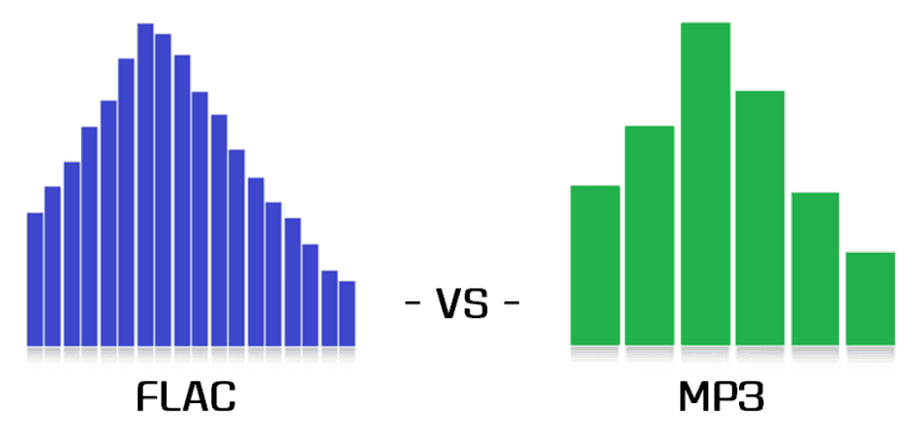
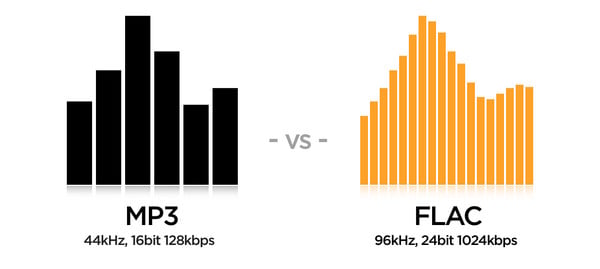
MP3 is a psychoacoustic compression process, which means it changes the signal as you can see in the image. FLAC just changes the way the data is presented so that the file can be saved more efficiently.
MP3 is leaky due to the way it works. This means that the information in the original file is lost and errors occur. On the other hand, FLAC files can be used to restore the original without errors.
MP3 achieves a file compression of approximately one-tenth the original size. FLAC reduces the size of the source file by approximately half.
PCM files, like WAV, store continuous fluctuations in sound pressure as discrete values ​​over time. With a high sampling frequency and depth, this process is virtually lossless. FLAC files store data from WAV files in a different way. However, the PCM file can be regenerated from it at any time.
MP3 files generate noise especially before the strong amplitude increases and reduces the dynamics of some frequencies and thus irreparably falsifies the output signal. However, if the encoding is good, the differences are subliminal
There is already a huge market for MP3 music, editing software and playback devices. Until now, FLAC has barely established itself in the area of ​​music downloading, audio processing software, and in terms of playback devices.

FLAC or MP3: which is better?

The differences between FLAC and MP3 in particular show which format is more suitable for which application:
MP3 has the immense advantage of being available, widespread, and compatible with common hardware and software. In addition, there is the huge compression rate, which is particularly suitable for fast streams and large music collections.
FLAC has a decisive force: it encodes lossless audio files and is much more flexible and more compressed than ZIP or RAR files. FLAC is particularly ideal in the recording studio, but also for highly dynamic music or simply for archiving lossless audio CDs.

AAC, all about the AAC format

AAC Format

What is AAC? AAC is short for Advanced Audio Coding.

This makes AAC an extremely compressed audio file. This is to save storage space. And this is achieved by dispensing with frequencies in an AAC file that are imperceptible to the human ear anyway. We speak here of the so-called audio codecs.

AAC

In this way, the AAC file works exactly the same as the MP3: in both cases, the goal is to reduce the amount of data so that it can be transferred or saved more quickly. AAC versus MP3, which is better? The AAC format does not exist that long as MP3. But does that automatically mean that the newest version is the best?

Basically, it can be said that AAC allows stronger compression with better sound quality compared to MP3. The AAC file achieves higher quality standards through error correction algorithms. Assuming the same sound output, the AAC file needs three-quarters of the storage space of an MP3 file.

AAC occupies more and more the space that MP3 files occupy. This means that more and more Internet radios are also using AAC transmissions. Several other music websites also see this audio compression as the model of the future. In addition to the standard format, many MP3 players are also designed for AAC files.

In addition, AAC formats appear in iTunes, are used on iPhone, iPad and iPod and are compatible with PlayStation and oriented to Nintendo. Playing AAC format You can play the AAC format with a standard audio player.

Common file extensions for AAC files are .acc, .mp4, .m4a, .m4p, and .m4v. Convert AAC Format If you don’t have any programs on your Windows or Mac computer that can be used to play AAC files, you can convert individual files.

You can access various offers. You can create a WAV file, a WMA file or an MP3 file from the AAC file. Is it recommended to convert the files to another format? Although it is always possible to change the file being played so that it can be listened to with a player on the mobile device or computer, this is not necessarily advisable.

Every file format conversion is accompanied by a loss of quality: regardless of whether you convert an AAC file to MP3 format or play the MP3 file as an AAC file, the audio quality suffers. Therefore, you should only do this in exceptional cases, for example if you do not have a suitable playback device or program.

Tones that the human ear cannot perceive are considered unnecessary for sound and can be eliminated. In addition to the inaudible frequencies, this means redundant sounds that are produced when they overlap.

ACC files score with high sound standards. This is also a reason why Apple’s iTunes relies on AAC files. You can also provide copy protection for files. This prevents uncontrolled distribution of sound files.

MP3? No thanks! Everything you need to know about audio files

WAV Format

In order to get your music with recordJet to all major stores, your audio files must meet some general requirements to be accepted by stores. Here we explain everything about MP3 and other file formats, as well as the requirements that stores have on audio files.

You have probably already noticed that you cannot load tracks as MP3 files into recordJet, but only in a certain WAV format. What seems annoying to some at first, however, has two important reasons: the sound quality and the avoidance of problems.

Audio Formats

WAV is actually just a container format in which audio data can be stored. The most popular are uncompressed WAV (E) files, which contain so-called PCM raw data and were created with a 16-bit sample size and a 44.1 kHz sample rate. When talking about WAV files (as is also here in this article), we usually mean exactly this variant, the so-called CD quality.

Uncompressed music files have the advantage that all the information in digital files is still available. This means that the music will sound almost as good when played back as the original recording. But at least as good as on a CD.

With a codec like FLAC (Free Lossless Audio Codec), audio files can be losslessly compressed and reduced to about half their original file size without loss of quality. This works in a similar way to packing files in zip format, only the process is specially designed for music.

MP3 (actually MPEG-1 Audio Layer III), on the other hand, is a method for lossy compression of music files. You don’t need to be a professional to hear the quality differences between WAV and highly compressed MP3 without problems. In the case of lossy compression, the file information that is as “insignificant” as possible is removed, so the file size is naturally reduced as well. For example, an audio file can be reduced from 35-60 MB to 3-8 MB by such compression.

Unfortunately, the more a sound file is compressed, the worse the sound quality, as more information is removed from the file. The amount of information from the original file that is still available can normally be read at the so-called bit rate: a song with 320 kbit / s (= kilobits per second) is less compressed and has better sound quality than a song with 192 kbit / s. With MP3 with 320 kbit / s bit rate, even a professional can hardly hear any difference in CD quality.

So why doesn’t recordJet accept MP3 files at high bit rate?
It’s simple: all stores want to receive music in a different file format. The most widespread are the WAV or FLAC formats. But MP3 at various levels of compression are also required. One of the reasons for our decision to trust WAV is that we always want to offer the highest quality possible. If we were to convert your MP3s again, more information from the file would be lost. Even if you hardly hear a difference in quality in the original MP3 compared to the uncompressed version, this may become audible after a new conversion. Also, there is not just one MP3 codec with one parameter. Different codecs produce different results. Therefore, the sound quality may vary despite the same bit rate.

And why then exactly PCM with a bit rate of 1411 kbit / s, a sample size of 16 bits and a sample rate of 44100 Hz?
As already mentioned, this specification is the standard for CD quality. No store has yet demanded higher quality levels, which are entirely possible. In addition, everyone who participates in music production knows this format. For these reasons, and to avoid misunderstandings and problems, we have defined this format as our standard. Also, due to good internet connections, files of this size are rarely a problem for uploading these days. This can certainly take a bit longer, but it should still be within an acceptable range.

Why is it not necessary, or worse yet, to add metadata or tags to the uploaded files?
Unfortunately, the metadata and tags are not 100% clearly defined in WAV files or are used differently by different audio programs. We always provide stores with high quality metadata and possibly tag the audio files, according to their standards.