Digital Audio – Quality Issues


Free Download Mp4Gain
picture

Digital Audio – Quality Issues

Digital Audio Quality

Relatively recently, the concept of “multimedia” was included in our discourse, and now the computer is increasingly used as an entertainment center. Now the computer is forced to reproduce the sound that exists in it in the form of numbers.

Digital Audio Quality issues

Just as some connoisseurs of sound argue about the advantages of “tube” sound over “transistor” sound, there is an endless debate about which is better: digital or analog sound. Let’s try to figure it out.

For our ears, sound is air vibrations with a frequency of 20 Hz to 20 kHz, and the upper limit depends on age: in children it is 22-24 kHz, and in old age the perceived frequency decreases, up to 8 -12 kHz.

The frequencies of the indicated limits are perceived as vibrations, higher, they are not perceived by a person.

However, not all the detection bandwidth is used with the same intensity, so speech is clearly perceived in the range of 500 to 3500 Hz. But for listening to music, this is not enough. Ideally, the reproduced sound should not differ from the sound field of the microphone. That is, the recording and playback equipment must not introduce distortions within the limits of human perception.

The sound we hear from the speaker is electromechanically converted to an electrical signal during recording; then there is the amplification and processing of the analog electrical signal; analog to digital conversion; digital signal processing; frequency correction; recording procedure.

After the digitized sound is stored and transmitted. During playback, digital signal processing occurs first; follows the conversion from digital to analog; analog signal processing and amplification; electromechanical conversion to sound vibrations.

All of these procedures introduce their own distortions. The process of recording and sound processing takes place, as a rule, on studio equipment, which performs much better than home audio equipment. Therefore, although there are distortions, they are significantly less than the distortions introduced by home equipment at the playback stage. With amateur sound recording, errors appear in the recording stages.

The electromechanical conversion produced by the studio microphone produces a very weak signal that needs amplification.

Even in the ideal conditions of a professional recording studio, due to acoustic noise, the dynamic range of recorded music can be narrower than that provided by 16-bit audio.

When recording from multiple microphones, the signal is necessarily processed: channel volume levels are selected, noise is filtered, etc. Furthermore, the dynamic range of the signal is reduced, which leads to a significant increase in noise. But without this procedure, it would sound unsatisfactory when playing back the recording on a home computer.

The sound path has its own distortions, which can be divided into three groups:

1. Linear distortions are caused by the amplitude-frequency characteristic of the sound path and are a change in the ratio of the amplitudes and phases of various frequency components. Frequencies that were originally missing from the signal do not appear.

2. Non-linear distortion: a change in the shape of the original signal, which leads to the appearance of frequencies that are absent in the incoming signal, but depend on it.

3. Interference: the appearance of strange frequencies in the sound path that are not associated with the useful signal. Interference appears, for example, by electromagnetic interference, penetration into the sound path of the frequency of the supply voltage, etc.

However, all these distortions occur only in analog circuits (hence speculation about the frequency response of a digital output makes specialists smile). But don’t forget about the superficial defects of CDs, DVDs, and other optical storage media that store sound, leading to data loss.

The digitization of the signal is also associated with a lot of distortion, but first let’s look at the difference between analog and digital signals.

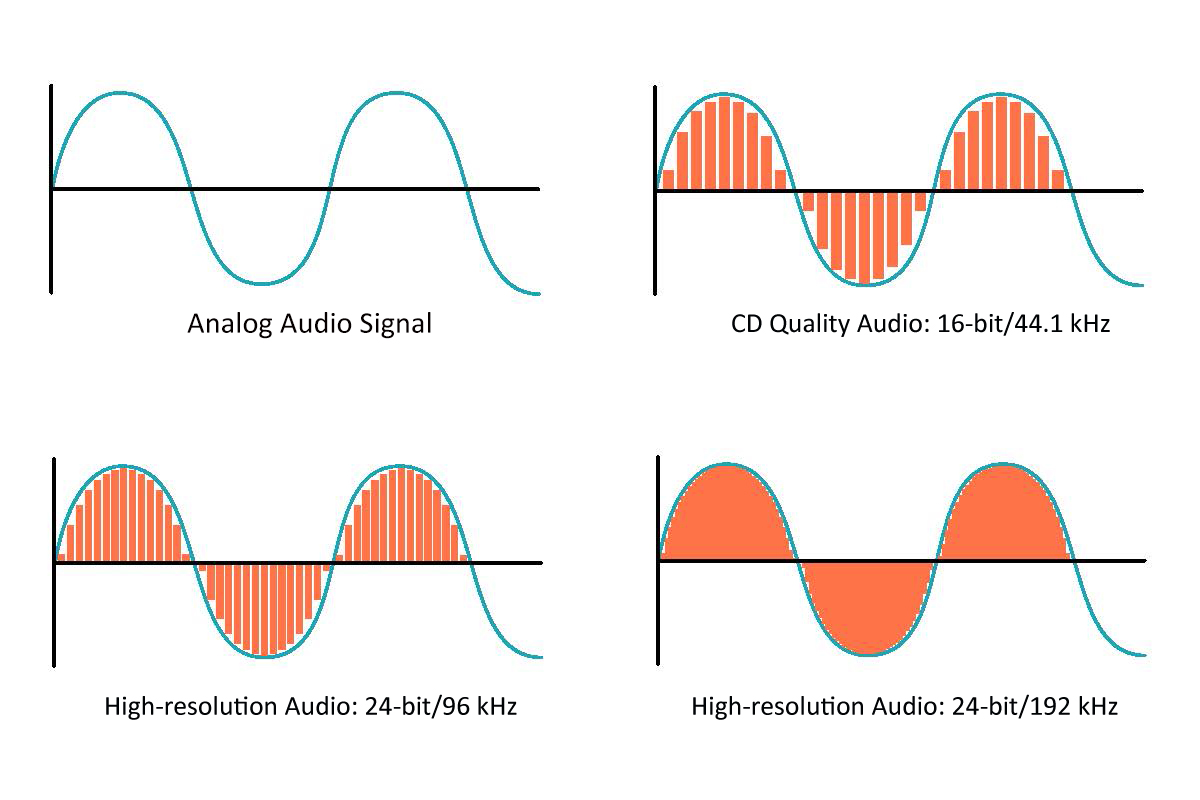
In an analog signal, the voltage changes smoothly over time, the signal is continuous. The digital signal is discrete, its value changes instantly. Furthermore, discretion is manifested in both frequency and amplitude region. Any change in signal value is sampled, and as a result, the values ​​are rounded to the nearest whole number.


Free Download Mp4Gain
picture


Mp4Gain Main Window
picture


Mp4Gain Features
picture


Free Download Mp4Gain
picture

Audio encoding: secrets revealed

Audio encoding: secrets revealed

audio encoding

Audio settings for video capture and transmission.
As people directly related to the AV sphere, we constantly talk about audio coding and audio codecs, but what is it?

Audio Encoding

An audio codec is essentially a device or algorithm that can encode and decode a digital audio signal.

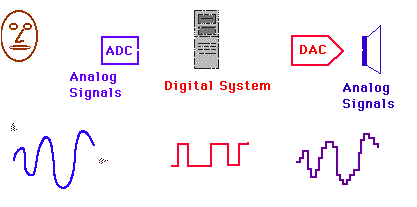
In practice, the audio waves that are transmitted over the air are continuous analog signals. The signals are converted to digital format by a device called an analog-to-digital converter (ADC), and the reverse conversion device is called a digital-to-analog converter (DAC). The codec is located between these two functions and it is it that allows you to adjust some important parameters for the successful capture, recording and transmission of an audio signal: codec algorithm, sample rate, bit depth and data transfer rate.

The three most popular audio codecs are Pulse-Code Modulation (PCM), MP3, and Advanced Audio Coding (AAC). The choice of codec determines the compression rate and the recording quality. PCM is a codec used by computers, CDs, digital phones, and sometimes SACD. The source of the PCM signal is sampled at regular intervals, and each sample is the digital magnitude of the analog signal. PCM is the simplest option for digitizing an analog signal.

With the correct parameters, this digitized signal can be completely converted back to analog without any loss. Unfortunately, this codec, which provides almost complete identity with the original audio, is not very cheap, which results in large files, and these files are not suitable for streaming. We recommend using PCM to record digital images for your sources or when doing audio post-processing.

Fortunately, we always have the option of choosing a different codec that can compress digital data (compared to PCM) based on some helpful observations on the behavior of sound waves. But in this case, you have to make a compromise: all alternative algorithms are associated with “losses”, since it is impossible to completely restore the original signal, but nevertheless the result is so good that most users will not be able to notice the difference.

MP3 is an audio encoding format that uses a digital data compression algorithm that allows you to save the audio signal in smaller files. The MP3 codec is the most used by users to record and store music files. We recommend using MP3 to stream audio content as it requires less network bandwidth.

AAC is a newer audio encoding algorithm that is the successor to MP3. AAC has become the standard for MPEG-2 and MPEG-4 formats. In fact, this is also a digital data compression codec, but with less quality loss than MP3, when encoded with the same bit rate. We recommend using this codec for online streaming.

Sampling frequency (kHz, kHz)
Sample rate (or sample rate): the frequency with which the signal is digitized, stored, processed, or converted from analog to digital. Time sampling means that the signal is represented by a number of its samples (samples) taken at regular intervals.

Measured in hertz (Hz, Hz) or kilohertz (kHz, kHz,) 1 kHz equals 1000 Hz. For example, 44100 samples per second can be labeled 44100 Hz or 44.1 kHz. The selected sample rate will determine the maximum playback frequency and, as follows from Kotelnikov’s theorem, to fully restore the original signal, the sample rate must be twice the highest frequency in the signal spectrum.

As you know, the human ear can pick up frequencies between 20 Hz and 20 kHz. Given these parameters and the values ​​shown in the table below, you can understand why 44.1 kHz was chosen as the sampling frequency for CD and is still considered a very good frequency for recording.

High-quality audio sound

High-quality audio sound

High Quality Audio

In recent years, there has been a steady rise in interest in High Definition Audio (HDA).

HIGH QUALITY AUDIO

AVR is gradually becoming a major trend in the audiophile and professional audio markets. The introduction of new formats and the improvement of their processing technologies, together with the growth in the volume of content delivery over the Internet, as well as significant efforts by the industry to make ABP the main format, indicate a interesting and promising future for the next few years. The High Resolution Audio Technical Committee supports seminars, discussions and the publication of guidance materials that highlight key aspects of ATS development for the benefit of the entire AES community.

NEW AVR FORMATS

Most notable in the last two years has been the emergence and rapid expansion of the use of DSD as a standalone encoding and distribution format for audio content. DSD is a name coined by Sony and Philips to indicate a one-bit format based on a sigma-delta transform that, along with appropriate processing, is used to store and transmit data associated with the production of SACD. Along with the original DSD 64 Fs format (64 x 44.1 kHz or 2.8224 MHz), higher sampling formats are now used: 128 F and 256 F. The main advantage of using higher frequencies is the region shift noise, which appears due to the transformation of the dynamic range in sigma-delta converters, well beyond the audible frequency range (> 60 kHz), as well as a decrease in the quantization noise level in the audio range compared with 64 Fs format. … DSD is considered to sound cleaner and more transparent at higher sample rates.

The DSD format is also related to the DXD format, the name of which is used to denote 352.8 kHz / 24 dB PCM signals, which is supported by Merging Technologies, which proposed it as an intermediate stage in obtaining DSD. Since digital processing of a single bit stream is difficult when preparing an audio recording, it is generally pre-converted to a PCM signal with a high sample rate. Some recording engineers are using DXD not only as an intermediate stage, but as a primary recording format for later release as DSD, or as an intermediate format between recording and release in DSD format, or perhaps in the future as a format. PCM 352. 8 kHz for audio release.

This trend toward higher sample rates in PCM and DSD formats is supported by consumer and professional equipment manufacturing. Many modern DACs and ADCs can handle PCM and DSD formats. New converters, software and even handheld devices increasingly support a variety of PCM signals from the CD level (44.1 kHz / 16 dB) to 384 kHz / 32 dB and DSD 256 Fs, while the industry continues to explore how and the degree of consumer interest in these formats. Most manufacturers have adopted an open standard for packaging DSD signals in PCM frames, known as DoP *, to facilitate DSD transfer over USB, as well as AES and SPDIF.

IMPROVEMENTS IN CONVERTERS, FILTERS AND SIGNAL PROCESSING

While high-quality sound has always been sought to find problem areas that lead to degradation associated with the processing and filtering of a digital music signal, increasingly higher resolution is becoming both the result and the driving force. of this search. High-end converter manufacturers are making efforts to address the inherent disadvantages of the higher sampling and multi-bit sigma-delta converters that are almost universally used in PCM DACs. Modernization methods include replacing microcircuits with FPGAs, increasing the sample rate in a computer, designing special filters, including filters with a minimum phase, increasing the value of bit depth during signal processing up to 64 bits with floating point and higher, using the original sigma-delta decimation and modulation schemes. Various chipmakers have developed better chips using the above techniques, improved noise shaping, jitter control, timing, and decoupling performance. These microcircuits are increasingly appearing in new ATS-compatible devices.

Audio codec

Audio codec

Audio Codec

Software codec

AUDIO CODEC

A software level audio codec is a specialized computer program, a codec that compresses (compresses) or decompresses (decompresses) digital audio data according to an audio file format or streaming audio format. The task of an audio codec as a compressor is to provide an audio signal with a certain quality / precision and the smallest possible size. Compression reduces the amount of space required to store audio data, and it is also possible to reduce the bandwidth of the channel through which the audio data is transmitted. Most audio codecs are implemented as software libraries that interact with one or more audio players such as QuickTime Player, XMMS, Winamp, VLC Media Player, MPlayer, or Windows Media Player.

Popular software audio codecs by application:

MPEG-1 Layer III (MP3): a proprietary audio codec (music, audiobooks, etc.) for computers and digital players
Advanced Audio Codec (AAC) – The second most common proprietary codec, positioned as an alternative to MP3. Most popular along with H.264 (AVC) video codec received in online video (eg flash video on YouTube)
Ogg Vorbis (OGG) is a free codec widely used in computer games and file-sharing networks to transfer music.
Free Lossless Audio Codec (FLAC) is a free codec that uses lossless compression. Alternative and less common lossless codecs: WavPack (WV), Monkey’s Audio (APE), etc.
GSM-FR is the first digital voice coding standard used in GSM phones
Adaptive multi rate (AMR): human voice recording on mobile phones and other mobile devices
G.723.1: one of the basic codecs for IP telephony applications
G.729 is a proprietary narrowband codec used to digitally represent speech
Internet Low Bit Rate Codec (iLBC) – A popular free codec for IP telephony (in particular for Skype and Google Talk)

Hardware codec
Realtek ALC 882 HD audio codec chip on motherboard
A hardware audio codec refers to a separate chip that encodes and decodes an analog audio signal into a digital signal and vice versa using analog-to-digital and digital-to-analog converters. Digital-to-analog conversion occurs when the computer sends sound to external speakers, and analog-to-digital conversion occurs when sound enters the computer from outside.

The audio codec is the main, but not always the only, component of a sound card. It is an intermediate link, an interface between analog ports to receive and transmit sound and digital sound processing units

In massive onboard sound cards on motherboards, the audio codec actually represents the entire sound card: it converts the analog signal received from the connectors into digital and transmits it to the south bridge of the motherboard, from where the sound digital goes to the central processor. This technology for processing digital audio in a central processor is called host signal processing.

In discrete sound cards connected to the motherboard, the audio codec performs the same function as in the integrated ones, but after digitization it transmits the audio signal not to the central processor, but to an audio processing and control chip special, also located on the sound card.

An audio codec chip is typically about 7mm², and in the case of an integrated sound card, it is typically located near the back of the motherboard. The main manufacturers of hardware audio codecs are Realtek, VIA Technologies, C-Media, Intel, and Analog Devices.

Is the digital signal distorted during transmission and storage?

Is the digital signal distorted during transmission and storage?

DIGITAL AUDIO

Since any digital signal is represented as a real voltage or current electrical curve, its shape is distorted in one way or another during any transmission, and a signal “frozen” for storage (signalogram) is subject to degradation due to physical reasons. common.

Digital Audio

All of these influences on the shape of the carrier signal are interferences that, up to a certain value, do not change the information content of the signal, since individual distortions and letter loss in words generally do not interfere with the correct understanding of words. words, and information redundancy, such as an increase in the length of the words, increases the probability of successful recognition. … In other words, the carrier signal itself can be distorted, but the information it carries, the encoded audio signal, remains unchanged in the vast majority of cases.

So that the quality of the carrier signal does not deteriorate, any transmission of useful audio information (copying, writing to a carrier and reading it) must necessarily include the operation of restoring the form of the carrier signal, and ideally, and the digital form primary of the information signal, and only after that the newly generated carrier signal can be transmitted to the next consumer. In the case of direct copy without restoration (for example, simply rewriting a video cassette with a digital signal obtained with a PCM decoder in common VCRs), the quality of the digital signal deteriorates, although it still contains all the information it carries. However, after repeated sequential copies or long-term storage, the quality deteriorates so much that unrecoverable errors begin to appear that irreversibly distort the information carried by the signal. Therefore, the copying and transmission of digital signals should be done only on digital devices and, when stored on media, should be “updated” in a timely manner without waiting for irreversible degradation (for magnetic media, this period is estimated to be several years ). A correctly transmitted or updated digital signallogram does not lose quality and can be copied and exist forever in absolutely unaltered form. without waiting for irreversible degradation (for magnetic carriers this period is estimated to be several years). A correctly transmitted or updated digital signallogram does not lose quality and can be copied and exist forever in absolutely unaltered form. without waiting for irreversible degradation (for magnetic carriers this period is estimated to be several years). A correctly transmitted or updated digital signallogram does not lose quality and can be copied and exist forever in absolutely unaltered form.

However, it should not be forgotten that the correctness of any code is finite, and the actual carriers are far from ideal, therefore the occurrence of unrecoverable errors is such a rare thing, especially with careless handling of the carrier. When reading new and correctly stored DAT cassettes or CDs on high-quality and reliable devices, these errors practically do not occur, however, with aging, contamination and damage of media and reading systems, they become more. A single uncorrected error is almost always invisible to the ear due to interpolation, however, it leads to distortion of the original sound signal, and the accumulation of such errors over time begins to be felt in the ear.

A separate problem is the difficulty of recording uncorrected errors, as well as verifying the identity of the original and the copy. Very often, designers of digital audio devices operating in real time do not care about the issue of accurate verification of the reliability of the transmission, considering that the measures taken to correct the errors are sufficient. In the general case, the impossibility of retransmitting an erroneous sample or block leads to interpolation occurring secretly and after copying it is impossible to say with certainty whether the original signal was copied exactly. Error indicators, which are found on some devices, usually light up only at the moment of their appearance, and in the case of single errors, their operation can easily go unnoticed. Even in personal computer-based systems, it is often impossible to control the accuracy of reception through a digital interface or direct reading from a CD; the only way out is to repeat the operation and compare the results.

Is there an advantage of SCSI over IDE for digital recording?

Is there an advantage of SCSI over IDE for digital recording?

SCSI

There is a widespread belief among audio workstation users, both at home and in the studio, that only SCSI drives can provide the required performance.

SCSI

However, despite a number of obvious advantages of SCSI, most of the professional workstations on the IBM PC can easily work with IDE disks. The read / write speed of typical IDE disk models today (late 1998) is in the 6-10 Mb / s level with a seek time of approximately 8-10 ms, which is equivalent to the same typical SCSI models (not high-end).

Such a hard disk can easily cope with the simultaneous reading of 16-bit audio data in 20-30 audio channels at a sample rate of 48 kHz and slightly less data in the case of recording. Another thing is that in the case of SCSI, its internal optimization (ordering requests to minimize head movement in SCSI-2) often masks the suboptimal performance of the operating system and sound program, and to achieve this level, an IDE may require a good operating system driver and a well-made program (eg DDClip).

The reasons for the dislike of many users for IDE disks are due to the fact that they generally find these disks in cheap, poorly assembled and tested average power computers consisting of varied components that are often poorly compatible with each other. In contrast, SCSI drives are often installed in more powerful and expensive models that contain components from “respected” manufacturers, more carefully assembled and tested. Replacing the SCSI disk in the second version with an IDE disk of approximately the same performance and assembling / configuring the system with the characteristics of IDE in mind in many cases will not have a noticeable effect on its performance.

Why are AV hard drives used in digital recording?

The class of AV (Audio / Video) hard drives stands for their ability to record and read streams of data extremely smoothly, without gaps. These disks are equipped with a larger internal buffer and do not interrupt the read / write process through thermal calibration of the positioning system. For digital recording systems that lack the speed and RAM capacity to smooth out potential irregularities in performance of conventional discs, AV discs are the only option.

It should be noted that the presence of the abbreviation AV in the designation of the disc does not mean that it belongs to the Audio / Video class; this must be clearly mentioned in the disc’s passport.

However, this feature is generally needed only when working with high-quality video information, the reception rate of which is approximately 10 megabytes per second per channel. For sound systems, the speed of a single channel 16-bit stream with a sample rate of 48 kHz is two orders of magnitude lower, amounting to just 94 kilobytes per second. At the same time, almost no workstation is capable of providing simultaneous work with hundreds of channels, just as a hard disk cannot simultaneously process such a large amount of data located in different parts of it. In real multi-channel recording applications to a disc, most of the overhead of the disc subsystem falls on the movement of the heads between the recording sections and in no way on the data transfer itself. The low speed of audio streams makes it more convenient and reliable to store them in the computer’s RAM, which compensates for the thermal calibration of the disk within 0.5 – 1 s, instead of using expensive and rare AV-class disks . Furthermore, thermal calibration does not have a noticeable effect on the uniformity of the data stream on not all conventional disks.

“Irregular” data transfer can also occur when using the “wrong” operating system (DOS, Windows without a 32-bit disk driver, etc.), insufficient number and size of operating system file buffers and the recording program, using low-class drives with a transfer rate of the order of 1-2 megabytes per second or less, wrong disk connection, etc. In either case, these situations usually indicate an incorrect configuration of the system hardware and software.

What is a digital audio workstation?

What is a digital audio workstation?

DAW

The Digital Audio Workstation (DAW) is a specialized or general-purpose computer system capable of recording, storing, reproducing, and processing digital audio. Specialized systems are exclusively focused on working with digital sound and are produced in a full version, allowing only limited expansion, or not at all. Universal systems represent an ordinary personal computer equipped with means for audio input / output (DAC / ADC and / or digital interfaces) and a set of programs for its recording, playback and processing. In addition, the station may contain other components, for example, digital processing hardware modules, music synthesizers, CD recorders, etc.

DAW

Since any computer system is a major source of high-frequency interference, there are problems with achieving professional sound quality when using the built-in ADC / DAC. In such cases, it is preferable to use external ADC / DAC modules that provide and receive digital information in real time via universal or proprietary digital interfaces.

What hard drives are used in workstations?

Most specialized workstations use SCSI (Small Computer System Interface) hard drives to store sound, which have become a universal standard; Any popular computer system has the ability to connect these disks. The advantages of SCSI are universality among all computer systems, the ability to connect up to seven devices (any, not just a disk) to one controller, good arbitrage in the competition between devices, the intelligence of each device, higher quality general performance, the ability to use an interface for direct communication between two stations. … Disadvantages of SCSI include the high cost of interfaces and disks and the limited range of models available.

In computers like IBM PC, hard drives with an IDE (Integrated Drive Electronics) interface are more popular, which have not been widely used in other systems. The advantages of IDE disks are simplicity, good performance, not inferior to most SCSI disks, and in some cases superior to them, low cost, mass production, a wide range of models. Disadvantages: poor performance and reliability of lower class models, the ability to connect only two units to one controller, the impossibility of direct connection of two stations, often the worst support of controllers for operating systems.

How is digital audio processing done?

How is digital audio processing done?

Audio Processing

Digital audio is processed by mathematical operations applied to individual samples of a signal, or to groups of samples of different lengths.

Audio processing

The mathematical operations performed can simulate the work of traditional means of analog processing (mixing of two signals – sum, amplification / attenuation of a signal – multiplication by a constant, modulation – multiplication by a function, etc.), or use alternative methods – for example, decomposition of a signal into a spectrum (Fourier series), correction of individual frequency components, then inverse “assembly” of the signal from the spectrum.

Digital signal processing is subdivided into linear (in real time, on a “live” signal) and non-linear, on a pre-recorded signal. Linear processing requires sufficient speed from the computer system (processor); in some cases it is impossible to combine the required performance and quality, and then simplified processing with reduced quality is used. Non-linear processing is not limited in time, therefore computing facilities of any power can be used and the processing time, especially with high quality, can reach several minutes or even hours.

For processing, both general-purpose processors (Intel 8035, 8051, 80×86, Motorola 68xxx, SPARC) and specialized digital signal processors (Digital Signal Processors, DSP) are used Texas Instruments TMS xxx, Motorola 56xxx, Analog Devices ADSP- xxxx, etc.

The difference between a general-purpose processor and a DSP is that the former focuses on a wide class of tasks: scientific, economic, logical, gaming, etc., and contains a large set of general-purpose instructions, in which common mathematical and logical operations prevail. DSPs are especially focused on signal processing and contain sets of specific operations: limiting addition, vector multiplication, calculation of mathematical series, etc. Implementing even simple audio processing on a universal processor requires significant performance and is far from always possible in real time, whereas even simple DSPs often cope with relatively complex real-time processing, and DSPs powerful are capable of processing high-quality spectrals of several signals at the same time.

Due to their specialization, DSPs are rarely used independently; Most of the time, the processing device has a universal average power processor to control the entire device, receive / transmit information, interact with the user, and one or more DSPs to process the audio signal. For example, to implement reliable and fast signal processing in computer systems, specialized boards with DSP are used, through which the processed signal is passed, while the central processor of the computer has only control and transmission functions. .

What formats are used to represent digital audio?

What formats are used to represent digital audio?

Audio Formats

The format is used in two different ways.

Digital Audio Formats

When using a specialized medium or recording method and special read / write devices, the concept of format includes both physical characteristics of a sound carrier: the dimensions of a cassette with a magnetic tape or disk, the tape itself, or a disc, recording method, signal parameters, encoding and error protection principles, etc. .P. When using a universal information medium of wide application, for example, a flexible computer or a hard disk, the format is understood only as a method of encoding a digital signal, the peculiarities of the arrangement of bits and words and the structure of service information; all the “low-level” part directly related to working with the media, in this case, remains under the control of the computer and its operating system.

Of the specialized digital audio formats and media, the following are the best known today:

CD (Compact Disc) is a 120mm or 90mm single sided optical laser read / write disc, containing a maximum of 74 minutes of stereo sound at 44.1 kHz sampling rate and 16 linear quantization bits. The system is offered by Sony and Philips and is called CD-DA (Compact Disc – Digital Audio). For error protection, Cross Interleaved Reed-Solomon code (CIRC) and Hamming code 8-14 modulation (Eight to Fourteen Modulation, EFM) are used. A distinction is made between stamped compact discs (CD) write-only (CD-R) and rewritable (CD-RW).
PCM decoder (PCM deck): a system for converting the digital audio signal into a pseudo-video signal compatible with popular video formats (NTSC, PAL / SECAM) and vice versa. PCM decoders are used in combination with home (VHS) or studio (S-VHS, Beta, U-Matic) VCRs, using them as read / write devices. The devices operate with 16-bit linear quantization at sample rates of 44.056 kHz (NTSC) and 44.1 kHz (PAL / SECAM) and can record a two- or four-channel digital signal. In fact, such a decoder is a modem (modulator-demodulator) for a video signal.
S-DAT (Fixed Head Digital Audio Tape – Fixed Head Digital Audio Tape) is a system similar to a conventional cassette recorder, in which recording and reading is performed by a block of thin film fixed heads in a 3.81 mm wide tape in a double-sided cassette with dimensions of 86 x 55.5 x 9.5 mm. It implements two- or four-channel 16-bit recording at 32, 44.1, and 48 kHz.
R-DAT (Rotating Head Digital Audio Tape) is a VCR-like system with cross-tilted rotating head recording. The most popular tape-based digital recording format, R-DAT systems are often referred to simply as DAT. The R-DAT uses a 73 x 54 x 10.5mm cassette, with a 3.81mm wide tape, and the cassette and tape system itself is very similar to a typical VCR. The basic belt speed is 8.15mm / s, the rotation speed of the main unit is 2000rpm. R-DAT operates with a two-channel signal (on some models, four channels) at sample rates of 44.1 and 48 kHz with 16-bit linear quantization and 32 kHz with 12-bit non-linear quantization. To guard against errors, a double Reed-Solomon code and modulation with an 8-10 code are used. Cassette capacity – 80. .240 minutes depending on speed and belt length. Domestic DAT recorders are usually equipped with a phonogram illegal copy protection system, which does not allow recording from the analog input at a frequency of 44.1 kHz, as well as direct digital copying in the presence of SCMS prohibition codes (Serial Code Managenent System). Studio tape recorders have no such restrictions.
DASH (Digital Audio Stationary Head) is a 6.3 and 12.7 mm wide magnetic tape recording system with fixed heads. Belt speed is 19.05, 38.1, 76.2 cm / sec. Implements 16-bit recording with sample rates of 44.056, 44.1 and 48 kHz from 2 to 48 channels.
ADAT (Alesis DAT) is a proprietary system for recording eight-channel audio on S-VHS videotape, developed by Alesis. It uses linear quantization of 16 bits at 48 kHz, the capacity of the cassette is up to 60 minutes per channel. ADAT tape recorders can be cascaded so that a 128-channel synchronous recording system can be assembled.

What methods are used to effectively compress digital audio?

What methods are used to effectively compress digital audio?

Digital audio Compresssion

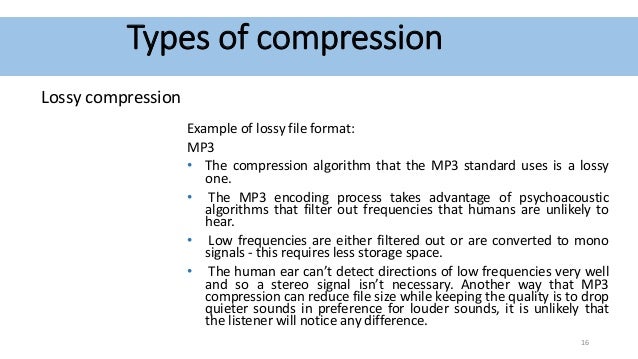
Currently, the most famous are Audio MPEG, PASC and ATRAC. All use the so-called “perception coding” (perceptual coding), in which information that is barely perceived by the ear is removed from the sound signal.

Audio compression

As a result, despite the change in the shape and spectrum of the signal, your hearing perception is practically unchanged and the compression ratio justifies a slight decrease in quality. Such encoding refers to lossy compression methods, when it is no longer possible to accurately restore the original waveform from the compressed signal.

Techniques to remove some of the information are based on a characteristic of human hearing, called masking: if there are pronounced peaks (dominant harmonics) in the sound spectrum, the weakest frequency components in the immediate vicinity of them are practically not perceived (masked) by ear. During encoding, the entire audio stream is divided into small frames, each of which is converted into a spectral representation and divided into several frequency bands. Within bands, masked sounds are detected and removed, after which each frame undergoes adaptive coding directly in spectral form. All these operations make it possible to significantly reduce (several times) the amount of data while maintaining the quality acceptable to most listeners.

Each of the described encoding methods is characterized by the bit rate at which the compressed information must enter the decoder when the audio signal is recovered. The decoder converts a series of compressed instantaneous signal spectra into a conventional digital waveform.

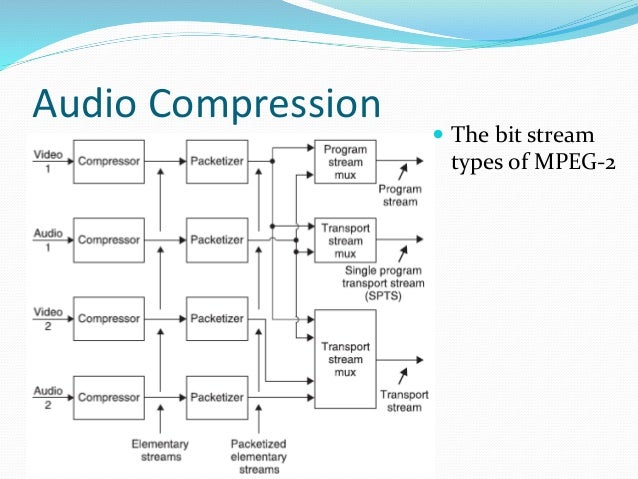
Audio MPEG is a group of audio compression techniques standardized by MPEG (Moving Pictures Experts Group). MPEG audio methods come in various types: MPEG-1, MPEG-2, etc .; currently the most common type is MPEG-1.

There are three layers of MPEG-1 audio to compress stereo signals:

1 – 1: 4 compression ratio with a data stream of 384 kbps;
2-1: 6..1: 8 at 256..192 kbps;
3 – 1: 10..1: 12 at 128..112 kbps.
The minimum data rate at each layer is defined as 32 kbps; the specified bit rates keep the signal quality close to that of a CD.

All three layers use a frame input spectral transform divided into 32 frequency bands. The most optimal level in terms of data volume and sound quality is recognized as level 3 with a bit rate of 128 kbps and a data density of approximately 1 Mb / min. When compressing at lower speeds, the forced limiting of the frequency band to 15-16 kHz begins, and phase distortions of the channels also appear (effect like a phaser or flanger).

MPEG audio is used in computer sound systems, CD-i / DVD, “audio” CD-ROM, digital radio / television, and other mass audio transmission systems.

PASC (Precision Adaptive Sub-Band Coding) is a special case of Audio MPEG-1 Layer 1 with a bit rate of 384 kbps (1: 4 compression). Used in the DCC system.

ATRAC (Adaptive TRansform Acoustic Coding) is based on a stereo audio format with 16-bit quantization and a sample rate of 44.1 kHz. When compressed, each frame is divided into 52 frequency bands, resulting in a transmission rate of 292 kbps (1: 5 compression). Used in MiniDisk system.