Adaptive Audio Streaming


Free Download Mp4Gain
picture

Adaptive Audio Streaming

Adaptive Audio Streaming

Adaptive audio streaming, a critical aspect of modern digital media delivery, has revolutionized how we experience audio content. In this comprehensive guide, I will delve into the intricacies of adaptive audio streaming and its significance in providing top-notch streaming audio quality.

Understanding Adaptive Audio Streaming

Adaptive audio streaming is a dynamic approach that optimizes audio quality based on the viewer’s network conditions. It ensures a seamless audio experience by adjusting the audio codec’s parameters and the bitrate of the audio stream in real-time. This adaptation is vital to prevent audio interruptions, buffering, and loss of quality, especially in the ever-changing world of online content delivery.

Imagine a journey on a highway where the traffic flow constantly changes. Adaptive streaming is like having a smart vehicle that adjusts its speed to maintain a smooth ride. Similarly, when your internet connection fluctuates, adaptive audio streaming adapts the audio quality to ensure you experience a continuous, high-quality audio stream.

The Science Behind Streaming Audio Quality

To grasp the science behind adaptive audio streaming, let’s explore some of the key technical aspects. Adaptive streaming relies on efficient audio codecs that compress and decompress audio data. These codecs use various algorithms to reduce the size of audio files while preserving audio quality. The choice of codec and its efficiency play a significant role in determining the quality of the audio stream.

In a real-world analogy, think of audio codecs as skilled chefs preparing a sumptuous dish. A masterful chef knows how to retain the flavors while reducing the dish’s size, making it easier to serve. Likewise, efficient audio codecs preserve the audio’s fidelity while making it compatible with varying network conditions.

The Impact of Latency in Audio Streaming

Latency, the delay between audio production and playback, is a crucial factor in adaptive audio streaming. While some latency is inevitable due to data transmission and codec processing, excessive latency can disrupt the streaming experience. Adaptive streaming technologies aim to strike a balance between audio quality and latency.

Think of latency as the time it takes for a letter to reach its destination through traditional mail compared to email. Adaptive audio streaming ensures the audio reaches your ears with minimal delay, akin to the swift delivery of an email. This balance is essential for real-time applications like online gaming or live broadcasts, where low latency is a top priority.

Now, let’s address the questions that often arise regarding adaptive audio streaming:

How Does Adaptive Bitrate Streaming Work?

Adaptive bitrate streaming, a close sibling to adaptive audio streaming, involves adjusting not only the audio quality but also the video quality based on network conditions. It works by dividing the audio and video content into small chunks of data and delivering them in varying quality levels. Players then choose the best quality for a seamless viewing experience.

What Technologies Drive Adaptive Audio Streaming?

Adaptive audio streaming leverages several technologies, including HTTP Live Streaming (HLS), Dynamic Adaptive Streaming over HTTP (DASH), and Real-Time Messaging Protocol (RTMP). These technologies enable adaptive streaming by optimizing content delivery over the internet, ensuring that audio quality remains consistent across different devices and network conditions.

Why Is Mobile Audio Streaming Challenging?

Mobile audio streaming presents unique challenges due to the variability of cellular networks and the limited processing power of mobile devices. Adaptive audio streaming is particularly crucial in this context, as it ensures a smooth listening experience, even when on the move. It’s like having an audio companion that adjusts to your surroundings, providing uninterrupted music or podcasts as you travel.

Last Words about Adaptive Audio Streaming

In the era of digital media, adaptive audio streaming is the unsung hero that ensures you enjoy a high-quality audio experience regardless of your network conditions. I’ve shared my knowledge and expertise on this topic, revealing the science behind streaming audio quality and the role of efficient codecs. Understanding the impact of latency and the technologies driving adaptive streaming is key to appreciating its significance. As an expert in the field, I encourage you to embrace the world of adaptive audio streaming, where your audio content is tailored to your network conditions, just like a perfectly orchestrated symphony.


Free Download Mp4Gain
picture


Mp4Gain Main Window
picture


Mp4Gain Features
picture


Free Download Mp4Gain
picture

Bitrate and the 4K Video Experience

Bitrate and the 4K Video Experience

4K Video
4K Video

Understanding 4K Video Bitrate

4K video, with its stunning resolution, has become a favorite for those seeking the ultimate visual experience. But what about the less-talked-about factor: bitrate? 4K video bitrate is a crucial element that influences the quality of your 4K content. In this article, I’ll explain what 4K video bitrate is, how it affects the 4K video experience, and why optimizing it is vital.

4K video bitrate is essentially the amount of data processed per second to create that beautiful, high-resolution image. It determines the level of detail and clarity you see on your screen. Think of it as the paint a talented artist uses to create a masterpiece—bitrate is the quality of that paint, and it directly affects the visual quality of your 4K video.

How Bitrate Impacts 4K Video Quality

The relationship between bitrate and 4K video quality is straightforward: the higher the bitrate, the better the quality. Higher bitrate means more data is allocated to each frame, resulting in a richer, more detailed image. If the bitrate is too low, you may notice compression artifacts, pixelation, and a loss of detail, which can be jarring in the context of 4K.

Imagine you have a high-definition painting of a scenic landscape. If you view it up close, every brushstroke and detail is clear and vivid—this is akin to high bitrate. On the other hand, if you were to stretch the same painting to cover an entire wall, you might notice pixelation and loss of detail, much like what happens with low bitrate 4K video.

Optimizing Bitrate for a Seamless 4K Experience

To enjoy a seamless 4K video experience, optimizing bitrate is key. Streaming services and platforms aim to find the right balance between image quality and efficient data transmission. As a viewer, you can help by ensuring a stable and high-speed internet connection. Additionally, when creating or encoding 4K content, it’s essential to select an appropriate bitrate setting that aligns with your content’s intended quality.

Think of bitrate optimization as finding the right balance in a recipe. Too much spice can overwhelm the dish, while too little can make it bland. In the world of 4K video, the right bitrate ensures a visually pleasing experience without unnecessary data bloat or loss of quality.

Enhancing the 4K Video Experience

In conclusion, bitrate plays a pivotal role in your 4K video experience. Understanding its importance and finding that sweet spot between quality and efficiency is the key to unlocking the full potential of 4K content. So, whether you’re a content creator or a 4K enthusiast, keep in mind that bitrate is the paintbrush that adds the final strokes to your visual masterpiece.

Last Words

Bitrate and 4K video quality go hand in hand, and with the right knowledge and adjustments, you can enjoy a truly immersive 4K experience.

Bitstream Synchronization

Bitstream Synchronization

Bitstream Synchronization

Understanding Bitstream Synchronization: A Comprehensive Guide

Bitstream Synchronization is a crucial concept in the realm of digital technology and communication. In this article, I will provide you with a comprehensive overview of Bitstream Synchronization, explaining its importance, how it works, and its real-world applications.

Bitstream Synchronization ensures that data is transmitted accurately from sender to receiver, and it plays a pivotal role in various technologies, including telecommunications, data storage, and more. Let’s dive into this fascinating subject.

What Is Bitstream Synchronization?

Bitstream Synchronization is the process of aligning the incoming data stream with the receiver’s clock to ensure proper data extraction. In simpler terms, it’s like syncing two watches to show the same time. In digital communication, data is transmitted in the form of bits (0s and 1s), and precise timing is crucial for error-free reception.

Imagine you’re receiving a stream of water from a hose. To collect the water effectively, you’d need to synchronize your bucket’s position with the water’s flow. Similarly, in digital communication, Bitstream Synchronization ensures that the data is captured accurately by aligning the receiver’s timing with the incoming bits.

How Does Bitstream Synchronization Work?

Bitstream Synchronization involves multiple steps:

Clock Recovery: The receiver extracts the clock signal from the incoming data. This clock signal helps determine the timing of each bit.

Bit Detection: The receiver uses the recovered clock to sample and interpret the incoming bits. It identifies the transitions between 0s and 1s based on the clock’s timing.

Synchronization Adjustment: If there’s a slight timing mismatch between the sender and receiver, synchronization circuits make fine adjustments to ensure the bits are captured accurately.

Think of Bitstream Synchronization as a skilled juggler who adjusts their hand movements to catch balls thrown at varying speeds. It ensures that even if the sender and receiver have slightly different clocks, the data is received correctly.

Real-World Applications

Bitstream Synchronization is essential in various technological applications:

Wireless Communication: In mobile phones and Wi-Fi networks, Bitstream Synchronization helps maintain a stable connection by aligning the receiver’s clock with the transmitter’s clock.

Data Storage: In hard drives and solid-state drives (SSDs), Bitstream Synchronization ensures data is read and written accurately, preventing data corruption.

Digital Broadcasting: Television and radio signals use Bitstream Synchronization to ensure a clear and uninterrupted viewing experience.

Now that we’ve covered the basics of Bitstream Synchronization, let’s delve into the questions you might have about this topic.

Why is Bitstream Synchronization Important?

Bitstream Synchronization is crucial because it ensures the accurate transmission and reception of digital data. Without it, errors can occur, leading to data corruption and communication breakdowns. Imagine sending a text message, and the recipient receives garbled characters instead. Bitstream Synchronization prevents such mishaps.

Can You Explain the Role of Timing in Bitstream Synchronization?

Timing is everything in Bitstream Synchronization. It’s like playing a musical instrument in perfect harmony. The receiver needs to know when to expect each bit, and the sender must transmit them precisely. Any deviation can result in misinterpretation, much like playing a musical note out of tune can disrupt a melody.

What Happens if Bitstream Synchronization Fails?

When Bitstream Synchronization fails, data errors can occur. In practical terms, this could manifest as a dropped call in a phone conversation, distorted video in streaming services, or corrupted files on a computer.

Bitstream Synchronization: Beyond the Basics

Now that we’ve covered the fundamentals, let’s explore some related aspects of Bitstream Synchronization. Understanding these nuances will provide you with a more comprehensive view of this vital concept.

Bitstream Synchronization and Error Correction

Bitstream Synchronization often works in tandem with error correction techniques. It not only aligns the data stream but also helps identify and correct errors that may occur during transmission. Think of it as spell-check for digital data.

The Evolution of Bitstream Synchronization

As technology advances, so does Bitstream Synchronization. Modern systems employ advanced algorithms and hardware to achieve even more precise synchronization, allowing for faster and more reliable data transmission.

Future Applications of Bitstream Synchronization

The importance of Bitstream Synchronization will continue to grow as our reliance on digital communication and data storage increases. Emerging technologies, such as 5G networks and quantum computing, will rely on Bitstream Synchronization for their success.

Last Words

In conclusion, Bitstream Synchronization is the unsung hero of digital communication and data storage. Its role in ensuring the accuracy of data transmission cannot be overstated. Whether you’re making a phone call, streaming a video, or storing files on your computer, Bitstream Synchronization quietly works in the background to make it all possible. As technology continues to evolve, Bitstream Synchronization will remain a critical component of our digital world.

So, the next time you send a message, make a call, or access your data, remember the vital role of Bitstream Synchronization in making it all happen seamlessly.

Bitstream Compression

Understanding Bitstream Compression: Enhancing Data Efficiency

Bitstream Compression


In today’s data-driven world, efficiency is paramount. Whether you’re a tech enthusiast, a professional in the field, or simply curious about data compression, the term “Bitstream Compression” might have piqued your interest. In this article, I’ll delve into the intricacies of Bitstream Compression, providing insights, examples, and technical knowledge to help you grasp its significance and applications.

Bitstream Compression: Unraveling the Concept

Bitstream Compression: A Closer Look

Bitstream Compression is a data compression technique designed to reduce the size of digital data streams. To put it simply, it’s like packing a suitcase efficiently to maximize space. This technology finds applications in various domains, from multimedia transmission to storage devices. Imagine you’re sending a high-definition video over the internet. Bitstream Compression optimizes the data, allowing for smoother transmission without compromising quality.

The Mechanics of Bitstream Compression

How Bitstream Compression Works

Let’s take a closer look at how Bitstream Compression works. Imagine you have a long string of binary data, consisting of 0s and 1s. Think of it as a sequence of beads on a string. Bitstream Compression identifies patterns within this sequence and replaces them with shorter codes, just like using symbols to represent words. This compression process reduces the overall size of the data while retaining essential information. As a result, you save bandwidth and storage space. This technique is analogous to shorthand writing, where complex sentences are expressed with fewer strokes.

Applications of Bitstream Compression

Bitstream Compression in the Real World

Bitstream Compression plays a pivotal role in modern technology. It’s the reason you can stream high-quality videos on your mobile device without constant buffering. Moreover, it’s widely employed in audio codecs like MP3, making it possible to carry your entire music library in your pocket. Beyond entertainment, it’s essential in sectors like medical imaging, where high-resolution images are compressed for efficient storage and transmission.

Optimizing Bitstream Compression

Now, let’s address some common questions that arise regarding Bitstream Compression:

1. How does Bitstream Compression affect data quality?

The Trade-Off Between Compression and Quality

Bitstream Compression aims to reduce data size, but what about quality? Find out how this technique strikes a balance between efficient storage and maintaining data integrity.

2. Where else is Bitstream Compression used besides multimedia?

Bitstream Compression Beyond Entertainment

Explore the diverse applications of Bitstream Compression, from medical imaging to data transmission, and discover how it impacts various industries.

3. Are there different methods of Bitstream Compression?

Exploring Bitstream Compression Techniques

Delve into the world of Bitstream Compression techniques and learn about the various methods used to optimize data streams for different purposes.

4. How can I implement Bitstream Compression in my projects?

Implementing Bitstream Compression: Practical Tips

If you’re considering incorporating Bitstream Compression into your projects, this section provides valuable insights and guidance on getting started.

Last Words

In conclusion, Bitstream Compression is a powerful tool in the digital age, enabling efficient data storage and transmission across a wide range of applications. Understanding its mechanics and applications can empower you to make informed decisions in your tech endeavors. Whether you’re a developer, a content creator, or simply someone curious about the digital world, Bitstream Compression is a concept worth exploring.

Audio Buffering

Audio Buffering: Ensuring Smooth Sound Playback

Audio Buffering
Audio Buffering

In today’s digital age, audio buffering is a crucial aspect of delivering seamless sound experiences across various devices and platforms. Whether you’re streaming music, participating in online meetings, or playing video games, audio buffering plays a significant role in ensuring that you hear clear and uninterrupted audio. In this article, I, as an expert in audio technology, will delve into the world of audio buffering, providing insights, explanations, and practical examples to help you understand its importance and how it works.

Understanding Audio Buffering

Audio buffering is like having a reservoir of sound data ready to be played, ensuring a continuous and smooth listening experience. When you’re watching a movie online or streaming music, the data is delivered in small packets called audio samples. These samples are stored temporarily in a buffer before they are played through your speakers or headphones. The buffer acts as a safeguard against interruptions, allowing your device to compensate for any delays in data transmission.

Imagine your audio buffer as a water tank in your home. The water continuously flows into the tank, and you use water from the tank as needed. If there’s a momentary disruption in the water supply, you can still use water from the tank without noticing the interruption. Similarly, audio buffering ensures that even if there are network fluctuations or data transfer delays, your audio playback remains uninterrupted.

How Audio Buffering Works

Let’s dive a bit deeper into how audio buffering functions. When you start streaming audio, your device begins to fill the audio buffer with small chunks of sound data. These chunks are usually a fraction of a second in duration, but they are filled continuously as you listen. The buffer size and management depend on the software or hardware you’re using.

Think of it as a conveyor belt in a factory. The audio samples are like products on the conveyor belt, and the buffer is the storage area where they temporarily wait before being delivered to your ears. If there’s a hiccup in the production line (e.g., a network lag), the buffer ensures that there’s still enough audio data ready for playback.

The Importance of Buffer Size

Now, let’s discuss the significance of buffer size. The size of the audio buffer affects the delay you experience while listening to audio. A larger buffer can store more data, which reduces the chances of audio dropouts but may introduce some delay. Conversely, a smaller buffer reduces delay but may result in more interruptions if there are data hiccups.

Imagine driving a car on a busy highway. A larger buffer is like keeping a safe distance from the car in front of you, reducing the risk of sudden stops. In contrast, a smaller buffer is like tailgating, which might get you to your destination faster but increases the chances of abrupt stops. Finding the right buffer size depends on the context; for live streaming or online gaming, low latency is crucial, while for offline playback, a larger buffer can ensure smoother playback.

Now, let’s explore some common questions related to audio buffering:

Why Do I Hear Audio Glitches During Online Calls?

Online calls, such as video conferences or VoIP calls, require real-time audio communication. In such scenarios, a small audio buffer is preferred to minimize latency. However, if you hear audio glitches during online calls, it could be due to network issues, insufficient bandwidth, or software problems. Ensuring a stable internet connection and using reliable communication software can help mitigate these glitches.

How Can I Optimize Audio Buffering for Gaming?

Gaming demands both low latency and high audio quality. To optimize audio buffering for gaming, you can tweak the buffer settings in your game or audio software to find the right balance between delay and audio smoothness. Additionally, using a gaming-specific headset with low latency features can enhance your gaming experience.

What Is the Impact of Buffer Size on Music Streaming?

When streaming music, a larger buffer can provide a smoother listening experience, especially in areas with unreliable internet connections. However, it may introduce a slight delay when you start playback. To strike the right balance, music streaming services often adjust buffer sizes dynamically based on network conditions.

How Does Buffering Affect Podcast Playback?

Podcast playback typically involves downloading the entire episode before listening. In this case, buffering isn’t as critical because the audio is preloaded. However, some podcast apps may use small buffers to ensure seamless playback even if your internet connection briefly drops.

Buffering for Video: A Multifaceted Approach

When it comes to video streaming, audio buffering is just one piece of the puzzle. Video and audio synchronization, network performance, and device capabilities also play crucial roles in delivering a smooth viewing experience. The buffer size for video often differs from that of audio to ensure synchronization and minimize lag.

Buffering: The Bridge to Seamless Audio

In conclusion, audio buffering is the unsung hero behind smooth sound playback in our digital lives. Whether you’re binge-watching your favorite series, engaging in a video call, or immersed in a gaming session, understanding how audio buffering works can enhance your overall audio experience. Buffer size and optimization depend on the context, but they all aim to ensure that you hear what you want, when you want it, without interruptions. So, the next time you enjoy your favorite audio content, remember that audio buffering is there, silently working to provide you with a flawless experience.

Last Words

In the realm of audio technology, audio buffering stands as a critical component that often goes unnoticed. It bridges the gap between data transmission and your ears, making sure that your audio experience remains uninterrupted and enjoyable. As an expert in the field, I’ve shared insights and knowledge to demystify audio buffering, helping you grasp its significance and impact on your daily digital interactions. So, the next time you encounter seamless audio playback, you’ll have a deeper appreciation for the role played by this essential technology.

Enhancing Video Format

Enhancing Video Format

Video Format
Video Format
Video Format
Video Format

Exploring Video Format Enhancement

Video format enhancement is a multifaceted process that involves improving the quality, clarity, and overall visual appeal of video content. This enhancement can significantly impact the viewing experience and is crucial for various applications, from filmmaking to online streaming. In this comprehensive guide, we’ll delve deep into the intricacies of video format enhancement, covering everything from the fundamental principles to advanced techniques.

The Importance of Video Quality

Video quality is a paramount consideration in today’s digital age, where video content is ubiquitous across platforms and industries. Whether you’re a content creator, filmmaker, or business owner, the quality of your videos plays a pivotal role in capturing and retaining your audience’s attention.

Enhancing video formats begins with an understanding of the key factors that influence quality. This includes resolution, bit rate, frame rate, and compression techniques. Each of these elements contributes to the overall clarity and visual appeal of your videos.

Resolution: A Deep Dive

Resolution, often expressed in pixels (e.g., 1080p, 4K), is a critical aspect of video format enhancement. It determines the level of detail and sharpness in your videos. Higher resolutions offer more clarity and are especially beneficial for larger screens and cinematic experiences. However, it’s essential to strike a balance between high resolution and file size, as larger files can lead to longer loading times and may not be suitable for all viewing platforms.

Bit Rate and Compression

Bit rate and compression techniques are closely tied to video quality. Bit rate refers to the amount of data transmitted per unit of time, usually measured in megabits per second (Mbps). Higher bit rates result in less compression and better image quality but can lead to larger file sizes. Compression, on the other hand, reduces file size but may sacrifice some image detail.

Finding the right balance between bit rate and compression is a delicate art in video format enhancement. Advanced video codecs like H.265 offer improved compression efficiency, allowing for high-quality videos with reduced file sizes.

Advanced Techniques in Video Enhancement

While understanding the basics of video quality is crucial, true video format enhancement goes beyond resolution and bit rate adjustments. Advanced techniques involve post-production processes that fine-tune video elements for optimal results.

Color Grading and Correction

Color grading is a sophisticated process that involves adjusting the colors and tones in a video to achieve a specific look or mood. It can make a significant difference in the visual appeal of your content. Correcting color imbalances, enhancing contrast, and applying creative color grading techniques can elevate your videos to a professional level.

High Dynamic Range (HDR)

HDR technology enhances the contrast and brightness of videos, resulting in more vivid and lifelike images. It expands the range between the darkest and brightest parts of a video, capturing a broader spectrum of colors and details. HDR is particularly beneficial for creating stunning visuals in films and high-end productions.

Delivering Enhanced Videos to Your Audience

Enhancing video formats is not just about creating stunning visuals; it’s also about ensuring that your audience can enjoy your content seamlessly. As you optimize your video formats, consider compatibility with various devices and platforms, as well as efficient streaming solutions.

Adaptive Streaming

Adaptive streaming is a technique that adjusts video quality in real-time based on the viewer’s internet connection and device capabilities. This ensures smooth playback and a consistent viewing experience, even under varying network conditions. Implementing adaptive streaming protocols like DASH or HLS can enhance the accessibility of your content.

Choosing the Right Format

Lastly, selecting the appropriate video format for your content is essential. Different formats offer various advantages and disadvantages, so it’s crucial to align your choice with your audience’s preferences and the platforms you’ll be using for distribution.

In conclusion, video format enhancement is a multifaceted journey that encompasses resolution, bit rate, compression, color grading, HDR, and delivery methods. By mastering these elements, you can create visually stunning videos that captivate your audience and deliver an exceptional viewing experience. Whether you’re a filmmaker, content creator, or business owner, the art of enhancing video formats can set you apart in today’s digital landscape.

Future Trends in Video Format Enhancement

As technology continues to evolve, the field of video format enhancement is poised for exciting advancements. Understanding these emerging trends can help you stay ahead in the world of video production and distribution.

8K Ultra High Definition (UHD)

While 4K resolution is becoming the new standard, 8K UHD is emerging as the next frontier in video quality. With four times the pixels of 4K, 8K offers unparalleled clarity and detail. Although it’s currently in its early stages of adoption, we can expect to see more 8K content in the future, especially for high-end cinematic experiences.

Immersive Technologies: VR and AR

Virtual Reality (VR) and Augmented Reality (AR) are transforming how we consume video content. These immersive technologies require specialized formats and techniques to create truly captivating experiences. Video format enhancement in VR and AR involves considerations like spatial audio, 360-degree video, and interactive elements, opening up new creative possibilities.

The Importance of Audio Enhancement

While much attention is given to video quality, audio plays an equally crucial role in the overall viewer experience. Audio enhancement techniques, such as spatial audio, surround sound, and noise reduction, complement video format enhancement efforts. These audio enhancements immerse viewers in a more engaging auditory environment.

Spatial Audio for Immersion

Spatial audio technology simulates the three-dimensional soundscapes, creating a more immersive audio experience. Viewers can perceive sounds coming from specific directions, heightening their sense of presence within the content. Incorporating spatial audio into video format enhancement can make a significant difference, especially in VR and AR applications.

Surround Sound for Cinematic Impact

Surround sound systems are a staple in cinemas and high-end home theaters. They create a multi-dimensional audio experience by placing speakers strategically around the viewer. Enhancing video formats to support surround sound can add a cinematic touch to your content, making it more engaging and impactful.

Conclusion

In the ever-evolving landscape of video production and distribution, video format enhancement remains at the forefront. Understanding the intricacies of resolution, bit rate, compression, color grading, HDR, and audio enhancement techniques is essential for creating captivating videos that leave a lasting impression on your audience.

As technology continues to advance, embracing emerging trends like 8K UHD and immersive technologies such as VR and AR will set you apart in the competitive world of multimedia. Remember that video format enhancement is not just about achieving technical excellence; it’s about creating experiences that resonate with viewers and leave a lasting impact.

In this article, we’ve delved deep into the world of video format enhancement, exploring its core principles, advanced techniques, and future trends. Whether you’re a filmmaker, content creator, or simply someone passionate about the world of multimedia, mastering the art of video format enhancement can elevate your creations to new heights.

What is the difference between bit depth and bitrate?

What is the difference between bit depth and bitrate?

Bit Depth
Bit Depth
Bit depth
Bit Depth

Understanding Bit Depth and Bitrate

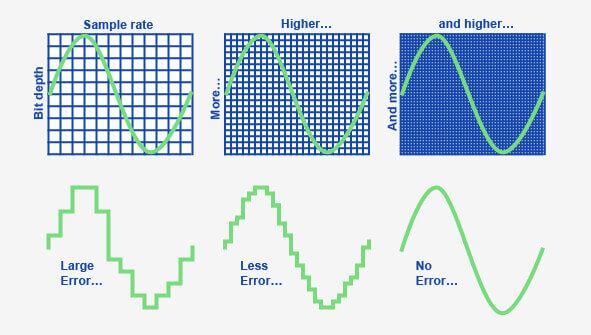
When it comes to audio and video files, there are two terms that are often used interchangeably: bit depth and bitrate. However, they are not the same thing. Bit depth refers to the number of bits used to represent each sample in an audio or video file, while bitrate refers to the amount of data transmitted per second.
Bit depth determines the number of possible values for each sample in a digital audio or video file. For example, an 8-bit audio file can have 256 possible values per sample, while a 16-bit file can have 65,536. The higher the bit depth, the more accurate the representation of the original sound or image.

On the other hand, bitrate refers to the amount of data transmitted per second in a digital file. In other words, it’s the rate at which data is encoded in a file. Higher bitrates typically mean higher quality files with more information, but also larger file sizes.

Audio Bit Depth vs Bitrate

When it comes to audio files, the bit depth and bitrate are both important factors in determining the quality of the sound. A higher bit depth means a more accurate representation of the original sound, while a higher bitrate means more data is transmitted per second, resulting in a higher quality sound.
However, it’s important to note that a higher bitrate does not necessarily mean a higher quality sound. If the original recording is of poor quality, increasing the bitrate will not improve the sound. In fact, it can actually result in larger file sizes with no improvement in sound quality.

Video Bit Depth vs Bitrate

Video files also have bit depth and bitrate, but they work slightly differently than in audio files. Bit depth determines the number of colors that can be represented in a video file, while bitrate determines the amount of data transmitted per second.
A higher bit depth means a wider range of colors can be represented in the video, resulting in a more accurate and vibrant image. However, a higher bitrate is also important for video files, as it determines the amount of detail that can be captured in each frame.

It’s important to find the right balance between bit depth and bitrate for video files, as increasing one can have a negative impact on the other. For example, a high bit depth with a low bitrate can result in a choppy or pixelated image, while a low bit depth with a high bitrate can result in a washed-out or blurry image.

Final Words

In conclusion, bit depth and bitrate are both important factors to consider when working with audio and video files. While they may seem similar, they serve different purposes and have different effects on the quality of the final product. It’s important to find the right balance between the two to ensure the best possible sound or image quality.
Keywords: audio bit depth, video bit depth, bit depth vs bitrate, bitrate definition, bitrate vs quality, audio quality, video quality, digital audio, digital video, file size, data transmission, accuracy, color representation, image quality, sound quality, audio recording, video recording, data encoding, pixelation, file format, media production, sound engineering, video editing, multimedia, digital media, technology, mp4gain, audio normalization, audio conversion, equalizer, windows, digital signal processing, dynamic