What is bit rate? Knowledge of the MP3 audio format.


Free Download Mp4Gain
picture

What is bit rate? Knowledge of the MP3 audio format.

mp3 bit rate

Digital audio formats are audio signals that are recorded, processed, and reproduced in digital form.

Mp3 bit rate

The emergence of digital audio formats is to meet the needs of high-fidelity playback, storage and transmission. Simply put, early analog audio formats had issues with playback distortion and glitches due to media wear. Since the advent of CD discs, audio files in digital format have become popular, but another problem has arisen: the limitation of storage volume and the phenomenon of CD disc wear is still present. Saving to a hard drive (in connection with longer storage time) is also not a good solution when storage media (mainly hard drives) are still expensive at the time. The rise of the Internet has created a requirement for long-distance file transmission. Under the restriction of bandwidth, the demand to reduce file size has become more intense. All this has led to the generation of lossy compressed digital audio formats from external factors!

In terms of internal factors, with the improvement of computing and coding capabilities, the progress of various acoustic psychological models has promoted the emergence of various lossy compressed digital audio formats. Some of the most commonly used audio formats in MP3 players are briefly introduced below: MP3 (CBR, VBR, ABR), WMA, WAV, ADPCM, and the emerging audio formats AAC, ASF, and OGG.

Before introducing various digital audio formats, let’s clarify one concept: bitrate.

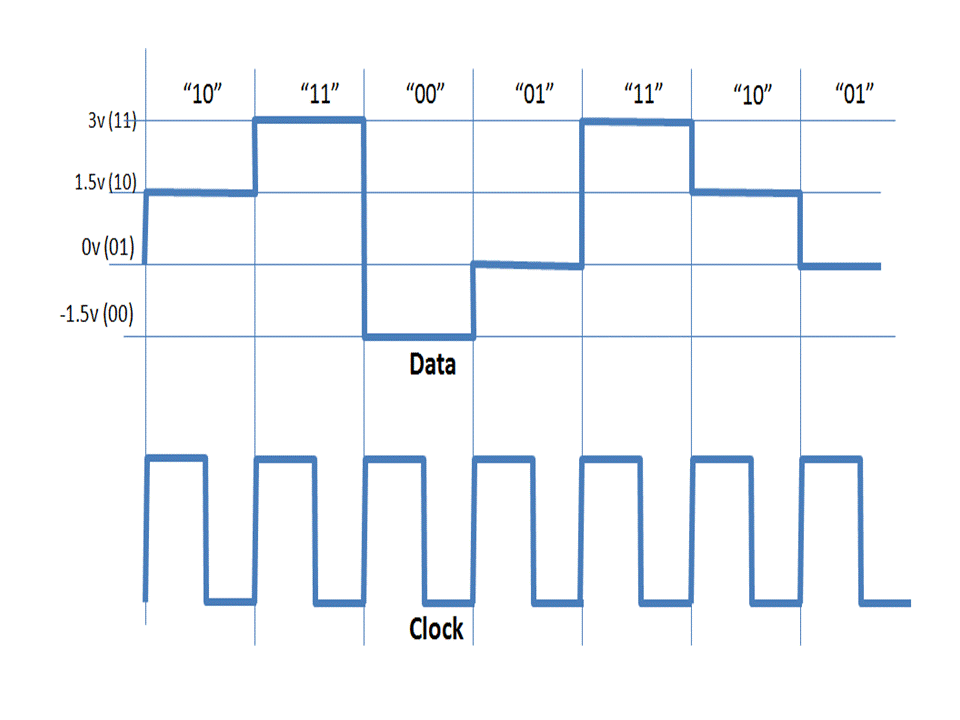
In the field of computing, all information is digitized. Bit is the smallest unit of data in a computer, it refers to a number of 0 or 1, which is a mathematical binary number, a “0” or “1” , is a bit. For example, when we say a 2-digit number, it means that it is a two-digit binary number, and there are 4 combinations of “00”, “01”, “10” and “11”, which represent 0, “11” in decimal respectively. 1, 2 and 3 are four numbers.


Free Download Mp4Gain
picture


Mp4Gain Main Window
picture


Mp4Gain Features
picture


Free Download Mp4Gain
picture

MP3 bitrate types

MP3 bitrate types

Mp3 Bitrate

Bit rate

bitrate

CBR stands for constant bit rate, that is, a constant bit rate that is set by the user and does not change when the part is encoded. Therefore, every second of the part corresponds to the same number of bits of encoded data (even when encoding silence).

VBR stands for variable bit rate, that is, a variable bit rate or variable bit rate that the encoder program dynamically changes during encoding based on the saturation of the audio material being encoded and the encoding quality set by the user (for example, silence is encoded with the minimum bit rate). The downside to this encoding method is that VBR considers the quietest snippets to be “negligible” audio information, so it turns out that if you listen too loud, these snippets will be of poor quality, while CBR makes quiet and loud snippets with the same bit rate …

ABR stands for Average Bit Rate, that is, Average Bit Rate, which is a hybrid of VBR and CBR: the user sets the bit rate in kbit / s and the program varies it, constantly adjusting it to the specified bit. Velocity. Therefore, the codec will be careful to use the maximum and minimum possible bitrate values, as it runs the risk of not conforming to the bitrate specified by the user. This is a clear disadvantage of this method, as it affects the quality of the output file, which will be slightly better than using CBR, but worse than using VBR (with the same file size).

MP3 codecs

The type of programs required to convert file formats. The most common MP3 codecs are:

mp3PRO-codec (uses SBR frequency transform).
LAME codec
fraunhofer-codec

What is bit rate and what is it for?

What is bit rate and what is it for?

bitrate

If you become familiar with the term, you can understand that there is nothing supernatural about it.

Bit-Rate

This value can be found in multi-server settings when people are streaming video and audio.

For example, when making desktop and online converters. To understand how to change the video and audio bitrate, you need to go to a specialized site, where, in principle, more information on how to do it.

Also, it should be borne in mind that you can not do without a special program. It should be used 100 percent and only after that will it be possible to see the result on whether the bit rate has been changed in the video or audio file.

There really is a lot that you can achieve with modern software. What features of the term should I pay attention to? It should be noted that the bit rate is translated exactly as the width of the stream. Basically, it is the amount of information that is transmitted or processed per second of time.

This concept is more related to the multimedia sphere, for example, the video information that can be seen on the screen in one second – this is the bit rate. Among the characteristics are the following: To measure bit rate, one must understand what a kilobit per second is. This is the transmitted information that can be viewed. Thanks to the VideoMaster program, the kilobit can be tracked visually.

A video clip where the low bit rate is one that is low quality in digital format. Also, you can see how the video looks blurry, dull, and pixelated during streaming. At a high quality bit rate, you can see a wide color gamut, as well as hear a high enough quality sound, because the music gamut will be really distinguishable and clear. Varieties include: a constant type of bitrate, variable, averaged.

All of them can be viewed using the VideoMaster program, which directly adjusts the video to every second. Bitrate can be used in the program in any specific situation to remove one second or another from the video, or leave it.

What is the bit rate?

What is the bit rate?

What is bit rate

What is the bit rate? It is difficult to do without this term when we talk about audio and video files. It is not difficult to understand what you need to see behind this term. Even someone who is far from any modern technology.

What is bit rate

First, you need to understand that there is a general principle for compressing and encoding files. For example, MP3 encoding assumes that the original audio file must be cut into chunks, the length of which will be 50 milliseconds. Each of these fragments is analyzed separately to break down into harmonics.

A person perceives the sound with the ear so that it throws out those harmonics that it perceives worse. That is, quieter sounds, when the loudest are heard, you do not perceive them. Therefore, due to the inertia of hearing, a person makes masked sounds. This means that you will not be able to hear any short-term signals that will pass in a fraction of a second, for example for a clap.

Information about the harmonics remaining after filtering is recorded in an MP3 file. It is significantly smaller than the original WAV. A WAV file is a complete repository of information about the original sound, which is digitized and quantized at 44 kHz. The resulting information is stored on normal audio CDs.

When playback is in progress, reverse conversion is performed. That is, the remaining harmonics are transformed back into a sound wave. Some of the information about the original signal is lost because the sound does not match the original. Since insignificant sounds were removed, the human ear does not distinguish the signal from the original. The same as it was before packing in MP3.

This means that the bit rate should be called the amount of information per unit of time. The essence of the bit rate is how much information we can spend on each second of recording. The smaller it is, the smaller the size of the files of the same length in time. This means that it will be necessary to eliminate a greater number of “extra” harmonics.

The higher the bit rate, the larger the file size and the higher its quality. For bit rates, units of measure are provided: kilobits per second (Kbps) and megabits per second (Mbps). The MP3 audio compression algorithm is mainly used with 128 kbps compression.

There are also two types: constants and variables. For example, in video compression, when using a constant bit rate, a fixed amount of data is used to encode one second of a movie. With a variable bit rate, depending on the scene in the movie, the codec sets its own bit rate value.

Bit rate, what is it?

Bit rate, what is it?

Bit Rate

as a feature of digital audio and video

Bit rate

Bitrate: literally, the information bit rate. It is common to use the bit rate when measuring the effective information transmission rate through the channel, that is, the “payload” transmission rate (in addition to that, the channel can transmit service information, for example, start and stop symbols for asynchronous transmission or control symbols for redundant coding). The baud rate, which takes into account the total bandwidth of the channel, is measured in baud.

Bit rate is the number of units of information required to store (transmit) one second of a stream of data (generally audio and video files). It is generally measured in ‘kbps’, kilobits per second.

The term bit rate is used in two basic meanings
: channel or device characteristic: the maximum number of bits that can be transmitted per unit of time.
– The size of the data stream transmitted in real time (the minimum size of the channel that can pass this stream without delay).
– A special case is the compressed video or audio bit rate.
Bitrate is expressed in bits per second (bit / s, bps), as well as values ​​derived with the prefixes kilo, mega, etc.

The term bit rate (in conjunction with subjective quality criteria) is often used as a characteristic to evaluate the performance of lossy compression algorithms.

Bitrate characterizes both the density of the information package and its quality. For example, out of two MP3 files compressed with different bit rates, a file with a higher bit rate will have higher sound quality (close to the original). At the same time, a file of a different format, with the same bit rate, can offer both better and worse sound quality.

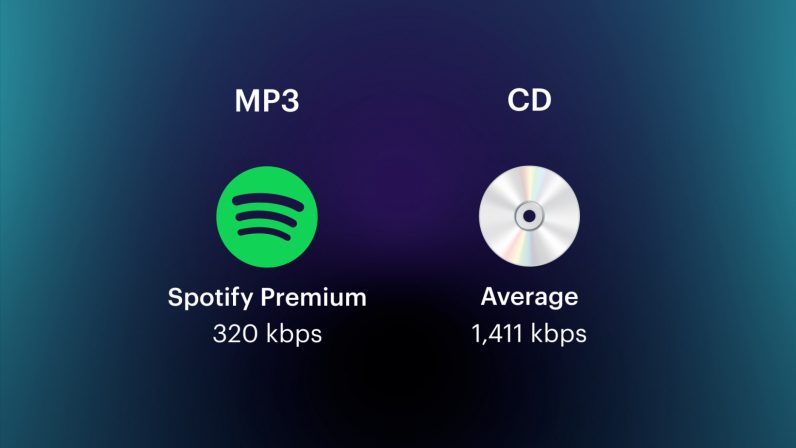
On an audio CD, information is losslessly encoded at a constant 1407 kbps bit rate.

The MP3 format allows you to encode audio information with constant or variable bit rates from 32 to 320 kbps, that is, they provide five times the compression compared to CD.

Bit rate as a characteristic of digital video and audio

In streaming video and audio formats (such as MPEG and MP3) that use lossy compression, the bit rate parameter expresses the degree of compression of the stream and therefore determines the size of the channel for which it is compressed data transmission. Most of the time, the audio and video bit rate is measured in kilobits per second (kilobits per second in English – kbps), less often – in megabits per second (for video only).

There are three compression modes for data transmission:

– with a constant bit rate (constant bit rate in English – CBR)
– with a variable bit rate (variable bit rate in English – VBR)
– with an average bitrate (English Average Bitrate – ABR)

Variable and average bit rate

The codec chooses the required bit rate based on the parameters (the level of the desired quality) and, during the encoded chunk, the bit rate may change. When compressing audio, the desired bit rate is determined based on the psychoacoustic model. ABR is a variation of VBR in which the codec is compressed to a specified average value.

What is bitrate: a clear explanation for beginners

Bit Rate

Once a student was teaching a class and asked me to give him the clearest possible explanation of what bitrate meant.

Today I am going to share with you that explanation that although it does not refer to sound but an image in the background, it is the same and is very easy to understand.

bit rate

Imagine that you put me in front of a beautiful landscape full of rivers and trees, mountains and Valleys with some Villas with Fields full of flowers and animals.

There is a lot of information there if I had to make a detailed description.

Imagine that you ask me to give you a description in 4 words.

It would have to make a very general description that, being very brief, Nova contains details. Maybe I’ll say something like “a beautiful autumn landscape.”

if after that you tell me that now I will have 14 words to describe what I am seeing.
I’ll be able to give more information Although it will really continue to be very summary, but you could already give some details.
“a beautiful autumn landscape with fields and mountains that have houses, flowers and animals”

If they ask me for the following explanation and they already allow me to use 50 words, I will be able to give many more details.
Although of course I will still have to omit a lot of details.

How many words might I need to give a detailed, spoken portrait of what I am looking at?

Well, this example that I just gave of the four words at the beginning then 15 words later have maybe 500 words later is exactly what the bit rate is.

We are talking about what is the amount of information that our audio or video file can transmit per second and obviously The higher the information There will be more details and therefore a higher quality and on the contrary the lower the information the lower the details and therefore lower quality.

That’s why a bit rate of 320 thousand bits per second will have a much higher audio quality than one of 90,000 bits per second.

Because in music, images and video, the quality always depends on the amount of information.

And in the specific case of audio and video, the amount of information is measured by seconds.

This means how much information it can transmit per second, that is, how many bits it can transmit per second, which means How much information and therefore How much detail, which is synonymous with quality.

With this we will understand very easily that as well as the sampling frequency is also very important and we will explain it in another article.
The rate of bits that are transmitted per second is crucial in determining the quality that an audio or video will have.

Of course, it must be understood that the higher the bit rate per second, the larger the size of the audio file will be because the greater the amount of information stored will be, but this will result in higher quality and greater definition.

Because here the definition concept is crucial.
The higher the bit rate the higher the definition and therefore the higher the quality.

The definition would be the detail of our initial explanation, if they let me use 2000 words to describe a landscape, I will be able to give many details and define them with great clarity. And that will mention a lot of quality.

This As-is applies to audio or video files.

Surely with this explanation it has been much clearer what is the rate of bits per second and why it is important.

Explanation of the sample rate, bit depth and bit rate

Explanation of the sample rate, bit depth and bit rate

Bit Depth

This is what happens when you compress audio files
High-resolution streaming and audio promise us particularly good lossless sound when playing digital music. But what exactly does that mean? Sample rate, bit depth, and bit rate are explained.

16-bit 44.1 kHz – CD Quality: This slogan is often used when marketing high-resolution and lossless audio formats and equipment. But what exactly is it about?

israelburrows | Israelsaepblog

The quality of digital audio signals is primarily determined by three things: sample rate, bit depth, and bit rate.

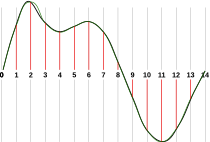
In principle, you have to imagine that a digital audio signal is not a constant flow of information. Rather, music is divided into very, many small “slices” (samples), each of which carries the information for the digital-to-analog converter in a short section.

The more samples a signal has per unit time, the more precisely the original analog signal can be mapped.

The sample rate reveals how tight the samples are: the 44.1 kHz of a CD represents 44,100 samples per second.

Bit depth

Bit depth (resolution) is specified in “bits” and indicates how many different values ​​each sample can assume. With 16 bits (CD quality), this is 2 ^ 16, that is, 65,536. The recording studio usually works with 24 or even 32 bits.

This is where many high-resolution formats come into play that also promise studio quality at 32-bit resolution.

▶ ︎ MP3, FLAC, ALAC, WAV – the most important music formats in comparison

Bit rate

The bit rate (bandwidth) of an audio file in uncompressed formats is initially nothing more than the summary of the sample rate, the bit depth and the number of channels. It is specified in kBit / s and therefore provides an initial characteristic value for evaluating the quality of a file.

Example: A stereo CD stores two tracks at 44.1 kHz with a bit depth of 16 bits. This means that its bit rate is 44.1 kHz x 16 bits x 2 channels = 1411.2 kBit / s