As a specialist with extensive experience in the world of digital video formats, I’m here to shed light on the WebM vs WMV debate. If you’ve ever wondered about the differences between these two formats and which one is the right choice for your video needs, you’ve come to the right place. In this article, we’ll explore the intricacies of WebM and WMV, comparing their advantages, limitations, and real-life applications to help you make an informed decision.
WebM vs WMV Comparison
The World of Digital Video Formats
Imagine you’re shopping for a new car, and the market offers a wide range of options, each with its unique features. Similarly, the digital video world presents a plethora of formats, each tailored to specific needs. Choosing the right format is crucial, as it can significantly impact your video projects.
Meet WebM: The Open Source Contender
Let’s start with WebM, the open-source champion. WebM is known for its high-quality video with efficient compression, making it an excellent choice for online content. It’s like a Swiss Army knife for video, offering versatility and robust performance.
WebM Advantages
WebM boasts impressive advantages, such as high-quality video and efficient compression. This format is like having a Swiss Army knife for video, providing a versatile tool for various applications.
WebM Drawbacks
However, WebM isn’t without its limitations. While it’s widely compatible, it may not be universally adopted, much like a unique fruit that’s beloved by some but unknown to others.
Introducing WMV: The Windows Classic
Now, let’s turn our attention to WMV, the classic format synonymous with Windows. WMV is highly compatible with the Windows ecosystem, making it a preferred choice for professional settings. It’s like the dependable sedan of video formats.
WMV Advantages
WMV’s compatibility with Windows is its most significant advantage, making it the go-to format for many professionals. It’s like the reliable old car model that never lets you down.
WMV Limitations
On the flip side, WMV faces challenges outside the Windows environment. Much like a reliable car model that struggles on off-road terrain, WMV may not be the best choice for all situations.
WebM vs WMV: The Showdown
In the WebM vs WMV showdown, it’s essential to consider various factors when making your choice. Let’s break down the comparison to help you decide which format suits your needs.
Video Quality
When it comes to video quality, WebM is known for its impressive clarity and resolution. Imagine comparing two TV screens, one with crystal-clear visuals and the other with slightly pixelated images. WebM is like the former, providing top-tier video quality.
Compression Efficiency
Video compression is akin to packing a suitcase efficiently. WebM excels at this, offering smaller file sizes without compromising quality. It’s like fitting everything you need for a trip into a compact suitcase, making your journey more manageable.
Compatibility and Usage
Both WebM and WMV have their areas of compatibility and usage. Choosing between them is like deciding what ingredients to use for different dishes. WebM is versatile, while WMV is the perfect choice for certain scenarios.
Looking to the Future
As technology advances, video formats continue to evolve. Just like phone technology, we can expect exciting innovations in the digital video world. Stay tuned for the latest trends and emerging technologies.
Why I Prefer WebM
Personally, I lean towards WebM for its versatility and high-quality video. It’s like opting for organic food because it aligns with my preferences and values.
Concluding Thoughts
In summary, WebM and WMV each have their strengths and weaknesses. To make an informed decision, consider your specific needs and the environment in which your videos will be used. Much like choosing a meal from a restaurant menu, your selection should cater to your taste and requirements.
Latest Words on WebM vs WMV
Stay updated with the latest developments in the world of digital video formats. The landscape is ever-changing, and staying informed will help you make the best choices for your video projects.
Let’s Talk About WebM vs WMV
I hope this article has been informative and helpful in your journey to understand the differences between WebM and WMV. If you have any questions or would like to share your experiences with these formats, please feel free to leave a comment. Your insights and inquiries are always welcome.
Comments:
Hey, great article! I’ve always wondered about the differences between WebM and WMV. This really helped me make an informed choice for my video projects.
Thanks for breaking down the WebM vs WMV comparison. It’s like having a guidebook for navigating the digital video landscape.
I appreciate the insights on video quality and compression efficiency. It’s like understanding the secret recipe for great videos.
I’m a fan of WebM for its versatility. It’s like having a toolbox full of video options.
WMV’s compatibility with Windows is a real advantage, especially for business presentations. It’s like speaking the native language of your computer.
I’m excited about the future of video formats. It’s like being on the edge of a new era in video technology.
Can you recommend any software for converting WMV to WebM? It would be a helpful addition to the article.
I’d love to see more technical details about video codecs. It’s like delving into the inner workings of video magic.
WebM feels like the Mac of video formats – sleek, user-friendly, and reliable. I can relate to that.
Thanks for simplifying the WebM vs. WMV debate. This article feels like a friendly chat about digital video formats. Kudos!
I’ve had some issues with WMV files on non-Windows devices. Could you recommend a reliable converter for WMV to WebM?
This article is like a good conversation over a cup of coffee. It made understanding video formats much easier for a non-techie like me.
As a specialist with extensive experience in video encoding, I’m here to provide you with a comprehensive guide to MP4 encoding. If you’re curious about MP4, what it entails, and why it’s a dominant force in the digital video landscape, you’ve come to the right place. Let’s delve into the world of MP4 encoding and unravel its key aspects.
Demystifying MP4
What is MP4?
MP4, or MPEG-4 Part 14, is a versatile and widely used digital video format. It’s a container format that can encapsulate video, audio, and even subtitles in a single file. MP4 is celebrated for its ability to deliver high-quality video while maintaining manageable file sizes.
A Brief History
MP4 has a rich history, with its roots in the early 2000s. It was developed as a successor to earlier video formats and quickly gained popularity due to its efficient compression and broad compatibility.
The Significance of MP4 Encoding
Versatile Digital Video Format
MP4 has found applications in various domains, from online streaming and social media to professional video production. Its versatility makes it an excellent choice for a wide range of use cases.
Why MP4 Reigns Supreme
MP4’s dominance in the video format world can be attributed to its ability to strike a balance between video quality and file size. It is supported by a vast number of devices, media players, and streaming platforms.
In the following sections, we’ll explore how MP4 compares to other video formats, the MP4 encoding process, advanced techniques, and compatibility with various platforms.
MP4 vs. Other Video Formats
MP4 isn’t the only video format available, and it’s essential to understand how it stacks up against the competition.
MP4 vs. AVI
Battle of the Early Formats
MP4 and AVI are both older video formats that have been around for quite some time. They each have their strengths and limitations, but MP4 has taken the lead in recent years.
Quality and Compression Comparison
When comparing the two, MP4 typically offers superior video quality at lower bitrates. This makes it an excellent choice for online video streaming.
MP4 vs. MKV
Balancing Features and Compatibility
MKV, or Matroska, is known for its flexibility and support for multiple audio and subtitle tracks. However, MP4 often scores points for broader compatibility.
Ideal Use Cases for Each Format
While MKV may be preferable for archiving purposes or situations where flexibility is essential, MP4 shines in scenarios where compatibility and efficient streaming are priorities.
MP4 vs. WMV
Proprietary vs. Open Standards
Windows Media Video (WMV) is a proprietary format developed by Microsoft. MP4, on the other hand, is based on open standards.
Considerations for Windows Users
For Windows users, the choice between WMV and MP4 often depends on the specific use case. MP4 is preferred for its compatibility across different platforms, whereas WMV may be more suitable for certain Windows-centric applications.
In the upcoming sections, we’ll dive into the MP4 encoding process, including codec selection, encoding tools, and advanced techniques. We’ll also explore how MP4 performs on different platforms and its role in the future of digital video.
MP4 Encoding Process
Understanding how MP4 encoding works is essential for getting the best results. This section will walk you through the steps involved and the critical choices you’ll need to make.
Selecting the Right Codec
H.264 vs. H.265 (HEVC)
One of the initial decisions you’ll face is selecting the appropriate codec. H.264, also known as AVC (Advanced Video Coding), and H.265, or HEVC (High-Efficiency Video Coding), are popular choices. H.264 is widely supported and delivers excellent compression. H.265, while more efficient, may require more computational resources. Your choice will depend on your target audience and devices.
Making Informed Codec Choices
When it comes to codecs, making informed choices is crucial. You’ll need to consider factors like your target audience’s devices, storage limitations, and the desired video quality.
Essential Encoding Tools and Software
Encoders, Decoders, and Their Roles
A variety of encoding tools and software are available to facilitate MP4 encoding. Encoders, like x264 and HandBrake, are used to convert video and audio data into the MP4 format. Decoders, which are often built into media players, are responsible for playback. Some of the popular choices include VLC and MPC-HC.
Step-by-Step Encoding Procedure
The encoding process usually involves selecting your source video, customizing encoding parameters (such as bitrate and resolution), and then letting the software work its magic. For most users, default settings will suffice. However, for those with specific preferences or requirements, customization is an option.
Customizing MP4 Settings
Bitrate, Resolution, and Frame Rate
Customizing your MP4 settings allows you to control various aspects of your video, such as bitrate, resolution, and frame rate. The choice of these settings affects the trade-off between video quality and file size. Higher bitrates result in better quality but larger file sizes, while lower bitrates prioritize compression.
Enhancing Video Quality and File Size Control
Balancing video quality and file size is an art. A higher resolution, for example, is essential for 4K video, but it also increases file size. Frame rate adjustments can help with smooth playback, but it may affect the file’s overall size. It’s crucial to consider your target audience and the devices they use.
Batch Encoding for Efficiency
Time-Saving Techniques and Strategies
If you have a vast collection of videos to convert to MP4, batch encoding is a time-saving strategy. Most encoding software allows you to select multiple files for simultaneous conversion, ensuring consistency in your video library.
In the following sections, we’ll explore advanced MP4 encoding techniques, including 4K video encoding, variable bitrate vs. constant bitrate, multichannel audio in MP4, and adaptive streaming with MP4.
Advanced MP4 Encoding Techniques
As an expert in video encoding, I’m committed to helping you achieve the best video quality. Advanced MP4 encoding techniques can elevate your video quality and cater to specific requirements.
4K Video Encoding
Immersive Visual Experiences
4K video, with its ultra-high-definition resolution, offers immersive visual experiences. Whether you’re capturing breathtaking landscapes or intricate details in a product review, 4K can make your videos stand out.
Storage and Playback Considerations
It’s important to remember that 4K video files are significantly larger than lower-resolution counterparts. Ensure you have ample storage capacity and consider the playback capabilities of your target audience’s devices.
Variable Bitrate (VBR) vs. Constant Bitrate (CBR)
Adapting to Video Complexity
Variable Bitrate (VBR) encoding dynamically adjusts the bitrate based on the complexity of the video, resulting in higher quality during intricate scenes. Constant Bitrate (CBR) maintains a consistent bitrate throughout the file.
Application Scenarios for VBR and CBR
VBR is often preferred for videos with varying complexity, such as action sequences, as it optimizes video quality. CBR is more suitable for consistent video complexity, like a simple interview or talking head video.
Multichannel Audio in MP4
Elevating the Sound Experience
MP4 supports multichannel audio, allowing you to create immersive audio experiences. This feature is especially useful for videos that demand spatial audio, such as gaming, home theater setups, and virtual reality content.
Compatibility and Challenges
While multichannel audio can create stunning audio landscapes, it’s essential to consider compatibility. Not all devices and media players support multichannel audio in MP4. In some cases, you may need to downmix your audio to stereo for broader compatibility.
Adaptive Streaming with MP4
Optimizing for Different Devices and Bandwidths
Adaptive streaming involves preparing multiple versions of your video at various quality levels. This ensures smooth playback on devices with different capabilities and adapts to varying network conditions.
Preparing Video for Streaming Platforms
Many streaming platforms, like YouTube and Netflix, use adaptive streaming to provide the best possible viewing experience for their audiences. To be part of this streaming ecosystem, understanding adaptive streaming is crucial.
In the upcoming sections, we’ll discuss how MP4 functions on different platforms, from Windows and macOS to Android, and its role in the future of digital video.
Adaptive audio streaming, a critical aspect of modern digital media delivery, has revolutionized how we experience audio content. In this comprehensive guide, I will delve into the intricacies of adaptive audio streaming and its significance in providing top-notch streaming audio quality.
Understanding Adaptive Audio Streaming
Adaptive audio streaming is a dynamic approach that optimizes audio quality based on the viewer’s network conditions. It ensures a seamless audio experience by adjusting the audio codec’s parameters and the bitrate of the audio stream in real-time. This adaptation is vital to prevent audio interruptions, buffering, and loss of quality, especially in the ever-changing world of online content delivery.
Imagine a journey on a highway where the traffic flow constantly changes. Adaptive streaming is like having a smart vehicle that adjusts its speed to maintain a smooth ride. Similarly, when your internet connection fluctuates, adaptive audio streaming adapts the audio quality to ensure you experience a continuous, high-quality audio stream.
The Science Behind Streaming Audio Quality
To grasp the science behind adaptive audio streaming, let’s explore some of the key technical aspects. Adaptive streaming relies on efficient audio codecs that compress and decompress audio data. These codecs use various algorithms to reduce the size of audio files while preserving audio quality. The choice of codec and its efficiency play a significant role in determining the quality of the audio stream.
In a real-world analogy, think of audio codecs as skilled chefs preparing a sumptuous dish. A masterful chef knows how to retain the flavors while reducing the dish’s size, making it easier to serve. Likewise, efficient audio codecs preserve the audio’s fidelity while making it compatible with varying network conditions.
The Impact of Latency in Audio Streaming
Latency, the delay between audio production and playback, is a crucial factor in adaptive audio streaming. While some latency is inevitable due to data transmission and codec processing, excessive latency can disrupt the streaming experience. Adaptive streaming technologies aim to strike a balance between audio quality and latency.
Think of latency as the time it takes for a letter to reach its destination through traditional mail compared to email. Adaptive audio streaming ensures the audio reaches your ears with minimal delay, akin to the swift delivery of an email. This balance is essential for real-time applications like online gaming or live broadcasts, where low latency is a top priority.
Now, let’s address the questions that often arise regarding adaptive audio streaming:
How Does Adaptive Bitrate Streaming Work?
Adaptive bitrate streaming, a close sibling to adaptive audio streaming, involves adjusting not only the audio quality but also the video quality based on network conditions. It works by dividing the audio and video content into small chunks of data and delivering them in varying quality levels. Players then choose the best quality for a seamless viewing experience.
What Technologies Drive Adaptive Audio Streaming?
Adaptive audio streaming leverages several technologies, including HTTP Live Streaming (HLS), Dynamic Adaptive Streaming over HTTP (DASH), and Real-Time Messaging Protocol (RTMP). These technologies enable adaptive streaming by optimizing content delivery over the internet, ensuring that audio quality remains consistent across different devices and network conditions.
Why Is Mobile Audio Streaming Challenging?
Mobile audio streaming presents unique challenges due to the variability of cellular networks and the limited processing power of mobile devices. Adaptive audio streaming is particularly crucial in this context, as it ensures a smooth listening experience, even when on the move. It’s like having an audio companion that adjusts to your surroundings, providing uninterrupted music or podcasts as you travel.
Last Words about Adaptive Audio Streaming
In the era of digital media, adaptive audio streaming is the unsung hero that ensures you enjoy a high-quality audio experience regardless of your network conditions. I’ve shared my knowledge and expertise on this topic, revealing the science behind streaming audio quality and the role of efficient codecs. Understanding the impact of latency and the technologies driving adaptive streaming is key to appreciating its significance. As an expert in the field, I encourage you to embrace the world of adaptive audio streaming, where your audio content is tailored to your network conditions, just like a perfectly orchestrated symphony.
As an expert in the field of video streaming technology, I am thrilled to share my insights into the latest advancements that are shaping the future of this industry. Video streaming has come a long way since its inception, and the developments in this field have been nothing short of remarkable. From improved video quality to enhanced user experiences, let’s delve into some of the key aspects driving the evolution of video streaming.
One of the most notable advancements in video streaming is the adoption of cutting-edge video codecs. Codecs are essential for compressing and decompressing video data, and they play a pivotal role in determining the quality of the streamed content. The newest audio codecs, such as AAC (Advanced Audio Coding) and Opus, have revolutionized the way audio is transmitted over the internet. These codecs offer superior audio quality even at lower bitrates, making it possible for users to enjoy crystal-clear sound while streaming their favorite content. It’s akin to upgrading from a standard definition television to a 4K Ultra HD display, but for your ears.
To put it into perspective, imagine you’re listening to your favorite song on a streaming platform. With the latest audio codecs, you can hear every subtle nuance of the music, from the delicate strumming of a guitar to the softest whisper of a vocalist. It’s like being in the same room as the musicians, experiencing their performance in its full glory. This enhancement in audio quality not only elevates music streaming but also enriches the audio experience in video content, such as movies and TV shows. It’s a game-changer for audiophiles and casual listeners alike.
In addition to superior audio quality, the latest video codecs like HEVC (High-Efficiency Video Coding) and AV1 (AOMedia Video 1) have transformed video streaming. These codecs employ advanced compression techniques to deliver high-definition and even 4K video content with exceptional clarity and detail. It’s like watching your favorite movies on the big screen, right in the comfort of your home. The reduction in bandwidth requirements also means smoother streaming experiences, even in areas with slower internet connections. These advancements have made streaming 4K content as seamless as streaming standard definition videos, revolutionizing the way we consume visual media.
Addressing “People also asked” questions about video streaming
Let’s dive into some of the common questions that people often ask about the past and future of video streaming. These inquiries shed light on the intricacies of this rapidly evolving industry and provide valuable insights into what to expect in the coming years.
“What are the key challenges faced by video streaming platforms?”
Video streaming platforms face several challenges, including:
Content Delivery: Ensuring seamless content delivery to users across the globe, considering varying internet speeds and network conditions.
Content Licensing: Negotiating licensing agreements with content creators and studios to provide a diverse and attractive library.
Content Discovery: Improving content recommendation algorithms to help users discover new content aligned with their interests.
Piracy and Security: Implementing robust security measures to combat piracy and protect user data.
To overcome these challenges, streaming platforms continuously invest in technology and user experience enhancements.
“How has the pandemic impacted video streaming trends?”
The COVID-19 pandemic accelerated the adoption of video streaming. With people spending more time at home, the demand for streaming services surged. This led to increased investments in original content, live streaming events, and improved infrastructure to handle the heightened traffic. As a result, streaming platforms have become a cornerstone of entertainment and communication for many.
“What role does 5G play in the future of video streaming?”
The rollout of 5G networks is set to revolutionize video streaming. With significantly higher speeds and lower latency, 5G will enable seamless 4K and even 8K streaming on mobile devices. It will also facilitate augmented reality (AR) and virtual reality (VR) experiences, opening up new avenues for immersive content. The integration of 5G into streaming services will be a game-changer, shaping the future of how we consume media.
The significance of streaming protocols
Streaming protocols are the backbone of the video streaming industry, ensuring that content reaches viewers reliably and efficiently. While many may not be familiar with the technical details, these protocols play a vital role in our daily streaming experiences.
One of the most widely used streaming protocols is HTTP Live Streaming (HLS). HLS divides video content into small segments, allowing adaptive streaming. This means that the quality of the stream can be adjusted on the fly based on the viewer’s internet speed and device capabilities. It’s like driving a car with adaptive cruise control that automatically adjusts your speed to maintain a safe distance from the vehicle in front of you. HLS ensures a smooth viewing experience, even when network conditions fluctuate.
Another crucial protocol is Dynamic Adaptive Streaming over HTTP (DASH). DASH offers similar adaptive streaming capabilities as HLS but is not tied to specific devices or platforms. It’s like having a universal remote control that works with any TV brand. This protocol promotes interoperability among various streaming services and devices, giving viewers more choices and flexibility.
Real-Time Messaging Protocol (RTMP) is yet another important player in live streaming. It’s like a live telephone call between a broadcaster and viewers, allowing real-time interaction during events like live sports or gaming. However, as technology advances, RTMP is gradually being replaced by more modern protocols like WebRTC, which offers lower latency and improved security.
In conclusion, streaming protocols are the unsung heroes of the video streaming industry, ensuring that we can enjoy our favorite content seamlessly, no matter where we are or what device we’re using.
Exploring the future of video streaming business models
The future of video streaming is not just about technological advancements; it also involves innovative business models that cater to changing consumer preferences. Let’s take a closer look at some emerging trends in this regard.
Hybrid Subscription and Ad-supported Models: Many streaming platforms are adopting a hybrid approach, offering both subscription-based tiers and free, ad-supported versions. This provides users with choices based on their willingness to pay and tolerance for ads. It’s akin to choosing between premium cable channels and free-to-air TV.
Original Content Investments: Streaming giants like Netflix and Amazon Prime have set the bar high by investing heavily in original content. This strategy not only attracts subscribers but also allows platforms to differentiate themselves in a crowded market. It’s like a bookstore offering exclusive editions of popular books that you can’t find anywhere else.
Global Expansion: To tap into new markets and reach a broader audience, streaming services are expanding globally. The availability of localized content and subtitles is crucial in making these services accessible to diverse regions. It’s like a restaurant chain adapting its menu to suit the tastes of customers in different countries.
Live Events and Exclusive Premieres: Streaming platforms are increasingly focusing on live events and exclusive premieres to create a sense of urgency and community. Just like attending a live concert or the premiere of a highly anticipated movie, viewers can now experience the excitement of live broadcasts and exclusive content releases from the comfort of their homes.
As the video streaming landscape continues to evolve, these innovative business models will play a pivotal role in shaping the industry’s future. Whether you’re a content creator or a streaming enthusiast, staying attuned to these developments is key to navigating the dynamic world of online entertainment.
The evolution of video streaming devices
Video streaming devices have come a long way since the days of bulky cable boxes and VHS tapes. Today, we have a plethora of sleek and sophisticated options that cater to every streaming need and preference.
Smart TVs: Smart TVs have become the norm, integrating streaming apps directly into the television itself. It’s like having a Swiss army knife with all the tools you need in one convenient package. These TVs offer easy access to popular streaming services like Netflix, Hulu, and Disney+ without the need for additional devices.
Streaming Sticks and Boxes: Devices like Roku, Amazon Fire TV, and Apple TV have gained immense popularity. They’re like miniature powerhouses that transform any TV into a smart TV. These compact devices provide access to a wide range of apps and offer features like voice control and 4K streaming.
Gaming Consoles: Gaming consoles like the Xbox and PlayStation have also become versatile streaming devices. They’re like multipurpose entertainment hubs that not only allow you to play games but also stream your favorite shows and movies. This convergence of gaming and streaming is a testament to the evolving nature of entertainment.
Mobile Devices: Let’s not forget about the role of smartphones and tablets in video streaming. These devices have become personal theaters, allowing users to stream content on the go. It’s like carrying a mini cinema in your pocket, ready to entertain you whenever and wherever you are.
The evolution of video streaming devices has made it easier than ever for consumers to access their favorite content. Whether you prefer a large-screen TV, a compact streaming stick, or the convenience of a mobile device, there’s a streaming option to suit every taste and lifestyle.
The importance of content delivery networks (CDNs)
Behind the scenes of every seamless video streaming experience lies a critical component: content delivery networks (CDNs). CDNs are the unsung heroes that ensure content reaches viewers quickly and reliably, regardless of their location.
CDNs are like a network of well-placed warehouses that store copies of popular movies and shows. When you hit “play,” the content is fetched from the nearest warehouse rather than traveling long distances. This reduces latency and ensures smooth streaming. It’s similar to ordering a product online and having it shipped from a local warehouse for faster delivery.
Moreover, CDNs employ load balancing techniques to distribute network traffic efficiently. Imagine a busy highway with multiple lanes, each directing traffic smoothly to its destination. CDNs ensure that no single server is overwhelmed, preventing congestion and buffering issues during peak streaming times.
In addition to speed and reliability, CDNs enhance security. They employ various measures, such as encryption and DDoS protection, to safeguard content and user data. It’s like having a dedicated security team that ensures your online experience is safe and secure.
In conclusion, while CDNs may operate behind the scenes, their role in delivering high-quality streaming experiences is invaluable. They are the backbone of the streaming industry, ensuring that we can enjoy our favorite content seamlessly, no matter where we are in the world.
Video format enhancement is a multifaceted process that involves improving the quality, clarity, and overall visual appeal of video content. This enhancement can significantly impact the viewing experience and is crucial for various applications, from filmmaking to online streaming. In this comprehensive guide, we’ll delve deep into the intricacies of video format enhancement, covering everything from the fundamental principles to advanced techniques.
The Importance of Video Quality
Video quality is a paramount consideration in today’s digital age, where video content is ubiquitous across platforms and industries. Whether you’re a content creator, filmmaker, or business owner, the quality of your videos plays a pivotal role in capturing and retaining your audience’s attention.
Enhancing video formats begins with an understanding of the key factors that influence quality. This includes resolution, bit rate, frame rate, and compression techniques. Each of these elements contributes to the overall clarity and visual appeal of your videos.
Resolution: A Deep Dive
Resolution, often expressed in pixels (e.g., 1080p, 4K), is a critical aspect of video format enhancement. It determines the level of detail and sharpness in your videos. Higher resolutions offer more clarity and are especially beneficial for larger screens and cinematic experiences. However, it’s essential to strike a balance between high resolution and file size, as larger files can lead to longer loading times and may not be suitable for all viewing platforms.
Bit Rate and Compression
Bit rate and compression techniques are closely tied to video quality. Bit rate refers to the amount of data transmitted per unit of time, usually measured in megabits per second (Mbps). Higher bit rates result in less compression and better image quality but can lead to larger file sizes. Compression, on the other hand, reduces file size but may sacrifice some image detail.
Finding the right balance between bit rate and compression is a delicate art in video format enhancement. Advanced video codecs like H.265 offer improved compression efficiency, allowing for high-quality videos with reduced file sizes.
Advanced Techniques in Video Enhancement
While understanding the basics of video quality is crucial, true video format enhancement goes beyond resolution and bit rate adjustments. Advanced techniques involve post-production processes that fine-tune video elements for optimal results.
Color Grading and Correction
Color grading is a sophisticated process that involves adjusting the colors and tones in a video to achieve a specific look or mood. It can make a significant difference in the visual appeal of your content. Correcting color imbalances, enhancing contrast, and applying creative color grading techniques can elevate your videos to a professional level.
High Dynamic Range (HDR)
HDR technology enhances the contrast and brightness of videos, resulting in more vivid and lifelike images. It expands the range between the darkest and brightest parts of a video, capturing a broader spectrum of colors and details. HDR is particularly beneficial for creating stunning visuals in films and high-end productions.
Delivering Enhanced Videos to Your Audience
Enhancing video formats is not just about creating stunning visuals; it’s also about ensuring that your audience can enjoy your content seamlessly. As you optimize your video formats, consider compatibility with various devices and platforms, as well as efficient streaming solutions.
Adaptive Streaming
Adaptive streaming is a technique that adjusts video quality in real-time based on the viewer’s internet connection and device capabilities. This ensures smooth playback and a consistent viewing experience, even under varying network conditions. Implementing adaptive streaming protocols like DASH or HLS can enhance the accessibility of your content.
Choosing the Right Format
Lastly, selecting the appropriate video format for your content is essential. Different formats offer various advantages and disadvantages, so it’s crucial to align your choice with your audience’s preferences and the platforms you’ll be using for distribution.
In conclusion, video format enhancement is a multifaceted journey that encompasses resolution, bit rate, compression, color grading, HDR, and delivery methods. By mastering these elements, you can create visually stunning videos that captivate your audience and deliver an exceptional viewing experience. Whether you’re a filmmaker, content creator, or business owner, the art of enhancing video formats can set you apart in today’s digital landscape.
Future Trends in Video Format Enhancement
As technology continues to evolve, the field of video format enhancement is poised for exciting advancements. Understanding these emerging trends can help you stay ahead in the world of video production and distribution.
8K Ultra High Definition (UHD)
While 4K resolution is becoming the new standard, 8K UHD is emerging as the next frontier in video quality. With four times the pixels of 4K, 8K offers unparalleled clarity and detail. Although it’s currently in its early stages of adoption, we can expect to see more 8K content in the future, especially for high-end cinematic experiences.
Immersive Technologies: VR and AR
Virtual Reality (VR) and Augmented Reality (AR) are transforming how we consume video content. These immersive technologies require specialized formats and techniques to create truly captivating experiences. Video format enhancement in VR and AR involves considerations like spatial audio, 360-degree video, and interactive elements, opening up new creative possibilities.
The Importance of Audio Enhancement
While much attention is given to video quality, audio plays an equally crucial role in the overall viewer experience. Audio enhancement techniques, such as spatial audio, surround sound, and noise reduction, complement video format enhancement efforts. These audio enhancements immerse viewers in a more engaging auditory environment.
Spatial Audio for Immersion
Spatial audio technology simulates the three-dimensional soundscapes, creating a more immersive audio experience. Viewers can perceive sounds coming from specific directions, heightening their sense of presence within the content. Incorporating spatial audio into video format enhancement can make a significant difference, especially in VR and AR applications.
Surround Sound for Cinematic Impact
Surround sound systems are a staple in cinemas and high-end home theaters. They create a multi-dimensional audio experience by placing speakers strategically around the viewer. Enhancing video formats to support surround sound can add a cinematic touch to your content, making it more engaging and impactful.
Conclusion
In the ever-evolving landscape of video production and distribution, video format enhancement remains at the forefront. Understanding the intricacies of resolution, bit rate, compression, color grading, HDR, and audio enhancement techniques is essential for creating captivating videos that leave a lasting impression on your audience.
As technology continues to advance, embracing emerging trends like 8K UHD and immersive technologies such as VR and AR will set you apart in the competitive world of multimedia. Remember that video format enhancement is not just about achieving technical excellence; it’s about creating experiences that resonate with viewers and leave a lasting impact.
In this article, we’ve delved deep into the world of video format enhancement, exploring its core principles, advanced techniques, and future trends. Whether you’re a filmmaker, content creator, or simply someone passionate about the world of multimedia, mastering the art of video format enhancement can elevate your creations to new heights.
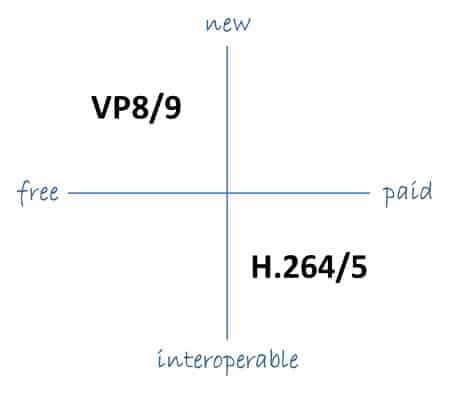
As the world becomes increasingly digitized, the importance of video codecs in our lives cannot be overstated. Video codecs are essential in video compression, encoding, streaming, and playback. Choosing the right codec can make the difference between smooth playback and frustrating buffering, between crisp and clear images and pixelated messes. In this article, we will explore the differences between three of the most popular video codecs in use today: H.264, H.265, and VP9.
H.264 vs H.265: What’s the Difference?
H.264, also known as AVC (Advanced Video Coding), has been the dominant codec in use for the past decade. It is widely supported by devices and software and offers good compression while maintaining high video quality. However, H.265 (HEVC) is slowly taking over. It is a newer and more advanced codec that offers better compression ratios, which means smaller file sizes with the same quality as H.264. H.265 is also better at handling high-resolution videos, making it a good choice for 4K and 8K videos. However, it requires more processing power to decode, which may be an issue on older devices.
Personally, I have found that H.265 delivers noticeably better quality than H.264 for the same file size. It is especially noticeable in high-motion scenes like action movies or sports. However, it does require more processing power, so make sure your device can handle it before choosing it as your preferred codec.
VP9: The New Kid on the Block
VP9 is a newer codec developed by Google and is designed to be a royalty-free alternative to H.265. It offers better compression than H.264 while maintaining the same video quality. It is also highly efficient at handling high-resolution videos, making it a good choice for 4K and 8K videos. However, its adoption has been slow due to its lack of support in many devices and software. It also requires more processing power to decode than H.264.
One of my personal experiences with VP9 was when I was trying to stream a 4K video on my laptop. I noticed that the video was buffering a lot and the quality was not as good as I expected. After some research, I found out that the video was encoded with VP9, which my laptop did not support. I had to switch to H.264 to get smooth playback.
Conclusion: Choosing the Right Video Codec
Choosing the right video codec is crucial for ensuring smooth video playback and high video quality. H.264 is still a solid choice for most situations, but H.265 and VP9 offer better compression and handling of high-resolution videos. However, they require more processing power and may not be supported by all devices and software. Make sure to choose the codec that best suits your needs and device capabilities.
In conclusion, video codecs are an essential part of our digital lives, and choosing the right one can make all the difference in our video-watching experience. Always keep in mind the pros and cons of each codec and make an informed decision based on your needs.








Comments:
Hey, great article! I’ve always wondered about the differences between WebM and WMV. This really helped me make an informed choice for my video projects.
Thanks for breaking down the WebM vs WMV comparison. It’s like having a guidebook for navigating the digital video landscape.
I appreciate the insights on video quality and compression efficiency. It’s like understanding the secret recipe for great videos.
I’m a fan of WebM for its versatility. It’s like having a toolbox full of video options.
WMV’s compatibility with Windows is a real advantage, especially for business presentations. It’s like speaking the native language of your computer.
I’m excited about the future of video formats. It’s like being on the edge of a new era in video technology.
Can you recommend any software for converting WMV to WebM? It would be a helpful addition to the article.
I’d love to see more technical details about video codecs. It’s like delving into the inner workings of video magic.
WebM feels like the Mac of video formats – sleek, user-friendly, and reliable. I can relate to that.
Thanks for simplifying the WebM vs. WMV debate. This article feels like a friendly chat about digital video formats. Kudos!
I’ve had some issues with WMV files on non-Windows devices. Could you recommend a reliable converter for WMV to WebM?
This article is like a good conversation over a cup of coffee. It made understanding video formats much easier for a non-techie like me.