How to Convert MP3 to WAV


Free Download Mp4Gain
picture

How to Convert MP3 to WAV
How to Convert MP3 to WAV

Are you looking for an easy way to convert your MP3 files to WAV format? Then look no further than Mp4Gain. Mp4Gain is a powerful audio conversion tool that allows you to quickly and easily convert MP3 files to WAV format.
How to Convert MP3 to WAV

What is Mp4Gain?

Mp4Gain is  software application that enables users to convert MP3 files to WAV format. It is available for Windows operating systems. The software supports a wide range of audio formats, including MP3, WMA, AAC, FLAC, and Ogg. Additionally, the software supports a variety of video formats, including AVI, MPG, DivX, XviD, and WMV.

How to Convert MP3 to WAV using Mp4Gain

The process of converting MP3 to WAV using Mp4Gain is simple and straightforward. To get started, follow the steps below:

  • Download and install the latest version of Mp4Gain on your computer.
  • Launch Mp4Gain and click the “Add” button to add the MP3 files that you want to convert.
  • Select the “Format” tab and choose the “WAV” option.
  • Adjust the settings for the output file, such as the bitrate, sample rate, and channels.
  • Click the “Convert” button to start the conversion process.
  • When the process is complete, the converted WAV files will be saved to the output folder.

Advantages of Using Mp4Gain

Using Mp4Gain to convert MP3 to WAV has several advantages, including:

  • It is easy to use, even for beginners.
  • It supports a wide range of audio and video formats.
  • It can be used to normalize the volume of audio and video files.
  • It is available for free.
  • It is regularly updated to ensure compatibility with the latest operating systems.

Conclusion

Converting MP3 to WAV using Mp4Gain is a simple and straightforward process. The software is easy to use and supports a wide range of audio and video formats. Additionally, Mp4Gain can be used to normalize the volume of audio and video files, making it an invaluable tool for anyone who needs to convert their audio files.


Free Download Mp4Gain
picture


Mp4Gain Main Window
picture


Mp4Gain Features
picture


Free Download Mp4Gain
picture

What is the best digital audio format?

What is the best digital audio format?

What is the best digital audio format?


When choosing the best digital audio format, several factors must be taken into account. The most popular digital audio formats are MP3, AAC and WAV.

What is the best digital audio format?

MP3

MP3 is the most commonly used digital audio format. It is a compression format that allows audio information to be compressed without a great loss of quality. It is compatible with most audio players and is very easy to play on most devices.

AAC

AAC is a digital audio format developed by Apple. It offers better sound quality than older digital audio formats like MP3, but with a much smaller file size. This means more songs can be stored on a device without affecting performance.

WAV

WAV is the lossless digital audio format. This means that the original audio file is saved exactly as it was recorded. This means that WAV files are much larger than MP3 or AAC files, which means that more storage space is needed to store the files.

In conclusion, the best digital audio format depends on your needs and preferences. If you need a small file size, MP3 or AAC are good options. If you need the best sound possible, then WAV is the best choice.

What is the digital audio format with the best sound quality?

Currently there are several digital audio formats, each with its own qualities. The most popular formats are FLAC, MP3, AAC, OGG and WMA. But which of these offers the best sound quality?

FLAC (Free Lossless Audio Codec)

FLAC is a lossless audio format that preserves all the characteristics of the original audio without any compression. This means that the audio is reproduced with the highest sound quality, without any loss of quality. Also, FLAC is an open format, so it is compatible with most audio players.

MP3 (Moving Picture Experts Group Layer 3)

MP3 is a compressed audio format used to reduce file sizes. This allows more audio files to be stored and streamed, but also causes a loss of quality. However, if a high bit rate is used, the sound quality of MP3 files can still be very good.

AAC (Advanced Audio Coding)

AAC is a compressed audio format developed by Apple as an alternative to MP3. It has a better compression ratio than MP3, which means smaller audio files with equal or better sound quality. However, as with MP3, the sound quality depends on the bit rate.

OGG (Ogg Vorbis)

OGG is a lossless audio format developed by Xiph.Org. Like FLAC, it does not compress audio, so audio files are played at highest sound quality. Unlike FLAC, however, OGG is a closed format, so it is not supported by all audio players.

WMA (Windows Media Audio)

WMA is a compressed audio format developed by Microsoft. It is compatible with most audio players, but offers lower sound quality than other formats. Also, like MP3 and AAC, the sound quality depends on the bit rate.

Conclusion

Of the five popular digital audio formats, FLAC and OGG offer the best sound quality because they don’t compress the audio. However, MP3, AAC and WMA offer good sound quality if a high bit rate is used. Finally, FLAC is the most widely supported digital audio format, while OGG is the least widely supported.

The impact of Sample Rate on the audio quality of your MP3s

The impact of Sample Rate on the audio quality of your MP3s

The impact of Sample Rate on the audio quality of your MP3s

What is the Sample Rate and how does it work?

The impact of Sample Rate on the audio quality of your MP3s

The Sample Rate, also known as sampling frequency, refers to the number of times sound is measured per second in an audio file. It is measured in hertz (Hz) .

The higher the sample rate, the more detailed the sound will be captured and played back. However, this also means that the file will be larger in size.

How to choose the right Sample Rate?

Choosing the right Sample Rate will depend on how you will use the file. For music files, a sampling frequency of at least 44.1 kHz is recommended for decent sound quality. However, if you want higher sound quality, you can go for a higher sample rate, such as 48 kHz or even 96 kHz.

For voice audio files, a sampling rate of 22 kHz is sufficient for clear sound quality. However, if you want higher sound quality, you can opt for a higher sample rate, such as 44.1 kHz.

How is Sample Rate related to bitrate and number of channels?

Sample Rate, bitrate and number of channels are important factors that affect the audio quality of an MP3 file. It is important to choose an appropriate combination of these factors to obtain the best sound quality. A high sample rate combined with a high bitrate and high channel count will provide superior sound quality, but will also require a larger file. On the other hand, a low sample rate combined with a low bitrate and a low number of channels will provide lower sound quality, but the file size will be smaller. It is important to find a balance between these factors according to your needs and preferences.

Conclusion

In conclusion, Sample Rate is a crucial factor in the audio quality of an MP3 file. It is important to choose an appropriate sample rate, as well as take into account other factors such as bitrate and the number of channels to obtain the best sound quality. Consider your needs and preferences to find the right balance.

It is also important to note that the Sample Rate is not the only factor that affects the audio quality in an MP3 file, as the bitrate and the number of channels are also involved. It is important to find the right balance between these factors to get the best possible sound quality. In addition, it is also important to consider the end use of the file, as a higher sample rate may be required for music files, while a lower sample rate may be sufficient for voice audio files.</ p>

In short, the Sample Rate is an important factor in the audio quality of an MP3 file, and it is important to choose the right rate to get the best possible sound quality. Be sure to balance this with other factors like bitrate and number of channels, and take into account the end use of the file. With these factors in mind, you will be able to enjoy a high-quality audio listening experience.

The bitrate and its relationship with the audio quality in an MP3

The bitrate and its relationship with the audio quality in an MP3

The bitrate and its relationship with the audio quality in an MP3

The bitrate is a measure of the amount of audio information that is encoded per second in a compressed audio file, such as an MP3. Bit rate is measured in kilobits per second (kbps).

The bitrate and its relationship with the audio quality in an MP3

The higher the bitrate, the higher the audio quality. However, a larger file size will also be required to store the same amount of audio time. Therefore, it is important to choose a suitable bitrate to balance quality and file size.

For music files, a bitrate of at least 128 kbps is recommended for decent sound quality. However, if you want higher sound quality, you can go for a higher bitrate, such as 256 kbps or even 320 kbps.

For voice audio files, a bit rate of 64 kbps is sufficient for clear sound quality. However, if you want higher sound quality, you can go for a higher bitrate, such as 96 kbps or 128 kbps.

In short, bitrate is an important factor in the audio quality of an MP3 file. It is important to choose a suitable bitrate to balance quality and file size.

Also, it’s important to note that bitrate isn’t the only factor that affects the audio quality of an MP3. Other important factors include the sample rate and the number of channels. The sample rate refers to the number of times the sound is measured per second, while the number of channels refers to the number of audio channels in the file.

For example, an audio file with a bit rate of 128 kbps and a sample rate of 44.1 kHz and 2 audio channels will have higher sound quality than a file with the same bit rate but a sample rate of 22 kHz and 1 audio channel.

In conclusion, if you want to get the best audio quality from an MP3 file, it’s important not only to choose a suitable bitrate, but also to consider the sample rate and number of channels. It is advisable to choose an optimal combination of these factors to obtain the best sound quality.

In addition, it is important to mention that there are other audio formats, such as WAV, FLAC, AIFF, which, unlike MP3, are not compressed, which means that they do not lose audio quality to the compression process. However, these formats often have much larger file sizes than compressed formats like MP3.

So, if you want the best audio quality, it’s recommended to use uncompressed formats like WAV or FLAC, but it’s also important to consider storage space and compatibility with different devices and audio players. In case of opting for compressed formats, it is important to choose an appropriate bitrate and take into account other factors such as the sampling frequency and the number of channels.

In summary, bitrate is an important factor in the audio quality of an MP3 file, but it is not the only factor to consider. It is important to choose a suitable bitrate, as well as take into account the sample rate and the number of channels to obtain the best sound quality. In addition, there are other uncompressed audio formats that offer higher sound quality, but also have a larger file size.

Masking in an mp3

Masking in an mp3

 Masking in an mp3
Masking in an mp3

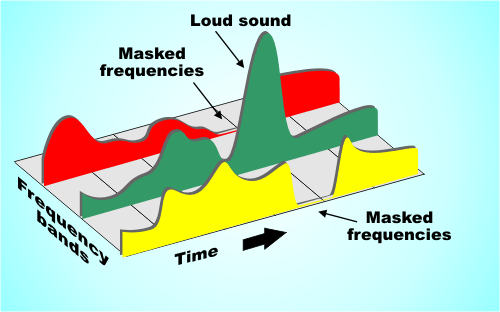
Masking is one of the main problems affecting the quality of compressed audio files.

Masking in an mp3
Masking in an mp3

This technique is used to reduce the file size by encoding the information, which causes significant loss of quality and distortion. This distortion can be so pronounced as to be audible in the resulting file. The masking effect is particularly evident in MP3 files compressed at low bitrates, since excessive compression removes much of the original information from the file.

The good news is that there are ways to deal with the effect of masking in MP3s. One way is to simply use a higher bitrate when encoding your files, as this will prevent users from experiencing distortion due to poor audio quality. Another way is to use an improved codec like AAC or FLAC to encode your files, which offers better performance and quality without sacrificing much file size. Finally, there are specialized programs designed to correct the masking effect, allowing users to recover some of the quality lost during the compression process.

In short, the masking effect can be extremely detrimental to the sound quality of MP3 files compressed at low bitrates. Fortunately, there are ways to deal with this effect if proper measures are taken when encoding the original files or if dedicated programs are used to correct the effect after encoding.

In recent years, the MP3 audio encoder has been the standard audio format for producing files of superior sound quality. Due to its nature, compression in MP3 files can cause perceptible destruction of high-quality sound if some precautionary measure is not taken. The addition of masked framing to the process removes many distortions between noise and finer details.

In simple terms, the “masking” process helps to minimize those sound frequencies that can interfere with each other. It is used to match the dynamic range of the encoded file without having a large effect on the final result. This allows the detections and artistic characteristics to remain intact to some extent during encoding to the MP3 format.

How to improve the sound quality in an mp3

How to improve the sound quality in an mp3

How to improve the sound quality in an mp3

Mp4Gain is the best option. In this case we will talk about the masking effect.

How to improve the sound quality in an mp3

MP3 masking is an audio processing tool that has gained popularity in recent years. This technique is used to improve audio quality by removing unwanted sound elements. Masking is a form of audio filtering used to improve sound quality by removing unnecessary sounds, such as background noise. This technique has been widely used to improve the quality of MP3 files by allowing file sizes to be reduced without sacrificing sound quality.

Masking can be an invaluable help for those who want to store audio files in a compact format without compromising sound quality. This technique can be used to reduce the size of audio files without compromising sound quality. This is accomplished by filtering out unnecessary sounds from the audio, allowing the file to be compressed without sacrificing sound quality. In addition, masking also reduces background noise in the audio, which improves sound quality.

Masking can also be a useful tool for those who want to improve the quality of their audio files. This technique can be used to improve sound clarity and sharpness, as well as to reduce background noise. This helps users to get cleaner and more detailed sound in their audio files.

In short, MP3 masking is a useful tool for those who want to improve the quality of their audio files. This technique can be used to reduce file sizes without sacrificing sound quality, as well as to improve sound clarity and sharpness. This helps users to get cleaner and more detailed sound in their audio files.

Mp3 normalize volume

Mp3 normalize volume

Mp3 normalize volume

MP3 Normalization: What it is and How to Do it

mp3 normalize volume

MP3 normalization is the process of adjusting the volume level of an MP3 audio file so that it plays at a consistent volume across different devices and playback systems. This is important because MP3 files can have varying levels of volume due to the way they were recorded or encoded.

There are several ways to normalize the volume of an MP3 file. One popular method is to use a software program such as MP3Gain or AIMP. These programs analyze the audio data in an MP3 file and adjust the volume level accordingly. They also provide a “normalize” or “gain” function that can be used to bring the volume level up to a desired level.

Another method for normalizing MP3 volume is to use an online service such as mp3Doctor or AudioNormalizer. These services allow you to upload your MP3 file and then adjust the volume level using a web-based interface. The advantage of using an online service is that you don’t need to download or install any software on your computer.

When normalizing the volume of an MP3 file, it’s important to be careful not to overdo it. If the volume level is too high, it can cause distortion and damage your hearing. It’s also important to keep in mind that some devices and playback systems have a limited dynamic range, so it may not be possible to bring the volume level up to the maximum level without causing distortion.

In conclusion, normalizing the volume of MP3 files is a simple process that can help ensure that your music is heard at the same volume level across different devices and playback systems. Whether you use a software program or an online service, it’s important to be mindful of the volume level and not to overdo it. With the right tools, you can make sure that your music sounds great no matter where or how you listen to it.

What is digital audio masking?

What is digital audio masking?

What is digital audio masking?

Digital music is a vital part of today’s culture.

What is digital audio masking?

Whether it’s a simple MP3 file or live streaming, digital music is used to relax, have fun and even inspire. One of the main concepts involved in the production and distribution of digital music is masking, which significantly affects the audio quality. The details of MP3 masking and how it hurts our digital audio experience will be explained below.

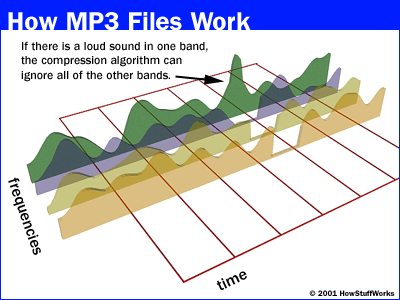
Masking is a concept used to describe how sounds are distributed between different frequencies when they are encoded for digital reproduction. This is the result of compressing files like MP3 or AAC with algorithms that remove unnecessary frequencies to reduce file size. When this frequency compression is done, the remaining frequencies are superimposed on each other, thus creating a unique sound pattern known as masking.

The effects of masking, however, can be quite detrimental, limiting the sharpness and precision with which individual musical instruments are displayed throughout the encoded audio. This difference is even more noticeable when playing wired music directly from the original compressed file; then each individual volume element loses sharpness due to the masking of existing MP3 within the group.

In fact, several consumers have reported significant differences between the sound generated by various platforms and digital servers when performing hearing tests directly from the source. The main reason lies in the type and level of masking present within the chosen container formats (MP3, AAC or OGG) to improve the overall quality of the sound delivered to the end listeners.

In general, considering only the parameters related to the compressed sound within the MP3 container by general commercial recommendations, there is an optimum level that leads to the best balance between aural definition versus set bitrate (which determines the file size). Once chosen the right speed-quality/optimal-file-size ratio to optimize your overall sound (many platforms offer customizable parameters), everyone can benefit from enjoying CD-like audio further from their own mp3 mini-converter enjoying the complete works compacted to their greatest possible thumbnail without hassle !.

Does the bitrate of an mp3 improve the sound quality?

Does the bitrate of an mp3 improve the sound quality?

Does the bitrate of an mp3 improve the sound quality?

The sound quality of a digital audio file depends on a variety of factors, including bitrate. Does the bitrate of an MP3 file improve the sound quality? In this article, we will explore this question and see how bitrate affects the sound quality of an MP3 file.

Bitrate refers to the amount of data used to encode a digital audio file. The more data used, the better the sound quality. This is because there is more information contained in the file to recreate the original sound.

Bitrate is measured in bits per second (bps). The higher the bitrate, the better the sound quality. For example, an MP3 file with a bit rate of 128 kbps will have much better sound quality than an MP3 file with a bit rate of 64 kbps.

However, the higher the bitrate, the larger the file size. This means that higher bitrate MP3 files will take up more space on your hard drive. Therefore, it is important to balance the bitrate with the desired sound quality. For example, if you want to store a lot of MP3 files on a hard drive, it is better to use a lower bitrate to reduce the footprint.

Also, MP3 files with a higher bitrate will have better sound quality on high-quality audio players. Therefore, if using headphones or a high-quality speaker system, it is advisable to use a higher bitrate to get the most out of the speakers’ potential.

In conclusion, the bitrate of an MP3 file affects the sound quality. The higher the bitrate, the better the sound quality. However, it will also increase the file size. Therefore, it is important to find a balance between bitrate and desired sound quality to get the best performance.