Does the birate of an mp3 affect the quality or is it just an impression?

Since the mp3 appeared, I always understood that it is a lower format than the CD quality, no matter how much bit rate it contains. When it comes to mixing and producing my personal recordings, I have used wave support and when converting it to mp3 it is impossible not to distinguish the differences: at least, the reduction of bass and treble is very noticeable. The dishes of the drums or the bass are very opaque and hidden, sometimes they even disappear. But in these assessments I think that perhaps my subconscious has betrayed me in some cases.

bitrate

First of all I will explain some basic things about mp3 and its bitrate (or bit rate). Compressing sound means loss of quality, so you have to pay attention to how much information is transmitted per unit of time: the most used encodings for mp3 are 64, 128, 192 and 320 kbps (kilobits per second). Thus, a song of 64 will occupy less space than one of 128 and so on. Nor should we forget the CBR, constant bitrate, and the VBR, variable bitrate. The latter is more advisable when compressing different parts of a recording with various bitrates.

Well, there has always been controversy and confrontation between those who prefer to save space and opt for the musical amount, claiming that the quality differences of the mp3 are almost imperceptible to our ears, and those who bet on the qualitative details of the music, preferring heavier files and with higher bitrates, emphasizing the multiple peculiarities that our auditory system loses to lower quality media. I have been a supporter of the second group, although current opinions about it make me doubt my choice.

volume booster

I recently informed myself about a study conducted by programmer Jeff Atwood through his blog, in which he tried to discover if normal people, fond of music (but without becoming music experts) notice the differences between mp3 formats . More than 3,500 people participated in the study, who had to listen to 5 different audio files (with bitrates between 128 and 320 Kbps and one without compression) and vote from 1 to 5 depending on the quality they had received. Naturally, users were unaware of the characteristics of the media so as not to influence their objectivity. The results were as follows: the 128 Kbps CBR mp3 was undoubtedly considered the worst; the one of 160 Kbps VBR would be the one of better quality, surpassing even the one of 320 CBR (the variable bit rate would be higher than the fixed one). This is very curious since it is assumed that an original CD would house a quality between 192 and 256 Kbps. According to the study cited, the mp3 of 160 would have more quality than the compact, which seems absurd, so I tend to think that the Most people, after 160, do not distinguish some sounds from others, also taking into account that the subconscious can deceive us and make us imagine what it is not.

In short, the best way to compress, saving on storage and with optimal sound, would be thanks to the 192 Kbps VBR bitrate. From there, onwards, it is very difficult to appreciate nuances and alterations.

We must also consider something logical: if we recompress a file of 128 and convert it to 192 Kbps, improvements will not be achieved and we will lose space. If we do the opposite, go from 192 to 128 Kbps, we will reduce the quality somewhat but reduce the weight of the file.

I think this experiment obviates interesting data such as knowing the player or equipment from which the music was broadcast (computer, speakers, headphones, hi-fi equipment, etc.), listening time (our senses do not lend the same attention for 5 minutes than during 20) or musical style (electronic, rock, classical, etc.), since all these factors can greatly influence the final result.

Even, and this is proven: the volume (if the file is normalized) and the dynamics (a normalization like the one that only Mp4Gain does) manage to make one perceive the music as with higher quality.

Decibels: Understanding Decibels part 2

As you know the level of a digital audio signal should not exceed 0 db, in case it does distortions will occur. Normally the signal has an average level of -x db; but it is its highest peaks that should not exceed 0 dbs. That is, you can have a signal with an average level of -5 dbs but with a level of peaks of -2db, which prevents those peaks from raising the signal by more than 2 db.

decibels

Normalize is to increase the volume of a shot until the highest point of it is 0 dB.
It is assumed that when recording, for example, a voice shot, you have regulated the gain so that it does not saturate (0 dB pass). Most likely, that shot has not reached its maximum volume. When you normalize you climb to the maximum just before the highest peak saturates.
It is the same as raising the fader of the corresponding track until you reach 0 dB, but the normalize option calculates it automatically.
Necessary? Well, I guess not always. But it doesn’t hurt to know if you’ve reached the highest possible volume of a track.

There are cases in which it is very useful. Imagine that when you make a song you record a guitar shot and then start applying equalizers, compressors, etc. But you decide to make more shots, to see if they come out better (almost always this way). If each recording has different volumes, you must adjust everything for each shot (for example the compressor threshold). But if you have normalized after each recording, just replace one audio jack with another, since its volume is the same. In some posts you can read things like: “test set the threshold to -20 dB”. The one who gives that advice assumes that the track is normalized, because if it actually sounds much lower, what that compressor does will have nothing to do. In addition, some functions, such as noise reducers, are optimized for standard shots.
If you get used to normalize the newly recorded tracks, the values ​​that you will use in all types of plugins (or hardware tackle) will be similar. You can create your presets and apply them quickly.
It is assumed that normalizing does not change the quality of the recording.
Some people think that the background noise is also increased, but that is normal given that the volume is rising. The important thing is that everything goes up in the same proportion. Maybe you would have to do tests to check

What is a decibel?

A decibel (dB) is a unit of measure that is used to express, in a logarithmic way, the relationship between two values. In the world of acoustics it is about the relationship between two levels of sound pressure.

Decibel is composed of two words:

deci: that means one tenth.
bel: which is a unit named after Alexander Graham Bell, the inventor of the telephone.
The bel is a unit of sound and a decibel (dB) is one tenth of a bel.
So, in acoustics, a decibel is a unit used to measure the sound pressure level (SPL) based on a reference level.

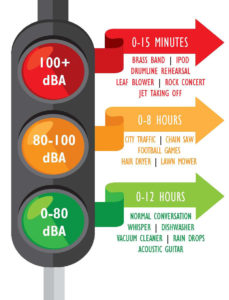
The human ear is sensitive to a wide range of sound levels ranging from 0 dB, which means total silence for the human ear, up to 130 dB, which causes pain.

To get an idea:

-Smooth human breathing, which is heard only when we are very close, reaches about 10 dB.
-A normal conversation can be around 60 dB.
-A vacuum reaches up to 80 dB.
-An ambulance siren is around 120 dB when we are close to it.
-A volume of 140 dB can cause damage to the ear, if it is supported for a period of time.
-Exposure to 150 dB can burst the eardrums. And the sound above this level can be very harmful and even lethal.

Some details of the sample rate

For many years it was thought that the sample rate or sampling frequency did not decisively influence the final quality of the digital audio; There are currently several engineers who record in 44.1K or 48K without really knowing why they do it. With the advent of new and better computers, interfaces, ports and protocols, 88.2K, 96K and up to 192K entered the discussion table on the best sample rate to use. It has always been the subject of discussion between engineers and audiophiles; some argued that they did hear the difference between different sample rates and others that did not, and the topic has been subjected to millions of A / B tests with very high quality equipment, causing all kinds of opinions found and uncompromising, fights and friendships of years broken

samplerate

While this is a basic issue of digital audio, it is always surrounded by a halo of mystery, mysticism and magic (like every sound theme), which is well worth clarifying.

 What is the sample rate?

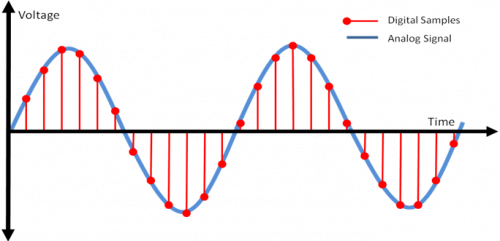
This topic, although it occurs in the first or second class of digital audio, is not always understood correctly. In scholastic thinking, sample rate is defined as the amount of audio samples transported and taken per second. Since this is a unit of measurement over a second and with events that occur cyclically, the Hertz (1 / Frequency) is used as a unit. Obviously we cannot talk about this subject without referring to the Nyquist sampling theorem, which was tested by Shannon almost twenty years after its publication and in which it is stated that for a signal of limited bandwidth (B) (for example, a vibraphone reaches 14.917Hz), the sampling frequency must be twice its bandwidth (2 * B). Then, taking the previous example, we can say that: 2 * B → 2 * 14.917Hz → The sampling frequency for 14.917Hz should be 29.834Hz. This would be equivalent to 29,834 samples per second (1/29, 834) to be able to regenerate the signal of a vibraphone without error. Hence, it is taken that the highest frequency that human beings listen to is 20kHz and if we apply Nyquist it should be 40kHz, but it takes 44.1kHz to meet the demanding ears and for a matter of multiples.

44.1K or 48K to 88.2K or 96K, the correct division

At the dawn of the digital audio era, Nyquist was used to use the sampling resolution of 44.1K, used at that time audio CD format that played at 16bit / 44.1kHz. With the advent of DVD and Blu Ray as video and audio formats, resolutions such as 24Bits / 48K or 24Bits / 96kHz began to be used. Although for many years there were recordings that were made in 24Bits / 88.2kHz or 24Bits / 96kHz, at a certain time of mastering, before sending it to the disk duplicator, the audio suffered a mutilation that reduced it to 16Bits / 44.1kHz as It was ordered by the CD format. This process should be carried out with equipment specially designed for this function and in stages so that the audio did not suffer a very noticeable cut and the bad conversion was evidenced. Although the old and dear Dither was applied since then to compensate for this process (something like “grain” in the cinema. Watch a film without “grain” and it will look like HD even though it was filmed in 1980 on tape and goes to notice until the makeup of the actor and the assembly of the special effects, something otherwise disagreeable).

Generally, to prevent the audio from mutilating or applying several conversions that degrade it, it was decided at what resolution to record before pressing the REC button (we will not mention those that come down directly with your DAW from 24Bits / 96kHz to 16Bits / 44.1kHz in one step to export the audio … there is a place reserved especially for them in hell). If the audio was going to end on CD, a 88.2kHz sample rate was generally applied, since at the time of mastering, with the symmetric re-sampling at “half”, it was 44.1kHz.

Sounds better?

The subjective point of this is that we expect recordings to “sound” better at a higher sample rate. The reality is that if we record in high sample rates, with very good sampling, our sound will not “sound better”, but will be more detailed. Obviously, if our sound source is bad, our microphones and preamps too and so on, no matter how much we record at 192K, the result will not be the best. Now, if we use a good sound source, good audio chain and a good converter, everything will be obviously good. But don’t confuse; We are talking about detail here, not if it will sound more “warm,” “fat,” or “full-bodied.” This translates into a more homogeneous capture of the entire frequency spectrum, both audible and non-audible.

sample rate

CPU, disk and plug-ins

Obviously, having a higher sample rate means that our processor must do more calculations, since it has to process more samples (or audio samples). Depending on the amount of plug-ins that we use before a multitrack in high resolution, our use of both DSP and native processors (the computer equipment), will increase significantly, making it very difficult or impossible to work. There are several options to overcome this problem, from buying more processor or DSP, using fewer processes or external equipment (hybrid mixing), to borrowing a machine. The only option that should never go through our minds is to lower the resolution of the audio, process and upload it again. The serious problem that comes with this is a cut in the audio, which is not reversible and what is limited and trimmed, so it stays.

Another aspect to consider is that the storage speed must be in accordance with the audio resolution we use. Suppose we want to record at 24Bits / 96kHz; The transfer rate would be: 2304kbits / second. Now, calculating the amount of tracks, we should use a disc that really reaches us in speed for this transfer rate (topic to be developed in another article).

In these times, storage size is not a problem, but speed is. Having three terabyte disk drives are generally used for 5400 rpm dish disks; the least that should be used if they are not solid state disks, would be 7200 rpm plate disc drives. Obviously, with 5400 rpm discs, we would have a third reduction in the final transfer speed and reading and writing possibilities called “iops” (in out per second or in and out per second), which have a certain number, depending on the disk, capacity and arrangement of the same (RAID) which, depending on how much we demand in the resolution of the audio, amount of channels, processing (plug-ins) and expected latency (if we record with real-time monitoring), we will surely face some problems like “clicks” and / or “pops” in our audio.

Clock

The importance of using a good clock (or clock) and being in sync with all the elements that belong to our audio chain is vital. Recall that a few articles ago we have exposed this topic in detail, but it should be reinforced in this article. Several ADC and DAC converters of economic interfaces do not perform sampling and quantization in the correct or expected manner; External clocks or protocols such as Dante help the synchronization between several devices to be correct and improve the audio quality. Much of the final quality of our work in audio is in this part of the process and it is important that if we take our work and passion seriously, we begin to pay attention to these kinds of details that are generally overlooked.

Audio Formats: Everything musicians should know to choose the right file

What is the best audio format? It is a very frequent question. Surely you’ve already raised it.

The answer is simple. It all depends on your needs. Whether you’re sending demos, building your digital music distribution, or archiving your songs, the file format is very important.

So, to help you choose the best file format for your music, we have collected all the essential information about the audio formats.

And even more important, which one is better in each situation.

Compression: the first impression

Audio formats depend on compression.

I don’t mean the compression you apply to a song in your DAW software. I am talking about file compression.

Compression makes a file smaller, to save space when streaming, downloading or storing.

But what happens when you compress?

There are 3 types of file compression:

Uncompressed (I know that “uncompressed” is not a type of compression, but I add it to make everything clearer), without loss and loss.

Uncompressed and lossless files retain the original data intact. But files with loss delete certain data from the original file to reduce the file size.

So the more compressed a file is lost, the more information is lost.

Compressing with loss does not mean that all your drums are going to be deleted. It simply removes the audio that the human ear is not able to hear. Maybe only dogs notice the difference …?

In any case, if you really want to hear what disappears when you compress a file, watch this MP3 conversion experiment.

About compression types
Here is a simple way to understand each type of compression:

An uncompressed file is an exact copy of the original. No information is lost. Uncompressed files are like an original picture.
Lossless files are slightly smaller files, but they keep the original information intact. A lossless file is like an original painting, but it is folded in two until you look directly at it.
Files with loss are the most compressed. Some of the original information is lost during compression. Files with loss are smaller versions than the original — the photo is still there, but some details have disappeared.


formats_c

Now that you know what compression is, you may be wondering how each type of file is compressed.

Do not worry. Here we go.

How each type of file is compressed

Uncompressed Formats

Uncompressed formats are not compressed (obviously). The most common uncompressed formats are WAV and AIFF.

These are the formats that you usually export from your DAW. If you duplicate a song to WAV, it is an exact and uncompressed copy of the original.

Lossless Formats
LANDR: A space to create. More details
Lossless files are compressed. But although they are compressed, they retain all the original information as a WAV. They simply unfold at the time of opening.

The most common lossless format is FLAC. Apple also has its own lossless format, called ALAC, used in iTunes.

The FLAC format makes the files lighter than WAVs, but they retain all the original information. Although the size of these files is usually very large.

Formats with loss

Lossy files are the most common audio format. The most used is the MP3. But there are other types, such as OGG, WMA and AAC.

The drawback of files with lossy compression is that it deletes some data from the original file.

But the benefit is that they are smaller, open faster and take up less space.

Files with loss can be high and low resolution, depending on the amount of compression. The higher the quality, the less information will be lost.

The truth about bitrates

The quality of an audio file is determined by its bitrate (bit rate).

The bitrate corresponds to the information processed per second. And that is what 320 or 192 means in MP3 files.

Thus, an MP3 with a bitrate of 320 has 320 kilobits per second — or kbps.

WAV and AIFF usually have 1411kbps.

A higher bitrate means more information per second. And more information per second means better sound. Simple, right? Now you understand the basic points of compression, file types and bitrate, right?

Perfect. Let’s continue.

Now comes the million dollar question …


In what situation do I use each format?
If I talked about each of the audio formats, we would be here for days. Surely you have other responsibilities, and a lot of music to produce. So I will be brief and concise. These are the best uses for each of these formats. We talk about WAV, MP3 320 and MP · 192.

WAV
The WAV is at the top of the podium. It is the Ferrari of audio formats. The WAV offers a cleaner and sharper sound than the other compressed formats. If you share demos with a record label, show your work for a possible audiovisual project or send your music to a blog, you need a mastered WAV.

1512-38_mixtape-700×366

The WAV is a guarantee that your best sound represents you.

When you master your music, always use the WAV as the delivery format.

WAVs can also be converted to other formats later, so it is the right format for conversion later.

The only drawback of WAVs is the large size of the files. They take up a lot of hard disk space. So your computer, your phone, your iPod or your Dropbox will fill up very quickly if you only use WAV.

But when it comes to your own music, it is important to always have a WAV copy of each of your tracks.

Most platforms require WAV to upload your music for distribution. For example: iTunes and Amazon ask for high-quality WAV to upload music to their services.

The 320 MP3
The MP3 of 320 is the most frequent type of file. For one simple reason: It has the best of both worlds.

They are compressed, so they are easy to handle in regards to their size. But they also offer a pleasant and rich sound.

If you listen to music in streaming, it is very likely that it is 320. For example: everything you hear in high quality on Spotify is at 320kbps.

The MP3 of 320 is a good way to share your best sound saving space on the hard drive and avoiding long waits during the upload and upload.

MP3 192
The 192kbps MP3 is the draft horse. They are fast and dirty MP3, for when you have to share something easily and quickly. They are useful when transferring a handful of files at once, check your entire catalog or share and reference tracks quickly.

A lower bitrate causes more degradation than an MP3 of 320 with loss, but sometimes it is difficult to feel the difference. Take the test and judge for yourself.

The MP3s of 192 are the perfect tool for musicians who need an efficient and fast way to share or listen to their music in streaming.

Useful tip: if you use your own streaming player on your web page, an MP3 of 192 will make your page load faster.

Don’t forget any format by the way
Each format has its uses. Choosing the right format depends on each context.

So think about what sound you share and where you do it. Are you using the right format?

Mastering in WAV format is the best bet to share your music. Once you have the mastered WAV, you can convert it in any other format into a periquete.

Formats are important in the era of streaming. So make a smart choice and use the right format.