What is the encryption mechanism?


Free Download Mp4Gain
picture

What is the encryption mechanism?

Video Bitrate

5 points to consider for HD video encoding

Video Bit Rate

Encode

The image quality of Internet videos is almost proportional to the bit rate. However, if the bit rate increases unnecessarily, the file size will increase. “Keep bit rate low”, “Reduce file size” and “Reduce load time” are linked, and there is nothing to say if you can encode in high definition while keeping the bit rate low.
Also, at the beginning, I wrote that “image quality is almost proportional to bit rate”, but I think some of you may have experienced that “I increased the bit rate and encoded, but I am not satisfied with the quality of the image. “So, this time, I will explain five points that are often used to do high definition video encoding.

Encoding Mechanism
First, I will briefly explain the encoding mechanism.
An image is a collection of continuous images (frames), and by changing this in a short time like a flip book, it appears that you are visually moving. Japanese television images are 29.97 frames per second (short for 29.97 fps / frame per second) and most movies and animations are standard 24 fps. Since a large number of frames are required for video, the amount of data is also huge. Therefore, data compression is indispensable for distributing videos on the Internet.

When coding

“Prediction in frame” that compresses data within a frame
“Prediction between frames” that compresses data into consecutive frames
The information is reduced to the extent that it does not affect the visual sense and the data is compressed.

■ What is in-frame prediction?
There are various methodologies for data compression, so I will skip the details here, but the basic idea of ​​within-frame prediction is to divide a frame into small blocks called cells and the colors adjacent to each other in the block. they are the same or similar, they are compressed together.
For example, if there is information “blue blue blue blue blue blue blue blue blue blue red red yellow yellow yellow” information in the divided block, the amount of data can be reduced by combining this with “blue 11, red 2, yellow 3”. It’s an image.

An example of data compression in in-frame prediction (image)

■ What is cross-frame prediction?
However, in the case of video with a time axis, the number of frames is large, so there is a limit to the overall weight reduction based solely on the prediction within the frame. On the other hand, in the prediction between frames, based on the idea that “the contents are similar before and after the consecutive frames”, the cells that do not change from the previous frame reduce the amount of data by reusing information, and the cells that change is converted to data as difference information.

Point 1: learn a suitable bit rate guideline for resolution

The above three are excerpts of the same 640x360px image, but the file sizes are different at 1MB, 250KB, and 50KB. The image quality of 250 kB is lower than that of 1 MB and is much coarser at 50 kB. This is because the amount of data allocated per pixel is reduced, resulting in poor image quality.

The same phenomenon can be said of the videos. Bit rate is the amount of data allocated per second and affects the image quality of the video. If you want to view a video on a large screen, such as viewing it full screen on a computer or TV monitor, you need a sufficient bit rate according to the resolution. On the other hand, when displayed at a small resolution, the roughness is not as noticeable even if the bit rate is reduced. On the contrary, even if you encode at a high bit rate, you will not notice the difference in image quality, and in many cases the file size will only increase.


Free Download Mp4Gain
picture


Mp4Gain Main Window
picture


Mp4Gain Features
picture


Free Download Mp4Gain
picture

Difference between wav and mp3

Difference between wav and mp3

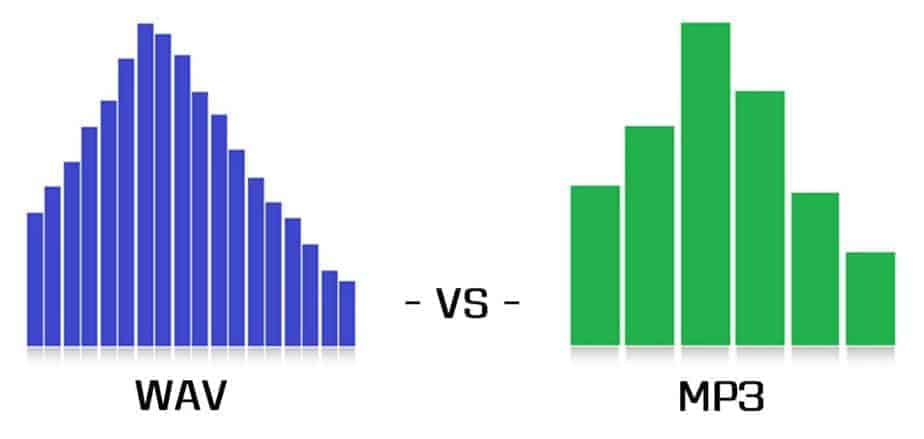
WAV vs MP3

I heard that there is a difference in sound quality between WAV and MP3, but how much is it really different?
Does anyone think so?

WAV vs. MP3

Even if you theoretically know that a WAV file is a lossy compressed file, it is an MP3 file, but it seems that few people really compare the WAV file and the MP3 file of the same song.

Lossy compression is a compression method that can significantly reduce the amount of data, but when compressed data is decompressed, it is not fully restored and data loss (corruption) occurs.

This time, we will do a simple check so that you can understand the difference between WAV and MP3 more deeply by learning not only the form and theory, but also the sense of hearing!
Even if it says verification, just listen and compare!
I hope you have read this article and used it as a basis for deciding whether to use WAV or MP3 in the future.

From the meaning of the terms to the operation procedure, we will explain it smoothly with pictures.
PR: New Vook Video Production Glossary

Difference between WAV and MP3
For those who don’t know what the different format of WAV and MP3 is, I will explain it in words first.
If you already know, go to the “Listening Comparison Test” below.

In short, a
WAV sound source is a format that preserves the same sound quality as an uncompressed recorded state.
The sound quality is good because it is not compressed, but it also has the disadvantage that the file is very heavy.

Secondly,
MP3 is a file that is significantly lighter by removing only the sounds that are inaudible to humans in the WAV file to lighten the sound source file that is too heavy for WAV.

By the way, for reference, the size of the same WAV and MP3 file
it’s 9.2MB, which is less than 1/4 of that, while WAV is 41MB.

The file is very light, but let’s check how much sound is gone.

Comparative hearing test
In fact, I prepared the MP3 version and the WAV version of the same song.
If you say this is MP3 and WAV first, you may hear WAV better due to biases, so first try listening to the sounds without saying which one …

Play the same phrase from the same song three times.
Of those three times, we will answer after the final summary if each was MP3 or WAV.

People with very good hearing can hear it because it only cuts out sounds that humans shouldn’t be able to hear, but it doesn’t matter if they can’t be heard.

What is an MP3 file?

We start with one of the most common files in the world of computing, that is, the one with the name MP3.

File Format Mp3

MP3 files have been around for years and that is why their development is so widespread.

But what does an MP3 file represent in practice?

Well, an audio file in general is a sequence of numbers obtained by sampling the analog signal.

MP3

This sampling then responds to some parameters that are the frequency, measured in Khz and the resolution that is instead expressed in Bit.

The MP3 file is the most compressed form of an audio file, so to speak.

At the end of the day, you have to understand that the MP3 file manages to eliminate all the superfluous parts of the digital file of the sequence and the final sampling, exploiting some imperfections of the human body to be able to give you a clear and clean melody.

However, on the other hand, the MP3 file considerably reduces the quality of the reproduced sounds.

In fact, all the different nuances of a given melody boil down to the bone.

An MP3 is small in size from the point of view of memory, it must be seen as a kind of concentrate that gives you an appreciable final result but not one hundred percent complete.

In the most extreme cases, an MP3 file can reduce the original sounds and nuances of the music or melody by up to 90%.

However, these formats are highly appreciated and used because in addition to being practical and straightforward, they are now compatible with any technological device.

This means that you can always carry them with you and any product you have will be able to read an MP3 file.

Importance of MP3 (digital music)

Importance of MP3 (digital music)

Music has always been present in societies around the world, and with the passage of time and technological advances it has been enclosed in very diverse reproduction formats: cassette, LP, CD or Mini-Disc have been some of the means Most popular in which people have brought their favorite music.

Software engineering made it possible for Moving Picture Experts Group (MPEG) to design a specific audio format with a .MP3 file extension, a name given by the Fraunhofer Society in July 1995. The MP3 digital audio format would become popular from the second half of the last decade of the 90s thanks to the Internet, P2P networks and the commercialization of the first MP3 players (MPMan and Rio PMP300).

The digital audio format MPEG-1 or MPEG-2 Audio Layer III (MP3) is the most important of all time, even ahead of WMA, FLAC, OGG or AAC, readable by any electronic media player device: televisions, CD / Blu-ray / DVD players, car radios, portable MP4 and MP3 players, PCs, Tablets, mobile phones, compact audio systems, compact music systems….

MP3 music has had a huge impact on modern, hyper-connected society, and has made it possible for people to carry vast music libraries in as little space as on a micro SD memory card.

MP3 quickly moved to CD-Audio, a format that is only capable of storing music with a standardized maximum of 80 minutes of playback and about 20 tracks per CD: the data CD, with MP3 tracks, is capable of storing about 150 tracks per disk (at the rate of 5MB per track).

MP3, with a maximum audio quality of 320KBps and an acceptable minimum of 128Kbps, would conquer digital music lovers and facilitate the “physical” compaction of music libraries: going from individual 80-minute (700MB) discs to discs hard laptops between 250 and 500GB or 8GB / 16GB USB sticks… managing to store thousands of albums in devices smaller than the size of an Apple iPhone.

MP3 would also change the style of music players, in addition to changing to smaller, more versatile and manageable formats. From rough and large portable CD players to tiny devices like iPod Shuffle.

The change from a CD-Audio unit to integrated physical memories or micro SD would also favor the use of music players in sports activities, thus avoiding skipping between tracks due to movement: the new storage medium would solve the typical deterioration of the units optical, with a tendency to scratch in more or less careless use.

MP3 music would dramatically reduce file size, going from around 50MB on CD-Audio tracks (.wav files on PCs) to 5MB or less on MPEG-2 Audio Layer III (depending on encoding quality): It would favor sending tracks by email, sharing them through P2P networks (.torrent), bluetooth or their storage in the cloud (DropBox, BOX…).

The MP3 music format is preferred by the general public, ahead of others such as OGG, FLAC, WMA or AAC: greater diffusion, and better compatibility of the format with consumer electronics devices.

MP3 has also contributed to greater accessibility of music content, its organization on digital devices, management and copying of tracks on computers and mobile devices, and editing of the information attached to each track.

MP3 and its full compatibility in devices commonly used by users has favored legal downloading (online stores, such as iTunes or Amazon) and illegal downloading (download pages and P2P networks).

Thanks to the success of MP3, listening to music on any device with speakers, or to which headphones can be connected, is a simple activity: conventional digital music players (MP4 and / or MP3) are being defeated by Smartphones, with accessible memory of at least 16GB).

MP3 has become the most important and widespread digital audio format of all time.

DEFINITION OF MP3

DEFINITION OF MP3

MP3 is an acronym derived from MPEG Audio Layer III. It is a digital audio format or, more specifically, a compression format for this type of audio.

To generate an MP3 file, an algorithm is used that allows reducing the size or weight of the file that stores the sound, although with a certain loss of quality. Said loss, in any case, is not usually significant, which is why MP3 is the most widely used format in computers and portable players.

German sound engineer Karlheinz Brandenburg is singled out as the creator of the MP3. He was among those responsible for the development of the Moving Pictures Experts Group (MPEG) and in the 1980s he began working on audio compression. As early as 1995, it started using the .mp3 extension for files with compressed audio under this system.

mp3 vs aac

The MP3 format was a revolution in the way of distributing and consuming digital audio. MP3 files are much lighter (and therefore easier to transfer or download) than files on an audio CD or CDDA. With the advancement of Internet connections, the download of entire discs whose songs are compressed in MP3 was facilitated.

The digital audio player is also known as MP3. These devices can save and play MP3 files, although they are generally able to work with other formats as well.

A person, for example, can store two hundred songs in one MP3 and then listen to them wherever and whenever they want. All this tells us that MP3 was a great invention that revolutionized the way we store and listen to our music, facilitating actions such as moving our entire music collection from one country to another at a level that in the past would have been a luxury. of few people.

However, everything surrounding this compression format is not positive. First of all we must talk about piracy: in its early years, MP3 was synonymous with “stolen music”, since due to the small size of the files it was possible to upload entire discs to the Internet for any user to download freely. This did not go unnoticed by the record labels, much less for the artists, but it was a phenomenon that generated great losses of money in the music industry.

One of the measures that was gradually bringing the industry to life was the sale of music in digital format, both MP3 and AAC (the iTunes format), among others; we could say that he adopted the saying “if you can’t against them, join them”. Unlike pirated discs, purchased ones come with the digital booklet, whose quality is impeccable and far superior to the scanned version that pirates usually include in their packages, as well as certain items that are not found on the physical disk.

In addition to combating illegal downloading with the sale and inclusion of exclusive material, another determining factor was quality: one of the outstanding characteristics of the MP3 format is that it can offer different degrees of compression, and the differences between very small files (such as being the 96 kbps) and the big ones (320 kbps) is appreciated without effort.

Undoubtedly, the eventual offers go a long way in convincing people to buy rather than steal. But none of this can change the mindset of those who are absolutely stuck in their ideas, those people who download games, movies, music and books without paying for them, claiming that “the creators already have enough money.”

Audio quality: Bitrate in MP3 files

In many cases the term Bitrate is used, which is the bit rate per second that a multimedia file (Audio or Video) has. Currently the MP3 music format is one of the most widespread (Although there are currently other more current formats such as OGG Vorbis, AAC, Flac, Monkey Audio, …) however the audio quality is variable, this is due to the characteristics with which the MP3 in question has been compressed, including:

Mode: It can be of two types mainly:
Mono: With a single channel (The right and left channel go together, not separated which gives worse audio quality).
Stereo: Two channels (Right and Left, improve audio quality).

Sampling frequency: Audio CDs use 44,100 Hz (22,050 Hz per channel), although there are higher frequencies such as 48,000 Hz used in DVDs and lower, the higher the frequency, the higher the quality.

Bits: Audio CDs have 16 Bits (Although MP3 can be compressed at a lower quality such as 8 Bits).

Bitrate (Bit Rate per second): Audio CDs have about 1,400 Kbps (44100 Hz * 16 Bits * 2 channels), meaning that an Audio CD would have a bitrate of 1,400 Kbps (In MP3 format the maximum Bitrate is 320 Kbps, however, it is assumed that an MP3 with a 128 Kbps Bitrate has a quality similar to CD, although in many cases to achieve a quality similar to CD it is necessary to use a Bitrate of 192 Kbps, and to obtain CD quality it is necessary use 256 Kbps or 320 Kbps).

Some of the most common Bitrates are:
8 Kbps Mono: Telephone Sound.
16 Kbps Mono: Better quality than shortwave.
32 Kbps Mono: Better quality than AM.
64 Kbps Stereo: Better quality than FM.
112 – 128 Kbps: Quality close to CD.
160 Kbps: Quality closer to CD.
192 Kbps: Virtually CD quality.
256 Kbps: Quality CD practically undisputed from an original CD.
320 Kbps: CD quality.

Coding method: It can be of two types:
VBR (Variable Bit Rate, Bit Rate Variable): Encodes the file in MP3 with a variable Bitrate.
CBR (Constant Bit Rate, Constant Bit Rate): Encodes the MP3 file with a fixed Bitrate.
In addition, another factor that influences the encoding of the MP3 file is the CODEC (Encoder-Decoder) used, one of the most common and the best result is LAME (Lame Ain’t an MP3 Encoder) which is also free.
One point to keep in mind is that if we recompress an MP3 file that originally has a 128 Kbps bitrate and convert them to 192 Kbps for example, audio quality is not really gained because the MP3 format has some quality loss (MP3 is a loss algorithm, also called lossy). which has occurred when converting the original file (Ex: CD Audio or a 320 Kbps MP3 to a 128 Kbps MP3) so this recompression does not make much sense since we will not gain in audio quality (As they say where there is no one can not get) and the only thing we will achieve in any case is to increase the initial size of the file.
The opposite case (Recompress a 320 Kbps MP3 file for example at 192 Kbps) if it makes some sense because in this case although we lose some audio quality we reduce the weight (Kilobytes or Megabytes) of each MP3 file somewhat.
In conclusion, it can be said that if we need to encode / compress an MP3 file with good quality, the “ideal” would be to do so:
To be able to start from an Audio CD, although an MP3 at 320 or 256 Kbps could also be valid for a recompression of the file.
In stereo mode (With two channels, right and left).
With at least 44100 Khz sampling rate and 16 Bits.
With a minimum bitrate of 192 Kbps or at most 256 Kbps (Using 320 Kbps would give higher quality but also increase the file size considerably).

Mp3 Patent: goodbye

The MP3 format that revolutionized the music industry is already free as the wind: goodbye to patents

When you download video on the internet sometimes you use AVI or MKV but do you know the differences between them? When you download video on the internet you sometimes use AVI or MKV but do you know the differences between them?


This was the first industry guy to realize that the MP3 they had rejected was killing them. This was the first industry guy to realize that the MP3 they had rejected was killing them.
Services like Spotify already have more customers than digital music buying Services like Spotify already have more customers than digital music buying

The MP3 format revolutionized the world of music. For better or worse, this audio coding format made it possible to listen to (and share) music through the Internet so that the entire industry ended up adopting this or other solutions to end up making the leap to a model in which the physical format gave prominence to downloads and streaming.

The technology, however, was subject to patents that were defended by Technicolor, but those patents – still valid for encoders, for example – expired on April 16, 2017 completely. The MP3 is now freer than ever.

Until never, MP3 patents

Those responsible for Fraunhofer IIS explained a few days ago how “on April 23, 2017, the Technicolor mp3 licensing program for certain Technicolor and Fraunhofer IIS patents and software related to the mp3 has expired.”

Fraun

In that message, all those who have licensed the technology were thanked for their support of a format that became the “defacto audio codec worldwide over the past two decades,” and highlighted that even with more efficient audio codecs, mp3 is still “very popular with consumers”. The success of MP3 was parallel to that of the legendary Winamp, the player that became that symbol of a change of air in the audio industry.

These patents have been very beneficial for their owners: it is estimated that thanks to them the Fraunhofer Society achieved revenues that reached 100 million euros in 2005. Those amounts of money made many others try to take a piece of that juicy cake, and the lawsuits and lawsuits surrounding who owned what in the MP3 segment have been frequent.

Linux distros, among the big winners

These alternatives still fail to undermine the popularity of the MP3 format, which for the purpose of patent validity can be used without restrictions in all types of scenarios.

Fedora
One of the best known cases was that of Linux distributions, in which we often found ourselves without native reproduction of MP3 content by those patents. In the Fedora documentation, for example, it was indicated how since October 11, 2016 this distribution could already include MP3 players since the patents for music reproduction had expired.

The encoding of MP3 files – creating them from a CD in Fedora, for example – was not “permissible because it requires proprietary technologies and the patent owner has not provided licenses compatible with Fedora requirements.” Neither Technicolor wanted to assign, nor Fedora (or any other distribution) to pay for those licenses.

It was possible to install a posteriori players that provided this option, but the developers of the distributions preferred to be cured in health in this section: now any “distro” may finally include native support for reproduction, but now also for coding.

The alternatives exist, but MP3 does not seem to lose strength

The MP3 format (MPEG-1 Layer 3) has undoubtedly been the “lost” audio format — we lose data in encoding — the most popular in history, but it is certainly not technically the best. The rise of the format and its deficiencies made in fact that many others tried to develop alternatives with which to conquer the market.

Mp31

Among these codecs is the AAC family of formats, which does not require the payment of licenses to stream or distribute content in that format. Of course, there are patents for the development of AAC codecs, which forces those who implement Open Source software that takes advantage of this format to distribute it only with the code, as in the case of the famous FFMpeg.

Normalize the volume of an mp3

For several decades, with the appearance of MP3, it has become a customary practice that people accumulate a large number of music files, mainly in MP3 format.
Some people get to accumulate thousands of songs in the MP3 format. which are easily transported with a pendrive using any other device, to be able to listen to them anywhere, and at any time.


This is very comfortable because one does not need to load any hard disk and much less large numbers of CDs or cassettes.
but it has the disadvantage here when mixing the songs that comes from very different recordings, times, etc. It occurs very frequently in volume level differences.
It is a typical problem today, want to Play favorite songs meets the fact that some sound much louder than others. And this eventually becomes a problem.

for this the volume normalizers have been created. The volume means all the songs have a volume as optimized as possible every possible level that each of them can play.
Volume normalizers have also existed for decades, and their algorithms to achieve amazing results. today download Mp4 Gain and check results no other software can offer. Russian other options How to change the pitch of a song Without altering its speed on the contrary modify the speed without affecting the Pitch. You can also equalize it and perform various functions that will be very useful.

Encoding digital audio with a loseless format?

Compressing a digital audio with loss is to reduce the size of an audio file.

Codecs are used to reduce the size of the files. Some of the operations that codecs can perform to reduce file sizes are as follows:

Reduce the bit rate of the original sound so that the audio takes up less space.
Remove sounds at frequencies that are not noticeable by the human ear.
Elimination of redundancies of the audio signal.
They can reduce the number of existing channels by transforming a surround sound to Stereo.
Reduce the number of bits per sample.
Etc.
Note: The compression process of an audio is extremely complex. In addition, each codec applies different methodologies to compress the size of an audio.

Obviously during the compression process there will be a loss in audio quality. The higher the weight reduction of the compressed file, the higher the loss of quality.

UTILITIES THAT YOU HAVE TO COMPRESS AN AUDIO

Obviously compressing an audio has certain utilities. Some of them are as detailed below:

The space needed to store the songs on our hard drive will be much smaller. Although hard drives are cheap and their storage capacity is large, it is not feasible and / or practical to store all of our songs without loss.
We can pass the audio files to third parties in a much more convenient and fast way. After compressing a music song we can pass it by email or other means without any problem.
It seems that the trend in the very near future will be to consume video and audio via streaming. Therefore the compression of video and audio is very important. If we offer a web service in which we provide streaming audio, it is essential to compress the audio to save bandwidth and so that customers can play it at home without problems.

Select the compressed audio file format

There are numerous types of compressed file format with loss. Some of the most popular are the following:

.mp3
.ogg
.wma
.m4a
.aac
Depending on the needs, it may be useful to select one format or another.

However in my case I recommend using the mp3 or ogg file format. The reasons are as follows:

The .mp3 files do not stand out for providing the best audio quality. However, the .mp3 format is the most universally extended.
Any music player is capable of playing the .mp3 file format. You cannot say the same of the other file formats.
Everyone is able to play audio in .mp3 format. Even people with little knowledge technologically speaking.
If someone does not want to use the .mp3 format because they think the quality is not enough, or because it is a proprietary format, I recommend using .ogg. In the following link you can find the advantages and disadvantages of the .ogg files with respect to the .mp3 files.
Select the audio compression codec (encoder)

Once the file format is selected we must be aware of the codec that we will use to perform the audio compression.

In the case that we want to compress in the .mp3 file format there are the following codecs:

FHC: It’s the first codec that existed. At present this codec has become obsolete. Its compression time is very high and does not support variable bit rate.

Xing: It is the fastest encoder and allows you to obtain files with a variable bit rate (VBR). However, the quality level offered by this type of encoder is lower than Blade and Lame.

Blade: Until Lame’s appearance was the best option. It is slightly slower than Xing, but the quality levels obtained are much better. Currently this host has a problem and it does not support variable bit rates.

Lame: It is available under the GNU license and is also the best host available today. It supports variable bit rates, is fast and the quality obtained is better than in the rest of the encoders.