AAC: Lossy Encoding Is Getting Better – AAC Format Summary


Free Download Mp4Gain
picture

AAC: Lossy Encoding Is Getting Better – AAC Format Summary

AAC Music File Format

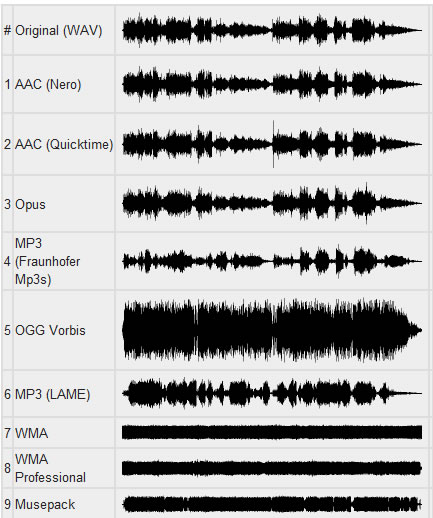
At the time of writing this article, the MP3 codec is over 23 years old. So as not to repeat myself with the article (its most recent version), which already describes the OGG Vorbis codecs (and again hello to the Xiph organization, this is also its development), MPC (Musepack), WMA (Windows Media Audio) and AAC, I will briefly describe the format here. AAC in terms of technologies that until recently were at the forefront of lossy coding.

AAC Format

In my humble opinion, AAC (Advanced Audio Codec) is one of the most advanced formats in the field of data encoding. I will describe the main features of this format, starting with the popular profiles that can be represented by a matryoshka (see the figure below):

– Low Complexity Advanced Audio Coding (LC-AAC)

Low decoding complexity is great for implementing a hardware codec; The hardware requirements for CPU and RAM are also low, which has gained a lot of popularity for this profile. It encodes the 96 kbps signal efficiently.

– High Efficiency Advanced Audio Coding (HE-AAC).

The HE-AAC profile is an extension of LC-AAC and is complemented by patented SBR (Spectral Band Replication, thick – “spectral repetition”) technology. It is spectral repetition technology that allows you to “preserve” high frequencies by encoding at low bit rates.

Why is “save” in quotes? Because the king is not real: the codec leaves room for additional information that is used by the codec synthesizer to restore the high frequencies, but since these frequencies are synthesized, that is, they are recreated by the codec, they are, in fact, a rough copy of the high frequencies that existed in the original file. … In practice, a signal encoded at 48 kbps will sound, for example, as mp3 at 98 kbps if it is supported by the decoder; otherwise, the file will simply be played without restoring the high frequencies and its bit rate will correspond to its mp3-like quality.

– High Efficiency Advanced Audio Coding Version 2 (HE-AACv2)

This profile is relatively young (described in 2006), it was created for a more efficient audio coding in low bandwidth conditions.
The second version of the profile is an extension of the first profile, the changes are in the addition of PS (Parametric Stereo) technology. The principle is somewhat similar to SBR technology: the codec also makes room for recovery information from the stereo base, sacrificing precision.

The operating conditions for this profile are the same as for the HE-AAC described above; The lack of profile support from the decoder will make the recording sound in mono.

– AAC-LD (advanced audio coding – low delay)

The AAC-LD profile has advanced coding algorithms to reduce delays (up to 20 ms);

– AAC-ELD (Advanced Audio Coding – Enhanced Low Delay)

This profile, which inherits all the capabilities of HE-AACv2 (analogous SBR and PS technologies are used, but designed for low latencies);

– AAC main profile

This profile was introduced as MPEG-2 AAC or HC-AAC (High Complexity Advanced Audio Coding). Not compatible with LC-AAC;

– AAC-LTP (Advanced Audio Coding – Long Term Prediction)

This profile is more complex and resource intensive (but also of higher quality) than all the others. It is also not compatible with LC-AAC.

That’s all I wanted to write about this codec. I put the greatest emphasis on the technologies that are used in various AAC profiles (which, by the way, generate a lot of abbreviations: AAC, LC-AAC, eAAC +, aacPlus, HE-AAC, etc.), as I will compare them with the from Opus, but the codec does its job: it is widely used in Internet radio, as well as in digital radio transmission technologies: DRM (Digital Radio Mondiale) and DAB (Digital Audio Broadcasting) (you can see these technologies here), YouTube , as an audio track for many videos in mp4, mkv, etc.

2. Introduction to Opus: description of the format

On December 21, 2017, Xiph announced the beta version of the Opus audio codec version 1.3. I will not go into important matters when I describe this codec, since such information is freely available (for example, here, here, and for those who know English, here and here). The release notes for this beta version can be found here. Here I will point out that this codec is an excellent candidate to replace other codecs. It has many advantages:

bit rate from 6 to 510 Kbit / s;
sampling frequency from 8 to 48 KHz;
support for constant bitrates (CBR) and variables (VBR);
support for narrowband and wideband audio;
support for voice and music;
support for stereo and mono;



Free Download Mp4Gain
picture


Mp4Gain Main Window
picture


Mp4Gain Features
picture


Free Download Mp4Gain
picture

Sound coding

Sound coding

Sound Coding

Sound is physical in nature. Any sound is vibrations in space (in this case, in the air), which are captured by our ears. The oscillations are continuous and can be described by mathematical models. We, of course, will not do this, but we will pose the question: how can vibrations of a continuous nature be written to a machine that operates only with zeros and ones?

Sound Coding

1.1. No compression, no loss

The WAV (WAVE) format preserves the audio track in its true quality, without any manipulation of the audio file itself.

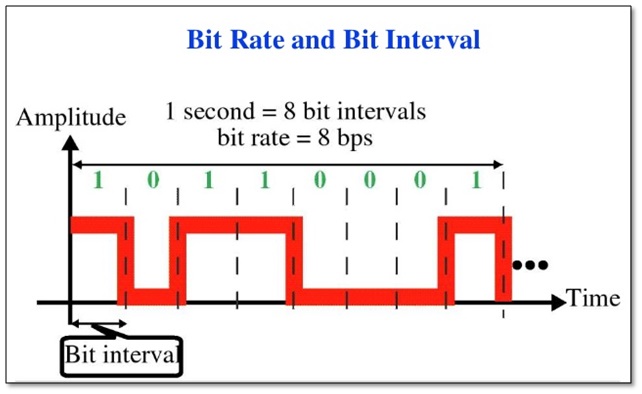
To record sound, we need to convert it to a set of zeros and ones. In the case of the WAV format, this is done in the stupidest way: the incoming audio stream is divided into the smallest segments (how many, hence the terms “sample rate”, “sample rate” or “sample rate”). sampling “) and in each time interval the current value of the analog signal is written in binary. to form. WAV files can be recorded at sample rates of, for example, 8 kHz to 192 kHz, but the de facto standard is 44.1 kHz.

It should be noted that WAV, as a container, also supports other ways of storing audio information: for example, ADPCM which is capable, depending on the bandwidth, of encoding audio data with a variable sample rate.

The 44.1 kHz frequency was no accident. If we admit inaccuracies in the description, then this figure was produced as a statement of Kotelnikov’s theorem: to maintain the most correct waveform at frequencies up to 20 kHz (the theoretical limit of audibility of the human ear), a frequency of Sampling twice as high: 40 kHz. Actually, the frequency at 44.1 kHz is due to technical aspects, details of which can be read here.

In each segment of this type, the actual voltage of the analog signal is coded in binary form: the highest level can be represented as “1111”, the lowest as “0000”. And here the second parameter comes into play: the depth of the sound, which determines how precisely the wave value will be digitized over a period of time. WAV files are often written in 16 or 32 bit. Higher bit depth means more accurate recording.

By the way, about PCM. What is burning to an ordinary CD, so popular after audio cassettes? That is, a sequence of uncompressed zeros and ones in PCM format. Bit depth: 16 bits, Sampling frequency: 44.1 kHz. What then will be the bit rate of said recording?

A 16-bit number is written 44100 times per second. 44100 * 16 = 705600 bps for one channel;
for stereo recording, this value is multiplied by 2 – 1411200 bps or our ~ 1411 kbps;
for 32-bit recording, this value will be twice as high: ~ 2822 kbps.

Conclusion: hence the gluttony of these files for free space on the hard drive, but as a benefit: the total absence of losses when recording and listening to an audio file.

1.2. Lossless compression

I won’t write much about lossless compression. This term can be found here. In fact, this method generally consists of archiving audio recordings using algorithms built into the codec, but the data is not lost and the ability to restore the audio recording with bit-by-bit precision is maintained. By decoding these formats, we actually get the same WAVE format, only it takes up less disk space; compression is approximately twice and depends on the nature of the encoded composition. When listening to the recording, the codec “decompresses” the composition and sends a sequence of uncompressed zeros and ones for the sound card to process.

There are many codecs of this type: this is FLAC (Free Lossless Audio Codec), developed by Xiph organization (also developed Opus), ALAC (Apple Lossless) from the company of the same name, APE (Monkey’s audio), WV (WavPack) and other lesser known lossless audio compression formats.

1.3. Lossy compression: fooling our ears

Scientists began to think that, in principle, it often does not make sense to save complete information about an audio recording, since our hearing is imperfect. You may not hear soft sounds after loud sounds, you may not hear frequencies that are too high or too low, etc. These phenomena are called the masking effect.

As a result, we understood: after all, you can throw it here, cut it there, and the listener will practically not notice anything – an imperfect ear will simply give the listener the opportunity to fool himself. Therefore, it is possible to get rid of the psychoacoustic redundancy in the file.

Actually, psychoacoustics exists as a discipline and studies the psychological and physiological characteristics of human perception of sounds.

LEARN HOW AUDIO DATA COMPRESSION WORKS

LEARN HOW AUDIO DATA COMPRESSION WORKS

Audio Data Compression

MP3s Around Us Many, many years ago, the Internet was supposed to be the force that would democratize the music industry, physical distribution was supposed to become obsolete, and it was possible to publish music on the Internet and be heard by millions of audiences.

Audio Data Compression

In fact, enthusiasts and companies have created websites where fans can listen to new tunes, the MP3 format has made it easy to place songs for critics, and music demo pieces are now helping to sell a CD or LP. physical. It is not difficult to put your music on the Internet, but if you are not a star of the first magnitude, you will have to accept the placement of the data in compressed format to save space on the server, as well as save download time for those who download your masterpiece. While there are many critics of MP3, there are ways around some of the limitations of this format.

The MP3 format is based on the use of data compression algorithms that can reduce the amount of data required to play music. Compression algorithms in MP3 work with loss of data, they do not work like Zip or Rar compression algorithms that restore original file without data loss. MP3 algorithms discard “unnecessary” data. For example, if there is a lot of high-level sound on a track, the algorithm may assume that you cannot hear low-level material and think that only 24 dB of dynamic range is sufficient for that part of the audio material. It only requires 4 bits of data, a quarter of the data needed for 16-bit resolution. Unfortunately, it is difficult to preserve the sound quality of music when compressed, but it is possible. One way is to use algorithms, working without data loss, such as FLAC, or some algorithms offered by Microsoft and Apple for their audio formats. However, these algorithms do not lead to a significant reduction in file size; with complex music, the size reduction can be only 10-20%.

Although there are many algorithms for compressing audio data, only a few are the most common:

MP3. This format allows multiple levels of encoding, you can create audio files of almost any size with a smaller size with greater loss of precision. There are many free and shareware MP3 players (such as iTunes and Windows Media Player), to encode MP3, you can use iTunes and most digital audio editors.

AAC. As the native iPod format, this format is quite popular and sounds better than MP3 for the same file size according to most users. ITunes can convert files to AAC.

Windows Media Audio. The format is promoted by Windows, but is used less frequently than MP3 or AAC. WMA sound quality is generally better than MP3. While Microsoft does not offer users WMA playback software for the Mac platform, the Flip4Mac utility (free version available) can play Windows Media formats on Mac.

Ogg Vorbis. A great but rarely used format that sounds better than MP3 at the same bit rate, and unlike MP3, the encoding tools are free for developers. Ogg Vorbis files are not widely used yet, but they are popular with advanced technical users.

FLAC. This popular lossless format is not supported by many portable music players, but musicians often use FLAC to exchange files when working on collaborative projects. High sound quality is maintained.

Although MP3 does not offer the best quality, this format is most often used when placing audio files on the network. all players can play MP3. It is important to choose the correct MP3 settings. When encoding files to MP3, it is always best to use a high-quality source file without compression. Then select the compression settings. When saving in MP3 format, you can generally choose from a range of bit rates (bits per second), from 320 kbps stereo (great quality, but also a fairly large file) to 8 kbps mono (good enough for dictation) . In addition to the fixed settings, there is variable bit rate (VBR) encoding, which optimizes the bit stream according to the playback material. VBR encoding is not supported by all players.

What sound quality is better than 320 or 128?

What sound quality is better than 320 or 128?

Bit Rate

What are bit rates? How do they affect the quality of music and video? Optimal bit rate for various musical styles

Bit Rate

There is a lot of talk these days that we have lost real music with the advent of compressed audio formats like MP3, AAC and the like. Is it really so? Will lossless music save music? Can an inexperienced listener tell the difference between MP3 and FLAC music? Let’s take a look at this problem.

What is Bitrate?

You’ve probably heard the term “bitrate” before, and you probably have a basic idea of ​​what it means, but it might be a good idea to familiarize yourself with its official definition to find out how it all works.

Bit rate is the number of bits or the amount of data that is processed over a period of time. In audio, this generally means kilobits per second. For example, the music you buy from iTunes is 256 kilobytes per second, which means that every second of the song

The higher the bit rate of the track, the more space it will take up on your computer. Audio CDs typically take up quite a bit of space, so it has become common practice to compress these files so that you can burn more music to your hard drive (or iPod, Dropbox or whatever). This is where the “lossy” and “lossy” formats conflict.

Lossless and Lossy formats: what’s the difference?

When we say lossless, we mean that we haven’t really changed the original file. That is, we copy a track from the CD to our hard drive, but we do not compress it to the point of losing data. Essentially the same as the original CD track.

However, most of the time, you will probably extract your music in Lossy format. That is, you took a CD, copied it to your hard drive, and compressed the tracks so they don’t take up a lot of space. A typical album is probably about 100MB. The same lossless album as (aka Apple Lossless) will be about 300MB in size, so it has become common practice to use lossy formats for faster boot times and more hard drive savings.

The problem is that when you compress a file to save space, you are removing chunks of data. Just like when you take a high-quality image and compress it to JPEG, your computer grabs the raw data and “tricks” certain parts of the image into being basically the same, but with some loss of clarity and quality.

Mobile Hi-Fi: Understanding Music Formats

Mobile Hi-Fi: Understanding Music Formats

Hi-Fi Mobile

In recent years, the topic of high-quality sound “on the go” is more relevant than ever. Digital players are making a comeback, DAC technologies that were previously only available to expensive audiophile systems are now slipping into your pocket, and streaming services are beginning to stream in high-resolution quality. It’s time to find out if you need headphones for the price of a car and what really affects sound quality.

Mobile Hi-Fi

History
The first truly mobile player was the Sony Walkman in 1979. Then it revolutionized music. The mere fact that the music could be played out of his pocket seemed fantastic. The cassette recordings were loud, the tape could be chewed, and to save energy it might be fun to rewind with a pencil. However, the Walkman was an innovative product that was very commercially successful for more than 20 years.

Literally a few years later, in 1983, the Sony Discman appeared, which played CDs, a super-modern format at the time that has not lost its relevance to this day. The sound was much better than that of a cassette, but with each shake, the music was turned off, as the laser head could not stay on the optical track. However, the biggest problem with portable CD players was size – they were much larger than cassette players. Sony’s next format to solve the size problem, the MiniDisc, failed miserably.

The first MP3 players appeared in the late 1990s. They played heavily compressed MP3 files that could barely fit on the 32MB internal memory. Apple’s iPod revolutionized portable digital music, introduced by Steve Jobs as “1000 songs in your pocket.” Later, the first truly popular store where you could buy and download music appeared: the iTunes Store.

The next stage in the development of portable music was smart phones and streaming services in the late 2000s. And this is “Over 30,000,000 songs in your pocket.” No more buying compressed music for the price of a CD: For a small monthly fee, you get almost all the music on the planet.

Now
Sound quality has become the trend of the current decade. People are tired of low quality music. Vinyl record sales (!) Are breaking all records. In 2016, more than 3.2 million records were sold in the UK, 53% more than in 2015, while digital music purchases fell 30%.

High-resolution audio formats emerged from the professional recording environment, which began to appear on streaming services. Smartphones have learned to work with external DACs that are capable of delivering Hi-End sound straight out of your pocket. The technology of the internal monitors that musicians use during live concerts has reached portable headphones. And finally, the players have made a comeback, but not cheap plastic, but metal, glass, and with high-quality audio processors inside. Not a bad time to be a music fan!

Portable Hi-Fi system
To get good sound, simply plugging an expensive headset into your smartphone is not enough. Of course, the sound will be better compared to the “plugs” that come with the phone, but to get really good sound, you’ll need to go through the entire chain, from the recording studio to your ear.

Find out in detail what is the MP3 and ACC music format

Find out in detail what is the MP3 and ACC music format

MP3 o AAC

Songs have become part of our daily life and we rarely listen to a single song during our day, during our breaks or in our free time. New music never stops appearing and it is likely that on many occasions we would like to download these songs.

MP3 VS AAC

Many of us listen to hundreds of songs by our favorite bands every day, and we may never really analyze the format of each song in detail. We have heard of the existing formats, but we really do not know the benefits of each of them and their characteristics.

For this reason, Solvetic on this day will analyze in detail the two most common formats at a musical level, such as MP3 and ACC.

What is AAC?

AAC (Advanced Audio Coding) is a new audio format developed by the Fraunhofer Institute in Germany in collaboration with companies such as AT&T, Nokia, Sony and Dolby.

AAC, whose extension is m4a, is responsible for compressing a part of the audio files of an element called lossy compression, that is, some data that affects its optimal quality since inaudible frequencies are removed from the audio element, etc.

This AAC format is based on the international standard ISO / IEC 13818-7 and is basically an extension of MPEG-2. It is important to note that Apple chose AAC as the default format for the iPod and for iTunes, demonstrating its high level of quality.

Among its main characteristics we find:

It uses a bit rate encoding variable called VBR, which adapts the number of bits used in one second to encrypt the audio data.
Supports up to 48 channels for polyphonic sounds
It offers frequencies ranging from 8Hz to 96.0kHz.
They are smaller in MP3 size
AAC focuses on broadband usage
Provide high quality sound
As we can see little by little, AAC is establishing itself as one of the best music formats of the time.

What is MP3

MP3 (Motion Picture Experts Group) is an audio format that delivers quality while drastically reducing file size.

MP3 uses a lossy algorithm with which we can reduce the size of an element without losing its quality. This format, like AAC, was developed at the Fraunhofer Institute in Germany. MP3 has the ability to compress using a lower or higher bit rate, which will affect the sound quality.

Its main characteristics are:

Supports frequencies from 16 to 48 kHz
Allows compression of the audio object with a ratio of 11: 1
With the MP3 format, music is divided 44,100 times per second and each of these parts is 16 bits.
MP3 can contain tags with information about the included file
With these concepts in mind, we will see that AAC and MP3 behave in certain situations.

Audio file size

Both formats perform the function of reducing the size of the original file while maintaining sound quality. At this point AAC reduces the file size more than MP3, for example a 20MB MP3 file will weigh 16MB in AAC format.

compatibility

As we already mentioned, the ACC is being implemented by Apple for its devices, and therefore there is no doubt that the most compatible format is MP3, since since the 90s it has accompanied us on various devices such as cell phones, audio systems, televisions. , team. calculations, etc.

Sound quality

In this regard, AAC surpasses Mp3 for technical reasons such as a higher audio frequency, a higher level of audio compression to eliminate elements that affect its quality, better encoding, among other things.

Next, we will see the relationship between these two audio files:

The death of the MP3 has been mentioned in some places, but this is not really the case where the licenses of this format have stopped being active, so the MP3 will continue to be active in many of the songs we listen to, and there is no doubt that that ACC will gradually gain strength until it surpasses it. MP3 medium term, but for now, AAC users can enjoy and appreciate AAC.

Let’s continue enjoying our favorite songs and remember that the purpose of these files is to offer quality sound in a small storage space.

Important things about the quality of digital music and digital video audio

Important things about the quality of digital music and digital video audio

quality digital music

1. The file format does not play a decisive role

digital music quality

What the producer of a track does with it in the studio is a thousand times more important than in what format the result of this work will be encoded. You can’t make candy out of shit – a decent track with an artistic message, properly produced, mixed, and mastered in an acceptable dynamic range (where you didn’t go overboard with compression in the first place), even on unimportant speakers, will sound better than a dull, gray, poorly mastered track, even if you hear it in lossless format on a fancy stereo system. It is always. This should be obvious to everyone.

2. Compressing the file size by 80% does not proportionally reduce the audio quality

When you compress digital audio, you get rid of the main ballast without affecting the quality of the music audible to the human ear. This process is called lossless compression (very similar to RAR or ZIP files). If you want to reduce the size of the audio file even more radically, you will have to shred the source and its sound forever; this is already a case of the notorious “quality loss”. Yes, as a result, the track undergoes irreparable changes, but people too often create darkness, claiming that this happens indiscriminately.

It’s time to admit that most people can’t hear some of the details on the album. It’s just that our ears cannot be compared to the hearing of a dog and other animals. You can get rid of a lot of secondary information in the audio and no one will know the difference. This is psychoacoustics in action, this is how lossy audio compression works. There is a certain threshold below which the difference begins to be heard (MP3 with a bitrate of 96 kilobits per second cannot be compared with an analog of 320), but this does not mean that the myth about the relationship between the percentage of compression and the end result is true. It is a myth.

3. People make the most of life when music is far from being of the best quality.

Life story. In the 90s, the conditional hero of the article participated in an illegal rave, spent the whole night and decided that he would make DJing the profession of his life. A brave step and a fateful decision. But what happened to the sound at that party? Everything was wrong, remember. The needle flew, the EQ not tuned, and the amps periodically cut out. Has anyone fired on this? Barely.

Have you ever been to a nasty sounding party that changed your life? Danced all night by shitty announcers in a weird club and left in the morning with your future life partner? They turned on the shortwave radio in the car, and there an old hit sounded like a balm on the soul and saved him from a reckless act. Or the cork didn’t seem so boring anymore. Did you play your favorite song before the tape broke on your pocket cassette player and you decided to form a band? All bloody sweltering summer listening to the playlist on Vkontakte and remembering this time for the rest of your life? Did you play a deplorable sounding set, burning with embarrassment, and then a line of people lined up with you, saying it was the best party of your life?

Congratulations! You are 99% of real people in real life situations who have experienced something with music. And music of such quality that the remaining percentage of purists and snobs are ready to burn to ashes. These guys think you need to worry about the audio format and dynamic range of someone’s equipment. Better to live real life. After all, it is quite short.

4. The search for an ideal is harmful

Each of us wants the world and its components to be ideal; this is the axiom. Any DJ wants to have speakers in clubs connected and tuned, every track in the collection shines with quality mastering, and so on. But only the results of the work done are taken into account, each of us is forced to make commitments every day.

So interestingly, this also applies to the quality of the music. We already noted at the beginning that this is an important point, but not so much as to deny the space of options and the possibilities of making decisions, perfectionism is completely out of place here. For example, a distinctive underground producer puts out a new track at 128 KBPS, and it will definitely break the crowd. A dilemma arises: to play it or not?

Purists will answer negatively. But you have to be honest with yourself and judge by the emotions you want to convey through music. If the combined weight of the factors exceeds five minutes of not-so-high-quality sound on your computer, the question can be dismissed.

Can you notice the difference between MP3 and FLAC?

Can you notice the difference between MP3 and FLAC?

FLAC vs MP3

“Here, of course, the question is not about the difference between MP3 and FLAC, it is broader: that lossy compression formats (MP3, AAC, WMA, Ogg Vorbis and others; that is, lossy) differ from the “lossless” (FLAC, ALAC, APE, WavPack and others; that is, lossless).

FLAC vs. MP3

Actually, with such wording, it becomes clear that in the first group of formats, the original data is not completely saved, and the second can be restored to its original format (for example, Wav or Aiff extracted from CD) without loss. What exactly is lost and in what proportions depends on the specific type of lossy files and their bit rate, that is, the degree of compression. But to say that all MP3s sound bad and the “flacks” are perfect is the height of arrogance and incompetence. Lossy audio formats have been developing for more than twenty years, and serious research laboratories (Fraunhofer Institute, for example, in addition to working on MP3, is also famous for the invention of the most efficient solar battery) and a group of enthusiasts. The math of encoding is constantly improving, and nowadays it is not so easy to distinguish files produced by different codecs by ear.

I would immediately make a reservation that not only the files themselves are important, but also the equipment they are to be tested on, the listening environment, and the examiner’s listening experience. In MP3 of any low bitrate Ariel Pink will sing with the voice of Ariel Pink, of that there is no doubt. It is quite possible that a person listening to music as a melody through white headphones in a subway car is sufficient for the eyes, and the difference in codecs will come down to a comparison of file sizes. A disc jockey who is embarrassed to buy or search lossless will also think that everything is in order with his MP3, while preparing a set in the “Tractor” on the built-in speakers of the laptop. True, during a party on a big, loud, clean-sounding audio system from the club (sometimes they meet, believe me), it suddenly turns out that the guy who speaks right after for some reason, the music got big, clear and cool. Lossy formats are developed for the convenience of transferring files over the Internet, for storing them on portable audio players, and finally for personal playback. Okay, it’s silly to watch a gigabyte AVI movie on a big screen. Even in a home theater, this is not entirely decent. The same goes for MP3. On your iPod: listen to your health (although AAC from iTunes definitely sounds better), but if you go to the disco, please don’t miss out, even if you start Skrillex. And when you listen to Christmas jazz with your girlfriend’s parents on their big lacquered speakers, buy FLAC or ALAC too. With MP3, you run the risk of getting into an awkward situation. In theory, after 256 kbps bit rate, it will be quite difficult for your future audiophile father-in-law to know if you are leaking or not.

Usually when you view an MP3 file, you don’t care about anything other than the bit rate. If you already consider yourself a person with a taste for music and sound, you should look in the file properties for the codec data that was used during the conversion. Suppose you see “Lame 3.99” there, this means the latest MP3 codec was used and you’re in luck. But next to it is “Joint Stereo”, which is not great anymore. This means that to save a couple of percent of the file size, the codec was allowed to add something to mono, although the recording is stereophonic and the sound image has slightly lost depth and clarity. There are also fully botanical CBR or VBR, ABR and UBR, but if you’re ready to dig that seriously, do it yourself. Well, you found out the properties of the file, everything is simple there. The difficulty is this: You hardly ever know what your 320 CBR Stereo is made of. Scammed out of Internet radio? Made from an unremastered original Japanese CD? Recoded from 192? There is a lot of music on torrents or Soulseek, but there are few guarantees. Another complication is that lossy formats slightly increase the peak values ​​of the audio signal. The so-called overshoot: thousands of micro-overloads throughout the entire file. Again, you won’t notice this on a train with an iPod. And the future father-in-law can hear. “The so-called overshoot: thousands of micro-surges throughout the entire file. Again, you won’t notice this on a train with an iPod. And the future father-in-law can hear.” The so-called overshoot: thousands of micro-overloads throughout the entire file. Again, you won’t notice this on a train with an iPod. And the future father-in-law can hear. “

What you need to know about MP3

What you need to know about MP3

Mp3

What is MP3?

Mp3

MP3 is short for MPEG Layer3. It is one of the transmission formats for storing and transmitting audio in digital form, developed by Fraunhofer IIS and THOMSON, and later approved as part of the MPEG1 and MPEG2 compressed video and audio standards. This scheme is the most complex scheme in the MPEG Layer 1/2/3 family. It requires the most amount of machine time to encode compared to the other two and provides higher encoding quality. It is mainly used for audio CD encoding.

The high degree of compactness of MP3 compared to other formats such as PCM (i.e. normal WAV- file) and similar formats while maintaining similar sound quality (considered 16-bit stereo at 44.1 kHz) is achieved using additional quantization according to a certain scheme, which minimizes the loss of quality. This is achieved by taking into account the peculiarities of human hearing, including the masking effect of a weak signal from one frequency range with a stronger signal from an adjacent range, when it occurs, or a strong signal from the previous frame, which causes a temporary decrease in the ear’s sensitivity to the current frame signal (simply, background sounds are eliminated, which are not heard by the human ear due to the presence at a given / previous moment of another – louder). It also takes into account the inability of most people to distinguish between signals that are below a certain power level,

This is called adaptive coding, and it allows you to save on the less perceptually significant sound details. The compression ratio (and therefore quality) is not determined by the format, but by the width of the data stream when encoded in MP3. The bit rate when encoding a signal similar to an audio CD (44.1 kHz 16 bit stereo) varies from the largest, 320 kbs (320 kilobits per second, also kbs, kbps or kb / s), up to 96 kbs and less.

Why MP3?

MP3 has two huge advantages over other formats available today. It is true that MicroSoft is trying to squeeze MP3 with its new WMA format, and there are also alternative VQF and AAC formats, but they have not yet received proper distribution and the quality is often a little worse. However, WMA is still, in fact, closed for free use, so you have problems with various encoding / listening / maintenance programs (although, who doubts MicroSoft’s mobilization capabilities :-).

The first advantage of MP3 is that none of the existing similar formats can yet be said to fully guarantee the stable preservation of sound quality at sufficiently high bit rates, except MP3, which has stood the test of time with dignity.
The second, no less important advantage: over the next few years, and perhaps the entire decade, MP3 has become the de facto standard, as the parties that use it (eg me 😉 have made a lot of investments in him, including digital radio stations. There are also many easy-to-use software programs written for MP3. Now the production of hardware MP3 players has been launched, both pocket and car. Thus, MP3 became the first massively recognized audio storage format after Audio CD (although it is often illegal).

The most famous encoders

Today there are 3 main sources that have created programs to encode MP3 music. These are Fraunhofer-IIS, Xing Technologies, and ISO itself, which adhere to the ISO MPEG standard developed by it.
Most of the encoders created to date use modified code from one of these organizations. Fraunhofer-IIS based encoders are not very fast, but very high quality, quality optimized for low bit rates.

128 kbps (11: 1)
The most popular bit rate today. The 11: 1 compression ratio is of course an argument, especially for the internet, where every kilobyte counts. However, the high frequencies are not very well preserved and there is some distortion in the sound. At the same time, I can safely say that on an ordinary computer, for example, using an ordinary sound card, computer speakers, albeit of good quality, or output through a simple recorder to your speakers (using the input for a External CD, like me), the difference will not be noticeable unless you are a sound expert.
However, in normal speakers (at least large and expensive), the lack of high frequencies is quite noticeable.

Reasons why Bluetooth can reduce sound quality

Reasons why Bluetooth can reduce sound quality

Bluetooth audio

While Bluetooth technology offers an easy way to listen to wireless audio through speakers and headphones, some people are opposed to Bluetooth because in terms of audio fidelity it is better to choose one of the Wi-Fi based wireless technologies such as AirPlay, DLNA , Play-Fi or Sonos. … While this understanding is generally correct, there is more to using Bluetooth than meets the eye.

audio Bluetooth

A little about Bluetooth technology

Bluetooth was not originally created for audio entertainment, but rather to connect speakerphone and phone headsets. It has also been designed with a very narrow bandwidth, which forces data compression to be applied to the audio signal. While this format may be ideal for phone calls, it is not ideal for playing music. Additionally, Bluetooth can apply this compression over existing data compression, such as digital audio files or sources streamed over the Internet.

Bluetooth 5.0 standard – a new level of wireless communication

But one important thing to keep in mind is that the Bluetooth system should not apply this additional compression. That’s why:

All Bluetooth devices must support low complexity subband encoding. However, Bluetooth devices can also support additional codecs, which can be found in the Bluetooth Advanced Audio Distribution Profile specification. Additional codecs listed: MPEG 1 and 2 Audio, MPEG 3 and 4, ATRAC and aptX.

In fact, the familiar MP3 format is MPEG-1 Layer 3, so MP3 is included in the specification as an additional codec.

Additional Bluetooth codecs

The official Bluetooth standard in section 4.2.2 states: “The device can also support additional codecs to maximize usability. When both SRC and SNK support the same subcode, that codec can be used instead of the required codec. ”

In this document, SRC refers to the source device and SNK refers to the destination (or receiver) device. So the source would be your smartphone, tablet, or computer, and the receiver would be your bluetooth speaker, headset, or receiver.

By design, Bluetooth does not necessarily add additional data compression to material that is already compressed. If both the source and receiver devices support the codec used to encode the original audio signal, the audio can be transmitted and received without change. So if you are listening to MP3 or AAC files that you have saved on your smartphone, tablet, or computer, Bluetooth should not degrade the sound quality if both devices support this format.

This rule also applies to Internet radio and music streaming services that are encoded in MP3 or AAC format, which covers most of what is available today. However, some music services are experimenting with other formats, for example Spotify uses the Ogg Vorbis codec.

According to the Bluetooth SIG, the organization that licenses Bluetooth, compression remains the norm for now. This is mainly due to the fact that the phone has to transmit not only music, but also calls and other notifications related to calls. However, there is no reason why a manufacturer cannot switch from SBC compression to MP3 or AAC if it supports the Bluetooth receiver. This will apply compression to the notifications, but the original MP3 or AAC files will be transmitted without modification.

What about aptX

The quality of stereo sound transmitted via Bluetooth has improved over time. The current aptX codec, which is marketed as an upgrade to the mandatory SBC codec, provides CD-like audio quality via Bluetooth wireless technology.

Just remember that both your Bluetooth source and receiver need to support the aptX codec in order to benefit. However, if you are playing MP3 or AAC material, it is best if the manufacturer uses the proprietary format of the original audio file without additional transcoding via aptX or SBC.

Bluetooth 5.0: new power saving mode

Most Bluetooth audio devices are not made by companies whose employees wear their brand on their chest, but by an original design that you have never heard of. And the Bluetooth receiver used in the audio product was probably not made by ODM, but by another manufacturer. The more complex a digital product is and the more engineers work on it, the more likely it is that no one knows everything about what is actually going on inside the device. One format can easily be transcoded to another and you will never know, because hardly any Bluetooth receiver will tell you what the incoming format is.