MP3 creators made CDs useless

MP3 creators made CDs useless

The CD Is Dead

Fraunhofer IIS, better known as the creators of the MP3 format, have invented a way to compress audio without data loss so that its quality is better than that of an audio CD, and the file size will allow you to exchange recordings over the Internet . The institute said in a press release that the new technology renders CD collections useless.

CD is dead

In fact, a new format called HD-AAC is based on the MPEG 4 SLS lossless compression mechanism and allows you to store a 24-bit audio recording at a sampling rate of 96 kilohertz. Audio CD stores 16-bit audio at a sample rate of 44.1 kilohertz.

Simply put, HD-AAC lets you listen to modern studio recordings, while the Audio CD makes them a bit worse. Music lovers are expected to convert their CDs to HD-AAC and then discard the CD.

Peaceful revolution
This is not to say that this is the first attempt for audiophiles to hear high-quality sound on a computer. There are other lossless audio compression formats. These are FLAC, which allows you to compress CD data by 30-50 percent, Monkey’s Audio, which is ahead of FLAC in this parameter, and several others. There are two reasons for the relatively low prevalence of these formats.

The first reason is the poor compatibility with portable devices. In many cases, to support FLAC or other formats, the consumer must upgrade the purchased player or mobile phone. Especially popular, for example, is the Rockbox project, which provides gamers with features that its creators have forgotten.

HD-AAC has partially circumvented this problem. Modern audio codecs are something like onions, consisting of several layers. The new format is no exception. One of its layers is AAC-LC recording, which is compatible with many cell phones and the super popular iPod (its market share exceeds 70 percent in the US).

It’s worth noting here that AAC is a lossy audio compression format. All “clippings” are placed on another layer. Therefore, although iPod owners will be able to listen to HD-AAC files without an update, they will still not be able to enjoy the promised high quality.

All the delights of HD-AAC can be listened to in a multimedia center that supports this format. However, they say that in the future, players and mobile phones will learn to support high-quality HD-AAC sound. It is very good for companies to inform the consumer that for the extra money, their audio collection will sound better.

The second reason for the low popularity of high-quality audio is the size of the resulting files. If a normal uncompressed audio CD has more than 600 megabytes of data, then the same CD in FLAC has more than 300 megabytes. At the same time, MP3 with a more or less acceptable quality is able to fit data from a CD in 100 megabytes.

Now, Apple marketers write that the iPod Touch player with 8 gigabytes of flash memory fits 1,750 songs. If FLAC were used instead of MP3 or AAC, the number would decrease several times.

German researchers also found a compromise here. Multiple lower quality files can be muted from one HD-AAC file. For example, a server might contain an archive file consisting of a basic AAC recording with a bit rate of 128 kilobits per second (one second of sound takes 16 kilobytes) and a supplementing “queue” before recording without loss. .

If ultra-high quality is not required, then the “tail” with a relatively fast connection can provide a bit rate of 384 kilobits per second (one second of sound is 48 kilobytes). And if you need to transfer sound over a slow connection, then the basic part is used for this: AAC.

The usual formats are deprived of these possibilities with rare exceptions.

Conjectures and assumptions
IIS in Fraunhofer IIS stands for Integrated Circuit Institute. So it doesn’t end with math, a couple of programs, and a dry press release. At the CES 2008 Electronics Show in Las Vegas, Fraunhofer offered software for personal computers and microprocessors and DACs from ARM, MIPS, Texas Instruments, Analog Devices, Intel, AMD and IBM.

The statement of the German inventors is suggestive. In late 2007, rumors and clues emerged that Apple would begin selling lossless compressed music through its online iTunes store within the next 12 months.

The HD-AAC announcement was the only thing missing from audiophiles to start buying music on iTunes. The year the rumors spoke of is long enough to add an HD-AAC set-top box to iTunes and update iPods.

And CDs alone cannot be updated

Audio compression formats

Audio compression formats

Audio Compression Formats

Now there are many audio compression formats that were originally developed for a computer, but later migrated to home appliances. Some of them are outdated and practically unused, some have appeared recently and have not had time to occupy their niche yet. Here I will focus only on the lossy compression formats that allow you to achieve the highest degree of compression of the audio data. What does “lossy compression” mean? Only after encoding from a .wav file to a compressed format, and then re-encoding from a compressed format to a .wav file, the original file and the final file will be different. Maybe not for the better.

audio compression formats

The compressed audio format means that there is practically no change in sound quality, despite the decrease in file size by several times. How do you manage to achieve such a result? The science of psychoacoustics answers this. The human brain is designed in such a way that we do not notice the whisper of books in the background of a conversation, although on a computer, with close listening, we can track this sound. So it turns out that it looks like it is, but it looks like it isn’t …

The combination of conventional data compression methods and the knowledge of what information is perceived by our brain and what is not, allows you to achieve a music compression ratio of up to 10 times with an acceptable sound quality. Below I have provided a brief overview of the most common and well-known music file compression formats that could be used to create a home music collection.

MP3
MPEG 1 Layer III (less often MPEG 2 Layer III), also sometimes called by people as incompetent MPEG 3 (this format does not exist), has been for many years the only association with the phrase “computer music” for many users. Developed in the late 1980s, the format, which allowed music to be compressed up to 10 times without a catastrophic loss of quality, quickly took root in home computers.

The optimal compression bit rate is approximately 192 Kb / s. Although everyone’s ears are different: someone distinguishes distortions better, someone worse. A decent minimum is 128 Kb / s. It is possible to use a variable bit rate. That is, at the moment when the range of sound frequencies is small, the bit rate decreases, and when many things sound at the same time, then, on the contrary, it increases. A constant bit rate greater than 320 Kb / s is often excessive and causes a loss of space. Also, the MP3 file includes a specific area header Id3 tag. Contains basic information about the file. There are 2 different versions of this tag. The second, consequently, is more extensive, but nothing revolutionary has been added. The sound quality of an MP3 file can vary greatly depending on the selected encoder and player.

MPEGplus / Musepack (MP + / MPC / MPP)
This encoder is similar in principle to MPEG Layer II (MP2), but uses a more advanced algorithm. Unlike most modern codecs, the goal of the creators of Musepack was not at all to achieve the highest possible quality at low bit rates. The format is best displayed at medium and high bit rates (typical file bit rate is usually in the 160-180 Kb / s range). A superb psychoacoustic model that uses VBR encoding for excellent sound quality. As a result, the codec performs better than most of its competitors at similar bit rates. The quality of the files obtained when compressed in MPC significantly exceeds the quality of similar MP3 files. One of the serious shortcomings of the current version of Musepack is the limitation of the file format: 44 kHz, 16 bit, stereo, which makes it inapplicable, for example, to compress audio tracks for DVD movies. If MP3 compatibility is not too important to you and you want the highest quality from the final file, choosing Musepack may be the ideal solution. Using this format is a real alternative to using lossless compression to encode music from CDs for those who are already disappointed with the possibilities of the MP3 format. and it is desirable that the quality of the final file is as high as possible, choosing Musepack may be the ideal solution. Using this format is a real alternative to using lossless compression to encode music from CDs for those who are already disappointed with the possibilities of the MP3 format. and it is desirable that the quality of the final file is as high as possible, choosing Musepack may be the ideal solution.

Computer sound processing

Computer sound processing

Sound Processing

MP3 format

Audio processing

The audio compression method as well as the compressed audio file format proposed by the international organization MPEG (Moving Pictures Experts Group) is based on perceptual audio encoding. Work on creating efficient audio coding algorithms (originally for digital broadcasting) started in 1987 as part of the European project EUREKA (code EU147). The result is an extremely powerful algorithm, standardized as ISO-MPEG Audio Layer-3 (IS11172-3 and IS13818-3). It allows you to achieve a compression ratio of up to 12 (sometimes even more) and without a noticeable loss in sound quality. There are three levels of compression for stereo signals:

• MPEG Layer-1 – 1: 4 compression ratio with 384 Kbps data stream;

• MPEG Layer-2 – 1: 6.1: 8 at 256–192 Kbps;

• MPEG Layer-3 (MP3) – 1: 10.1: 12 @ 128-112 Kbps.

The files corresponding to these three levels usually have extensions. mp1, mp2 and. mp3 respectively.

Initially, MPEG audio compression and restoration methods were intended only for hardware implementation using digital signal processors (DSP), but the performance of modern processors is sufficient to reproduce compressed audio in real time. So, to play files recorded in MP3 format, a Pentium processor with a clock frequency of 75 MHz is sufficient.

Such processors are not powerful enough to compress audio in real time, but there are software converters that compress audio files out of the box. Another more convenient way to work with the MPEG Audio format in Windows 95 is to use ACM Codec, automatic format converters that work at the system level. When installing such a converter, MPEG audio files can be given the extension. wav and work with them using any program that supports ACM, for example the standard media player (phonograph).

A compressed MP3 audio file actually offers the audio quality of a CD. There are losses, of course, but they are insignificant and sometimes completely invisible (more, given the possibility of putting 10 to 12 albums on a CD using this format).

Technology is next. You must first create a WAV file from the tracks on the CD. There are two possibilities for this: digitize the sound with a sound card or obtain audio data directly from a CD.

In the former case, the signal from the sound card is sent to the CD or line (line) input and a “normal” audio recording is made.

In the second, special programs are used that allow you to obtain a high-quality WAV file by extracting digital audio data directly from a CD using special functions of the CD drive, namely the Read Long command. Such a program is called a grabber, and hobbyists call the process itself “grabbing an audio disc” (capture trace copy).

The main disadvantage of the first way is the noise of the sound card itself, which is the louder, the cheaper the card. So, this method leads to a loss of quality already in the first step and is often quite noticeable.

What is the difference between MP3 and MP4?

What is the difference between MP3 and MP4?

MP3 vs. MP4

MP4 files are just a newer and better version of MP3 files, right? The answer is no. This ambiguous difference may give the impression that they are the same thing, but nothing could be further from the truth. Each has its own uses, history, and benefits, so let me repeat: MP3 and MP4 are not two versions of the same thing. In this article, I’ll explain some of the key differences that everyone should know about.

MP3 vs MP4

When you have finished reading, you will know exactly which file type is right for your needs. MPEG Overview But before delving into the differences, it is important to understand where these two types of files come from. Mp3 is short for MPEG-1 Audio Layer 3. It was one of two formats that were considered for the MPEG audio standard in the early 1990s. Philips, the French research institute CCETT, and the German Institute of Technology for Broadcasting have supported the format because of its simplicity, minimal error, and computational efficiency.

The decision was made in 1991 and the MP3 files were made available to the public in 1993. MP4 stands for MPEG-4 Part 14. This technology is based on Apple’s QuickTime MOV format, but adds support for various other MPEG functions. . The file type was first released in 2001, but it is a 2003 reissue and is now commonly used when viewing MP4 files. Audio and digital media only

The most fundamental difference between MP3 and MP4 is the type of data they store. MP3 files can only be used for audio, while MP4 files can store audio, video, still images, subtitles, and text. Technically speaking, MP3 is an “audio encoding” format and MP4 is a “digital media container.” MP3: King of Audio Because they are so good at storing audio, MP3 files have become the de facto standard for audio formats for music software, digital audio players, and music streaming sites. Regardless of the operating system or device you have, you can be sure that MP3s will work right out of the box without any problems. The main reason they are so popular is the way the file type works. MP3 files use lossy compression, which greatly reduces the size of the audio file with little effect on its quality.

The process works by removing all the data that is beyond the average person’s hearing and then compressing the rest as much as possible. MP3 also allows users to balance sound quality and file size. If you are an audiophile, you can go for larger files with higher bit rates and better sound quality. On the other hand, if you want to compress as much music as possible on your portable device, you can reduce the file size and sound quality accordingly. Also, MP3s will always be smaller than equivalent MP4 files.

If your audio player or smartphone is getting crowded, you can convert any audio saved as MP4 format to MP3. Be aware that the sound quality may decrease in the process. MP4: more use, more flexibility MP4 files are “containers”: instead of storing the code of the file, they store data. So MP4 files don’t have their own way of handling file encoding. They are based on specific codecs to determine how encoding and compression will be handled. There are currently hundreds of codecs, but not many work with MP4. For the device to be able to read and play the MP4 file, it must have the same codec. Most supported codecs: Video: MPEG-4 Part 10 (H.264) and MPEG-4 Part 2. Audio: AAC, ALS, SLS, TTSI, MP3 and Subtitles: MPEG-4 Timed Text. These codecs give MP4 much more flexibility than MP3. For example, M4A files (which are MP4 files that only contain audio) can handle both Advanced Audio Coding (AAC) and Apple Lossless Audio Coding (ALAC). The choice of quality is up to the user. Either way, the file will appear as an MP4 file, but the data in the file will vary significantly. Besides audio, MP4 files can also contain video, images, and text. You will often see multiple file extensions indicating the type of data in the container. Some of the most common are: MP4 is an official extension. M4A: unprotected audio. M4 P: encrypted audio recording (digital rights management) M4B: audiobooks and podcasts. M4V: MPEG-4 visual bitstreams.

Why does digital music sometimes sound bad?

Why does digital music sometimes sound bad?

Digital Music

Technology is changing our lives, this maxim does not raise the slightest doubt, and it is understood that these changes are for the better. The past is perceived through the prism of the present, then we were young and for the first time many things happened.

digital music

But over the years, technology has changed us, our environment, and our perception of the world around us. From the world of things created over decades, if not centuries, we quickly move on to disposable things: used and thrown away without any regrets. The flourishing of fast food is a reflection of the transience of our century, its time is programmed in seconds and it needs to be injected with fuel to function quickly and efficiently. It seems that we have never had such opportunities, such a variety of entertainment, but it often turns into fast food, which fills the stomach, but does not bring satisfaction. Fast food technologies gradually penetrated into electronics, our perception changed and became completely different: black became white, and white became black. It’s good to see this transformation in terms of music and how sound quality has changed, how electronics has transformed this industry and you and me. But first, try to remember some musical group, performer who appeared in the last ten or fifteen years and became a discovery, which can be called defining new directions, at the height of the giants of the past. Nobody comes to my mind! A survey of friends, cronies, and strangers online showed only one thing: many are not friends with numbers and name the ones that appeared twenty years or so ago (yes, time flies inexorably). There is a void in modern music and we must thank technology,

In hindsight, trying to figure out when things went wrong, I can’t pinpoint a particular day or even a year. As is often the case, this is a set of events, each of which was presented as a technological breakthrough and a blessing directed at you and me, but being in the future, we can already say that a lot has gone completely wrong. But no one thought of that then.

In the 90s, the Internet began to develop, all the habits that are characteristic of everyday life are introduced into the network. These are uncharted territories, and pioneers quickly conquer vast areas, empires emerge from nowhere, the dot-com boom begins. The Internet is not just a network as such, it is also computers that are needed to access and view various resources, the development of technologies is increasing, the very pace of this development is becoming frantic. Equipment prices are falling, competition is intensifying in every possible area, corporations are entering new markets for themselves.

The appearance of the mp3 format in 1995 changes everything. The music coding technology developed at the Fraunhofer Institute is capable of building a psychoacoustic model, eliminating from the source file those sounds that a person does not perceive. In theory, the sound quality of an mp3 file does not distort a piece of music much, but the size of such a file is 75-95% smaller than on a CD. It is ideal for storing and distributing music in the Internet age. The popularity of mp3 is gradually growing, at first it is the ability to store your favorite music on your computer, the quality of the speakers and the playback leaves much to be desired. It’s not about quality, but about the ability to listen to music in the workplace.

It is impossible to overestimate the revolution that the mp3 format has made, people are starting to encode CDs in digital format, this becomes a universal hobby. The boom of digital music is reaching everyone, it is a gold rush where everyone creates their own. In 1997 the WinAMP application appeared, a simple but pleasant player that allows you to play music on your computer. It is distributed free of charge and quickly becomes a standard player for Windows computers. This is a success story in the rise of the popularity of the mp3 format.

The technology that made music fast food, why digital music sounds bad
My 1997 CD collection has several hundred titles, the records are expensive, it is not always possible to find what I like. On Novy Arbat, in the House of Books, half of the second floor is reserved for records and videotapes. Every Saturday I walk through the ruins to find something new, something I want to hear. My musical tastes are varied, but the limit is the amount of money that can be spent on CDs, money is always tight.

AAC vs mp3 quality

AAC vs mp3 quality

MP3 vs AAC

Answer 1 :
Q: What is the difference between AAC and MP3?

AAC vs MP3

The other answers here helped to talk about the technical differences between the two lossy compression formats.

I’ll take a different tactic with this answer and explain how they sound different to the ear.

To explain the difference in abbreviated form, at any given bitrate, AAC will sound better in the higher ranges, while MP3 will sound better in the lower ranges.

MP3 compression adds a specific sound to the sound. This is very noticeable at bit rates of 128 kbps and below; everything sounds confusing. At higher bit rates like 256 kbps (where it’s hard to hear) or 320 kbps (where you need high-end hardware to listen to artifacts), MP3 compression is much less of a problem.

AAC compression is much better at high frequencies. “AAC” in AAC is that music sounds weak, especially at low bit rates. If you like music with significant low frequency content (drums, electronic drums, bass, bass, etc.), you will miss some of that bass in AAC files; they just sound like they lack solidity. However, as with MP3, the higher the bit rate, the less problem you will be able to hear.

At any bit rate below 256 kbps, I personally prefer AAC. The lack of solidity in AAC compressed music is less undesirable than in Futz with MP3 compression.

At 320 kbps, these artifacts are very difficult to hear in any compression format, so the fact that MP3 is more compatible in most cases gives this compression algorithm an advantage.

But we also live in today’s world where conventional hard drives have more than 12 terabytes. A completely uncompressed album (that is, AIFF or WAV format) is less than 650 megabytes in size. (** grip calculator **) You can put 18,461 uncompressed WAV or AIFF albums on a 12TB hard drive. So why do we continue to use MP3 and AAC today?

Answer 2:
Both are compressed audio files, and although the audio quality is fairly similar, the AAC format was designed to improve over MP3 in the following ways:

Higher sampling frequency (8 kHz to 96 kHz) than MP3 (16 kHz to 48 kHz)
Up to 48 channels (MP3 supports up to two channels in MPEG-1 mode and up to 5.1 channels in MPEG-2 mode)
Arbitrary bit rates and variable frame length. A constant bit rate standardized with a bit pool.
Higher efficiency and simpler filter bank (uses pure MDCT instead of hybrid MP3 encoding)
Higher encoding efficiency for stationary signals (AAC uses a block size of 1024 or 960 samples, which can be encoded more efficiently than 576 MP3 blocks)
Higher encoding precision for transition signals (AAC uses 128 or 120 sample block size, which provides more precise encoding than 192 MP3 sample blocks)
You can use a Kaiser-Bessel derived window function to eliminate spectral leakage by enlarging the main lobe
Much better handling of audio frequencies above 16 kHz
More flexible articulation stereo (different methods can be used in different frequency ranges)
Add additional modules (tools) to improve compression efficiency: TNS, inverse prediction, PNS, etc. These modules can be combined to create different encoding profiles.

Answer 3:
Both are lossy codecs, aimed at significantly reducing file size without affecting sound quality as much as you might think.

AAC is 2 generations younger than MP3, so by then the algorithms had improved significantly, and most tests confirmed that 256 kbps AAC sounds just as good, if not better than 320 kbps MP3, which is why Apple chose this file format for iTunes.

AAC supports higher sample rates than MP3, although I’ve recently seen some weird MP3 implementations (incompatible with just about everything) that do this too.

After all, storage and internet speed are not an issue, lossy compression should be gone by now in favor of FLAC or ALAC. It seems that some bad habits are very difficult to break. 🙂

Answer 4:
AAC stands for Advanced Audio Coding. It was developed by the same people who invented MP3 and is destined to be its successor. Audio in AAC is better than MP3 in almost all cases.

It is more efficient than MP3 in terms of file size precision (bit rate). In other words, an AAC encoded song will sound as good or better than an MP3 encoded with the same bit rate. Therefore, encoding a file at 256 kbps AAC will give you better sound and smaller file size than MP3 at 320 kbps.

Digital audio formats: the MP3 phenomenon

Digital audio formats: the MP3 phenomenon

MP3 format

The MP3 music format (MPEG-1 Layer 3) is one of the most widely used digital audio formats in the world.

MP3 formatMP3 format : An Overview

It is compatible with all portable and stationary audio devices. In May 2017, the developers of the format announced his “death”. On April 23, 2017, the Technicolor and Fraunhofer IIS licensed commercial program was canceled: the last patent included in the program expired, making the format standard in the public domain.
Can we say that the days of the most popular format are numbered? MP3 development began in the late 1980s at the Fraunhofer Institute for Integrated Circuits (IIS). In 1987, the University of Erlangen-Nuremberg and Fraunhofer IIS teamed up to work on the EU147 EUREKA Digital Audio Broadcasting (DAB) project. The first result of the alliance’s work was the LC-ATC codec, which made it possible to encode stereo music in real time.

The next step was the development of an optimal frequency domain (OCF) coding algorithm, which already had some of the characteristics of the future MP3 codec. For the first time, it is possible to encode music in good quality at 64 kbps for a mono signal. OCF was the beginning of the path towards standardization MPEG (Moving Picture Expert): an organization, responsible for the development and implementation of international standards for the compression and transmission of digital video and audio content.

In 1989, MPEG received 14 proposals for the implementation of an audio coding standard, so participants were invited to combine their developments. This led to the emergence of four potential candidates, including MUSICAM from the Institute for Broadcasting Technology IRT and Philips and ASPEC (Adaptive Spectral Perceptual Entropy Coding), which is the result of further enhancements to the OCF Fraunhofer IIS in addition to contributions from the University of Hannover in collaboration with AT&T and Thomson.

After extensive testing, MPEG proposed combining MUSICAM and ASPEC to create a family of three encoding methods: Level 1: a low-complexity version of MUSICAM; level 2 – MUSICAM codec; Level 3 (later called MP3): based on ASPEC. Technical development of the MPEG-1 standard was completed in December 1991. In 1994, Fraunhofer IIS introduced the world’s first MP3 encoder, the L3enc, and in 1995 the Fraunhofer researchers unanimously accepted “.mp3” as the file extension for MPEG Layer 3 [1].

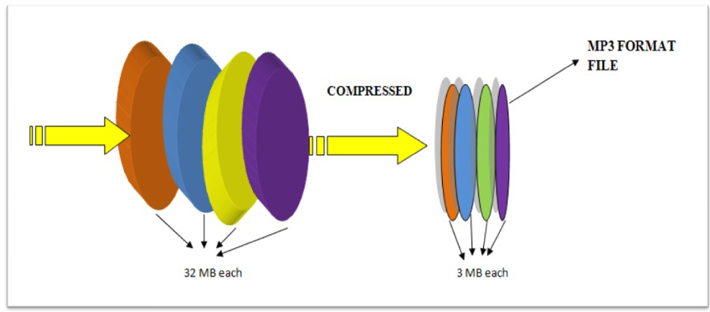
Thanks to the compression algorithm used in the MP3 audio format, the size of the data required to reproduce the recording and ensure the quality of sound reproduction is significantly reduced to 10-12 times the original, depending on the recording bit rate. . Bit rate refers to the encoding / decoding rate of a digital audio stream; sound quality improves with increasing bit rate. The MP3 format has the following bit rates: 32 kbps (very low quality, acceptable only for voice), 96 kbps, 128 kbps (medium quality), 160 kbps, 192 kbps, 256 kbps, 320 kbps (maximum optimal quality). The principle of the compression algorithm is as follows: during the compression process, the audio codecs analyze the signals, focusing on the audible fragments, which are saved for later playback or transmission.

This rules out sounds beyond the perception range of the human ear (20 to 20,000 Hz). That is why MP3 is called lossy. There are three ways to encode MP3 files: constant bit rate (CBR), variable bit rate (VBR), and medium bit rate (ABR). CBR is the default encryption mode. In this mode, the bit rate is constant for the entire file. This means that each part of the MP3 file uses the same number of bits. Regardless of the complexity of a piece of music, the encoder uses the same bit rate, so the quality of the final file is variable.

Complex parts will be of lower quality than simpler ones. The main advantage of this mode is that the size of the final files does not change and can be accurately predicted. When encoding in VBR mode, the user selects the desired quality on a scale of 9 (lowest quality, highest distortion) to 0 (highest quality / lowest distortion). The codec then tries to maintain a certain quality throughout the file by choosing the optimal number of bits for each part of the audio recording. The main advantage is the ability to specify the level of quality to be achieved, but the significant disadvantage is the unpredictability of the final file size.

Wav and Mp3: comparison of these two formats.

Wav and Mp3: comparison of these two formats.

WAV vs MP3

The development of digital audio distribution has led to the fact that there are now several dozen audio file formats on the market. Each developer tried to create their own encoding method and encryption algorithms, and then make them popular. But now, in 2019, it has become clear: MP3 won the battle of music formats. And even if the developers don’t support it anymore, that’s fine. Anyway, music in files of this type can be played on any phone, player, computer, radio, TV, and even some models of smart watches.

MP3 VS WAV

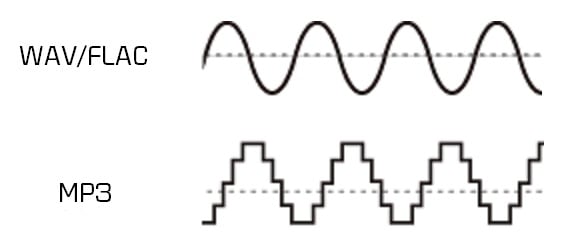
However, when you buy high-quality audio equipment, for example, headphones and a sound card for a total of 1.5 salaries, the disadvantages of MP3 start to show. It seems that the technique is good, but anyway the music sounds a bit “flat” and boring. This is because MP3 cuts parts of the audio stream.

And then you want to choose a higher quality format. For example, a slightly less common WAV, which will help the technique to “open up”. But is this WAV good? Let’s compare two formats, WAV and MP3, and choose the correct one. How compressed and uncompressed music formats are different Since WAV is a sample of uncompressed music format and MP3 is a compressed format, it is worth understanding what compressed and uncompressed music formats are to understand the key difference. between the two.

We are not going to go deeper, we will also talk about sigma-delta modulation, just “let’s go over the top.” Uncompressed music formats were one of the first to emerge. They involve sequentially recording every sound captured by the microphone in the studio, every note, every attempt by the vocalist to hit eight octaves in a single song. As a result, the file is incredibly detailed as all the sounds are listed. There are only a couple of problems.

Due to the high level of detail of the audio file, it is huge. On average, a three-minute song in a WAV container “weighs” about 60 megabytes. As a result, it’s good for a gigabyte flash drive if it fits at least one artist’s album. And at a time when a 1GB hard drive was an unattainable luxury, it was at least unwise to waste precious hard drive space for songs. The second problem is that decoding such music requires a powerful and agile processor.

That is, the chip has to constantly take a digital signal and convert it to analog that goes to the speakers. At the same time, there are many digital signals; remember, every sound. Therefore, the performance of the chip must also be high. Thus, engineers and programmers were faced with the task of ensuring that a Robbie Williams fan could keep his entire discography (14 albums, 3 collections, countless singles, 8 DVDs) without having to buy a server. This is how compressed formats appeared, of which MP3 is an example. Compressed formats involve additional music transcoding. The audio stream is divided into separate frames, then they are pasted, the details are partially lost (for example, two loudness peaks are pasted into one), maybe, as in MP3, some frequency ranges are cut off … And as a result, the file is much smaller! On average, a three minute song in a high bit rate (320 kbps) MP3 file “weighs” around 10 megabytes.

In other words, a full EP (mini-album) in MP3 will fit the volume occupied by a song in WAV! And if you reduce the bitrate by removing even more frame-parts from the audio stream and significantly degrading the quality, then the entire discography of the long-suffering Robbie Williams may be “cluttered.” On the other hand, the loss of quality cannot be said to be too significant for the listener. MP3 320 kbps provides enough quality for listening to music, watching movies, etc. The listener ignores the “missing details” or “ponders” them to create a complete acoustic picture. In addition, the quality of the equipment also affects the quality of playback. On computers with a weak integrated sound card and Chinese speakers, MP3 64 kbps, MP3 320 kbps, WAV will sound equally bad. But just get a multi-channel audio system, an amplifier, a discrete sound card with a 192KHz DAC, and the sound in WAV flourishes. But MP3 will seem too flat and with little detail.

What audio file formats are best for DJing?

What audio file formats are best for DJing?

What audio file formats are best for DJing?

DJ music collections consist of audio files of various formats. Many play music in mp3 format and are absolutely satisfied with the sound quality, others only use WAVE files and argue that mp3 quality is not suitable for a good club speaker system. Let’s try to find out how things really are.

audio formats for DJ

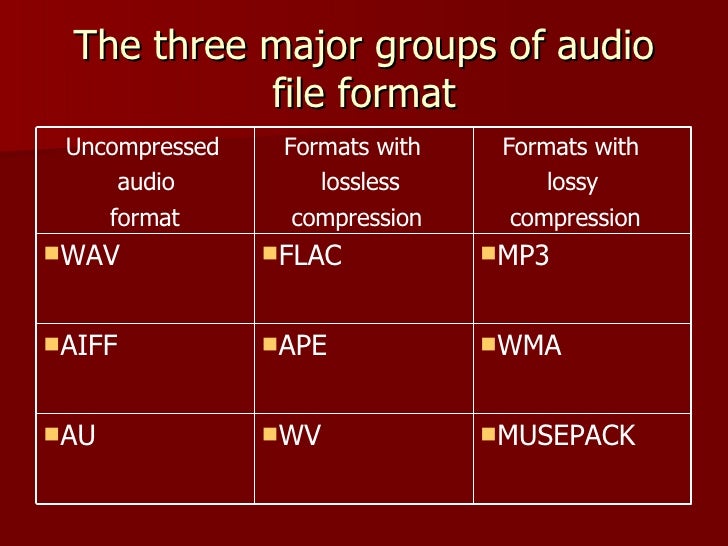
All audio formats are globally divided into two main groups: lossless and lossy.

No loss

These are music formats in which all the musical information for a track is stored. Lossless formats come in compressed and uncompressed formats. The most popular uncompressed lossless music formats are WAVE and AIFF, and the most popular compressed lossless audio format is FLAC. Large online music stores provide the opportunity to purchase tracks in these formats.

Lossless files take up a lot of disk space. For example, the track Echomen – Substance (original mix) which is 7 minutes 30 seconds long in WAVE and AIFF formats occupies 75.7 MB of disk space, in FLAC – 48.1 MB format. The downside of the WAVE format for DJs playing from computer programs is the lack of meta information about the file. Metadata is used to store important information about a track: its key, tempo, etc. Any DJ software can read and display this data. Note that the AIFF format allows storing meta information, this is its advantage over WAVE.

At a loss

Lossy formats are always compressed music. Some of the music information has been removed from lossy files to reduce the file size. The most popular lossy format is still mp3. In this case, the degree of compression of a music file in mp3 format may be different. The higher the bit rate of an mp3 file, the less music information is removed during compression. The best quality is for 320 kbps mp3. The sound quality of such mp3s is believed to be as close as possible to lossless music files. In any DJ music store there is the possibility to buy and download 320 kbps mp3, and many DJs collect music in this format. The great advantage of mp3 is its support for meta information.

The second popular lossy file format is AAC. Files in this format are sold on iTunes and have the extension m4a. This is a newer format than mp3. AAC sound quality is said to be better than mp3. However, the file size is slightly smaller. The track Echomen – Substance (original mix) in 320 kbps mp3 format occupies 17.1 MB, and in 256 kbps AAC format (this is the least compressed version of the AAC file) – 13.8 MB.

There is a widespread belief that the sound quality of lossy files is significantly worse than lossless music, supposedly especially well heard in high-end studio acoustics or on a powerful speaker system in a club. Personally, I am one of those who do not notice the difference in studio monitors or in a club. So my music collection consists of 320kbps mp3s. I also transcode AAC files purchased from iTunes to mp3 so that all music is in the same format.

A big advantage of lossy music is the cost of the files. For example, in Beatport you will have to pay $ 0.75 for a lossless track. Multiply this amount by the number of tracks you buy and calculate the total cost of the quality surcharge.

Lossy music formats are likely to become history in the future. The speed of the Internet and the availability of disk space will allow everyone to store music in lossless formats. However, today the problem of choosing between lossless and lossy is more than relevant. In no way do I urge you to give preference to lossy formats. If you hear a difference and are willing to pay more for sound quality, then your choice is zero loss. Otherwise, you can take advantage of the obvious advantages of mp3. There is no one-size-fits-all, each DJ individually chooses the audio format for their music collection.