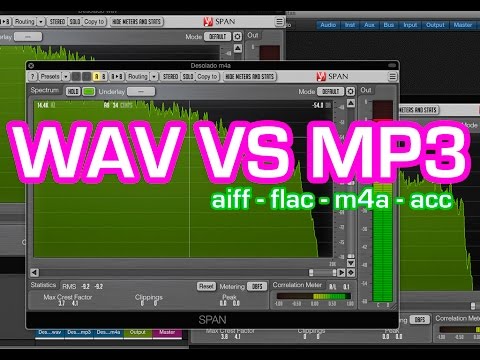
Why is WAV not as popular as MP3 or FLAC?


Free Download Mp4Gain
picture

Why is WAV not as popular as MP3 or FLAC?

WAV vs. MP3

WAVE or WAV is a short form of Wave Audio File Format (less commonly known as Audio for Windows). This format is the standard for storing audio streams on a PC. It is the domain of the RIFF format for storing audio in “strings”, very similar to the 8SVX and AIFF formats used by the Amiga and Macintosh computers respectively. It is also the main format on Windows systems for storing normal uncompressed audio. Typically this is done by linear pulse code modulation.

WAV vs MP3

Both WAV and AIFF are compatible with Windows, Macintosh or Linux operating systems. The format also takes into account some of the differences in Intel processors, such as endian byte order. The RIFF format acts as a wrapper for various audio compression codecs.

Although a WAV file can contain compressed audio, its most common use is to store uncompressed audio in linear PCM format. The standard audio CD format, for example, is LPCM audio, with 2 channels, 44-100 Hz sample rate, and 16 bits per sample. Since the LPCM format stores uncompressed audio that is exactly the same as the original, it allows professional users and audio experts to use it for maximum audio quality. The WAV audio file can also be modified in almost any audio editor. The Wav format works with compressed audio on Windows systems through the Audio Compression Manager (ACM). Any ACM codec can be used to compress a WAV file. The ACM user interface can be accessed through a variety of programs, including the standard audio recording program on some versions of Windows.

Starting with Windows 2000, the WAVE_FORMAT_EXTENSIBLE header appeared, which allowed storing multichannel audio data, taking into account the location of the speakers, eliminating ambiguities in terms of sample types and container sizes in the standard WAV format. It also supported arbitrary extensions for the snippet format.

There are also many inconsistencies in the WAV format: for example, 8-bit data is unsigned, while 16-bit data is signed.

WAV files can contain embedded IFF “lists”, which can contain multiple sub-changes.

Metadata
Derived from the Resource Interchange File Format (RIFF), WAV files can have metadata (tags) in an INFO chunk. Additionally, Extensible Metadata Platform (XMP) metadata can be embedded in WAV files.

Popularity
WAV files are large enough that this format is cumbersome to share over the Internet, and this greatly undermines its popularity. However, this format, as a general rule, is most often used to preserve the original appearance of high-quality files in cases where the amount of free disk space is not limited. It is also used in audio editing programs to save time when compressing and decompressing data.

More often, data is compressed using lossy formats such as Ogg Vorbis, MP3, ATRAC, AAC, Musepack, and WMA, which are used to store and share music (for example, between Internet users). The small file size and the ability to download them quickly are also a significant advantage, while this audio data takes up much less space. But lossy formats sacrifice quality for size, so their algorithms don’t preserve the original sound quality in every detail. But there are also lossless codecs like FLAC, Shorten, Monkey’s Audio, ATRAC Advanced Lossless, Apple Lossless, WMA Lossless, TTA, WavPack, but none of these codecs can be called generally accepted.


Free Download Mp4Gain
picture


Mp4Gain Main Window
picture


Mp4Gain Features
picture


Free Download Mp4Gain
picture

Wav and Mp3: comparison of these two formats.

Wav and Mp3: comparison of these two formats.

WAV vs MP3

The development of digital audio distribution has led to the fact that there are now several dozen audio file formats on the market. Each developer tried to create their own encoding method and encryption algorithms, and then make them popular. But now, in 2019, it has become clear: MP3 won the battle of music formats. And even if the developers don’t support it anymore, that’s fine. Anyway, music in files of this type can be played on any phone, player, computer, radio, TV, and even some models of smart watches.

MP3 VS WAV

However, when you buy high-quality audio equipment, for example, headphones and a sound card for a total of 1.5 salaries, the disadvantages of MP3 start to show. It seems that the technique is good, but anyway the music sounds a bit “flat” and boring. This is because MP3 cuts parts of the audio stream.

And then you want to choose a higher quality format. For example, a slightly less common WAV, which will help the technique to “open up”. But is this WAV good? Let’s compare two formats, WAV and MP3, and choose the correct one. How compressed and uncompressed music formats are different Since WAV is a sample of uncompressed music format and MP3 is a compressed format, it is worth understanding what compressed and uncompressed music formats are to understand the key difference. between the two.

We are not going to go deeper, we will also talk about sigma-delta modulation, just “let’s go over the top.” Uncompressed music formats were one of the first to emerge. They involve sequentially recording every sound captured by the microphone in the studio, every note, every attempt by the vocalist to hit eight octaves in a single song. As a result, the file is incredibly detailed as all the sounds are listed. There are only a couple of problems.

Due to the high level of detail of the audio file, it is huge. On average, a three-minute song in a WAV container “weighs” about 60 megabytes. As a result, it’s good for a gigabyte flash drive if it fits at least one artist’s album. And at a time when a 1GB hard drive was an unattainable luxury, it was at least unwise to waste precious hard drive space for songs. The second problem is that decoding such music requires a powerful and agile processor.

That is, the chip has to constantly take a digital signal and convert it to analog that goes to the speakers. At the same time, there are many digital signals; remember, every sound. Therefore, the performance of the chip must also be high. Thus, engineers and programmers were faced with the task of ensuring that a Robbie Williams fan could keep his entire discography (14 albums, 3 collections, countless singles, 8 DVDs) without having to buy a server. This is how compressed formats appeared, of which MP3 is an example. Compressed formats involve additional music transcoding. The audio stream is divided into separate frames, then they are pasted, the details are partially lost (for example, two loudness peaks are pasted into one), maybe, as in MP3, some frequency ranges are cut off … And as a result, the file is much smaller! On average, a three minute song in a high bit rate (320 kbps) MP3 file “weighs” around 10 megabytes.

In other words, a full EP (mini-album) in MP3 will fit the volume occupied by a song in WAV! And if you reduce the bitrate by removing even more frame-parts from the audio stream and significantly degrading the quality, then the entire discography of the long-suffering Robbie Williams may be “cluttered.” On the other hand, the loss of quality cannot be said to be too significant for the listener. MP3 320 kbps provides enough quality for listening to music, watching movies, etc. The listener ignores the “missing details” or “ponders” them to create a complete acoustic picture. In addition, the quality of the equipment also affects the quality of playback. On computers with a weak integrated sound card and Chinese speakers, MP3 64 kbps, MP3 320 kbps, WAV will sound equally bad. But just get a multi-channel audio system, an amplifier, a discrete sound card with a 192KHz DAC, and the sound in WAV flourishes. But MP3 will seem too flat and with little detail.

MP3 or WAV: who offers more advantages

MP3 or WAV: who offers more advantages

MP3 and WAV are two of the most popular audio formats in the world. Even if for many the only difference lies in the size of the files, there is much more that distinguishes these two formats. For example, there are differences in the display accuracy of many spectral components and many other things that are explained in more detail below. Then you will know exactly where the differences are between WAV and MP3 and what is the optimal application area for the respective format.

WAV vs. MP3

Everyone has to find out for themselves which format offers them the most advantages and which special application area is really important to them. For example, if you only listen to music on your cell phone or in the car, MP3 may be what you need as it takes up little space and is therefore particularly practical. If you work with music a lot, and especially create music yourself, WAV may be more suitable for you, as it brings some additional aspects to processing.

Mp3 vs Wav

The differences between the two formats:

-An MP3 file reaches the quality of a normal CD at about 128 kbit / s. However, with a WAV file, around 1400 kbit / s are required.
-In theory, WAV can have up to 65535 channels of audio, while an MP3 surround can only have six.
-WAV files are usually uncompressed PCM files.
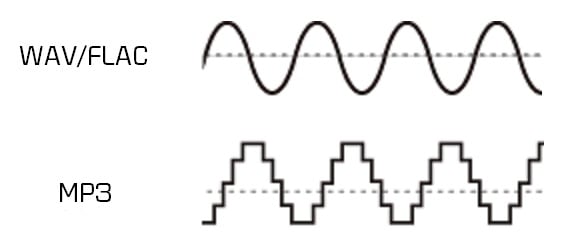
-MP3, on the other hand, is a codec. Therefore, it is the result of compression, which, however, does not normally lead to a noticeable loss of quality.

A WAV file is suitable here:

When producing music. WAV should always be the first choice here, because with WAV files you can make any specific frequency range higher. In the case of MP3 files, on the other hand, it may happen that the desired frequency range is encoded precisely and therefore no longer reflects the natural dynamics of the original signal. This quickly creates noise that does not exist with WAV files.
Also, WAV is much more flexible as you can save the files with a variety of channels. For example, an optimal 7.1 music performance can only be created thanks to WAV.
You should also always prefer WAV for analytical measurements, as MP3 can produce noises that were only created later by the encoder.
If you are bothered by the “large” storage space that is lost due to WAV files, you can convert these files even further. In the FLAC format, WAV files are also reduced by up to 60%.

For this, you should prefer MP3:

With no audible loss of quality, MP3 files can be extremely compressed without most people hearing them. You can save up to 90% storage space without having to accept a noticeable loss of quality! You can also save huge music collections on your mobile devices without any hassle.
In addition, MP3 is now so widespread that there is practically no device that does not support this format. All DVD and BluRay players, smartphones, consoles or car radios should be able to play your MP3 files without any problem. So you never have to worry about whether you can play your favorite songs with it before buying a new device.
If any of the formats particularly convince you, you can convert your files very easily and, above all, free to the format you want. If, for example, the facts you just read inspire you for the MP3 format, you can convert your WAV files to MP3 quickly and easily. There are numerous free and understandable programs for this, with which you can convert as a loan in a few minutes.