Differences between audio formats

Wav
Wav
It is the primary audio format for many, many digital audio playback systems and is used as a standard audio file format on personal computers. In addition, it has a strong set of specifications, which has grown considerably in recent years. Its full name is Microsoft RIFF / WAVE – Resource Interchange File Format / Wave – Resource Interchange File Format / Waveform, and it was created by Microsoft and Intel engineers. In turn, WAV stands for Waveform Audio File Format.
WavPack (.WV extension)
WP
WavPack also includes a unique “hybrid” mode that provides all the benefits of lossless compression with the added benefit of creating a relatively small, high-quality, and lossy file (.wv) rather than creating a single file, which is you can reproduce by yourself. and a “fix” file (.wvc), which (in combination with the old .wv) allows you to fully restore the original. For some users, this means that they will never have to choose between lossy and lossy compression.
The format has very good compatibility with the player. Also, of course, the plugin for Winamp from the official codec site http://www.wavpack.com, you can download plugins for Adobe Audition (!) And Nero Burning Rom. There is a great plugin for XMMS: the Winamp analog for Linux. In addition, there is a project for the development of DirectShow filters for WavPack; this will allow the format to be used in any Windows program, including Windows Media Player. You can download the latest version from here. There is a third party interface for WavPack. Download it here.
From a technical point of view, there is nothing to complain about either. Multi-channel audio is supported, 32-bit audio stream resolution, sample rate: up to 192 kHz (!).
The format, like the source codes of the compression program, is open source. Unfortunately, the encoder is compiled only for the Windows platform, but there is always the possibility to independently recompile the source codes available for your operating system.
The site, like the codec itself, is regularly updated, which is good news.
DTS
DTS
DTS – Digital Theater System, in fact, is Dolby Digital, or rather its competitor. DTS uses a lower compression rate than Dolby, so it actually sounds better, as evidenced by DVDs that have DTS or DD tracks. DTS in home theater systems uses a maximum bit rate of 1536 kbps (full bit rate), this sound is better than Dolby Digital’s AC-3 format. DTS – Uses 6 free audio tracks and supports 7.1 sound distribution system, with this DTS 4.0 bit rate – it will sound as immersive as Dolby 5.1.
Windows Media Audio (WMA)
WMA
A licensed file format developed by Microsoft to store and transmit audio information.
Nominally, the WMA format is characterized by good compressibility, which allows it to “bypass” the MP3 format and compete on parameters with the Ogg Vorbis and AAC formats. But as the independent tests, as well as the subjective evaluation, showed, the quality of the formats is not yet unequivocally equivalent, and the advantage even over MP3 is unequivocal, as Microsoft claims.
Lossless WMA
The codec is part of the Windows Media Audio suite. It’s free, but the format, as well as the encoding program, are proprietary. Of course, the version only exists for the Windows platform.
Basically, WMA Lossless supports all the necessary functions: tags, high sample rates, multi-channel audio (including 7.1), streaming audio over a network, etc. Additionally, Windows Media Player’s built-in decoder support eliminates the need to download anything from the Internet to play a music file.
MP3
MP3
MP3 – (MPEG Audio Track Encoding Format) is a licensed file format for storing audio information.
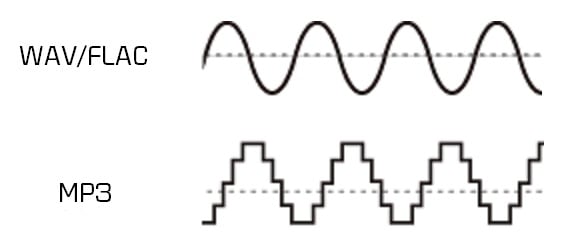
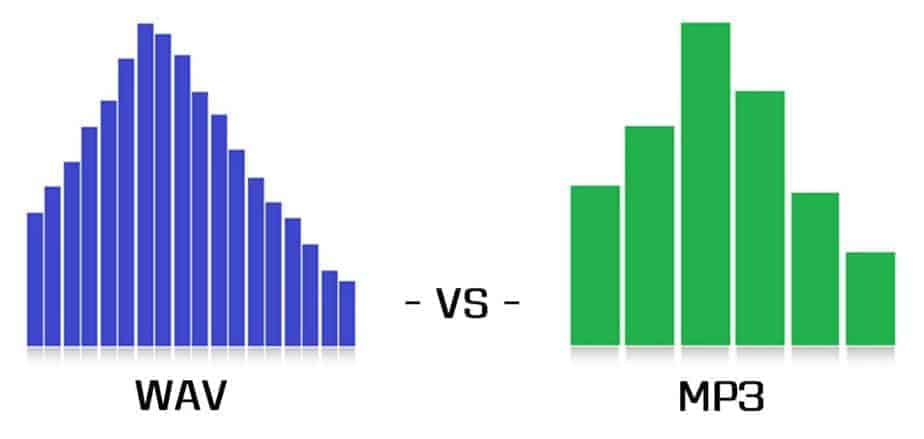
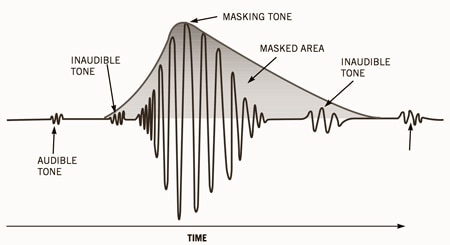
The most popular compression format today. The MP3 (MPEG Layer 3) format was developed, after several intermediate formats, by the Fraunhofer Institute in Germany. Actually, the .MP3 format relies on fooling the human ear. After some research, it turned out that human hearing tends to adapt to the appearance of new sounds, which is expressed in an increase in the hearing threshold. Therefore, some sounds are capable of masking (that is, making them subjectively inaudible) others. So in this format, some of the sounds that, according to the corresponding theory, are made inaudible, are simply removed from the general sound.