Differences between audio formats


Free Download Mp4Gain
picture

Differences between audio formats

Digital audio formats

Wav

WAV or MP3

Wav
It is the primary audio format for many, many digital audio playback systems and is used as a standard audio file format on personal computers. In addition, it has a strong set of specifications, which has grown considerably in recent years. Its full name is Microsoft RIFF / WAVE – Resource Interchange File Format / Wave – Resource Interchange File Format / Waveform, and it was created by Microsoft and Intel engineers. In turn, WAV stands for Waveform Audio File Format.

WavPack (.WV extension)
WP
WavPack also includes a unique “hybrid” mode that provides all the benefits of lossless compression with the added benefit of creating a relatively small, high-quality, and lossy file (.wv) rather than creating a single file, which is you can reproduce by yourself. and a “fix” file (.wvc), which (in combination with the old .wv) allows you to fully restore the original. For some users, this means that they will never have to choose between lossy and lossy compression.

The format has very good compatibility with the player. Also, of course, the plugin for Winamp from the official codec site http://www.wavpack.com, you can download plugins for Adobe Audition (!) And Nero Burning Rom. There is a great plugin for XMMS: the Winamp analog for Linux. In addition, there is a project for the development of DirectShow filters for WavPack; this will allow the format to be used in any Windows program, including Windows Media Player. You can download the latest version from here. There is a third party interface for WavPack. Download it here.

From a technical point of view, there is nothing to complain about either. Multi-channel audio is supported, 32-bit audio stream resolution, sample rate: up to 192 kHz (!).

The format, like the source codes of the compression program, is open source. Unfortunately, the encoder is compiled only for the Windows platform, but there is always the possibility to independently recompile the source codes available for your operating system.

The site, like the codec itself, is regularly updated, which is good news.

DTS
DTS
DTS – Digital Theater System, in fact, is Dolby Digital, or rather its competitor. DTS uses a lower compression rate than Dolby, so it actually sounds better, as evidenced by DVDs that have DTS or DD tracks. DTS in home theater systems uses a maximum bit rate of 1536 kbps (full bit rate), this sound is better than Dolby Digital’s AC-3 format. DTS – Uses 6 free audio tracks and supports 7.1 sound distribution system, with this DTS 4.0 bit rate – it will sound as immersive as Dolby 5.1.

Windows Media Audio (WMA)
WMA
A licensed file format developed by Microsoft to store and transmit audio information.

Nominally, the WMA format is characterized by good compressibility, which allows it to “bypass” the MP3 format and compete on parameters with the Ogg Vorbis and AAC formats. But as the independent tests, as well as the subjective evaluation, showed, the quality of the formats is not yet unequivocally equivalent, and the advantage even over MP3 is unequivocal, as Microsoft claims.

Lossless WMA

The codec is part of the Windows Media Audio suite. It’s free, but the format, as well as the encoding program, are proprietary. Of course, the version only exists for the Windows platform.

Basically, WMA Lossless supports all the necessary functions: tags, high sample rates, multi-channel audio (including 7.1), streaming audio over a network, etc. Additionally, Windows Media Player’s built-in decoder support eliminates the need to download anything from the Internet to play a music file.

MP3
MP3
MP3 – (MPEG Audio Track Encoding Format) is a licensed file format for storing audio information.

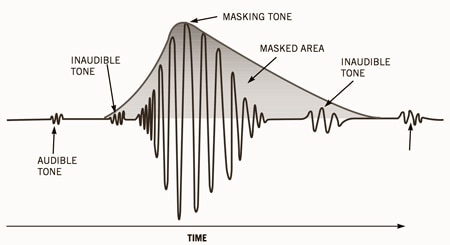
The most popular compression format today. The MP3 (MPEG Layer 3) format was developed, after several intermediate formats, by the Fraunhofer Institute in Germany. Actually, the .MP3 format relies on fooling the human ear. After some research, it turned out that human hearing tends to adapt to the appearance of new sounds, which is expressed in an increase in the hearing threshold. Therefore, some sounds are capable of masking (that is, making them subjectively inaudible) others. So in this format, some of the sounds that, according to the corresponding theory, are made inaudible, are simply removed from the general sound.


Free Download Mp4Gain
picture


Mp4Gain Main Window
picture


Mp4Gain Features
picture


Free Download Mp4Gain
picture

WAV AND MP3 COMPARISON | FEATURES AND WHICH IS BEST Part 2

WAV AND MP3 COMPARISON | FEATURES AND WHICH IS BEST Part 2

WAV vs. MP3

And now to the description of the formats. WAV music format The WAV music format was developed jointly by IBM and Microsoft engineers. The goal was to create a universal container format that would store uncompressed music and could be played on multiple devices.

WAV vs MP3


In fact, they succeeded. WAV is loved by both users (thanks in large part to native support for the Windows operating system) and music studios (minimal loss, fast encoding and decoding). It is true that WAV has not lost the main drawback of uncompressed formats: the huge file size. But the sound quality is as high as possible. In fact, it is a quasi-analog format in which the audio stream is recorded in waves. MP3 music format The MP3 music format was developed by the German company Fraunhofen IIS and was originally created to transfer audio into video files. Even its name stands for Moving Picture Expert Group Layer 3, that is, “the third layer in moving pictures”. But it turned out that the format is perfect for recording any sound and can be easily played without being packaged in an MPEG container. Since the task of the developers was to reduce the bit rate (“size”) of the audio track, otherwise it will weigh like a video track, they boldly mocked the audio stream. And, in addition to frame-splitting and spike-pasting compression, they also eliminated inaudible frequencies. That is, when encoding, everything below 20 Hz and above 15 kHz is removed from the audio stream. In theory, a person does not hear this, so he should not suffer. In practice, it turns out that frequencies below 20 Hz make the bass deeper, and above 15 kHz the voice is more detailed. But it doesn’t matter if headphones or speakers can’t reproduce frequencies below 20 Hz and above 15 kHz. And inexpensive audio equipment just can’t do that. But MP3 files are “heavy” a bit and provide enough quality for independent listening. And in the age of digital distribution, these two virtues have made MP3 very popular. Difference Between MP3 and WAV Actually, the main difference between WAV and MP3 is that the former is uncompressed and incredibly detailed, while the latter is compressed and not very verbose. But for the sake of music in the first format, you will have to buy an external hard drive, and in the second, a flash drive will suffice. The WAV format in 2019 is commonly used in the field of “professional audio”. Record musicians in studios. It’s where the songs mix. Only notorious audiophiles with excellent quality audio equipment listen to music on it. The MP3 format is now ubiquitous. It is suitable for listening at home, on the road (from a smartphone or player), in a car through a radio. A CD can fit about 50 songs in high quality or about 200 in low quality. The quality, of course, is not very high, but sufficient. And the “size” decides. In terms of numbers, the WAV bit rate is 1140 kbps, the MP3 bit rate is a maximum of 320 kbps. Which format is better, WAV or MP3? There is no definitive answer to this question. These formats are designed for different purposes. Comparison table, below: TECHNIQUE ON WHICH THEY WILL LISTEN TO MUSIC. PREFERRED FORMAT WHY HIGH DETAIL WAV HIGH-END EQUIPMENT, WITHOUT ELIMINATION OF INAUDIBLE FREQUENCIES ECONOMIC MP3 EQUIPMENT STILL CAN’T WAIT TO GET THE BEST SOUND QUALITY, CAN SAVE SPACE ON YOUR COMPUTER OR CUP PHONE PLAYER, MP3 PLAYER OF SPACE

WAV AND MP3 COMPARISON | FEATURES AND WHICH IS BEST

WAV AND MP3 COMPARISON | FEATURES AND WHICH IS BEST

WAV vs MP3

The development of digital audio distribution has led to the fact that there are now several dozen audio file formats on the market.

WAV vs. MP3

Each developer tried to come up with their own encoding method and encryption algorithms, and then make them popular. But now, in 2019, it has become clear that MP3 has won the battle of music formats.

And even if the developers no longer support it, that’s fine. Anyway, music in files of this type can be played on any phone, player, computer, radio, TV, and even some models of smart watches. However, when you buy high-quality audio equipment, such as headphones and a sound card for a total of 1.5 salaries, the disadvantages of MP3 start to show.

It seems that the technique is good, but still the music sounds somewhat “flat” and boring. This is because MP3 cuts parts of the audio stream. And then you want to choose a higher quality format. For example, a slightly less common WAV, which will help the technique to “open up”. But is this WAV really that good? Let’s compare two formats, WAV and MP3, and choose the one that suits you best! What is the difference between compressed and uncompressed music formats? Since WAV is a sample uncompressed music format and MP3 is a compressed format, it is worth understanding what compressed and uncompressed music formats are to understand the key difference between the two. We are not going to go deeper, we will also talk about sigma-delta modulation, just “let’s go over it.”

Uncompressed music formats were one of the first to emerge. They involve the sequential recording of every sound captured by the microphone in the studio, every note, every attempt by the vocalist to hit eight octaves in a single song. As a result, the file is incredibly detailed as all the sounds are listed. There are only a couple of problems. Due to the high level of detail of the audio file, it is huge. On average, a three-minute song in a WAV container “weighs” about 60 megabytes. As a result, it’s good for a gigabyte flash drive if it fits at least one artist’s album. And at a time when a 1GB hard drive was an unattainable luxury, it was at least unwise to waste precious hard drive space for songs.

The second problem is that to decode this type of music you need a powerful and agile processor. That is, the chip has to constantly take a digital signal and convert it to analog that goes to the speakers. At the same time, there are many digital signals – we remind you of every sound. Therefore, the performance of the chip must also be high. Thus, engineers and programmers were faced with the task of ensuring that a Robbie Williams fan could keep his entire discography (14 albums, 3 collections, countless singles, 8 DVDs) without having to buy a server. This is how compressed formats appeared, of which MP3 is an example. Compressed formats involve additional music transcoding. The audio stream is divided into separate frames, then they are pasted, the details are partially lost (for example, two loudness peaks are pasted into one), perhaps, as in MP3, some frequency ranges are cut off …

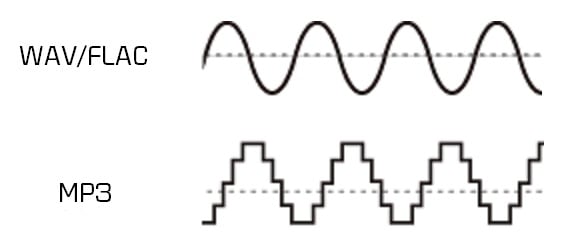
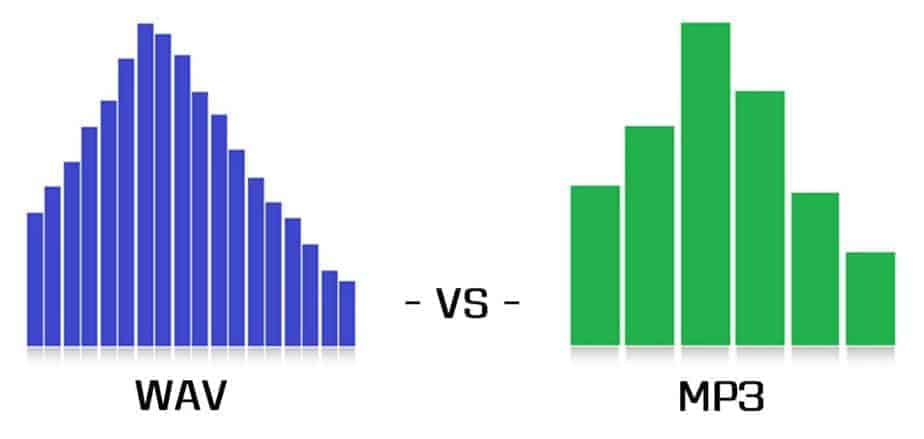
As a result, the file is much smaller. On average, a three minute song in a high bit rate (320 kbps) MP3 file “weighs” about 10 megabytes. In other words, a full EP (mini-album) in MP3 will “fit” in the volume of a song in WAV! And if you reduce the bitrate, removing even more frame-parts from the audio stream and significantly degrading the quality, then the entire discography of the long-suffering Robbie Williams may be “cluttered.” On the other hand, the loss of quality cannot be said to be too significant for the listener. MP3 320 kbps provides enough quality for listening to music, watching movies, etc. The listener ignores “missing details” or “ponders” them to create a complete acoustic picture. In addition, the quality of the equipment also affects the quality of playback. On computers with a weak built-in sound card and Chinese speakers that MP3 64 kbps, that MP3 320 kbps, that WAV will sound just as bad. But just get a multichannel audio system, an amplifier, a discrete sound card with a 192KHz DAC, and the sound in WAV flourishes. But MP3 will seem too flat and with little detail.