Audio Expansion


Free Download Mp4Gain
picture

How Understanding Audio Expansion Can Improve Your Music Production

Audio Expansion
Audio Expansion
Audio Expansion
Audio Expansion

What is Audio Expansion and How Does it Work?

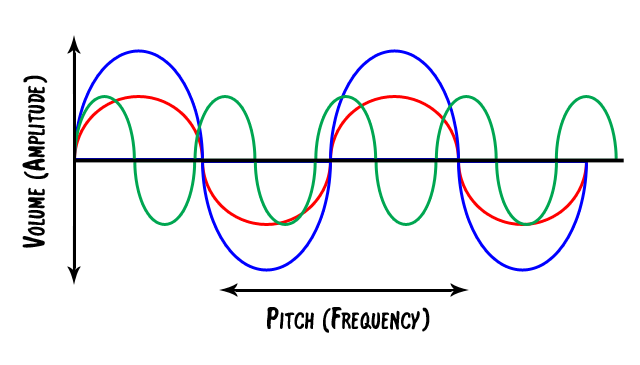
As a music producer, understanding the concept of audio expansion is crucial to achieving the desired sound quality in your productions. Audio expansion, also known as upward expansion, is a dynamic audio processing technique that increases the gain of a signal when it is below a certain threshold level. This technique is used to increase the dynamic range of a signal by amplifying only the quieter parts, resulting in a more natural and transparent sound.
To put it simply, audio expansion is like a reverse compressor. While a compressor reduces the dynamic range of a signal by reducing the gain of louder parts, an expander increases the dynamic range by amplifying quieter parts. According to Roey Izhaki in “Mixing Audio,” “expansion is a powerful tool that can significantly enhance a mix, giving it a lively and open sound.”

How to Use Audio Expansion in Your Music Production

To use audio expansion effectively, you first need to set the threshold level. The threshold is the level at which the expander starts to increase the gain. The higher the threshold, the less effect the expander will have. You also need to set the ratio, which determines the amount of gain increase when the signal falls below the threshold level. The ratio is expressed in decibels and can range from 1.5:1 to 10:1 or higher.
One important thing to keep in mind is that audio expansion should be used sparingly. Overuse can result in an unnatural and exaggerated sound. It is recommended to use a gentle ratio and adjust the threshold level to suit the dynamics of the source material.

The Benefits of Audio Expansion in Music Production

Using audio expansion in your music production can result in a more natural and transparent sound. It can also help to improve the overall dynamic range of your mix, making it sound more open and spacious. By selectively amplifying the quieter parts of a signal, you can bring out subtle details and nuances that may have been masked by louder elements.
As an audio engineer, I have found that audio expansion can be particularly useful when working with vocals or acoustic instruments. By gently expanding the dynamics, you can help to preserve the natural character of the performance and avoid the artificial sound that can result from heavy compression.

In the words of Roey Izhaki, “expansion can be a great tool to help you achieve your sonic goals.” With careful use and experimentation, audio expansion can be a powerful technique to enhance your music production.

Final Words:
In conclusion, understanding audio expansion is an important skill for any music producer. By using this dynamic processing technique, you can improve the sound quality and dynamic range of your productions. Remember to use audio expansion sparingly and experiment with different settings to find the best results for your mix.

audio dynamics, dynamic processing, audio processing, music production, sound quality, mixing techniques, signal processing, dynamic range, compression, mastering, mixing, audio engineering, audio effects, audio plugins, VST plugins, audio editing, audio software, DAW, audio mixing, audio mastering, audio normalization, audio EQ, audio filters, audio enhancement, audio post-production, audio mastering services, audio production tips, audio recording, audio editing software, audio effects plugins, audio frequency, audio volume, audio levels, audio peak, audio clipping, audio restoration, audio quality, audio improvement,


Free Download Mp4Gain
picture


Mp4Gain Main Window
picture


Mp4Gain Features
picture


Free Download Mp4Gain
picture

Factors Affecting Audio Quality

Factors Affecting Audio Quality

Audio Quality
Audio Quality
Audio Quality
Audio Quality


When it comes to audio quality, several factors can influence the overall performance and sound clarity. Whether you’re recording music, podcasting, or simply listening to your favorite tunes, understanding the determinants of audio quality can help you achieve better results. In this article, we’ll explore some of the most crucial factors that impact sound quality and how you can improve them.

Acoustics and Room Treatment

One of the most important factors that affect audio quality is the acoustics of the room where you’re recording or listening to music. Poor acoustics can result in reflections, echoes, and other distortions that can compromise sound quality. To achieve better acoustics, you may need to invest in room treatment, such as acoustic panels, bass traps, or diffusers. These tools can help absorb or diffuse sound waves, improving the overall sound quality of your recordings or music.

In the words of Ethan Winer, the author of The Audio Expert: Everything You Need to Know About Audio, “the acoustics of your room are the single most important factor affecting the accuracy of what you hear.” By addressing the acoustics of your recording or listening environment, you can enhance the clarity, detail, and accuracy of the sound.

Equipment and Gear

Another critical factor that affects audio quality is the equipment and gear you use. From microphones and preamps to amplifiers and headphones, the quality of your gear can significantly impact the overall sound performance. Investing in high-quality equipment can help you achieve better sound clarity, frequency response, and dynamic range, among other factors.

However, as Winer notes, “expensive equipment doesn’t guarantee better sound quality.” Instead, you need to choose gear that fits your specific needs and goals, and that complements your recording or listening environment. Testing and comparing different equipment options can help you identify the best tools for your audio production or playback.

Recording and Mixing Techniques

Finally, the recording and mixing techniques you use can significantly impact the quality of your audio productions. Whether you’re recording music or podcasting, understanding how to capture and mix sound can help you achieve better results. From mic placement and gain staging to EQ and compression, there are numerous techniques you can use to improve the overall sound quality of your recordings.

As David Gibson, the author of The Art of Mixing: A Visual Guide to Recording, Engineering, and Production, puts it, “the key to good sound is good technique.” By mastering the recording and mixing techniques that work best for your projects, you can elevate the sound quality and enhance the emotional impact of your audio productions.

Final Words

In conclusion, audio quality is influenced by several factors, including acoustics, equipment, and recording techniques. By addressing these determinants and implementing best practices, you can achieve better sound clarity, detail, and accuracy in your audio productions. Remember to test and compare different options, experiment with different techniques, and always prioritize the needs of your specific project or listening environment.

Keywords: Audio quality, Sound clarity, Sound fidelity, Audio performance, Sound accuracy, Sound detail, Sound precision, Sound resolution, Sound dynamics, Sound tonality, Audio engineering, Sound production, Recording techniques, Mixing techniques, Room acoustics, Room treatment, Acoustic panels, Bass traps, Diffusers, Microphones, Preamps, Amplifiers, Headphones, Frequency response, Dynamic range

What is the Best Bitrate for Audio Recording?

What is the Best Bitrate for Audio Recording?

Bit Rate Audio Recording


Bit Rate Audio Recording


The Importance of Bitrate for Audio Recording Quality

As a musician and audio engineer, I’ve learned that bitrate is crucial to achieving high-quality audio recordings. The bitrate determines the amount of data that is processed and transmitted for each second of audio recording. A higher bitrate means more data is being processed, resulting in better audio quality.

In my experience, the optimal bitrate for professional audio recording is 24-bit/96kHz. This allows for a wide dynamic range and captures every detail of the sound. As filmmaker Christopher Nolan once said, “The sound and music are 50% of the entertainment in a movie.” This applies to music recording as well. Without proper audio recording settings, even the most talented musician’s performance can fall flat.

When recording music, it’s important to remember that bitrate isn’t the only factor that affects audio quality. Other factors like microphone placement, room acoustics, and instrument quality can also have a significant impact on the final recording. However, by starting with the right bitrate, you’re setting yourself up for success.

How to Choose the Best Bitrate for Your Audio Recording

When choosing the best bitrate for your audio recording, it’s important to consider your specific needs and goals. If you’re recording for personal use, a lower bitrate may be sufficient. However, if you’re recording professionally, it’s worth investing in higher-quality equipment and choosing a higher bitrate.

In addition to considering the purpose of your recording, you should also consider the file format you’ll be using. Different file formats have different requirements for bitrate and other audio settings. For example, WAV files require a higher bitrate than MP3 files to maintain the same level of audio quality.

Ultimately, the best bitrate for your audio recording will depend on your individual needs and preferences. Don’t be afraid to experiment with different settings and seek advice from other audio professionals. With the right bitrate and equipment, you can capture every detail of your sound and create high-quality audio recordings that stand the test of time.

The Benefits of Using an Audio Normalizer and Converter

As someone who has recorded and produced music for years, I know firsthand how frustrating it can be when audio levels are inconsistent across different tracks. This is where an audio normalizer and converter can come in handy.

An audio normalizer like MP4Gain can analyze and adjust the volume of your audio tracks to ensure they’re consistent and balanced. This can save you time and effort in post-production and help you achieve a more professional sound.

Additionally, an audio converter can help you convert your audio files to different formats, making them compatible with a wider range of devices and software. MP4Gain is a powerful audio converter that supports a variety of formats, including MP3, WAV, FLAC, and more.

By using an audio normalizer and converter like MP4Gain, you can streamline your audio production workflow and achieve higher-quality results with less effort. It’s just one more tool in your arsenal as an audio professional or enthusiast.

best bitrate for audio recording, optimal audio recording bitrate, audio recording quality, bitrate for professional audio recording, recording audio with high quality, improve audio recording bitrate, audio bitrate for music recording, ideal audio recording settings, audio engineering, audio quality, dynamic range, high-quality audio recordings, microphone placement, room acoustics, instrument quality,

Dynamic Range and Bit Depth, those great strangers

Many times we listen to songs and they seem like absolute songs and other times they seem like a waste of time. To some extent it is because of the music that is heard. But today we are going a little further. I dare say that part of the fact that we end up liking it is due to the fact that there are two concepts that have not been taken into account in production lately.

I mean the Dynamic Range.

What is it? Well, it’s just the difference between the highest possible peaks and the noise threshold. Yes, there is always a noise basis, even in the best soundproof studio. And how does that affect what you hear is a great song? Very easy, since this variation in amplitude influences the sound intensity, how the song flows, the difference between strong and weak. The specific nominal amplitude of each equipment must also be taken into account, which is called the dynamic ceiling or Headroom. Normally it stays at 120Db, since it is the limit that integrated circuits allow. What we hear from all this is the SNR, signal noise ratio, that is, the relationship between residual noise and the average signal of the subject.

If we transfer this to our tasks as musicians, it means that no frequency that we are using within our theme should be fixed, which is called average, and that too much compression is bad too, since it can crush the sound, since applying a compressor decrease dynamic differences. This also includes mixing and normalization (which we will talk about later) where some resources can help us to make our theme cover the widest dynamic range in all its frequencies. For example: If the amplitude of the mid frequencies is reduced, approximately the frequencies of 250Hz, it is possible to boost frequencies of 5KHz.

Another resource that sometimes we fail when we are playing a synthesizer, whether analog or digital, or when we are mixing is Bit Depth or Bit Resolution / Quantization.

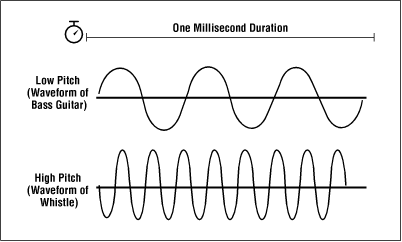
Bit Depth is the amplitude of variations of a sound wave. Translated into Christian, the number of bits recorded per sample. This affects the previously explained concept, dynamic range, since the greater the bit depth, the greater the possibility of working with wide dynamic ranges, which is called the rule-of-thumb. Since for example, if we work with 8-bit synthesizers, which are so fashionable, we are saying that this synthesizer, the wave that sends the output, only allows to register 256 variations in the amplitude of the wave. Let’s remember that 8 bits = 2 to 8. With this I don’t mean that an 8-bit synthesizer is bad, each one does its job, but there are many cases where pears are asked from the elm, when we all know that you have to go to the pear tree. I would like to emphasize this concept especially for we use analog synthesizers, drum machines, samplers. Since the bit depth within a PCM, the digital representation of an analog sound, recreates the maximum dynamic range, which means that the sound will be more real.

So let us return to the question asked above. How does this affect my theme to sound good? Well the bit depth limits the amount of dynamic range and signal noise ratio. This means that if we cover a higher bit resolution we will be able to interact with more precision within the theme that we are composing and therefore improve the output signal of the set.

Even so, I am sorry to be this party pooper, the bit depth problem comes from the fact that nowadays we use a format that has very low and bad compression, such as MP3 or WMA. Although you export at 24 bits, it does not mean that the MP3 / WMA has a bit depth of 24 bits, since you have mastered them at 24 bits but then it has been compressed and that is where it fails. This also happens even if we copy directly to a CD, since CDs are burned at 16 bits.