When it comes to video encoding, achieving a high frame rate in your MP4 files can greatly enhance the viewing experience. In this article, I will share my expertise and insights on optimizing MP4 encoding for high frame rates, ensuring you have a deep understanding of the process. Let’s dive in!
Key Parameters for High Frame Rate Video Encoding
To optimize MP4 encoding for high frame rates, it’s crucial to understand key parameters. The frame rate, bitrate, and codec are the primary factors to consider. A higher frame rate, such as 60 or 120 frames per second, ensures smooth video playback, but it also requires a higher bitrate to maintain quality. H.265 is an efficient codec choice for high frame rates, offering smaller file sizes without compromising quality. Experiment with these parameters to find the perfect balance for your specific needs.
How High Frame Rate Affects Video Quality
High frame rates, like 60fps or 120fps, deliver exceptional video quality by capturing more frames per second. This creates smoother motion and reduces motion blur, making it ideal for action-packed content like gaming or sports videos. However, it’s worth noting that not all displays can take full advantage of high frame rates. To appreciate the difference, you need a monitor or TV with a high refresh rate, typically 120Hz or above. For an immersive experience, combining high frame rates with compatible hardware is key.
Ideal Frame Rate for Smooth Video Playback
The ideal frame rate for smooth video playback depends on the content and the audience’s preferences. While 30fps is considered standard for most videos, high frame rates like 60fps or 120fps are perfect for fast-paced content. Gamers and sports enthusiasts often prefer 120fps for the unparalleled smoothness it provides. However, it’s essential to ensure your audience’s devices can handle the chosen frame rate to avoid playback issues.
Last Words about How to Optimize MP4 Encoding for High Frame Rate
In conclusion, optimizing MP4 encoding for high frame rates is a powerful way to enhance video quality and viewer experience. By selecting the right software, adjusting key parameters, and understanding the impact of high frame rates on video quality, you can create outstanding content. Remember to consider your audience’s preferences and device capabilities when choosing the ideal frame rate. With the knowledge shared in this article, you’ll be well on your way to producing top-notch high frame rate MP4 videos.
4K video, with its stunning resolution, has become a favorite for those seeking the ultimate visual experience. But what about the less-talked-about factor: bitrate? 4K video bitrate is a crucial element that influences the quality of your 4K content. In this article, I’ll explain what 4K video bitrate is, how it affects the 4K video experience, and why optimizing it is vital.
4K video bitrate is essentially the amount of data processed per second to create that beautiful, high-resolution image. It determines the level of detail and clarity you see on your screen. Think of it as the paint a talented artist uses to create a masterpiece—bitrate is the quality of that paint, and it directly affects the visual quality of your 4K video.
How Bitrate Impacts 4K Video Quality
The relationship between bitrate and 4K video quality is straightforward: the higher the bitrate, the better the quality. Higher bitrate means more data is allocated to each frame, resulting in a richer, more detailed image. If the bitrate is too low, you may notice compression artifacts, pixelation, and a loss of detail, which can be jarring in the context of 4K.
Imagine you have a high-definition painting of a scenic landscape. If you view it up close, every brushstroke and detail is clear and vivid—this is akin to high bitrate. On the other hand, if you were to stretch the same painting to cover an entire wall, you might notice pixelation and loss of detail, much like what happens with low bitrate 4K video.
Optimizing Bitrate for a Seamless 4K Experience
To enjoy a seamless 4K video experience, optimizing bitrate is key. Streaming services and platforms aim to find the right balance between image quality and efficient data transmission. As a viewer, you can help by ensuring a stable and high-speed internet connection. Additionally, when creating or encoding 4K content, it’s essential to select an appropriate bitrate setting that aligns with your content’s intended quality.
Think of bitrate optimization as finding the right balance in a recipe. Too much spice can overwhelm the dish, while too little can make it bland. In the world of 4K video, the right bitrate ensures a visually pleasing experience without unnecessary data bloat or loss of quality.
Enhancing the 4K Video Experience
In conclusion, bitrate plays a pivotal role in your 4K video experience. Understanding its importance and finding that sweet spot between quality and efficiency is the key to unlocking the full potential of 4K content. So, whether you’re a content creator or a 4K enthusiast, keep in mind that bitrate is the paintbrush that adds the final strokes to your visual masterpiece.
Last Words
Bitrate and 4K video quality go hand in hand, and with the right knowledge and adjustments, you can enjoy a truly immersive 4K experience.
WMV stands for Windows Media Video. It is a series of video codecs and their corresponding video coding formats developed by Microsoft. Designed for applications on the internet, such as streaming, it is a compression method that allows for high-quality video in smaller file sizes. WMV is based on the Microsoft Advanced Systems Format (ASF) container format, ensuring consistent performance across a wide range of Windows-based and other platforms.
There are varying versions of WMV, each improving on the previous in terms of compression efficiency and capabilities. This has allowed the format to stay relevant as the demand for high-quality video streaming has grown.
“Change is the end result of all true learning.” – Leo Buscaglia
How does WMV differ from other video formats?
There are numerous video formats available today, with each designed for a specific purpose or application. WMV, due to its origins with Microsoft, has strong ties to the Windows operating system. This makes it especially suited for playback on Windows-based devices and systems.
Its compression technique is different from other formats, and it sometimes offers better quality at the same file size when compared to its counterparts. Additionally, WMV has unique security features which were introduced to cater to the needs of certain video distribution systems, giving it a distinctive edge in certain applications.
“Our differences are what make us unique.” – Anonymous
Why was WMV created?
The primary motive behind the creation of WMV was to ensure smooth video streaming over the internet. At the time of its inception, the online environment had begun to realize the potential of multimedia content. However, bandwidth was a limiting factor. Microsoft aimed to provide a solution where videos could be streamed with acceptable quality, even with limited bandwidth.
The design of WMV was to allow for scalability. As internet speeds improved, so too did the versions of WMV, ensuring that it could provide high-quality video streaming in various conditions.
“Necessity is the mother of invention.” – Plato
Are WMV files good for HD playback?
Yes, WMV files are capable of HD playback. The WMV format includes a variation known as WMV HD, which stands for Windows Media Video High Definition. This version was developed to provide high-definition content with resolutions of up to 1080p.
The superior compression capabilities of WMV ensure that HD videos remain at a reasonable file size while maintaining quality. This has made WMV HD a popular choice for various applications, from home theaters to professional broadcasting.
“Quality is not an act, it is a habit.” – Aristotle
How to recognize a WMV file?
The simplest way to recognize a WMV file is by its file extension, which is “.wmv”. Most operating systems and software will display this extension, making it easy to identify. Additionally, properties or metadata within the file usually contain detailed information about the codec used and other specifics related to the WMV format.
“The details are not the details. They make the design.” – Charles Eames
What are the benefits of using WMV format?
WMV offers a range of benefits. It provides high-quality video compression, ensuring that videos, even of longer durations, are of manageable sizes. Its strong integration with Windows OS ensures seamless playback on such devices. Moreover, it supports Digital Rights Management (DRM), which is pivotal for content creators aiming to distribute their content securely.
“Every advantage has its tax.” – Ralph Waldo Emerson
Can WMV files be easily converted?
Yes, WMV files can be converted to many other video formats and vice versa. The versatility of WMV ensures that it’s supported by many video converters. This allows users to convert their content to or from WMV with relative ease, ensuring compatibility across various platforms.
“Flexibility is the key to stability.” – John Wooden
What devices support WMV playback?
While WMV was primarily designed for Windows platforms, its popularity ensured that many devices and platforms incorporated support for WMV playback. This includes some TVs, media players, and even non-Windows operating systems, with the necessary codecs installed.
“Diversity: the art of thinking independently together.” – Malcolm Forbes
How does WMV compression work?
WMV uses a form of data compression that reduces the size of video files by eliminating redundant and unnecessary data. It employs various algorithms to analyze each frame and determines the best way to represent it, ensuring that the final video retains as much quality as possible while reducing its size.
“Less is more.” – Ludwig Mies van der Rohe
What are the limitations of WMV?
Despite its advantages, WMV is not without limitations. Being proprietary to Microsoft, it may not always be the best choice for non-Windows platforms. Also, while its compression is efficient, some purists believe that other formats offer slightly better quality at similar file sizes.
“Limitations live only in our minds. But if we use our imaginations, our possibilities become limitless.” – Jamie Paolinetti
Final Words
WMV format has stood the test of time and remains a relevant choice for many applications, especially within the Windows ecosystem. While it has its share of limitations, its benefits make it a go-to option for many users and creators. Understanding its nuances can help make the most of what this format offers.
MP4, also known as MPEG-4 Part 14, is a digital multimedia container format most commonly used to store video and audio. However, it can also store other data such as subtitles and still images. The format streamlines the multimedia files for both streaming and storage purposes. MP4 files are marked by the .mp4 extension and are known for their ability to compress complex multimedia files without significantly degrading quality.
MP4 operates by compressing video and audio files, making them more manageable for playback on various devices. This compression is achieved through codecs, which are algorithms that encode and decode the data.
“The beauty of digital technology is that it lets you compress the impossible into the possible.” – Unknown
Why is MP4 so popular?
MP4’s popularity can be attributed to its versatility and adaptability. It’s universally accepted on most platforms and devices, which means users don’t have to worry about file compatibility. Its efficient compression capability ensures that files retain good quality even when they’re reduced in size, making it ideal for streaming and sharing online.
Another reason for its widespread acceptance is the fact that it can store multiple types of data, including video, audio, subtitles, and even interactive features. This multi-functionality makes it a go-to for various multimedia applications.
“In a world of constant change, the fundamentals are more important than ever.” – Jim Rohn
What are the benefits of using MP4?
Among the many benefits of the MP4 format, some stand out more than others. It offers high-quality video and audio playback, even when the file size is reduced, making it ideal for online streaming. The format’s adaptability means it can be used on virtually any device or platform without compatibility issues.
Moreover, the MP4 format supports advanced features like 3D graphics, menus, and user interactivity, adding more dimension to its usage. It’s also a secure format, offering DRM (Digital Rights Management) support to protect copyrights.
“The essence of strategy is choosing what not to do.” – Michael Porter
How does MP4 compare to other video formats?
When comparing MP4 to other video formats, its versatility and efficiency stand out. While formats like AVI or MOV may offer higher quality, they typically come with larger file sizes. MP4 strikes a balance between quality and size, making it ideal for various applications, from streaming to storage.
The adaptability of MP4 also means it’s less likely users will encounter compatibility issues. This ease of use and wide acceptance give it an edge over other formats in the market.
“Comparison is the death of joy.” – Mark Twain
Can MP4 files contain audio and video?
Yes, MP4 files can contain both audio and video. In fact, this dual capability is one of the reasons for its widespread use. By integrating video and audio into one file, it streamlines the playback process and ensures synchronization between the two. It also means users only need to manage a single file when sharing or transferring content.
“In unity, there is strength.” – Mattie Stepanek
How is the quality of an MP4 video?
The quality of an MP4 video is generally very good, especially considering its compact size. The format uses advanced compression algorithms which ensure that quality isn’t significantly compromised. Of course, like with any compression, there might be some loss of detail, but for most users and applications, MP4 offers a satisfactory quality-to-size ratio.
“Quality is not an act, it’s a habit.” – Aristotle
What are the drawbacks of MP4 format?
While MP4 offers numerous advantages, it’s not without its drawbacks. One potential issue is that if an MP4 file becomes corrupt, often the entire file becomes unplayable. Some other formats might still play portions of a damaged file. Additionally, while MP4 compression is efficient, it’s not always the best for professional applications where the highest quality is desired.
“Every solution breeds new problems.” – Arthur Bloch
Are there any alternatives to MP4?
Yes, there are many alternatives to MP4, including AVI, MKV, MOV, and WMV, to name a few. Each format has its strengths and is suited for particular applications or platforms. While MP4 is versatile and widely accepted, sometimes specific situations or needs might make another format more suitable.
“Variety’s the very spice of life, That gives it all its flavor.” – William Cowper
How can I ensure the best quality when converting to MP4?
When converting to MP4, it’s essential to use high-quality source files and avoid excessive compression. Using a reliable converter that allows for customization of settings can help users optimize quality and file size as per their needs.
“Do not squander time, for that’s the stuff life is made of.” – Benjamin Franklin
Why are MP4 files sometimes large?
While MP4 is known for its efficient compression, the file size can still become large, especially when dealing with lengthy videos or those with high resolution. The codecs used, bit rate, and the complexity of the content can all influence the final file size.
“Size does matter. But so does depth.” – Neil Strauss
Final Words
The MP4 format has revolutionized the way we consume multimedia content, providing a balance between quality and size. Its versatility ensures that it remains a top choice for many, from casual users to professionals. Understanding its strengths and potential limitations can help users make the most out of this influential format.
As the world becomes increasingly digitized, the importance of video codecs in our lives cannot be overstated. Video codecs are essential in video compression, encoding, streaming, and playback. Choosing the right codec can make the difference between smooth playback and frustrating buffering, between crisp and clear images and pixelated messes. In this article, we will explore the differences between three of the most popular video codecs in use today: H.264, H.265, and VP9.
H.264 vs H.265: What’s the Difference?
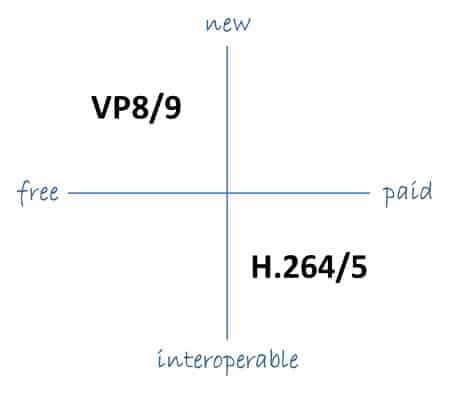
H.264, also known as AVC (Advanced Video Coding), has been the dominant codec in use for the past decade. It is widely supported by devices and software and offers good compression while maintaining high video quality. However, H.265 (HEVC) is slowly taking over. It is a newer and more advanced codec that offers better compression ratios, which means smaller file sizes with the same quality as H.264. H.265 is also better at handling high-resolution videos, making it a good choice for 4K and 8K videos. However, it requires more processing power to decode, which may be an issue on older devices.
Personally, I have found that H.265 delivers noticeably better quality than H.264 for the same file size. It is especially noticeable in high-motion scenes like action movies or sports. However, it does require more processing power, so make sure your device can handle it before choosing it as your preferred codec.
VP9: The New Kid on the Block
VP9 is a newer codec developed by Google and is designed to be a royalty-free alternative to H.265. It offers better compression than H.264 while maintaining the same video quality. It is also highly efficient at handling high-resolution videos, making it a good choice for 4K and 8K videos. However, its adoption has been slow due to its lack of support in many devices and software. It also requires more processing power to decode than H.264.
One of my personal experiences with VP9 was when I was trying to stream a 4K video on my laptop. I noticed that the video was buffering a lot and the quality was not as good as I expected. After some research, I found out that the video was encoded with VP9, which my laptop did not support. I had to switch to H.264 to get smooth playback.
Conclusion: Choosing the Right Video Codec
Choosing the right video codec is crucial for ensuring smooth video playback and high video quality. H.264 is still a solid choice for most situations, but H.265 and VP9 offer better compression and handling of high-resolution videos. However, they require more processing power and may not be supported by all devices and software. Make sure to choose the codec that best suits your needs and device capabilities.
In conclusion, video codecs are an essential part of our digital lives, and choosing the right one can make all the difference in our video-watching experience. Always keep in mind the pros and cons of each codec and make an informed decision based on your needs.
MPEG decoding is the process of converting compressed digital video data into a viewable format. This process is necessary because most digital videos are compressed to save space and reduce bandwidth requirements. Decoding MPEG involves using a special algorithm to decompress the data and extract the video and audio streams. Once the video and audio streams are separated, they can be played back on a computer or other device.
According to the book “Video Demystified” by Keith Jack, “Decoding MPEG requires a powerful processor and specialized hardware.” This is because the process is computationally intensive and requires a lot of processing power to be done in real-time. Many modern computers and mobile devices are capable of decoding MPEG on their own, but some may require specialized software or hardware to do so.
MPEG Decoder
An MPEG decoder is a piece of software or hardware that is designed to decode MPEG-encoded video files. Decoders come in many different forms, from standalone devices to software that can be installed on a computer. Most modern media players, such as VLC, have built-in MPEG decoders that can play back MPEG-encoded video files without the need for additional software.
As noted by the book “Digital Video Processing” by A. Murat Tekalp, “The quality of an MPEG decoder determines the quality of the video output.” This is because the decoding process can introduce artifacts and other issues that can degrade the quality of the video. It is important to use a high-quality decoder to ensure that the video is decoded correctly and looks its best.
Decoding Video Files
Decoding video files is an essential part of playing back digital video content. Many different video codecs are used to compress video data, and each requires a specific decoder to play back the content. MPEG is just one of many video codecs that are commonly used. Other popular codecs include H.264, HEVC, and AV1.
As stated by the movie “The Matrix”, “Unfortunately, no one can be told what decoding video files is. You have to see it for yourself.” While decoding video files may seem complicated, modern media players and other software have made the process much easier. With the right software and hardware, anyone can decode and play back digital video content with ease.
Final Words:
In conclusion, MPEG decoding is an essential process for playing back digital video content. Whether you are using a standalone device or a computer with specialized software, understanding how MPEG decoding works is important for getting the best possible video playback experience. If you’re looking for a high-quality MPEG decoder, consider using mp4gain to ensure that your video files are decoded correctly and look their best.