Maximize Sound Quality: The Ultimate Mp3 Normalization Guide


Free Download Mp4Gain
picture

Maximize Sound Quality: The Ultimate Mp3 Normalization Guide

Mp3 Normalizer
Mp3 Normalizer


Let’s Learn About Mp3 Normalizer: An Overview

Mp3 Normalizer
Mp3 Normalizer

Explanation of What Mp3 Normalization Is

Before diving into the specifics of Mp3 normalization, let’s take a moment to understand how sound works. Sound is a physical phenomenon that is created by vibrations that travel through a medium, such as air, and are picked up by our ears. Our ears then convert these vibrations into electrical signals that our brains interpret as sound.

When it comes to recording sound, we use microphones to capture these vibrations and convert them into an electrical signal that can be stored and played back. In the past, recordings were made on physical media, such as vinyl records or cassette tapes. Nowadays, however, most recordings are made digitally.

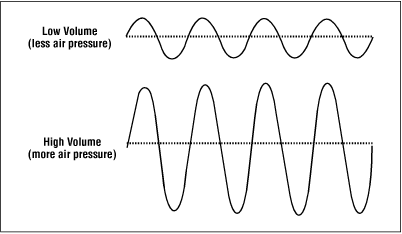
When sound is recorded digitally, it is captured as a series of numbers that represent the amplitude of the sound wave at different points in time. These numbers are then stored as a digital file, such as an Mp3. The amplitude of a sound wave determines its volume, with larger amplitudes producing louder sounds.

So, what is Mp3 normalization? In simple terms, Mp3 normalization is the process of adjusting the volume of an Mp3 file so that it plays at a consistent level. This can be achieved by adjusting the amplitude of the sound wave so that it does not exceed a certain level, known as the normalization level.

Importance of Normalizing Mp3 Files for Optimal Listening Experience

Now that we understand what Mp3 normalization is, let’s explore why it is important. Have you ever experienced the frustration of having to constantly adjust the volume while listening to music? Perhaps you turn up the volume to hear a quiet part of a song, only to be blasted by a loud part a few moments later.

By normalizing Mp3 files, we can avoid these volume fluctuations and ensure a consistent listening experience. Normalizing also helps to prevent distortion, which can occur when the volume of a sound wave is too high and clips the top or bottom of the waveform.

Brief Overview of the Benefits of Mp3 Normalization

  • Consistent volume levels for a better listening experience
  • Prevention of distortion
  • Ability to match the volume of different songs or recordings

In summary, Mp3 normalization is the process of adjusting the volume of an Mp3 file to ensure a consistent listening experience. It can help prevent volume fluctuations and distortion, and allows us to match the volume levels of different songs or recordings. In the following sections, we will explore Mp3 normalization in more detail and provide tips for achieving optimal results.

Before we dive into the different types of Mp3 normalization, it’s important to understand the basics of audio normalization. In essence, audio normalization refers to the process of adjusting the volume of an audio file to a standardized level, usually measured in decibels (dB).

One common method of measuring the level of an audio file is using root mean square (RMS) amplitude. RMS is a mathematical formula that calculates the average power of an audio signal. Essentially, RMS measures the amount of energy in an audio signal over a period of time, which helps determine the overall loudness of the audio file.

Decibels (dB) are another common unit of measurement for sound volume. Decibels are a logarithmic scale that measures the ratio between the sound pressure level of an audio signal and a reference level. This means that every 10 dB increase represents a tenfold increase in the sound pressure level. For example, an audio file with a volume level of 70 dB is ten times louder than an audio file with a volume level of 60 dB.

Another important unit of measurement for audio normalization is Loudness Units Relative to Full Scale (LUFS). Unlike decibels, which are based on the sound pressure level of an audio signal, LUFS measures the perceived loudness of an audio signal, taking into account the human ear’s sensitivity to different frequencies.

When it comes to normalizing audio, it’s important to measure the level of sound accurately. This is because different audio files can have different volume levels, and normalizing them to the same level ensures consistency and eliminates the need to adjust the volume manually when playing back a playlist of audio files.

Normalization is typically achieved through a process called gain adjustment, which involves increasing or decreasing the amplitude of an audio signal. This can be done manually or with the help of software. There are various types of normalization, such as peak normalization, RMS normalization, and true peak normalization, each with its own advantages and disadvantages.

Definition of Mp3 Normalization

Simply put, Mp3 normalization is the process of adjusting the volume of an Mp3 audio file to a standardized level. This is done to ensure consistency of volume levels across multiple audio files, particularly in cases where an Mp3 audio file has a different volume level than other files in a playlist or album.

How Mp3 Normalization Works

The process of Mp3 normalization typically involves analyzing the audio file to determine its peak level or RMS amplitude. This information is then used to adjust the volume of the audio file to a target level, usually measured in dB or LUFS.

One important thing to note is that Mp3 normalization is a lossy process. This means that the audio quality may be slightly reduced after normalization, particularly if the audio file is heavily compressed or if the normalization is performed at a high level. However, in most cases, the reduction in audio quality is negligible and the benefits of normalization outweigh the potential drawbacks.

Explanation of the Different Types of Normalization

There are several types of normalization that can be used for Mp3 audio files, each with its own advantages and disadvantages:

  • Peak normalization: This method adjusts the volume of an audio file so that its loudest peak is at a target level, usually 0 dB. However, this method doesn’t take into account the overall loudness of the file, so it may not be the most effective method for achieving consistency across multiple files.
  • RMS normalization: This method adjusts the volume of an audio file based on its RMS amplitude, which gives a more accurate measure of the file’s overall loudness. This method is generally considered to be more effective than peak normalization for achieving consistency across multiple files.
  • True peak normalization: This method takes into account inter-sample peaks, which can occur when digital audio is converted to an analog signal. By accounting for these peaks, true peak normalization can prevent clipping and distortion in the final output.

Advantages of Using Mp3 Normalization for Your Audio Files

Using Mp3 normalization has several advantages, including:

  • Consistency: Normalizing your audio files to a standardized level ensures that they will all have the same volume level, which can be particularly helpful when playing back a playlist or album.
  • Improved listening experience: When audio files are at a consistent volume level, listeners won’t need to constantly adjust the volume when switching between files.
  • Protection from clipping: Clipping occurs when an audio signal exceeds the maximum level that can be represented by the digital system. Mp3 normalization can help prevent clipping by reducing the overall volume of the audio file.
  • Better compression: Normalizing an audio file can improve its compression efficiency, resulting in a smaller file size without sacrificing quality.

Overall, Mp3 normalization is an effective way to ensure consistent volume levels across multiple audio files, resulting in a better listening experience for the audience. By understanding the different types of normalization and the units of measurement involved, audio professionals and enthusiasts can effectively optimize their audio files for various applications.

Normalization with Audio Compression

Normalization with audio compression is a method that combines normalization and audio compression to ensure that there are no passages of low volume. This method is commonly used in radio stations, television channels, and live concerts, where the aim is to make sure that all sounds, from the lead singer’s whisper to the sound of the drums, are clearly heard by the audience.

For example, let’s say you have an audio file of a live concert. The volume levels of the different instruments and vocals may vary throughout the recording. If you normalize the file without compression, the volume of the quieter parts may increase, but the louder parts may become too loud and distorted. However, by using audio compression, you can ensure that the volume of the entire recording is consistent and that no parts are too loud or too quiet.

Replay Gain

Replay Gain is a method of audio normalization that adjusts the volume levels of an audio file to a consistent level without altering the dynamic range. Unlike audio compression, Replay Gain does not compress or expand the audio’s dynamic range, which preserves the original sound quality of the recording.

Replay Gain analyzes the audio file’s volume levels and applies a gain adjustment to bring the overall volume to a specified target level. The adjustment is applied uniformly across the entire file, which helps to maintain the audio’s balance and clarity.

For example, if you have an audio file with a very quiet intro and a very loud chorus, Replay Gain will adjust the volume of the entire file to a target level, ensuring that the intro and chorus are both at an optimal volume level without distorting the dynamic range of the recording.

Replay Gain can be especially useful for creating consistent playback levels across different audio tracks in a playlist, as well as for reducing the need to constantly adjust the volume during playback.

Converting Audio and Video Formats

Mp4Gain can also be used as a format converter, allowing you to convert audio and video files from one format to another. This can be useful if you have a file that is not compatible with your media player or if you want to reduce the file size.

Extracting Audio from Video

If you have a video file with an audio track that you want to use separately, Mp4Gain can also extract the audio from the video file and save it as a separate audio file.

Common mistakes to avoid when normalizing audio files

When normalizing audio files, there are some common mistakes that you should avoid:

  • Normalization with too much audio compression: Too much audio compression can make your audio sound unnatural and distorted.
  • Normalization with too little audio compression: Too little audio compression may result in inconsistent volume levels and passages of low volume.
  • Normalization with incorrect settings: Make sure to choose the right normalization settings for your audio file to ensure optimal sound quality.

How to test your audio files after normalization to ensure optimal sound quality

After normalizing your audio files, it is important to test them to ensure optimal sound quality. You can do this by:

  • Listening to the file: Listen to the normalized filewith different audio devices, such as headphones, speakers, or car audio systems, to make sure it sounds good on all of them.
  • Checking the waveform: Use a waveform viewer to check the waveform of the normalized audio file. The waveform should be consistent and not have any clipping or distortion.
  • Comparing with the original file: Compare the normalized file with the original file to make sure that the changes made during normalization do not negatively affect the quality of the audio.

V. Conclusion

Mp4Gain is a versatile software that can help you improve the sound quality of your audio and video files. Whether you need to normalize the volume levels of your audio files, convert audio or video formats, or extract audio from video files, Mp4Gain has got you covered. With its user-friendly interface and powerful features, Mp4Gain is a great tool for anyone who wants to achieve optimal sound quality for their media files.

By using the tips and tricks mentioned in this article, you can ensure that your audio files are normalized correctly and sound great on any device. Remember to avoid common mistakes when normalizing

The Benefits of Mp3 Normalization: Final Thoughts

Overall, Mp3 normalization is an effective way to improve the quality of your audio files. By adjusting the volume levels to a consistent and optimal level, you can enhance the listening experience and avoid the need to constantly adjust the volume.

However, not all normalization software is created equal. While there are many options available, Mp4Gain is a modern normalizer that is designed to provide consistent, high-quality sound across a variety of devices and listening environments.

In today’s world, many people listen to music on their smartphones, tablets, and computers, often with headphones or earbuds. Additionally, many headphones have noise-cancelling features, while others do not. The headphones that cancel outside noise work by using a microphone to detect the sound waves and creating an opposite sound wave to cancel it out. This can affect the sound quality of the music and make it difficult to achieve consistent volume levels. Some headphones also have a frequency response curve that can make certain frequencies louder or quieter, which can also affect the sound quality of the music.

With Mp4Gain, you can rest assured that your music will sound great no matter where you listen to it. The software is designed to adjust the volume levels while maintaining the dynamic range of the original recording and taking into account the frequency response curve of the headphones, so that the music sounds just as good on a phone as it does on a high-end stereo system.

Whether you’re listening in a noisy environment or a quiet one, with or without noise-cancelling headphones, Mp4Gain’s normalization process will ensure that the sound is consistent and optimal. So why wait? Start normalizing your Mp3 files with Mp4Gain today and experience the difference in sound quality!

udio files, choose the right normalization settings, and test your files after normalization to ensure optimal sound quality.

Try out Mp4Gain today and experience the difference in sound quality for yourself!


Free Download Mp4Gain
picture


Mp4Gain Main Window
picture


Mp4Gain Features
picture


Free Download Mp4Gain
picture

Understanding Audio Normalization

Understanding Audio Normalization

Audio Normalization
Audio Normalization

Audio normalization is the process of adjusting the loudness of an audio recording to a standard level. The goal is to ensure that all audio files have a consistent volume, making them easier to listen to and preventing ear fatigue. In this article, we will explore the different types of audio normalization and how they work.

Audio Normalization
Audio Normalization

Peak Normalization

Peak normalization is the process of adjusting the peak amplitude of an audio recording to a certain level. The peak amplitude is the highest point in the audio signal, and it is measured in decibels (dB). The goal of peak normalization is to ensure that all audio files have the same peak amplitude, making them easier to listen to and preventing ear fatigue.

Peak normalization is typically used for digital audio files, such as MP3 and WAV files. These files are usually stored in a digital format that allows for easy manipulation of the audio data. However, peak normalization can also be applied to analog audio recordings, such as cassette tapes or vinyl records.

RMS Normalization

RMS normalization is the process of adjusting the root mean square (RMS) level of an audio recording to a certain level. The RMS level is a measure of the average power of an audio signal, and it is measured in decibels (dB). The goal of RMS normalization is to ensure that all audio files have the same RMS level, making them easier to listen to and preventing ear fatigue.

RMS normalization is typically used for digital audio files, such as MP3 and WAV files. However, it can also be applied to analog audio recordings, such as cassette tapes or vinyl records.

RMS normalization is often considered to be a more accurate method of normalizing audio than peak normalization because it takes into account the average power of the audio signal, rather than just the peak amplitude.

Loudness Normalization

Loudness normalization is the process of adjusting the loudness of an audio recording to a certain level. The loudness of an audio recording is measured in loudness units (LU). The goal of loudness normalization is to ensure that all audio files have the same loudness, making them easier to listen to and preventing ear fatigue.

Loudness normalization is typically used for broadcast audio, such as television and radio. Loudness normalization is required by many countries to ensure that the audio levels of all broadcast programs are consistent, making them easier to listen to and preventing ear fatigue.

Loudness normalization is often considered to be a more accurate method of normalizing audio than peak or RMS normalization because it takes into account the perceived loudness of the audio signal, rather than just the peak amplitude or RMS level.

Conclusion

Normalizing audio is an important process for ensuring that all audio files have a consistent volume, making them easier to listen to and preventing ear fatigue. There are several different types of audio normalization, including peak normalization, RMS normalization, and loudness normalization. Each method has its own advantages and disadvantages and is best suited for different types of audio.

When it comes to audio normalization, one solution that stands out is Mp4Gain. It is a software that allows you to normalize your audio files in a quick and efficient way. It can be used to normalize a single audio file or multiple files at once. It also supports a wide range of audio file formats, including MP3, WAV, and more. Furthermore, Mp4Gain is user-friendly and easy to navigate, making it a great option for both professional and casual users.

In conclusion, audio normalization is a crucial process for ensuring that all audio files have a consistent volume, making them easier to listen to and preventing ear fatigue. There are several different types of audio normalization, including peak normalization, RMS normalization, and loudness normalization. Each method has its own advantages and disadvantages and is best suited for different types of audio. Mp4Gain is a powerful and easy-to-use software that can help you normalize your audio files quickly and efficiently.

Loudness normalization

Loudness normalization

Loudness Normalization

When you have a lot of mp3 files, you often look for loudness normalization.

Loudness Normalization

What usually happens is that we have mp3s (although Mp4Gain can do Loudness normalization of many other audio and video formats!!) that have been created with different settings, for example different bit rates… which causes them to have a loudness different and that is annoying to the ear.

Many times we have been collecting mp3s from different sources, finding one here and another there and over time we have managed to have a good collection that is worth thinking about, but we have a problem: the loudness differs between different music or video files.

And this has generated that we desperately need to find a solution.

Mp4Gain is the result of many years of experience and is definitely the best normalizer out there, I have no doubt.

Even for very advanced users, it offers different settings to adjust exactly what you are looking for. Pewreo if you are a common user, you will not need anything, just load the song or video (you can normalize one or hundreds at the same time) and click a button, it’s that simple.

Loudness Normalization: Why is it necessary to Normalize the loudness of an audio or a video?

Loudness Normalization: Why is it necessary to Normalize the loudness of an audio or a video?

Loudness

The war of volume or loudness war.

Already in the 1940s and in later decades, in the middle of the vinyl record era, a volume war was experienced.

The goal was to make a song sound louder on the radio, louder than other songs and louder than advertising.

Sure, the limitations of vinyl didn’t allow the ability to indiscriminately increase volume to be possible.

Loudness normalization

But with the advent of CDs and digital music it was possible to push the loudness of a song to the max. The situation is that the digitization of the audio allowed it to be manipulated quite precisely, achieving dynamic normalizations that actually ended the dynamics of the music and then played all the time at maximum volume.

By the 90s, groups like Red Hot Chilli Peppersm and their album Californication took this war of loudness to levels rarely seen.

But why did they do that?

Some research on human hearing showed that people did not find that a song sounded better if it had louder loudness.

Every artist, every producer, and every hardware manufacturer has figured out a way to make their production sound louder, louder.

Digitally many limiters and compressors pointed in that direction and made a lot of music sound almost to the point of distortion.

Each one wanted their music to stand out, among other things for being louder and having a greater sound, a higher volume level.

If to this recipe we add the appearance of the mp3 and a great variety of encoders, and also that ordinary people did not understand the effect that the bit rate could produce, then many mp3s with different qualities were generated.

The possibility of sharing these mp3s filled people with mp3s that each had very different sounds. Both for its production and for its coding.

Then a new need appeared: normalize the music to avoid these disparities in loudness, in the volume of the songs.

The holy grail of normalization had to be found.

Many ideas were found, many experiments. The situation matured and certain products like Mp3Doctor and Mp4Gain matured to the point where they actually managed to find the solution: a dynamic standardization that will work well with today’s advanced player equipment.

Then Mp4Gain made the leap, achieving that even videos could not be normalized.

Audio could already be normalized in its main formats (mp34, aac, ogg, floac, etc) with Mp3Doctor, but Mp4Gain added the possibility of these dynamic normalization to video in its main formats (mp4, 3gp, flv, avi, etc. )

What does it mean to normalize audio?

We often hear someone normalize an mp3 file or a flac, ogg, aac, etc.
Even with the Mp4Gain we talk about normalizing the audio of video files such as Mp4, AVI, mpeg, etc.

What does normalizes mean?

We could say that it refers to something similar to standardize, in the sense that it maintains a volume standard, that it does not lower the loudness up or down, that it stays within a standard, within given limits.

Music Loudness War

Audio compression

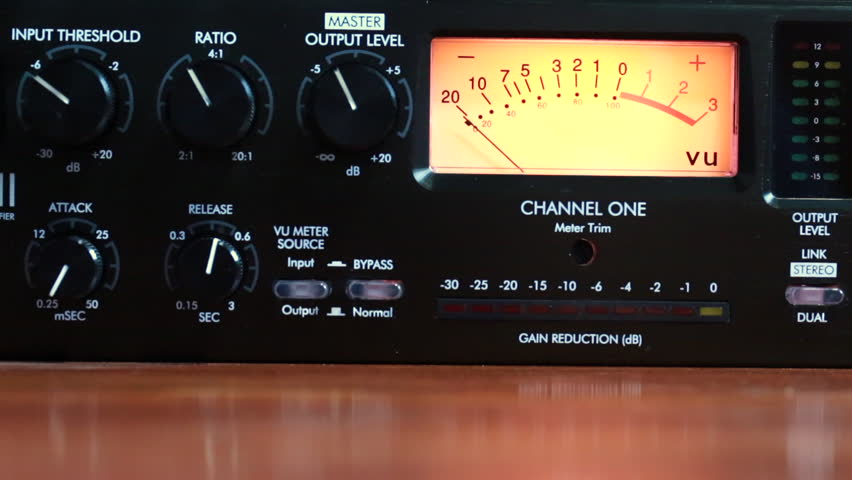
When the music began to digitize, going from analog to digital, it became absolutely necessary to use compressors, which will work as a limiter, to stop the peaks and as an expander or compressor to enhance the valleys of lower loudness.

At the same time, a principle that has to do with the human ear was detected: at higher volume the ear believes that the music is “better heard” and that is where the so-called volume war began.

Audio Loudness and Normalizer

Each time the audio productions registered an increase in loudness.

All of the above caused anyone who listened to various music files, in an order, to notice differences in the sound of these, which was unpleasant and uncomfortable.

And there arises the need to normalize the volume, to obtain a similar loudness without variations in loudness.

Then we will see that a normalizer is a software or hardware that is responsible for maintaining the loudness of all the audio, because it is not only about music, but we also talk about videos, movies, etc. It maintains that constant sound, without fluctuations.

Even modern normalizers, at least the Mp4Gain, do this by separating the audio by bands, thus achieving an enhancement that the audio had lost when being compressed excessively.

Audio compressors are necessary, but their abuse in the last decades, have managed to reduce the quality of the audio and also that the loudness is not the same between one file and another.

The normalizer has become one of the most important accessories in the audio chain, at least at the user level.

People search everywhere how to equalize volume levels, how to improve volume levels, how to match the volume of their audio files … until they finally find a good normalizer that comes to solve the problem, greatly improving the audio quality and ending the problem of uneven loudness.

Audio normalization for beginners

What’s more annoying when listening to music is that you have to manipulate the volume control for every song that plays. If you have a computer, a tool allows you to uniformize the atmosphere from track to track while the songs are playing. This is called normalization. Three main means are used to achieve this result more or less effectively.

Audio normalization

Normalization through detection of maximum volume

The player or audio processing software analyzes the sound of the track and detects the highest amplitude. If it is less than the maximum gain value that is imposed, the signal is automatically boosted by the number of decibels required to reach and reach this value in all samples on the track. If the highest amplitude is equal to or greater than the maximum gain value, nothing is done.

Normalization

This method has only one advantage: the avoidance of saturation. However, the drawbacks are many.

This form of normalization cannot be applied in real time, as it is assumed that the maximum signal value is known in advance, which is hardly the case with live audio sources (playback or recording). Also, this type of normalization turns out to be totally ineffective when the overall sound of the song is low, but interrupted by small ridges that can be parasitic. When these peaks reach or exceed the maximum gain value, nothing happens and the overall sound is always reduced, especially if these peaks last only a few fractions of a second.

Normalization in detecting maximum volume is almost never used by reading software. Many audio processing software or even audio CD burning offers this option, such as Audacity and Nero.

Normalization by medium volume detection

Here, the player or audio processing software analyzes the sound of the track and does not detect the highest amplitude, but the average amplitude of the signal. Thus, the volume of the song will automatically increase or decrease by the number of decibels required to reach the imposed value, as appropriate.

Also known as RMS, this method has the advantage that the sound is fairly accurately balanced from one song to another, even if there are sharp peaks in the volume.

However, normal normalization of volume detection, like the previous method, cannot be applied in real time and is ipso facto unsuitable for live audio sources. In addition, saturation can occur if the imposed value to be achieved is not sufficient. It is recommended to use normalization values ​​small enough to avoid this problem as much as possible.

Many reading software programs use this normalization mode, but they all work better or worse than the others. .

Sound compression / modern normalization

The mp4gain audio processing  software performs the audio signal analysis, analysis that will lead to increase or decrease the volume of certain areas of the signal according to a complete set of fairly complex parameters inherent in the signal itself. Ultimately, the loud sounds will be attenuated, the weak sounds will improve when multiple presets are reached.

This is the best normalization method if the sound processing values ​​are well established, in which case the sound volume becomes very constant and without saturation, regardless of the source and signal type, in real time or No

However, this type of normalization requires some processing power from the processor. Although the results achieved are much more professional and the only ones that really achieve what the 2020 ear is looking for. Mp4Gain has the most efficient response to normalize audio, either from audio files of the most popular formats or from video files, including the most commonly used formats.

What exactly is normalizing?

Music is distinguished by what is often called “dynamic” and which refers to the changes (more or less abrupt) of the “effort” with which certain notes or passages are interpreted.
Whether it is an instrument or the voice.

singer

Any vocal performance that has been considered virtuous, in general terms, will have a dynamic that goes from very soft passages, almost whispered, to intense passages, with a high volume, singing at full voice.

At the time when vinyl existed as the option to listen to music, it was not felt (at least it went almost unnoticed) the fact of noticeable differences between the loudness or the volume of a song.

It was with the advent of digitization and the possibility of its variants (opting for different bitrates, sample rates, bitdepths, etc.) that this difference became very evident.

And with the appearance of mp3 and its distribution or exchange, at the same time that winamp and distribution lists arose, when it was inevitable and it was even started to look for solutions.

Napster

These first ones were based on the sound peaks and their results were very inefficient.

Returning to the mention of the mp3, situations such as masking (where information is removed) further marked the problem of differences in volume.

Then began to use the RMS that rather mediates the average power that the song had, more than the peaks.

Initially, it was enough to put a slower reaction level to the volume meter, to have a more general idea and less impacted by the volume peaks.

And so, the way of listening to music and considering what normalization was evolved.

Finally it appears to be somewhat closer to a mixture of a volume limiter and a compressor.

What is a volume limiter? It is a hardware (although lately there are also limiters in software version) that ensures that no peak exceeds a maximum limit.

A compressor, on the other hand, is a device or software that is used to “compact” the volume, preventing the parts with the lowest volume from being too low and at the same time preventing the high parts from exceeding a range that has been assigned. We would say that the compressor dampens the increases and decreases in volume.

To this we can add an equalization that differentiates the bands and treats them differently both in the limitation and in the compression. Each frequency band has a different treatment in the Mp4gain and that produces a very efficient result. It is NOT the only improvement offered by Mp4Gain, but this is described here. In other articles we will deal with other differences.

Mp4Gain is the best normalizer of 2020 and this is clear when using it.

Audio Level normalization

The audio levels of the material produced in a radio station
In general, in radio they do not tend to stay within standardized levels for their audio editions (spots), it is not necessary to know much about levels, since an audio processor compresses and limits everything on air.

Radio Studio Compressor

The console operator does not understand anything about dynamic range, something that has no practical use in the air. And this is how many radios work with adjustments that “work” in the air by trial and error, and not always with the most demanding criteria. successful.

Dynamic range compression

Level normalization

In radio, an editor does not know or manage any level convention, so it could be said that level normalization is not widely used. However, a good professional practice would be that all the material generated by a station “sounds” at the same level. Not to the air, because to the air if it is transmitted normalized or compressed and limited, but inside the station. And for this, there are two ways:

The material is processed “by ear” by comparison.
An RMS value is defined and all publishers normalize their mixes to that average level.

Regarding the first point, differences of up to +/- 2 dB will be absolutely acceptable. But a very common vice is to overcompress the edits, or sometimes the voices, seeking to hear the compact and aggressive sound of the FM on studio monitoring. That sound should be determined on-air by the streaming processor, not the publisher. Editors generally abuse processes like Normalize RMS (Sound Forge) and “maximizers”; Wave Hammer (Sound Forge / Vegas) Ultramaximizer and L1 (Waves). Ideally, how much to “squeeze” the dynamics of the edited material should be a function of the type of processor the radio has. At this point it is possible to clarify a fairly common confusion: STANDARDIZATION has nothing to do with making an audio sound “strong” or “powerful”. Using normalization for that purpose is a beginner’s mistake.

The second option is the most accurate way of working -although this precision is not necessary- normalizing all the editions to a given RMS value. This does not impact the sound in the air but it does the internal prolixity of the station. RMS is not an accurate measurement of loudness or “volume”, but for what you need in radio it is enough.

The streaming audio processor knows nothing about the level of the audio file. The processor receives an audio level from the console and works accordingly. What affects the behavior of the processor is the dynamics of the material, if it has dynamics or is super-compressed / limited.

Normal working values

The level at which operator-editors generate material has two well-defined extremes to avoid: very high levels of compression / cliping and excessively low material (less than 24 dB RMS). When we talk about level, we must be clear about the differences between peak level and average level.

PEAK level

Regarding the peak level, the logical maximum limit is digital cliping. Needless to say, a cliping mix is ​​unacceptable.
It is advisable that the maximum peak level is not 0 dBfs, as this will generate overshoot cliping in the D / A converters and especially if the compressed material (MP3) is exported.
An appropriate value for the material on a radio is maximum peak – 1dBfs (the recommendation if using mp3 compression is -3 dBfs). But this does not mean that it should be -1 dB. If no peak reaches the established maximum it is not a problem as long as the material complies with the appropriate working level. The peak level does not matter, but in general the signal will always reach the maximum peak level.

Listening level (RMS)

The “listening level” or mix level is determined by the RMS or “average” value of the material. This is true even if the publisher has never measured the RMS value of their audios. In general the radio editor “compresses”, “maximizes” or -conception error by- “normalizes” your edits “so that they sound”. And in that “so that they sound”, it is taking the cuts to a certain value.

The question that arises is what should that value be? How much should the final mix “squeeze”? The final value should not be a value that generates excessive compression, as this is the task of the transmission processor. How to compress is a topic of discussion for another article, since it is fine spinning and the radios in general do not take into account these aspects. In general lines we will say:

If the radio has a simple analog processor, type M31 or Solidyne 362, they will perform better with material that has a more compact sound (more compression).
If the station has a high-end digital processor, and especially if it works with a highly processed sound in the air, it is not recommended or necessary to excessively maximize the material generated by the station, because these audio equipment respond better when the material is origin is not over compressed.


But what if the file level is very low? It depends. Depending on the PC-Console connection, the operator typically has at least 15 dB of gain range for level correction from the PC. In turn, if the level is low with the fader on, the AGC of the processor has between 10 and 20 dB more correction to compensate the level in the air. But if the file were generated too low, it could fall outside the operator / processor correction range and go low on air.

GENERAL AND ELEMENTARY CONCLUSIONS:

Different materials generated in the radio must sound at the same level, either by ear or measured RMS.
It should not be overcompressed, much less cliping.
The peak level should not exceed -1 dB.
It should not be too low as it may fall outside the processor’s AGC / operator correction ranges.

Put in values:

RMS values ​​between -16 to -13 dB RMS are acceptable.
Values ​​between -13 and -10 dB RMS generally indicate strong compression.
Values ​​less than -10 dB RMS indicate excessive compression, not recommended as it generates a very loud but “muffled” sound that cannot be “improved” by the air processor.

Normalization of an audio file.

How to normalize an audio or video file.

Normalization is used to increase or decrease the level of the song as a whole, so that its maximum volume peaks assume the indicated level.

For example, if the maximum intensity points of the song are at -3 dB (therefore, well below 0, which should represent the maximum before distortion), normalizing to 0 dB means increasing the level of the entire song so that these peaks reach 0 dB.

audio level

This is the typical normalization of the peaks.

There is also RMS normalization (which takes into account not the peaks, but the actual average level of the song).

AUDIO CDs, which have good dynamic possibilities (various intensity tones, from pianissimo to fortissimo), are generally recorded so that the maximum volume points are at 0 dB.

Free image of audio levels

Normalizing your recordings in WAV can be useful to adapt them to the average level of a CD in case they are too low (because you had been careful in the level during the recording) but there is one important thing to keep in mind:

normalization of this type alters the original dynamics, that is, the reciprocal relationships between weak and strong sounds.

Although all levels are raised by the same amount, the relationship between 2 levels changes (small mathematical example:
2/5 = 0.4 ma (2 + 1) / (5 + 1) = 0.5 …

The result is that the weaker sounds, after sudden normalization, sound much louder and those that were already loud only sound a little louder … altering the dynamic relationships that had been envisioned by those who originally recorded the music and causing the sound output to lose depth.

Some types of music, generally already deficient dynamics (rock, metal, etc.) since the excursions between the minimum and maximum volume are almost never very consistent, are more “normalizable” without problems, while the genres in which there may be Large Dynamic excursions (classical music or music with passages from pianissimi to fortissimi) are more problematic.

Furthermore, it is necessary to keep in mind that if you normalize a large wav file that contains many songs (not yet divided) there can still be, even in genres with little dynamics, consistent differences, in this case between one song and another and not between different points of the same song.

So a light normalization can do and is actually used (to raise the level of the song), but it would be better to make sure you don’t need it (recording from the beginning with a good level) or at least not have too much need. and remember, however, that the dynamics are somewhat flattened.

Normalization of an mp4 or normalization of a video.

We are in the video age, it is said that 2,000 hours of video per minute are uploaded on YouTube.

HOWEVER, THERE IS NO OTHER SOFTWARE THAT IS ABLE TO NORMALIZE THE AUDIO OF THE VIDEOS !!

Mp4Gain is used by television channels throughout the world. Also by radio stations … even by some famous musicians, of whom we cannot give the name for reasons of confidence … but we are talking about musicians of global fame.

One of them is the guitarist of one of the groups that generates the most money on their world tours … or perhaps the one that generates the most money on their world tours. He uses Mp4Gain …

And so, many other celebrities are our clients. NBA players belonging to the legendary dream team, etc.

Normalization of an audio file.

Normalization of an audio file.

Normalization is used to increase or decrease the level of the song as a whole, so that its maximum volume peaks assume the indicated level.

Loudness Normalization

For example, if the maximum intensity points of the song are -3 dB (therefore well below 0, which should represent the maximum before distortion), normalizing to 0 dB means increasing the level of the entire song so that these peaks reach 0 dB.

This is the typical normalization of the peaks.

There is also RMS normalization (which takes into account not the peaks but the actual average level of the song).

Audio Normalization

AUDIO CDs, which have good dynamic possibilities (various intensity tones, from pianissimo to fortissimo), are generally recorded so that the maximum volume points are at 0 dB.

Normalizing your WAV recordings can be helpful in adjusting them to the average level of a CD in case they are too low (because you had been careful in level during recording) but one important thing to note:

Normalization of this type alters the original dynamics, that is, the reciprocal relationships between weak and strong sounds.

Although all levels are raised by the same amount, the relationship between 2 levels changes (small mathematical example:
2/5 = 0.4 ma (2 + 1) / (5 + 1) = 0.5 …

The result is that the weaker sounds, after abrupt normalization, sound much louder and those that were already playing only sound a little louder … altering the dynamic relationships that had been envisioned by those who originally recorded the music and making the sound output to lose depth.

Some types of music, generally already deficient dynamics (rock, metal, etc.) since the excursions between the minimum and maximum volume are almost never very consistent, are more “normalizable” without problems, while the genres in which there may be Large Dynamic excursions (classical music or music with passages from pianissimi to fortissimi) are more problematic.

In addition, it is necessary to take into account that if you normalize a large wav file that contains many songs (not yet divided) there can still be, even in genres with little dynamics, substantial differences, in this case between one song and another and not between different points of the same song.

So a light normalization can do and is actually used (to raise the level of the part), but it would be better to make sure you don’t need it (recording from the beginning with a good level) or at least not have too much. remember, however, that the dynamics are somewhat flattened.

Normalize with Mp4Gain

This software is capable (it is the only one that can do this) of normalizing the main audio and video formats and its standardization algorithm is by far the most efficient and the one that produces the best results.
For this reason it is used by musicians, radio broadcasters, universities, television stations, producers, etc.