Audio normalization explained


Free Download Mp4Gain
picture

Audio normalization – Audio normalization

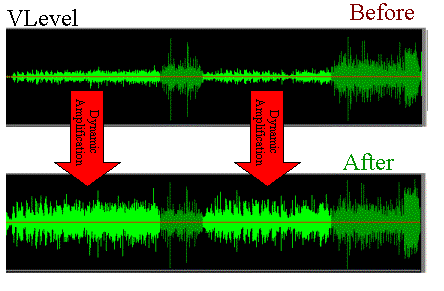
Audio normalization is the application of a constant amount of amplification of a sound recording to bring the amplitude of a target level (standard). Because the same amount of gain over the entire recording, the signal-to-noise ratio and relative dynamics are unchanged.

Two basic types of audio normalization exist. Peak normalization adjusts the recording based on the highest signal level present in the recording. Loudness normalization adjusts the recording based on perceived loudness.

Normalization differs from dynamics compression, which applies varying levels of gain across a recording to fit the level within a minimum and maximum range. Normalization adjusts the gain with a constant value over the entire recording.

Normalization is one of the functions usually provided by a digital audio workstation.

Peak normalization

One type of normalization is peak normalization, where the gain is changed to bring the highest PCM sample value or analog signal peak to a certain level – usually 0 dBFS the loudest level allowed in a digital system.

Peak normalization

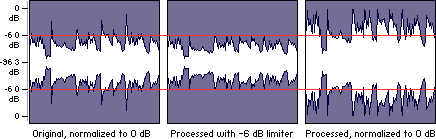
Since it only goes to the highest level, only peak normalization does not take into account the apparent loudness of the content. As such, peak normalization is commonly used to change the volume so as to ensure optimal use of the available dynamic range during the mastering phase of a digital recording. In combination with compression / restriction, however, peak normalization becomes a feature that can provide a volume advantage over off-peak normalized material. This feature of digital recording systems, compression and limiting followed by peak normalization, sets contemporary trends in program loudness.

Loudness normalization

Another type of normalization is based on a measurement of loudness, where the gain is changed to bring the average amplitude to a target level. This average can be a simple measurement of average power, such as the RMS value, or it can be a measure of human perceived loudness, such as that offered by ReplayGain, Soundcheck and EBU R128.

Loudness Normalization

For example, YouTube reference level -14 LUFS, so if a program analyzed at -10 LUFS, YouTube will decrease the level 4 dB to the reference of -14 LUFS.

Loudness normalization was made in different volume combat when listening to different music in a series. Before loudness normalization, one song in a playlist would be quieter than the rest, so the end listener would have to put a volume knob to adjust the playback volume.

Depending on the dynamic range of the content and the target level, loudness normalization may result in peaks that exceed the storage medium. Software offering such normalization usually offers the option of using dynamic range compression to avoid clipping when this happens. In this situation, signal-to-noise ratio and relative dynamics changed.


Free Download Mp4Gain
picture


Mp4Gain Main Window
picture


Mp4Gain Features
picture


Free Download Mp4Gain
picture

Volume normalization, an explanation

Audio Normalization: Make Your Audio & Video Consistently Loud

Audio normalization is a process in which the amplitude (volume) of an audio recording is increased or decreased in a constant relationship over time, so that the maximum amplitude or the maximum effective value or the perceived volume (volume) reaches a predetermined level, the standard. If the signal has multiple tracks, they all undergo the same correction.

Normalize Audio

Example: normalization of peaks to -3 dB:
A collection of digital recordings is made with a peak modulation standard of -3dB FS.
A new stereo recording is measured. The highest maximum level is -5.5 dB FS on the left track, -5.7 dB FS on the right track.
Normalization consists of applying a constant gain of 5.5 – 3 = 2.5 dB.
Standardization requires two passes. The first determines the maximum level, the second applies the correction to the entire recording.

Audio Normalization

Maximum normalization changes the level, but not the dynamics of the sound.
Volume normalization or perception of loudness often includes compression that changes the dynamics of sound.

Peak normalization

Peak normalization applies a constant gain to a recording to bring the highest peak to a target level, 89% professional audio (-1 dBFS true peak (True Peak)).

The sound dynamics of the recording are more or less preserved, except that maintaining a low distortion level after multiplication of all samples may involve the application of a known quantization error decorrelation noise. under the name redithering (tingling of the least significant bit) 2, which slightly increases the background noise level.

Volume normalization

The purpose of volume normalization is to bring all sound elements in a collection to the same sound volume level, so you can hear them without having to adjust the volume. In fact, the normalization of the maximum level in no way guarantees a homogeneity of the perceived sound volume (Loudness).

A simple approach to volume normalization, which is provided by various software programs, is to normalize the RMS value of the integrated signal within a few tenths of a second. The most advanced machines use extensive algorithms for more accurate evaluation of the perceived noise level. The European Broadcasting Union published a recommendation 1 in 2011, which provides a relatively simple method for this evaluation.

If the standard is not low enough, volume normalization involves compression for recordings whose sound dynamics would be higher than implied when setting the standard from the maximum level. If not, the signal peaks would exceed the quantization limits.

In the simplest implementation, volume normalization collects volume data during the first pass, determines the gain or attenuation necessary for the maximum volume to reach the norm, and applies this correction to the second pass. If the elements of the collection have the same characteristics, from form factor to top factor and dynamics, as is the case with popular music collections or recorded speech, this approach produces satisfactory results.

Extensive implementations use a standard that includes not only the volume of the sound, but also the maximum maximum values ​​and dynamics of the sound. They collect loudness levels and maximum values

VOLUME NORMALIZATION: WHAT IS THE VOLUME NORMALIZATION FUNCTION?

Audio Normalization

HOW IS THE VOLUME BETWEEN TITLES NORMALIZES?

WHAT ARE the benefits of activating the normalization feature?

The “NORMALIZE VOLUME” volume normalization feature allows you to achieve a volume of the same level, music title after music title, regardless of which one succeeds during playback.

How Audio Normalization Works

This provides undeniable listening comfort rather than having to, as before, sometimes turn the volume up or down depending on certain pieces of music.

Note that this difference between a high volume and a low volume sound is called dynamic. If this sound is short or long (1 second or 3 minutes …), be it music, voice or noise.

WHY IS THE SOUND MUSIC OR LETTERS STRONG, SOME TIME?

We must not forget that music, recorded or not, as well as everyday acoustic sounds (those that surround us) are something “alive” which, like during a human discussion, necessarily contains volume passages. weaker sound and others that are louder.

The human ear is by definition used to these differences in sound levels. If these sound differences between the low and high levels did not exist, it could end up giving us a headache because the sound heard would not be natural. The ear needs moments of rest, even if only for a moment, and stronger moments for words to remain audible (and to work the ear again!). The human ear needs this natural “breath”.

Today’s music is very “compressed” (constant sound level, few low levels) when recording (mixing), that is, there are few passages with a big difference between the lowest and highest passage of the song. The STANDARDIZE feature can even be activated and not work much if all the titles of an album are very “compressed”.

Finally, the sound world is like the aquatic world: there are high and low waves. Some tracks are not recorded (mixed) like others. They leave a big difference between low and high noise levels. The NORMALIZE VOLUME feature allows you to level up and try to get everything back to the same level.

WHEN SHOULD I USE THE STANDARDIZATION FUNCTION?

Eg. On the street or in the subway, standardization plays an additional role in making your music more audible. And of course, first and foremost to get a comfortable listening when listening to different music titles with as much sound as possible.

WHY disable the standardization feature?

When the need arises, you can turn this feature off at any time when you want to find this “breathing sound”, titles read (play), with multiple moments that contain smoother (weaker sounds) and higher variations (it’s loud).

Especially if all the titles in your album or playlist are compressed at source, disabling the NORMALIZER feature will help your ear rest, at the end of the day you will be less tired.

Deezer’s NORMALIZE feature does not compress sound and fatigue, it only reduces the major differences between high-level and low-level titles.

Digital audio normalization

Digital audio normalization

In the last decade the term digital audio normalization has become popular. You could say that most people have a vague idea of ​​what they mean. However, it is important to understand some concepts that relate very closely to the issue of the volume gain of an audio file.

One of these issues is audio quality, so we think it is very important to start by explaining what kilobytes per second means.

It is not difficult to understand this concept, however very few people understand it and much less people manage to understand

So let’s try to understand what the subject of kilobytes per second means and how it impacts the quality of an audio file of any format.

This will allow us to have a greater vision to understand the issue of volume, digital audio normalization and loudness given that all this is closely related to audio quality.

So let’s begin to understand why at higher kilobytes per second we will usually have better audio quality.

For this it is necessary to use some examples. But first we need to understand that the greater amount of kilo bytes per second means a greater amount of information per second.

Many will ask And why more information per second synonymous with better audio or video quality?

For that it is important to keep in mind that audio or video files are capturing information and this information is usually very rich in data. For example, the amount of data per second in the performance of a musical group with five or six instruments is quite a lot. Or say the information per second in an image What is very many. So if we lower the number of bytes per second we are reducing the amount of information which impoverish our audio or video file.

The war of volume

For some years now, music recording companies have detected that people listen as a synonym for quality if there is a greater volume And then they have opted for the strategy of increasing the volume of the music they record a little more and produce.

If we had a graphic that will show us the volume and loudness that music used to have in the 70s and we were comparing by decade we could see that the loudness and volume level and volume gain have been increasing decade after decade.

This as I mentioned produces a deceptive effect of perception in the human being that confuses an increase in volume with an increase in audio quality.

And this has been called the war of volume because as we mentioned they have gradually increased the volume level of musical productions to make it appear that they have a higher sound quality.

And how does this compare to bytes per second? As it happens that the amount of information per second does really determine a higher quality and does not need an artificial increase in volume to appear to have a higher quality of digital audio.

So a modern digital audio normalization like the one offered by mp4gain is not misleading, but tries to ensure that each musical passage and each instrument have their optimum volume so that the loudness is constant and so that the quality is the best possible.

Audio normalization

Audio normalization

The concern to achieve an adequate sound in the music and a correct balance of the volume levels is something that actually takes centuries.

As soon as the first string quartets or the first symphony orchestras were formed, it was detected that there was a need to maintain an adequate balance of the volumes of each instrument section.
In fact, it is not accidental with a symphony orchestra to have a certain amount of each of the instruments, nor is it accidental that they are accommodated in the way they are accommodated when they are going to play a symphonic concert.

The reason for this is to achieve an adequate balance to the sound of the complete musical piece and it is something that has been thoroughly studied for many centuries.
That is, the human being many years ago of text, what was important to take care of the loudness of each part of a musical piece And of course the global musical work.

Hence we have become accustomed to musical dynamics, What is it that music has more intense moments and softer moments but must be audible all the time, it must be something that is not taken lightly.

Great masters of classical music paid a lot of attention and that is how it was achieved that symphonic orchestras were formed from the amount of instruments that are formed and that were accommodated in a specific way in order to achieve adequate volume management.

This has generated that our ear is used to hearing an adequate musical balance with the correct audio levels and when that is not so we detect that there is a problem and we seek to solve it.

With modern technology and the emergence of digitized music it has been very noticeable for all people that it has become an almost indispensable necessity to normalize the audio.

Normalizing the audio means achieving a standardization where the highest and lowest levels are maintained within a certain standard or certain limits so that it is audible and pleasant for us to listen to all the musical parts that make up a song.

The normalization of the audio has evolved since the music that at first was simply looking for the highest volume peaks was digitized and now in programs such as mp4gain it has achieved very important sophistication that resembles a compression mix, with the use of limiters, and an adequate management of the volume gain of each of the instruments and sounds that form a song.

In other words, we are facing much more modern and advanced algorithms that manage to normalize the audio of music files and videos, even being able to convert from one format to another without problem and normalizing it at the same time. Even The Advance are modern What can perfectly modify the speed of the audio without affecting the Pitch and vice versa.

If you need to achieve the normalization of the audio of a video in the most popular formats of an audio file in the most popular formats the solution is mp4gain which will allow you to easily convert to the format you want and normalize in the most efficient way that exists in the moment your audio or your favorite video.

How does a modern mp3 normalization really work and why is it superior?

Actually we will refer to an audio normalization in general, regardless of the format.

normalize volume

-First attempts to normalize the audio

As soon as the digital format emerged and people were able to store audio files on their computers, it was necessary to encode them to save space, without losing quality.

This is how formats such as mp3 emerged, because they managed to make the same song occupy 10 times less space than a wav format, and if it was well coded and / or with a quality encoder, it sounded practically the same. It was gained in space and the loss of quality was practically zero.

For this it was necessary to maintain a samplerate of at least 44,100 kHz and a bitrate of at least 128.

Initially the most accessible format was the mp3 and although later other formats have emerged (even looseless like FLAC), the mp3 continues to take the place of favorite.

normalize

But when a person listens one song after another, he will soon perceive differences in the sonority of these songs. It seems that the volume level is not even, and that is when it becomes necessary to normalize, to avoid having to manually correct the audio volume level of each song by turning the volume knob.

Even Spotify has had to incorporate some normalize option to avoid these annoying volume gain level changes between songs.

The difference is that Spotify only normalizes the volume while playing the songs, so if we stored them on our hard drive, the volumes would remain uneven.

-The solution of volume peaks

The first attempts to normalize the audio of an mp3 were inefficient, they only looked for the peak of a song and amplified it all to the point where those peaks did not distort.

But this did not eliminate the perception that one song would sound louder than others.

Over time the volume level normalization algorithms have been refined and have become more subtle and complex. They have been achieving similar results to those obtained by the great sound consoles in musical concerts, where the music is highly processed to – among other things – make the volume levels are even and unchanged, and also achieve a sussuro of The singer’s voice is audivble even if the battery gives tremendous blows in a roll.

Mp4Gain has come to obtain these results, without the need for you to invest thousands of dollars in hardware like these musical groups or large radio stations do.

Today, audio normalization really is a combination of compression, limiters and normalization, which achieves an amazing result. Far from those first attempts to level the volume gain of each song to avoid big differences.

Does bitrate influence? A 320 kbps Mp3 sounds better than a 128 kbps one?

Much has been speculated about the bitrate. Most people do not understand clearly what it is. A few understand, but almost nobody knows if a file with 320 kbps really sounds different or better than the same file but with 128 kbps.

The easiest way is to test:

The first is at 128 kbps

Now let’s hear the 320 kbps option

Notice the difference? In case the note is because it was encoded using the Mp4Gain.
Normally it is almost impercentible, but using a good encoder you get to notice some subtle difference.

It should be taken into account that at higher kbps, if there is a higher quality – although it is not always noticeable – and will always use more disk space.

Therefore it is not the best option to say “all my mp3s will be 320 kbps”, unless the space does not mean any problem at all.

How MP3 files work

The MP3 movement is one of the most incredible phenomena that the music industry has ever seen. Unlike other similar phenomena, such as the introduction of cassette tape or CD, MP3 technology did not start with the industry, but with a huge audience of music lovers on the Internet. The digital MP3 music format has had, and will continue to have a great impact on how people collect, listen and distribute the music.

If you have wondered how MP3 files work, or simply want to know what uses can be given, read on. This article will give some features of this popular sound format.

MP3 format

If you know something about how CD’s work, then you know how they store music. A CD stores a song in the form of digital information. The data on a CD uses a decompressed high resolution format. This is what happens when a CD is created:

The music is sampled (fractionated) 44,100 times per second. Each of these parts has a size of 16 bits.
Pieces of these fractions or “samples” are taken from the left and right channels in a stereo system.
With a simple formula we realize how great a single song can be.

Fractions * bits * channels = X bits per second

In our case it would be 44,100 for 16 bits per 2 channels, which would give us 1,411,200 bits per second. 1.4 million bits per second equals 176,000 bytes per second. If the average of a song is 3 minutes, then the average of a song on a CD is 32 million bytes of space. That is a lot of space for a song, and it is especially great if we consider that we are downloading music with a 56K Modem, which will take us a few hours.

The MP3 format is a compression system for music. This format allows you to reduce the number of bytes in a song without damaging the sound quality. The goal of the MP3 format is to compress a CD quality song without letting you see the difference. With MP3, a 32 MB song from a CD, compresses up to 3 MB. This allows you to download a song in minutes instead of hours, and store hundreds of songs on your computer’s hard drive.

Compression and quality

Is it possible to compress a song without damaging the quality? To perform this compression, the use of algorithms is needed, in the same way that we use them to compress other formats, such as graphics, text files, applications, etc. A very popular algorithm for compressing sound is the “perceptual noise shaping” technique. This algorithm uses characteristics of the human ear such as:

There are certain sounds that the human ear cannot hear.
There are certain sounds that the human ear hears better than others.
Its there are two sounds playing at the same time, we can hear the one that is louder, and not the lowest.
Using factors like these, certain parts of the song can be eliminated without significantly damaging the quality of the song for the listener. When you have created the MP3 file, what you have is music with a quality close to that of a conventional CD. It doesn’t sound exactly the same because some things have been removed, but it’s very close.

Using the MP3 format

The MP3 movement – consisting of the MP3 format itself and the ability of websites to distribute it – have done several things in the music world:

It has made it easy for anyone to distribute music at a low cost, or even for free.
It has made accessing music simple and instant.
He has taught people to manipulate music on a computer.
One of the strengths of this format is the ability to edit, create and modify music files thanks to powerful computer software tools. Thanks to these tools, it is extremely easy for anyone:

Download an MP3 file from a website and play it instantly.
Transform or “rip” a song from a CD, to the MP3 format, and listen to it later.
Record a song yourself, convert it to MP3, and make it available to everyone on the Internet.
Convert MP3 files into CD files and make your own audio CD’s with MP3 files downloaded from the Internet.
Have thousands of hours of music stored on one or more hard drives.
Upload MP3 files to portable players and listen to them wherever you want.
To do all this, all you need is a computer with a sound card, speakers, an Internet connection, a CD / DVD player / recorder, and an MP3 player.

Audio quality: Bitrate in MP3 files

In many cases, the term Bitrate is used, which is the bit rate per second that a multimedia file (Audio or Video) has. Currently the MP3 music format is one of the most widespread (Although there are currently other more current formats such as OGG Vorbis, AAC, Flac, Monkey Audio, …) however the audio quality is variable, this is due to the characteristics with which the MP3 in question has been compressed, including:

Mode: It can be of two types mainly:

Mono: With a single channel (The right and left channel go together, not separated which gives worse audio quality).

Stereo: Two channels (Right and Left, improve audio quality).

Sampling frequency:

Audio CDs use 44,100 Hz (22,050 Hz per channel), although there are higher frequencies such as 48,000 Hz used in DVDs and lower, the higher the frequency, the higher the quality.
Bits: Audio CDs have 16 Bits (Although MP3 can be compressed at a lower quality such as 8 Bits).
Bitrate (Bit Rate per second): Audio CDs have about 1,400 Kbps (44100 Hz * 16 Bits * 2 channels), meaning that an Audio CD would have a bitrate of 1,400 Kbps (In MP3 format the maximum Bitrate is 320 Kbps, however, it is assumed that an MP3 with a 128 Kbps Bitrate has a quality similar to CD, although in many cases to achieve a quality similar to CD it is necessary to use a Bitrate of 192 Kbps, and to obtain CD quality it is necessary use 256 Kbps or 320 Kbps).

Some of the most common Bitrates are:

8 Kbps Mono: Telephone Sound.
16 Kbps Mono: Better quality than shortwave.
32 Kbps Mono: Better quality than AM.
64 Kbps Stereo: Better quality than FM.
112 – 128 Kbps: Quality close to CD.
160 Kbps: Quality closer to CD.
192 Kbps: Virtually CD quality.
256 Kbps: Quality CD practically undisputed from an original CD.
320 Kbps: CD quality.

Coding method: It can be of two types:

VBR (Variable Bit Rate, Bit Rate Variable): Encodes the file in MP3 with a variable Bitrate.
CBR (Constant Bit Rate, Constant Bit Rate): Encodes the MP3 file with a fixed Bitrate.

In addition, another factor that influences the encoding of the MP3 file is the CODEC (Encoder-Decoder) used, one of the most common and the best result is LAME (Lame Ain’t an MP3 Encoder) which is also free.

One point to keep in mind is that if we recompress an MP3 file that originally has a 128 Kbps bitrate and convert them to 192 Kbps for example, audio quality is not really gained because the MP3 format has some quality loss (MP3 is a loss algorithm, also called lossy). which has occurred when converting the original file (Ex: CD Audio or a 320 Kbps MP3 to a 128 Kbps MP3) so this recompression does not make much sense since we will not gain in audio quality (As they say where there is no one can not get) and the only thing we will achieve in any case is to increase the initial size of the file.

The opposite case (Recompress a 320 Kbps MP3 file for example at 192 Kbps) if it makes some sense because in this case although we lose some audio quality we reduce the weight (Kilobytes or Megabytes) of each MP3 file somewhat.


In conclusion, it can be said that if we need to encode / compress an MP3 file with good quality, the “ideal” would be to do so:

To be able to start from an Audio CD, although an MP3 at 320 or 256 Kbps could also be valid for a recompression of the file.
In stereo mode (With two channels, right and left).
With at least 44100 Khz sampling rate and 16 Bits.
With a minimum bitrate of 192 Kbps or at most 256 Kbps (Using 320 Kbps would give higher quality but also increase the file size considerably).
Use the LAME Codec (Lame Ain’t an MP3 Encoder).

What it is and how to perform a volume normalization on your MP3


What it is and how to perform a volume normalization on your MP3

Have you ever heard the term audio normalization, without being sure of what it meant? As a lover of music and technology, I also encountered such a doubt many years ago. Basically, giving a short definition, it is about the standardization of the volume, or rather, of the audio spectrum with respect to other subjects, usually of the same disc.

And that, to put it more simply, is the equalization of the volume of the different tracks on a disc. The reasons are many, and usually if the tracks are extracted from the same job they already have the same volume and gain, but what happens if we want to make a mixtape? For example, we decided to make a compilation called The Best 100 Rock Songs in History. Surely have songs from The Beatles or The Rolling Stones, and therefore from different albums. Depending on the year, type of mastering, etc. etc., we can end up with a CD that contains many different volumes, something that can be annoying when listening. That is just one of the reasons to normalize our MP3 collection.

There are add-ons for players that allow us to normalize on the fly. In fact we can say that programs like Spotify already do this by means of the option to equalize volume of all the songs, however the application that I present below allows us to permanently normalize modifying MP3 files and many other formats, both audio and Of video..

This is Mp4Gain, which stands out for its simplicity of use and is presented under an interface that is ideal to understand exactly what a normalization is and see the before and after. When we open the application we find a window in which we have a grid, which will be populated when we add files or folders, and a keypad with various options.

How do we normalize? Simply change the gain through the specific menu for this.

By pressing OK the application will start working and save our files with the same gain, so it is ideal that before doing the first tests we make a backup. It must also be taken into account that it is an operation that can take time, something that depends on the speed of our processor, the number of issues to normalize and also the size and quality of them.