Bit rate and audio quality


Free Download Mp4Gain
picture

Bit rate and audio quality

Bit rate and audio quality

Audio and video quality

Bit rate and audio quality

We know that there are two types of compression, called lossy, which discards information to make the file smaller, and lossless, which simply uses zip-type compression to reduce the size.

The quality of the audio depends on the number of bits that can be transmitted per second.

Let’s understand this concept well, it’s simple.

If the audio file has a certain amount of information and we can transmit ALL of it, then we will obtain a very high quality and there will be no loss of information.

On the other hand, if we must discard more data because we can only transmit a small amount, quality will necessarily be lost.

For this reason, the amount of information collected by the sample rate and the number of bits that can be transmitted per second go hand in hand. It will be useless to have a very good samplerate if the bitrate is low and forces us to transmit only a small portion of the abundant data available.

Many times when encoding a file, of any format, information is lost either by using a poor encoder or by mutilating the wrong settings.

Mp4Gain is highly efficient at all of this and uses the best settings for you to get the best quality, both when encoding and converting.


Free Download Mp4Gain
picture


Mp4Gain Main Window
picture


Mp4Gain Features
picture


Free Download Mp4Gain
picture

What does the quality of the audio or video depend on?

What does the quality of the audio or video depend on?

Sample Rate
Sample Rate

What factors are crucial for a higher or lower quality in digital files?

Sample Rate
Sample Rate

Files like WAV are not compressed, but they take up a lot of space and contain a lot of inaudible and unnecessary information.

This forced them to look for ways to be able to compress this audio or video to save space and so that they were also lighter to watch or listen to live on sites like YouTube or Spotify, etc.

Let’s see what are the important parameters:

1.- Bit Rate

It is the bit transfer rate. Said in an easy to understand way, it is the amount of information that can be transmitted per second. It is obvious that the more information that can be transmitted, the greater the detail and therefore the greater the quality.

Sometimes the transfer rate is fixed (CBR) but it can also be variable. Where the bitrate chosen for each moment will depend on the amount of information needed.

An audio with a lot of silence and few sounds will need to transfer much less information per second than an audio full of sounds and nuances.

2.- Sampling rate

The amount of information per second that is sampled will mark the number of details that are captured and can be transmitted.

But obviously also the higher the sampling rate, the greater the information contained.

Therefore, we see as a very simplified summary that a higher quality requires greater detail and therefore better information stored and a higher speed of transmission of that information.

Therefore higher bitrate and higher samplerate will usually mean higher quality, and will also take up more space.

Which is better, MP3, FLAC or WAV? Part 2

Which is better, MP3, FLAC or WAV? Part 2


The right audio file format can do more with less

M4A
M4A is a format compatible with Apple products such as iPhone and iPod, and corresponds to MPEG-4 video files. M4A files have lossless compression and can be edited multiple times without quality loss. Compared to other audio file formats, M4A has similar quality but smaller file size.

CCA

Like MP3, Advanced Audio Coding (AAC) files are also lossy formats. However, AAC files are of much higher quality in their original state than all other audio file formats, and AAC files are generally similar in size to MP3, but slightly higher in quality.

In addition, AAC also offers variable bitrate or constant bitrate encoding, and AAC files are also open source, which means you don’t have to pay royalties to create and share them (unlike MP3 files). .

AAC files are usually used in iTunes, but can also be used in other player devices and game consoles.

undefined

OGA

Like AAC, OGA files are open source and use lossy compression. They use a variable bit rate to reduce file size without reducing the overall sound quality. In practice, OGA files tend to be of higher quality than MP3s, but many programs don’t support OGA.

FLAC

Like M4A, FLAC is a lossless format, but unlike M4A, FLAC is an open source encoding and has a more efficient compression algorithm that reduces the file to 50% to 70% of its original size. This format is popular with audiophiles as a way to collect music in its highest quality form. Because it is open source, it is compatible with many devices and programs.

PCM, WAV and AIFF

PCM (Pulse-Code Modulation) is an uncompressed audio file format commonly used on CDs and DVDs. This format uses a “sample rate” and a “bit depth”, where the sample rate represents the sample rate of the original audio file and the bit depth represents how many bits are used to define each sample.

WAV (Waveform Audio File Format) is generally used as a format for storing PCM audio files, which makes it more suitable for Windows computers.

AIFF (Audio Interchange File Format, Audio Interchange File Format) like WAV is commonly used to store audio files in PCM format (except Mac).

How to choose the correct audio file format

Choosing the right format completely depends on the audio file you intend to use, you should choose a format that expresses the sound quality of the desired audio file, unnecessary high quality audio files can be difficult to move, share, convert and manage . Consider the following two cases:

If you plan to edit audio files (such as podcasts), use uncompressed formats (including PCM, WAV, and AIFF) so that the quality of the audio files is maintained each time you edit and save the file. Once completed, it can be generated in a compressed format that is easy to share.
If you are an audiophile and want to listen to your music in high fidelity, choose a lossless compressed file format, including FLAC, WMA, M4A. It uses less storage space than uncompressed formats, but still retains the original full file quality.
If you don’t care about the quality of audio files, want to share files on the Internet, or need to save hard disk space, choose a format that uses lossy audio file compression, including MP3, OGA, AAC. Fortunately, lossy compression has gotten so good in recent years that most people can’t tell the difference between lossy and lossless compression.
In conclusion

In summary, the most popular types of audio files are:

MP3
M4A
CAA
OGA
FLAC
WAV
PCM
AIFF
In some cases it is better to use one file format than the other, in which case you should convert between the two file formats. To programmatically convert between audio or video file types, you can use Filestack’s Audio Transcoding API or Video Transcoding API. The Filestack API also supports splitting audio files from video files, cropping or resizing video files, video file thumbnails, and more.

What is the difference between 128k and 320k music?

What is the difference between 128k and 320k music?

audio bitrate
audio bitrate


Some time ago, a colleague came across a very troubled client. The mess was said to have been caused by the client asking him to provide song files larger than 100MB-200MB in size.

bit depth
bit depth

And my colleagues don’t know much about audio formats, so they started endlessly fumbling about FLAC, WAV and audio size. In the end, the colleague did not clearly explain to the customer what was going on.

After that, other things happened that made me feel that in the music industry there are too many practitioners around me who have an extremely poor understanding of music and even lack some basic knowledge related to music. I don’t even have the idea to understand, which makes me very sad. It seems that music has only one merchandise attribute, and our practitioners only need to organize the shelves, encode various merchandise, and use the big data of users’ purchase records to recommend merchandise to users, no matter why to users. they like this. features that these products have, and provide users with various services with cold data.

Therefore, I think it is necessary to write something. I don’t expect practitioners to become people who really love music. I just hope that even if you still think of “her” as a commodity, you can first figure out what you’re selling. and what is..

PS: The content of the first lesson is about media files. Since the relevant content involves a lot of technical issues, it seems a bit boring, but if you read it carefully, you will find that it is actually very easy to understand, but this basic knowledge can be very helpful.Improve your skill well. Also expect more interesting content about records, musical styles, etc. which I will post soon.

【text】

Bit Rate, Sample Rate, Lossless, MP3, FLAC, APE, 320kb, 192kb, 128kb, 44.1khz, CBR, VBR. Does this bunch of various names make you both familiar and unknown?

The higher the bitrate, the better the sound quality. Lossless music is the highest sound quality, right? So, let’s start with the sound collection.

【Audio composition】

Nowadays, when we talk about audio, everything is digital audio. Digital audio consists of three parts: sample rate, sample precision, and number of sound channels.

Sample Rate: Both the sample rate, which refers to the number of samples per second when recording the sound, expressed in Hertz (Hz).

Sampling Precision: Refers to the dynamic range of the recorded sound, measured in bits (Bit).

What is the recording bitrate (the appropriate mp3 bitrate range)

What is the recording bitrate (the appropriate mp3 bitrate range)

MP3 Bitrate
MP3 Bitrate

All music on the web is digital, so what does the “bitrate” or “kbps” you see when previewing or downloading mean? What is bit rate?

MP3 Bitrate
MP3 Bitrate

In its simplest terms, bitrate represents the amount of data a file produces per second.

For example, you might see something like “320 kbps.” Literally, that means 320 kilobits per second, or the amount of data that is produced.

How does bitrate affect music?
Common audio file formats are MP3, OGG Vorbis, or AAC, which can be called lossy compression, while others are lossless compression, such as FLAC or WAV, which basically retain all the audio information.

320k is the highest bitrate encoding of mp3, and the sound quality is generally considered to be the closest to CD format. If you listen to popular music, you can see that there is more music encoded in 196k. From the point of view of listening, the difference between 320k encoding and uncompressed encoding is negligible, but in theory, the bit rate of a common CD is 1411k, which is 4.5 times the bit rate highest of MP3.

There is a direct relationship between bit rate and sound quality, but reasonable compression does not degrade listening.

Since MP3s are lossy files, meaning some of the audio is lost due to compression, why don’t the ears seem to change the sound? This involves psychoacoustics, a fringe discipline that studies the relationship between sound and the hearing it provokes. Psychoacoustics refers to “the way the human brain interprets sound.” Compressed audio is the use of powerful algorithms to convert audio messages that we cannot hear. remote.

So even though the bitrate of a lossy file like MP3 is much lower than that of a lossless file, it doesn’t sound like that. Even with just 320kbps MP3, the listening experience is not 4.5 times worse than music on CD.

Of course, the compression is not unlimited, when the bit rate drops below 128kbps, the sound quality will be degraded, and the lower it is, the more obvious it will be. On the contrary, the higher the bitrate, the higher the quality of the music.

Mp3 ape flac What is the difference between the three music formats?

Mp3 ape flac What is the difference between the three music formats?

When we often download songs, we want to download some of the best sound quality, and we are also confused about which sound quality is the best.

If you ask the friends around you, they will definitely all say that you want to download lossless files, but how good is the sound quality of lossless files?

First of all, the first impression is that the volume of lossless files is obviously different from normal MP3 files. Normally, the size of normal MP3 music file is only 2-5M, but the volume of lossless APE files of the same version is about 30M, a difference of 10M times more.

In the case of the same playback time, why is there such a big volume difference?

Here to talk about a term – bitrate It is a data factor that determines whether the quality of a song file is good or bad, bitrate refers to the number of bits transmitted per second (bit). The unit is bps (bits per second). The higher the bit rate, the higher the data transmission speed. The bit rate in sound refers to the amount of binary data per unit of time after converting an analog sound signal (a signal with sound properties such as amplitude and frequency) into a digital sound signal (i.e., a binary signal such as 010101 stored on a computer’s hard drive) is an indirect measure of audio quality. The principle of bit rate (bit rate) in video is the same as in sound, which refers to the amount of binary data per unit of time after the analog signal is converted to a digital signal.

Bitrate Property for Lossless Files

Bitrate Properties for High Quality MP3

The bit rate of MP3 files with ordinary sound quality is generally 128 kbps, the bit rate of high-quality MP3 files is generally 320 kbps, and the bit rate of lossless files is generally 960 kbps. kbps or even more. The difference in bit rate can be understood as the vibration frequency of the sound decoded by the decoder at the same time. The higher the bit rate, the higher the vibration frequency and the better the corresponding sound. Good timbre means that the restoration of sound details is relatively complete, that is, the sound quality is good. However, this is also the reason for the large size of the lossless files.

What video bitrate is appropriate for video? Part 2

What video bitrate is appropriate for video? Part 2

Video Bitrate
Video Bitrate

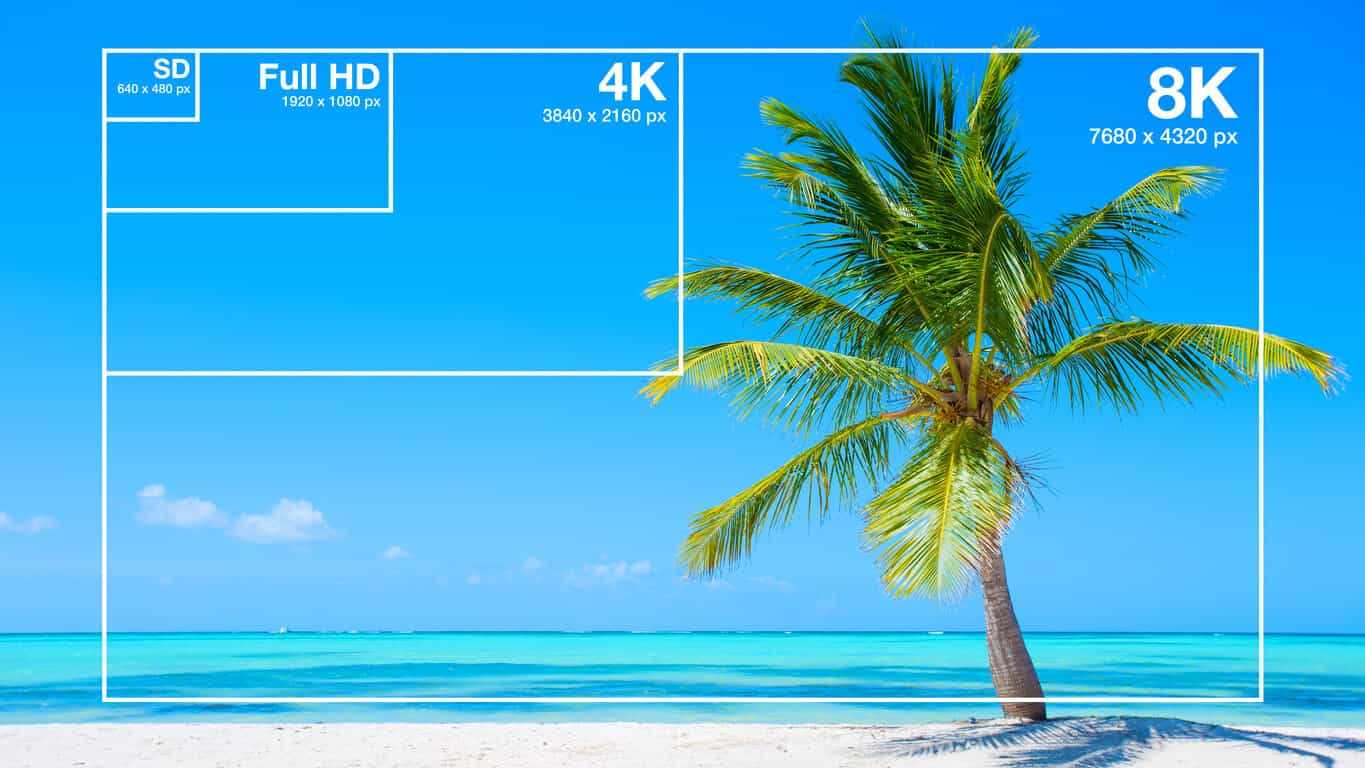
Ultra Clear 720P>=1.5M (Standard 1280×720 resolution, minimum 960*540, this and higher resolutions are in MP4 era) [some websites have this minimum requirement to upload]

Video Bitrate
Video Bitrate

Blu-ray 1080P>=2.5M (1920 × 1080 standard resolution) [optimal 4-8M] [220M when the material is stored] [some websites have this higher requirement for uploading] (it is better to use 720P and 1080P when make videos )

2K=(2048×1080 resolution)
4K=(4096×2160 resolution) [Optimal 8-12M]
The most normative statement is:
reaching 720p resolution is the threshold for high definition signal sources, 720p is called the HD (high definition) standard;
up to 1080p resolution, known as the Full HD (full high definition) Blu-ray standard.
2K refers to 2048 × 1080, and the actual resolution of Quad HD (four times high definition, 2K can be called “four times ultra high definition”) has various specifications, and the ones listed above are just common specifications. ;

4K refers to 3840 × 2160, and the actual resolution of Quad Full HD (four times full HD, 4K is called “four times ultra full HD”) has various specifications, and the ones listed above are just common specifications. .
Blu-ray is the clearest and SD is the worst If your internet speed can’t bring you 1080p, then at least 720p won’t feel blurry to the naked eye.
P refers to the number of horizontal scan lines, and the higher the number, the higher the resolution of the image. The letter P stands for progressive scan.

1. What is the video bitrate?

Video bitrate is the number of bits of video data (color, brightness, and pixels) that are output per second. The unit generally used is kbps.

2. Recommended bitrate for video size and resolution

How much video bitrate is appropriate (above H.264 bitrate, 720P, 1080P output bitrate setting)

3. A set of formulas to set the bitrate is shared with you as follows:

How much video bitrate is appropriate (above H.264 bitrate, 720P, 1080P output bitrate setting)

Regarding the two items of “Use the highest rendering quality” and “Process with the maximum depth” when exporting from PR editing software, the effect of image quality is not obvious on the big screen and the output time can increase exponentially depending on the complexity of the track. I also encountered this problem in the morning. I have been there, it is a waste of time and the effect is average. So I usually don’t choose this.

What video bitrate is appropriate for video?

What video bitrate is appropriate for video?

Video Bit Rate
Video Bit Rate

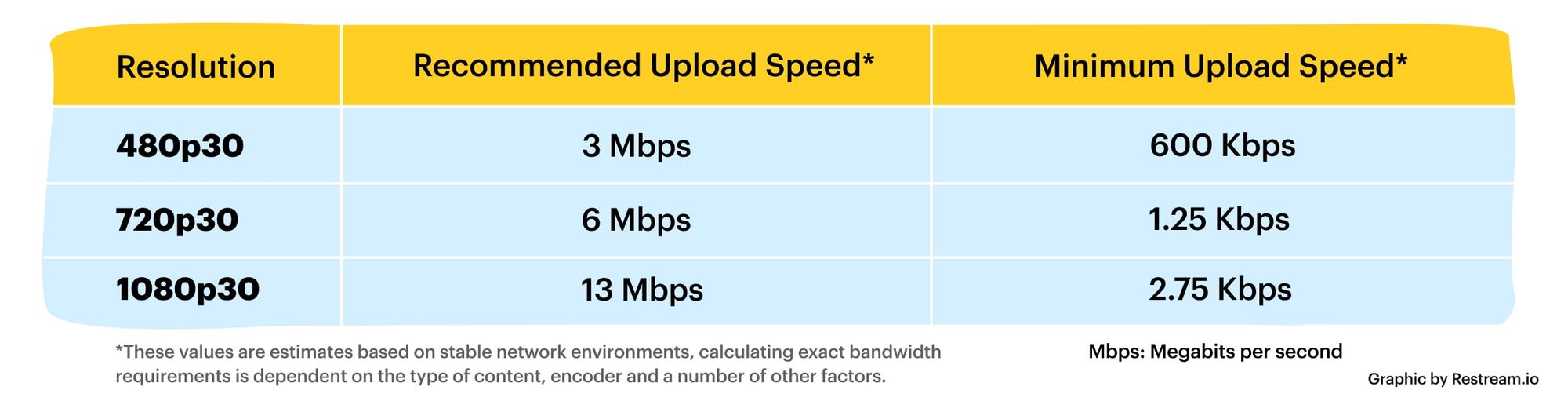
At present, 720p video recommended minimum bitrate is above, h.264 encoding 2M bitrate is adequate, 1080p is 4M enough
to get a high-quality video, convert it with different bitrates, and then compare the image quality.

Video Bit Rate
Video Bit Rate

The most commonly used are: h.264 encoding, 1080P, 2.5M bit rate or more.
Summary: [h.264 encoding, 2.5M bitrate (up to 4M), maximum 4M bitrate (add 2M to target), most platforms are Blu-ray. 】

1. If the bitrate is higher than the original video, it will not be a bit higher than the original video. When you move, you’ll pick a lower point to compress the file a bit.
2. 1080P 1M bitrate has distortion feeling to watch on computer, and 2M can’t see distortion, you can adjust the bitrate to 4M to get the best.
The following are the bitrate upload requirements for a platform:

How much video bitrate is appropriate (above H.264 bitrate, 720P, 1080P output bitrate setting)

How much video bitrate is appropriate (above H.264 bitrate, 720P, 1080P output bitrate setting)

***Normal 240p, 320p SD, 480p HD, 720p Ultra HD, 1080p Full HD (Blu-ray), 2K, 4k Ultra HD ***
Normal 240P (320×240 standard resolution, it was 3GP, this is basically nobody used)
SD 270P<0.8M (360×270 standard resolution, was 3GP, rarely used) [140M when storing 422 materials]

High definition 480P (360P)>=0.8M (standard resolution of 640 × 480, minimum 480 * 360, was 3GP) [480 re-advertising is called high definition, but the normative statement can only be regarded as standard definition]

Sample rate and bit rate of MP3 Part 3

Sample rate and bit rate of MP3 Part 3

Sample rate and bit rate of MP3

Sound is actually a type of energy wave, so it also has the characteristics of frequency and amplitude, with frequency corresponding to the time axis and amplitude corresponding to the level axis.

Sample rate and bit rate of MP3

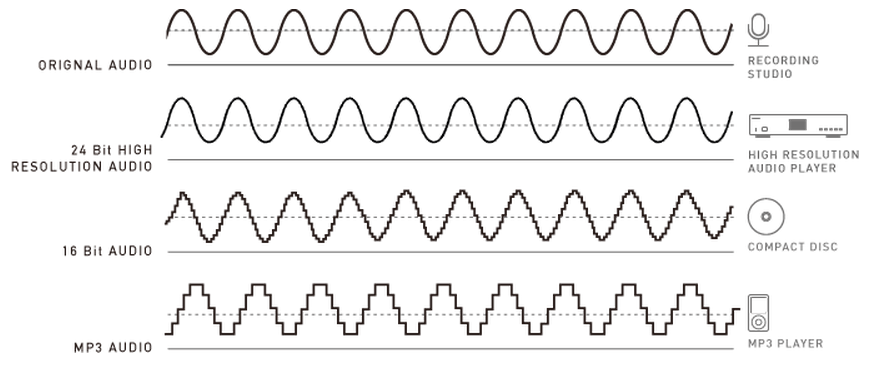
The wave is infinitely smooth, and the string can be considered to be made up of innumerable points. Since the storage space is relatively limited, in the process of digital encoding, the points of the string must be sampled. The sampling process consists of extracting the frequency value of a certain point. Obviously, the more points that are extracted in one second, the richer the frequency information that can be obtained. To restore the waveform, there must be two sampling points in one vibration. The highest frequency that can be felt is 20kHz, so to meet the auditory requirements of the human ear, at least 40k samples per second, expressed at 40kHz, and this 40kHz is the sample rate. Our common CD has a sample rate of 44.1 kHz. It is not enough to have only frequency information, we must also obtain and quantify the energy value of this frequency to represent the strength of the signal. The number of quantization levels is an integer power of 2, and the sample size of our common CD bit is 16 bits, that is, 2 to the power of 16. Sample size is harder to understand than bit rate. sampling, because it makes it seem abstract. For a simple example: suppose a wave is sampled 8 times, and the energy values ​​corresponding to the sampling points are A1-A8, but we only use 2-bit sampling size, as a result we can only keep the 4 point values ​​in A1-A8 and discard the other 4. If we use the 3bit sample size, all 8 point information is recorded. The higher the sample rate and sample size values, the closer the recorded waveform is to the original signal.

It is very easy to calculate the bit rate of a PCM audio stream, the value of the sample rate × the value of the sample size × the number of bps of the channel. A WAV file with a sample rate of 44.1 KHz, a sample size of 16 bits, and two-channel PCM encoding has a data rate of 44.1 K×16×2 = 1411.2 Kb/s. We usually say that 128K MP3, the corresponding WAV parameter, is this 1411.2Kb/s, this parameter is also called data bandwidth, it is a concept with the bandwidth in ADSL. Divide the code rate by 8 to get the data rate for this WAV, which is 176.4 KByte/s. This means storing a 1-second sample rate of 44.1 KHz, a 16-bit sample size, and a two-channel PCM-encoded audio signal, which requires 176.4 KB of space, which is approximately 10.34 M in 1 minute, which is unacceptable. For most users, especially friends who like to listen to music on the computer, to reduce disk usage, there are only 2 ways to downsample or compress. Lowering the index is not advisable, so experts have developed various compression schemes.

The minimum value of the 16-bit binary number is 0000000000000000, the maximum value is 1111111111111111, and the corresponding decimal numbers are 0 and 65535, that is, the difference between the maximum and minimum values ​​is 65535, that is, the dynamic range of the analog quantity that quantizes The difference can be 65535, which is 96.32 decibels, so quantization accuracy is only related to dynamic range and has nothing to do with frequency response. It also makes sense to set the dynamic range to 96 decibels. The painless limit sound pressure of the human ear is 90 decibels. The dynamic range of 96 decibels is sufficient for ordinary applications. Therefore, after quantization, analog waves within the 96 decibel dynamic range will not be quantized. Clipping distortion will occur.

The number of digits in the sound is equivalent to the number of colors on the screen, indicating the amount of data per sample. Of course, the larger the amount of data, the more accurate the playback sound, so as not to confuse the sound. of the teapot with the train whistle. In the same way, it is more clear and precise for the image, so as not to confuse blood and ketchup. However, limited by the function of human organs, 16-bit sound and 24-bit image are basically the limits of ordinary humans, and the highest digits can only be distinguished by instruments. For example, the phone has 7-bit sound sampled at 3 kHz and the CD has 16-bit sound sampled at 44.1 kHz, so the CD is clearer than the phone.

Sample rate and bit rate of MP3 Part 2

Sample rate and bit rate of MP3 Part 2

Sample rate and bit rate of MP3

The sample rate is similar to the number of frames of moving images.

Sample rate and bit rate of MP3

For example, the sampling rate of movies is 24 Hz, the sampling rate of PAL format is 25 Hz, and the sampling rate of NTSC format is 30 Hz. When we play back the still images sampled at the same rate as the sampling frequency, we see a continuous image. In the same way, when a CD recorded at a sampling rate of 44.1 kHz is played back at the same rate, a continuous sound can be heard. Obviously, the higher the sample rate, the more coherent the sound will be heard and the picture will be seen. [Of course, the sampling rate that human auditory and visual organs can distinguish is limited, which is basically higher than sound sampled at 44.1kHZ, and most people haven’t noticed the difference. ]

The number of digits in the sound is equivalent to the number of colors on the screen, indicating the amount of data per sample. Of course, the larger the amount of data, the more accurate the playback sound, so as not to confuse the sound. of the teapot with the train whistle. In the same way, it is more clear and precise for the image, so as not to confuse blood and ketchup. [However, limited by the function of human organs, 16-bit sound and 24-bit image are basically the limits of ordinary humans, and the higher digits can only be distinguished by instruments. For example, the phone has 7-bit sound sampled at 3 kHz and the CD has 16-bit sound sampled at 44.1 kHz, so the CD is clearer than the phone. ]

When you understand the above two concepts, bitrate is easy to understand. Take the phone as an example, 3000 samples per second, each sample is 7 bits, then the phone’s bit rate is 21000. And the CD is 44100 samples per second, two channels, each sample is 13 bit PCM encoded, so the CD bit rate is 44100*2*13=1146600, which means the data volume of the CD per second is about 144KB, and the capacity of a CD is 74 minutes equal to 4440 seconds , which is 639360KB=640MB.