What does MP3 bitrate mean?


Free Download Mp4Gain
picture

What does MP3 bitrate mean?
What does MP3 bitrate mean?

The rate at which a digital channel transmits digital signals is called the data transfer rate or bit rate.
What does MP3 bitrate mean?

The word bitrate has many translations, such as bitrate, etc., which indicates how many bits per second the encoded (compressed) audio data should be represented, and a bit is the smallest binary unit, either 0 or 0. 1. The relationship between bitrate and audio and video compression is simply that the higher the bitrate, the better the quality of the audio and video, but the larger the encoded file; if the bitrate is lower, the situation is reversed.

For example: encode audio and video at 500 Kbps.
where bps are bits 1K = 1010 = 1024
b is little
s is the second
p is for (for)
Therefore, encoding at 500 kbps means that the encoded audio and video data must be represented at 500 K bits per second.
In the baseband transmission system, the bit rate is used to represent the code rate of transmitted information.
The bit rate Rb refers to the unit of time
The number of binary bits transmitted within the unit, the unit is b/s. For example, the transmission speed of a computer serial port is up to 115200b/s.
The symbol rate or baud rate Rs refers to the number of modulation symbols transmitted per unit of time, that is, ternary and ternary
The information transmission rate of the multivariate digital code stream in the

In M-ary modulation, the relationship between the bit rate Rb and the baud rate Rs is:
Rb=Rslog2M
The sampling rate refers to the ratio of the sampling samples to the total number of samples, and the sampling rate refers to the number of samples per unit of time. If it is an instrument, the sampling rate is 40MSa/s, which means the number of samples per second is 40M, but it cannot be represented by 40MHz.

The process of converting analog audio to digital audio is called sampling. In a nutshell, how much data is needed to record a 1 second duration of sound via waveform sampling. A sound with a sample rate of 44 KHz requires 44,000 data points to describe a 1-second sound waveform. In principle, the higher the sample rate, the better the sound quality.

Bitrate refers to the sampling rate at which digital sound is converted from analog to digital format. The higher the sampling rate, the better the quality of the restored sound. The bit rate indicates the speed of the number of bits bps (bit per second, bits per second) transmitted per unit of time (1 second). We usually use kbps (colloquially speaking, 1000 bits per second) as the unit. 128 KBPS = tape (best setting for mobile phone stereo MP3 players, best setting for low-end MP3 players) 160 KBPS = HiFi HIFI (best setting for mid to high-end MP3 players )
192KBPS=CD (best setting for high-end MP3 players) 256KBPS=Studio Music Studio (for music enthusiasts).
The better the sound quality, the larger the file, and the worse the sound quality, the smaller the file. The MP3 on the Internet is 192KB and 128KB, so the file size is different.
The higher the bitrate, the higher the volume. The higher the bitrate, the better the sound quality.


Free Download Mp4Gain
picture


Mp4Gain Main Window
picture


Mp4Gain Features
picture


Free Download Mp4Gain
picture

Bitrate of the audio file

Bitrate of the audio file

Bitrate of the audio file

There is a parameter in the audio file properties that the bitrate unit is Kbps

Bitrate of the audio file

What parameter is this? Does the high or low of this parameter have any effect on the audio?

With the development of digital technology. The MP3 format is known for its small capacity. The path of good sound quality has won favor in this market. The best sound quality is CD. But the portability of CDs limited their development. At this time, compressed music allows us to find a balance between sound quality and capacity. Bitrate was born. Its size represents the compressed size of the audio file. The higher the bitrate. The lower the compression ratio.
The sound quality is also better. And the 128 bit rate represents a golden ratio point in sound quality. Because compressed music compresses highs and lows. So the music in this format is damaged in the bass and treble parts. However, the human ear is more sensitive to the middle frequency. So the compressed effect. Starting at 128 bitrates. There is almost no noticeable difference. So the general music is limited by the capacity of the machine.
We download music files with 128 bitrate for benefit. The larger the capacity. I can’t hear any difference. No matter how big it is, it means nothing to us. Of course, if the capacity of your machine is big enough. You can also download 320 KBPS or even more. Audiophiles probably still listen to CDs. But now there are lossless formats that sound close to CDs. The general bit rate is more than 600-1000 bit rates.
However, your machine must support lossless formats. Like FLAC. APE, etc. are all representatives of lossless formats. You can download the corresponding music files according to your own requirements.

Bit Depth and Sample Rate PART 2

Bit Depth and Sample Rate PART 2

Bit Depth and Sample Rate

Fade processing

Bit Depth and Sample Rate

We now know that digital signal processing is bound to be very buggy. So the approximation of the total will also have a lot of error. These errors not only render the audio unrecoverable, but also introduce an unnatural sound.

To remove these artifacts, we add computed low-amplitude noise to the signal, which we call dithering. The amplitude of the jitter noise is very low, and although some is still heard, it is better than no addition.

Note that jitter noise accumulates. When you add noise to a signal, the signal-to-noise ratio decreases. If the operation is repeated, this ratio will continue to decrease, adding uncertainty to the signal. This is why dithering is often applied as the last step in mastering, and only once.

Dithering has quite an interesting history:

The first dither processing appeared during World War II. Bombers use mechanical computers for navigation and ballistic calculations. Interestingly, these computers are more precise in their processing performance in the air. Engineers realized that vibrations from the plane reduced errors in moving parts. His movements become more continuous, rather than sudden vibrations. Computers have little vibrating motors, and their vibrations are called oscillation, which is derived from the medieval English word “didderen,” meaning “to shake.” Modern dictionaries define dither as a state of high tension, confusion, or anxiety. Dithering brings digital systems closer to analog systems in some way.

– Ken Pohlmann, Digital Audio Rules


Sampling rate
According to theory, the sampling rate of 44.1 K per second is sufficient to cover the hearing range of the human ear. You may have inadvertently learned about Nyquist’s theorem, which states how to avoid aliasing (a type of distortion) and how to reconstruct all frequencies by sampling, which requires sampling at twice the highest frequency of the signal (this theorem also applies to non-audio media, we won’t go into that here).

The human ear has a hearing range of up to 20kHz (most studies show that this number is actually around 17K), so a sample rate of 40K is enough to hear every frequency clearly. 44.1K is the industry standard, which was determined by SONY, which was an oligopoly at the time, for a few reasons.

In a nutshell, the digital audio samples must be above the Nyquist frequency because, in practice, the samples are low-pass filtered during the digital-to-analog conversion process to prevent aliasing. The smoother the slope of the low pass filter, the lower the manufacturing cost. So an audio signal that normally uses a low pass filter will have a smooth slope at 2 kHz. For example, to keep the full spectrum below 20kHz, it should be done at a 44kHz sample rate (20K[highest frequency]+2K[low pass filter slope]x2[Nyquist theory]=44K)

Ultimately, the 44.1K standard was resolved in a battle between Sony and Philips (both had similar end goals). This is also based on the math behind audio sample rate and videotape anatomy. In this way, audio and video can coexist on the same video tape, which has a higher cost performance. However, 48K is the standard for video related to audio. CD audio remains at 44.1K.

How to compress an mp3 so that it takes up less space on the hard drive?

How to compress an mp3 so that it takes up less space on the hard drive?

Mp3 compression
Mp3 compression

An mp3 occupies one eleventh of the original on average.

Mp3 compression
Mp3 compression

Sometimes people don’t realize that literally compressing an mp3 means making the data take up a lot less space on the hard drive.

A WAV usually takes up a lot of space, especially because it saves as much information as possible.

A long time ago it was determined that the human ear was not very precise and therefore there were many sounds that could not be heard.

Based on an analysis of all this information about the peculiarities of human perception with respect to sound, an algorithm could be achieved to remove all this information, which was contained in the original WAVs, but since it could be removed without major impact, achieved that the compression was not only of the zip type, but also auditory.

The result was surprising, since an mp3 managed to occupy an average of one eleventh of the size of the original audio with hardly any differences being perceived.

Over time this has improved even more and it has been achieved, according to many tests carried out by many different researchers, to determine that an mp3 with a bitrate of 192 or more and a samplerate of 410 or more is almost impossible to distinguish from some audio without lost for 99.99% of people.

Especially if we consider the quality of equipment and headphones available today.

What do the bits, bit rate and sample rate of an audio file mean?

What do the bits, bit rate and sample rate of an audio file mean?

bits, bit rate and sample rate

For example, the common mp3 format audio source

bits, bit rate and sample rate

In order to store a continuous physical signal (well, tell me about Planck’s constant…) in a computer, it must be converted to a digital signal. In acoustics, a digital signal is a digital representation of the amplitude of the sound wave at any moment.

Sound waves are longitudinal waves, which are difficult to draw. The following figure is replaced by transverse waves (the concept of longitudinal waves is the phenomenon that the density of air or other media changes regularly due to energy. The peaks represent high density, the troughs represent low density, and the horizontal line is the average density, i.e. silent state)


Using high school physics, waves contain two dimensions, one is intensity and the other is time. “Number of digits” indicates how many levels sound waves are divided into from the strongest to the weakest; “Sampling Rate” determines the precision of the time axis or the sampling density, that is, the length of time represented by each red dot, and the code rate is one second The number of dots on the clock, multiplied by the space that each point occupies.
So the so-called 24 bits consist of dividing the intensity of the sound wave by 2 at power level 24, occupying 3 bytes of space. Obviously, the finer the grade, the more details are restored.

The sample rate is generally 44100 Hz for CD (Hertz = times/second), 48000 Hz for DVD, and 96000 Hz as standard. As with the number of digits, the more points you get in a single second, the more details you retrieve. Why does CD take this value? Because the hearing range of the human ear is generally believed to be between 20 and 20,000 Hz. A peak and a trough need to be represented, and at least two sampling points are required. Therefore, the CD can represent the sound of 22050 Hz at most, but this sound does not have any detail, because if there are only two peak and valley points, the average waveform is completely lost. Therefore, there will be a higher sampling rate.

If it’s in a lossless uncompressed format, the bit rate is strictly equal to the number of bits * sample rate * number of channels. And typically, the MP3 bitrate you can see just represents how much capacity the format needs to describe this one second of audio.

MP3 is lossy compression. In the compression process, some information is lost, but the lost information cannot be represented by the number of bits and the sampling rate. Generally, the higher the code rate, the less information is lost. Mathematically, bitrate and sound quality are proportional. As for whether you can hear it or not, it depends on many factors. The MP3 algorithm is not complicated, of course, to understand it you have to learn what the Fourier transform is.

There is also lossless compression (representing APE, FLAC, etc.), which also has a bitrate, and this bitrate has nothing to do with sound quality. It also describes how much capacity the file uses to describe one second of audio content, but the same audio content can be compressed to different sizes (compression ratios), similar to zip compression ratios. No matter how big you compress it, in the end it can be restored to the same file. So if you see someone looking for a lossless bitrate, you can basically conclude that the product is a bad pen.

Does MP3 quality depend on how much KBPS is the bitrate?

Does MP3 quality depend on how much KBPS is the bitrate?

MP3 quality
MP3 quality

KBPS = fast bitrate, the read speed must be to play this file smoothly,
because mp3, a common streaming format on the internet, can be downloaded while listening.

MP3 quality
MP3 quality

If the download speed is slower than the playback speed, it will stop. (LAG), and the bit rate
refers to the minimum required download speed, but since the lower the required download speed,
the higher the compression required, and MP3 is a destructive compression format, so the bitrate
also
will affect the quality of the file. Bitrate is not the biggest influencer on overall sound quality, but the main influencing factors are sample rate and bit depth. The
sample rate refers to the number of times your computer records the sound per unit of time. Usually,
the sample rate used for a CD is 44100MHz, so
you can get good quality by setting the file to this, but remember that the bitrate should be set to 96KBPS or higher.
Reduce distortion.

Normalize the volume and loudness of an mp3 or a video easily

Normalize the volume and loudness of an mp3 or a video easily

Normalize the volume and loudness of an mp3 or a video easily

It’s absolutely easy if we use Mp4Gain, it only takes one click of a button and all audio and video files are volume normalized.

Normalize the volume and loudness of an mp3 or a video easily

Today we find many problems with this volume issue because they are compressed by different compressors and above all using different bitrate and sample rate settings.

People don’t realize how important this whole issue is, but Mp4Gain solves it automatically. Not only through bitrate and samplerate, but also by making a deep analysis of each frame and optimizing each frequency band, so that the result is magnificent.

The largest number of inquiries we receive by email refer to that difference in volume levels in the mp3s and also between the mp4s.

And what we have been able to corroborate is that, to a large extent, many are due to having been encoded with wrong settings, for example a very low bitrate.

Because the bitrate implies the amount of information or detail that the audio or video can pass per second and this translates into the detail that a video has, for example. Which immediately affects the quality of the aforementioned video.

Mp4Gain is the solution to normalization problems.

Non-professional and easy to understand popular science on sample rate, bit depth, bit rate and lossless – Part 2

Non-professional and easy to understand popular science on sample rate, bit depth, bit rate and lossless – Part 2

sample rate, bit depth, bit rate and lossless

Bit rate kbps (kp/s)

sample rate, bit depth, bit rate and lossless

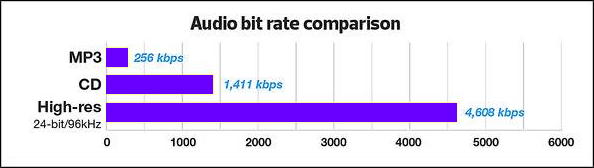
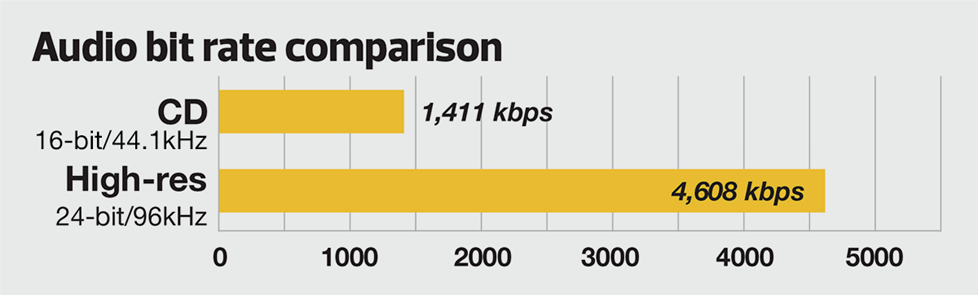
In lossless uncompressed formats (such as .wav), bit rate = sample rate x bit depth x number of channels. In lossy compression (for example, .mp3), the bitrate does not equal this formula, because the original information has been destroyed. The bitrate describes the amount of information about the audio in one second, so the total size of the sound file is the bitrate x the total duration. The bit rate is also called the bit rate and the unit is the bit rate (bps, bit per second). Usually 128kbps and 320kbps are bit rates when listening to songs, of which 320kbps is the highest bit rate of mp3 format. But compared to wav file with 44.1 kHz sample rate and 16 bit bit depth (calculate two channel bit rate is 44.1 x 16 x 2 = 1411.2 kbps), it is far from the same. After compression, the bit rate has changed. Bitrate in lossless compression has nothing to do with sound quality, and bitrate in lossy compression is positively correlated with sound quality.


lossless compression
Lossless compression refers to compression (conversion) between formats without loss. Regardless of the format that is compressed (converted), the sound quality is the same and can be restored to the same original file. Lossless generally refers to lossless compression, and there is no such thing as lossless code rate. The compression of various formats corresponds to an algorithm (or encoding), and a decoder is required to decode during playback, and different decoders can also affect the integrity of the decompressed file. Common lossless formats are:

wav – A Microsoft sound file format, which is the closest uncompressed format to real sound (followed by midi), supporting multiple sample rates and multiple quantization precisions. All lossless formats are essentially wav compression, which is converted back to wav when played.

flac: Free Lossless Audio Coded, which is an international general format, characterized by high compression ratio and mature encoding algorithm. When the flac file is damaged, it can still be played normally. Furthermore, this format is also the first lossless format widely supported by hardware.

monkey: The file format converted from CD ripping using Monkey’s audio software, but the advantage is not prominent and decoding is slow.

wma-lossless: It is also produced by Microsoft. It is characterized by a high compression ratio, but it has not become mainstream.

aiff: Produced by Apple, it is the standard audio format on Apple computers.

DSD: I don’t know much about Sony Dafa and I can’t appreciate the spicy culture.


lossy compression
Lossy compression refers to the loss of sound information during the compression process, and the lost sound cannot be represented by the sample rate and number of bits. But the feature is that the compressed file becomes very small and is often used in streaming media. Common lossy formats are:

mp3: A complex algorithm developed to simulate human hearing, known as a “psychoacoustic model”. It improves the compression ratio, lowers the bit rate, and reduces the footprint by extracting some frequency bands in the audio, but at the same time, the details of the sound, such as the emotion of the human voice, the reverberation in the later stage, etc., have been deformed. It is also difficult to distinguish wav and mp3 quickly if you listen blindly and need to use equipment. MP3 is currently the most popular audio compression format, which can best preserve the sound quality before compression.

wma: Microsoft’s masterpiece, characterized by lower bitrate (such as 64kbps), wma can get smaller volume under the same sound quality conditions as mp3. And at ultra-low bit rates (like 16 kbps), wma sound quality is much better than mp3.

aac: The storage format for sound files on Apple computers.

ogg – Completely free, open, and patent-free, but less popular.

Non-professional and easy to understand popular science on sample rate, bit depth, bit rate and lossless

Non-professional and easy to understand popular science on sample rate, bit depth, bit rate and lossless

sample rate, bit depth, bit rate and lossless

HZ sampling rate

sample rate, bit depth, bit rate and lossless

The sound from the outside world is an analog signal, which is converted to a digital signal represented by 0 and 1 in the digital device and then stored. Digital signals are discrete, so sampling rate refers to the number of samples per second. The higher the sample rate, the more realistic the restored sound will be. Since the hearing range of the human ear is 20 Hz to 20 kHz, according to Shannon’s sampling theorem (also called Nyquist’s sampling theorem), in theory, audio formats with a sampling frequency greater than 40 kHz they can be called lossless formats. However, the sound obtained at the 40 kHz sampling rate does not have any detail and all frequencies are only sampled with a peak and a valley. The sample rate of general professional equipment is 44.1 kHz. 44.1 kHz is the lowest sample rate in professional audio, also known as “CD-quality sound” (22.05 kHz sample rate is broadcast-quality sound). There are 96kHz, 192kHz, etc., more detailed of course, hearing the details at these higher sample rates is ear and equipment dependent.


bit depth
To reproduce sound as accurately as possible, a high sample rate is not enough. Describes a sample point, the horizontal axis (time) represents the sample rate and the vertical axis (amplitude) represents the bit depth. 16bit means that 16 bits (2 bytes) are used to represent the level of the sample point (in general, it is proportional to volume) The degree of precision that can be achieved when encoding, i.e. the vertical axis is divided into 16 parts Describe the level, such as -3dB and -3.1415926dB accuracy difference. Similarly, there are 20 bits and 24 bits. 16-bit is considered to be the lowest bit depth standard in the field of professional audio and, like the 44.1 kHz sample rate, is the common standard for consumer and professional audio products. Bit depth is also directly related to the size of the signal-to-noise ratio, which directly affects the overall dynamic range of the recorded signal.