Working with sound


Free Download Mp4Gain
picture

Working with sound

Analog and Digital

Analog and digital audio

 Analog and Digital

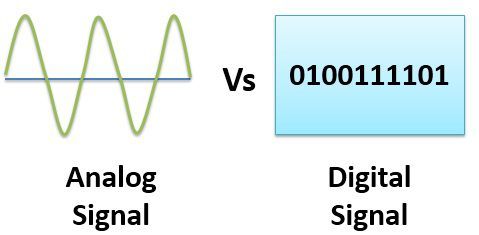
Analog sound recording is based on the conversion of acoustic waves into electrical waves using a microphone. A microphone consists of a small membrane that can vibrate and a mechanism to convert the vibrations of the membrane into an electrical signal. (The exact electrical mechanism differs depending on the type of microphone.) Generally, a higher pressure corresponds to a higher voltage and vice versa.

The recorder transmits the waveform one more time, this time from an electrical signal through a wire to a magnetic signal on tape. When the recording is played back, the opposite process occurs: the magnetic signal is converted into an electronic signal, which makes the speaker vibrate (usually electromagnetic).

The main device for digital recording is an analog-to-digital converter (ADC, analog-to-digital converter, ADC). The ADC captures a chunk of electrical voltage on the audio path and presents it as a number, which is then transmitted to the computer. By capturing the voltage several thousand times per second, you can get a signal quite close to the original. The unit of capture is called a sample (each number in a sound file represents corresponds to a sample in a waveform).

There are two factors that determine the quality of a digital recording:

Sampling rate
The frequency at which samples are captured or played, measured in Hertz (Hz) or samples per second. A typical audio CD is recorded at a sample rate of 44100 Hz, more commonly known as 44 kHz for short. This is the same default sample rate used for most digitals.

Sample format (size)
The number of digits in the digital representation of each sample. Imagine that the sample rate is plotted horizontally and the sample size is plotted vertically. Audio CD is 16 bits wide, which corresponds to approximately 5 decimal places.

Higher sample rates for digital recording provide accurate recording at higher frequencies. The sample rate must be at least twice the highest desired sample rate. The average human ear is believed to be unable to distinguish frequencies above 20,000 Hz, so 44,100 Hz was chosen as the standard for audio CDs. Now the transition to the frequencies of 96 and 192 kHz is taking place gradually, in particular within the DVD-Audio format. However, many people just don’t hear the difference between 44.1 kHz and 192 kHz audio.

Larger sample sizes provide a greater dynamic range, that is, the ability to present louder and quieter sounds. If you are familiar with the decibel (dB) scale, you can give an example from ordinary audio CDs – its dynamic range is theoretically 90 dB, but it actually sounds lower than -24 dB. Audacity supports two more sample sizes: 24-bit, which is most often used in digital studio recording, and 32-bit floating point, whose dynamic range covers all imaginable needs, despite the fact that the data with these parameters occupies just twice the disk space compared to 16-bit audio.

When playing digital sound, a digital-to-analog converter (DAC) is used. In this case, to recreate the original signal and then digitized with the ADC, a sample is taken, from which a certain voltage is established at the analog outputs. The first CD players did just that, so the sound quality was not very good. Modern players also smooth out the audio signal by sampling within a range of the sampling frequency. The quality of the filters on the DAC also affects the sound signal that is recreated. The filter is one of the signal adaptation stages in the DAC.

The inevitable loss in the transition from analog to digital audio can be offset by a number of advantages of digital recording. Digital data can be copied as much as you like and there is no loss of quality. This data can be burned to a music CD or posted on the Internet as compressed files. Also, digital recordings are much easier to edit than analog tapes.

A personal computer has all the necessary devices to convert audio data from analog to digital and vice versa. First of all, it’s a sound card, an additionally installed separate device like Creative SBLive !, and maybe a sound chip built into the motherboard. In both cases, the audio device contains an analog-to-digital converter (ADC) to record sound and a digital-to-analog converter (DAC) to play it back. The operating system you are using interacts with the sound card,


Free Download Mp4Gain
picture


Mp4Gain Main Window
picture


Mp4Gain Features
picture


Free Download Mp4Gain
picture

Digital sound. Digital audio encoding

Digital sound. Digital audio encoding

Digital audio

What determines the quality of an audio signal?

Digital Audio

The purity and timbre of the sound are mainly determined by the audio codec, or rather, by its bit depth and sample rate (the higher they are, the better the sound). This processing can be done in hardware with a special chip, an audio processor, or in software that uses controllers, which consumes CPU resources.

What is AC’97, HDA?
AC’97 and HDA (High Definition Audio) are Intel’s proposed standards for audio codecs. AC’97 was introduced in 1997 and then improved several times, but eventually became obsolete and is now replaced by HDA. HDA is fully AC’97 compliant with improved performance and enhanced capabilities.
What is the difference between AC’97 and HDA?
AC’97 defines the maximum bit depth of a 16-bit audio codec at a sampling rate of 48 kHz, HDA – 32-bit / 192 kHz. Additionally, HDA devices support 8-channel (7.1) audio, DVD-Audio, Dolby surround sound technologies, and other advanced features.
What is the sample rate and bit depth of the codec?
Sampling is the acquisition of instantaneous values ​​(samples) of an analog signal with a certain time step in the digitization process. The frequency of this step is called the sample rate (it is also the sample or sample rate). The larger it is, the better the sound recorded and reproduced. In studio equipment, the frequency is 48 kHz, in home systems – 44.1 kHz.
Bit depth determines the quality of the recorded audio. Higher is better. The bit value, for example 32, denotes the number of bits that are allocated to record the amplitude of the signal at the time of its measurement.
Consequently, the more often (sample rate) and more accurately (bit depth) the audio signal is measured, the higher quality audio file is obtained.
What is the signal-to-noise ratio?
The ratio of the pure audio signal to the noise generated by the device itself. The higher the value (in dB), the better. The Sound Blaster X-Fi sound card has a signal-to-noise ratio of 118 dB. Most audio codecs are 80-95 dB.
What is DAC and ADC?

The DAC (digital to analog converter) and ADC (analog to digital converter) are part of the codec and directly perform sampling: during playback, the DAC converts the digital code to an analog signal, while recording, the ADC performs the reverse conversion. The better the ADC, the clearer and more detailed the sound that will flow from the speakers. The better the DAC, the more accurately the analog signal will be converted to digital.
Codecs for multi-channel audio support include various DACs and ADCs.

What is the bit rate?
The bit rate (literally, the information bit rate) determines the maximum amount of information that can be transmitted through the audio channel per unit of time. A high bit rate is needed to transmit a rich sound image and is not required when encoding speech. Audio recordings with a 128 Kbps bit rate are suitable for inexpensive speakers, but when accessing expensive equipment, it makes sense to get music at a 192-256 Kbps bit rate.
Convenient solution: variable bit rate encoding, change the bandwidth of the audio channel according to the quality and saturation of the musical fragment.

Sound capacity of a computer or device?

Sound capacity of a computer or device?

Multimedia Equipment

Recently, the capabilities of multimedia equipment have grown significantly, but for some reason this area has not received enough attention. The average user suffers from a lack of information and is forced to learn only from his own experience and mistakes. With this article we will try to eliminate this annoying misunderstanding. This article is aimed at a common user and aims to help you understand the theoretical and practical foundations of digital sound, to identify the basic possibilities and techniques of its use.

Multimedia Equipment

What exactly do we know about the sound capabilities of a computer, except that our home computer has a sound card and two speakers? Unfortunately, probably due to insufficient literature or for some other reason, but the user, in most cases, is unfamiliar with anything other than the built-in Windows audio input / output mixer and recorder. The only use of a sound card that a common user finds is to play sound in games and listen to a collection of audio. And after all, even the simplest sound card installed in almost every computer can do much more: it opens up wide opportunities for everyone who loves and is interested in music and sound, and for those who want to create your own music, a sound card. it can become an omnipotent tool. To find out what the computer can do in the field of sound, you just need to take an interest, and you will be presented with opportunities that, perhaps, you did not even know about. And all this is not as difficult as it might seem at first glance.

Some facts and concepts that are difficult to do without:

According to the theory of the Fourier mathematician, a sound wave can be represented as a spectrum of frequencies included in it.

The frequency components of the spectrum are sinusoidal oscillations (so-called pure tones), each of which has its own amplitude and frequency. Therefore, any vibration, even the most complex shape (for example, a human voice), can be represented as the sum of the simplest sinusoidal vibrations of certain frequencies and amplitudes. On the contrary, by generating different vibrations and superimposing them on each other (mixing, mixing), you can get different sounds.
Reference: The hearing aid / human brain is capable of distinguishing between 20 Hz and ~ 20 kHz sound frequency components (upper limit may vary based on age and other factors). Also, the lower limit fluctuates a lot depending on the intensity of the sound.

Digitize sound and store it on digital media
“Normal” analog sound is represented on analog equipment as a continuous electrical signal. The computer operates with data in digital form. This means that the sound on the computer is also represented in digital form. How does the analog to digital conversion work?
Digital sound is a way of representing an electrical signal using discrete numerical values ​​of its amplitude. Let’s say we have a good quality analog audio track (by saying “good quality” we will assume a silent recording that contains spectral components from the entire audible frequency range, roughly 20 Hz to 20 KHz) and we want to “feed” it into a computer. (that is, digitize) without loss of quality. How to achieve it and how does digitization occur? A sound wave is a kind of complex function, the dependence of the amplitude of a sound wave on time. It would seem that since it is a function, you can write it to a computer “as is,” that is, describe the mathematical form of the function and store it in the computer’s memory. However, this is practically impossible, since sound vibrations cannot be represented by an analytical formula (like y = x2, for example). There is only one way left: to describe the function by storing its discrete values ​​at certain points. In other words, at each moment you can measure the value of the amplitude of the signal and write it down as numbers. However, this method also has its drawbacks, as we cannot record the amplitude values ​​of the signal with infinite precision and we are forced to round them. In other words, we will approximate this function along two coordinate axes: amplitude and time (approximate in points means, in simple terms, taking the values ​​of the function in points and writing them with finite precision). Therefore, the digitization of a signal involves two processes: a sampling process (sampling) and a quantization process. Sampling process is the process of obtaining the values ​​of the converted signal at certain intervals.

Digital Sound and Sample Rate

Digital Sound and Sample Rate

Sample Rate

Given the wide availability of inexpensive digital audio equipment, we invite you to take a closer look at digital audio.

Sample Rate

Acoustic sound is a continuous process in time and in amplitude, that is, the air pressure changes smoothly with time and does not jump from one value to another. Acoustic sound can be converted into an electrical signal using a microphone that, depending on the change in air pressure, changes the electrical voltage it generates at the output. After the conversion of an acoustic sound into an electrical signal, continuity is maintained in time and in amplitude: the signal voltage changes in the same way that the air pressure changes, which is why this sound is called analog. We can record an electrical signal on magnetic tape and convert it back to sound using a loudspeaker that functions as a “reverse microphone”: it moves air in response to changes in voltage. Respectively,

Despite the fact that the analog electrical signal has regularly served humanity for decades, over time some of its representatives (of humanity) became clear that the analog signal and magnetic recording are not the best ways to transmit and store audio information, since both during transmission and during storage occur. unavoidable losses, i.e. sound degradation. At the same time, the transmission and storage of data on computers that operate exclusively on digital data can be done without any loss. The only question is how to convert analog audio to digital and vice versa.

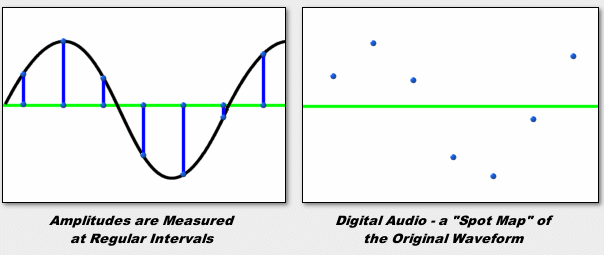
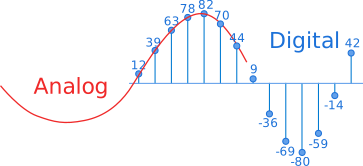
To solve the first problem, there are special devices known as analog-to-digital converters (ADCs). These devices are capable of converting a continuous analog signal into a sequence of separate numbers, that is, making it discrete (English discrete – separate, consisting of separate parts). The conversion takes place as follows: the device measures the amplitude of the analog signal many times per second and outputs the measurement results in the form of numbers.

Analog signal
Sampling
Sampled signal
As seen in the figure, the measurement result is not an exact analog of a continuous electrical signal. How much does digital sound compare to analog? Obviously, this correspondence will be more complete the more often the measurements are made and the more accurate they are. The frequency at which measurements are taken is called the sample rate. And the precision of amplitude measurements is indicated by the number of bits used to represent the measurement result. This parameter is called the bit depth.

Sampling rate
So, the conversion of an analog signal to digital consists of two stages: sampling in time and quantization in amplitude. Time sampling means that the signal is represented by a number of its samples (samples) taken at regular intervals. For example, when we say that the sample rate is 44.1 kHz, it means that the signal is measured 44,100 times per second (in MO, the more intelligible term “sample rate” is usually used, however, “sample rate “is more correct.).

The main issue in the first stage of converting an analog to digital signal (digitizing) is to choose the sampling frequency of the analog signal. As already mentioned, the higher the frequency, the closer the digital signal is to the analog. However, in proportion to the increase in frequency, the following increases: a) the intensity of the digital data stream and the bandwidth capabilities of the interfaces are not unlimited, especially if several channels are recorded / played simultaneously; b) the computational load of digital effects processors and their computational capabilities are also limited; c) the amount of memory required to store the digital signal. Obviously a compromise is needed.

The choice of the sampling frequency affects the frequency range of the received digital sound or the maximum frequency of an analog signal, correctly represented in digital. The range of frequencies a person hears is believed to be 20 to 20,000 Hz. According to the well-known Nyquist theorem, in order for an analog (continuous in time) signal to be accurately reconstructed from its samples, the sampling frequency it must be at least twice the maximum audio frequency. An audio frequency equal to half the sampling frequency is called the Nyquist frequency and is the maximum frequency that a given digital system can store and reproduce correctly. Thus, if the real analog signal that we are going to digitize contains frequency components from 0 Hz to 20 kHz.

Sound quality of Vinyl vs CD

Sound quality of Vinyl vs CD

Vinyl vs CD

Short answer: NO !!

At the moment, the best sound quality is HD audio formats such as DVD or Blu-ray Audio.

CD VS VINYL

So now we are faced with the problems of the skeptics, like you can’t hear the difference between audio CDs and HD audio, because audio CDs can play louder sounds than anyone else, or vinyl records they sound so much better. But just ignore these people as I explain how digital audio works, which most people don’t understand.

Uncompressed digital audio has two components. One is the sample size, the other is the sample rate.

The sample size determines how loud the music can be, or more precisely, the dynamic range, the difference between the quietest and the loudest parts (you can always turn the stereo up to 11 for more volume). It turns out that people can easily hear more than 16-bit dynamic range than a 16-bit audio CD provides. What this really means for HD audio is that you can have a very quiet section (and not hear noise) and then play loud music. In practice, extremely loud sounds are just instantaneous peaks, but you can, if you wish, record something with a large difference in volume, for example, next to an emergency siren. You will hear the background sounds of the birds and then the siren. If you turn up the volume to hear the birds well enough to hear them during playback,

Another component is the sampling rate, the frequency with which you sample the sound to reproduce the sound wave. The higher the sample rate, the more realistic the recording will be. Since CDs are played 44.1K times per second, sounds can be played up to 20 kHz, which is louder than most people can hear (I can only hear up to 17 kHz), so in In theory, a CD can reproduce a wider frequency range than people can listen to. … But sadly, this does not account for all the people who can hear. People have a highly developed sense of stereo sound. We can easily determine the direction of the sound. This is the result of very small differences in the time it takes to reach each of our ears. The brain processes this and produces spatial awareness of where the sound is coming from, and that’s pretty accurate. So this is where HD (high definition) audio comes in. With a higher sample rate, you can get a more refined waveform with enough detail to reproduce these subtle differences, which make the sound more vivid and lifelike than typical CD recordings.

When it comes to analog audio sources, the main problem with all analog formats (tape and vinyl) is that they degrade with each playback (and not even playback). Vinyl is famous for the awe, the thrill, the shock, and of course the scratches, cracks, and pops when the needle goes through the grove. The tape is elastic, has speed issues, and only sounds great at 15IPS or higher. Neither is perfect.

A few things to consider when considering HD audio.

Never discuss HD audio with someone who has never heard it. A complete waste of time arguing with idiots. This is the main rule of HD audio.
Most of the commercially available audio is already compressed for CD and radio playback. They deliberately remove dynamic range so music sounds clearer and better on low-quality systems (like phones).
The higher the sample rate, the more natural the sound will be. Good uncompressed 24/192 sound sounds open and natural, like you’re in the room listening with headphones. Compare the same recording on HD and CD if you can. You want to listen to uncompressed music, not a rap or pop cut. The quality of the CD is good enough for this.
Ignore those who say you have to spend a lot of money to listen to HD sound. You can use any analog amp (most of them), a DVD or Blu-ray player (make sure it can handle up to 192), and decent speakers or headphones. Good speakers and headphones can be bought for less than $ 300 if you look around. Obviously, you can spend more, but that will get you to the door. And, of course, a DVD or Blu-ray disc. Look for full digital recordings with a sample rate of 96 or higher. 48k is not much different from 44.1 except for the dynamic range (which can be significant). I have created new systems for $ 500 and even novice listeners can tell the difference.

Answer 2:
No, but that’s more than enough if you haven’t spent thousands on a listening room / system.

Lossless sound quality

Lossless sound quality

Lossless Audio

This group of formats records, encodes the sound in such a way that by decoding it it can be restored exactly.

Lossless Audio Compressor

The most popular lossless encoding formats are:

FLAC (Free Lossless Audio Codec)

APE (mono audio)

ALAC (Apple Lossless Audio Codec)

Loss of sound quality (lossy)
Lossy compression modifies the sound. For example, frequencies inaudible to the human ear are eliminated. The decoded file will differ from the original in terms of the information recorded on it, but it will sound almost the same.

Popular lossy formats: MP3, WMA, OGG, AAC. [2]

Bit rate is the amount of information transmitted over a certain period of time. The essence of its principle is how much information we can dedicate to each second of the reproduction of our audio file. It is generally accepted to use Kbps (kilobits per second) or Mbps as units.

1. Constant Bit Rate Coding (CBR, Constant Bit Rate): An encoding mode in which the bit rate remains unchanged regardless of the nature of the music. The main task of the encoder in this case will be the need to obtain the highest possible file quality with a constant stream.
2. Average Bit Rate Coding (ABR, Average Bit Rate): intermediate coding mode between CBR and VBR. When encoding, the desired average bit rate is indicated. If necessary, the encoder can slightly increase or decrease the bit rate to achieve a higher quality / size ratio. The downside of ABR mode is the lower quality than VBR mode. The advantage is a more or less uniform flow and, as a result, an easily predictable file size.
3. Variable Bit Rate (VBR) Encoding – A mode of encoding in which the desired quality level is set at the encoder. When encoding, the codec chooses the bit rate required to compress each fragment of the recording, while the range of bit rates used can be very large. This mode allows you to achieve the highest quality / size ratio, but the size of the resulting file is often difficult to predict (for example, when compressing with musepack -normal, the average file bitrate can be 140 or 210). The disadvantage of VBR is the impossibility of using it for Internet broadcasts with a small channel width. [3]
SBR (Spectral Band Replication) is a technology that allows you to restore high frequencies using information contained in other regions of the spectrum and a small stream of additional data.

DRM (digital rights management) is a set of tools designed to protect a recording from illegal copies.

The digital audio format is a format for representing audio data used in digital audio recording, as well as for additional storage of recorded material on a computer and other electronic media, so-called audio media. [4]

An audio file (a file that contains a sound recording) is a computer file consisting of information about the amplitude and frequency of sound, saved for later playback on a computer or player.

The file format determines the structure and presentation characteristics of the audio data when stored on a PC storage device. To eliminate the redundancy of the audio data, audio codecs are used, with the help of which the audio data is compressed. There are three groups of audio file formats:

1.Uncompressed audio formats like WAV, AIFF
2.Lossless compressed audio formats (APE, FLAC)
3.audio formats using lossy compression (mp3, ogg)
Sound quality is a very subjective parameter and can vary greatly from person to person. If we are talking about the so-called music file encoding, when the audible differences between the original file and the file obtained by decoding a compressed audio file are not desirable, then it is assumed that the music will be played on Hi-Fi equipment (or even Hi-End) of high quality, and not at all. on computer speakers that cost $ 15-20. Modern codecs allow you to achieve the sound of an encoded file, which is indistinguishable to the ear from a CD, even with good equipment, with a compression ratio of about 1: 5. To listen to music every day on a computer, generally choose a higher audio compression ratio (up to 1:10 or even 1:20), as a result it is possible to create smaller files at the expense of lower quality. Subjectively, it may not change: in particular, ordinary computer speakers often introduce noticeably more distortion.

Description of the main audio formats

Description of the main audio formats

audio formats

In the world of music there are a large number of music formats, their modifications and versions, created by the giants of the music industry and small companies that have received public recognition in the electronic world.

audio formats

Various physical methods have been developed to store audio data for these purposes, such as vinyl records, magnetic tape, CD, DAT, MD (minidisc), DVD, or converting music scores to music (MIDI), in the same way that they have many different computing methods emerged. audio data storage – digital: OGG, Mp3, Flac, Wav formats.

It is impossible to consider and discuss all audio formats, codecs, their advantages and disadvantages, so in my article I will try to tell you about the most popular audio file extensions that you find.

Why can’t we use any universal audio file encoding format? Because implementing multiple functions requires a different format. For example: to play CDs in a CD-ROM drive, to record music or sound effects in video games, to record a movie track or video clip, to play on mobile phones or to transfer files over the Internet, in addition, there are various operating systems that are the most widely used in the world … These include: Amiga, Macintosh, NEXT, and Windows PC.

Also, the work of a dj, sound engineer, cj, video engineer, or a simple music lover is quite different in nature. This may require that your audio data be saved in your own way. For example, the audio of a CD must be saved using 16 bits and a sampling frequency of 44.1 kHz. However, to download sound over the Internet, we’d better use a different bit depth and sample rate, as each minute of 16-bit, 44-kilohertz audio takes up about 10MB, i.e. an average track of 5 minutes will be 50 meters, too much data for the average user. This article provides an overview of the most popular music formats.

AA (Audible Audio Book File) is a proprietary format developed by Audible. It is used to record audiobooks sold through the Audible and iTunes services. It is possible to reduce or accelerate the speed of listening to files: digital tone, the ability to leave bookmarks when listening to audio books, file protection, when delivering sound recordings over the Internet.

AAC (Advanced Audio Coding) is an audio file format with less quality loss when encoding than MP3 in the same sizes. Lossless music encoding of original quality using the ALAC profile. AAC is a family of MPEG4 audio coding algorithms. Unlike the hybrid mp3 filter bank, AAC uses MDST (Modified Cosine Transform) technology, which means that the listener gets better sound quality than MP3 encoding with the same or lower bit rate. Possible AAC file extensions: [.m4a], [.m4b], [.m4p].

Additionally, AAC is a wideband audio coding algorithm that uses two basic coding principles to dramatically reduce the amount of data required to transmit high-quality digital audio. This format is one of the highest quality, uses lossy compression, compatible with most modern equipment, including notebooks.

For 2009, it is much less common than MP3 and other workarounds. AAC (Advanced Audio Coding) was originally created as a successor to MP3 with improved encoding quality. The AAC format, officially known as ISO / IEC 13818-7, was released in 1997 as the new seventh part of the MPEG-2 family. There is also the AAC format known as MPEG-4 Part 3.

Benefits of AAC over MP3:

– up to 48 audio channels;

– high coding efficiency with constant and variable bit rate;

– sampling frequencies from 8 Hz to 96 kHz (MP3: 8 Hz – 48 kHz);

– More flexible set stereo mode.

ADX is a proprietary ADICM-based lossy compression and storage format developed by CRI Middleware specifically for use in video games. The most characteristic feature is the ability to repeat the sound recording, which makes using the format convenient to use as background music in various games that support this media container. It is compatible with many SEGA Dreamcast games, some PlayStation 2 games and GameCube.

Unlike MP3, it does not use the psychoacoustic model of reducing the volume of sound data (reducing its complexity). Instead, the ADPCM model uses a prediction function relative error data record to store samples.

Understand audio codecs

Understand audio codecs

Audio Codecs

A codec, or, in other words, an encoder, is a software or hardware tool for encoding and decoding information (in our case, audio information) according to a certain algorithm. There are a large number of codecs on the market, but we will consider only a few of them, the most popular and in demand.

AUDIO CODECS

AOoding, or compression, can be of two types: lossy and lossless. For each type of encoding, there are different types of audio codecs. How is lossless coding different from lossy coding?

When information is encoded without loss, data compression does not lead to loss of information, and thus the decoded audio file is absolutely identical to the original. By coding in this way, the reduction in the initial volume of information reaches 20-50%. Increasingly, this method is used not only by audiomaniacs, but also by ordinary users. As disk space increases and the price of drives decreases, more and more users are choosing to store audio data encoded in this way. Today, there are quite a few algorithms that allow you to do this, but the most popular are those implemented in the FLAC, Monkey’s Audio, WavPack, and TTA codecs.

Lossy data compression is used to obtain the smallest file size. With this encoding, there is no longer a complete match between the original and its converted copy, and there is no way to recover lost information. To achieve the minimum file size, various encoding algorithms are used, from mathematical compression algorithms, in which the quality of the track is not affected, to the so-called psychoacoustic model, which involves removing the “unnecessary” sounds from the original. and reduce the frequency range. Due to the peculiarities of the perception of sound by the human ear, “unnecessary” sounds can conventionally be called those parts of the audio track, the removal of which will not be very noticeable. The very process of eliminating “unnecessary” sounds is called quantization.

There are many lossy compression methods, the most famous of which are MPEG-1 Layer 3, MPEG-2/4 AAC, Ogg Vorbis, Windows Media Audio, MusePack, etc.

Lossless compression
FLAC
One of the most popular formats for lossless audio compression is the FLAC codec. The main advantages of this audio codec are its constant updating and, of course, cross-platform: FLAC compiles on many platforms: Unixes (Linux, BSD, Solaris, OS X), Windows, BeOS and OS / 2. This comprehensive support of the operating system facilitates the widespread use of this audio encoder.

Another advantage of the FLAC audio codec is the presence (in addition to the basic encoder and decoder in the form of libraries that are included in the installation kit) a graphical shell that simplifies the encoding process, as well as external modules (plugins) for different players (including Winamp of different versions, Foobar2000, etc. etc.). The kit also includes a command-line utility for compressing and decompressing files and a utility for editing file metadata.

An interesting distinctive feature of FLAC is that it allows you to make an archival copy of an audio CD, burned to a. In the future, such a copy can easily be written to the disc in case the original disc is lost or damaged. FLAC uses eight compression rates. As with any encoder, the encoding rate and the size of the resulting file depend on the compression rate. ID3v1 and ID3v2 tags can be added to the FLAC stream. This data is not related to the format, but the decoder can pass it.

Monkey Audio
Perhaps the most popular lossless compression codec today is Monkey’s Audio. This is mainly due to the fact that this codec is free and the high-quality compression of the audio stream it provides. The only factor limiting its scope is the lack of cross-platform support: Monkey’s audio codec is present only on the Windows platform. However, support for this format is implemented in various players and, for example, a plug-in for the Winamp player comes with Monkey’s Audio. Additionally, DirectShow filters can be installed for other compatible players. Playback plugin supports all common functions and ID3 tags.

Monkey’s audio codec will certainly be appreciated by those who need the highest sound quality. The codec provides a compression of approximately 40-50%. When encoding data, several different compression rates are available, from a parameter that provides faster encoding to a parameter that performs better compression at the expense of more processor time.

Understand what audio compression is

Understand what audio compression is

Audio Compresion

A container format is a data format that “encapsulates” other encoded data. It often contains “meta information” about the encoded data, or has a way of storing several separate streams of encoded data, or something like that.

Adio Compression

The encoding produced by the codec is the real essence of the data stream.

The most common example I can think of is the Ogg / Vorbis format. Ogg is the container format and Vorbis is the encoding. So you have an Ogg file and inside there are these little segments that contain encoded data. Each block contains a stream of Vorbis-encoded data and nothing else. For example, a cube might have the name of an artist and the title of a song stamped on it.

So, back to technology:

If you already have lossy music like mp3 or ogg / vorbis, converting it to lossless format will only take up (a lot) of disk space and will NOT, at all, NOT improve the audio quality at all. You can’t create loyalty when it’s already lost. Unless you’re writing a Visual Basic GUI on some popular TV show called CSI, but that’s fantasy, not reality.

If you have music in other lossless formats and want to convert it to FLAC, you can.

Be careful when using the term “WAV”. Wav doesn’t have to be lossless; in fact, WAV is just a container for the various possible formats. In this sense, it is similar to AVI. You can have lossless WAV if it is just raw PCM data, but you can also embed MPEG-1 Layer III (lossy) data in a WAV file.

It is possible to lose data when converting from one lossless format to another if you reduce the precision of the data. For example, if you convert an unsigned 16-bit PCM data stream at 48000 Hz to 8-bit PCM data at 44100 Hz, you lose precision in two ways: samples are merged from 48000 to just 44100 at a time. second (leading to data loss), and the data needs to be scrambled to fit the information into just 8 bits instead of 16 per sample, which will drastically degrade the quality.

Every digital audio stream, even encoded with a compressed encoder (lossy or lossless), has the following sample format properties, which are important elements that describe the properties of the stream:

An example of bit width and depth, i.e. 8 bit, 16 bit, etc. Bit widths and depths are slightly different and there is also big endian / endian byte order (which does not affect quality) and signed or unsigned sign (which does not matter either) affects quality but does affect encoder / decoder operation with data). The key point to remember is “the more bits the better”. So 32-bit is better than 16-bit, etc.

Frequency, also known as the sample rate. The more the better, because more “samples” of sound are played per second. Imagine sliding your finger across a deck of cards and seeing the cards blur; this is essentially how digital sound occurs. Each sample is a map, and if you have more maps flying per second, the sound is softer. For example, you would really notice if you were flipping only 5 cards per second, but everything would be blurry if you were flipping thousands of cards per second. So it’s even better, because it’s more natural and closer to reality, which is analogous and infinitely divisible (well, up to Planck units, but this is debatable and off-topic).

Lossless simply means that if you use the same or better sample format in the output that you used in the input, you won’t lose any data.

Therefore, if you change from 16-bit to 32-bit sample format, you will not lose data. But if you go from 32 bit to 16 bit, you will lose data.

So the answer to your question about whether it makes sense to use FLAC depends on the original data: if you have 64-bit WAV files that were originally recorded in this 192,000 Hz (or 192 kHz) sample format, and you convert them to “format Standard 16-bit 44.1kHz FLAC, you’ll lose a ton of data. But if your WAV file is 8-bit with 22100 samples per second and you convert it to 16-bit FLAC with 44100 samples in second, you won’t lose data. and you can even increase the file size depending on whether you gain lossless compression or a smaller sample format.

The sample format will affect the amount of space the file takes up, so “bigger” bits and a “faster” sample rate will take up more space.

When it comes to practical considerations and human hearing, you won’t notice if you convert very high-quality originals to 16-bit FLAC at 44.1 kHz. But you won’t notice any improvement if you convert MP3 to FLAC either. As such, you need to evaluate what format your raw data is in before deciding what to do.

Digital video characteristics

Digital video characteristics

digital video characteristics

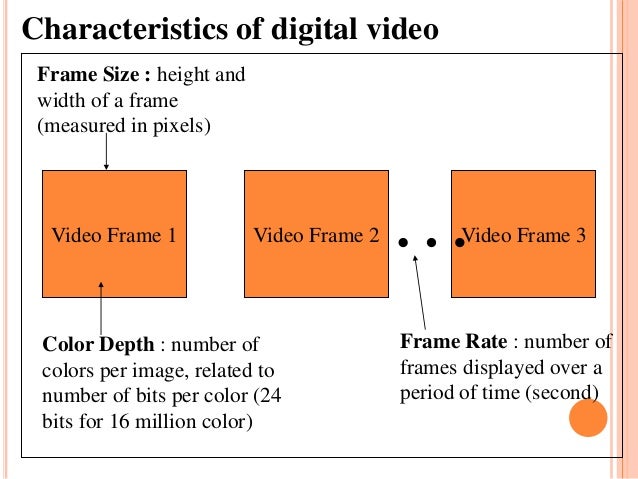
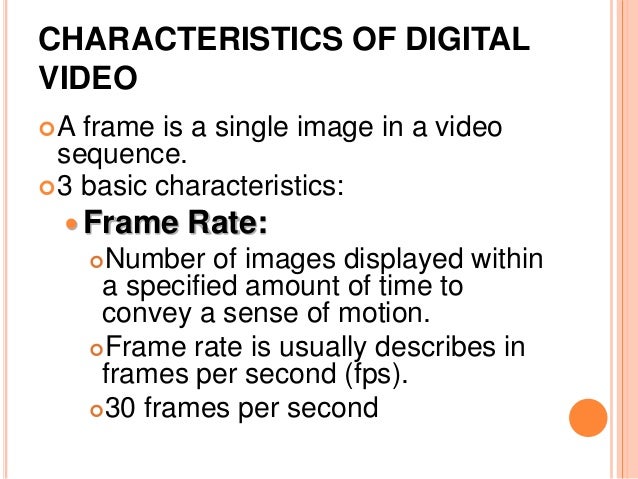
Frame Rate.

DIGITAL VIDEO CHARACTERISTICS

The standard video signal playback speed is 30 frames / s (for cinema this figure is 24 frames / s). Each frame consists of a certain number of lines, which are drawn not sequentially, but after one, resulting in two half-frames, or the so-called “fields”. Therefore, each second of an analog video signal consists of 60 fields (half frames). This process is called interlaced video. Meanwhile, the computer monitor uses the “progressive scan” method to draw the screen. (progressive scan), in which the lines of the frame are formed sequentially, from top to bottom, and the full frame is drawn 30 times every second. Of course, this method is called non-interlaced video. This is the main difference between computer and television method of video signal formation </p>

Color depth (Color Resolution).

This metric is complex and measures the number of colors displayed simultaneously on the screen. Computers process color in RGB (red-green-blue) format, while video uses other methods. One of the most common color models for video formats is YUV. Each of the RGB and YUV models can be represented by different levels of color depth (maximum number of colors) The RGB color model usually has the following color depth modes: 8 bit / pixel (256 colors), 16 bit / pixel (65,535 colors) and 24 bit / pixel (16.7 million colors). For the YUV model, the following modes are used: 7 bits / pixel (4: 1: 1 or 4: 2: 2, approximately 2 million colors), and 8 bits / pixel (4: 4: 4, approximately 16 million colors)

Screen resolution (Spatial Resolution).

Another characteristic is the screen resolution, or, in other words, the number of dots that make up the image on the screen. Since PC and Macintosh monitors are typically designed for native resolutions, many consider this to be the standard format. Unfortunately, it is not. There is no direct connection between the resolution of analog video and computer display & nbsp; Standard analog video provides a full-screen image without the size limitations often associated with computer video. Television standard NTSC (National Television Standards Committe), developed by the US National Television Standards Committee. Used in North America and Japan, it has a resolution of 768 by 484. The PAL standard (Phase Alternative), which is common in Europe, has a slightly higher resolution – 768 by 576 pixels

Since the resolution of analog video and computer video is different, when converting analog video to digital format, sometimes you have to scale and reduce the image, which leads to some loss of quality