Audio sample rate and bit depth – in simple, understandable language


Free Download Mp4Gain
picture

Audio sample rate and bit depth – in simple, understandable language

Bit Depth and Sample Rate

What is the sample rate (sample rate)? What is bit depth?

Sample Rate & BitDepth

Even if you are not dealing directly with digital sound recording, you will be interested!

Are you new to the world of digital music? Not sure what all these designations and complex numbers mean?

Hmm, no wonder! After all, every day there is more and more information. And knowing everything is almost impossible.

Yes, this is not necessary! You need to know the essentials.

Sample rate and bit depth are sound engineering concepts that you should know if you decide to make music in a computer environment.

Even if you haven’t had to record music in a virtual environment yet, but have dealt with audio (be it on a portable digital player, a player on a computer, or elsewhere), you may have seen some numbers in the properties of audio: “16 bit, 24 bit, 44100 Hz, 48000 Hz …”

The material is presented briefly and is accessible even to the uninitiated. Just the essentials.

So what are sample rate and bit depth? What is it for?

To begin with, we agreed that in different sources you can find: Sample rate and Sample rate. The abbreviations are equivalent. Call it what you like the most.

And bit and bit depth. It’s the same, the same, it just sounds different.

So.

Sample rate (sample rate) …

All inanimate music (music produced by a computer, music center, etc., that is, not live) has this parameter. This is the number of samples per second. Without going into details, I will say that 44100 Hz is optimal for humans. Since at a higher value, the sounds to be sampled will be practically inaccessible to our ears, we will simply not hear them, because they will be out of earshot.

I’ll explain a bit more in datell about sample rate. Discrete means discontinuous. That is, the sampling process is the processing of each bit of information one by one (that is, discretely and not all at once). In our case, this happens 44100 times per second. By Nyquist’s theorem, the required sampling rate for normal perception should be twice the hearing threshold. Since an average person listens up to 16 KHz (KiloHz or 16000 Hz), and something (normal for a healthy young person) up to 20 KHz, the sampling frequency was determined at 44.1 KHz (44100 Hz), that is, twice the threshold. audibility of the human ear. Why not 40 kHz (40,000 Hz)? Taken with margin (nobody canceled errors and noise on the route and after the CD release).

I hope everything is clear now.

The bitness (Bitness) is a kind of resolution of these same samples. Why am I calling this permission? Just so you prefer to understand by analogy what is what.

Grab your monitor – the higher the resolution, the better the picture, right? At low resolution you will see individual pixels and the eye will no longer be happy as before. I smile

Bitness is dynamic range, that is, the oscillation of your audio up and down (in terms of volume, power, so to speak), the nuances of performance.

The higher the audio bit rate, the more space the audio will occupy on your hard drive (on your computer); keep in mind.

For projects that are important to you, I advise you to use 24 bits and a sample rate of 48000 Hz. THIS IS A STANDARD. Then, for CD output, it will be possible to downgrade the data to 16 bits and 44.1 kHz.

But some people prefer to work on 24/96 (24 Bits – bit depth, 96 KHz – sample rate) or 24 / 88.2. The taste and the color …

For most projects, 16 / 44.1 is adequate (16 bit – bit depth, 44100 Hz is equivalent to 44.1 KHz – sample rate).

The sample rate and bit depth go directly next to each other and never go alone. That is their destiny.



Free Download Mp4Gain
picture


Mp4Gain Main Window
picture


Mp4Gain Features
picture


Free Download Mp4Gain
picture

Why is 44,100 used as the high quality sample rate?

Why is 44,100 used as the high quality sample rate?

Sample Rate

Why did we choose 44.1 kHz as the recording sample rate?

Sample Rates

People’s ears hear a sound whose frequency varies between 20 Hz and 20 kHz. By Nyquist’s theorem, the recording speed must be at least 40 kHz. Is this the reason for choosing 44.1 kHz?

Explain in more detail, the sample rate means how many “frames” should be recorded per second to have high quality audio.
According to the famous theorem created by a famous scientist named Nyquist, the sampling frequency must be at least twice the maximum frequency that we will record … then, as the human ear can hear approximately 20 kHz at most, twice that would be 40,000 per which was proposed 44,100 as a standard sampling frequency for high fidelity audio.

It is true that, like any convention, the choice of 44.1 kHz is something of a historical accident. There are several other historical reasons.

Of course, the sample rate must be higher than 40 kHz if you want high-quality audio with a 20 kHz bandwidth.

How to make 48.0 kHz was discussed (this matched well with 24fps and supposedly 30fps movies on North American television), but given the physical size of 120mm, there was a limit to the amount of CD data that could be stored and what an error detection and correction scheme is needed that requires some data redundancy, the amount of logical data that a CD can store (about 700MB) is about half of the physical data. With all of this in mind, at 48 kHz, we were told that it cannot hold all of Beethoven’s 9s, but that it can hold all of 9 on one record at a slightly slower speed. So 48 kHz is not.

However, why 44.1 and not 44.0 or 45.0 kHz or some nice round number?

Then in the late 1970s, there was a product called the Sony F1, designed to record digital audio onto readily available videotape (Betamax, not VHS). It was at 44.1 kHz (or more precisely 44.056 kHz). Thus, it will facilitate the transfer of recordings without oversampling and interpolation from F1 to CD or in the other direction.

My understanding of how this turns out is that the horizontal scan speed of the NTSC TV was 15,750 kHz and 44.1 kHz is exactly 2.8 times. I’m not entirely sure, but I think this means you can have three pairs of stereo samples per horizontal line, and for every 5 lines where you would normally have 15 samples, there are 14 samples plus an extra sample for some checking. for parity or redundancy in F1. 14 samples for 5 lines is the same as 2.8 samples per horizontal line and 15,750 lines per second, which is 44,100 samples per second.

With the transition to digital formats, audio was stored in the form of pseudo-video, which could be viewed as black or white (representing a binary format).

The frequency and field structure used by the television standard is as follows for 60 Hz video: 245 lines per field (excluding the first 35 skipped lines). With three samples per line, that is 60 x 245 x 3 = 44100 = 44.1 kHz.

This convention was later used for the CD format due to hardware compatibility issues (the first computer used to make master CDs used for CD replication was video-based).

Now, with the advent of color television, they’ve had to slow the horizontal line speed a bit to 15,734 lines per second. This setting results in 44,056 samples per second on the Sony F1.

Everything you need to know about audio formats.

Everything you need to know about audio formats.

Audio Fomats

Whether you use iTunes or buy and download digital music, you will find a number of terms and abbreviations that describe digital audio files. This alphabet soup can be quite confusing. What are audio file formats or codecs? What is the bit rate and what is the sample rate? What does it mean when the music is “high definition”?

AUDIO FORMAT FILES

This article explains what you need to know about digital audio files. I’ll tell you the difference between lossy and lossless files, explain why bitrate matters (or not), and help you understand the various file formats you can encounter.

Compression: lossy and lossless
When you buy a CD, the audio on the disc is not compressed. You can rip (or import) CDs with iTunes or other software, converting CD audio into digital audio files for use on a computer or portable device. In iTunes, you can copy in two uncompressed formats: WAV and AIFF (other software supports other formats). Both formats simply encapsulate the PCM (Pulse Code Modulation) data stored on CD so that it can be read as audio files on a computer, and their bit rate (you’ll find the one below) is 1411 kbps.

WAV and AIFF files can be quite large. Therefore, digital audio files are compressed to save space. There are two types of compression: lossless and lossy. Lossless includes formats (or codecs for short codec algorithms) such as Apple Lossless and FLAC (Free Lossless Audio Codec). Lossy includes the ubiquitous MP3 and AAC formats. (AAC, which stands for Advanced Audio Coding, is actually MP4, the successor to the old MP3. Although Apple adopted it in the early days of iTunes, Apple was not involved in its creation and does not own the format.)

You can also view other audio formats, although they are less common. These include Ogg Vorbis, Monkey’s Audio, Shorten, and others. Some of these codecs are lossy and some are not. However, if you use iTunes and Apple hardware, you will only find WAV, AIFF, MP3, AAC, and Apple Lossless, at least for music.

iTunes can copy or import audio files in these formats. Select the one you want to use in iTunes> Preferences> General> Import Settings.

When you copy or convert an uncompressed audio file to a lossless format and then play that file back, it is a perfect copy of the original (provided the data was read correctly from the CD). Thus, you can convert from one lossless format to another without quality loss.

However, when you copy to a lossy format, if you later convert the file to another format, it loses some of its quality. This is similar to how a photocopy of a photocopy does not look as good as the original.

Some people prefer lossless formats because they play audio like CDs. Lossy compression is a tradeoff to save space, allowing you to store more music on your portable device or hard drive and speed up downloads. However, most people cannot tell the difference between a CD and a lossy file at high data rates, so if you’re ripping your music to sync to iPhone, lossless files are superfluous.

Lossless ripping is a good way to back up your files as you can convert them to other formats without losing quality. And you can have iTunes automatically convert them to AAC files when syncing. Check out this article for more information on this automatic conversion, as well as other lossless file questions.

Bit rates
The best way to measure the quality of an audio file, relative to its original quality rather than its musical or engineering quality, is to look at its bitrate. The bit rate of audio files is measured in thousands of bits per second or kbps. I mentioned earlier that the CD contains 1411kbps audio, and when you convert that audio into a lossy file, its bitrate is much lower.

The higher the bit rate the better, so a 256 kbps MP3 or AAC file is better than a 128 kbps file. However, this is not the case for lossless files. Lossless file transfer speed depends on the density and volume of your music. Two lossless tracks on the same album can have bit rates of, say, 400 kbps and 900 kbps, but when played back, they reproduce the original CD audio at the same level of quality. Lossless compression uses as many bits as necessary and no more.

What are Lossless, Lossyless music formats?

What are Lossless, Lossyless, cue and WAV music formats?

Lossless Audio

To make it easier to handle bitrates, I’ll give a somewhat simplified understanding of Lossy and Lossless bitrates.

lossless audio

If we imagine the sound in the form of a broken diagram, then in MP3 and OGG formats (these are currently the main Lossy formats, we will not consider the rest here as they are quite rare) from 128 to 256 kbps the ends of the sound are cut off (from this diagram). As for the 320kbps bit rate, the sound is not cut off.

What are bit rates?
Bit rate is an indicator of how much information a second of sound encodes. The higher it is, the less distortion and the closer the encoded composition is to the original.

Lossless – Lossless, which means that lossless (lossless) audio formats such as FLAC, APE, and WAV, as well as lesser-known ones, convert CDs to digital without loss of quality, that is, you can take a disc from your collection, save it to WAV, re-encode WAV, say to FLAC (or APE), then from FLAC (or APE) to WAV and burn it to disc and you get a disc absolutely identical to your CD. This begs the question: why not just use the WAV format? It’s very simple: lossless formats have the same quality as WAV, but take up less space, this is their advantage. There is a myth that an analog of a CD is an MP3 with a 320 kbps bit rate, but this is not the case, only a lossless image of this CD is an analog of a CD, by the way, and vinyl does not it has analogs at all. The bitrate of the vinyl analog must be equal to infinity, since vinyl records are made from so-called master tapes. A master tape is an analog copy of a piece mixed in a studio.

What are WAV and APE?
It is a lossless compression algorithm for WAV audio files, commonly used to store music extracted from compact discs (CD-DA). First, the original WAV file is removed from the CD-Audio (if a standard disc is fully recorded with music for 80 minutes, then the file will be 700Mb), and then it is archived in APE (standard extension for files compressed by Monkey’s Audio) . Yes, this is comparable to archiving, since APE can later be decompressed and the original WAV obtained, as if it were archived with ZIP or RAR. Compress the APE of the original WAV normally 1.5-2 times.

APE is a format for music connoisseurs, who are often interested in entire albums, not individual compositions. Music databases like freedb also work with albums. Also, a compressed album with one file takes up slightly less space than if each song were separated. But in fact, nobody forbids storing music in APE per track.

Many people don’t like APE because they need to spend more time on it to load it to the site (or from the site) or to the disk grabber. They argue that the size is large and it only causes a lot of problems with APE. The size of APE can be 2 or 4 times larger (depending on the type of music) than MP3. But, for the sound quality you have to pay (and not very, in my opinion, a great price). The extra half hour of horse racing or graberra is well worth it.

The APE bit rate ranges from 700 kb / ps to 1000 and more.

What is FLAC?
FLAC stands for Free Lossless Audio Codec (free lossless audio codec). FLAC is free, open source, and cross-platform. The compression ratios of FLAC are slightly lower than those of Monkey’s Audio, while the encoding (compression) time in FLAC format is approximately the same as that of Monkey’s Audio, however, the decoding (decompression) is much faster. FLAC is very popular on the Oslo network due to its cross-platform nature: it can be used on Windows, Linux, Unix and Mac OS X. There are also portable media players that support playing FLAC files. The Windows version of the codec contains plugins for Winamp (version 2.x / 5.x),

MP3
MP3 is a lossy compression format, that is, lossy. It is based on the assumption that the human ear simply does not perceive some frequencies and consequently they are removed during the compression process, which can significantly reduce the volume occupied by the composition.

The only advantage of MP3 is the size and nothing else. The fact is that when digitizing (encoding, compressing) a musical composition in MP3, frequencies that, according to some experts, cannot be heard by the human ear are discarded, so we obtain a small size (around 70% less than the source, depending on the quality of the bitrate and the codec).

All Digital Audio Formats

All Digital Audio Formats

Digital Audio Formats

ACC
Advanced audio coding
The format is a further development of the MP3 format.
ALAC
Apple Lossless Audio Codec
Apple Lossless (also known as Apple Lossless Encoder, ALE or Apple Lossless Audio Codec, ALAC) is an audio codec developed by Apple Inc for lossless compression of digital music.
ALS
MPEG-4 audio lossless encoding
MPEG-4 ALS is an efficient and fast codec for a variety of applications.
AMR
Adaptive multiple rate
The AMR compression format was developed specifically for use in cellular systems. Its field of application is voice audio content compression.
MONKEY
Monkey Audio
Monkey’s Audio (Windows only) is considered one of the best lossless audio codecs for storing music due to its effective ratio of output file size to speed.
ATTRAC
Adaptive Transformation Acoustic Coding
ATRAC is a lossy compression system based on psychoacoustic principles. Compresses an audio CD to approximately 1/5 of the original with a slight loss in sound quality.
Asao
Nellymoser audio codec
Nellymoser Asao is a proprietary codec that was designed for low bit rates.
CELTIC
Overlapping energy restricted transformation
The CELT codec is an algorithm for compressing audio data. Like MP3, Vorbis and AAC, it is suitable for high quality music streaming. Unlike these formats, CELT also has a very low latency, lower even than Speex, GSM or G.729.
Dolby
Dolby has developed many audio sound formats. Among them are compression formats.
FLAC
Free Lossless Audio Codec
FLAC is possibly the most popular lossless audio compression format.
LossyWAV
LossyWAV is a free lossy compression format. But, in essence, it is a preprocessor for PCM audio stored in WAV containers.
MP1
MPEG-1/2 Audio Layer I
MPEG-1 Audio Layer I (abbreviated as MP1) is one of the three formats included in the MPEG-1 standard. Even though it is compatible with many media players, the codec is already very outdated and has been superseded by the MP2 and MP3 codecs.
MP2
MPEG-1/2 Audio Layer II
MP2 is still used in the broadcasting industry for satellite transmission of digital video transmission and digital audio transmission.
MP3
Audio Layer III MPEG-1/2
The format is sometimes confused with MPEG-3, but MP3 is designed to compress only audio information and the full name sounds like MPEG Audio Layer-3.
Surround sound MP3
In 2004, Fraunhofer IIS released a backward compatible extension for MP3. MP3 Surround files provide high quality 5.1 sound with new decoders.
MP4
MPEG-4 Part 14
These are file extensions for the MPEG-4 container format, which can include all types of media (video, natural and synthetic audio, 2D and 3D graphics, animated avatars, etc.).
MPC
Musepack
Musepack is a lossy compression scheme invented by German programmer Andree Buschmann.
MT9
A new multi-track waveform data storage format that claims to be MP3.
Ogg Vorbis Audio
The Ogg vorbis format was developed by Xiphophorus. On the same site you can find the source codes of the project. It is part of the Ogg project to create a completely open multimedia system.
OptimFROG
OptimFROG is a lossless compression algorithm whose main goal is to reduce the size of audio files as much as possible. This is somewhat similar to ZIP compression, but is highly specialized for audio data.
Opus
Opus is a highly versatile, royalty-free, open source audio codec.
RealMedia
RealMedia is a proprietary streaming and multimedia file format owned by RealNetworks products and services.
SND
Sound
SND (SouND) is a digital audio file format created by Apple.
Speex
Speex is a patent-free audio compression format developed for voice transmission, as well as for use in open source software (for example, VoIP).
TAK
Tom’s lossless Audio Kompressor
TAK is lossless audio compression that provides APE efficiency and FLAC decoding speed.
VQF
TwinVQ
A proprietary format that was created to replace MP3, but was never fully developed due to its proprietary nature.
Wav
Wave audio file format
The WAV format is perhaps the most common audio storage format. It is the easiest to use to process and is compatible with almost all audio players.
WMA
Windows Media Audio
WMA is a compression format developed by Microsoft.
WavPack
WavPack is a completely open, lossless, high quality, lossy audio compression format with a unique hybrid mode.

Digital audio from A to Z

Digital audio from A to Z

Digital Audio

Confused about the terms used to describe audio devices? We have created a quick guide to help you discover them.

DIGITAL AUDIO

Do you want to immerse yourself in the wonderful (and sometimes overwhelming) world of high definition audio? You have a lot to learn about this world, but the endless abbreviations and terms can be confusing, making the text look like a collection of words.

There is nothing to worry about. At Sony, we make sure you get all the Hi-Res Audio knowledge you need, become a true expert, understand the complexities of terminology, and enjoy the best sound with the best music.

Below is a list of the main terms used by hardcore audiophiles when discussing Hi-Res Audio technology, as well as their definitions.

Hi-Res Audio / Hi-Res Audio

Hi-Res Audio generally means digital recordings with a higher sample rate than audio CDs and the MP3 format. This technology offers much higher sound quality while retaining more data than converting the original studio recording to MP3 files. Some of the high resolution audio formats are WAV, DSD, ALAC, FLAC, and AIFF.

DSD and PCM

What is the difference? There are two main ways to process / encode audio in digital formats: PCM and DSD. In short, editing is easier with PCM. However, the DSD file format is used in recording studios and this digital format is believed to be as close as possible to the original analog source. Below is a more detailed description of each format:

DSD

Direct Stream Digital is a digital recording method in which the audio signal is encoded using pulse density modulation like digital media. The sample rate of this audio format is 2.8224 MHz or 5.6448 MHz, which is 64-128 higher than the sample rate of audio CDs.

PCM

Pulse Code Modulation (PCM) is the basis for digital audio recording whereby the standard analog audio signal is converted to digital. This is the standard form of digital sound on computers and CDs. The analog signal is sampled at regular intervals and its amplitude is recorded as a point on a digital scale.

With data loss

The lossy format removes some of the information from the original digital recording in an attempt to preserve the quality of the original sound as much as possible when played back. This is the case for MP3 and AAC audio formats. The compressed file takes up much less space than the original file, but the quality suffers.

No data loss

The lossless encoding format allows you to store digital audio without losing the original data or allows you to reconstruct it when played back. Lossless audio files are generally larger than lossless files. However, it achieves significantly better sound quality. Examples of audio recordings of this type are files with the extensions FLAC and Apple Lossless.

No compression

The definition of the concept is derived from the name: uncompressed raw data. In general, uncompressed audio files like WAV and AIFF are of the best quality. The downsides of uncompressed audio are that they take up a lot of space and require a lot of bandwidth to open and play.

kHz / bit

This is a standard notation for the relationship between sample rate and bit depth.

Number of kilohertz (kHz)

It is a unit of sampling frequency which is the number of times the audio signal is quantized per second. Therefore, the higher the kHz number, the better the sound quality.

Bit depth

The bit depth of a digital recording determines how many bits (that is, data) are used to store each sample of the analog signal. Bit depth is directly related to the resolution of each sample. The higher the bit depth, the better the sound quality.

Now that you understand the complexities of Hi-Res Audio terminology, try to find examples for each concept.

MP3, AAC, WAV, FLAC: we talk about all audio file formats

MP3, AAC, WAV, FLAC: we talk about all audio file formats

Audio Formats

As you organize your digital music collection, you can dive into a variety of audio file formats. Almost everyone has heard of MP3, but what is OGG, AIFF, or MQA?

audio file formats

If, after reading the list, you have the suspicion that all these formats for obtaining such chic abbreviations were studied in different universities, we will help to dispel it. This material will clarify the essence of some popular music formats, the difference between them and why it is important to know them.

Regardless of what you’re listening to, low-bitrate MP3, slightly better tracks in AAC, or high-resolution audio in FLAC or WAV, it’s time to find out exactly what you get in each case and how to choose the optimal format.

Let’s evaluate the pros and cons of each.

A quick overview of file formats and codecs

In order not to beat around the bush, we’ll provide a quick guide to all file formats and the differences between them at first. If you want to know more, here is a more detailed description of the differences in size, sound quality and compatibility.

–AAC (not high resolution audio format). Apple’s popular alternative to MP3. Compressed and lossy, but with higher sound quality. Used to download from iTunes and stream from Apple Music.

–AIFF (high resolution). Apple’s alternative to WAV with more complete metadata. It is not an uncompressed and lossy format very popular with large files.

–DSD (high resolution). One-bit format used in Super Audio CD. Available in 2.8 MHz, 5.6 MHz and 11.2 MHz sample rates. Due to the use of a high quality codec, it is not currently used for transmission. Uncompressed format.

–FLAC (high resolution). Lossless compression format supporting high-resolution supporting sample rates and metadata storage; the file size is half that of WAV. Due to the absence of royalties, it is considered the best format for downloading and storing albums in high resolution audio. Its main drawback is the lack of support for Apple devices (and therefore the incompatibility with iTunes).

–MP3 (not high resolution audio format). Popular compression and lossy format with small file size and far from the highest sound quality. Convenient for storing music on smartphones and iPods.

–MQA (high resolution). Compressed format for storing high resolution files in an easier way to transmit. Used by the Tidal Masters service for high resolution audio streaming.

–OGG (not high resolution audio format). He is sometimes known as his full name: Ogg Vorbis. An open source alternative to MP3 and AAC that is not covered by patents. This 320 kbps format is used in Spotify broadcasts.

–WAV (high resolution). The standard format in which all CDs are recorded. Great sound quality, but large files due to lack of compression. Weak support for metadata (versions, song titles and artists).

–WMA Lossless (high resolution). An uncompressed version of Windows Media Audio, the compatibility of which is not often found on smartphones and tablets.

Compressed and uncompressed audio files

Let’s start by looking at three categories into which all audio file formats can be grouped. They are determined by the degree of data compression and the associated loss of sound quality.

If a special algorithm (or codec) was not used to compress the audio in your file, this will lead to a double result: first, there will be no loss of sound quality, and second, your space will soon be exhausted. HDD.

In essence, the uncompressed recording corresponds completely to the original audio file, in which real sound signals are recorded in digital representation.

WAV, AIFF or FLAC: uncompressed formats

WAV and AIFF are the most popular uncompressed audio file formats. Both are based on PCM (Pulse Code Modulation), a known mechanism for directly converting audio to digital format. WAV and AIFF use similar technologies, but the storage methods are slightly different. In these formats, you can record CD-quality files with higher resolution.

The WAV format was developed by Microsoft and IBM, and is therefore used on Windows-based platforms; it is the standard CD recording format.

The AIFF format was created by Apple as an alternative to WAV; And while AIFF files are less common, they provide more comprehensive metadata support, allowing you to store album art, song titles, and the like.

These fortmats take up a lot of space.

Single Bit Audio Formats Insights

Single Bit Audio Formats Insights

Single bit audio

For many years, devices focused on multi-bit digital recording have dominated the field of consumer sound reproduction equipment. But it is possible that single-bit recording technology with a high sample rate will become widespread in the future.

SINGLE BIT AUDIO

The ghost of perfection

Today, digital audio recording and processing technologies dominate studio and consumer equipment. Due to the simplicity of editing and processing, as well as the possibility of long-term storage and multiple copying of phonograms without the slightest degradation, digital formats quickly gained the sympathy of the first professionals of the recording industry and later of the end users.

However, soon after digital devices and media almost completely drove their analog predecessors from the mass market in a relatively short time, the chorus of voices that admired the unsurpassed perfection of “crystal clear” digital sound died down. Professional musicians, recording specialists and simply connoisseurs of high-quality sound began to pay attention to the fact that, despite the stereotype imposed by a massive advertising campaign, the digital presentation of sound is by no means “perfect”.

Without a doubt, the transition to digital technologies eliminated a number of fundamental shortcomings inherent in analog recording. However, developers of digital equipment had to break their heads to solve specific problems associated with the practical implementation of the problem of converting an analog signal into digital form and vice versa. If before sound equipment designers were concerned with combating the characteristic distortions and noise inherent in analog technologies and media, then in the age of digital recording they had to look for methods to minimize errors and artifacts that arise in the process. of digitizing an analog signal and converting a digital stream to analog.

The greatest difficulties are caused by the development of modules designed to recover an analog signal from a digital recording. In general, creating a digital-to-analog converter (DAC), which could perfectly recreate the shape of the original analog signal, is an almost insoluble task. At the very least, because digital recording is discreet in nature. In the process of quantizing an analog signal, rounding of the instantaneous values ​​of each sample inevitably occurs. Thus, we can only speak of a greater or lesser deviation of the reconstructed signal with respect to its original form, which is capable of providing a particular circuit solution.

Evolution dead end
Some experts are of the opinion that the development of digital sound recording technologies initially was not the most optimal path. Both in the field of professional and consumer equipment, the most widespread formats and devices are based on multi-bit digital recording.

Conversion of an analog signal to this format is done using the pulse code modulation (PCM) method. In this case, the amplitude of the original analog signal is measured at regular intervals. The frequency at which these measurements are made is called the sample rate. Its numerical value must be at least twice the upper cutoff frequency of the original signal. Therefore, to digitize a phonogram with a frequency range of 20 Hz to 20 kHz, the sampling frequency must be at least 40 kHz. In practice, non-multiples are generally used: 44.1 kHz in the case of a CD and 48 kHz in the first generation DAT recorders.

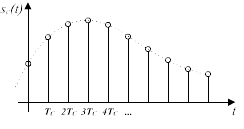
The result of digitizing an analog signal using the pulse code modulation method.
For clarity, a 4-digit scale is used.

The amplitude values ​​of the analog signal measured for each sample are rounded to the nearest integer value of the scale used. This process is called quantification. The precision of the measurement is limited both by the characteristics of the ADC and by the bit width of the digital signal or, more simply, by the number of bits allocated to record each sample. For example, in the case of 8-bit recording, the scale has 256 values, for 16-bit – 65,536, and for 24-bit – more than 16.7 million.

On the one hand, it is obvious that as the sample rate and bit depth of PCM recording increase, the conversion precision will also increase. But on the other hand, in practice, the potential to increase these parameters is limited by many objective factors, in particular the speed of the microprocessors.

What to expect from digital audio

What to expect from digital audio

digital audio

A few years ago, the word “multimedia” entered the computer lexicon, and more recently, the PC is increasingly used as a home entertainment center. In both cases, the computer must reproduce the sound, which, as you might guess, exists on it only in digital form. And if with the advent of the first transistor technology, the phenomenon of “transistor sound” was vigorously discussed and covered with myths and legends; However, it is often believed that computer signal processing, on the other hand, is obviously better. So what is digital audio and how is it inferior to or superior to analog?

Digital Audio

From a human point of view, sound is air vibrations with a frequency of approximately 16 Hz to 20 kHz. A person perceives the lower frequencies (with sufficient amplitude) not as sound, but as vibration. Superiors are not captured at all. The upper limit of the frequency range depends on age: in young children it reaches 22-24 kHz, and gradually decreases to 8-12 kHz over time. Therefore, the human ear can hear signals of a very wide bandwidth. For comparison: the eye can perceive color only in the range that covers the change in frequency of electromagnetic oscillations by less than 2 times. Of course, not all frequencies are equally important. For example, a range of 500 to 3500 Hz is sufficient for speech intelligibility. But to listen to music or the soundtrack of a movie, this is not enough. Ideally, the sound field in the listening area should be indistinguishable from the sound field in the recording area. That is, the entire audio path, from a studio microphone to a home speaker, must not introduce distortions that are within the resolution of the human auditory analyzer.

The sound that our ears perceive when playing a digital recording has previously undergone a series of transformations:

1) electromechanical conversion of air vibrations into an electrical signal;

2) amplification and processing of an analog electrical signal (frequency equalization, addition of reverb, etc.), mixing;

3) analog to digital conversion;

4) digital signal processing: frequency correction, mixing, mastering, etc .;

5) storage or transmission of digitized sound;

6) digital signal processing: frequency correction, volume control, oversampling;

7) digital to analog conversion;

8) Analog signal processing (frequency equalization, mixing, adding reverb, etc.);

9) amplification of the analog signal;

10) electromechanical transformation of electrical current oscillations into sound oscillations.

When processing an analog signal in a studio, devices with an analog interface and digital “fill” are often used, so the chain of analog-to-digital and digital-to-analog conversions can be much longer.

The first four stages are most often carried out on studio equipment, which has incomparably higher performance than home equipment. Therefore, although the distortions are unavoidable, we will assume that they are insignificant compared to the distortions of a similar nature introduced by the household equipment in the last five stages. In amateur audio recording, additional distortion should be considered in the early stages, which will be described below.

Electromechanical conversion is usually done with a studio microphone. This device generates a very weak signal that needs amplification and is also extremely susceptible to mechanical stress. Even under ideal conditions, for example in a concert hall, acoustic noise can cause the dynamic range of the music being played to be less than the maximum dynamic range of a 16-bit sound presentation.

A signal recorded from several microphones is inevitably processed: the required volume levels of the different channels are selected, the noise is cut with filters, etc. Also, the dynamic range of the signal is generally compressed. The last operation leads to a significant increase in the noise level, but without it, the recording would sound unsatisfactory on middle-class consumer equipment, first of all, too quiet.

The distortions introduced by the sound path have a varied physical nature and very different manifestations, but nevertheless they can be divided into three large groups.

Sample rate and bit depth

Sample rate and bit depth

Bit Depth

When a signal reaches the ADC from a preamplifier, compressor, console output, synthesizer, it represents electromagnetic oscillations. That is, a certain wave with variable voltage (very small values) reaches the input of the ADC. To save a signal to a file, it must be “digitized,” that is, encoded by ones and zeros. The result is a graph of the wave on the computer screen.

Bit Depth

Even the best converter has an error, because there are no intermediate values ​​between zero and one, and the wave graph will consist of only vertical and horizontal segments, with no oblique lines. The graphical representation of the wave will be influenced by the pitch (oscillation frequency), its timbre (waveform) and the volume (amplitude). A high-quality ADC must correctly transmit all these parameters to the recording system.

So the sound enters the system discreetly, that is, divided into small segments. The precision of encoding an analog signal in a digital environment depends on the size of these segments. The smaller the horizontal and vertical discrete units, the more accurate the scan will be.

Sampling rate

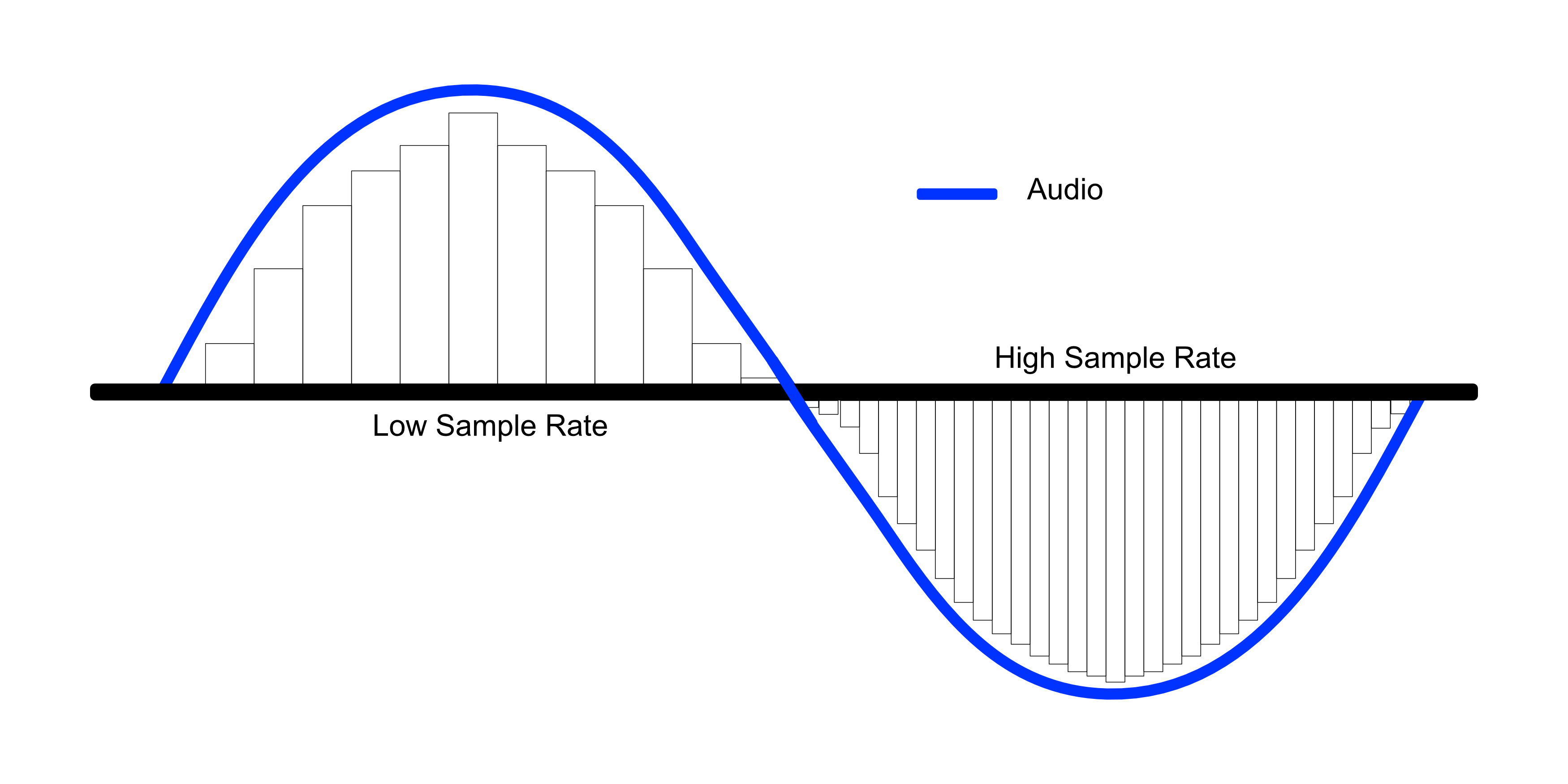
Splitting the wave horizontally gives us an idea of ​​the sample rate or sample rate. The more often the ADC detects changes in waveform values, the higher the sample rate. In reality, a sample is a discrete unit segment, the smallest unit of sound. The shorter it is, the higher the sample rate.

For example, a sample rate of 44.1 kHz indicates that there are 44,100 samples per second of recording. We can edit the wave, taking a segment with a duration of 1/44100 seconds as the minimum editing element. As the sample rate increases to 48 kHz, this section drops to 1/48000 of a second, allowing for more accurate impact.

Sample rate match

Each sample is the same length as the previous one. For proper sound reproduction, the file and system sample rates must be identical. When an audio track with a different sample rate than the host (program) sample is added to the project, it must be converted.

If you play a higher frequency file on a lower system, it will sound slower than it should and vice versa. Converting a signal from one frequency to another always produces distortion. To “reshape” the sound for a new sample rate, the system must divide the samples into smaller pieces and reassemble them into a single wave. Such a process can lead, at best, to simply blurring the sound, at worst, to the appearance of clicks.

Of course, in the built-in speakers of a home laptop, the difference will not be noticeable. But when it comes to working with sound at a professional level, sample rate coordination is necessary.

It is not recommended to change the sample rate within the same project. A justification for higher sampling could be, for example, the need to process the file with algorithms or plugins that work better at high frequencies. Since a higher sample rate means dividing into smaller samples, the processing precision will be higher and the result will be of better quality. But it is also impossible to guarantee the effectiveness of this method: in each case the result will be individual. It is necessary to evaluate each time what is more important: the effect of processing at a higher resolution or the negative effect of conversion.

If for some reason, after completing the job at 48 kHz, you need to convert the signal to 44.1 kHz, save the original file in case you need to re-manipulate the material (for example, for alternative mastering). Processing at a higher sample rate will provide a better effect than processing at a lower sample rate.

Sound capacity

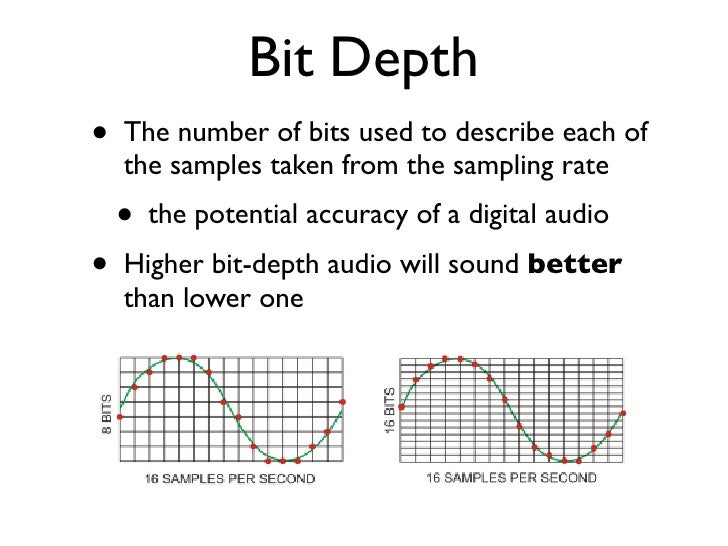
If the horizontal division of a wave gives us an idea of ​​the sampling frequency, then the vertical sampling is the bit depth, which is responsible for the reliable transmission of the dynamic elements of the register. The more “steps” the converter can correct, the higher the bit depth of the recorded sound file.

For example, a wave over a period of time may move one step from 0 to 16, or perhaps four – 4 units per step. A more accurate representation would be 16 steps by one. The number of steps the wave is divided into vertically is the bit depth.

The higher the bit depth of the converter, the more reliably it will transmit signals of different volume levels.