How sound is stored on a computer


Free Download Mp4Gain
picture

How sound is stored on a computer

Sound in a computer

The term “audio” today means everything that is somehow connected with sound. This is processing, playing, mixing and simply listening to audio recordings. Few people know that during their existence all popular audio formats have undergone significant changes, sometimes for the better and sometimes even for the worse.

Sound omputer

The problem is that when the creators tried to improve the recording quality by using the new format, the size of the result increased significantly. Reducing the size of the final file resulted in a significant loss of quality. But this was not always the case.
First audio format used in computer games

The first mention of computer sound is associated with the creation of several primitive video games. Then the sound was played back using the speaker of the system. As the software developers of that time did not try, it was impossible to achieve the level of quality that would be compatible with tape and reel recorders. This is what got many developers thinking about how to change the audio format to make the sound more natural and natural. It is this problem that has led to the current competition in the audio market. As a result, the formats used strongly affect the quality of the reproduced material and the configuration of the basic playback parameters.

Wav
The first full quality of audio formats is associated with this particular format. The WAV extension designation was derived from the English word “wave”, which means wave in Russian. It was this format that became the first audio format to be processed with computer programs at a highly professional level. Files with a WAV extension had the following characteristics:

– depth of sound;
– sampling frequency;
– bit rate, etc.

This format was even compatible with the sound that could be obtained after processing an audio CD with an equalizer and other tools. However, the file size in this case was completely unwarranted. For example, the most common 3 minute long track could be up to 50 megabytes long.

CD

Audio CDs, or more precisely the .cda extension, appeared around the same time as the wav format. But unlike files with the wav extension, .cda cannot be edited. But it can be opened in any audio processing software, transcoded and formatted, and saved to your hard drive. Of course, you will not be able to save your changes to a CD.

MP3 codec

After the introduction of the LAME MP3 Encoder codec in the music industry, there was a real revolution in the audio world. Now the audio files are ten times smaller. At maximum compression, the size of a five minute composition rarely exceeds 7MB. This was a significant advance. Also, this extension finally implemented the ability to tweak some features and configure additional parameters, such as ID3 tags. They can contain information about the track title, artist, album, and release date.

Of course, this format immediately became widespread. Almost the entire Internet community uses this universal format. So we can say that the MP3 format has revolutionized the field of computer sound. Today it is one of the most demanded and popular audio formats. Although today it is already being replaced by other audio formats. But we will talk about this a bit later.

AIFF files

There are other types of audio files. This is the so-called aiff format. This format was originally created for use on Macintosh computers. A little later, a transformation occurred, as a result of which it was possible to achieve the compatibility of various audio formats and the possibility of their use on different platforms and operating systems.

OGG format

This audio format is also quite common. It was developed by the specialists of the Vorbis company. Please note that this format has several disadvantages. First of all, despite the small size of the files, using this format places a heavy load on the computer’s system resources.

Also, to work with this audio format, you must use your own decoders and codecs, which may not be installed automatically. For example, those who worked with the FL Studio Producer Edition program had to manually activate the installation file in .inf format to work with this format. Otherwise this app just won’t play OGG files. Despite all these shortcomings, OGG audio files are quite common nowadays and they sound good.

Let’s take a look at another audio file format: AMR. It can be safely attributed to low-quality audio formats.



Free Download Mp4Gain
picture


Mp4Gain Main Window
picture


Mp4Gain Features
picture


Free Download Mp4Gain
picture

Frequently asked questions about audio formats

Frequently asked questions about audio formats

Audio File Formats

The rapid development of computer technology and the Internet has led to the need to create digital formats that could be stored and reproduced on computers without the use of any physical medium. As a result, various types of digital audio formats have been developed.

audio file formats

Types of digital audio formats
All digital audio formats can be divided into 3 groups according to the principle (codec) used to compress audio data, namely:

Lossy formats
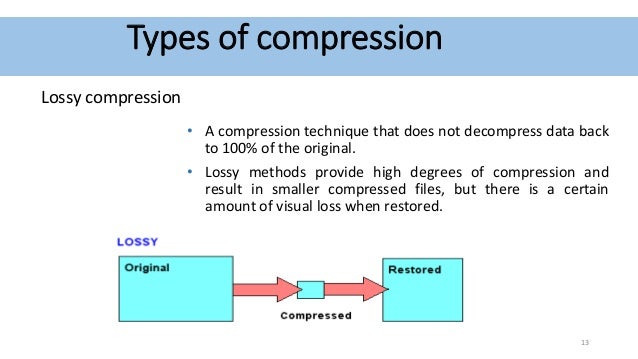
These are audio formats that use a lossy compression method for audio data. That is, when encoding a digital audio recording with any of the lossy codecs, certain changes are made to the audio data. This can significantly reduce the size of the resulting file, but at the same time leads to a deterioration in sound quality. The most popular lossy formats include MP3, WMA, Ogg Vorbis, AAC, and others.

Advantages and disadvantages of lossy audio formats
The main advantage of lossy formats is the small file size, while maintaining acceptable quality for listening. Furthermore, these audio formats are compatible with the vast majority of electronic devices and music players, including home audio systems, radio recorders, and MP3 players.

The main drawback is the loss of sound quality compared to the original. If you convert an audio recording from an original licensed audio CD to a lossy format, when you play the resulting file, the sound will be worse than that of the source.

Lossy formats sound bad?
No way. First, when lossy encoding, there is a choice of compression ratio and sound quality. For example, if we are talking about the MP3 format, then to record a voice (audiobooks, audio tracks for a textbook in a foreign language), the CBR 128 kbps quality will be enough, but for music, the ideal option is CBR 320 kbps. It is worth noting that CBR is short for ConstantBit Rate, which stands for Constant Bitrate.

Second, the compression process uses the principle of removing from the recording those frequencies and sounds that a person cannot hear by nature. There is an opinion, confirmed by many experiments, that music compositions in high quality MP3 format (CBR 320 kbps) cannot be distinguished by ear from the original recording or from a licensed audio CD purchased from a store.

Lossless audio format
This is a type of digital audio format in which the audio data is encoded without loss of quality. The sound will not differ from the source in any way, be it a licensed music CD (CDA format) or a digitized vinyl head, saved in uncompressed WAV format (for Windows) or its analog AIFF (for iOS). The most popular lossless formats are FLAC, Monkey’s Audio, ALAC, WavPack, MWA Lossless.

This makes lossless audio formats ideal for listening to music on good audio equipment. For example, in high-end home speakers or Hi-Fi systems and high-end headphones.

Advantages and disadvantages of lossless formats
The main advantage of lossless audio formats is that during encoding and decoding, the program does not remove any data from the audio stream. Because of this, when playing such files, the listener receives the original sound without disturbance.
But lossless audio formats also have a major drawback. The fact is that many devices for playing sound files do not yet support these formats. You can solve the problem by purchasing the right type of equipment, for example a portable Hi-Fi player or a media player, as well as a home audio system that supports lossless audio formats.

Main digital audio formats

Main digital audio formats

Audio Formats

–MP3: was created by Moving Pictures Experts Group (MPEG), which created and continues to create standards for storing and transmitting audio and video in digital format. In its entirety, the format is called: MPEG-1 / MPEG-2 Layer 3 (MP3). It is the most popular music storage format in the world today.

Audio File Formats
MP3 simultaneously compresses data and processes audio to obtain the smallest possible file size. The bit rate can vary from 8 Kb / s to 320 Kb / s, the sampling rate from 16 kHz to 48 kHz. The goal of processing the original recording with the MP3 compression algorithm is to compress the information as little as possible. So if in its original form a song occupies around 70 MB of memory, then in MP3 format with acceptable quality it will only take around 7-8 MB, as you can see, the gain is significant, although it is achieved by degrading the sound quality .

–AAC: The format has become popular because Apple has adopted it as a standard for storing, selling and distributing music in its ecosystem and iTunes. AAC is very similar to MP3 in terms of audio processing during encoding, although it gives a slightly better result.
Furthermore, AAC not only compresses the data, but also performs sound processing, removing a certain type of data, thus achieving significant savings in memory for storing music. The bit rate can range from 8 kbps to 320 kbps, the sample rate ranges from 8 kHz to 96 kHz. With more sophisticated and sophisticated encoding and compression algorithms, AAC music can sound better than MP3 and take up less memory. Another advantage of the AAC format is that it supports up to 48 channels, while MP3 only supports 2.

–WMA: format developed by Microsoft to compete with MP3. During encoding, data is compressed, music is processed, and parts of it are removed, saving memory. However, there is a variation of the format called WMA Lossless that preserves the quality of the original sound. The vast majority of modern phones, players and computers support this format and there should be no problems with its playback. However, some computers may have a hard time playing them, so if you want maximum compatibility, MP3 may be worth choosing.

–FLAC: Developed by the Xiph.Org organization, this format is free for any type of use, so it is quite widespread these days.
FLAC uses data compression, however it preserves the original sound quality of the recording. music is not processed. The recording quality can be 32-bit / 96 kHz (this is significantly higher than the recording quality of CDs, which is 16-bit / 44.1 kHz). The data compression algorithm can save up to 30% memory compared to the original recording, while maintaining perfect sound quality. It is for this reason that the FLAC format has become very common.

–ALAC: this format is analogous to FLAC, but made by Apple, whose full name is Apple Lossless Audio Codec. Its properties are the same as those of FLAC, but its advantage was that all Apple devices could work with it without the need to install third-party applications. Since iOS 11, the FLAC format has also become fully compatible with Apple devices, so the urgent need for ALAC has decreased significantly for the sake of freedom and the greater compatibility with other devices that FLAC offers.

–WAV: A format developed by Microsoft, this format stores the sound in its original form, so the files take up a lot of memory, although they preserve the perfect quality of the music.
WAV does not compress or process sound, we can say that it is an ideal format for storing master copies and for subsequent sound processing. Although there are certain encoding settings that allow you to compress data, they are generally not used. WAV files are similar in storage method to PCM and AIFF formats.

–AIFF: a format also developed by Apple, the full name is Audio Interchange File Format. The main goal is to store music on Apple computers in its original form.
AIFF doesn’t compress data or perform any sound processing, so like WAV it takes up a lot of memory. The best sound storage format if you want to keep processing it in an editor or convert it to other formats on Mac computers.

–PCM: This format is used for digital recording of analog signals, which is sound. It is a standard for recording audio to CDs, but can also be used to store music digitally in computer memory. PCM does not compress audio, ideal for storing master copies of music or for professional audio work.

Lossy compressed audio formats

Lossy compressed audio formats

Audio compression
.

MP3
In accordance with the MPEG-1 Audio Layer 3 standard, it appeared in 1993 and instantly won universal love precisely because of its economy in memory consumption.

A CD can store the complete discography of your favorite band.
Throw some records in the glove compartment and you can enjoy music from Kaliningrad to Vladivostok.
During this time, you can listen to all the books by all the writers worth listening to.
The MP3 format is such a solid eunuch, from which they cut the most reluctant, but began to show the ability to store and save. So MP3 is a very inexpensive format.

The main advantage is that he leans on everything that he just plays and sings.

ACC
An advanced form of audio encoding. The younger but advanced brother of MP3. It has slightly improved sound characteristics and a higher compression ratio.

Applies to Android, iOS, iTunes, YouTube, Nintendo, and the latest versions of PlayStation.

Also a folk format, but for people a little more advanced. Which is reflected in the title.

OGG
In general, this is not a format, but a container, and in fact the name OGG says nothing about the sound it contains.

However, it usually contains the Vorbis codec.

Significantly improved sound quality relative to other lossy compression formats.
Smaller files can be recorded with the same sound quality.
Even cheaper than MP3.

The problem is that the OGG format is free, so nobody invests in its promotion. Therefore, it may not be compatible everywhere and incompatibilities may arise.

Then you have to convert to MP3.

WMA
Microsoft’s proprietary format, therefore, although it is an improved version of MP3 and OGG, has not received widespread use and is not compatible with most devices and platforms.

Advice. If it is possible to use WMA instead of MP3, use the former. Cheaper and more pleasant to the ear.

Lossless compressed audio formats
For owners of advanced and expensive devices, branded desktops and mobiles, with high-quality headphones and speakers.

The downside to these formats is that file sizes of the same recording length will be roughly two to three times larger.

However, although lossless compression is stated, it should not be confused with high-fidelity audio recordings. There are minimal losses, although notable only for musicians.

FLAC
Free lossless audio codec. Its advantage is its great popularity, almost like MP3.

The compression ratio is up to 60% of the original file.
Compatible with most software platforms and devices.
It can be a profitable alternative when burning CDs. Almost indistinguishable in sound, but the advantage of saving almost half the disk space.

A THE C
Format for owners of Apple branded devices, as others may not be supported.

Slightly less good than FLAC in terms of compression ratio.

But Apple owners simply have no choice: the free FLAC format does not work in principle on iOS and iTunes.

Lossless WMA
An improved version of the aforementioned WMA. Slightly lower than FLAC and ALAC. It has a significant advantage over ALAC, as WMA is compatible with Windows and Mac.

However, it is not very widespread, so if you have many different devices in use, there is likely an incompatibility.

Verdict
Well, we have considered all the most famous, widespread and having the best audio formats and briefly talked about the characteristics of their use.

So now you can confidently decide in which case and in which format it is best to convert your sound recordings, music and audiobooks.

Audio formats: rating and benefits

Audio formats: rating and benefits

Audio Formats

As actual field studies have shown, a good idea to rank the top ten audio formats turned out to be an impossible task at first.

Audio formats

Competition conditions too different for unequal participants. In addition, some corruption schemes or lobbyists of transnational companies in the field of audio recording interfere in our good cause to help people choose the best sound product.

The world’s most popular MP3 format reached the leaders of popular love solely due to multi-million dollar promotional investments. And if you take the sound quality, then regular. And even in terms of compression and disk space savings, it’s not the highest compression either.

Therefore, a compromise decision was made: divide the test subjects into three groups and compare and identify the leaders by groups.

Three types of audio formats
No compression.
Lossless compression.
Lossy compression.
Uncompressed audio recording formats show their best performance only on high-quality professional audio equipment.

If you have an inexpensive tablet or smartphone in your hands, then wonderful music will sound on your device, but you will not hear it simply because the hardware and software resource and the speakers or headphones cannot reproduce such high sound quality.

On the other hand, if you start MP3 sound recording through professional stereos and amplifiers, you will hear such noise and rattle from the speakers that, again, this type of use is completely meaningless.

Audio classification by type of sound reproduction equipment
For professional equipment, uncompressed audio formats.
For semi-professional teams, compressed audio formats. But without loss.
For inexpensive equipment: lossy and compressed audio formats.
In the first case, the hardware is so expensive that it is ridiculous to worry about saving money on media.

In the second case, the owner of an Apple device for a thousand dollars will obviously be able to call himself and spend a couple of hundred dollars on a bulky memory.

In the third case, since it has hardly been possible to raise money for a cheap smartphone, saving on the size of the stored music is very important. Well, no one is going to listen to a symphony orchestra in Hi-Fi on the phone anyway. Unless you can download a ringtone from the classics for fun to make it look like a fresh bell pepper to the eyes of tomatoes.

With this concludes the overture, we begin to present the subject.

Audio formats for high quality sound
This includes uncompressed formats.

PCM – Pulse Code Modulation. The original analog audio is sampled as is, without any modification.
PCM is the most common audio recording format used on CDs and DVDs. Dolby multi-channel, surround, subject to high-quality speakers, sounding almost one-on-one with a live performance.

If you like to sit in front of a home theater and immerse yourself in empathy for the main and supporting characters in the movie, this is it.

Wav
A fairly old format, developed as early as 1991. Well, the old masters always thought of high quality.

Many people consider WAV to be an uncompressed format. But it is actually a container and it can also contain compressed files.

In most cases, WAV contains uncompressed PCM audio. Therefore, the quality is high. But even for one minute of recording, approximately 32MB of memory is wasted.

Good enough compatibility with Windows and Mac.

AIFF
WAV analog from Apple developers. This is also a container and also usually contains sound in PCM format. Good compatibility with Windows.

Lossy compressed audio formats
Truly popular formats for everyone.

MP3
In accordance with the MPEG-1 Audio Layer 3 standard, it appeared in 1993 and instantly won universal love precisely because of its economy in memory consumption.

A CD can store the complete discography of your favorite band.
Throw some records in the glove compartment and you can enjoy music from Kaliningrad to Vladivostok.
During this time, you can listen to all the books by all the writers worth listening to.
The MP3 format is such a solid eunuch, from which they cut the most reluctant, but began to show the ability to store and save. So MP3 is a very inexpensive format.

The main advantage is that he leans on everything that he just plays and sings.

AAC
An advanced form of audio encoding. The younger but advanced brother of MP3. It has slightly improved sound characteristics and a higher compression ratio.

Applies to Android, iOS, iTunes, YouTube, Nintendo, and the latest versions of PlayStation.

What is the best video format?

What is the best video format?

Best Video Format

What video format is better?

Video compression
At the moment, you have a wide variety of options for storing and presenting digital multimedia information. There are many different video formats, each with its own unique characteristics. In such a situation, a natural question arises, which video format is better?

To convert any information into digital form, special programs are used – codecs. They create a special file – a container in which all the data is stored. These two concepts should not be confused, as they perform completely different functions.

The following codec definition can be found on Wikipedia. A codec is a special computer program that converts a stream of data or a signal for later use. Codecs transform the information available to store it more optimally and compactly. In this case, the main structure of the file (container) remains the same, only the way the data is presented changes. The most popular codecs for video recording are: DivX, XviD, MPEG2, H.264, etc. If you decide to record a movie or, for example, create a slide show online, you must decide which video codec to use.

XviD is a modern MPEG4 codec. Allows you to obtain high definition images in dynamic scenes. Therefore, when choosing a codec, proceed from the characteristics and characteristics of the video file itself. This will allow you to understand which video format is best for a particular case. Unlike DivX, XviD is free software released under the GNU license.

What video format is better?
DivX is one of the most popular video codecs. Provides high-quality images. The files converted with this codec are small and can be viewed on almost all modern DVD players. As of the fifth version, you paid for encoding.

H.264. Compared to the two previous video codecs, H.264 is more efficient and provides higher compression rates without sacrificing quality. However, as a general rule, this codec is absent from the computer initially and must be installed additionally.

MPEG2 is a popular video standard that is actively used in digital television to provide high-speed information transmission. In addition, the MPEG2 codec is used when recording DVD discs, as well as in video compression systems.

Let’s say you are faced with a specific practical task: creating a video slideshow. What is the best video format to record? First of all, you need to proceed from where you will use the created video file. For example, if you want to put a finished video on any video hosting service, use the H.264 codec, which allows you to get a significant degree of data compression with minimal loss of quality. AMS Software’s PhotoSHOW slideshow maker includes a full set of modern video codecs and enables you to make spectacular slideshows from professional-quality photos.

The codecs then convert the information into a special file called a container. A container is a kind of shell in which the information converted by codecs is stored digitally. The container structure is heterogeneous and includes several components: video stream, audio stream, various additional information (file information, titles, etc.). Therefore, the container itself cannot convert information, it only serves to store it. The most common containers are AVI, TS, MP4, MKV. Let’s look at some of them in more detail to answer the question, which video format is the best?

AVI (Audio-Video Interleaved): literally means “interlaced audio and video”. It is a universal container for storing information of various types. The AVI file can contain video, sound, text information, etc. Also, there can be multiple audio streams. When creating an AVI file, a wide variety of codecs can be used. This video format is superior to similar video standards due to the ease of use and the wide range of video recording capabilities.

MKV is a freely distributed container known as the “Matroska” project. This multimedia container allows you to store a large amount of a wide variety of information, including audio tracks in different languages, subtitles, it allows you to create special video chapters, etc. The main characteristic of this format is the openness of the code, which allows programmers from all over the world to edit and improve it. When comparing AVI with MKV, the latter video format is better than the former in most parameters. MKV container has all the necessary parameters to store video files and is becoming more and more popular

Video compression

Video compression

Video Compression

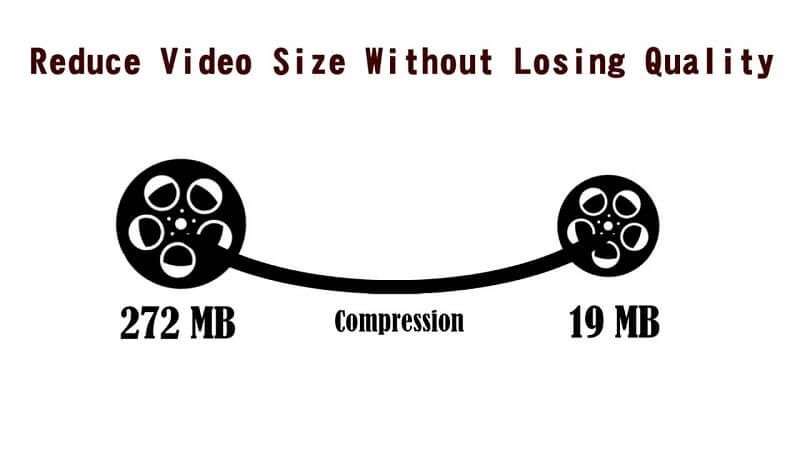
Video compression (video compression) is the art of removing the maximum possible amount of data without noticeable degradation in quality.

Video Compression

Most common compression methods are lossy (lossy), ie the unpacking result is not identical to the original source. By reducing resolution, color depth, and frame rate, postage stamp-sized video first appeared on PC, but then ways were developed to better render images and reduce data volume without affecting images. physical dimensions. Video compression is implemented by so-called codecs (codec – from COmpression / DECompression). Various types of codecs were developed, implemented in hardware, software or hardware-software, which provided efficient video compression and decompression.

Lossy compression techniques reduce data size (through complex mathematical transformations and the selective removal of visual information that our eyes and brains often ignore) and can result in degraded image quality. On the other hand, lossless compression only removes redundant information. Codecs can be implemented in hardware, software, or hardware / software. Codec compression ratios range from 2: 1 to 100: 1, allowing it to handle large amounts of video data. The higher the compression ratio, the worse the resulting image will be. It shows faded colors, distortions and interference, the outlines of objects become sharper, and in the end the result may be useless.

At the end of the 90s of the last century, the most used methods were based on a three-stage discrete cosine transformation algorithm (Discrete Cosine Transform – DCT). The DCT algorithm takes advantage of the fact that neighboring pixels in an image (physically close, in space, or close in successive images, in time) can have the same meaning. The mathematical transformation (similar to the Fourier transform) is performed on 8×8 pixel grids; this explains the block distortions (artifacts) at high compression levels. Low-frequency components have been shown to be more important than high-frequency components in visual systems. Consequently, the quantization process weights them and removes those that contain the least visual information depending on the level of compression required. For example, deleting 50% of the converted data can result in the loss of only 5% of the visual information.

Compression was originally done in software. Insufficient processor power limited the algorithm to execute its task in 1 / 25th of a second, that is, the time it takes to form a frame of fully moving (“live”) video. However, Avid Technology and other non-linear editing (NLE) pioneers released PC-based editing systems that used software compression in the late 1980s. Although the video had a quarter of the resolution of the broadcast television, color fade and block distortion, the NLE system revolutionized the production process. In the beginning, these systems were used for offline editing, when the material was polished with software.

Although the video quality of early PC-based NLE systems was inferior to the quality of offline editing with VHS VCRs, NLE systems had certain advantages. As a word processor for video, they provided a faster and more creative work style. The user could quickly cut and paste parts of the video, enhance them, and perform various editing actions typical of the production process. Also, importing the NLE-generated Edit Decision List (EDE) onto a floppy disk on an online computer was much more convenient than writing a temporary code list. The NLE system not only provided a more convenient edition, but also provided an offline product close to the final version,

However, NLE systems practically disappeared in 1991 when hardware compression provided VHS quality video. The first hardware video compression was called M-JPEG (Motion JPEG). It is derived from the DCT standard for still images called JPEG. This standard was never designed for video compression, but when C-Cube released a codec chip in the early 1990s that could compress JPEG up to 30 still images per second, the pioneers of NLE systems couldn’t resist for long time. By compressing data 50 times, personal computers were able to process digital video.

Meanwhile, PCs were getting faster and memory cheaper, allowing for lower compression ratios with better capacity.

What is digital video?

What is digital video?

Digital Video

Digital video is a set of technologies for recording, processing, transmitting and storing images and sound from digital television. The main difference from analog video is that the video signal and sound are encoded and transmitted not in their original form, but after analog-digital conversion into video and sound data streams. In most cases, digital video is compressed to reduce the amount of data that is transmitted and stored. Digital video can be delivered to various video media through digital interfaces in the form of streams or files.

Digital Video

Digital video has five main characteristics: screen resolution, frame rate, color depth, bit rate (video transmission width), and image quality.

Screen resolution (resolution): indicates the number of dots (pixels) horizontally and vertically that make up the image (video frame) on the screen.
When recording the resolution, the value of the number of dots per line (horizontal resolution) is indicated first and then the number of lines involved in the image (vertical resolution).
For example, for the European PAL video standard, the frame size is 720×576 pixels, for the North American NTSC standard – 720×480, for high definition video (HD 720p) – 1280×720, and for the new HDTV standard (Full HD) – 1920×1080 pixels.
As you probably understand, the higher the screen resolution, the better the video quality.

Frame rate, frame rate (frames per second (FPS), frame rate, frame rate): the number of frames per unit of time in television and cinema. The concept was first used by photographer Edward Muybridge, who carried out chronophotography experiments of moving objects with multiple cameras in a row. The generally accepted unit of measurement is frames per second.
– 24 – the world standard for the frequency of filming and projection;
– 25 – the filming frequency used in the production of films and television reports for their translation to the European decomposition standard 625/50;
– 30 – Standard video playback speed.

Color depth (color resolution) is a characteristic that indicates the number of colors that can participate in the formation of a video image.
The number of colors in digital video is measured in bits. So 1 bit can take two different values ​​(0 or 1) and it only allows encoding two colors (usually black and white), respectively. With two bits, you can encode 4 colors (22 = 4), with three bits – 8 colors (23), four – 16 (24) and so on.
Typically, color resolution is described by special color models. In computer technology, the RGB (red-green-blue) model is used, which can be represented by the following most common color depth modes: 8 bits (256 colors), 16 bits (65,536 colors) and 24 bits (16,777. 216 colors). By the way, the human eye, according to various opinions, can perceive 5-10 million shades of color.

A pixel is the smallest element in a digital image in bitmap graphics. It is square in shape. “Pixel” is a word made up of the words “image” and “element”. The physical size of a pixel is not set by the user, but is determined by the characteristics of the display device. The more pixels a display device has, the finer details in the image can be displayed.

Video bit rate is the amount of information transmitted per second. From this it follows that the higher the video bit rate, the better it is, the clearer the image, the less artifacts, etc. And it takes more hard drive space to store this video and consequently more time to transfer it over the network.

Image quality is a characteristic designed to evaluate the quality of the processed video compared to the original and is determined by a set of values ​​for resolution, color depth, and video transmission speed.

HD. High definition video. Most of the HD formats in use provide a resolution of 1920 x 1080 or 1280 x 720. There is a significant difference between the 1080 and 720 standards: the former uses 2.25 more pixels per frame.
This difference significantly increases the demands of 1080 data processing in terms of compression time, decompression speed, and size of the storage area. All 720 formats are progressive. The 1080 format is a combination of progressive and interlaced frame types. Computers and their monitors are inherently progressive, whereas television broadcasts

Where did 44100 come from

Where did 44100 come from

44100 sample rate

Normally the sample rate is usually 44100, for example on CDs or DVDs.
This means that 44100 samples are taken per second.

44100 sample rate

But many people wonder why that number was reached.

We know that the human ear can hear sounds up to 20 khz and that according to some acoustic theorems, at least twice as many samples should be taken, we would then come to speak of 40 thousand, but nevertheless it reached 44,100.

The standard sample rate for CD-audio is 44100 Hertz. Where and why were these 44100s originally chosen for CD audio production?

Starting from the condition (see Nyquist-Shannon-Kotelnikov) of reproduction of the upper limit of the spectrum at 20 kHz, the sampling frequency should have been chosen above 40 kHz. But at the time of the creation of these standards and the development of CD-DA technology (the second half of the 70s of the last century), there was no generally accepted medium in which to record, edit and store digital sound. And for this, it was decided to use standard VCRs, which in those days worked in U-matic format. The digital signal was encoded by a special encoder into a black and white video pseudo-signal and recorded on a video cassette. The structure of the digital signal had to be linked to the frequency and structure of the fields of the television signal used for recording.

This decision was complicated by the fact that different video recording standards are used in Europe and the US: 525 lines at 60 Hz and 625 lines at 50 Hz, while not all lines can be used to record information. The selected frequency should fit the structure of both video signals. 44100 Hz meet this requirement.

In a 60 Hz NTSC video signal, 35 lines are not used for recording, leaving 490 active lines per frame, or 245 in the field for digital audio recording. When writing three samples to a string, the sample rate will be:

60 × 245 × 3 = 44100.

In a 50Hz PAL signal, 37 lines are not used, leaving 588 active lines per frame, or 249 per field, so the frequency will be:

50 × 249 × 3 = 44100.

Although digital sound at that time had nothing to do with the video signal, video equipment was used in the production of the CD, which determined the choice of sampling frequency.