How to get Hi-Fi sound on your PC


Free Download Mp4Gain
picture

How to get Hi-Fi sound on your PC

HI FI

Anyone reading this article can always download some MP3 songs and listen to them simply by connecting a pair of multimedia speakers to a computer. There is nothing wrong with that, but you should always know that you can get higher quality sound on your computer. We spent a considerable amount of time studying this topic, and as a result, we got high-quality music playback on the computer, in quality corresponding to the sound of a CD player.

hi fi sound

What are the benefits of using a computer to play music?

Comfort
– On a computer, you can create a well-structured music collection.
– Thanks to tags, you can search and sort music by artist, album name, genre, etc.
– Create playlists to listen to your favorite songs.
– Synchronize with portable players
– Use simultaneously in several rooms thanks to DLNA technology

DLNA
DLNA (Digital Living Network Alliance) is a standard for data exchange between any AV device connected to a home computer network. It allows one device to work with another, transmit audio or video streams over the network. DLNA may become as mandatory a standard for AV devices as TCP / IP has been for the global web.
To receive the DLNA logo, a product must pass the necessary certification, which ensures that devices from different manufacturers can work together.
DLNA terminology
1. DMS – Digital Media Server – a digital media server, a device that contains music and video
2. DMP – Digital Media Player – a digital media player – a device that plays music or videos
3. DMR – Digital Media Renderer – a device that plays music or video, which can be controlled by a remote control.
4. DMC – Digital Media Controller – Digital Media Controller – Render Software Control, works like a remote control

Resolution
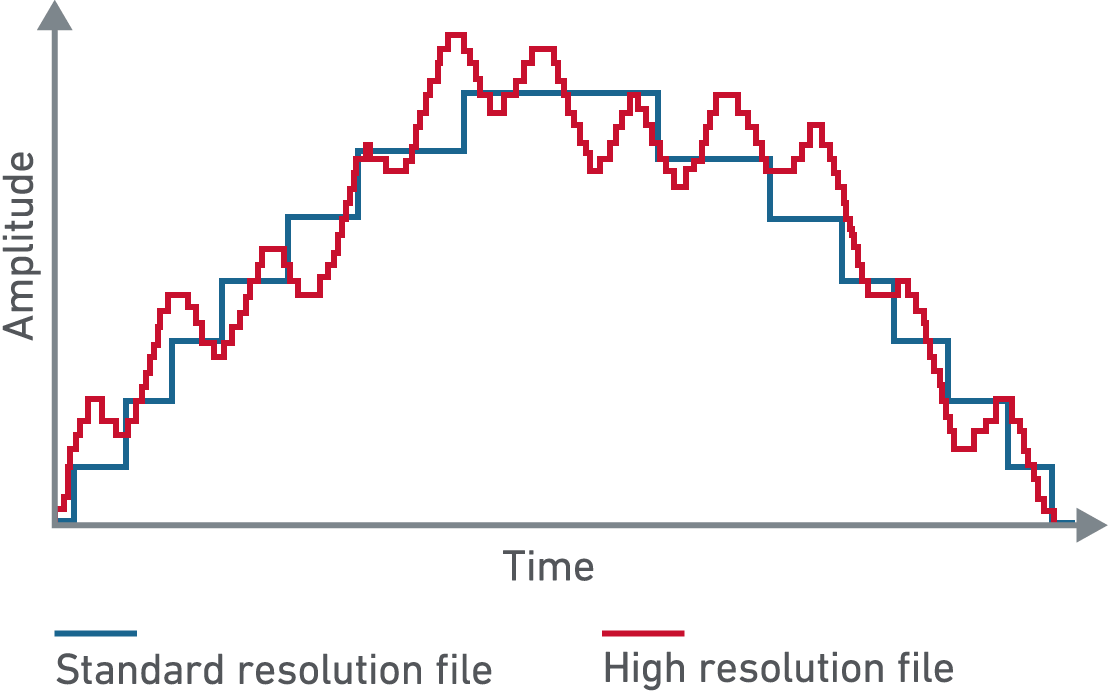
Audio CD recordings have a 16-bit, 44.1 kHz sample rate, which complies with the Redbook audio standard. Modern audio recording is done with a 24-bit bit depth and a sample rate of 44.1 to 192 kHz. But, even a 24-bit / 96 kHz recording cannot be played with a CD player, as this bit rate is not compatible with the Redbook standard. Before recording a high-resolution phonogram on a CD, you must reduce the resolution and dithering to 16-bit / 44.1 kHz.
You can play high-resolution audio on your PC if your audio system (DAC) supports it. Otherwise, the audio files can generally be played automatically by reducing the resolution to the bit rate that your audio system supports.
If you plan to buy new Hi-Res Audio equipment, keep in mind that it must support at least the 24/96 format.
The catalog of high-resolution phonograms available for download on the Internet is not very large yet, but it is constantly growing.

Downloading files from
Internet CD is gradually disappearing. People buy less and less CDs, download music files. Most of the websites offer MP3. Gradually, the bit rate of music files grows, as Internet speed increases and the cost of network storage (in terms of a storage unit) decreases. Lossless music formats are not yet widespread, but their availability is growing by the day.

Back up
For true collectors with a large collection of music, this collection is of great value, tangible and intangible. Unfortunately, in the event of a fire, you can lose all your music CDs. However, in the case of music files, you can play it safe and store a copy on another server away from home.

Sound quality
This aspect is very important for music lovers.
For example, a laptop alone is not designed for high-quality audio playback. You can check it out for yourself, just take the headphones and plug them into the corresponding output on the laptop. In very rare cases, the sound quality may be average.
When organizing a modern computer-based audio system, you can use a decent sound card or USB-SPDIF converter and connect your tested DAC digitally, or connect the USB DAC directly to your laptop. Sound quality can be very high. Your computer can play just as well as a CD player.

Choice
In general, when creating a modern audio system based on computer technology, you can choose one of three options. It is a PC audio, music server or network audio player.


Free Download Mp4Gain
picture


Mp4Gain Main Window
picture


Mp4Gain Features
picture


Free Download Mp4Gain
picture

What affects the sound quality of digital recordings?

What affects the sound quality of digital recordings?

Soun Qualty of Digital RECORDING

My grandfather was listening to a gramophone. My father’s youth turned to music coming from the speaker of a reel-to-reel tape recorder. The heyday and decline of cassette recorders fell upon my youth. My son is growing up in the age of digital audio. To keep up to date and give my son a good “sound”, I decided to find out what determines the quality of the digital audio signal reproduction.

Digital Recording Sound Quality

I talked to my music loving friends. He did an information search on the Internet. As a result, I came to the conclusion that high-quality sound can be achieved in the digital age by choosing the right 7 basic elements of modern music centers:

the format in which the music is recorded;
player;
digital to analog converter;
amplifier;
acoustics;
cables;
food.
Below I will share my observations and conclusions on achieving high quality sound recordings in digital formats.

How can a number ring?

Lyrical digression, experts don’t need to read.

Let me explain in a few words where digital sound comes from. During the recording process, the microphone converts mechanical vibrations (the sound itself) into an analog electrical signal. An analog signal is, in the most general case, similar to a sinusoid that has been familiar to all of us since high school. In the age of analog sound, it was this signal that was recorded on various media and then played back.

With the development of microprocessor technology, it became possible to record and store audio information in digital formats. These formats are obtained through an analog-to-digital conversion (ADC) process.

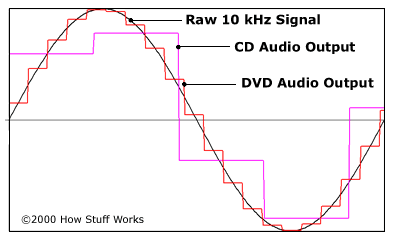
During the ADC, the analog signal (our high school sine wave) becomes a discrete one (in other words, it is cut into pieces). In the next stage, the discrete signal is quantized, that is, each resulting segment of the sinusoid is assigned a digital value. In the third step, the quantized signal is digitized, ie encoded in the form of a sequence of 0 and 1. With respect to digital sound recording, the information about the amplitude and frequency of the sound is digitized.

How to store good sound?

To record and store digital audio information, digital audio formats are used. The audio format is understood as a set of requirements for the digital representation of audio data.

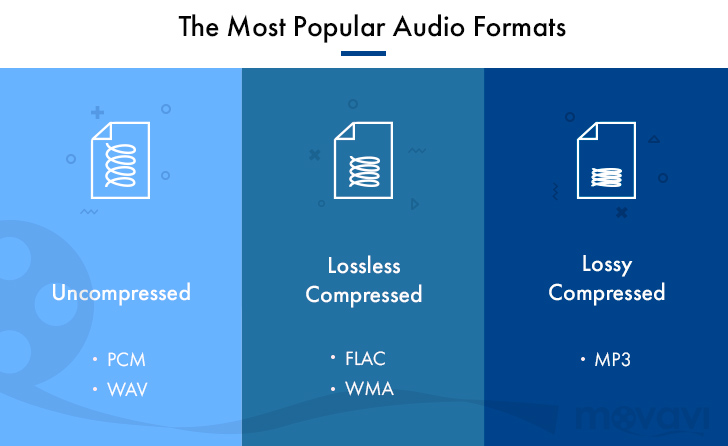
When it comes to sound quality, digital formats are divided into 3 categories:

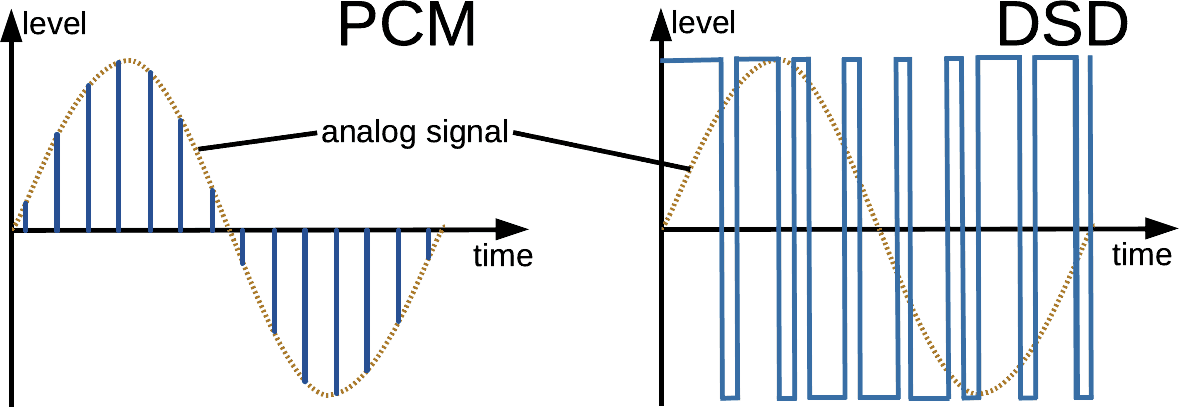
Formats without additional compression (CDDA, DSD, WAV, AIFF, etc.);
Lossless compressed formats (FLAC, WavPack, ADX, etc.);
Lossy compression formats (MP3, AAC, RealAudio, etc.).
High-quality sound is obtained when playing music saved in formats of the first and second category. In the formats of the third category, to reduce the amount of data, certain information is deliberately excluded. For example, information about hidden frequencies.

Latent frequencies are those that are outside the range of perception of the average person: 20 Hz – 22 kHz. For audiophiles, this range is wider due to individual psychophysiological characteristics.

To complete your home audio library, you must select records saved in files with the following extensions:

* .wav, * .dff, * .dsf, * .aif, * .aiff are uncompressed sound files;
* .mp4, * .flac, * .ape, * .wma are the most common lossless compressed audio files.
From history. They say that the first experiments on the preservation of sound were carried out by the ancient Greeks. They tried to keep the sound in amphorae. It looked something like this: they spoke words into the amphora and quickly sealed it. Unfortunately, none of those records have survived to this day.

Acoustics: Understanding acoustics

Acoustics: Understanding acoustics

Acoustics

What is a good speaker system is the most confusing question. The choice of acoustics depends on the individual characteristics of a person’s hearing, the parameters of the room in which the system will be located, and financial capabilities. In this system of three variables, finding an optimal point is very difficult. Therefore, we will consider three fundamental options to solve the problem.

Acoustics

Solution one. Budgetary. You can equip your home audio center with bookshelf speakers. These small systems can be placed on a shelf. They are suitable for small spaces. Due to its small size, it is also an inexpensive option. A significant disadvantage of this solution is that “shelf” acoustics will not produce normal bass sound.

Solution two. Luxurious. If the dimensions of the room and financial possibilities allow, you can buy floor acoustics. This system, due to its size, can contain a large diameter woofer. So there is a chance to enjoy a good bass.

Solution three. The “golden” compromise. This solution is suitable for large and small spaces and is affordable. It consists of acquiring a subwoofer and satellites. The subwoofer is responsible for high-quality bass reproduction. High frequencies are reproduced in stellites.

When choosing acoustics, you should not follow any advice. You need to rely only on your own hearing. You should also be prepared for the fact that the sound of acoustics in the store and in your apartment will be different.

Cables: brevity, the sister of talent

The choice of connection leads is a question that must inevitably be resolved in order to achieve high quality sound. Many articles have been written about the effect of cable on sound. The only thing the authors have achieved unity in is the cable length requirement. The shorter the better – this is the rule of thumb for choosing patch cables.

A little theory. Cables are divided into interconnection and acoustic. The interconnects are used to connect audio center units such as a player and a DAC. The speaker cables connect the speaker system to the power amplifier.

Depending on the type of conductive material, cables are divided into OFC, OCC and composite. OFCs are oxygen-free copper cables produced by pulling method. OCCs are monocrystalline copper cables, obtained directly from the melt. Composite cables are cables in which the conductor is made up of multiple materials.

If your goal is to create an ideal audio hub from blocks from different manufacturers, try using the shortest connection cables possible. And get ready to experience the perfect sound quality.

Hearing Portal
Today we discovered how to decipher an audiogram. Svetlana Leonidovna Kovalenko, senior doctor, audiologist and chief pediatric otolaryngologist in Krasnodar, and candidate for medical sciences, helps us with this.

Summary
The article turned out to be long and detailed: to understand how to decipher an audiogram, you must first familiarize yourself with the basic terms of audiometry and make examples. If you do not have time to read for a long time and understand the details, the card below is a summary of the article.

The audiogram is a graph of the patient’s listening experience. Helps diagnose hearing impairment. There are two axes in the audiogram: horizontal – frequency (the number of sound vibrations per second, expressed in hertz) and vertical – sound intensity (relative value, expressed in decibels). The audiogram shows bone conduction (sound that vibrates into the inner ear through the bones of the skull) and air conduction (sound that reaches the inner ear in the usual way, through the outer and middle ear).

In audiometry, the patient is given a signal of different frequency and intensity and the value of the minimum sound heard by the patient is marked with dots. Each point represents the minimum sound intensity at which the patient hears at a particular frequency. By connecting the dots, we get one graph, or rather two: one for bone conduction of sound and the other for air.

Hearing standard: when the graphics are in the range of 0 to 25 dB. The difference between the bone and air conduction graph is called the air-bone gap. If the bone conduction graph is normal and the air graph is below normal (there is a gap between the bone and the air), this is an indicator of conductive hearing loss. v

How to store good sound in your computer?

How to store good sound in your computer?

digital to analog converter DAC

To record and store digital audio information, digital audio formats are used. The audio format is understood as a set of requirements for the digital representation of audio data.

Digital Audio to Analog Converter

When it comes to sound quality, digital formats are divided into 3 categories:

Formats without additional compression (CDDA, DSD, WAV, AIFF, etc.);
Lossless compressed formats (FLAC, WavPack, ADX, etc.);
Lossy compression formats (MP3, AAC, RealAudio, etc.).
High-quality sound is obtained when playing music saved in formats of the first and second category. In the formats of the third category, to reduce the amount of data, certain information is deliberately excluded. For example, information about hidden frequencies.

Latent frequencies are those that are outside the range of perception of the average person: 20 Hz – 22 kHz. For audiophiles, this range is wider due to individual psychophysiological characteristics.

To complete your home audio library, you must select records saved in files with the following extensions:

* .wav, * .dff, * .dsf, * .aif, * .aiff are uncompressed sound files;
* .mp4, * .flac, * .ape, * .wma are the most common lossless compressed audio files.
From history. They say that the first experiments on the preservation of sound were carried out by the ancient Greeks. They tried to keep the sound in amphorae. It looked something like this: they spoke words into the amphora and quickly sealed it. Unfortunately, none of those records have survived to this day.

The record player: finding a win-win solution

Choosing a player should start with an understanding of how the home audio library will be formed. You can buy CDs the old fashioned way or go shopping for your favorite music on the internet. The last option has two important advantages. It is compact and ecological:

There is no doubt about the place in the apartment to keep the CDs.
No need to throw faulty drives in the trash.
Have you decided how to buy music? Excellent! If you buy discs, you need a CD player. If you prefer to shop online, look for a player on a hard drive or flash memory. Undecided? Excellent! Look for a versatile player. In this, you can listen to both the discs and the files purchased through the network.

Naturally, it can be turned into a player and a personal computer. But this option is convenient when the computer is truly personal. The prospect of competition for keyboard space and potential conflicts will significantly reduce the enjoyment of listening to good quality music.

When choosing a turntable, pay particular attention to the connectors available. The more connector options, the easier it is to select other items in the Music Center.

DAC! And the figure turns … into an analog signal

The player reads a sequence from a CD or a file. Now comes the most mathematical moment of digital audio playback. The digital signal becomes analog. This math occurs in the DAC or digital-to-analog converter.

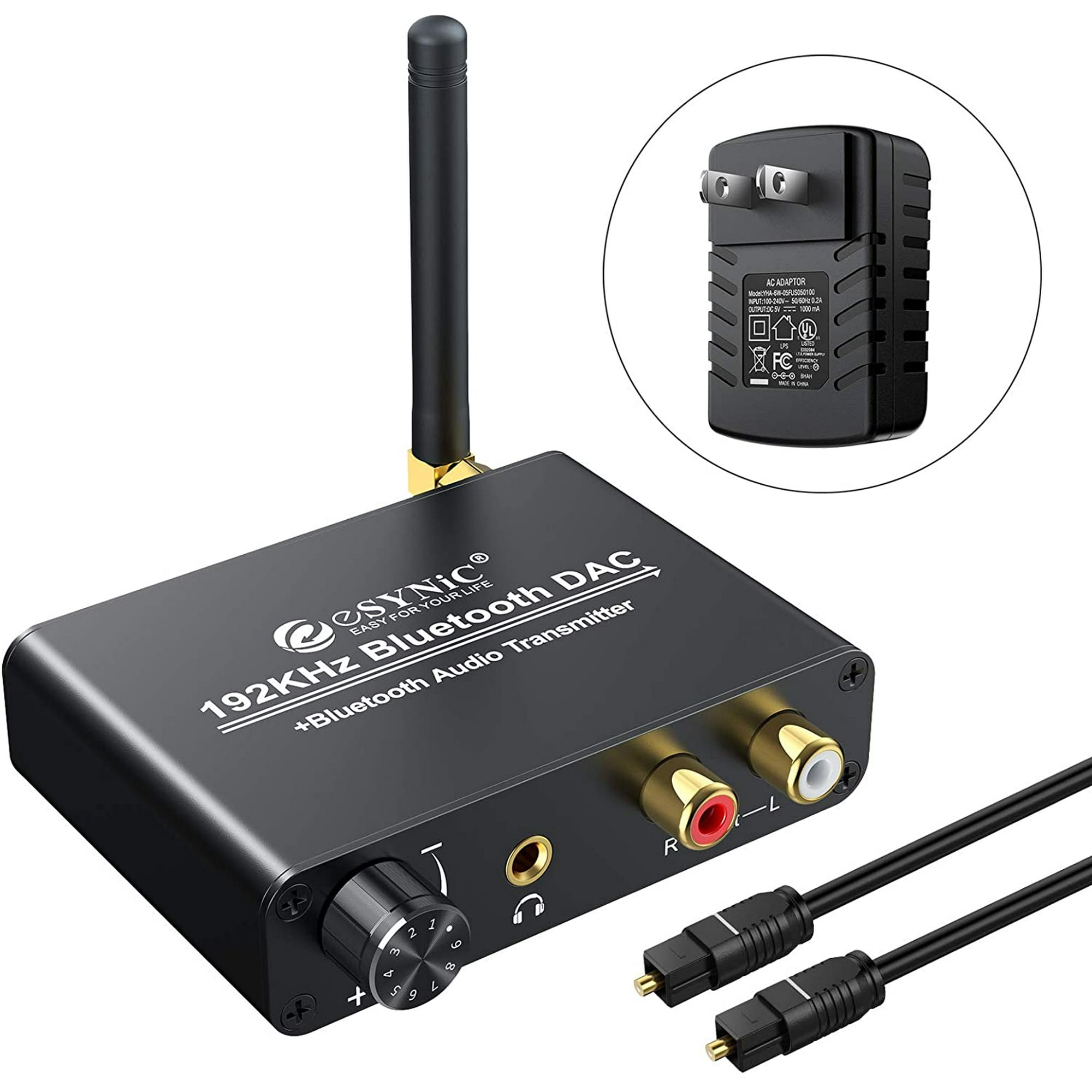
The DAC can be integrated into the player or implemented as a separate unit. To get high-quality sound, you should go for the second option. The built-in converter is usually of lower quality than the independent one. The external DAC has its own, built-in power supply powered from a common source with the player. When using an external DAC, it is almost unaffected by turntable and amplifier interference.

An external DAC for circuit solutions is implemented in 4 main versions:

Pulse width modulator;
Oversampling scheme;
Type of weighing;
R-2R ladder or chain scheme.
With so many options for high-quality sound, the R-2R option is indisputable. Due to a special circuit implemented in precision resistors, a ladder type DAC achieves very high conversion precision.

When choosing an external digital-to-analog converter, you should pay attention to two main features:

Bit depth. It is good if the selected model has 24 bits.
Maximum sample rate. Very good 96 kHz, great 192 kHz.

How a digital to analog converter affects the sound quality of your audio system

How a digital to analog converter affects the sound quality of your audio system

Digital to Analog Converter

Digital music formats are ubiquitous – even the most loyal vinyl supporter has to admit that it is extremely attractive to keep your entire music collection in the palm of your hand or put it on a server. Music lovers will have to accept a significant reduction in sound quality when listening to your favorite songs, albums and artists. And if you are serious about music, maintaining the original quality is undeniable.

Digital to Analog Converter

How Digital-to-Analog Conversion (DAC) Technology Works

In simple terms, a DAC converts digital data into sound that can be heard and enjoyed. When you break down digital files and music streams into their basic components, you end up with a lot of binary code. A DAC converts this data into an analog signal, which is then sent to the input of an amplifier and finally delivered through headphones or speakers to the listener’s ears. Aside from vinyl records, virtually all current music formats rely on this sound creation process: streaming services, digital music files, CDs, etc. Not all DACs are created equal, or by design, for that matter. Your smartphone’s DAC doesn’t need to convert data streams with the same precision and quality as a high-end component, for example. No one expects that their smartphone will provide 100 percent fidelity, high resolution audio reproduction. If you want the best sound quality from a variety of digital audio formats, a DAC that can handle the task of providing the best possible audio fidelity is absolutely necessary.

Choose the right DAC for your audio system

There are a few things to keep in mind when considering DAC options. First, does it support a wide variety of data file transfer speeds? If the timing of the bitstream conversion is not quite accurate, you will experience so-called jitter (clock jitter), which probably means poor sound quality. Second, with what skill level is this device designed? Poor quality circuitry can create unwanted noise and interference that degrade sound quality. There are also separate external DACs on the market available to act as intermediaries between your music source and your speakers or headphones, but you can eliminate this with audio gear that already has a high-quality built-in DAC inside.

For example, there are computers that are equipped with a high-resolution conversion function and are compatible with many audio formats, including FLAC, WAV, and ALAC. Its high-quality construction isolates noise to prevent it from adversely affecting overall sound quality. It also features a dedicated headphone amp block, so music lovers can fully immerse themselves in their favorite albums. As a general rule, the best equipment will allow you to create the best audio system. Explore the entire line of modern AV receivers, wireless music systems and hi-fi components to lay the foundation for your audio system.

Analog vs Digital: a fight that never happened

Analog vs Digital: a fight that never happened

Analog vs Digital Audio

This article is not intended to foment a holy war between fans of analog and digital audio. The goal is to show the fundamental differences between the two technologies. The author of the article (that is, me) takes the side of digital technology as the most perfect and wants to explain his point of view to everyone, not only from the subjective side, but also from the scientific one. Knowledge of the principle of digital sound recording, together with an understanding of the scientific side of this matter, clearly excludes any doubt about the superiority of digital over analog technologies.

Analogue Vs. Digital

ANALOG AUDIO RECORDING.
In fact, sound (vibration of air particles) is analogous in nature. Sound propagates in airspace, it can be distorted depending on a variety of conditions: distance to the sound source, reflection from surrounding objects, speed of movement relative to the source, etc. The range of sound vibrations perceived by the human ear is considered to be the range of 20 Hz to 20 kHz. In fact, 20 kHz is a pretty optimistic figure, few can boast that they actually listen to that frequency. Most of the adults I met did not hear frequencies above 15-16 kHz, so I would say with a high degree of certainty that the average hearing threshold is 15 kHz. However, in terms of pitch, our ear perceives frequencies only up to 5 kHz; all that is higher are additional overtones, overtones, sounds, etc. However, correct reproduction of high components (cut-off frequency) is basically a measure of the quality of a sound recording, usually indicated in the technical specifications of any serious sound recording device.

In the world of analog sound recording, air vibration is first converted to electrical vibration through a microphone. The electrical vibration is then applied to a magnetic recording head (in the case of magnetic tape) or a mechanical cutter (in the case of vinyl). In the first case, the information is recorded on a magnetized tape, in the second – in the slot of the plate. To reproduce the sound, it is enough to stretch the magnetic tape along the magnetic head at the same speed at which the recording was made: the head converts the alternating magnetic field back into electrical oscillations, which are amplified and fed to the system of sound reproduction (speaker). The sound reproduction system vibrates the air and we hear sound. In the case of a plate, just drive the needle along the groove,

Purely from the point of view of common sense, it follows from all the above that vinyl is the worst option to record sound in principle, because in the recording / playback process there is an approximate mechanics (paradoxically, for some reason, conservatives they tend to advocate vinyl and not magnetic tapes, although the latter at the peak of their development had significantly higher quality characteristics). Among other things, almost all more or less normal vinyls were written from magnetic tapes. I simply had no where to record: mastering and mixing were done on tape, as on disk it is, in principle, impossible. That is, the sound of vinyl is the sound of a magnetic tape, only complemented by its own shortcomings of vinyl: creaks, hisses, and other outrages from “music lovers”,

In fact, analog audio recording is imperfect at almost every stage. For example, when recording on a magnetic tape, a lot depends on the quality of the magnetic head; its calibration with respect to the tape is paramount (eternal headache). Add to this detonation (inconsistency of belt speed due to inaccuracies in the belt transport mechanism), self-stretching of the belt, changes in the characteristics of the belt along its length, random bumps / foreign particles in she. Vinyl? Detonation, debris falling into the groove, disc warping, deterioration in sound quality after each playback due to “squashing” of the groove. But the main disadvantage of analog recording is the impossibility of creating an exact copy: any copy of the original will be of inferior quality. Also, any analog media, even if not in use,

DIGITAL SOUND RECORDING.
Digital sound recording has been made possible by the enormous technological advances of the last decades. In fact, digital sound recording is based on a fairly old theory – it just became possible to turn theory into practice.

Audio. Digital and analog audio

Audio. Digital and analog audio

Digital Audio

Despite the fact that most of the external information we acquire with the help of sight, sound images are no less important to us and often even more. Try watching a movie with the sound turned off; in 2-3 minutes you will lose the thread of the plot and interest in what is happening, no matter how large the screen and the high quality image. Thus, a pianist played off-screen in silent movies. If you remove the picture and leave the sound, the movie can be “heard” like a fascinating radio show.

DIGITAL AUDIO

Hearing gives us information about what we do not see, since the visual perception sector is limited and the ear captures sounds from all directions, complementing visual images.

Hearing gives us information about what we do not see, since the sector of visual perception is limited and the ear captures the sounds that come from everywhere, complementing the visual images. At the same time, our hearing with great precision can locate an invisible sound source in direction, distance, speed of movement.

They learned to convert sound into electrical vibrations long before images. This was preceded by a mechanical recording of sound vibrations, whose history dates back to the 19th century.

Accelerated progress, including the ability to transmit sound at a distance, was made possible by electricity, with the advent of amplifying, acoustic, and electro-acoustic equipment and transducers – microphones, pickups, dynamic heads, and other emitters. Today, audio signals are transmitted not only over cables and over the air, but also over fiber optic communication lines, primarily in digital form.

The acoustic vibrations are converted into an electrical signal, usually by microphones. Any microphone contains a moving element, the vibrations of which generate a current or voltage in a certain way. The most common type of microphone is the dynamic, which is a reverse speaker. The vibrations of the air set in motion a membrane that is rigidly connected to a moving coil in a magnetic field. A condenser microphone, in fact, is a condenser, one of whose plates vibrates at the same time as the sound, and with it the capacitance between the plates changes. Ribbon microphones use the same principle, only one of the plates is freely suspended. Similar to a condenser electret microphone, whose plates, in the process of oscillation, generate by themselves an electric charge proportional to the amplitude of the oscillations. Many models of microphones have a built-in amplifier (the signal level directly from the acoustic-electric transducer is very low). Unlike a microphone, the pickup of an electric musical instrument registers vibrations not from the air, but from a solid body: a string or the soundboard of an instrument. The cartridge reads the record slot using a needle mechanically connected to moving coils in a magnetic field, or magnets if the coils are stationary. Or the vibrations of the needle are transmitted to the piezoelectric element which, under mechanical stress, generates an electrical charge. In magnetic recording, an audio signal is recorded on a magnetic tape and then read with a special head. Finally, optical recording was traditionally adopted in cinematography: an opaque soundtrack was applied from the edge of the film,

In synthesizers, sound is born directly in the form of electrical vibrations, there is no primary transformation of acoustic waves into an electrical signal.

Modern autumn sound sources are diverse and digital media are becoming more and more common: CDs, DVDs, although vinyl records are also preserved. We continue to listen to radio, both terrestrial and via cable (radio hotspots). Sound accompanies television shows and movies, not to mention a phenomenon as familiar as telephony. A computer receives an increasing share in the world of audio, allowing it to conveniently archive, combine and process sound programs in the form of files. In the digital age, digitized speech and music are transmitted through digital channels, including the Internet, without serious losses in transportation. This is provided by digital encoding and the loss is due solely to compression, which is used most often. However, in digital media, either it does not exist at all (CD, SACD), or lossless audio compression algorithms are used (DVD Audio, DVD Video). In other cases, the degree of compression is determined by the required level of soundtrack quality (MP3 files, digital telephony, digital television, some types of media).

Variety of digital formats.

Variety of digital formats.

audio formats

Surely many users prefer to use their home computer not only as a workhorse, but also as a multimedia center, where they can watch movies or family photos, as well as listen to their favorite music. Although compact digital players or mobile phones are certainly more suitable for listening to musical compositions, but unlike them, a computer can not only play music.

Audio Formats

No matter how big the built-in memory of your music player is, it will most likely be difficult to store your entire music library on it. Plus, you can create, edit, organize, and search for music with your PC. Also, don’t forget that there are around three dozen common digital audio formats today, and most players are far from omnivorous and can only play a few of them.

So why do you need to create so many music formats to store one type of content? The fact is that, in the vast majority of cases, the sound is stored in “compressed” form, since one minute of uncompressed composition occupies about 10 MB on the hard disk. On the one hand, this seems not to be much, but on the other, if you are a music lover and your collection consists of several hundred or even thousands of songs, then it is clear that the sound must be compressed to reduce the space it occupies in electronic media.

Various special algorithms are used to compress music files, which subsequently determine the structure and presentation of the audio data, or so-called digital audio file formats. All audio formats can be divided into three groups: uncompressed audio formats, lossless compression, and lossy compression.

No compression
One of the most widespread formats related to this type is the well-known WAV. The sound of files with this extension is stored without compression or changes. It is true that much more space is required to store uncompressed files and therefore WAV is more widely used only in professional audio and video applications, where the sound should not have a loss of quality before processing. Keeping ordinary musical compositions in this form is unwarranted waste.

To play WAV files, you do not need any special software, as all media players understand this format, including the standard Windows Media audio player built into the Windows system.

Another format used to store uncompressed audio that is worth mentioning is Apple’s development called AIFF (Audio Interchange File Format). As you may have guessed, it is most commonly used on Macintosh computers running Mac OS X.

Lossless compression (lossless)
Lossless compression algorithms for audio files work on the principle of conventional file cabinets. They do not provide the highest level of compression (40 to 60%), while they have virtually no effect on sound quality. It is also worth noting that in this case, the encrypted data can be fully restored to its original form. Therefore, the use of lossless compression is most often used in cases where it is important to preserve the identity of the compressed data with respect to the original.

The most popular audio formats in this group are FLAC (Free Lossless Audio Codec), APE (Monkey’s Audio), WMA (Windows Media Lossless), and ALAC (Apple Lossless Audio Codec). Each has its own pros and cons. For example, the APE codec offers slightly better compression gains, while FLAC is more common. In general, all true music lovers store their music collections in lossless formats, since they do not remove any data from the audio stream and files created with these codecs can be listened to even on high-quality stereos.

To play lossless compressed formats, as a rule, third-party players (except WMA) are used, such as MPlayer, foobar, AIMP, Winamp, VLC and others, since all the necessary codecs are already built into them. Another option is to separately install an additional codec pack (for example, K-Lite), after which you can listen to files in lossless format from almost any audio player.

Lossy compression
This is the most popular group of algorithms that provides the maximum audio compression ratio (up to 10 times or more). However, unlike previous formats, the audio file loses quality here, and how much depends directly on the degree of compression.

To determine the quality of digitized sound, the most commonly used indicator is the bit rate, the speed of the audio stream obtained after compression and measured in kilobits per second (kbps).