3D, HD, 1080p, 1080i, Blue-Ray, DVD … Everything you need to know about video


Free Download Mp4Gain
picture

3D, HD, 1080p, 1080i, Blue-Ray, DVD … Everything you need to know about video

video quality

Part 1. Video quality

video quality

How do we celebrate the new year? That’s it, on the table! However, television is usually the most integral part of this table. New Years greetings, favorite shows, movies, shows, concerts, without this, the New Year would not be the holiday we are used to.

But the vacation itself lasts only one night, and there are many more vacations and weekends. And how else to decorate the cold days of the week in January that we spend at home, if not watching good movies in high quality? No way! What do we do when we want to see a movie? We turn on the TV … But there they impose a program on us, what if nothing relevant and interesting comes at the moment?

So a video player of any kind or a computer, in combination with the Internet or various discs, comes to our rescue. But, we already said that downloading from the internet is illegal. And time goes by, for example, you can’t download a 3D movie in such a modern format from the Internet. You’ll need a special monitor, special glasses, and for the sake of a movie, you really don’t want to pump out 30 gigabytes. What to do? And how do we understand what and how we see ourselves? How to get the most out of your film?

Or how not to spoil the impression of a canvas that has just been published, which has already been seen, but which you did not like at all due to the quality of the image? And it is not surprising, because this copy was filmed in an underground cinema, on a cheap video camera with shaking hands …

Everything can be solved! For the last time this year, I will open your eyes to the accessible, simple, but often hidden from the eyes of a normal man on the street!

Let go of ignorance. What is video quality?

Today, in 2012, already a year, let’s not mention the subject of videotapes. They have already outlived their own. Let’s see what video quality it is in general. What does it consist of? As measured? Various parameters:

Source. It is the most important. Without a high quality source you can do whatever you want with the video, record it wherever and however you want, it can’t be of better quality anymore. Worse please, but in the opposite direction, never. A simple example: take a movie from a DVD with 10 of them and burn it in Blue-Ray. Will the quality of this change? No…

Under the good quality source, or rather the one from which the countdown comes, we take the film edited in the film studio in the way it was assembled on the editing table in the final version. This is the source of all kinds of licenses and the video quality standard. Everything else can only be WORSE.

Resolution. No, not to see a movie! Video resolution measured in horizontal and vertical pixels. Have you often noticed that licensed DVD movies still look awfully “blurry” on modern “flat” TVs? And the television itself doesn’t look as “sharp” and “bright” as it used to? Many even complain that they bought expensive equipment, but everything has gotten even worse … And few people think that this process is roughly comparable to driving a Zaporozhets, buying a Mercedes, pumping gas from the first tank to the second tank and Undisguised surprise that this “gasoline” is enough for Mercedes for a very short time. Of course, Mercedes needs to fill its own full tank, not a full tank of Zaporozhets!

Do you remember the source? Therefore, it is already insufficient for comfortable viewing. Because standard television has a slightly worse transmission format than DVD. But even this is not enough for a clear display! So what kind of permissions are there?

480p: TV broadcast format. The letter p is responsible for the parameter of displaying the entire image at once, that is, at 24 frames per second, all the pixels in each frame are displayed. The resolution is 640×480 pixels (width x height ratio).

576p: widescreen DVD format, resolution 720X576.

720p – the youngest of the HD formats (high definition, high quality), most often used in games on modern XBOX360 and SONY PLAY STATION 3 consoles. Some modern TV channels also broadcast on it, so the picture looks a lot best. It has a resolution of 1024X768.

1080i: The format designated in technology as HD-Ready (not to be confused with Full-HD!). The letter i is responsible for the interlaced display method. That is, out of 24 (this is just an example, modern video has 60 frames per second), half of the frames will show all pixels across a line, in odd order, and the other half in even order. With this clever method, we have a high resolution, but in fact, although it is not noticeable with the naked eye, we get 12 frames per second, instead of 24. The resolution here is 1920X1080 pixels.


Free Download Mp4Gain
picture


Mp4Gain Main Window
picture


Mp4Gain Features
picture


Free Download Mp4Gain
picture

Dynamic sound processing.

Dynamic sound processing.

dynamic sound processing

Side-chain: control of device parameters using parameters imported from another.

Dynamic Sound Processing

In devices for dynamic sound processing, the main one is the compressor, one way or another. Rather, any dynamics processor is a compressor with various settings, and the performance of the compressor depends on the specific task. Therefore, the side chain is often referred to as side chain compression.

The side chain method is used especially in compressors, expanders and gates.

A typical example of the use of the side chain is the automatic suppression of a musical signal in the presence of a signal from a DJ microphone. This is implemented in the following way: the microphone signal is sent, in addition to the main, to the side chain, which is the compressor control. Which also compresses the musical signal. This scheme is often used on mixing consoles.

Something similar can be applied to several musical instruments that sound in the same frequency range, but with different loudness. For example, for synthesizer and guitar.

A very common case is the conflict between kick and bass. Generally speaking, it is these instruments that make up almost the entire low-frequency region of sound. Their coordination has a very good effect on the quality of the composition as a whole. The kick drum signal is selected as the side chain compressor control: upon impact, the bass signal is compressed using the default Threshold and Ratio values ​​(threshold and degree of compression.

In de-essers, dynamic equalization is often used, when the signal itself is used as a control signal for a parametric equalizer. It is only sent along the side chain with the release of “hiss” frequencies.

Parallel compression is often confused with side chain, although they have in common only a superficially similar scheme and the use of a compressor.

Parallel compression is a method of dynamic signal processing based on its branching, separate processing in each of the circuits (or only in one of them), followed by its addition.

A type of parallel compression (boost) involves compressing one of the original signal circuits, leaving the other as is. After its subsequent addition, it will turn out: the dynamic range will decrease while maintaining the signal peaks due to the pull-up of the “silent” component.

Digital audio compression

Digital audio compression

Digital Audio Compression

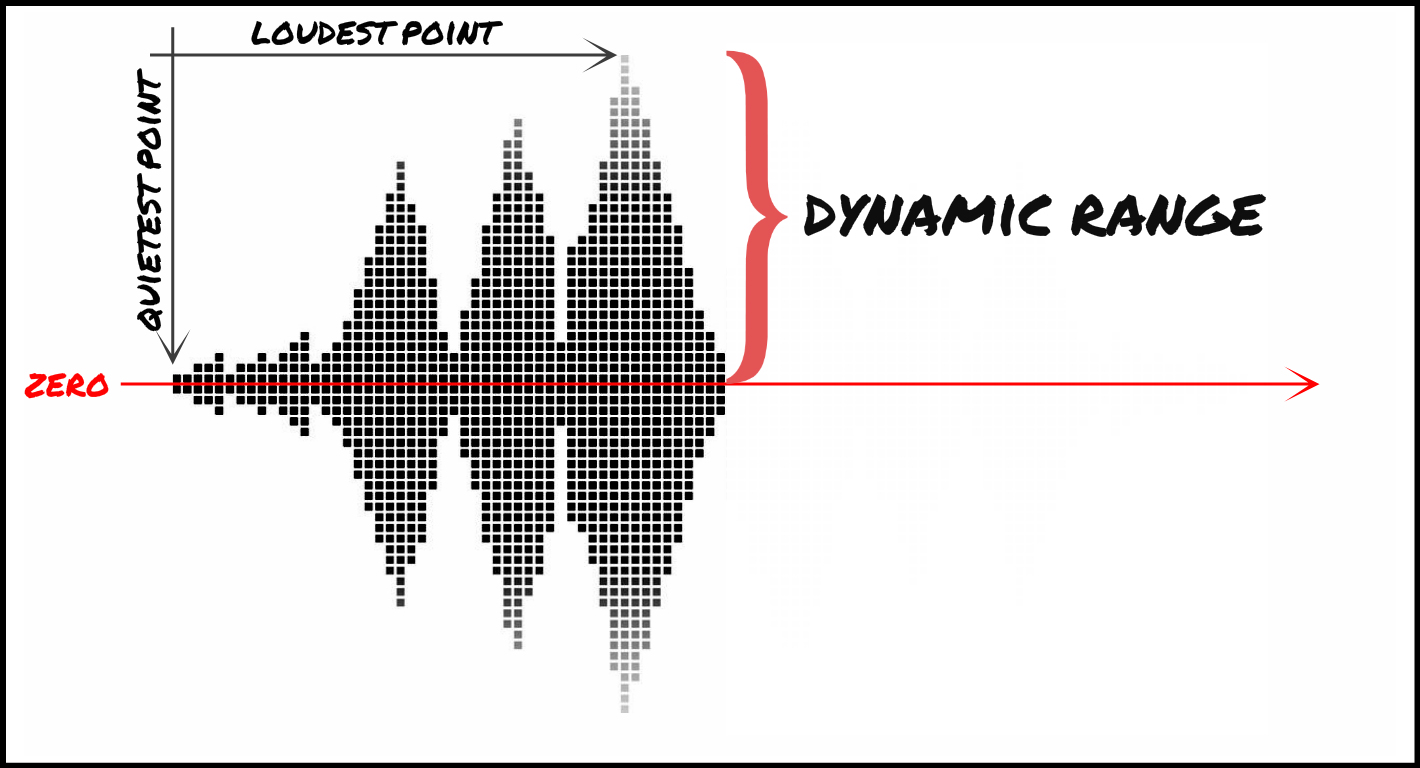
The concept of loudness is close and understandable not only for a musician, but also for people who are not associated with music. The relationship between the volume of the parts of a piece and the volume of the instruments that are playing simultaneously is called the dynamic range. One of the main tools producers and musicians use to influence dynamic range is the compressor.

Digital Audio Compression

Although the compressor works with a known phenomenon, loudness, in most cases its use occurs spontaneously, randomly, without understanding the essence of what is happening. You can know the general principle of the compressor and the purpose of each handle, but this does not eliminate the stupor at the first experience.

Why do you need a compressor?

The main purpose of the compressor is to automatically change the signal level. It works roughly the same as if you kept your hand constantly on the volume fader, turning it up and down. The difference is that a compressor can react very quickly to changes, much faster and more accurately than a human.

Up to this point, the word compressor meant a whole class of dynamic devices. Using the same basic principles as a conventional compressor, various instruments work for different purposes: limiters, expanders, gates, etc. They are united by working with the volume of individual sounds or the mix as a whole.

The classic compressor is controversial by its very name. Everyone knows that he makes the loudest sound. But the name comes from compress, which means “compression”, and if you ask any sound engineer what a compressor does, you’ll hear the answer: “squash the signal.” The compressor reduces the amplitude of the dynamic bursts, makes them quieter. So what is the main purpose of the compressor: to make it quieter or louder? The answer is both at the same time.

Let’s take an example of voice recording. Very often, in the process of singing, syllables or sounds of different volume are heard. If the singer does not control the dynamics of his performance very well, then such differences create problems for the sound engineer and negatively affect the final result of the work. Silent syllables disappear into the mix, text becomes difficult to distinguish, and if you adjust the volume for a quiet area, in other places the voice begins to “stand out.”

This is where the compressor comes in. It allows you to suppress strong bursts, equalize them with silent fragments. Now you can turn up the volume of the track without fear of some syllables sticking out. So the compressor makes the sound lower and higher at the same time. Three images show the stages of working with sound: a source with large peaks (a), a compressed signal (b) and an increase in the volume level of the entire file (c).

It is especially important to apply compression when recording in a digital environment, when we are forced to adhere to a maximum level of 0 dB, because exceeding this threshold leads to clips and distortion. When clips appear, we lower the preamp level, which means we lower the volume of not only bursts, but quiet areas as well, leading to signal degradation due to quantization and aliasing noise.

The compressor, positioned between the preamp and the digital recording system, operates only on the loudest bursts, reducing their volume and ensuring a smooth soundtrack. Thanks to this, we have the opportunity not to reduce the overall volume of the recorded signal and to maintain the sound quality.

Unfortunately, many modern musicians, without going into the technical characteristics of the compressor, use it everywhere, believing that with its help you can “stretch” any sound in the mix. Also, compressors are often included on the road in extreme conditions. They are only used by experienced sound engineers when there is a real need.

The compressor helps avoid recording problems. The most common causes of problems can be the following:

Non-professionalism of the interpreter (dynamic unevenness).
Mismatched path (bad, mismatched, or inadequate microphones, preamps).
Disadvantages of the digital environment (limited to 0 dB).
Uncomfortable conditions for the singer (small and stuffy room, poor monitoring).
Low qualification of a recording engineer.
If a performer has a voice and can sing into a microphone, and a recording engineer knows her job well and knows how to properly position microphones and set up equipment, a compressor may not be required at all. But this is the ideal situation.

The cinema compression algorithm was implemented in real life.

The cinema compression algorithm was implemented in real life.

Pied Piper compression tool

During an intense workday, Dropbox developers brought to life the fictional Pied Piper algorithm from the Silicon Valley television series.

Dropbox Engineers Recreate the Pied Piper Algorithm

Within days of encoding, we managed to get a working solution based on OpenH264, which demonstrates up to 13% compression for H.264 videos and 22% for arbitrary JPEG files, the publication reports. In this case, we are talking about honest lossless compression, when the compressed file can be returned to its original state with bit precision.

The source code for Pied Piper (losslessh264) is released under the free BSD license.

The developers of the Pied Piper codec copied everything from the movie: its functionality (compression and decompression of files without loss of quality), and even the name.

A “prank” development can save Dropbox a lot of money, as the company stores exabytes of files on its servers. Even a 1% savings allows you to get rid of at least 50 server racks, what can we say about compression by 13-22%, the journalists calculated.

Dropbox put ten programmers on this project at once. They are fine-tuning the version of the codec originally created during the hackathon.

Lead developer Daniel Reiter Horn says the algorithm fixes some legacy and ineffective encoding methods used to compress H.264 and JPEG files.

Compressors and compression

Compressors and compression.

Dynamic Audio Compression

Of all the processes used in modern music production, signal compression is perhaps the most difficult to perceive. First of all, this is due to the fact that often the result of sound processing by the compressor is barely audible, especially to beginners.

dynamic range of an audio compression
Another difficulty lies in the number of variable compressor parameters: they are not as few as it might seem and, moreover, changing each of them does not always lead to obvious results. The fact that these parameters are interrelated only significantly complicates the situation. And finally, an ordinary sound engineer can simply be confused by the astonishing variety of compressor types and models – he will have to think hard about choosing a suitable device before beginning his direct duties. Here’s the one for you which is a trivial example: Let’s say you really want to compress a record. Which is the best option? Compressor based on VCA (voltage control amplifier), or based on an optoelectric element? Transistor or tube (or maybe a hybrid of both)? Analog or digital? Hardware compressor, or is it limited to the program that performs its functions? And so on and so on. Which is the best option? Compressor based on VCA (voltage control amplifier), or based on an optoelectric element? Transistor or tube (or maybe a hybrid of both)? Analog or digital? Hardware compressor, or is it limited to the program that performs its functions? And so on and so on. Which is the best option? Compressor based on VCA (Voltage Control Amplifier – Voltage Controlled Amplifier), or based on an optoelectric element? Transistor or tube (or maybe a hybrid of both)? Analog or digital? Hardware compressor, or is it limited to the program that performs its functions? And so on and so on. Or on the basis of an optical-electrical element? Transistor or tube (or maybe a hybrid of both)? Analog or digital? Hardware compressor, or is it limited to the program that performs its functions? And so on and so on. Or on the basis of an optical-electrical element? Transistor or tube (or maybe a hybrid of both)? Analog or digital? Hardware compressor, or is it limited to the program that performs its functions? And so on and so on.
With so many options available, it’s no surprise that compressors and compression remain a mystery to many users. However, if you decide to achieve some success in recording and mixing, you simply need to master the skills of working with signal compression. Furthermore, all the main directions of modern popular music, with the exception of classics and some jazz trends, are directly related to compression. There is a simple rule: if you don’t know how to use the compressor correctly,
This article will guide you through the maze of all kinds of nuances that arise when working with a compressor, as well as shedding light on the characteristics of its practical application. We will start with the basics of signal compression, then give some examples on how to use compressors. Also, we will talk about the compressor features that you need to pay attention to and why it is important. Finally, I will introduce you to the different types and designs of compressors, I will tell you about some of the models and offer you different opinions on how

Because it is necessary?

Compression belongs to the category of dynamic processes. The term dynamics in a musical environment (and not only) means a change in the volume level. Therefore, the dynamic range of a signal is the difference between its lowest and highest levels. The goal of a dynamics processor, simply put, is to decrease or increase the dynamic range of a signal, which in effect leads to limiting the volume level within this range. The types of dynamics processors include devices such as expander, limiter, gate, well,
A compressor is a type of dynamics processor that “lowers” the dynamic range of a signal and, due to this, reduces the difference in volume level between the subtle and “peak” parts. The process of reducing the volume is called gain reduction. With enough experience, this process can achieve a tighter sound by an order of magnitude. For this reason, compression is the best tool for features that vary greatly in level.

By narrowing the dynamic range, the compressor raises the overall level of the signal, preventing distortion in the loudest parts of the signal. At the same time, using compression, you can adjust the quietest, almost inaudible sounds, such as the squeal of the strings and the jingle of a drum spring; the compressor will make them stronger, cleaner.

Dynamic compression

Dynamic compression

dynamic compression

Dynamic Compression (DRC): narrowing (or expanding in the case of an expander) the dynamic range of a soundtrack. Dynamic range is the difference between the quietest and loudest sound. Sometimes the lowest sound on the soundtrack will be a little louder than the noise level, and sometimes a little lower than the loudest. The hardware devices and programs that perform dynamic compression are called compressors, distinguishing four main groups among them: the compressors themselves, limiters, expanders, and gates.

dynamic compression

Up and down compression

Creep Compression lowers the volume when it exceeds a certain threshold, leaving quieter sounds unchanged. The extreme downward compression option is the limiter. Increase compression (upward compression), conversely, increase volume if it is below a threshold value without affecting louder sounds. In this case, both types of compression reduce the dynamic range of the audio signal.

Expander and gate

If the compressor decreases the dynamic range, the expander increases it. When the signal level rises above the threshold level, the expander raises it further, thus increasing the difference between high and low sounds. These devices are often used when recording drums to separate the sounds of some drums from others.

A type of expander that is used not to amplify loud sounds, but to drown out quiet sounds that do not exceed the threshold level (for example, background noise) is called a noise gate. In such a device, as soon as the sound level falls below the threshold, the signal flow stops. Normally, the door is used to suppress noise during breaks. In some models, you can make sure that the sound does not stop abruptly when the threshold level is reached, but gradually fades away. In this case, the decay rate is set with the Decay knob.

The gate, like other types of compressors, can be frequency dependent (that is, handle certain frequency bands differently) and can operate in side chain mode (see below).

Compressor working principle

The signal entering the compressor is divided into two copies. One copy is sent to an amplifier, in which the degree of amplification is controlled by an external signal, the second copy forms this signal. It goes into a device called a side chain, where the signal is measured and based on this data, an envelope is created that describes the change in its volume.
This is how most modern compressors are organized, this is the so-called feed-forward type. In older devices (feedback type), the signal level is measured after the amplifier.

There are several analog variable gain amplification technologies, each with its own advantages and disadvantages: tube, optics with photoresistors, and transistor. When working with digital sound (in a sound editor or DAW), you can use your own mathematical algorithms or emulate the work of analog technologies.

Basic parameters of compressors
Limit
The compressor reduces the level of the audio signal if its amplitude exceeds a certain threshold value. Typically specified in decibels, a lower threshold (eg -60 dB) means that more sound will be processed than a higher threshold (eg -5 dB).

Proportion
The amount of level reduction is determined by the ratio parameter: the 4: 1 ratio means that if the input level is 4 dB higher than the threshold, the output signal level will be 1 dB higher than the threshold .
For example:
Threshold = −10 dB
Input signal = −6 dB (4 dB above threshold level)
Output signal = −9 dB (1 dB above threshold level)

It is important to note that the suppression of the signal level continues for some time after it falls below the threshold level, and this time is determined by the value of the release parameter.

Compression with a maximum ratio of ∞: 1 is called limiting. This means that any signal above the threshold level is suppressed down to the threshold level (except for a short period after a sudden increase in input volume). For more details, see Limiter below.

Attack and release
The compressor provides some control over how quickly it responds to changes in signal dynamics. The Attack parameter determines the time it takes for the compressor to reduce the gain to the level determined by the Ratio parameter.

Digital audio compression

Digital audio compression

Digital Audio Compression

Audio data compression is a real problem today. There are two reasons for the need to compress audio data: memory savings when storing audio information, low bandwidth of remote digital information transmission channels. Compression effectively solves the two problems above. Data compression is an algorithmic transformation of data performed to reduce its volume.

Data Compression

It is used for a more rational use of data storage and transmission devices. Compression is based on eliminating the redundancy contained in the original data. To guarantee the parameters necessary for the transmission of voice signals (music) over modern low-speed digital communication channels and to guarantee the specified noise immunity, it is necessary to use highly efficient data compression algorithms. The transmission channel is characterized by a concept such as the capacity of the channel: And the signal – by the volume (signal): …

Both of the above features include dynamic range D, channel width (signal spectrum), and transit time T. Digital audio compressors are used to reduce dynamic range. To improve spectral efficiency, digital filters are used to limit the spectrum of the encoder output signal (according to Nyquist criteria). Among other things, encoders based on the principles of elimination of redundancy (Huffman codes) are used to guarantee a certain information transmission speed. The essence of which is as follows: codes based on the principle of assigning more probable values ​​of the amplitudes of the codewords of shorter length than the improbable ones.

Let’s consider how the types of redundancy described above are eliminated.
Structure of a lossy audio compression encoder The original digital audio signal is divided into frequency subbands and time-segmented into a time-frequency segmentation block. The length of the encoded sample depends on the shape of the temporal function of the audio signal. In the absence of sharp peaks in amplitude, a long sample is used, which provides high-frequency resolution. In the case of abrupt changes in signal amplitude, the length of the encoded sample decreases dramatically, giving a higher time resolution. The decision to change the length of the coded sample is made by the psychoacoustic analysis unit, calculating the value of the psychoacoustic entropy of the signal.
After segmentation, the frequency subband signals are normalized, quantized, and encoded. In the most efficient compression algorithms, it is not the samples of the audio signal that are encoded, but the corresponding MDCT coefficients. (the differential between the coefficients is smaller) The accounting of the auditory perception patterns of a sound signal is carried out in the psychoacoustic analysis unit. Here, according to a special procedure, for each frequency sub-band, the maximum allowable level of quantization distortion (noise) is calculated, in which they are still masked by the useful signal of this sub-band.

The block of dynamic distribution of bits according to the requirements of the psychoacoustic model for each coding subband selects a minimum possible number of them, in which the level of distortions caused by quantization does not exceed the threshold of their audibility calculated by the model psychoacoustic.

This article will consider the functional diagrams of the audio data compression algorithms, based on µ-laws, A. The functional diagram of the compression algorithm based on the A-level compression law is shown in Fig.2. Figure 2. Functional diagram of the compression algorithm based on the A-level compression law A signal (discrete sine) is applied to the input of the compressor. After compression, the signal passes to the adder, where the noise is fed to the second input of the adder, thus simulating the additive noise of the transmission channel.

Then the noisy signal enters the input of the expander, at the output we get the reconstructed signal. The reconstructed and original signal is then fed to the adder, after which the power of the spectral noise is observed.

Simulation results (A = 87.6)
The following graphs are presented: 1-original signal, 2-signal passed through the compressor, 3-recovered signal, 4-noise power at the output of the noise generator, 5-noise power after the expander.

TV and digital movies by interet

TV and digital movies by interet

digital movie library

By digitizing a real analog video signal (for example, a film or television broadcast) in high or even medium quality, you get a huge amount of data. Such an amount of digital information is impossible not only to transmit over the Internet, but even to record on the media available now. Therefore, special data compression, or compression, methods have been developed for storing and transferring video files.

TV Shows and Movies With TV Online

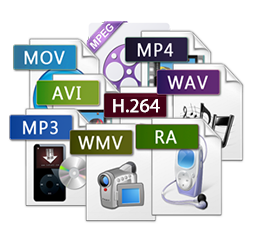
There is currently no single generally accepted compression standard. Among the most used are MPEG, AVI, RealVideo and QuickTime. These algorithms are characterized by different compression rates and, consequently, different quality of the resulting “image”. (Compression implies the loss of certain information). If you only need to save your video material to CD-ROM or DVD-ROM, you can use algorithms that provide higher image quality. But if you want to stream video over internet channels with limited bandwidth, then the compression ratio should be significantly higher.

To transmit video information over the Web, in addition to its compression, special “transport” programs are required, each of which includes a transmitting part located on the server and a receiving part (video player) on the server. user’s computer. The most popular programs today are Microsoft’s Windows Media Service and Real Networks’ RealVideo, which uses the compression format of the same name.

The task of the broadcast transport program is to deliver the video signal in real time immediately after the user presses the corresponding button. In this case, the video transmission can be carried out according to various schemes. For example, Unicast technology is suitable for viewing video files, when the server sends multiple copies of the same data, one copy for each user. However, with a large number of identical requests, the load on the line increases dramatically. Therefore, for the transmission of terrestrial television programs to a wide audience, the technology of “group transmission” (Multicast) is used. In this case, the video server sends only one copy of the data, “spread” by the routers on the network. At the same time, the network is not overloaded, because no more than one copy of data passes along each line, regardless of the number of connected users.

SD, HD, 3D and Ultra HD – Digital TV Formats Explained

SD, HD, 3D and Ultra HD – Digital TV Formats Explained

SD, HD, 3D and Ultra HD Formats

Digital television offers you several additional benefits and services. But what do the terms related to SD, HD, 3D and Ultra HD digital television mean? In this article we will try to explain their main essence, as well as the differences between them.

sd hd 4k 8k

First, it should be explained how digital and analog TV differ, especially since both are available in Georgia.

Technically, the transmission of an analog picture is in a continuous wave form, whereas a digital television picture is a stream of encoded digital data. From a practical point of view, digitizing data allows you to send more information to your televisions. The result is much clearer images, better sound quality, and more channels. Therefore, if you use a modern digital television at home and receive the signal via satellite, digital cable and digital terrestrial transmitter, you can be sure that you get the highest quality.

The new digital television formats require more transmission capacity and satellite is indispensable here. Satellite is the most reliable and efficient means (of the existing ones) to transmit television programs to the continent, especially in mountainous regions, where there is practically no limit on the number of digital satellite television channels that can be transmitted. Consequently, by means of a satellite it is possible to cover the entire population of the world.

The satellite signal is transmitted through the “Direct-To-Home / DTH” satellite dish, the satellite signal is also transmitted to terrestrial DTH providers for further transmission. Satellite television offers the viewer a wider selection of channels and experiences compared to other forms of television transmission.
Standard definition (SD) and high definition (HD) television

When we talk about SD and HD, first of all, we are dealing with the term “resolution”. Simply put, it is the image quality that your television device can display.

The term “standard definition”, or SD TV, became relevant when high definition television came into use, before all televisions were standard (both analog and digital), and the specifications of the specified format were considered acceptable. The fidelity of standard television is a comparative basis for the analysis of all other formats, any format beyond its borders is considered high definition. The SD format was quite good for standard 24-inch televisions, but then the population began to buy LCD and plasma televisions with screens 2 to 2.5 times larger, and the difference between SD and HD resolutions became quite obvious. For example, when watching a football game in SD format, you can see the ball, the players and a green background, while in HD you can also see the grass and the faces of the fans.

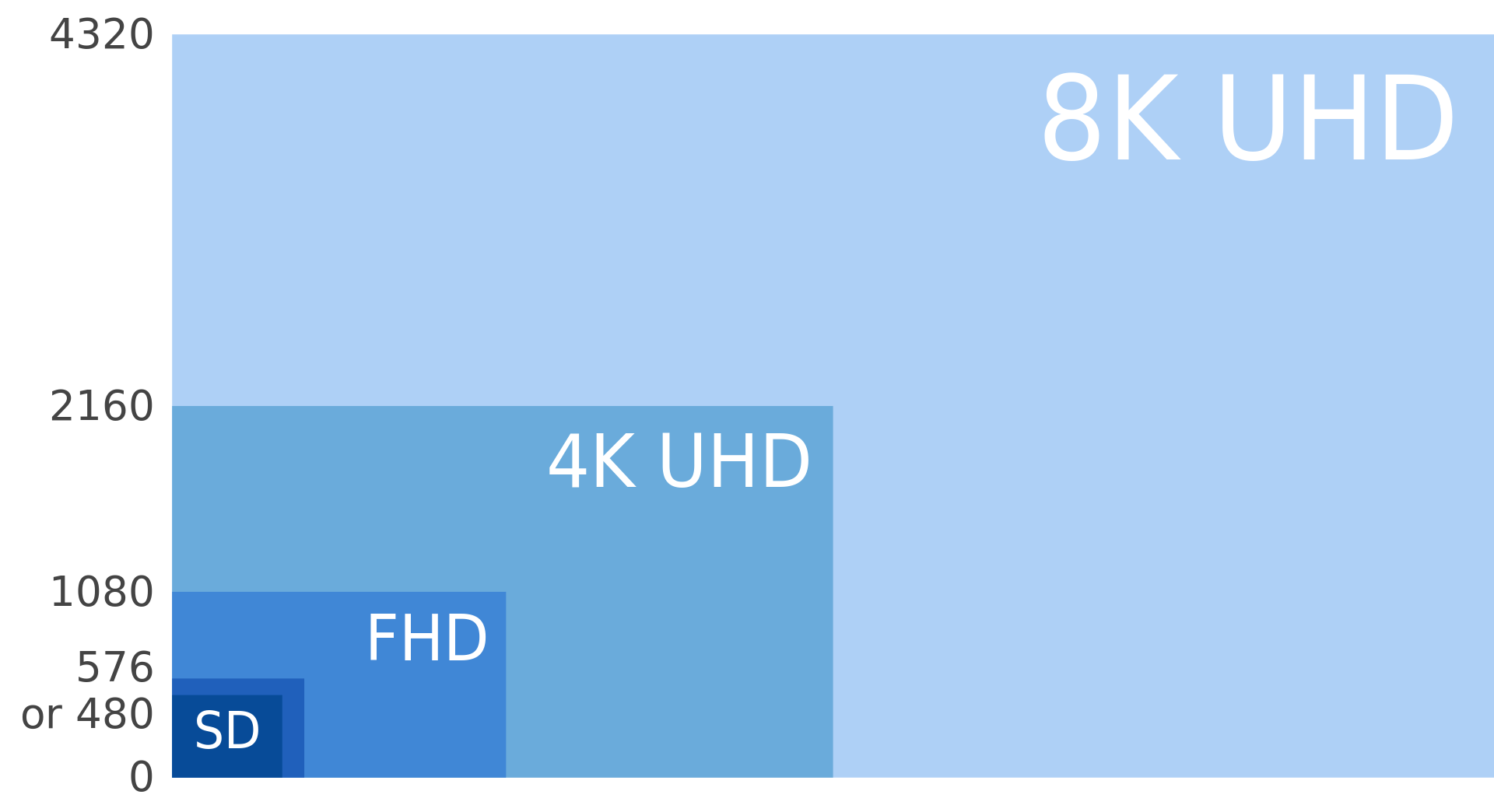
In conclusion, we can say that high definition television (HD) is a digital transmission format that allows you to receive higher quality images on your television screens. HD channels allow you to receive images with richer, more saturated colors and fine details; consequently, the display process becomes brighter, more interesting and attractive. If we look at the numbers, we can say that an HD image is usually made up of 2 million (1080×1920) pixels. This translates to about 5 times more detail than SD (720×576), making HD broadcasts more natural and engaging. The more pixels in the image, the more details you will see and consequently the display of curves and diagonal lines becomes more seamless.

Deal with digital video formats

Deal with digital video formats

Digital Video Formats

With the advent of the first computers, and with them digital storage devices, a gradual transition from analog to fully digital technology began. With it, we got a number of undeniable advantages (ease of copying and processing) and a big digital data storage problem. How to avoid quality loss when processing video, we will tell you in our article.

digital video formats

How much does the video weigh

PAL or SECAM video is a sequence of images displayed at 25 frames per second. A digital frame contains 720×576 pixels, that is, 414 thousand 720 elements (pixels). Each point can be one of 16.7 million colors and occupy 3 bytes on the computer. Consequently, one frame is approximately 1.2 MB. At the standard frequency, we get a figure of about 30MB per second, that is, storing just one hour of video (along with sound) without compression will cost 107GB. It seems intimidating, but it is already acceptable now.

But the progress of the video doesn’t stop. The highest possible quality is now achieved in HDTV (high definition TV), this format implies a resolution of 1920 x 1080 pixels, that is, all things being equal, a series of frames calculated for one second will already take 148 MB (521 GB per hour).

In order to avoid such volumes of stored video and waste of computing resources, as well as to be able to distribute video clips, various video compression methods have been developed. The achievements in the development of digital technology achieved over 15 years are actively used in everyday life, in video broadcasts, home devices (video cameras, DVD players) and on the Internet. Depending on the type of codec, you can achieve different compression rates and different “weight” of the finished film.

How compression occurs

Unlike universal archivers (such as WinRar or WinZip), video compression occurs with some loss, the amount of which depends on the selected codec. This is due to the fact that the algorithms of conventional filing cabinets practically do not compress the video information (as well as the sound). Modern compression algorithms use extensive logical analysis of the video to extract duplicate fragments between frames and reduce the size of the final file. When played, the compressed information is “expanded” and then displayed to the user. On a low-power computer, it can take a long time to break down images compressed with some codecs.

Various codecs are used to compress video

Most popular codecs

The most common codecs today are the MPEG family. It was based on the compression of photographs. We are all familiar with compact images with the JPG extension, and many can even distinguish a highly compressed image (with a cubic structure) from a high-quality one (with the naked eye, comparable to the original). The anatomical features of the human eye allow it to imperceptibly compress the image ten times using the JPEG encoder.

Strong compression

Maximum quality

In the given examples, you can see which artifacts, so-called cubes, appear in the photo that are incorrectly compressed (with a high compression ratio) and their absence in the photo with the correct compression. Such loss of quality with high compression by most codecs, including JPEG, is irreversible.