Main features of the sound card


Free Download Mp4Gain
picture

Main features of the sound card
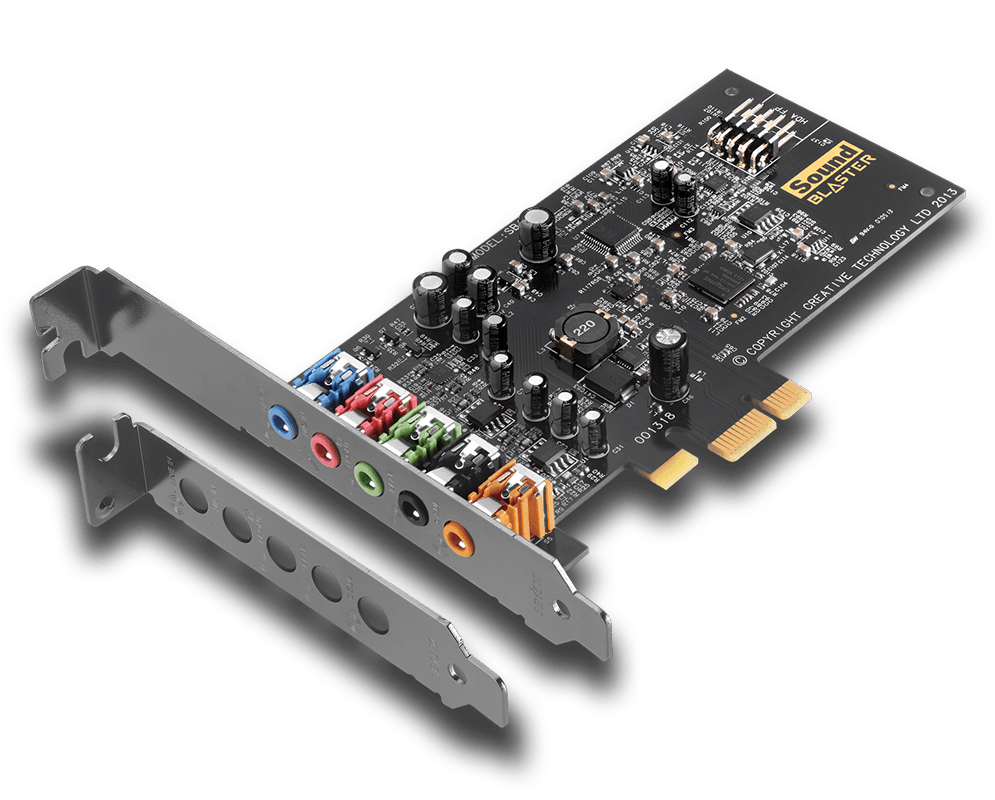
Sound Card

An audio card has a number of basic characteristics: location type, connection interface, a list of parameters for digital-to-analog and analog-to-digital converters (DAC, ADC), the number of supported sound processing standards, and the number of special inputs and outputs.
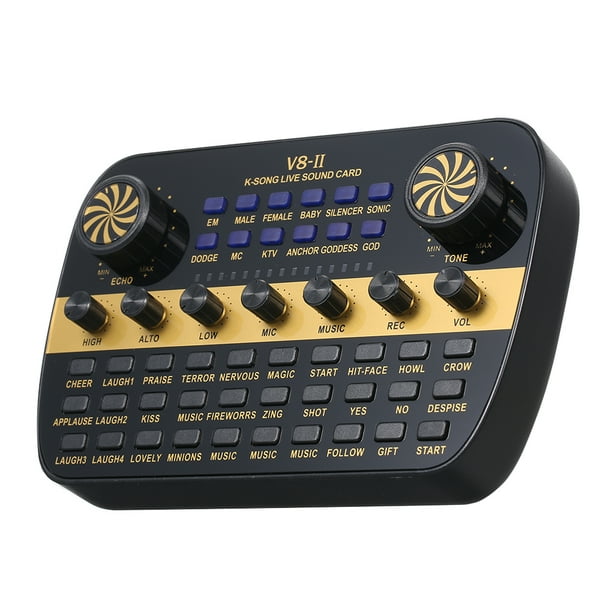
Sound Card

Mapping Type Even though a sound card has a large number of parameters that are worth paying attention to in the first place, the choice should start with its type of location. There are two types of sound cards per type of location: internal – installed directly in the system unit, which is quite practical, but not for professional use; These sound cards are subject to interference from other equipment installed inside the PC; external: the sound card is connected to the computer via an interface cable and is completely protected against interference.

There are internal sound cards with an additional control unit, which is installed in the five-inch bay on the front panel of the system unit.

This block can contain not only controls, but also inputs / outputs, which provides comfortable work with a sound card. PCI connection interface: the sound card is installed in a free PCI bus slot on the motherboard. PCI-E: the sound card is inserted into a free PCI-Express slot. This bus has good bandwidth and has replaced the PCI bus. USB is a standard interface connector for connecting external devices, in this case an external sound card. FireWire (IEEE 1394) is a high-speed standard for connecting external multimedia devices, another alternative way of connecting an external sound card. PCMCIA (PC Card) is a special interface for connecting compact peripheral devices.

Often used in laptops. ExpressCard, a laptop expansion card standard that replaces PCMCIA (PC Card), outperforms them in data transfer rates. ExpressCard uses the high-speed PCI-Express bus. Digital to Analog Converter, DAC Parameters Bit Depth – The number of bits in the digital to analog converter. The higher the number of bits, the better the signal at the sound card output. Most modern sound cards have a 24-bit DAC.

For example, Audio CD contains 16-bit audio, while DVD-Audio stores 24-bit audio. Dynamic range: ranges from 87 to 123 dB. The wide dynamic range allows you to accurately convey all the nuances of natural sound and provides higher quality sound to the output of your sound card. Signal-to-noise ratio: indicates the noise level and determines the quality of the sound output from the sound card.

Maximum frequency: the higher the frequency of the digital-to-analog converter, the better the signal at the sound card output. For example, on a normal audio CD, the sound is recorded at a sampling rate of 44.1 kHz, while on a DVD audio, 192 kHz. THD (Total Harmonic Distortion): range from 3.0E-4 to 0.013%. The lower the THD value, the clearer and more transparent sound will be obtained from the sound card output.


Free Download Mp4Gain
picture


Mp4Gain Main Window
picture


Mp4Gain Features
picture


Free Download Mp4Gain
picture

How sound is stored on a computer

How sound is stored on a computer

Sound in a computer

The term “audio” today means everything that is somehow connected with sound. This is processing, playing, mixing and simply listening to audio recordings. Few people know that during their existence all popular audio formats have undergone significant changes, sometimes for the better and sometimes even for the worse.

Sound omputer

The problem is that when the creators tried to improve the recording quality by using the new format, the size of the result increased significantly. Reducing the size of the final file resulted in a significant loss of quality. But this was not always the case.
First audio format used in computer games

The first mention of computer sound is associated with the creation of several primitive video games. Then the sound was played back using the speaker of the system. As the software developers of that time did not try, it was impossible to achieve the level of quality that would be compatible with tape and reel recorders. This is what got many developers thinking about how to change the audio format to make the sound more natural and natural. It is this problem that has led to the current competition in the audio market. As a result, the formats used strongly affect the quality of the reproduced material and the configuration of the basic playback parameters.

Wav
The first full quality of audio formats is associated with this particular format. The WAV extension designation was derived from the English word “wave”, which means wave in Russian. It was this format that became the first audio format to be processed with computer programs at a highly professional level. Files with a WAV extension had the following characteristics:

– depth of sound;
– sampling frequency;
– bit rate, etc.

This format was even compatible with the sound that could be obtained after processing an audio CD with an equalizer and other tools. However, the file size in this case was completely unwarranted. For example, the most common 3 minute long track could be up to 50 megabytes long.

CD

Audio CDs, or more precisely the .cda extension, appeared around the same time as the wav format. But unlike files with the wav extension, .cda cannot be edited. But it can be opened in any audio processing software, transcoded and formatted, and saved to your hard drive. Of course, you will not be able to save your changes to a CD.

MP3 codec

After the introduction of the LAME MP3 Encoder codec in the music industry, there was a real revolution in the audio world. Now the audio files are ten times smaller. At maximum compression, the size of a five minute composition rarely exceeds 7MB. This was a significant advance. Also, this extension finally implemented the ability to tweak some features and configure additional parameters, such as ID3 tags. They can contain information about the track title, artist, album, and release date.

Of course, this format immediately became widespread. Almost the entire Internet community uses this universal format. So we can say that the MP3 format has revolutionized the field of computer sound. Today it is one of the most demanded and popular audio formats. Although today it is already being replaced by other audio formats. But we will talk about this a bit later.

AIFF files

There are other types of audio files. This is the so-called aiff format. This format was originally created for use on Macintosh computers. A little later, a transformation occurred, as a result of which it was possible to achieve the compatibility of various audio formats and the possibility of their use on different platforms and operating systems.

OGG format

This audio format is also quite common. It was developed by the specialists of the Vorbis company. Please note that this format has several disadvantages. First of all, despite the small size of the files, using this format places a heavy load on the computer’s system resources.

Also, to work with this audio format, you must use your own decoders and codecs, which may not be installed automatically. For example, those who worked with the FL Studio Producer Edition program had to manually activate the installation file in .inf format to work with this format. Otherwise this app just won’t play OGG files. Despite all these shortcomings, OGG audio files are quite common nowadays and they sound good.

Let’s take a look at another audio file format: AMR. It can be safely attributed to low-quality audio formats.