Why does even digital audio deteriorate? Part 2


Free Download Mp4Gain
picture

Why does even digital audio deteriorate? Part 2

Digital Audio

I am not an audiophile, and I am not the type that is very demanding to listen, which is why I am not aware of so-called pure audio.
So I didn’t know Mr. Kanai at all, but he seems to be famous for that source.

Digital Audio

The reason I met Mr. Kanai was because I saw the serialized article “What is the definitive SACD born in the” Kaimaru Room “” from the “Ken Fujimoto Weekly Digital Audio Lab” which I have long subscribed to ? , this article was really interesting.

This is an interview article about the production process of Emi Fujita’s (Le Couple) work “Manzanilla Best Audio”, but it is very easy to understand the difference in mindset between the production side and the actual listener. I think .

Anyway, the content on Mr. Kanai’s HP was scaled content for me.
It’s a good opportunity, so I’d like to change my mind a bit.

Especially around surround sound, you need to study.
I cannot understand it at all because I have not tried surround sound as a real experience.

I am also very interested in SACD, but I am very concerned about buying a PS3 because I do not have a playback environment.


Free Download Mp4Gain
picture


Mp4Gain Main Window
picture


Mp4Gain Features
picture


Free Download Mp4Gain
picture

Why does even digital audio deteriorate?

Why does even digital audio deteriorate?

Digital Audio

It is not limited to DTM and DAW, I think if you are a musician you may have noticed the deterioration in sound quality.

Digital Audio

For example, change the shield to a higher one or allow it to be bypassed entirely when the effector is not in use.
When it comes to old stories, record without ping-pong as much as possible.

I don’t think the deterioration in sound quality bothers me, but I’m obviously not afraid of losing sound, so I’m careful.
But, it is simply an analog of the story in, don’t use your mind as I don’t say anything about digital audio.

Why?
That’s because I couldn’t fully understand the concept of “digital data degradation”.

When it comes to guitars, it’s easy to see that upgrading the various effectors and protectors between the guitar and the amp, and the protector that goes to the amp’s audio I / O “improves the sound.”
It is an analog signal.
But I couldn’t quite understand the history of changing the Firewire cable connecting the audio I / O to the PC to improve the sound quality.

It does not matter if it is via the Internet or copying from a medium, but when you think about it normally and transfer data digitally, there is no deterioration.
To be precise, transmission loss always occurs, so the signal itself deteriorates, but when the data of the transfer result is considered as the center, the picture is that the transfer retries increase rather than deteriorate, and on the user side. From the point of view, I don’t think it can be said that the transfer time has increased and the data has deteriorated.

If the transmission loss is very large, the file itself may be corrupted, and in the case of data to be processed in real time, the transfer may not be on time and the processing may result in an error, but it is transfers normally. In that case, I thought it was digital data that the data should be the same before and after the transfer, no matter how much transmission loss occurred or how long it would take …
(This is just my own expectation. I don’t know if it fits).

Also, in terms of sound, there are two patterns: deterioration of the analog sound quality, which is literally “deterioration” that produces sloppy sound like “thinning sound”, and noise mixed in the transmission path. I think that in the case of a digital data error, it is not a level that says “the sound is bad”, but it becomes a choppy sound or a loud sound that can only be called noise.

Even in digital, analog affects sound quality

Even in digital, analog affects sound quality

analog digital


Audio network audio for PC

analog digital audio

Whether you listen to music or watch videos on television, it is becoming more and more common to use digital data as a sound source.

With the improvement of the quality of communications, such as optical lines on the Internet, the amount of information is increasing and the enjoyment and choices for users are increasing.

However, whether you listen to music on a smartphone or PC audio, the sound quality of subscriptions differs by high resolution, but analog is really important to fully bring out the high quality of the source of sound.

Analog opinions that are not anti-digital

Official benefits! The initial construction cost is virtually 0 yen! Up to 37,500 yen off! You can start au Hikari at an incredible price!

Analog opinions that are not anti-digital
At first glance, the difference in the amount of digital information appears to be the deciding factor.
CD player whose analog circuit influences the sound.

At first glance, the difference in the amount of digital information appears to be the deciding factor.

Digital sound sources (software) that started with CDs are now changing for downloads and stories.

Music data has an Internet environment and digital devices, such as PCs, network players, and transmitters, receive digital signals and a DA converter converts them to analog.

The analog signal converted from digital is amplified by the amplifier and sound is output from the speaker.

Recently, it seems that the digital sound source in the smartphone is popular for products that play music directly from the speaker via Wi-Fi or Bluetooth, but in fact, the Bluetooth speaker has a DA converter that converts digital to analog. ..

From analog to digital and vice versa

From analog to digital and vice versa

Analog-to-digital

Today, almost 99% of sound recording, sound reproduction studio equipment, and music synthesizers are digital devices.

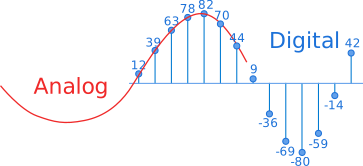
Everyone knows that even a typical home CD player uses a digital-to-analog converter and that music on CDs is written in 16-bit numbers. However, both the original sound and musical material (voice, classical musical instruments, electric guitars, etc.) and the sound output of your music center are analog signals, not digital signals. Therefore, for today’s recording industry, the key is to convert analog signals to digital and convert digital data to analog audio signals. Let’s try to find out how these transformations take place. The analog signal represents is a continuous process in time and amplitude, and its digital representation is a sequence or series of numbers that consists of a finite number of bits. The conversion of an analog signal to digital consists of two stages: time sampling and amplitude quantization. Time sampling means that the signal is represented by a series of its samples taken at regular intervals. For example, when we say that the sample rate is 44.1 kHz, it means that the signal is measured 44100 times per second. The main problem in the first stage of converting an analog to digital signal (digitization) is choosing the sampling frequency of the analog process. The answer is given by the well-known Nyquist theorem, which states that for an analog signal (continuous in time) occupying the frequency range 0 Hz to F Hz to be reconstructed with absolute precision from its samples, the frequency of The sample rate must be at least twice the maximum audio frequency F. Therefore, if the actual analog signal that we are going to convert to digital format contains frequency components from 0 Hz to 20 kHz, then the sampling frequency of that signal it should not be less than 40 kHz. Let’s take a closer look at what happens to an analog signal and its spectrum when sampled.

During sampling, the frequency spectrum changes significantly. The original analog signal tends to have a spectrum mainly concentrated in the frequency band from 20 Hz to about 20 kHz, since the usual pickups and microphones from which it is taken have about this frequency response. In addition, the signal often contains interference with frequencies of up to several hundred kilohertz. These are various “vans” difficult to remove from computer equipment, industrial and electrical appliances, trams, trolleybuses, etc. After sampling, the signal is a sequential time series of very narrow pulses with different amplitudes and with a very wide spectrum of up to several megahertz (a mathematical fact: the narrower the pulse, the broader its spectrum). Therefore, in general, the spectrum of such a pulse sequence expands to the same several megahertz. Therefore, the spectrum of the sampled signal is much broader than the spectrum of the original analog signal. Let’s take a closer look at how this new broad spectrum is set up. There are two important processes. First, the “convolution” of the entire original spectrum of the analog signal extending from approximately 20 Hz to several hundred kilohertz within the frequency band from 0 Hz to half the sampling frequency.

Convolution means that all components of the original analog signal, with frequencies above half the sample rate (and this is mostly inaudible noise)) fall in the frequency range audible to the human ear from 20 Hz to ” Average sampling frequency “Hz, ie Inaudible interference becomes audible and therefore the signal-to-noise ratio may deteriorate. All of this seems very unusual, not to say that it even contradicts common sense! It turns out that there is a sampling of high-frequency signals with frequency components that are significantly higher than not just half the sample rate, but also the sample rate itself. At first glance, this even contradicts the Nyquist theorem mentioned above. But let’s look at Fig. 4. It shows the process of sampling a high-frequency sinusoidal signal at more than two times less than its sampling frequency.

Analog-Digital Processing

Analog-Digital Processing

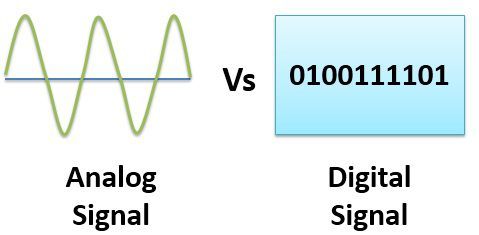
Digital vs Analog

A digital signal is obtained from analog or is directly synthesized into digital (in electric musical instruments).

DIGITAL ANALOG AUDIO

Converting from analog to digital involves two basic operations: sampling and quantizing. Discretization is the replacement of a continuous signal with a series of samples of its instantaneous values ​​taken at regular intervals. According to the Kotelnikov-Chenon theorem, a discrete signal can be completely restored later, as long as the sampling frequency is at least twice the upper frequency of the signal spectrum. The samples are then quantized according to level: each of them is assigned a discrete value closer to the real one. The precision of quantization is determined by the bit width of the binary representation. The higher the bit depth, the more quantization levels (2N,

The audio CD format has a sampling frequency of 44.1 kHz and 16 bits. This gives 44 thousand samples per second, each of which can take one of 216 = 65536 levels (for each of the stereo channels).

In addition to the 44.1 kHz / 16-bit format, others are used in digital recording. Studio recording is generally done in 20-24 bit, then the data is converted to audio CD by recalculation. The extra bits are then discarded or (better) rounded, sometimes pseudo-random noise is added to reduce quantization noise (dither).

The most advanced custom audio formats are DVD Audio and Super Audio CD (SACD). DVD Audio adopts the MLP lossless data compression algorithm developed by Meridian. And SACD, unlike other formats, does not use pulse code modulation (PCM or PCM), but one-bit encoding of the DSD (Discrete Pulse Width Modulation) stream. SACDs come in single or double layer (hybrid) discs with a normal CD layer.

The most popular audio medium today is compact disc, despite certain limitations in sound quality seen by audiophiles. The reason for them is in the low sample rate: for an accurate reconstruction of signals near the upper limit of the audio range, a filter that is not physically workable is needed (its impulse response covers the negative time area). This is compensated to some extent by digital filtering with higher sampling and bit depth. The data on the disc is redundantly encoded (Reed-Solomon code) to ensure smooth playback in real time.

Broadband communication is required for digital audio transmission, especially for uncompressed high definition multichannel transmissions.

Figure: 1. Digitizing an analog signal and obtaining digital samples on CD Audio and SACD (right)

DIGITAL AUDIO TRANSMISSION

The communication lines for digital audio transmission can be cables, optical lines, and overhead radio.

For the transmission of PCM signals over wired lines, AES / EBU (balanced, coaxial), S / PDIF (unbalanced coaxial) interfaces have been developed, which provide transmission of various signals (clock frequency, digital word rate, channel data) over a cable. Inside the devices, these signals are transmitted separately, at the output of the transport mechanism they are encoded and at the input of a digital-to-analog converter (in two-block systems) they are separated again in a digital receiver.

Typically, a high-quality coaxial cable is used for digital audio transmission. There are also S / PDIF converters for fiber optic lines: AT&T ST and Toslink (the latter is standard in consumer equipment). And also, for the use of twisted pairs in Ethernet cable networks. The medium of distribution for compressed audio in the form of archived files is the Internet.

Like any digital signal, digitized audio is distributed and switched by special devices: distribution amplifiers, matrix switches, and conventional.

There is one factor that negatively affects digital signals, and often negates almost all of the advantages of digital audio over analog, including the ability to repeatedly copy, stream, and archive programs without any loss of quality: we are talking about jitter. Jitter is jitter, or the uncertainty of a transition from 0 to 1 and vice versa.

Working with sound

Working with sound

Analog and Digital

Analog and digital audio

 Analog and Digital

Analog sound recording is based on the conversion of acoustic waves into electrical waves using a microphone. A microphone consists of a small membrane that can vibrate and a mechanism to convert the vibrations of the membrane into an electrical signal. (The exact electrical mechanism differs depending on the type of microphone.) Generally, a higher pressure corresponds to a higher voltage and vice versa.

The recorder transmits the waveform one more time, this time from an electrical signal through a wire to a magnetic signal on tape. When the recording is played back, the opposite process occurs: the magnetic signal is converted into an electronic signal, which makes the speaker vibrate (usually electromagnetic).

The main device for digital recording is an analog-to-digital converter (ADC, analog-to-digital converter, ADC). The ADC captures a chunk of electrical voltage on the audio path and presents it as a number, which is then transmitted to the computer. By capturing the voltage several thousand times per second, you can get a signal quite close to the original. The unit of capture is called a sample (each number in a sound file represents corresponds to a sample in a waveform).

There are two factors that determine the quality of a digital recording:

Sampling rate
The frequency at which samples are captured or played, measured in Hertz (Hz) or samples per second. A typical audio CD is recorded at a sample rate of 44100 Hz, more commonly known as 44 kHz for short. This is the same default sample rate used for most digitals.

Sample format (size)
The number of digits in the digital representation of each sample. Imagine that the sample rate is plotted horizontally and the sample size is plotted vertically. Audio CD is 16 bits wide, which corresponds to approximately 5 decimal places.

Higher sample rates for digital recording provide accurate recording at higher frequencies. The sample rate must be at least twice the highest desired sample rate. The average human ear is believed to be unable to distinguish frequencies above 20,000 Hz, so 44,100 Hz was chosen as the standard for audio CDs. Now the transition to the frequencies of 96 and 192 kHz is taking place gradually, in particular within the DVD-Audio format. However, many people just don’t hear the difference between 44.1 kHz and 192 kHz audio.

Larger sample sizes provide a greater dynamic range, that is, the ability to present louder and quieter sounds. If you are familiar with the decibel (dB) scale, you can give an example from ordinary audio CDs – its dynamic range is theoretically 90 dB, but it actually sounds lower than -24 dB. Audacity supports two more sample sizes: 24-bit, which is most often used in digital studio recording, and 32-bit floating point, whose dynamic range covers all imaginable needs, despite the fact that the data with these parameters occupies just twice the disk space compared to 16-bit audio.

When playing digital sound, a digital-to-analog converter (DAC) is used. In this case, to recreate the original signal and then digitized with the ADC, a sample is taken, from which a certain voltage is established at the analog outputs. The first CD players did just that, so the sound quality was not very good. Modern players also smooth out the audio signal by sampling within a range of the sampling frequency. The quality of the filters on the DAC also affects the sound signal that is recreated. The filter is one of the signal adaptation stages in the DAC.

The inevitable loss in the transition from analog to digital audio can be offset by a number of advantages of digital recording. Digital data can be copied as much as you like and there is no loss of quality. This data can be burned to a music CD or posted on the Internet as compressed files. Also, digital recordings are much easier to edit than analog tapes.

A personal computer has all the necessary devices to convert audio data from analog to digital and vice versa. First of all, it’s a sound card, an additionally installed separate device like Creative SBLive !, and maybe a sound chip built into the motherboard. In both cases, the audio device contains an analog-to-digital converter (ADC) to record sound and a digital-to-analog converter (DAC) to play it back. The operating system you are using interacts with the sound card,