Digital Video Editing


Free Download Mp4Gain
picture

Digital Video Editing
DIGITAL VIDEO EDITING

To understand the situation that has developed in the field of professional video editing, first of all, you need to understand how broadcast-quality video for television differs from video implemented on personal computers. Professional standards for high-quality television video have been developed over the years. Stringent television image quality requirements have spurred technological progress, which is why broadcast-quality digital video performance is significantly higher than computer video standards.

Digital Video Editing

Analog video
The oldest method of transmitting video signals is the analog method. Composite video was one of the first video formats based on this principle. Composite analog video combines all video components (brightness, color, sync, etc.) into a single signal. By combining these elements into a single signal, the quality of composite video is far from perfect. As a result, we have inaccurate color reproduction, an insufficiently “clean” image, and other quality loss factors.

Composite video quickly gave way to component video, in which multiple video components are represented as separate signals. Other improvements to this format have led to the appearance of various variations of it: S-Video, RGB, Y, Pb, Pr, etc.

However, all the above formats are still analog in nature and therefore have a major drawback: when copying, the shot is always inferior in quality to the original. The loss of quality when copying a video is similar to photocopying: the copy is never as clear and vivid as the original.

Digital video
The inherent disadvantages of the analog way of playing video eventually led to the development of the digital video format. Analog video has been replaced by digital. In the field of professional video, various digital video formats are used: D1, D2, Digital BetaCam, etc. Unlike analog video, the quality of which decreases when copied, each digital video copy is identical to the original.

Although modern video is based on a digital basis, virtually all digital video formats still use sequential tape as the carrier of the source signal. Therefore, most video professionals are still more used to working with films than with a computer.

Of course, film as a data source is even more preferable than a computer hard drive, as it can hold a much larger amount of data. But, on the other hand, for digital video editing, the use of computers brings a number of significant advantages: it not only provides direct access to any video fragment (which is impossible when working with film, since the necessary areas can only be achieved by sequentially viewing the video material), but also takes on extensive image processing capabilities (editing, compression).

These are reasons enough to switch video production from traditional equipment to computer equipment.

Digital computer video is a sequence of digital images and associated sound. Video elements are stored digitally.

There are many ways to capture, store, and play video on your computer. With the advent of digital computer video, a wide variety of video formats spontaneously emerged, leading to some confusion and interoperability issues at first. However, in recent years, thanks to the efforts of the International Standards Organization (ISO), uniform standards have been developed for video data formats, which we will consider later.

Compress video
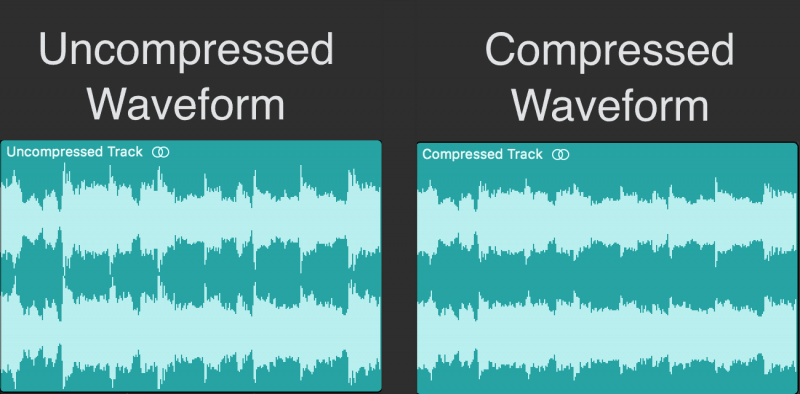
Reasonable sufficiency must be considered when determining the required compression ratio. However, you must consider how all four characteristics (frame rate, screen resolution, color depth, and image quality) affect the volume and quality of the video. You must be clear about the “price” you have to pay for a quality image. The higher the color depth, the higher the resolution and the better the quality, the more performance of the computer you will need, not to mention the enormous amount of disk space required for digital video. Taking these characteristics into account, you can choose the optimal compression ratio. It should be noted that there is a simple rule in professional video – the lower the compression ratio, the better.

Simple calculations show that 24-bit color video, with a resolution of 640×480 and 30 frames per second, will require 26 MB of data transfer per second. This flow not only goes beyond the bandwidth of the computer bus, but


Free Download Mp4Gain
picture


Mp4Gain Main Window
picture


Mp4Gain Features
picture


Free Download Mp4Gain
picture

The era of digital video

The era of digital video

Digital Video

In 1989, the Svema factory produced the last batch of amateur film in 8mm format. Five years ago the last laboratory for the development of this film was closed, and soon after, all the necessary chemicals disappeared from the sale … Thus, before our eyes, the era of home cinema ended and the era of amateur video began. . However, the latter, in turn, existed even fewer and, it seems, exactly the same fate awaits you: video is moving to digital formats.

Digital Video

So if you have a computer, buying an analog video camera and a board to digitize an analog signal (even a relatively cheap one, like MiroVideo DC20 / 30) seems at least a pointless waste of money today. The age of analog video is irrevocably a thing of the past, and we recommend that our magazine readers, before it’s too late, sell outdated analog hardware. Today, you can still get a third of the price for them, and if you’re lucky, even half …

Also, the same fate awaits television. For example, the state standard for high-definition color television (1,125 lines per frame), adopted in the United States in late 1996, has been successfully introduced into regular television broadcasting for the past three years. Inexpensive set-top boxes were launched for existing 525-line analog color televisions, and a decision was made in 2006 to stop broadcasting in analog format entirely.

All these innovations will gradually lead to the fact that fans of traditional videotapes will have to say goodbye to their clumsy “video boxes”: current alternative technologies are of much better quality, and moreover, they have a constant tendency to become cheaper. (Potentially, with increasing popularity, they will cost even less, than analog formats that have already reached their “ceiling”).

The excellent quality of DVD video recorded in MPEG-2 format is already capable of encouraging the average viewer to switch. The only limiting factor at the moment is that DVDs cannot yet be burned at home.

The hurdle is quite serious: many of us like to shoot home videos on amateur camcorders, rewrite movies, and play around with video editing. Furthermore, even with the massive proliferation of DVD-RAM in the foreseeable future, camcorders are unlikely to switch to new media (although Sony has already released digital cameras that use MD discs as media).

However, in addition to digital video DVDs, the MPEG-2 compression algorithm (albeit somewhat simplified and modified) is used in modern digital video in DV format (as opposed to the classic MPEG algorithm with I, B and P frames, in DV the data is recorded on cassettes using compression based on I-frames only). Furthermore, in the DV format, unlike Motion-JPEG, both intra-frame compression, in which each frame is compressed by itself, without taking into account the information of adjacent frames, and inter-field compression, which applies analyzing still images in adjacent frames using the same background. These compression algorithms produce very few artifacts. At the same time, video in DV (I-MPEG) format looks much better than the current de facto standard for non-linear editing systems: M-JPEG (Motion-JPEG) and,

For storing large amounts of video data at 500 TVL (TVL) resolution in component format with separate chrominance and luminance signals (Y, RY and BY) and 4: 1: 1 sampling (4: 2: 0 ) on small media, DV format uses 5: 1 compression (fixed stream – 3.6 MB / s). At the same time, Sony experts say that the quality of DV images is not inferior to the modern professional standard Betacam SP used in studio video equipment (differences appear only in the case of additional video processing as a result of compression image and some loss of color information during sampling). Professional modifications to the DV standard are also being successfully introduced: Sony’s DVCAM and Panasonic’s DVCPRO (in the latest implementations of these formats, the same 4: 2: 2 sampling is used as in Betacam SP).

Excellent consumer digital cameras already exist on the mass market.

Digital Video

Digital video

Digital Video

Little by little, all the equipment for the production of television and video programs in the world is going digital. Why is this happening? Not at all due to the fact that digital methods are admired by all and that the image quality is radically improving, the reasons for such a transition are mainly economic, because now both the price and the cost of operating a digital complex are less than a traditional analog one with the same functions. Now that digital technology has reached a certain maturity, analog equipment is suddenly less efficient, less reliable, and much less profitable.

DIGITAL VIDEO

EN The very foundations of video production and delivery of images to the viewer are currently being revised, and the dynamics of change in the current age – digital – is much higher than in analog. Today, for example, the 4: 3 aspect ratio is gradually being replaced by the 16: 9 aspect ratio, interlaced-progressive (non-interlaced) scanning and changing encoding standards increase image quality. The economy also dictates the need to compress video information. Naturally, any compression degrades the quality of the rendering and is applied not for a good life, but out of necessity.

Do not think that video compression was not used before and that it only appeared with the advent of digital technologies. No, compression has always been used, but only before it was analog, and today it is necessary to make it completely digital, getting rid, as much as possible, of double compression, that is, both analog and digital.

Modern digital compression methods, which have replaced analog, especially when combined with computer technology, can not only improve the quality of the video itself, but also expand the possibilities of video production and optimize the display of audiovisual products.

Basic concepts of digital transformation
P Essentially, the digital representation, or digitization, is a partition of the domain of a continuous function in some intervals and the representation of this function as a set of values ​​at the end of these intervals. So, for a digital sound signal, the second interval on the time scale is divided into 32, 44 or 48 intervals, in each sample the sound is measured and its value is stored with a certain representation precision, generally from 14 to 20 bits. These operations are called sampling processes, that is, the representation of any continuous quantity (in this case, sound) through periodic discrete measurements. After that, they say that the sound is digitized with a sample rate of 32 to 48 kHz, respectively, and a bit depth of 14 to 20 bits. Therefore, the digital current

In digital video, the process of sampling a value is simply generalized to a multivalued function that has an area of ​​value, not a number, but an image (that is, it becomes three-dimensional) in order to break the solid lines of an image (scanning beam) in so-called pixels, or image elements, our three-dimensional. the space will be because when the image is presented at each moment of time, it is not a value, as in sound, but the whole image: a frame. As a result, the video signal is also represented as a sequence of integers, in other words, as a stream of data.

In the case of (separate) component analog video signals, each channel must simultaneously transmit three color components (red – red, green – green and blue – blue, i.e. RGB) or a luminance signal together with signals of color difference (YUV). The conversion of RGB color components into YUV components is one by one, but the latter method allows to emphasize the change in the brightness of the signal, for which the human eye provides a separate perception mechanism, with the help of the rods. in the retina, in contrast to the perception of color made by the cells of the cone. Rods are more sensitive than cones, so in systems with separate component coding (e.g.

Sampling theory, in turn, requires that the sampling frequency be at least twice the bandwidth of the signal to be digitized. In the case of a broadband signal (for sound, that is, for example, the simultaneous reproduction of several octaves of frequencies), the sampling frequency must be at least twice the highest frequency of the input signal analog

High definition video

High definition video

High definition vIDEO

A digital image is the result of a mathematical calculation, in which the number of pixels appears as one of the main parameters, which determines the spatial resolution. Each pixel is assigned a certain value of the luminance signal and the chrominance signals at a given bit depth – the number of bits. The higher the resolution and the more color gradations and brightness levels, the higher the image quality (and, of course, the greater the amount of digital information). When receiving high definition images, all the video information in the camera head is processed and output in the form of HD or HDV video signals, just like a conventional camcorder.

high definition video

While PAL cameras typically record a signal captured by conventional interlaced scanning, HD cameras offer a choice between interlaced and progressive recording formats. The choice of recording format has a significant impact on the resulting image quality. In interlaced mode, the camera generally works with a vertical filter that can reduce vertical resolution by up to 30%. However, filtering is necessary, otherwise when using equipment in cathode ray tubes, it would be impossible to get rid of the annoying jitter of the image lines. When recording in progressive mode, this problem does not arise and the filter is no longer necessary. Similarly, progressive recording provides better motion resolution because all lines are recorded at once. (See FRAME RATE). Therefore, progressive recordings are much sharper than interlaced images for the same number of lines.

By their own principle of operation, all new display systems, such as plasma and liquid crystal displays (TFTs) and projectors, are progressive. When an interlaced signal is sent to them, the latter must first “break free” from the interlaced structure (“deinterlace”), which is very difficult, requires additional processing, and does not always lead to success. On the other hand, progressive signals are directly reproduced by such screens and deinterlacing becomes unnecessary. Therefore, progressive formats can be expected to prevail in the near future.

DATA TRANSFER RATE (BIT RATE)

The data transfer rate, or the value of the digital stream, or the bit rate is a parameter that determines the amount of visual and audio information transmitted per unit of time. With the same type of compression, a higher bit rate will provide a higher quality signal. When using different compression schemes, the quality will be determined by both the bit rate and the efficiency of the compression. For example, the same bit rate in an MPEG-2 signal provides higher quality than a DV signal because MPEG-2 is more efficient.

COMPRESSION (COMPRESSION)

The video data compression procedure is the condensation (merging) of similar pixels located within the same or adjacent frames in adjacent frames. Similar visual structures in different frames are highlighted by analysis and condensed within a certain number of frames, or so it is called. “Group of Pictures” GOP (Group of Pictures). When audio signals are compressed, “inaudible” information is simply removed from them.

MPEG- the general name of the technological platform created by the International Organization for Standardization ISO (International Organization for Standardization) and the International Electrotechnical Commission IEC (International Electrotechnical Commission). The latter has developed a series of standards for encoding original video and audio signals, which are collectively called MPEG standards. The term MPEG itself is an abbreviation for Motion Pictures Experts Group, which means “Motion Picture Experts Group”. The MPEG group is dedicated to the standardization of digital video and audio compression technologies. The MPEG standards are formed on the basis of a common basic structure that allows a fairly great freedom of configuration and has several levels. Each level describes certain characteristics,

The MPEG2 standard encompasses the technologies found in any DVD player, no matter where it works, and in all digital television systems. HDTV platforms use MPEG2 video compression in MP @ HL (High Level Main Profile) at the following bit rates: 15 Mbps at 720p50 and 19 Mbps at 1080i25. signals are easier to compress, 720p50 with the same image quality is performed at a lower bit rate. For this reason, the European Broadcasting Union (EBU) proposed to use 720p50 as the broadcast format in Europe (see EBU section).

What audio format should I choose?

What audio format should I choose?

Best Audio Format
Everybody loves music. Some listen to it on the way to work, and others can’t go a minute without their favorite songs. Listening to music comfortably depends not only on the mood, the time, the moon phase and good headphones, but also on the audio format in which it is stored on our devices.

Best Audio formats

In the 21st century, streaming services are becoming popular, but most people still store music offline and listen to it from their phones, players, audio systems, etc. But this post is not a discussion “Which headphones are better?”, “Why listen to music?” or “Why vinyl, not CD?”, but a brief summary of today’s most popular digital audio formats, their pros and cons. I will not analyze them all, and I will not compare different encodings, the differences “this AAC from this AAC”, but I will try to count in an accessible way the differences of some popular audio formats from each other.

So what is the best way to store your music collection? Today, there are many digital audio formats, and if you want, you can see a list of them on Wikipedia. But we will focus only on MP3, AAC, WMA and FLAC.

MP3

The most popular audio format and nobody can argue with that. Why is it so popular? It’s simple, because Mp3 was the first audio format with the best ratio (at the time) of file size and quality when compressed. Therefore, most of the songs were translated into MP3, which served as the undisputed primacy of the audio format on the market.

The advantages are clear from the previous paragraph: small size, tolerable compression loss, ubiquity, compatibility with all devices, and also, due to the small size, you can store a large collection of songs on a medium with little memory capacity, which it is also an advantage for some.

But Mp3 also has some disadvantages. Even though compression losses are not visible to ordinary people, knowledgeable people will notice them immediately. This is a low sound quality compared to other audio formats, as well as a “cut” of frequencies above 17 kHz, which is felt by ear with good headphones.

AAC

The young audio format AAC, mainly promoted by Apple, can be considered the successor to Mp3. AAC seems much more advantageous because Compared to MP3, AAC file compression is more efficient. At a bit rate of 128 kbps, an AAC composition is comparable in sound quality to the same MP3 composition at a 192 kbps bit rate.

Better compression quality is a major advantage of AAC. The disadvantage is not the same prevalence as in the same mp3. Some devices do not yet support this format. And also the compositions in AAC take up more space than in MP3. Not as much as FLAC, but still, for some it is a critical factor.

WMA

The WMA format was created by Microsoft as an alternative to Mp3 for Windows users. It was believed that with half the bit rate of MP3, WMA produces similar quality. But, in fact, the composition in WMA at 128 kbps is noticeably lower than that of Mp3. The advantages include full Windows support, but the disadvantage is extremely low quality at a low bit rate. By personal observation, I will say that I have not seen people storing their music in this audio format for a long time.

FLAC

One of the most common audio formats for music lovers in good quality. FLAC compresses the data, leaving it in the output identical to the original, without losing any data, which is the main lossless compression algorithm. Furthermore, decoding the FLAC format does not require as much processor resources, allowing you to listen to music on portable devices.

The advantages of music in FLAC are excellent quality and fast decoding, but a disadvantage, as a result, is the large file size.

So in what audio format should you keep your music collection? If you are not so critical of losses after compression, if you want to make a mistake with the support, so that your collection does not become a bunch of useless files in 5 years, you have a limited amount of memory for your music, then choose Mp3. If free space allows you to store larger files, switch to AAC. I personally don’t recommend WMA. I think this audio format is dead, although most people will not agree with me. And if quality is important to you, you have a good audio system or headphones, and even minimal compression loss is inexcusable for you, then FLAC definitely is. But be prepared for the fact that you must have plenty of room for music.

What audio format should I choose?

What audio format should I choose?

Best Audio Format

The audio format is usually a measure of the quality of a track. There is a lot of debate about which is the best music format. So I recently witnessed a similar dispute. Not virtual, but real. In general, I decided to write an article on audio formats and human language to try to explain what is the best audio format. I’ll try to avoid abstruse terms and feature descriptions, so as not to hurt the brains of readers again.

BEST AUDIO FORMAT

Right away, I admit that I will not sing praises in honor of any particular audio format, just as I will not “skip” anyone. Let everyone decide for themselves. I will not go into the “jungle” and review the most famous formats of high quality music.

I believe that these disputes are conducted by people, to put it mildly, not well versed in this matter. Because professionals (that is, people who know what they are doing and why they are doing it) will not do it. With today’s abundance of audio formats, anyone who needs it will find what they need. Agree, a dispute between a tractor driver and a driver about which is better – a tractor or a car will look silly. For some purposes a tractor, for others a machine. Here it is the same.

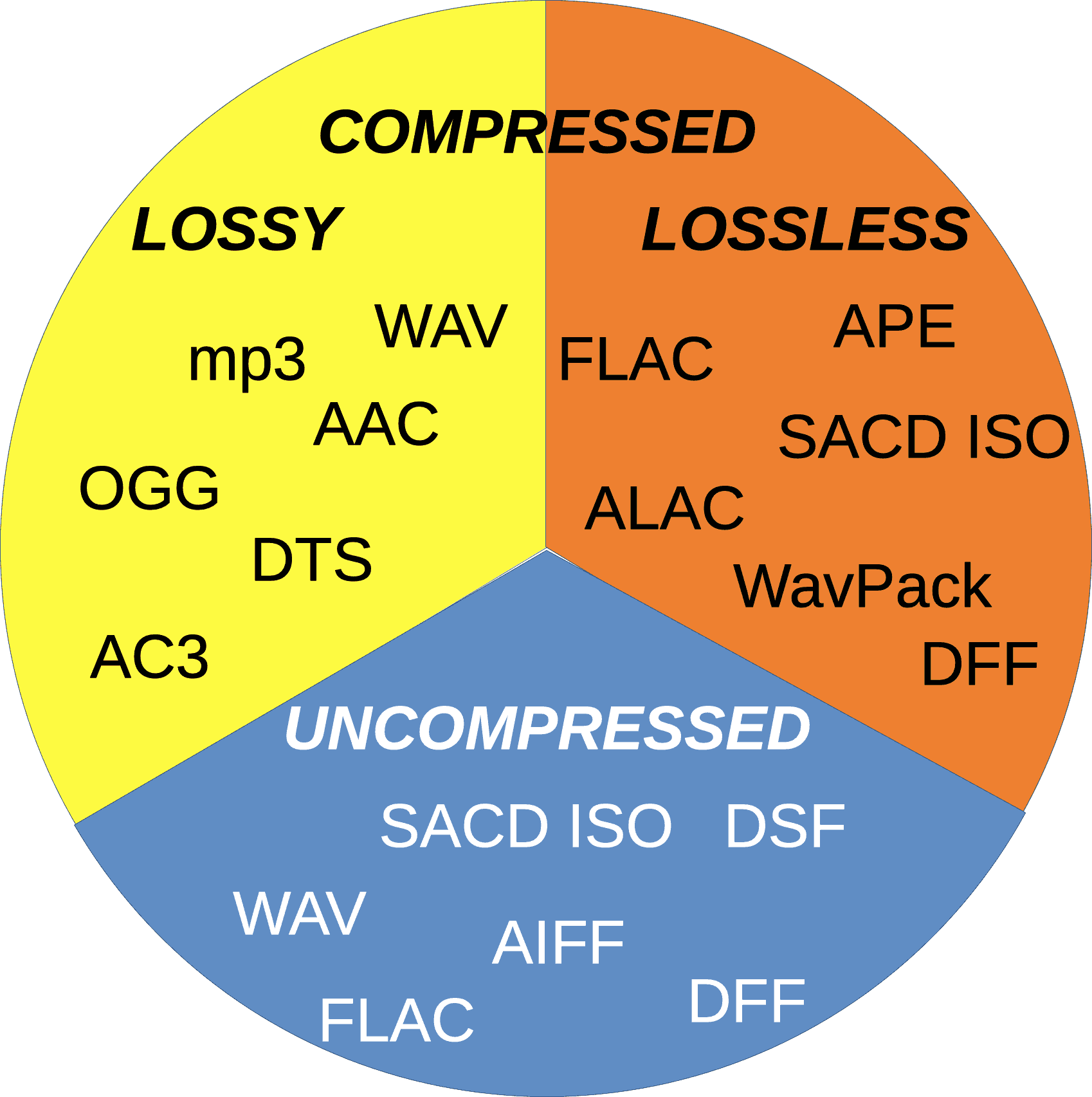
WAV is rightly considered the highest quality music format. This audio format is not compressed or lossy. Used for recording and processing sound, this is the highest quality sound, as the WAV recording is not compressed. Encoded to any other audio format. Well, as a result, it “weighs” a lot, which is why it’s mainly used for sound recording.

The following are several “interpretations” that can be divided into:

Lossy audio compression

I’ll start with the well-known and widely used (though not always loved) MP3 format. This audio format is actively used everywhere and everywhere, where it is needed and where it is not needed. But this does not mean that it is not worthy of the place it occupies in its niche. Very worthy. Although he has been “sitting” in his niche for about two decades, no one has “kicked” him out of there yet. And there were many who wanted to say it. And the main favorite of them is WMA (Windows Media Audio), which was conceived by Microsoft as an alternative to MP3. As a result, it is an alternative and it is, despite the best efforts of the developers. The next character is OGG. Despite the broader possibilities than MP3, for example, it never received widespread acceptance. Although it is compatible with many operating systems. Perhaps, it is worth mentioning the AAC audio format, which was supposed to replace MP3 in the relay. Encoding quality has been improved and compression loss reduced. But Ay.

The main advantage of these formats is their small size. The downside is the loss of quality.

Lossless audio compression

FLAC is perhaps the most popular lossless audio format and encoding codec. Music lovers are gradually switching to this format. WavPack competes with it, but it is not that popular. It’s the same story with Apple Lossless, which reduces the size to 60%.

Here the story is exactly the opposite: the quality is better and the size is greater.

Skeptics say that it is almost impossible to distinguish MP3 (320 kbps) from Losless by ear. “And if there is no difference, why pay more?” In fact, it is quite difficult to feel the difference in audio formats on common equipment, even for music lovers. But there are those who immediately feel this difference (they personally attended the experiment). But when listening to a good device, the difference is huge. The problem is that not everyone can afford a good device.

What is needed to improve the quality of the digital sound we hear?

What is needed to improve the quality of the digital sound we hear?

Sound Quality

Best Headphones

Sound Quality

The simplest way is not digital. The biggest improvement in sound quality for the money is a good pair of headphones. In-ear headphones, open or closed headphones – For the most part, it doesn’t matter. They don’t even have to be expensive, although expensive headphones can be worth it.

Remember that some headphones are expensive because they are well made, they are durable and they sound great. Others are expensive because they are $ 20 headphones that are styled for a few hundred dollars, are advertised, and carry a brand name. I won’t give any specific recommendations, but I will say that you most likely won’t find good headphones in big hardware stores, even if they specialize in stereos.

Lossless compression format

It can be considered true that a properly encoded OGG (or MP3 or AAC) file will be indistinguishable from the original at a moderate level of quantization.

But what about badly encoded files?

Twenty years ago, all MP3 encoders were very poor by modern standards. Many of these faulty encoders are still in use, presumably because their licenses are cheap and most people don’t know or care about the difference in sound. Why would companies spend money and fix something when people don’t even know it’s not working well enough?

Moving to newer formats, like Vorbis or AAC, will fundamentally change nothing. For example, many companies and individuals have used (and continue to use) FFmpeg’s low-quality standard Vorbis encoder because it comes with FFmpeg by default and they don’t care how bad it is. AAC has an even longer history of widespread low-quality encoders used for lossy compression of all major formats.

Lossless compressed formats, such as FLAC, eliminate any possibility of damage to sound quality [23] from a faulty encoder, or even a good one that has been used incorrectly.

The second reason for the proliferation of lossless formats is to avoid future losses. Each encoding and recoding loses more and more information, even if the first encoding was perfect, it is very likely that audio artifacts will appear after the second encoding. This is important for anyone looking to remix or try out music. This is especially important to us codec researchers, we need clear sound to work.

Best Master Records

In the BAS test I mentioned earlier, it was mentioned in passing that the SACD version of the recording can sound significantly better than the CD. This is not due to the increased sample rate or quantization level, but rather the fact that a higher quality master disc is used to create the SACD. When recording to CD-R, SACD still sounds as good as the original SACD and better than CD, because the original sound used to record the SACD was better. Good mastering and production techniques obviously contribute to the quality of the music [24].

Recently covered in the press “Mastering for iTunes” and other similar initiatives by other labels are somewhat encouraging. What remains to be seen is whether Apple and others will actually “tackle the problem” or if it is just bait to sell music to consumers they already have, but at a higher price.

Environment

Another “sales trick” that I would fall in love with is the “great” recordings. Unfortunately, there are some technical dangers here.

Discreet, old-fashioned “surround” sound with multiple channels (5.1, 7.1, etc.) is a technical relic, used as early as the 1960s in movie theaters. However, the surround picture is limited and the sound from nearby speakers is distorted when the listener moves out of position or sits in the wrong position initially.

We can repair and build excellent and reliable positioning systems using tools like Ambisonics. The cost of surround sound equipment and the fact that a recording encoded for a natural sound field sounds bad when played in stereo and cannot be artificially recreated correctly is a problem. It is very difficult to fake ambiphonic sound or holographic audio, the effect will be like 3D – it becomes a tasteless trick and shakes 5% of the population.

Binaural audio is also very complex. You can’t copy it because it sounds different to different people. People unconsciously move their heads to better track the source of the sound, without which they cannot determine its location. This cannot be accounted for in a binaural recording, although it can still be achieved in a fixed setting.

ENCODING PRINCIPLES OF THE MP3 FORMAT.

ENCODING PRINCIPLES OF THE MP3 FORMAT.

Mp3 Encoding

Mp3, or fully MPEG-1, 2 and 2.5 Layer 3, is one of the most popular and widespread standards for storing audio data.

MP3 ENCODING

In this article, we will not delve into the history of creation and further development, but will consider the basic principles of the standard and examples of its implementation.

The mp3 standard does not establish a specific compression algorithm to “encode” the source data, but rather describes the essence of the possible methods.

The quality of the result obtained depends on the modification of the algorithm used, embedded in any encoding program of the “codec”, and on the quality of the original audio data.

There are 3 most common modifications of the mp3 format, which differ in the compression ratio parameters of the original audio data.

Name
Modification of the rule
Data rate per second (bit rate) Possible sample rates
MPEG-1 layer 3
32 – 320 kbps 32000 Hz
44100 Hz
48000 Hz
MPEG-2 Layer 3 16 – 160 kbps 16000 Hz
22050 Hz
24000 Hz
MPEG-2.5 Layer 3 8 – up to 160 kbps 8000 Hz
11025 Hz

Processing begins with dividing the original audio signal into equal time intervals: equal frames, for example 0.05 or 0.26 seconds, after which each frame is analyzed and compressed according to general or individual parameters based on the data of the previous and next frames.

Most of the compression algorithms used are based on the perceptual characteristics of the human ear. Let’s consider the main options, which, as a rule, are applied in a complex way.

It is worth starting with the fact that, by ear, the average person is capable of perceiving a frequency range of approximately 10 Hz to 20,000 Hz. With growth, changes occur in the hearing aid and, for most, the sensitivity the higher frequency range decreases, as a result of which, in some mp3 modifications, during compression, all frequencies above 16000 hertz are cut off, which can significantly reduce the amount of information.

Audio recordings can be encoded in stereo (a surround sound effect that uses separate channels for the left and right speakers) or mono (the opposite of stereo). In mp3 format, different tracks are not recorded for each of your speakers, but information about the differences between the left and right channels.

In acoustics, there is a concept like “harmonics”, these are the frequencies of the “sounds” that sound together with the main and most prominent tone. For example, when hitting a drum, the loudest sound will be the tone and the minor, weaker, will be the harmonics.

After such a loud sound, the so-called “period of deafness” occurs, during a period of duration in which a person’s hearing practically does not respond to changes.

If in the intervals of the “deafness period”, remove all frequencies, then the errors of perception, will practically not allow to notice their absence, because of this, during compression, the weakest harmonics are cut off, located close to the most sounds. strong: tones.

A method is used to replace the near peak values ​​of the signal “peaks” (in terms of volume) with an average value.

There is a concept as bit rate: this is a value that characterizes the number of transmitted bits of information “units” during a period of time, usually one second.
The higher the bit rate, the better the audio detail will be, as long as the original, uncompressed audio data is of high quality.

As you can guess, digital formats consist of certain code sequences, in other words of sequences 0 and 1.
To save space, frequent joins within a file are assigned unique identifiers that replace long sequences.

Thanks to such complex influences, it is possible to compress the original audio signal into one of the popular formats with loss of quality – the mp3 format.

Various experiments have been carried out many times in order to reveal how significant the differences are before and after compression in mp3. As tests have shown, differences, some similar moments were not always possible, quickly and to distinguish, even when reproduced on equipment with higher fidelity.

For those who have never had the opportunity to directly compare the original and compressed audio recording, in most cases it will take some time or even find obvious differences.

Improved efficiency of digital audio data compression algorithms.

Improved efficiency of digital audio data compression algorithms.

audio compression

The relevance of the work. Methods for encoding high quality (HS) audio signals have become very widespread in the last decade in the field of broadcasting, digital sound recording, and home audio and video equipment. There’s even a fast-growing new class of consumer electronics: portable MP3 players.

Audio Compression:

Digital television and radio transmission networks are being developed, providing consumers with high-quality images and sound with a wide coverage area. The popularity of radio and television broadcasts over the Internet and mobile phone networks is increasing. All these technological innovations have become economically viable, and in some cases even technically possible, thanks to the use of highly efficient digital video and audio data compression algorithms, such as MPEG-1 ISO / IEC 11172, MPEG-2 TSO / IEC 13818, MPEG-4 ISO / IEC FCD 14496, ATSC Dolby AC-3. At the same time, due to the economic advantages of using these algorithms, which make it possible to reduce the bandwidth requirements of the transmission channels or the capacity of the information carriers by an order of magnitude, it is necessary to compensate with a certain decrease in the sound quality. During the era of the dominance of digital audio CDs, consumers have created a requirement for high sound quality from any sound reproduction equipment. The efforts of algorithm developers for encoding audio signals have always been aimed at ensuring that the quality of decoded audio material is no worse than that of a CD. Sound quality is often the determining factor in the economic success of digital broadcasting services or digital sound distribution services like iTunes). Further,

It is obvious that the problem of improving the quality of audio coding is today one of the key problems for the sound recording industry, the audio broadcasting industry and the manufacturers of various multimedia systems.

The basic principle of operation of highly efficient audio coding systems is to use the properties of the human auditory system, mainly the phenomenon of masking. The phenomenon of psychoacoustic masking is due to the biophysical and neuronal processing of sound signals by the human auditory system [173]. At the same time, part of the sound information does not affect the acoustic perception of the sound signal due to the presence of components with greater intensity in it. Therefore, the strongest components of the audio signal form the so-called masking thresholds. Sound information with a signal energy level below the masking threshold is not perceived by the auditory system. In the traditional digital representation of audio signals using pulse code modulation (PCM), time-sampled samples of the original signal are represented using a specific number of bits in the code word. The finite precision of the instantaneous values ​​of a continuous analog signal introduces an error in the signal, the so-called quantization noise. The idea of ​​encoding audio signals with the elimination of psychoacoustic redundancy is to combine psychoacoustic analysis and the quantization mechanism of audio signals [112]. In this case, the digitally encoded signal is converted into a time-frequency representation, as close as possible to the time-frequency resolution of the human auditory system. Psychoacoustic analysis determines the masking thresholds at each point in the time-frequency representation of the encoded signal, and the quantizer re-quantizes the signal with the minimum possible number of bits per sample, in which the increasing quantization noise is still below the masking thresholds. Thus, a compact representation of audio signals can be achieved without subjective degradation of sound quality. It is obvious that the efficiency and quality of such systems depend mainly on the precision of the psychoacoustic analysis. a compact representation of audio signals can be achieved without subjective degradation of sound quality. It is obvious that the efficiency and quality of such systems depend mainly on the precision of the psychoacoustic analysis. a compact representation of audio signals can be achieved without subjective degradation of sound quality. It is obvious that the efficiency and quality of such systems depend mainly on the precision of the psychoacoustic analysis.

Differences between analog and digital audio

Differences between analog and digital audio

Analog and Digita

Very often we hear definitions such as “digital” or “discrete” signal, how is it different from “analog”?

Actual] Difference between Analog and Digital Signal with Examples -  ETechnoG

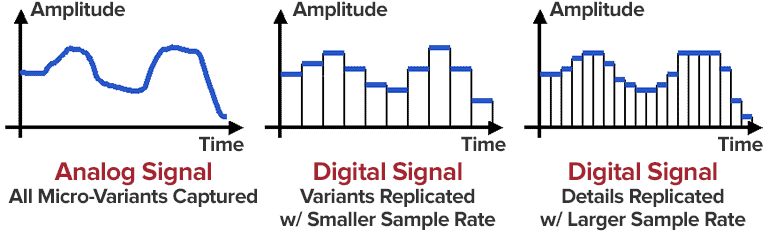
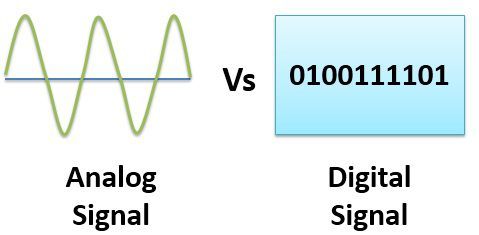
The difference is that the analog signal is continuous in time (blue line), while the digital signal consists of a limited set of coordinates (red dots). If everything is reduced to coordinates, then any segment of an analog signal consists of an infinite number of coordinates.

For a digital signal, the coordinates along the horizontal axis are located at regular intervals, according to the sampling frequency. In the popular audio CD format, this is 44,100 points per second. Vertically, the precision of the coordinate height corresponds to the digit capacity of the digital signal, for 8 bits it is 256 levels, for 16 bits = 65536 and for 24 bits = 16777216 levels. The greater the bit depth (the number of levels), the closer the vertical coordinates will be to the original wave.

Analog sources are cassette tapes and vinyl. Digital sources are: CD-Audio, DVD-Audio, SA-CD (DSD) and files in WAVE and DSD formats (including those derived from APE, Flac, Mp3, Ogg, etc.).

Advantages and disadvantages of the analog signal

The advantage of the analog signal is that it is in the analog form that we perceive sound with our ears. And although our auditory system converts the perceived sound stream into digital form and transmits it to the brain in this way, science and technology have not yet reached the possibility of connecting players and other sound sources directly in this way. Currently, this research is being actively carried out for people with disabilities, and we exclusively enjoy analog sound.

The downside to an analog signal is the ability to store, transmit, and replicate the signal. When recording on tape or vinyl, the quality of the signal will depend on the properties of the tape or vinyl. Over time, the tape will degauss and the quality of the recorded signal will deteriorate. Each read gradually destroys the medium and rewriting introduces additional distortion, where additional deviations are added by the next medium (tape or vinyl), devices for reading, recording and transmitting a signal.

Making a copy of an analog signal is like taking another photograph to copy a photograph.

Advantages and disadvantages of a digital signal

The advantages of a digital signal include precision when copying and transmitting an audio stream, where the original is no different from the copy.

The main disadvantage can be considered that the digital signal is an intermediate stage and the precision of the final analog signal will depend on how detailed and precise the coordinates of the sound wave are. It is quite logical that the more points there are and the more precise the coordinates, the more precise the wave will be. But there is still no consensus on how many coordinates and data precision is sufficient to say that the digital representation of the signal is sufficient to accurately reconstruct the analog signal, indistinguishable from the original by our ears.

In terms of data volume, the capacity of a conventional analog audio cassette is only 700-1.1 MB, while a normal CD is 700 MB. This gives an indication of the need for high capacity media. And this results in a separate war of compromises with different requirements for the number of descriptive points and for the precision of the coordinates.

Today, it is considered sufficient to represent a sound wave with a sampling frequency of 44.1 kHz and a bit depth of 16 bits. With a sampling frequency of 44.1 kHz, you can recall up to 22 kHz. As psychoacoustic studies show, a further increase in sample rate is unremarkable, but an increase in bit depth provides a subjective improvement.

How DACs Build the Wave

A DAC is a digital-to-analog converter, an item that converts digital sound to analog. We’ll take a quick look at the basics. If the comments show interest in considering various points in more detail, a separate material will be published.

Multibit DAC

Most often, the wave is presented in the form of steps, which is due to the architecture of the first generation of R-2R multi-bit DACs, which function similar to a relay switch.