Digital sound: DSD vs PCM


Free Download Mp4Gain
picture

Digital sound: DSD vs PCM

DSD vs. PCM: Myth vs. Truth | Audiofiles

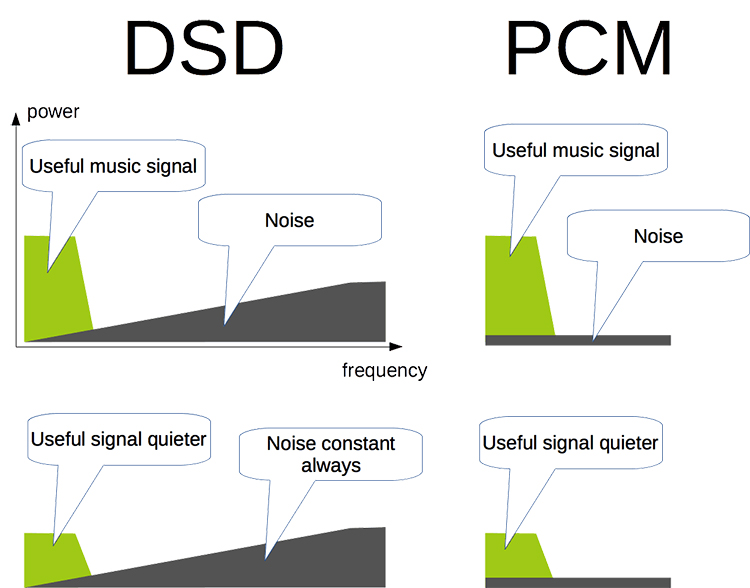
Digital sound. How many myths revolve around this phrase. How many disputes have arisen between lovers of comfort and digital quality and supporters of “live airy” vinyl sound multiplied by “warm tube” sound. In addition, there is a lot of controversy among lovers of “numbers”: is 16×44.1 enough or is 24×192 necessary? Which is better: multibit or delta sigma? CDDA or SACD? PCM or DSD? In this article, I will try to explain the basics of digital sound in simple language and will also expand in more detail on comparing two types of encoding of an analog to digital signal: DSD and PCM.
DSD Vs PCM - Real Competitors? | Headfonics Audio Reviews

First, let’s answer the question, what is digital sound? How is it different from analog? In short, in mathematical terms, an analog audio signal is a continuous function, a digital audio signal is a discrete function. What does that mean?

Analog signal

If you draw in your imagination a graph of a sinusoid (this is how a sound wave is most often represented): then no matter how we magnify it, trying to see all the details, we will always see a smooth, smooth line – this is an analog audio signal (Fig. 1).

analog Analog (recording) sound has many parameters that can be used to evaluate its quality. Consider the three most important: frequency range, dynamic range, distortion.

frequency range – a set of frequencies contained in sound. It is generally accepted that the frequency range of human hearing is 20 … 20,000 Hz (sometimes 16 to 22,000 Hz is indicated). The frequency range of the music itself is of no interest in terms of quality assessment (for example, the frequency range of the same plane taking off will be very wide and the tenor’s vocal part will be much narrower). A qualitative parameter, say, of an earphone is the potential frequency range, and it is estimated using the amplitude frequency characteristic (AFC). The ideal frequency response, a straight line across the entire range of hearing frequencies, means that the sound source does not amplify or attenuate any individual frequencies, meaning that the extracted sound matches the original.

Dynamic Range (DD) is the difference between the lowest and highest sound. Loudness is measured in decibels (dB). It is generally accepted that the maximum volume that does not cause injury to a person is 130 dB, the sound of an airplane taking off, and the minimum audible volume, 5 … 10 dB, is at the level of the rustling of the leaves in low wind conditions. Naturally, it will be impossible to distinguish the rustle of leaves against the background of a plane taking off, and listening to music at a level of 130 dB is extremely unpleasant. Therefore, it is generally accepted that a comfortable DD for listening to music is 80 … 100 dB.

The distortion is nothing more than a deviation of the signal from the original.


Free Download Mp4Gain
picture


Mp4Gain Main Window
picture


Mp4Gain Features
picture


Free Download Mp4Gain
picture

What you need to know about listening on Bluetooth headphones

What you need to know about listening on Bluetooth headphones

Bluetooth

Harald Bluetooth IBluetooth is the wireless transmission of data between two devices in a short distance. This is done using radio waves (WPAN).

Bluetooth

Few know that the name of Bluetooth technology comes from the name of the Danish king Harald Bluetooth I (958 AD). It was he who brought together parts of Norway and Denmark. And the Bluetooth symbol itself denotes the Scandinavian runes B and H.

So to transfer music via Bluetooth 3 factors are required:

Sampling frequency (kHz): the higher the sampling frequency, the clearer the sound can be transmitted (closer to digital). Distortion in sound is reduced and the audible frequency range is widened.

Sampling depth (bits): The higher the sampling depth, the higher the resolution of the music. Dynamics increases as the range between soft and loud sounds increases. In this way, it is possible to obtain more subtle sound levels and tonal nuances.

Bit rate (kbps) – This is the connection speed at which music audio data is transmitted from the device to the headphones. However this is not entirely true. More precisely, this value indicates the possible size of the amount of data transmitted at a given time. The higher the baud rate with the Bluetooth headset, the more data (at the same time) the device can transfer. Therefore, the audible sound is greatly improved.Better Bluetooth audio: what aptX, aptX HD and LDAC are all about

What do the abbreviations aptX, pptx HD, and LDAC mean?
These abbreviations are for Bluetooth codecs and mainly describe various transmission parameters. They differ in sample rate, sample depth, and bit rate. Android 8.0 devices support these audio codecs and you can enjoy better sound quality.

atpX is the slowest option for wireless music streaming. This technology provides a maximum bit rate of 352 kilobits per second at a sample rate of 48 kHz and a sample depth of 16 bits. The analog signal is read 48,000 times per second and stored with 16 bits. In principle, these are solid numbers. In comparison, a CD is read and stored with identical parameters. However, relatively slow streaming results in a nearly 50% loss in audio quality. So the sampling depth is only 8 bit, which is related to the resolution of the music.

The AtpX HD also has a sample rate of 48 kHz, but the digital signal is stored at 24 bits. The dynamic range is increased, resulting in higher quality sound. The use of LPCM (Linear Pulse Code Modulation) results in lossless data transmission from analog to digital signal. The sound is thus clearer.

PCM is a modulation technique that converts an analog signal into digital. The CD receives the analog sound waves from the music recording.

Best Bluetooth audio: what aptX, aptX HD, and LDAC are all about
Sony H. EAR on wireless
It is not yet known to what extent the bit rate in this codec is adapted only for the best sound transmission in headphones.

Sony’s LDAC Bluetooth codec is the best and fastest of the three wireless audio capabilities.

At data rates of less than 1 Mbps at a sampling rate (96 kHz) and a sampling depth of 24 bits, almost CD quality is achieved.

What is the bit rate?

What is the bit rate?

Bit Rate
Bit rate is the amount of data per unit of time used to transmit an audio stream. For example, a bit rate of 128 kbps means 128 kilobits per second and means that 128 thousand bits are used to encode one second of audio (1 byte = 8 bits). If we translate this value into kilobytes, it turns out that one second of sound occupies about 16 KB.

Bitrate

Therefore, the higher the bit rate of the track, the more space it will take up on your computer. But at the same time, within the framework of a format, a higher bit rate allows you to record sound with higher quality. For example, if you convert audio-cd to mp3, then at 256 kbps bit rate, the sound will be much better than at 64 kbps bit rate.

Since now disk space has become quite cheap, we recommend converting to mp3 with a bitrate of at least 192 kbps.

Also distinguish between constant and variable bit rates.

Variable (VBR) constant bit rate difference (CBR)
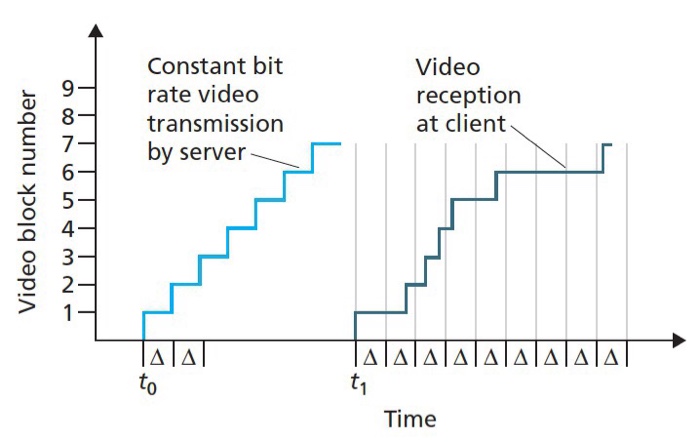
With a constant bit rate, the same number of bits is used to encode all sections of the sound. But the structure of the sound is usually different and, for example, encoding silence requires significantly fewer bits than encoding rich sound. The variable bit rate, in contrast to the constant one, automatically adjusts the quality of the encoding, depending on the complexity of the sound at certain intervals. That is, for sections that are simple from the point of view of encoding, a lower bit rate will be used, and for complex ones, a higher value will be used. Using a variable bit rate allows you to achieve higher sound quality with a smaller file size.

What is the sample rate?
This concept arises when converting an analog signal into digital and means the number of samples (signal level measurements) per second that are carried out to convert the signal.

What is the number of responsible channels?
A channel for audio encoding is a separate audio stream. Mono: one stream, stereo: two streams. The abbreviation nm is often used to indicate the number of channels, where n is the number of full audio channels and m is the number of low-frequency channels (for example, 5.1).

Analog to Digital

Analog to digital

Analog to digital

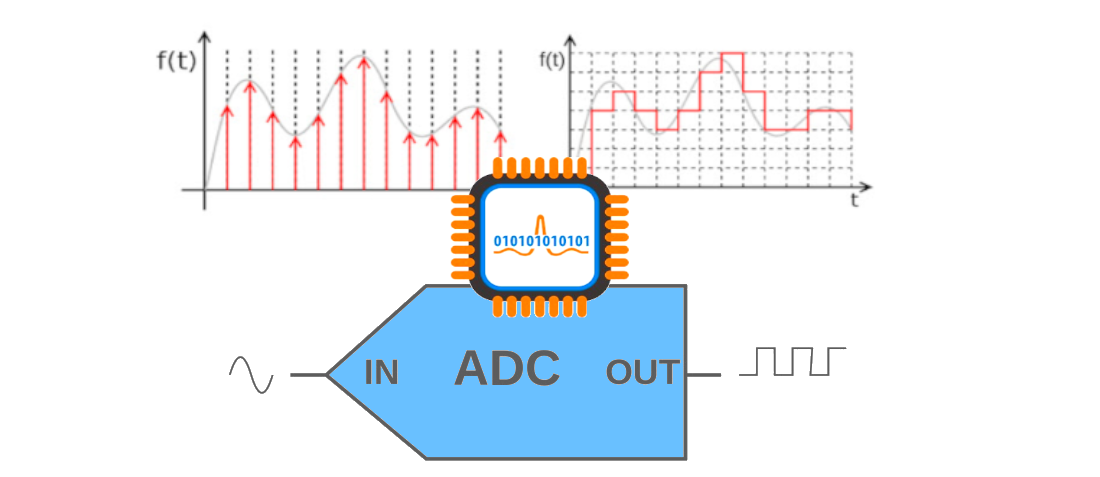
To convert any analog signal (sound, image) into digital format, three basic operations must be performed: sampling, quantization and encoding. Sampling – presentation of a continuous analog signal by means of a sequence of its values ​​(samples).

Analog to digital


These samples are taken at times separated from each other by an interval called the sampling interval. The reciprocal of the interval between samples is called the sample rate. In Fig. 1 shows the original analog signal and its sampled version. The images that appear below the time diagrams have been obtained assuming that the signals are one-line television video signals, the same for the entire television frame. Analog to digital conversion.

Sampling It is clear that the smaller the sampling interval and consequently the higher the sampling frequency, the smaller the difference between the original signal and its sampled copy. The stepped structure of the sampled signal can be smoothed with a low-pass filter. This is how the analog signal is restored from the sampled one.

But the reconstruction will be accurate only if the sampling frequency is at least 2 times the bandwidth of the original analog signal (this condition is determined by the well-known Kotelnikov theorem). If this condition is not met, the sampling is accompanied by irreversible distortions. The fact is that, as a result of sampling, additional components appear in the frequency spectrum of the signal, which lie around the harmonics of the sampling frequency in the range, equal to twice the bandwidth of the original analog signal. . If the maximum frequency in the frequency spectrum of the analog signal exceeds half the sampling frequency, the additional components enter the frequency band of the original analog signal. In this case, it is no longer possible to restore the original signal without distortion.

The theory of sampling is covered in many books. Analog to digital conversion. Distortion sampling An example of sampling distortions is shown in Fig. 2. An analog signal (again, suppose it is a TV line video signal) contains a wave, the frequency of which first increases from 0.5 MHz to 2.5 MHz and then decreases to 0.5 MHz. This signal is sampled at 3 MHz. In Fig. 2 the images are shown sequentially: the original analog signal, the sampled signal, the restored analog signal after sampling. The low-pass reconstruction filter has a 1.2 MHz bandwidth. As you can see, the low-frequency components (less than 1 MHz) are restored without distortion. The 1.5 MHz wave disappears and becomes a relatively flat field. The 2.5 MHz wave after recovery became a 0.5 MHz wave (this is the difference between the 3 MHz sampling frequency and the original 2.5 MHz frequency). These image diagrams illustrate the distortion associated with an insufficiently high spatial sample rate of the image. If the subject of the television recording is an object that is moving very fast or, for example, a rotating object, then sampling distortions in the time domain may occur. An example of distortion associated with insufficiently high sample rate (and this is the frame rate of television decay) is an image of a fast moving car with stationary wheels or, for example, slowly turning in one direction u another, the spokes of the wheel (stroboscopic effect). there is no sampling distortion when the bandwidth of the original signal is limited from above and does not exceed half the sampling frequency. associated with insufficiently high spatial sampling rate of the image. If the subject of the television recording is an object that is moving very fast or, for example, a rotating object, then sampling distortions in the time domain may occur.

An example of distortion associated with insufficiently high sample rate (and this is the frame rate of television decay) is an image of a fast moving car with stationary wheels or, for example, slowly turning in one direction u another, the spokes of the wheel (stroboscopic effect). there is no sampling distortion when the bandwidth of the original signal is limited from above and does not exceed half the sampling frequency. associated with insufficiently high spatial sampling rate of the image. If the subject of the television recording is an object that is moving very fast or, for example, a rotating object, then sampling distortions in the time domain may occur.

What is CBR? (constant bit rate)

What is CBR? (constant bit rate)

CBR (Constant Bit Rate)

CBR is an encoder to convert (compress) an audio file to mp3 format. In CBR encoding, the bit rate is kept constant throughout the file: the same number of bits are allocated to encode every second of audio, and within frames of the audio data they occur at regular and predictable intervals, thus that the full file size for a given audio length is predictable.

CBR


Therefore, CBR is the “opposite” of VBR. However, in some formats there may be some variability in the number of bits that contain the actual audio information from frame to frame.

This concept manifests itself in the MP3 bit repository. In MP3 CBR, even if the frames are of a fixed size, the audio data is not necessarily sequentially distributed among them; the audio for a frame may use fewer bits than the frame has, so this frame “adds” spare bits to a “bucket” that can fill in the allocated bits for the next block.

So the effective bit rate may vary slightly in CBR MP3, although there is a fixed number of frames in all audio. The degree of variability in the entire MP3 file is not as great as that of the VBR, but it is not negligible; a CBR encoder using repository inefficiently is more likely to produce a lower quality file than a VBR. Unlike VBR, the perceived quality of decoded audio will vary depending on the CBR file.

This is because CBR encoding is similar to the ABR form of VBR encoding in that it is typically based solely on the target bit rate and analysis of the input audio; often no attempt is made to use the lowest possible bit rate that will maintain a certain level of output quality. Technically, CBR implementations always involve predicting product quality, but they rely on fixed algorithms, rather than trial and error verification of results, as is done in VBR. Who should use this encoder: CBR is useful for people interested in maintaining maximum compatibility, especially with some streaming applications and some hardware decoders that do not support VBR.

CBR is also useful for people who want to be able to get accurate estimates of the bit rate or approximate length of a decoded audio file without scanning and partially decoding the entire file. VBR advocates are very vocal against CBR and often say that no one should use CBR when given a choice. Some reasonably argue that the goal of using a compression algorithm, especially in a lossy codec like MP3, is to store as many bits as possible while maintaining a certain level of quality, so CBR tends to use more bits than necessary. on simple passages, and using too little for complex passages is wasteful and should lead to worse results (at least in complex comps) than VBR.

However, these arguments need to be carefully refined and it would be incorrect to conclude that there are quality differences between CBR and VBR. In general, for most types of compression, considering identical input, encoding techniques, and reasonable goals for VBR quality and bit rate limits, VBR will almost always produce results of equal perceived quality. or better than CBR for files of the same size. This has been shown in numerous hearing tests.

CBR may exceed the quality of VBR if the comparison is not limited to the average bit rate or if the VBR encoding method does not take into account the actual output quality. For example, a 256 kbps CBR MP3 containing moderately complex audio is likely to sound noticeably better than a similarly encoded VBR, which averages 128 kbps, although VBR can use up to 320 kbps in some frames.

And even when VBR measures the quality of the output signal, there is a margin of error, especially when using psychoacoustic models of perception, so the encoder (even the highly respected LAME) can accidentally compress some segments, depending on the characteristics. audio, placing restrictions on quality and bit rate. At high bitrates, the quality difference between typical CBR and VBR files is close to zero, so for some CBR users it is quite acceptable, especially if the maximum savings in accommodation or hard drive space is not important. At low average bit rates, the quality difference between CBR and VBR is more pronounced with the same input signal, so VBR is often more desirable. At high bit rates, the quality difference between typical CBR and VBR files is close to zero, so for some CBR users it is quite acceptable.

Comparison of video encoding with H.264 and H.265 codec

Comparison of video encoding with H.264 and H.265 codec

H.265 VS H.264

I would like to draw the attention of readers to the fact that I will carry out my story about the H.265 codec only from the point of view of how it can be used to create video movies, regardless of use in other areas. , for example, in video surveillance – everything is completely different there. I will start with the technical definition of the H.264 and H.265 codecs.

H.264 vs H.265

H.264 codec: scientifically it is called MPEG-4 part 10 or AVC (Advanced Video Coding). It appeared in 2003, but in everyday life they began to use it far from immediate, approximately since people began to buy high-definition video cameras. In my opinion today it is the only codec you want to compress video, it just has no competitors. Except, of course, 265.

H.265 or HEVC codec (High Efficiency Video Coding – High Efficiency Video Coding). Frame formats up to 8K (UHDTV) with a resolution of 8192 × 4320 pixels are supported. Manufacturers officially announced this codec in 2012. It was first used in IP broadcast systems. Then when 4K and 8K formats appeared and started to be widely used, for which H.264 was no longer ideal, the fifth one was useful there too.

But Н.265 is not a new product, it is, in fact, an improved 264. Initially, the creators were tasked with halving the bitrate with the same quality. If this task had been completed, then it would be possible, using H.265, to have a computer with half the power, or to receive the final file twice as easy, with the same quality. But this is only in theory.

You probably know that not all pixels in the image are affected during encoding; The image is divided into blocks according to the content. And the main difference between these two codecs is that they form these blocks differently. In other words, they divide the image into a different number of fragments. H.265 includes more pixels in each block, that is, the image is divided into fewer parts.

The first thought that occurs to a normal person is what he is like, because this will only make the quality worse! After all, if there was only one pixel in each block, which was compressed with individual parameters, then the image would be much better. This, of course, is true, but the reality is that, unfortunately, in our time the concept of quality for manufacturers of something fades into the background.

Based on information received from other operators, it can be assumed that when encoding the 4K format with a low bit rate, the advantage of H.265 is more noticeable than when using the Full HD format. But I don’t work with a low bit rate, high quality is important to me.

H.264 or H.265. What is better?

Everyone knows that the higher the quality you want to achieve, the more time and effort it takes. The same goes for encoding. If we assume that H.265 encodes better, it means that more time will be spent on encoding compared to H.264. But 30 times is excessive! I’m sure at 100 percent motion picture, it’s almost impossible to tell the difference that can be seen in the freeze frame, but then why complicate things using the 265? Although, here everyone decides for themselves what is more important to him: code as soon as possible and get a finished product, or wait longer, but evaluate a higher result.

The exact encoding time depends on how you record the video, how many small details there are, movement, what frame size, what is the power of your computer. Based on my observations, when encoding H.265, the computer uses much more resources, but the process itself is more adapted for multi-core processors, that is, the computer runs more smoothly.

I also tried encoding H.265 in maximum quality Full HD video, 50 frames per second for about 10 minutes. And when Media Encoder, which in principle encodes faster than Premier, reported that encoding would take more than 300 hours, I realized that it would take almost two weeks not to turn off the computer, and this is for 10 minutes. And my computer is quite powerful. When encoding 265 with a quality profile of “good”, the elapsed time is the same as the 264 setting in the image, but the difference is so insignificant that there is no point in uploading these screenshots.

The H.265 codec was created a long time ago and the question arises why it is not as popular as the developers planned. To the best of my knowledge, I can assume that firstly there is no such clearly visible advantage in video editing, and secondly, the development of using H.265 is hampered by the fact that you have to pay for its use in all devices where it is present.

Video compression and decoding | Codecs and Decoders

Video compression and decoding | Codecs and Decoders

Video Container and Video Codecs

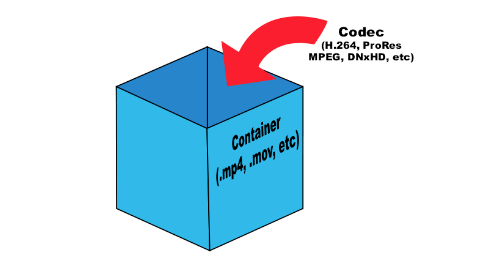
Before doing serious testing, there are a few simple things to clear up. It is important to distinguish between codecs and file containers. For example, Blu-ray files often appear with the extension .m2ts. But the BDAV (blu-ray Disc Audio / Video) container format generally acts as a storage container. In this case, you can use three codecs: MPEG-2, H.264, and VC-1.

Video Codec and container

What is the difference between a codec and a container? Think about your last vacation. Your suitcase, in this case, is a “container”. Baggage is content (video, audio, subtitles, and other information), and a codec is the way you store everything (data) in your suitcase to fit. You can put things in a suitcase by folding carefully (one codec) or press them into rolls and wrap them with tape to fit more (another codec). This is true for any multimedia content. For example, the Microsoft AVI (Audio Video Interleave) format is a file container, but the video it contains can be encoded with different codecs, from DivX to MPEG-2.

When you play something back on a video player, generally the encoded video is passed through a decoder, converted to YUV (color space) data, and sent to the screen. The decoder recognizes the format and decompresses the compressed data into useful information that can be processed and displayed.

There are two types of decoders: software and hardware. Before UVD, PureVideo, and Intel GMA 4500MHD, video was decoded using software decoders that relied on the power of the processors. Therefore, many companies tried to do something to play videos. But only two of them managed to do this really well: CyberLink and InterVideo (now Corel), so ATI later licensed the PowerDVD decoder for their ATI DVD decoder. Naturally, software decoders consume a large amount of processor time, which, while not affecting the performance of modern processors, significantly reduces the battery life of mobile devices.

Over time, graphics card manufacturers addressed this problem and began developing fixed-function decoders, which were logic circuits in the GPU for video processing. Today they are called hardware accelerators. Its advantage was that when the GPU was working, the time of the main processor was not wasted.

There are some interesting points. Since the decoder processes video, it is quite difficult to set parameters for its performance or efficiency. Regardless of whether the video goes through the hardware or software conversion pipeline, the data changes long before it appears on your monitor. When using software, it is not necessary to compare the systems used in decoding. However, when using the same system, different decoders can produce different images or change the image quality. Most Blu-ray discs played on nVidia or AMD graphics cards will look the same if you disable acceleration in PowerDVD. In both cases, the video is processed using software on the processor, giving the same result.

When hardware decoding is added to the process, things look different. Why? Modern GPUs have a special unit for decoding and processing video data. This is exactly the logic with a fixed function, which was discussed earlier. Hardware accelerated decoding on Sandy Bridge processors is designed and programmed differently than on AMD and nVidia graphics cards.

We must understand clearly: there are no general purpose GPU decoders. There are no decoders that can fully work on DirectCompute, APP, or CUDA. Striving to implement such support is doomed beforehand. GPGPU is designed to handle raw data with a high degree of parallelism. But we are talking about video, not raw data. To process images, you have to do a lot and in a sequential execution. Fixed function decoders decode and process video; they do nothing else. Porting this functionality to more general computing resources would be a step back from moving it to the processor, since in both cases you have to work with software decoding.

Elemental Technologies (known for its Badaboom) is unique in developing a CUDA-based MPEG-2 decoder. And it is not a pure GPGPU decoder. Parts of your pipeline, such as entropy encoding, syntax encoding, syntax decoding, and entropy decoding, must be executed sequentially. Other parts of the process can be designed to run in parallel, such as motion estimation, motion compensation, etc.

H.265 High Efficiency Video Coding (HEVC)

H.265 High Efficiency Video Coding (HEVC)

HEVC H.265
Until recently, H.264 (also known as AVC) was the codec of choice for optimizing video quality and reducing file sizes. Moving to the H.265 (or HEVC) codec requires more processing power than H.264, but the HEVC codec is much more efficient and provides improved video quality at lower bit rates.

HEVC H.265

The milestone for the HEVC / H.265 video codec was the 2017 Apple Worldwide Developers Conference (WWDC), at which Apple announced HEVC as its “next-generation video codec.” The consequences of this event became global. With this interest in HEVC and the hardware support for HEVC video encoding already introduced in most mobile devices at the time, video content providers realized that HEVC was the new standard for video compression. for transmission.
HEVC versus AVC. What are the benefits of the HEVC codec?
From Apple’s ad: “In short, efficiency. And, first of all, the efficiency of the encoding. HEVC is approximately 40% more efficient than AVC. This means that playback with decent quality will start 40% faster for the user, and when the player fully adapts to streaming video, the content will look 40% better. We decided to make HEVC available to everyone. Newer Apple devices have HEVC support built into the hardware. Even for older devices that do not have this hardware support, we plan to implement the HEVC codec at the software level. So now HEVC will be used everywhere. ”

The answer to any company’s question about the choice between HEVC and AVC can be summed up in two main advantages of the HEVC codec.

HEVC is approximately twice as efficient as AVC
HEVC supports high dynamic range and 4K images
By using the HEVC codec with the same bandwidth as AVC, you can achieve higher video quality, or provide the same level of quality as AVC with half the bandwidth required for AVC.

How does the HEVC codec affect video content libraries?
For media and entertainment companies that are selecting and creating large content libraries at an incremental rate, the HEVC codec can provide big bitrate savings. As organizations struggle to keep up with consumer demand for multiscreen technology, organizations are facing increasing pressure on their storage infrastructure. Save on storage costs with the HEVC codec, which cuts file sizes in half, instead of doubling storage capacity.
What are the advantages of the HEVC codec in terms of bit rate?
There are several examples of how the improved quality-to-bitrate ratio in the HEVC codec will affect the professional environment. Because high-quality video distribution requires high network bandwidth, the benefits of improving this ratio include:

deployment of more channels in satellite, cable and IPTV networks;
reduce the cost of managed and unmanaged video distribution;
expand coverage for mobile operators and IPTV with limited bandwidth;
improve display quality when using OTT services at the usual level of broadcasters.
How does HEVC codec improve mobile streaming, Ultra HD 4K and 8K?
In the mobile streaming market, the HEVC codec offers bit rate reductions of 30-50 percent with video quality comparable to H.264, resulting in lower costs of delivering video content over networks.

When the device is capable of decoding HEVC, mobile operators can deliver much less data to achieve a certain level of quality, reducing costs and providing more reliable video playback.

The proliferation of HEVC is also consistent with the mass market interest in high definition video (Ultra HD 4K and 8K), as 4K TVs generally only support HEVC and newer codecs.

The main conclusion. On average, HEVC can deliver video of the same quality as H.264 at about half the bitrate (exact ratios may vary depending on content type).

For example, for a 1080p stream, a lossless editor can reduce the data rate from 8 Mbps to 4 Mbps. This reduction in bitrate can have a significant impact on the cost of edge caching, since the File size becomes smaller when delivered to end users.

What is video encoding?

What is video encoding?

Video Encoding

Video encoding is the process of converting digital video files from one format to another. Encoding is also known as “transcoding” or “video conversion”. During recording, the device provides a video file in a specific format and other specifications. If a video owner wants to post a video, they need to consider the different devices the video can be played on.

Video Encoding

All the videos we watch on our computers, tablets, and mobile phones have gone through an encoding process that converts the original video so that it can be viewed in a variety of output formats. This is because many types of devices and browsers only support certain video formats. Often times, the goal of a video editor is to ensure compatibility with different formats.

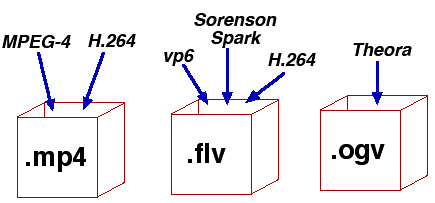
Digital video can exist in many different formats, each with specific variables such as video containers (.MOV, .FLV, .MP4, .OGG, .WMV, WebM), codecs (H264, VP6, ProRes), and bitrates (in megabits or kilobits per second). Different devices and browsers have different specifications, most of which are associated with one or more of these variables, and other variables.

When encoding a video, you should consider (a) the original source format and method of video capture, (b) any subsequent encoding operations that may have been performed on the video source, and (c) the required output formats.

The container is designed to store different types of data. This includes audio, video, and sometimes subtitles. They are like the boxes in which we put our sweets. Note that the biggest difference between these containers is the support they provide for the basic bits of information. Different containers provide support for different audio and video compressions. Some will allow multiple audio tracks or subtitles to be included, while others will allow only one or none. If you want to add subtitles to an AVI or WMV file, you may need to burn them to the image. Video / Audio Codecs The actual difference between most video files depends less on the container used, but more on the video or audio codec in the container. The video codec determines how the information is processed. Some of the most popular video codecs include DivX / XviD h264 / x264 FFMPEG Theora You must remember that the content or how the content is stored is not always determined by the container, although it is often limited (for example, some containers support multiple streams audio, while AVI only supports one). As a result, there are several different combinations available between containers and codecs.