Video Enhancement: How to Transform Your Footage into a Cinematic Masterpiece


Free Download Mp4Gain
picture

Video Enhancement: How to Transform Your Footage into a Cinematic Masterpiece


Video Enhancement
Video Enhancement
Video Enhancement
Video Enhancement

The Basics of Video Enhancement

In today’s digital age, video has become an integral part of our lives. Whether it’s for personal use or professional purposes, the quality of the video is crucial to make it more engaging and impactful. This is where video enhancement comes in. Video enhancement is the process of improving the visual quality of the video by applying various techniques such as color correction, noise reduction, and sharpening. In this article, we will explore the different methods and tools of video enhancement, and how they can help you turn your footage into a cinematic masterpiece.

Color Correction

Color correction is a technique used to adjust the colors of the video footage to make them more vibrant, natural, and appealing. It involves adjusting the brightness, contrast, and saturation of the colors to achieve the desired effect. Color correction can be done manually by adjusting the settings of the camera before filming, or by using software specifically designed for color grading.

Noise Reduction

Noise reduction is the process of removing unwanted grain or static from the video footage. This can be caused by low light, high ISO, or compression artifacts. Noise reduction tools use algorithms to analyze the video and selectively reduce the noise without affecting the details or sharpness of the video.

Sharpening

Sharpening is the process of enhancing the details and edges of the video to make them appear more crisp and defined. This can be done through software that applies filters to the footage or by adjusting the sharpness settings of the camera before filming.

Other Techniques

Other techniques that can be used for video enhancement include:

  • Stabilization – removing shaky footage
  • Color Grading – enhancing the colors and tones of the footage
  • Slow Motion – slowing down the footage to emphasize certain moments
  • Special Effects – adding visual effects such as lens flares, light leaks, or transitions to enhance the overall look of the video

Frequently Asked Questions

Can video enhancement improve the quality of low-resolution footage?

While video enhancement can improve the quality of low-resolution footage to some extent, it cannot completely restore the lost details. It is always best to film in the highest resolution possible to ensure the best quality footage.

Can video enhancement fix out-of-focus footage?

Video enhancement cannot fix out-of-focus footage. It is important to ensure that the footage is in focus before filming to avoid blurry or unusable footage.

Conclusion

Video enhancement is a crucial step in making your video footage more engaging and impactful. By applying techniques such as color correction, noise reduction, and sharpening, you can transform your footage into a cinematic masterpiece. Remember to film in the highest resolution possible and use the appropriate techniques to ensure the best quality footage. With practice and experimentation, you can master the art of video enhancement and create stunning visuals that captivate your audience.

What is the difference between video enhancement and video editing?

Video enhancement is the process of improving the visual quality of the video by applying various techniques such as color correction, noise reduction, and sharpening. Video editing, on the other hand, involves the process of selecting and arranging the footage to tell a story or convey a message. While video enhancement can be a part of the video editing process, it is not the same thing.

Is video enhancement only for professional videographers?

No, anyone can use video enhancement techniques to improve the quality of their video footage, regardless of their level of experience or expertise. With the availability of user-friendly software and tutorials online, even beginners can enhance their footage and make it more engaging and impactful.

Can video enhancement be done on a smartphone?

Yes, there are many apps available that allow you to enhance your video footage on your smartphone. These apps typically offer basic features such as color correction and noise reduction, but may not be as powerful as desktop software.

What are some common mistakes to avoid when doing video enhancement?

Some common mistakes to avoid when doing video enhancement include over-saturating the colors, over-sharpening the footage, and applying too many effects. It is important to use these techniques judiciously and with a discerning eye, keeping in mind the overall look and feel of the footage.

Can video enhancement be used to alter the content of the footage?

No, video enhancement should not be used to alter the content of the footage or to misrepresent the reality of the situation. The purpose of video enhancement is to improve the visual quality of the footage, not to manipulate or distort it.

Are there any ethical considerations to keep in mind when doing video enhancement?

Yes, it is important to be transparent and honest about any enhancements made to the footage. If the footage has been significantly altered, it may be necessary to disclose this to the audience. Additionally, it is important to respect the privacy and dignity of any individuals featured in the footage and to obtain their consent before sharing it publicly.


Free Download Mp4Gain
picture


Mp4Gain Main Window
picture


Mp4Gain Features
picture


Free Download Mp4Gain
picture

Understanding Video Resolution

Understanding Video Resolution: Everything You Need to Know

Video Resolution
Video Resolution

Video Resolution – Introduction

Video Resolution
Video Resolution

Video resolution is one of the most important factors to consider when watching or creating videos. It affects the overall quality of the video and can make a huge difference in how enjoyable it is to watch. In this article, we’ll cover everything you need to know about video resolution, from the basics of what it means to how it affects your viewing experience.

What is Video Resolution?

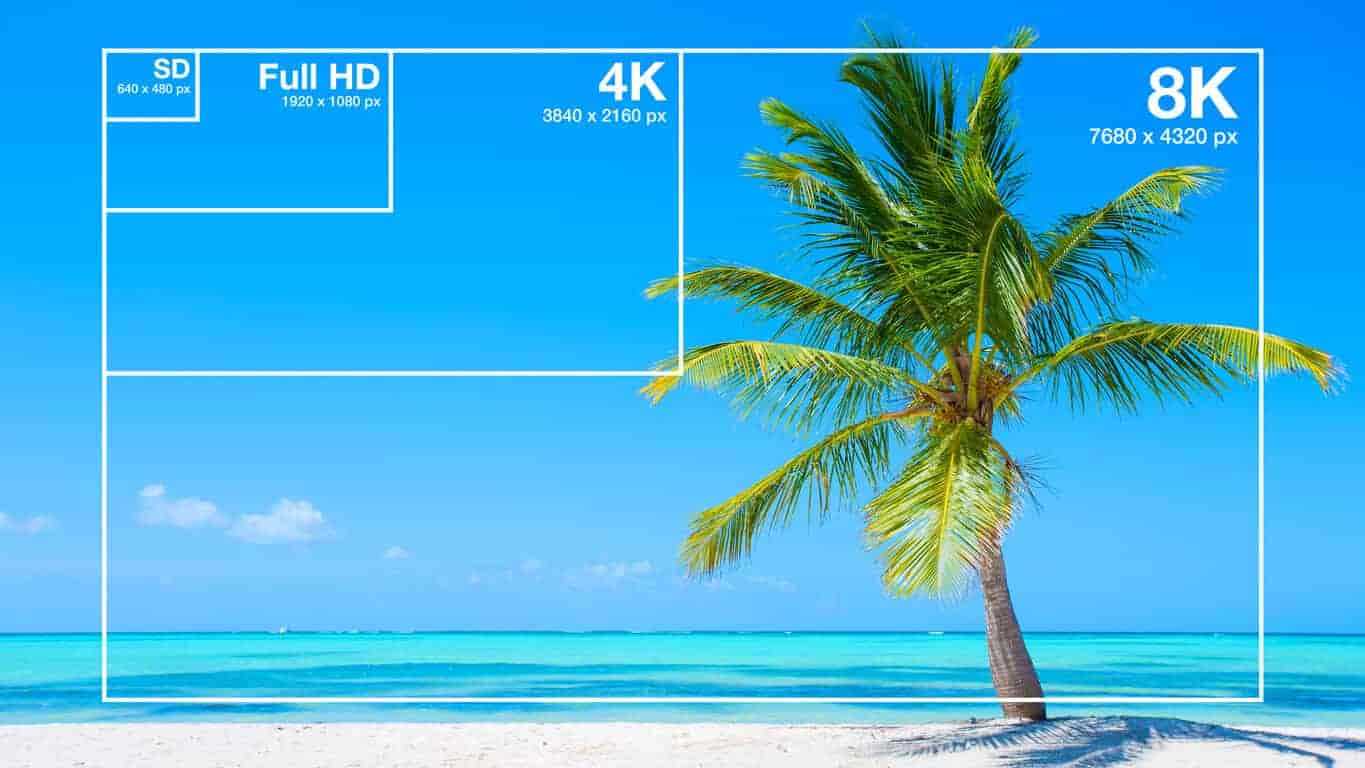
Video resolution refers to the number of pixels displayed on a screen in a video. A pixel is a tiny dot that makes up a part of an image or video. The more pixels there are in a video, the sharper and more detailed the image will be.

Video resolution is measured in terms of the number of pixels that are displayed horizontally and vertically on a screen. For example, a video resolution of 1920×1080 means that there are 1920 pixels displayed horizontally and 1080 pixels displayed vertically on the screen. The higher the number of pixels, the higher the video resolution.

Common Video Resolutions

  • 480p – 640×480 pixels
  • 720p – 1280×720 pixels
  • 1080p – 1920×1080 pixels
  • 4K – 3840×2160 pixels
  • 8K – 7680×4320 pixels

How Video Resolution Affects Viewing Experience

The video resolution can have a significant impact on the viewing experience. Videos with higher resolutions look sharper and more detailed, and are generally more enjoyable to watch. However, the difference in quality may not be noticeable on smaller screens or if the video is compressed.

Another important factor to consider is the size of the screen. A video with a high resolution will look better on a larger screen than on a smaller one. This is because the pixels are spread out over a larger area, making the image appear sharper and more detailed.

Factors that Affect Video Resolution

There are several factors that can affect the video resolution, including:

1. Recording Device

The recording device is one of the most important factors that affect the video resolution. Cameras with higher resolutions will capture videos with more pixels, resulting in a higher video resolution.

2. Compression

Videos are often compressed to make them smaller and easier to share. However, compression can also reduce the video resolution and make the video look less sharp and detailed.

3. Display Device

The display device, such as a TV or computer monitor, is also an important factor that affects the video resolution. If the display device has a lower resolution than the video, the video will be downscaled to match the capabilities of the display device.

FAQs

Q: What is the difference between 1080p and 4K resolution?

A: 4K resolution has four times the number of pixels as 1080p resolution, resulting in a much sharper and more detailed image.

Q: Can I watch a 4K video on a non-4K TV?

A: Yes, you can still watch a 4K video on a non c-4K TV, but the video will be downscaled to match the capabilities of the display device, resulting in a lower video resolution.

Q: Why do some videos look better than others even if they have the same resolution?

A: Video quality is influenced by several factors, such as the recording device, lighting, and color grading. Videos shot with high-end cameras and with good lighting and color grading will generally look better than videos shot with lower-end cameras or under poor lighting conditions.

Conclusion

Video resolution is an important factor to consider when watching or creating videos. The higher the video resolution, the sharper and more detailed the image will be. The size of the screen also plays a role in the viewing experience, as higher resolutions look better on larger screens. When creating videos, it’s important to use a recording device with a high resolution and to avoid excessive compression to maintain the video quality. Overall, understanding video resolution can help you make better decisions when it comes to choosing the right video to watch or creating high-quality videos yourself.

Video Formats

Video Formats

Video Formats
Video Formats
Video Formats
Video Formats


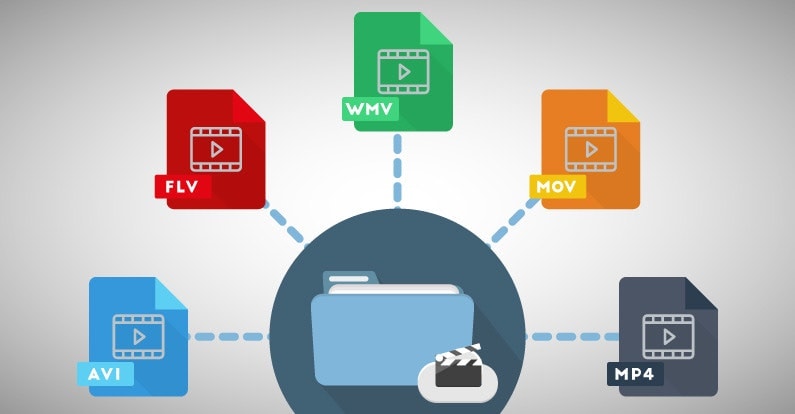
A video format is like a special type of container that holds a video file. It’s kind of like a lunch box that holds your food. There are many different types of video formats, just like there are many different types of lunch boxes.

Types of Video Formats

One of the most popular video formats is called MP4. This is like a lunch box that can hold lots of different types of food. Another popular format is AVI, which is like a lunch box that can only hold certain types of food.
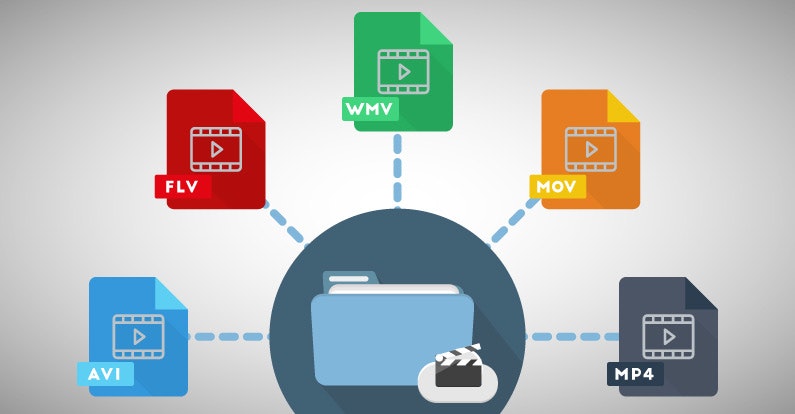
There are many other video formats as well, like MOV, WMV, and FLV. Each one is like a different type of lunch box that can hold different types of food.

What is Compression?

Now, let’s talk about something called compression. This is like when you take a big sandwich and squish it down so it can fit in your lunch box. Video files can be really big, and that can make them hard to share or store. So, compression is a way to make the file smaller without losing too much quality.

Codecs

Compression is done using something called a codec. A codec is like a special tool that knows how to squish your video file down. Just like you might use a knife to cut your sandwich, a codec can cut your video file down to size.
There are many different codecs, and some are better than others. For example, H.264 is a very popular codec because it can make your video file much smaller without losing too much quality.

Why do Formats Matter?

So, why does all of this matter? Well, different devices and websites can only play certain types of video formats. It’s like how some lunch boxes can only fit certain types of food.
If you have a video file in the wrong format, you might not be able to play it on your device or share it with your friends. That’s why it’s important to know what format your video is in, and to convert it to a different format if you need to.

Conclusion

So, that’s video formats in a nutshell! Remember, a video format is like a lunch box that holds your video file. Compression is like squishing your sandwich down so it fits in the lunch box, and codecs are like special tools that do the squishing.
It’s important to know what format your video file is in, and to convert it to a different format if you need to. And if you want to make your videos louder, you can try using a tool like mp4gain to boost the volume.

The History of Video Formats

Video formats have a long and fascinating history, dating back to the early days of video recording. Over the years, video formats have evolved and improved, becoming smaller, more efficient, and more versatile. In this section, we’ll take a closer look at the history of video formats, from the early days of analog recording to the latest digital formats.

Early Analog Formats

The first video recording devices used large, bulky tapes that could only hold a few minutes of footage. These analog tapes were cumbersome and difficult to work with, but they were the only option available at the time.
In the 1970s, the VHS format was introduced, which became the standard for home video recordings. Betamax tapes were also popular in Japan, but VHS ultimately won out due to its longer recording time and lower cost.

Digital Video Emerges

In the 1990s, digital video formats started to emerge, offering a more efficient and versatile way to record and store video. The first digital video format was called DV, which used small cassettes that could hold up to 60 minutes of footage.
Other digital formats soon followed, including MiniDV, Digital8, and HDV. These formats offered higher quality and greater flexibility than analog tapes, but they still had limitations when it came to sharing and distributing video content.

The Rise of Online Video

As the internet became more popular, new video formats were developed to make it easier to share videos online. In the early 2000s, the Flash Video format was introduced by Adobe, which made it possible to play videos on websites.
Other formats soon followed, including Windows Media Video (WMV), QuickTime, and RealVideo. However, these formats were often proprietary and could only be played on certain devices or platforms.

The Modern Era of Video Formats

Today, there are many different video formats available, each with its own advantages and disadvantages. MP4 has become one of the most popular formats, thanks to its versatility and ability to be played on many different devices.
Other popular formats include AVI, MOV, and WMV. There are also specialized formats for different types of video content, such as H.264 for high-definition video and HEVC for 4K and 8K content.

The Future of Video Formats

As technology continues to evolve, we can expect to see even more advanced video formats in the future, making it easier than ever to capture, share, and enjoy high-quality video content. Some of the emerging technologies in video formats include:
360-degree video formats, which allow viewers to experience video content in a fully immersive way
High Dynamic Range (HDR) formats, which offer a wider range of colors and contrast for more realistic and vibrant video
Virtual Reality (VR) formats, which allow viewers to experience video content in a completely immersive and interactive way
In conclusion, video formats have come a long way over the years, from the early days of analog recording to the latest digital and online formats. As technology continues to evolve, we can expect to see even more exciting developments in video formats, making it easier and more enjoyable than ever to capture and share high-quality video content.

Digital Video File Formats: Understanding Video Formats and Their Differences

Digital Video File Formats: Understanding Video Formats and Their Differences

Video formats
Video formats

When it comes to digital video, there are many different file formats to choose from. Each format has its own unique characteristics and is optimized for specific uses. Understanding the differences between these formats is important if you want to get the most out of your digital video content. In this article, we’ll take a closer look at digital video file formats and explore the top related keyword: digital video file formats.

Video Formats
Video Formats

What Are Digital Video File Formats?

Digital video file formats are a way of encoding and storing video data on a digital medium, such as a hard drive or flash drive. These file formats determine how the video is compressed, encoded, and played back. There are many different digital video file formats available, each with their own unique characteristics.

Why Are Video Formats Important?

Video formats are important because they determine how the video is encoded and compressed. This can affect the quality of the video, the file size, and the compatibility with different devices and software. Choosing the right video format is essential for creating high-quality video content that is optimized for your specific needs.

Popular Digital Video File Formats

There are many different digital video file formats to choose from, but some of the most popular ones include:

  • MP4: A highly versatile format that is compatible with most devices and software. It is a widely used format for web streaming and mobile devices.
  • AVI: A widely used format that is compatible with most devices and software. It is a popular format for video editing and video production.
  • WMV: A format developed by Microsoft that is optimized for Windows operating systems. It is a popular format for web streaming and video production.
  • MPEG: A format developed by the Motion Picture Experts Group that is optimized for high-quality video. It is a popular format for DVD and Blu-ray discs.

How to Choose the Right Video Format

Choosing the right video format depends on your specific needs. Some factors to consider when choosing a video format include:

  • Compatibility: Make sure the video format you choose is compatible with the devices and software you plan to use.
  • Quality: Choose a video format that delivers the quality you need for your specific application.
  • File Size: Consider the file size of the video format you choose, especially if you plan to share or distribute the video online.
  • Encoding Time: The time it takes to encode the video can be an important factor, especially for time-sensitive projects.

Conclusion

Digital video file formats are an important consideration when creating, editing, and sharing digital video content. Understanding the differences between the most popular digital video file formats is essential if you want to create high-quality video content that is optimized for your specific needs. In conclusion, if you want the best solution for your digital video file formats, we recommend using Mp4Gain. It is a powerful tool that can optimize your video files for maximum quality and compatibility.

What music format has the best sound quality?

What music format has the best sound quality?

Best Audio Format

When I want to download a song, I always feel that the sound quality is not so pure, it seems a bit muddy, what format is good to listen to?

Best Audio Format Codec

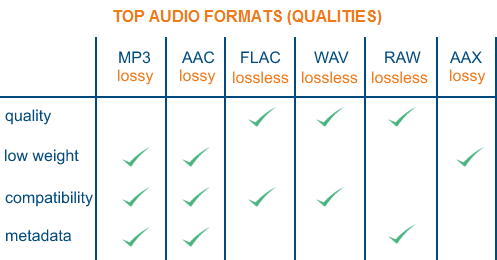
There are three lossless music quality formats: ape, wav and flac.

APE is one of the popular lossless compression formats for digital music. Due to its early appearance, it has a wide user base all over the world, especially in mainland China. Lossless compression formats such as APE use a more refined recording method to reduce volume, and the restored data is the same as the original file, ensuring file integrity.

WAV is a sound file format developed by Microsoft. It complies with the RIF file specification and is used to store audio information resources on the Windows platform. It is widely compatible with the Windows platform and its applications. This format supports a variety of compression types. algorithms and supports multiple WAV file with standard format is the same as CD format, with 44.1K sampling rate and 16-bit quantization number, so the sound file quality is almost the Same as CD.

Chinese translation FLAC is a lossless audio compression coding. FLAC is a well-known free audio compression codec, which is characterized by lossless compression. Unlike other lossy compression codes such as MP3 and AAC, it does not destroy any original audio data, so it can restore the sound quality of music discs. It has been compatible with many software and hardware audio products (such as CDs, etc.) since 2012.

What music format is good in sound quality?

What music format is good in sound quality?

Audio File Format

1. WAV format The format

Audio File Formats

WAV is a sound file format developed by Microsoft, also called waveform sound file. It is the first digital audio format and is widely supported by Windows platform and applications. The WAV format supports many compression algorithms, supports a variety of audio bits, sample rates, and channels. It adopts a sampling frequency of 44.1 kHz and a quantization number of 16 bits. Therefore, the sound quality of WAV is almost the same as that of CD, but WAV format requires too much storage space, it is very inconvenient to communicate and broadcast.
Supplement: Lossless format, Disadvantage: The volume is very large!
2. Format
FLAC FLAC is short for Free Lossless Audio Codec, which can be interpreted as Chinese lossless audio compression coding. FLAC is a well-known free audio compression codec, which is characterized by lossless compression. Unlike other lossy compression codes such as MP3 and AAC, it does not destroy any original audio data, so it can restore the sound quality of music discs. It is now compatible with many software and hardware audio products. In short, FLAC is similar to MP3, but it has lossless compression, which means that the audio is compressed in FLAC without losing any information. This compression is similar to Zip, but FLAC will give you a higher compression ratio, because FLAC is a compression method specially designed for the characteristics of audio, and you can use the player to play FLAC compressed files like you normally play MP3 files. same.
Supplement: It is a lossless format. Compared with ape, it is bigger in size, but it has good compatibility and fast encoding speed. The player supports a
longer edition of this paragraph.
3.APE format
APE is one of the most popular digital music file formats. Unlike lossy compression methods like MP3, APE is a lossless audio compression technology, which means that after compressing the audio data file read from the audio CD in APE format, you can also compress the file in APE format. The audio file is exactly the same as before compression, without any loss. The file size of APE is about half that of a CD, but with the rise of broadband, the APE format is loved by many music lovers, especially for friends who want to stream audio CDs over the net. APE can help them save a lot of resources
Supplement: It is a lossless compression format, which is smaller than flac. Encoding is slow.

What are the differences between the audio formats?

What are the differences between the audio formats?

Audio Formats

Common audio formats are: CD, WAVE, AIFF, MPEG, MP3, MPEG-4, MIDI, WMA, RealAudio, VQF, OggVorbis, AMR, APE, FLAC, AAC.

Audio Format

FAQ

What are the audio formats?

The most common audio formats are: CD, WAVE, AIFF, MPEG, MP3, MPEG-4, MIDI, WMA, RealAudio, VQF, OggVorbis, AMR, APE, FLAC, AAC. But new formats are being designed and will be available soon. There are other very new ones like Opus that are gaining followers and users.

What are the best audio formats?

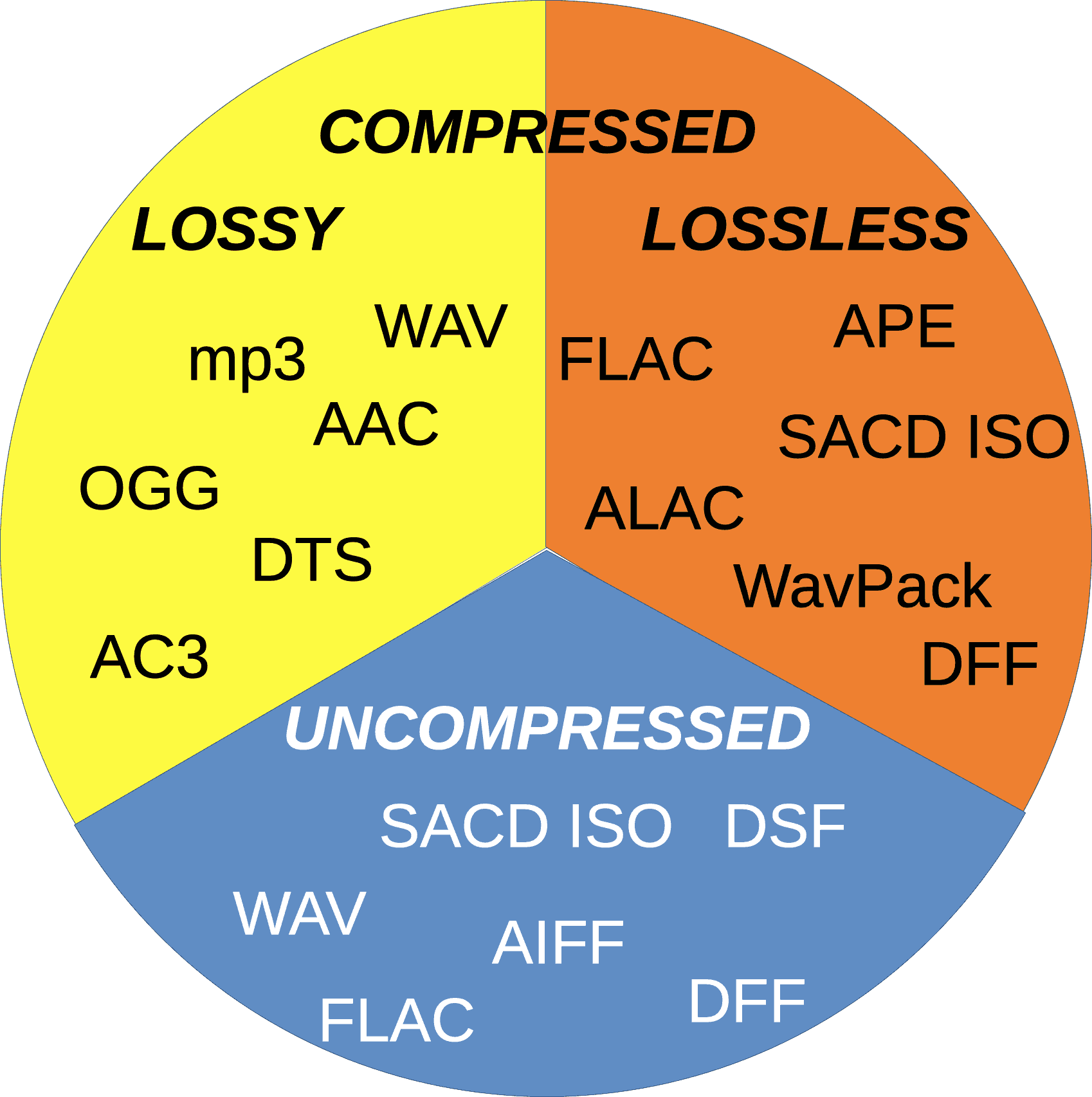
We could say that audio formats are divided into god classes: Lossless and Lossy.
LossLess formats are usually ranked as the best, for example FLAC.

Which normalizer can normalize most audio and video formats?

Mp4Gain is the normalizer that offers the largest number of audio and video formats. It’s even a convert as well as a normalizer

The difference of each sound quality:

1. The sound quality of the CD format is a relatively high audio format. Therefore, when it comes to audio formats, the CD is naturally the pioneer.

2. WAVE is a sound file format developed by Microsoft. Complies with the PIFF Resource Interchange File Format file specification. It is used to store the WINDOWS platform audio information resources and is compatible with the WINDOWS platform and its applications.

3. AIFF (Audio Interchange File Format) format and AU format are very similar to WAV, and these common music formats are also supported by most audio editing software.

4. MPEG is the English abbreviation for Moving Picture Experts Group. This group of experts was established in 1988 to create video and audio compression standards for CDs. MPEG audio file refers to the sound part in the MPEG standard, that is, the MPEG audio layer.

5. The MP3 format was born in Germany in the 1980s. The so-called MP3 refers to the audio part of the MPEG standard, that is, the MPEG audio layer.

6. The MPEG-4 standard is a video compression standard for multimedia applications published by the International Group of Experts on Moving Images in October 2000.

What types of formats exist in digital video?

What types of formats exist in digital video?

Who has not ever wondered what H264 means or what is an Mp4, Mkv or Avi file. These are some of the questions that we all ask ourselves when we are talking about digital video in some of the applications that we see online to find out which format or format has more quality or how I can convert a file to another file.

What in my measure can contribute is to shed light on the distinctions that exist when we talk about video formats within the different types that are applied to digital video and that there are three important parts to distinguish between them on the Internet or on a DVD:

The video and its codec (As the video has so much weight, it must always be encoded and subsequently decoded). They are simply mathematical algorithms to compress and decompress the video file.
Audio and its different formats or containers.
The file that contains the audio and the video. The container
Let’s go to see which are the most popular and try to explain them:

Digital Video Formats

MPEG: Moving Pictures Expert Group (Mpeg1, Mpeg2, Mp4 or Mpeg4)
AVI: It is the standard format but the one with the most weight. (Xvid or Divx)
WINDOWS MEDIA: Format developed by Microsoft. (. Mp4 or .asf)
MOV: Format developed by Apple. Quicktime required to read it. Low weight.Ideal for Web (.m4v or .mov)
FLV: Adobe Flash format. Use Sorensen Spark codec. (.flv)
Digital Audio Formats

Mp3 or MPEG-1 Audio Layer 3: Tablet with imperceptible signal loss for humans. (1Mb / Min)
Aiff: Audio Interchange File Format. It has no compression and uses PCM modulation so they are very heavy (10 Mb / Min.)
AAC: Advanced Audio Coding. Mpeg-2 compression. Indicated for surround or surround sounds
Windows Media Audio: The worst quality of all the previous ones, is the Windows format.
Digital Video and Audio Container Formats

.mp4
.mov
.avi
.mkv
.flv
.swf
.m4v

The truth is that it is a whole world and more when the big companies live thinking only about leading their own markets and not from the point of view of the user whom they have had abandoned for years. Obviously these are not all there are but I have wanted to include the best known.

But if we are talking about a file or files that any dvd may have or downloaded from the Internet in any format or container such as Mp4, mkv, avi with greater or lesser quality, it must be remembered that what is important is the amount of information that they contain, is say the Mbs this video is exported to.

It is as if we have a 16 ton truck and we put a box of oranges inside it when it can carry 1000 boxes of oranges. what we are going to see is oranges but with a very low quality.

I hope I have shed some light on this world of digital video and how the next time you face such a file you will be able to understand what each of the things attached to it means. I have to admit that it is not easy, but with that global vision and knowing what each one means, you feel better when facing it.

Most important video formats

As with text documents, photographs or audios, video in digital format is available in different formats or extensions.

When we talk about video formats we can refer to several things. The most common, the physical formats in which we have access to a movie, series or documentary.

In this sense, today we find DVD and Blu-Ray, although some of us still keep in an old VHS closet and maybe some Betacam.

But a second meaning or meaning of video formats refers to their encoding, since in digital video, as with a computer program, any file is written in a certain code.

In videos, the code influences the image quality, the sound quality, whether or not it includes subtitles and, in particular, the relationship between quality and file size.

Thus, today we consume digital audiovisual content through physical discs (DVD, Blu-Ray), through streaming and through IPTV (Internet television), but we also handle digital video files, especially for content that we generate ourselves.

Next we will review the most common digital video formats that we can find, what is their origin and what benefits they offer

AVI

We start with the most popular format that we will find. Video files with an .AVI extension have their origin in a format that was launched in 1992 and is so popular that most smart TVs, DVD / Blu-Ray players, video game consoles and operating systems play it.

AVI is an acronym for Audio Video Interleave and not many know that it was created by Microsoft as a digital alternative without dependence on a physical format such as the then popular DVD.

Among its advantages, it allows you to include several audio channels and host content generated with different codecs (AC3 or MP3 for audio, DivX or Xvid for video), which can be an advantage but also an inconvenience with which players.

MP4

MP4 or MPEG-4 is one of the most modern formats, launched in 1998 as a standard for playing video and audio in a single digital file.

MPEG stands for Moving Picture Experts Group, the expert group that has established digital audio and video standards and was formed by two international organizations, the ISO (International Organization for Standardization) and the IEC (International Electrotechnical Commission).

In summary, the MPEG and MPEG-2 format were launched in 1993 and 1995 respectively as standards for encoding digital audio and video. To understand each other, any DVD offers its audiovisual content in MPEG-2.

MP4 also supports several audio channels, but has the advantage of allowing more image and sound quality in a less heavy file, as it compresses data better. Apple, for example, opts for this format and derivatives for its iTunes content.

Related to MP4 we can find M4V (video) or M4A (audio).

MKV

The MKV video format is an open format, free to pay rights, and whose full name is Matroska, like traditional Russian dolls.

MKV saw the light at the end of 2002 and has become popular thanks to the fact that within a single MKV file we can store, together with the audio channel, several channels or audio tracks and several subtitle tracks.

Like MP4, it offers very good audio and video quality in a small space. And as a curiosity, the WebM format that allows you to integrate online video via HTML, is inspired by Matroska.

FLV

The FLV or Flash Video format was created by Macromedia, and subsequently acquired by Adobe. This format is usually found as an FLV or SWF extension.

Like the other Flash content, FLV videos are designed for online playback from the browser through Adobe Flash Player.

As we saw in a previous article, Flash will stop developing in 2020, although we still find pages that use it.

MOV

I said before that Apple is currently betting on MP4 (and AAC) to facilitate multimedia content. But its star format for many years was MOV.

MOV, from QuickTime Movie, is also called QuickTime File Format, and today it is still the default format of QuickTime, the macOS video player.

This format can also be found in many digital video cameras, since it offers very good image and sound quality without compression.