
Quality (bit rate)


Free Download Mp4Gain
picture

Quality (bit rate)

Bit Rate

In multimedia technology, quality is often used to judge the effect of audio, and quality here is actually bitrate.

Bit Rate

1. Introduction
2 sound control
3 encoding mode
Introductionedit transmission
The term quality is widely used.
In multimedia technology, quality is often used to judge the effect of audio, and quality here is actually bitrate.
On WINDOWS it is called “bit rate” and on some players it is described as ” bit rate “.
Quality refers to the bit rate at which digital sound is converted from analog to digital format. The higher the bitrate, the better the quality of the restored sound.
sound control edit stream
16 Kbps = phone quality
24 Kbps = increase phone quality, shortwave transmission, longwave transmission, European standard medium wave transmission
40 Kbps = American standard medium wave transmission
56Kbps=Voice
64 Kbps = boost voice (best bitrate setting for cell phone ringtones, best setting for cell phone mono MP3 players)
112 Kbps = FM stereo broadcast FM 128 Kbps = tape (best setting for mobile phone stereo MP3 player, best setting for low-end MP3 player)
160 Kbps = HIFI high fidelity (best setting for mid to high end MP3 players)
192Kbps=CD (best setting for high-end MP3 players)
256Kbps=Studio Music Studio (for music enthusiasts)
In fact, with the advancement of technology, the quality of music is also getting higher and higher, the highest quality of MP3 is 320Kbps, but some formats can achieve higher sound quality.
For example, the emerging APE audio format can provide real audiophile level lossless sound quality and smaller volume than WAV format, and its quality is usually 550kbps-950kbps.
encoding modeedit stream
VBR (Variable Bitrate) Dynamic Bitrate means there is no fixed bitrate. The compression software immediately determines which bitrate to use based on the audio data being compressed. This is a method that takes quality as a premise and takes file size into account The recommended encoding mode;
ABR Average Bit Rate (Average Bit Rate) is an interpolation parameter of VBR. LAME created this encoding mode in response to the low file volume ratio of CBR and the variable size of files generated by VBR. Within the specified file size, ABR takes every 50 frames (about 1 second for 30 frames) as a segment. High-frequency and insensitive frequencies use relatively low traffic, and low-frequency and large dynamic performance use high traffic, which can be used as VBR and CBR, a compromise option.
CBR (constant bitrate), constant bitrate means the file has one bitrate from start to finish. Compared to VBR and ABR, the compressed file size is very large and the sound quality will not improve significantly compared to VBR and ABR.


Free Download Mp4Gain
picture


Mp4Gain Main Window
picture


Mp4Gain Features
picture


Free Download Mp4Gain
picture

What sound quality is better than 320 or 128?

What sound quality is better than 320 or 128?

Bit Rate

What are bit rates? How do they affect the quality of music and video? Optimal bit rate for various musical styles

Bit Rate

There is a lot of talk these days that we have lost real music with the advent of compressed audio formats like MP3, AAC and the like. Is it really so? Will lossless music save music? Can an inexperienced listener tell the difference between MP3 and FLAC music? Let’s take a look at this problem.

What is Bitrate?

You’ve probably heard the term “bitrate” before, and you probably have a basic idea of ​​what it means, but it might be a good idea to familiarize yourself with its official definition to find out how it all works.

Bit rate is the number of bits or the amount of data that is processed over a period of time. In audio, this generally means kilobits per second. For example, the music you buy from iTunes is 256 kilobytes per second, which means that every second of the song

The higher the bit rate of the track, the more space it will take up on your computer. Audio CDs typically take up quite a bit of space, so it has become common practice to compress these files so that you can burn more music to your hard drive (or iPod, Dropbox or whatever). This is where the “lossy” and “lossy” formats conflict.

Lossless and Lossy formats: what’s the difference?

When we say lossless, we mean that we haven’t really changed the original file. That is, we copy a track from the CD to our hard drive, but we do not compress it to the point of losing data. Essentially the same as the original CD track.

However, most of the time, you will probably extract your music in Lossy format. That is, you took a CD, copied it to your hard drive, and compressed the tracks so they don’t take up a lot of space. A typical album is probably about 100MB. The same lossless album as (aka Apple Lossless) will be about 300MB in size, so it has become common practice to use lossy formats for faster boot times and more hard drive savings.

The problem is that when you compress a file to save space, you are removing chunks of data. Just like when you take a high-quality image and compress it to JPEG, your computer grabs the raw data and “tricks” certain parts of the image into being basically the same, but with some loss of clarity and quality.

Definition and explanation of the term bit rate

What is bitrate

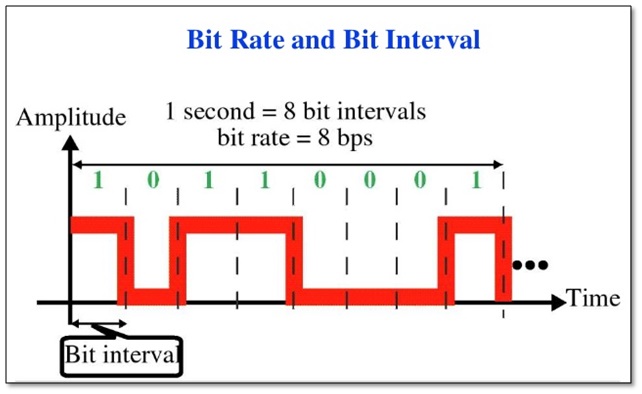
Bit rate denotes a unit in which the relationship between the amount of data and time occurs. It is measured in the unit of bits per second. Common abbreviations for bit rate are bit / s or bps. The output quantity of information units in relation to digital multimedia formats limited by a constant output time is designated on a timeline.

Bit rate

Bit rate is used in video and audio compression. Encoding is possible with constant (short CBR) and variable (short VBR) bit rate. The variable bit rate aligns the encoding with the content of the multimedia content. In the case of a predominantly quiet scene in a movie, for example, fewer units of information are required relative to time. However, in scenes with a lot of movement, the bit rate increases. This is intended to allow optimal use of storage space with high image quality at the same time when compressing with a codec. Often times the required memory space is also less when encoding with a variable bit rate compared to a fixed rate.

Constant bit rate

Constant bit rate describes a compression method for video and audio content during storage and transmission. A constant data rate is used, regardless of the complexity of the respective signal. The same amount of data is always produced per unit of time.

Constant bit rate is often used in multimedia broadcasts. The reason for this is the limited streaming capabilities. By using constant bit rate, optimal quality is achieved with the same data throughput. In some cases, however, it may also happen that amounts of data are “given away”. This is the case when the content to be encoded requires a lower rate than specified. This is especially true for videos with quiet scenes or very quiet audio files. The constant bit rate is used, for example, for video CDs or Internet radio.

Variable bit rate

In addition to the constant bit rate, encoding with a variable bit rate is also possible. Here is audio and video content in constant quality at different bit rates depending on the content stored or transmitted.

This solution has established itself in the media storage field as it offers higher quality with less memory consumption at the same time. When encoding with a variable bit rate, individual sections of a medium receive different compressions depending on the complexity of the content. This enables the highest possible quality to be achieved with low memory consumption.

For a long time, encoding with the help of variable bit rates was considered insecure. In the meantime, however, the technology has matured, so good results can also be achieved by converting a medium with a variable bit rate. The downside of this method is that you cannot predict before conversion how big the file will be in the end. In most cases, only a minimum and maximum bit rate can be set. Individual encoders also offer the option of specifying how large the file should be before converting it.

Average bit rate

A third compression method is the definition of an average bit rate. A medium is converted at a variable bit rate. This enables a fixed file size to be achieved while maintaining high quality. For this variant of media compression, some codecs offer the option to compress in two passes. This allows the average bit rate to be reached very precisely.

In the first pass, the material is analyzed and then compressed in the second. Basically the method corresponds to that of variable bit rate, but an average bit rate allows you to calculate the size of a file. A deviation tolerance can be specified for individual programs.

Nominal bit rate

Nominal bit rate indicates the average bit rate that is achieved by encoding with a variable bit rate. Despite the possible fluctuations that arise in the various VBR modes, a quality assessment can be made.

The nominal bitrate concept was introduced by the developers of the OggVorbis codec. This should make it easier for MP3 users to start using variable bit rate. Many Mp3 codec users were only used to compressing an audio file with a fixed bit rate.